QA
QA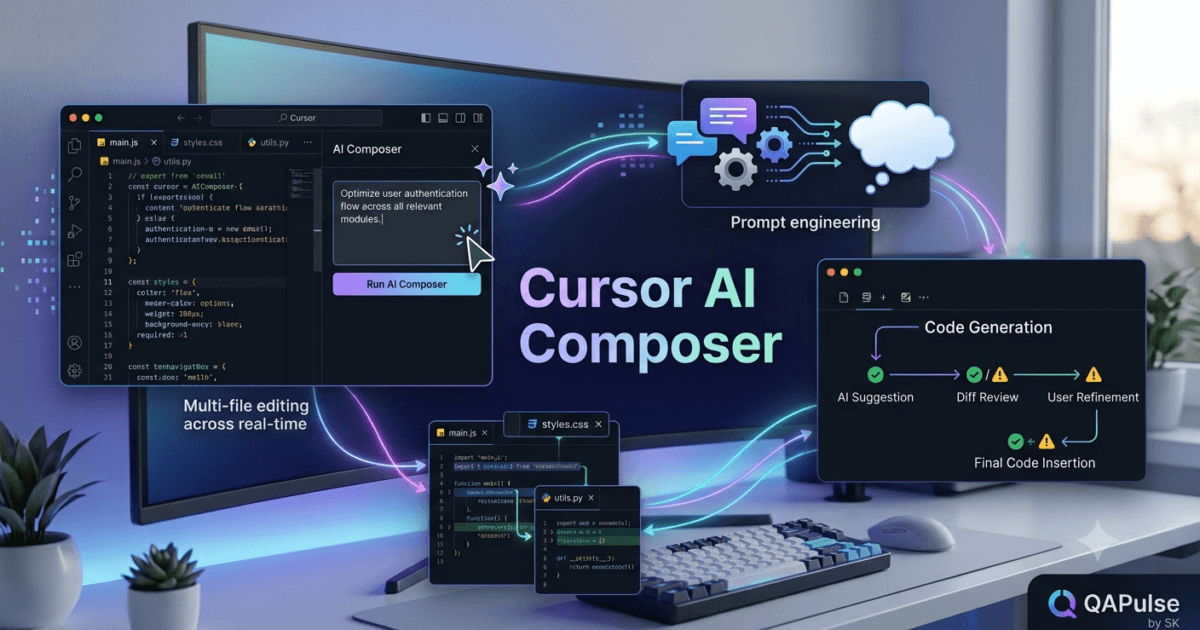
What is Cursor AI Composer?
As AI-powered development tools continue to evolve, developers are no longer limited to generating individual code snippets or asking isolated programming questions. Modern AI coding assistants can understand entire projects, modify multiple files simultaneously, and help build complete software features from a single instruction.
One of Cursor’s most powerful capabilities is Cursor AI Composer.
Cursor AI Composer is an advanced AI feature that enables developers to generate, edit, and organise code across multiple files using a single prompt. Instead of manually updating every affected file, developers can describe the desired feature, bug fix, or architectural change, and Composer analyses the project context to generate coordinated modifications while respecting the existing codebase.
This transforms Cursor from a simple AI code assistant into an intelligent software engineering partner capable of handling complex development workflows.
Why Cursor AI Composer Matters
Developing modern applications usually requires changes in multiple parts of a project.
For example, adding a new feature may involve updating:
- Backend APIs
- Database models
- Service layers
- Business logic
- Frontend components
- API clients
- Validation rules
- Unit tests
- Integration tests
- Documentation
Traditionally, developers switch between files and manually coordinate these changes.
With Cursor AI Composer, much of this repetitive work becomes faster because the AI understands how different parts of the project are connected.
Benefits include:
- Faster feature development
- Better consistency across files
- Reduced repetitive editing
- Improved developer productivity
- Easier project maintenance
- Faster onboarding
- Lower risk of missing related updates
- Improved development workflow
How Cursor AI Composer Works
Unlike basic AI prompts that generate isolated code, Composer analyses the broader project before proposing changes.
A simplified workflow looks like this.
Developer Request

↓

Cursor AI Composer

↓

Analyse Project Context

↓

Identify Related Files

↓

Generate Coordinated Changes

↓

Developer Review

↓

Apply Updates
This project-wide understanding enables Composer to make more accurate recommendations than tools that only analyse a single file.
Understanding Project Context
The strength of Cursor AI Composer lies in contextual awareness.
Before suggesting changes, Composer examines:
- Project structure
- Folder hierarchy
- Existing classes
- Shared components
- Internal APIs
- Configuration files
- Framework conventions
- Dependency relationships
By understanding the surrounding codebase, Composer generates changes that align with the project’s existing architecture instead of introducing isolated implementations.
Multi-File Editing
One of the defining capabilities of Cursor AI Composer is coordinated multi-file editing.
For example, when implementing a new user authentication feature, Composer may recommend updates to:
- Authentication service
- API routes
- Database schema
- User model
- Middleware
- Configuration
- Frontend login form
- Unit tests
- Documentation
Developers receive a unified proposal instead of manually editing every file individually.
Intelligent Code Generation
Composer can generate complete implementations rather than isolated functions.
Examples include:
- REST API modules
- CRUD functionality
- Authentication flows
- Dashboard components
- Form validation
- Database integration
- Error handling
- Configuration updates
Generated code follows existing project patterns whenever sufficient context is available.
Supporting Modern Frameworks
Cursor AI Composer works well with many popular development ecosystems.
Typical projects include:
- Python applications
- JavaScript projects
- TypeScript applications
- React interfaces
- Next.js projects
- Node.js services
- FastAPI backends
- Django applications
- Express APIs
- Full-stack solutions
Because Composer analyses the project instead of relying on predefined templates, it adapts to different architectures and coding styles.
Working with Existing Code
Most software engineering involves maintaining existing systems rather than starting from scratch.
Cursor AI Composer helps developers:
- Extend existing features
- Improve readability
- Modernise implementations
- Add missing functionality
- Update deprecated code
- Improve consistency
- Simplify complex modules
This makes Composer valuable for both new and mature projects.
Human Review Remains Essential
Although Composer automates many development tasks, developers remain responsible for:
- Reviewing generated changes
- Verifying business logic
- Confirming security requirements
- Running automated tests
- Maintaining coding standards
- Validating architecture decisions
AI accelerates implementation, but engineering judgement remains essential.
Common Mistakes
Developers adopting Cursor AI Composer should avoid several common pitfalls.
Providing Vague Instructions
Broad requests often produce broad results.
Specific prompts that include project goals, constraints, and expected behaviour generally lead to higher-quality outcomes.
Applying Changes Without Review
Every generated modification should be inspected before being accepted.
Even context-aware AI may not fully understand project-specific business rules.
Ignoring Existing Architecture
Generated code should integrate naturally with the project’s architecture, naming conventions, and design patterns.
Skipping Automated Testing
Every multi-file change should be validated through unit, integration, and end-to-end testing before deployment.
Best Practices for Cursor AI Composer
To maximise the value of Composer:
- Write clear development objectives.
- Provide sufficient project context.
- Review every suggested modification.
- Keep automated tests up to date.
- Follow existing coding standards.
- Commit changes in logical increments.
- Validate feature behaviour thoroughly.
- Use version control before accepting large modifications.
- Document significant architectural changes.
These practices help developers combine AI productivity with professional software engineering discipline.
Looking Ahead
Understanding Cursor AI Composer is an important milestone in mastering AI-assisted software development. However, creating complete features is only one part of the development process. In the next lesson, you will explore how Composer works with natural language instructions, prompt engineering techniques, and iterative refinement to generate more accurate, maintainable, and production-ready software solutions.
Summary
Cursor AI Composer enables developers to generate coordinated code changes across multiple files using natural language instructions and project-wide context. By analysing architecture, dependencies, and existing coding patterns, Composer helps implement complete features, modernise applications, and improve development efficiency while allowing developers to retain full control through careful review, testing, and validation. As software projects become larger and more interconnected, Cursor AI Composer provides a practical way to accelerate development without compromising engineering quality.
Cursor AI Prompt Engineering: Writing Better Prompts for Smarter AI Development
What Is Cursor AI Prompt Engineering?
Artificial intelligence has changed how developers write, debug, and maintain software. However, the quality of AI-generated output depends heavily on the instructions given to the model. Even the most advanced AI coding assistant can produce incomplete or inaccurate results if the prompt lacks clarity or context.
This is where Cursor AI Prompt Engineering becomes a valuable skill.
Cursor AI Prompt Engineering is the practice of writing clear, structured, and context-rich instructions that help Cursor AI generate accurate, maintainable, and project-specific code. Instead of asking vague questions, developers learn to communicate requirements in a way that allows the AI to understand the project, constraints, architecture, and desired outcome.
Effective prompt engineering transforms Cursor AI from a simple code generator into an intelligent software development partner.
Why Prompt Engineering Matters
Many developers assume that AI always understands what they want.
In reality, the AI only works with the information provided.
Consider these two requests:
Vague Prompt
Build a login page.
Well-Structured Prompt
Build a responsive login page using React and TypeScript with Tailwind CSS. Include email and password validation, accessible form controls, loading indicators, error handling, and reusable components that follow the existing project structure.
The second prompt provides significantly more context, enabling Cursor AI to generate output that is closer to production quality.
Benefits of strong prompt engineering include:
- More accurate code generation
- Fewer revisions
- Better architectural consistency
- Improved code quality
- Faster development
- Reduced manual editing
- Better collaboration with AI
- Improved maintainability
How Cursor AI Prompt Engineering Works
Cursor analyses both your prompt and your existing project before generating suggestions.
A simplified workflow looks like this.
Developer Prompt

↓

Cursor AI

↓

Analyse Project Context

↓

Interpret Requirements

↓

Generate Solution

↓

Developer Review

↓

Apply Changes
The more precise the prompt, the more useful the generated output becomes.
Elements of an Effective Prompt
A high-quality prompt usually contains several important components.
Objective
Clearly explain what you want to build or modify.
Example:
- Create a REST API endpoint
- Refactor an authentication module
- Generate unit tests
- Optimise database queries
A clear objective reduces ambiguity.
Technology Stack
Specify the technologies involved.
Examples include:
- Python
- TypeScript
- React
- Next.js
- FastAPI
- Django
- Node.js
- PostgreSQL
- Docker
Knowing the technology stack helps Cursor AI generate framework-appropriate solutions.
Project Context
Describe how the requested feature fits into the existing application.
Helpful context may include:
- Existing architecture
- Folder structure
- Coding standards
- Design patterns
- Business rules
- Naming conventions
- Dependencies
- Existing APIs
Project context improves consistency across generated code.
Constraints
Every project has limitations.
Examples include:
- Maintain backward compatibility
- Avoid third-party libraries
- Preserve existing APIs
- Follow REST principles
- Optimise performance
- Support accessibility requirements
Explicit constraints help the AI avoid unsuitable solutions.
Asking for Step-by-Step Solutions
Rather than requesting a complete implementation immediately, developers can ask Cursor AI to solve problems incrementally.
Example workflow:
- Explain the architecture.
- Design the API.
- Implement the backend.
- Create the frontend.
- Generate tests.
- Review security.
- Improve performance.
Breaking complex requests into smaller tasks often produces higher-quality results.
Using Examples in Prompts
Examples provide valuable guidance.
Instead of saying:
Create validation.
You could say:
Create validation similar to the existing user registration module while following the project’s coding standards.
Examples help Cursor AI understand expectations more accurately.
Refining AI Responses
The first response is rarely the final solution.
Developers should refine results by asking follow-up questions such as:
- Simplify this implementation.
- Improve performance.
- Reduce duplication.
- Add documentation.
- Explain the design.
- Generate additional tests.
- Follow our coding conventions.
Iterative refinement is one of the most effective ways to use AI productively.
Working with Large Projects
Large enterprise repositories require additional context.
Useful prompt information includes:
- Module names
- Related services
- Existing interfaces
- Shared utilities
- Configuration files
- Business requirements
- Team coding standards
Providing repository-specific information allows Cursor AI to produce recommendations that integrate more naturally with the existing system.
Common Prompt Engineering Mistakes
Developers frequently encounter similar problems.
Using Extremely Short Prompts
Very brief instructions often produce incomplete results.
Provide enough information for Cursor AI to understand the task.
Omitting Project Context
Ignoring existing architecture may lead to code that conflicts with established project conventions.
Requesting Too Many Tasks at Once
Large prompts covering multiple unrelated objectives can reduce response quality.
Divide complex work into smaller requests whenever possible.
Accepting the First Response Immediately
Treat AI-generated output as a draft rather than the final implementation.
Review, refine, and validate every recommendation.
Best Practices for Cursor AI Prompt Engineering
To achieve consistent results:
- Write clear objectives.
- Specify the technology stack.
- Include project context.
- State important constraints.
- Break complex work into smaller tasks.
- Use existing code as reference when appropriate.
- Review every AI-generated response.
- Validate functionality with testing.
- Continue refining prompts until the solution meets project requirements.
These practices help developers build a productive partnership with AI.
Preparing for Advanced AI Conversations
Learning Cursor AI Prompt Engineering is the foundation for effective AI-assisted software development. Once developers can communicate requirements clearly, they can move beyond simple code generation and begin using AI for architectural planning, complex refactoring, debugging, testing, documentation, and long-term project maintenance. In the next lesson, you will explore advanced conversational workflows that allow Cursor AI to participate in multi-step development sessions while maintaining awareness of project context and engineering objectives.
Summary
Cursor AI Prompt Engineering is the process of writing clear, structured, and context-aware instructions that enable Cursor AI to generate accurate, maintainable, and project-specific software solutions. By defining objectives, technologies, constraints, and architectural context, developers can significantly improve AI-generated code quality while reducing manual revisions. Combined with iterative refinement, careful review, and comprehensive testing, effective prompt engineering helps software engineers unlock the full potential of AI-assisted development.
Cursor AI Code Generation: Building Production-Ready Software with AI Assistance
What Is Cursor AI Code Generation?
Writing high-quality software requires much more than simply converting ideas into code. Developers must follow coding standards, maintain consistency, handle edge cases, write tests, document functionality, and ensure their solutions integrate correctly with existing systems. These activities often consume significant development time, especially for repetitive implementation tasks.
This is where Cursor AI Code Generation becomes a game-changing capability.
Cursor AI Code Generation enables developers to generate complete, context-aware code using natural language instructions. Rather than producing isolated snippets, Cursor analyses the surrounding project, existing architecture, dependencies, and coding conventions to generate implementations that align with the rest of the application.
Whether creating a new API, implementing business logic, building user interfaces, or generating automated tests, Cursor AI helps developers move from idea to working software much more quickly while maintaining professional engineering practices.
Why AI Code Generation Matters
Modern software projects involve many repetitive development tasks.
Developers regularly create:
- REST API endpoints
- Database models
- Service classes
- Configuration files
- User interface components
- Validation logic
- Authentication modules
- Unit tests
- Integration tests
- Documentation
Although these tasks are essential, they often follow predictable patterns.
Cursor AI Code Generation automates much of this repetitive work, allowing engineers to focus on solving business problems and designing robust software architectures.
Key benefits include:
- Faster feature development
- Reduced repetitive coding
- Improved consistency
- Better productivity
- Easier onboarding
- Faster prototyping
- Cleaner implementations
- Reduced development time
How Cursor AI Code Generation Works
Unlike traditional code generators that rely on templates, Cursor analyses your entire project before generating code.
A simplified workflow looks like this.
Developer Request

↓

Cursor AI

↓

Analyse Existing Project

↓

Understand Context

↓

Generate Code

↓

Developer Review

↓

Testing

↓

Deployment
This contextual understanding allows Cursor AI to produce recommendations that fit naturally into the existing application.
Generating Backend Code
Backend development often involves repetitive implementation patterns.
Cursor AI can assist with generating:
- REST APIs
- GraphQL resolvers
- Database models
- CRUD operations
- Authentication services
- Business logic
- Middleware
- Error handling
- Configuration files
- Logging utilities
Generated code follows the conventions already used throughout the project whenever sufficient context is available.
Generating Frontend Components
Frontend applications also benefit from AI-assisted development.
Examples include:
- React components
- Next.js pages
- Forms
- Navigation menus
- Dashboards
- Data tables
- Responsive layouts
- Validation logic
- State management
- API integrations
Cursor AI helps developers build interfaces more efficiently while maintaining consistency with existing design patterns.
Generating Automated Tests
Testing is an essential part of professional software engineering.
Cursor AI can generate:
- Unit tests
- Integration tests
- End-to-end tests
- Mock services
- Test fixtures
- Boundary condition tests
- Error-handling tests
- Regression test templates
Developers should always review generated tests to ensure they cover business requirements and important edge cases.
Generating Documentation
Well-maintained documentation improves collaboration.
Cursor AI assists by creating:
- README files
- API documentation
- Function descriptions
- Inline comments
- Usage examples
- Installation guides
- Configuration instructions
- Developer documentation
Documentation should be updated whenever significant application changes are introduced.
Working Across Multiple Files
Many software features require coordinated changes across different parts of the application.
Cursor AI Code Generation can recommend updates involving:
- Models
- Controllers
- Services
- Routes
- Frontend components
- Configuration
- Tests
- Documentation
This project-wide awareness helps reduce the risk of forgetting related changes.
Supporting Multiple Programming Languages
Cursor AI works with numerous programming languages and frameworks.
Common examples include:
- Python
- JavaScript
- TypeScript
- Java
- Go
- C#
- PHP
- Rust
- Kotlin
- Swift
Because the AI understands project context, it adapts its recommendations to the technologies already being used.
Human Oversight Is Essential
Although AI can generate substantial amounts of code, developers remain responsible for ensuring software quality.
Every generated implementation should be reviewed for:
- Correctness
- Security
- Performance
- Maintainability
- Business requirements
- Coding standards
- Architectural consistency
AI accelerates development but does not replace engineering expertise.
Common Mistakes
Developers should avoid several common issues.
Generating Code Without Context
Providing little information often leads to generic implementations.
Include project goals, technologies, and architectural requirements whenever possible.
Skipping Code Reviews
Generated code should be treated like code written by another developer.
Review every implementation carefully before merging.
Ignoring Existing Standards
New code should follow the project’s existing naming conventions, architecture, formatting rules, and design principles.
Neglecting Testing
Every generated feature should be validated using automated and manual testing before deployment.
Best Practices for Cursor AI Code Generation
To maximise development quality:
- Write detailed prompts.
- Provide project context.
- Generate features incrementally.
- Review all generated code.
- Execute comprehensive automated tests.
- Refactor where necessary.
- Keep documentation current.
- Commit logical changes frequently.
- Use version control throughout development.
Following these practices helps teams balance AI productivity with professional engineering discipline.
Real-World Applications
Organisations use Cursor AI Code Generation across many software engineering activities.
Typical use cases include:
- Web application development
- Backend API engineering
- Mobile application development
- Test automation
- Internal tooling
- DevOps scripting
- AI application development
- Enterprise software modernisation
- Prototype development
- Continuous feature delivery
Because Cursor AI understands project context, it can support both small personal projects and complex enterprise systems.
Preparing for Intelligent AI Workflows
Mastering Cursor AI Code Generation enables developers to build software more efficiently, but producing code is only one aspect of AI-assisted engineering. In the next lesson, you will discover how Cursor AI combines code generation with intelligent conversations, project reasoning, iterative improvements, and long-running development sessions to create a collaborative AI programming experience that extends far beyond simple code completion.
Summary
Cursor AI Code Generation enables developers to create context-aware, production-ready software using natural language instructions. By analysing project structure, coding standards, dependencies, and existing implementations, Cursor AI generates backend services, frontend components, automated tests, documentation, and multi-file updates that integrate naturally into existing applications. Combined with careful review, testing, and engineering best practices, AI-assisted code generation helps development teams deliver reliable software faster while maintaining quality, consistency, and long-term maintainability.
Cursor AI Conversational Development: Solving Complex Software Problems Through AI Collaboration
What Is Cursor AI Conversational Development?
Traditional code editors require developers to switch constantly between documentation, search engines, code examples, and debugging tools to solve programming problems. Modern AI-powered editors have changed this experience by allowing developers to communicate with AI using natural language throughout the software development lifecycle.
This capability is known as Cursor AI Conversational Development.
Cursor AI Conversational Development is the process of interacting with Cursor AI through continuous, context-aware conversations to design software, generate code, debug applications, refactor existing systems, explain complex logic, and improve overall software quality. Rather than treating every request as an isolated prompt, Cursor AI maintains awareness of the ongoing discussion and the surrounding project, enabling developers to work collaboratively with AI during extended development sessions.
This conversational approach transforms AI from a code generator into an intelligent engineering assistant.
Why Conversational Development Matters
Software engineering is rarely a single-step activity.
Developers often move through multiple stages such as:
- Understanding requirements
- Designing architecture
- Writing code
- Debugging issues
- Refactoring implementations
- Writing automated tests
- Updating documentation
- Optimising performance
- Reviewing security
- Deploying applications
Instead of repeatedly switching between different tools, developers can use one continuous conversation with Cursor AI to complete the entire workflow.
Benefits include:
- Better project understanding
- Faster problem solving
- Reduced context switching
- Improved developer productivity
- Higher-quality implementations
- Easier knowledge sharing
- Better collaboration
- More consistent software development
How Cursor AI Conversational Development Works
Cursor AI combines natural language understanding with project awareness.
A simplified workflow looks like this.
Developer Conversation

↓

Cursor AI

↓

Understand Project Context

↓

Analyse Previous Messages

↓

Generate Recommendations

↓

Developer Feedback

↓

Refine Solution
Each interaction builds upon previous discussions, creating a more collaborative development experience.
Maintaining Context Across Conversations
One of the most valuable capabilities of Cursor AI is maintaining context throughout a development session.
Instead of repeating information, developers can continue asking questions such as:
- Improve this implementation.
- Optimise performance.
- Add authentication.
- Generate tests.
- Explain this function.
- Refactor the service layer.
- Simplify the architecture.
Because Cursor AI remembers the current discussion, follow-up requests become more efficient and natural.
Collaborative Problem Solving
Complex engineering challenges often require multiple iterations.
A typical conversation may involve:
- Explaining the business requirement.
- Designing the solution.
- Generating initial code.
- Improving performance.
- Strengthening security.
- Creating automated tests.
- Updating documentation.
- Reviewing the final implementation.
Rather than treating these as unrelated tasks, Cursor AI supports them within one continuous workflow.
Understanding Existing Code
Developers frequently inherit unfamiliar projects.
Cursor AI can explain:
- Application architecture
- Business logic
- API interactions
- Database relationships
- Design patterns
- Configuration files
- Dependency chains
- Framework conventions
This helps developers become productive without manually studying every source file.
Refining AI Responses
The first AI-generated answer is rarely the final solution.
Developers can continue refining results by asking Cursor AI to:
- Improve readability.
- Reduce complexity.
- Follow project standards.
- Increase performance.
- Add documentation.
- Improve security.
- Simplify architecture.
- Generate additional tests.
Each refinement builds on previous responses rather than starting from scratch.
Supporting Large Software Projects
Enterprise applications often contain thousands of interconnected files.
Cursor AI Conversational Development assists developers by discussing:
- Module relationships
- Microservice communication
- Shared libraries
- Internal APIs
- Deployment configurations
- Database models
- Testing strategies
- System architecture
Project-wide understanding enables more meaningful technical discussions.
Working with Different Roles
Conversational development is valuable for many software engineering roles.
Examples include:
Software Developers
Generate features, debug issues, refactor code, and improve maintainability.
QA Engineers
Understand application behaviour, create test cases, analyse failures, and improve automation coverage.
DevOps Engineers
Review deployment scripts, explain infrastructure configurations, and optimise CI/CD workflows.
Technical Architects
Discuss architecture decisions, scalability strategies, and system design alternatives.
Each role benefits from AI-powered conversations tailored to its responsibilities.
Human Expertise Remains Essential
Although Cursor AI provides intelligent recommendations, developers remain responsible for:
- Architectural decisions
- Business logic
- Security validation
- Performance optimisation
- Regulatory compliance
- Final code reviews
- Production readiness
AI supports engineering decisions but does not replace professional judgement.
Common Mistakes
Developers adopting conversational development should avoid several common pitfalls.
Treating Every Request as Independent
Maintaining one structured conversation allows Cursor AI to build context and generate more relevant recommendations.
Providing Limited Information
The more context developers provide, the better the AI can understand project requirements.
Accepting Suggestions Without Validation
Every recommendation should be reviewed, tested, and verified before production use.
Ignoring Project Standards
AI-generated implementations should continue following the project’s architecture, coding standards, and engineering guidelines.
Best Practices for Cursor AI Conversational Development
To maximise collaboration with Cursor AI:
- Start with clear project objectives.
- Build conversations step by step.
- Share relevant architectural context.
- Refine responses iteratively.
- Ask follow-up questions.
- Review every recommendation carefully.
- Validate generated code with automated testing.
- Document important engineering decisions.
- Continue learning from each AI interaction.
These practices create a productive partnership between developers and AI.
Enterprise Applications
Many organisations are adopting conversational AI development across different engineering activities.
Typical enterprise use cases include:
- Feature planning
- Legacy system analysis
- API development
- Architecture reviews
- Test automation
- Documentation generation
- Developer onboarding
- Technical knowledge sharing
- Continuous improvement initiatives
- Large-scale software modernisation
Because Cursor AI understands both project context and conversation history, it becomes increasingly valuable throughout long-term development efforts.
Preparing for Advanced Cursor AI Workflows
Mastering Cursor AI Conversational Development prepares developers to work efficiently with AI across the entire software lifecycle. In the next lesson, you will explore advanced Cursor AI workflow optimisation techniques, learning how to combine conversational AI, intelligent automation, prompt engineering, code generation, testing, and enterprise collaboration into repeatable development processes that maximise productivity while maintaining software quality.
Summary
Cursor AI Conversational Development enables developers to collaborate with AI through continuous, context-aware conversations that span software design, implementation, debugging, testing, refactoring, documentation, and architecture. By maintaining project awareness and conversation history, Cursor AI supports iterative problem solving, reduces context switching, and improves engineering efficiency while ensuring developers remain responsible for reviewing, testing, and validating every solution before deployment.
Internal Links:
- Learn MCP – Zero to Hero
- Learn AI Agents for QA – Zero to Hero
- Playwright Automation – Zero to Hero
- Learn Python – Zero to Hero
- OpenAI Codex: Complete Zero to Hero
- Cursor AI: Complete Zero to Hero
- Claude Code Tutorial: Complete Zero to Hero
- Free QA Resources Built From Real Experience
- QA Glossary: Test Automation Terms Every Engineer Should Know
External Resources:
- Model Context Protocol documentation
- Playwright documentation
- GitHub documentation
- TypeScript documentation
- Prompt Engineering Overview
- Git Documentation
- Visual Studio Code
- Cursor AI
- Cursor Documentation
People Also Ask
What is Cursor AI Composer?
Cursor AI Composer is an advanced AI feature that allows developers to create and modify complete software features across multiple files using natural language instructions while understanding the project’s architecture and coding conventions.
How does Cursor AI Composer improve development?
Cursor AI Composer accelerates feature development by analysing project context, generating coordinated code changes, assisting with refactoring, creating documentation, and reducing repetitive manual work.
Can Cursor AI Composer generate production-ready code?
Yes. Cursor AI Composer generates context-aware implementations that follow existing project patterns. However, developers should always review, test, and validate generated code before deployment.
Does Cursor AI Composer work with multiple programming languages?
Yes. Cursor AI Composer supports numerous languages and frameworks, including Python, JavaScript, TypeScript, React, Next.js, Node.js, FastAPI, Django, Java, Go, and many others.
Is Cursor AI Composer suitable for enterprise development?
Absolutely. Enterprise teams use Cursor AI Composer to accelerate development, improve consistency, modernise legacy applications, assist onboarding, and streamline collaborative software engineering workflows.
Featured Snippet
What Is Cursor AI Composer?
Cursor AI Composer is an AI-powered development feature that analyses an entire project and generates coordinated code changes across multiple files from a single natural language prompt. It helps developers build complete features, improve existing applications, and maintain consistency while keeping engineers in control of every change.
AI Overview Answer
Cursor AI Composer enhances software development by combining project-wide context, natural language understanding, prompt engineering, and intelligent code generation into a collaborative development experience. It enables developers to implement complete features, improve code quality, and accelerate delivery while maintaining architectural consistency, security, and engineering best practices.