QA
QA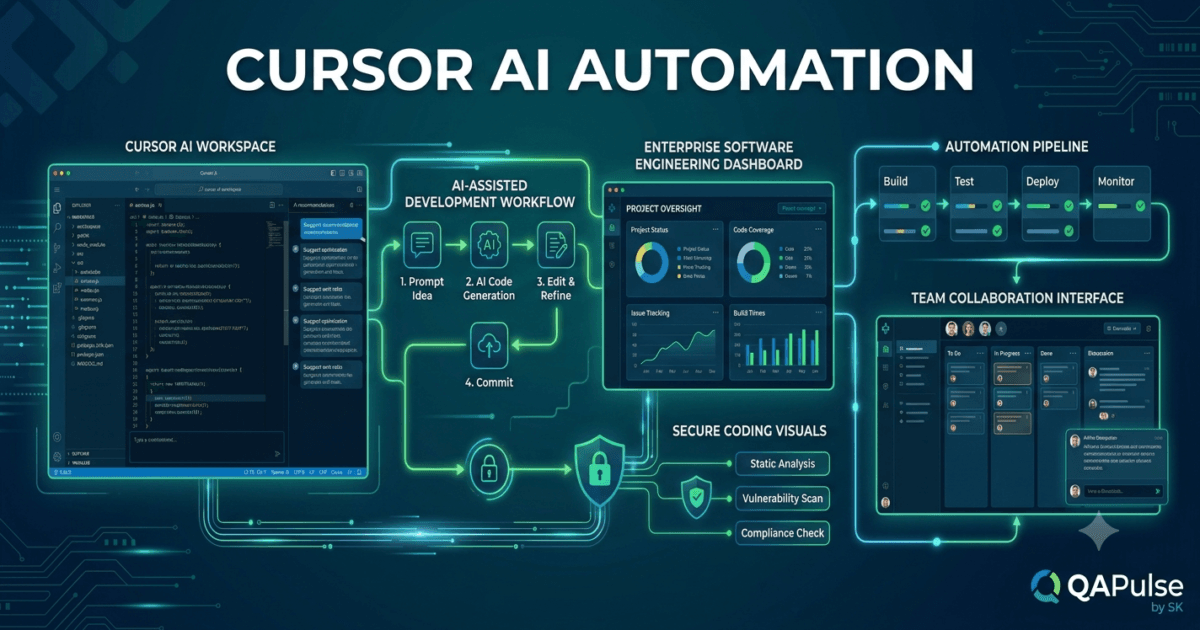
What is Cursor AI Automation?
Modern software engineering involves far more than writing code. Developers spend significant time on repetitive activities such as creating boilerplate code, updating documentation, generating tests, reviewing pull requests, refactoring existing implementations, fixing simple bugs, and maintaining project consistency. While these tasks are essential, they often reduce the time available for solving complex business problems.
This is where Cursor AI Automation becomes transformative.
Cursor AI Automation uses artificial intelligence to automate repetitive development tasks while allowing developers to maintain full control over design decisions, architecture, security, and code quality. Instead of replacing software engineers, Cursor AI acts as an intelligent development partner that accelerates routine work across the entire software development lifecycle.
Whether you are building a small personal project or maintaining a large enterprise application, automation helps reduce manual effort, improve consistency, and increase overall productivity.
Why Automation Matters
Software projects continue to grow in size and complexity.
Developers frequently perform tasks such as:
- Writing repetitive code
- Creating project documentation
- Generating unit tests
- Refactoring existing code
- Reviewing pull requests
- Updating configuration files
- Explaining unfamiliar code
- Fixing common programming errors
- Creating API documentation
- Maintaining coding standards
Although individually simple, these activities consume a considerable portion of a developer’s working day.
Automation allows engineers to focus on designing better software rather than repeatedly performing routine operations.
Benefits include:
- Faster software delivery
- Improved code consistency
- Reduced repetitive work
- Higher developer productivity
- Better documentation quality
- Faster onboarding
- Improved collaboration
- Reduced human error
How Cursor AI Automation Works
Cursor continuously analyses your project context before assisting with development tasks.
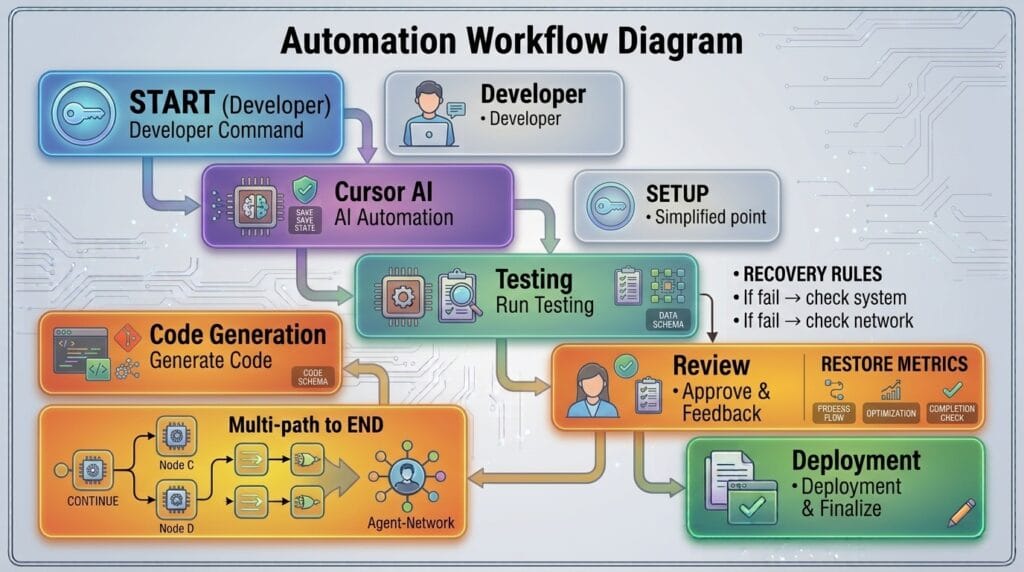
A simplified workflow looks like this.
Developer Request

↓

Cursor AI Analysis

↓

Project Context

↓

Generate Automated Solution

↓

Developer Review

↓

Apply Changes
Rather than generating isolated code snippets, Cursor considers the surrounding project structure, coding conventions, and dependencies to provide relevant automation.
Automating Code Generation
One of the most common uses of Cursor AI Automation is generating repetitive code.
Examples include:
- API endpoints
- Database models
- Service classes
- Utility functions
- Configuration files
- Data validation logic
- Interface definitions
- Boilerplate project structures
Instead of creating these components manually, developers can generate high-quality starting points in seconds.
Automating Documentation
Keeping documentation current is often challenging.
Cursor AI can assist by generating:
- README files
- API documentation
- Function descriptions
- Usage examples
- Inline comments
- Technical guides
- Project setup instructions
Well-maintained documentation improves collaboration and simplifies onboarding for new developers.
Automating Test Creation
Testing is a critical part of modern software engineering.
Cursor AI can automatically generate:
- Unit tests
- Integration tests
- End-to-end test templates
- Mock objects
- Test data
- Edge case scenarios
Developers should still review and extend generated tests to ensure they accurately validate application behaviour.
Automating Refactoring
Maintaining clean code requires regular refactoring.
Cursor AI can automate tasks such as:
- Simplifying functions
- Removing duplicate code
- Improving naming conventions
- Extracting reusable components
- Modernising outdated syntax
- Applying current best practices
Automation accelerates the refactoring process while allowing developers to validate each recommendation.
Automating Code Reviews
Before submitting changes for peer review, developers can use Cursor AI to analyse their code.
Automated review suggestions may include:
- Code duplication
- Naming improvements
- Missing documentation
- Potential bugs
- Performance concerns
- Security considerations
- Readability improvements
This helps developers resolve common issues before creating a pull request.
Automating Project Navigation
Large projects often contain thousands of files.
Cursor AI helps developers quickly locate:
- Related functions
- Shared components
- Configuration files
- Dependency relationships
- Business logic
- Frequently modified modules
This reduces the time spent manually searching through complex repositories.
Working Alongside Existing Tools
Cursor AI Automation complements established development tools rather than replacing them.
A typical workflow may include:
Git Repository

↓

Cursor AI

↓

Automated Code Generation

↓

Testing Framework

↓

CI/CD Pipeline

↓

Production Deployment
Automation fits naturally into modern development environments.
Human Oversight Remains Essential
Although automation significantly improves productivity, developers remain responsible for ensuring software quality.
Every automated suggestion should be evaluated for:
- Correctness
- Security
- Performance
- Maintainability
- Compliance with project standards
- Business requirements
Automation accelerates implementation but does not replace engineering judgement.
Common Mistakes
Developers should avoid several common automation pitfalls.
Automating Without Understanding
Generated code should always be understood before being merged into a project.
Understanding the implementation makes future maintenance easier.
Skipping Testing
Automation should never eliminate testing.
Every generated feature should be validated using appropriate automated and manual testing strategies.
Ignoring Existing Architecture
Automatically generated code should align with the project’s architecture, naming conventions, and coding standards.
Expecting Perfect Output
AI-generated solutions provide an excellent starting point, but developers should refine them based on project-specific requirements.
Best Practices for Cursor AI Automation
To maximise the benefits of automation:
- Provide clear and specific instructions.
- Include relevant project context.
- Review generated output carefully.
- Validate changes through testing.
- Follow existing coding standards.
- Commit changes using version control.
- Keep documentation updated.
- Continue improving your understanding of the underlying technologies.
These habits help teams gain productivity while maintaining software quality.
Preparing for Advanced Automation Workflows
Understanding Cursor AI Automation is the first step toward building highly efficient AI-assisted development environments. In the next lesson, you will explore how Cursor AI automates collaborative workflows across Git repositories, issue tracking systems, testing frameworks, documentation pipelines, and continuous integration environments, enabling development teams to deliver software more quickly while maintaining reliability, consistency, and high engineering standards.
Summary
Cursor AI Automation enables developers to automate repetitive software engineering tasks such as code generation, documentation, testing, refactoring, project navigation, and code review while preserving full control over architectural decisions and code quality. By combining intelligent automation with human expertise, modern development teams can reduce manual effort, accelerate software delivery, improve consistency, and focus more of their time on solving meaningful engineering challenges.
Cursor AI Team Collaboration: Enhancing Software Development with AI-Powered Workflows
What Is Cursor AI Team Collaboration?
Software development has evolved from individual programming to highly collaborative engineering. Modern applications are typically built by cross-functional teams consisting of frontend developers, backend engineers, QA specialists, DevOps engineers, UI/UX designers, product managers, and technical writers. Efficient collaboration is essential for delivering reliable software on time.
This is where Cursor AI Team Collaboration plays a significant role.
Cursor AI Team Collaboration combines artificial intelligence with modern collaborative development practices to help teams communicate more effectively, review code faster, understand complex projects, share knowledge, and maintain consistent coding standards. Rather than replacing existing collaboration tools, Cursor AI enhances them by providing intelligent assistance throughout the software development lifecycle.
By reducing repetitive tasks and improving project understanding, Cursor AI allows teams to spend more time building high-quality software together.
Why Team Collaboration Matters
As projects grow, so does the need for effective communication.
Development teams regularly collaborate on:
- Feature implementation
- Bug fixes
- Code reviews
- Pull requests
- Documentation
- Test automation
- Architecture discussions
- Sprint planning
- Production support
- Knowledge sharing
Poor collaboration often leads to duplicated work, inconsistent code, delayed releases, and increased technical debt.
AI-assisted collaboration helps reduce these challenges by making project knowledge easier to access and understand.
Benefits include:
- Faster onboarding
- Improved communication
- Better code quality
- Consistent coding standards
- Reduced review time
- Enhanced documentation
- Faster issue resolution
- Greater development productivity
How Cursor AI Team Collaboration Works
Cursor continuously analyses the project while assisting every contributor.
A simplified workflow looks like this.
Development Team

↓

Shared Repository

↓

Cursor AI

↓

Project Understanding

↓

AI Suggestions

↓

Team Review

↓

Production
Every developer benefits from AI-powered insights while maintaining established team workflows.
Improving Code Reviews
Code reviews help ensure software quality before changes are merged.
Cursor AI assists reviewers by identifying:
- Duplicate code
- Naming inconsistencies
- Potential bugs
- Missing documentation
- Unused variables
- Performance concerns
- Security considerations
- Readability improvements
Developers still make the final approval decisions, but AI reduces the time required to review common issues.
Knowledge Sharing Across Teams
One challenge in large organisations is ensuring that project knowledge is not limited to a few individuals.
Cursor AI helps explain:
- Existing modules
- Business logic
- Design patterns
- Folder structures
- Configuration files
- API implementations
- Dependency relationships
This enables new team members to become productive more quickly.
Supporting Pull Requests
Preparing a pull request often requires additional documentation.
Cursor AI can help generate:
- Change summaries
- Feature descriptions
- Testing notes
- Deployment considerations
- Breaking change explanations
- Reviewer guidance
Well-prepared pull requests make collaboration smoother and reduce review cycles.
Maintaining Consistent Coding Standards
Different developers often have different coding styles.
Cursor AI encourages consistency by suggesting improvements related to:
- Naming conventions
- Formatting
- Code organisation
- Documentation
- Error handling
- Project-specific patterns
Consistency improves readability and simplifies long-term maintenance.
Assisting QA and Test Engineers
Collaboration extends beyond software developers.
QA engineers can use Cursor AI to:
- Understand application logic
- Generate test cases
- Create automation scripts
- Analyse regression risks
- Explain new features
- Improve test documentation
This strengthens collaboration between development and testing teams.
Helping DevOps Engineers
DevOps teams manage deployment infrastructure and automation.
Cursor AI assists by explaining:
- Configuration files
- CI/CD pipelines
- Deployment scripts
- Container definitions
- Infrastructure code
- Monitoring configurations
Better understanding leads to fewer deployment issues.
Working with Large Repositories
Enterprise applications often contain thousands of files.
Cursor AI helps teams navigate:
- Project architecture
- Shared libraries
- Internal APIs
- Module dependencies
- Frequently modified components
- Historical changes
Developers spend less time searching and more time contributing.
Integrating Collaboration into Daily Development
A modern collaborative workflow may look like this.
Plan Feature

↓

Develop Code

↓

Cursor AI Assistance

↓

Run Tests

↓

Create Pull Request

↓

Code Review

↓

Merge

↓

Deploy
AI enhances every stage without replacing human collaboration.
Common Collaboration Challenges
Teams frequently encounter similar issues.
Inconsistent Coding Styles
Different coding practices can reduce readability.
Shared standards combined with AI recommendations help maintain consistency.
Limited Project Knowledge
When only a few developers understand critical modules, project risk increases.
Cursor AI helps distribute knowledge across the team by explaining unfamiliar code.
Slow Code Reviews
Large pull requests require significant review effort.
AI can highlight common issues early, allowing reviewers to focus on architecture and business logic.
Poor Documentation
Incomplete documentation slows onboarding and maintenance.
Cursor AI helps generate accurate technical documentation as development progresses.
Best Practices for Cursor AI Team Collaboration
To build effective AI-assisted collaboration:
- Follow established coding standards.
- Keep pull requests focused.
- Review AI suggestions carefully.
- Share project knowledge openly.
- Maintain comprehensive documentation.
- Execute automated tests before merging.
- Encourage constructive peer reviews.
- Use version control consistently.
- Treat AI as a collaborative assistant rather than a replacement for teamwork.
These practices strengthen communication while improving software quality.
Enterprise Use Cases
Large organisations increasingly use Cursor AI to support collaborative engineering.
Common applications include:
- Distributed software development
- Enterprise code reviews
- Knowledge transfer
- QA collaboration
- DevOps automation
- Documentation generation
- Legacy system maintenance
- Cross-functional engineering teams
By combining AI with established development processes, organisations improve productivity while maintaining governance and engineering standards.
Preparing for AI-Assisted Enterprise Development
Strong collaboration is the foundation of successful software projects, but enterprise environments also require scalable automation, governance, security, compliance, and efficient development workflows. In the next lesson, you will explore how Cursor AI supports enterprise software engineering by integrating with large-scale development processes, helping organisations deliver secure, maintainable, and high-quality software faster.
Summary
Cursor AI Team Collaboration enhances modern software engineering by helping development teams communicate more effectively, understand complex codebases, improve code reviews, generate documentation, support QA and DevOps activities, and maintain consistent coding standards. By combining AI-powered insights with established collaborative workflows, Cursor AI enables teams to reduce repetitive work, accelerate project delivery, and build reliable software while keeping developers at the centre of every engineering decision.
Cursor AI Enterprise Development: Scaling AI-Assisted Software Engineering Across Organisations
What Is Cursor AI Enterprise Development?
As software organisations grow, so do the challenges of maintaining code quality, ensuring security, managing large development teams, and delivering new features rapidly. Enterprise applications often consist of millions of lines of code spread across multiple repositories, microservices, cloud environments, and development teams.
This is where Cursor AI Enterprise Development becomes a strategic advantage.
Cursor AI Enterprise Development applies artificial intelligence to enterprise software engineering by helping organisations automate repetitive development tasks, improve collaboration, accelerate onboarding, enhance code reviews, and maintain consistent engineering standards across large-scale projects. Rather than replacing established enterprise processes, Cursor AI integrates with them to improve developer productivity while supporting governance, compliance, and software quality.
Why Enterprise Development Needs AI
Enterprise software projects are significantly more complex than small personal applications.
Engineering teams often manage:
- Multiple repositories
- Distributed development teams
- Large microservice architectures
- Cloud-native applications
- CI/CD pipelines
- Security compliance
- Technical documentation
- Legacy systems
- Automated testing
- Continuous delivery
Managing these activities manually can reduce productivity and slow software delivery.
AI helps engineering teams automate repetitive work while allowing developers to focus on solving complex business problems.
Benefits include:
- Faster software delivery
- Higher development productivity
- Improved code consistency
- Reduced onboarding time
- Better knowledge sharing
- Improved documentation
- Faster issue resolution
- Stronger collaboration across teams
How Cursor AI Enterprise Development Works
Cursor continuously analyses project context while integrating with enterprise development workflows.
A simplified architecture looks like this.
Enterprise Repository

↓

Cursor AI

↓

Project Analysis

↓

AI Recommendations

↓

Developer Review

↓

Testing

↓

Deployment
The AI assists developers without disrupting existing engineering processes.
Supporting Large Development Teams
Enterprise software is rarely built by a single developer.
Multiple roles often collaborate, including:
- Software Engineers
- QA Engineers
- DevOps Engineers
- Technical Architects
- Security Engineers
- Product Managers
- Technical Writers
- Site Reliability Engineers
Cursor AI helps each contributor understand project context and perform routine engineering tasks more efficiently.
Improving Enterprise Code Reviews
Code reviews are critical for maintaining software quality at scale.
Cursor AI assists reviewers by identifying:
- Duplicate implementations
- Naming inconsistencies
- Potential bugs
- Missing documentation
- Performance opportunities
- Security concerns
- Unused code
- Readability improvements
Reviewers can then concentrate on architectural decisions, business requirements, and overall design quality.
Accelerating Developer Onboarding
Enterprise applications often require weeks or months for new developers to fully understand.
Cursor AI shortens this process by explaining:
- Project architecture
- Folder structures
- Business workflows
- Internal APIs
- Shared libraries
- Configuration files
- Service dependencies
- Coding conventions
New team members become productive much faster.
Supporting Legacy System Modernisation
Many organisations continue maintaining applications built over many years.
Cursor AI assists with:
- Understanding legacy code
- Identifying outdated patterns
- Recommending modern alternatives
- Explaining business logic
- Suggesting incremental refactoring
- Improving maintainability
This reduces the risks associated with modernisation projects.
Enhancing Documentation
Large engineering organisations depend on accurate documentation.
Cursor AI helps generate:
- Technical documentation
- API references
- Architecture summaries
- Deployment guides
- README files
- Developer onboarding guides
- Code comments
- Operational documentation
Keeping documentation aligned with the codebase improves collaboration across departments.
Supporting Security Reviews
Security remains a top priority in enterprise development.
Cursor AI can assist developers by highlighting:
- Potential insecure coding patterns
- Hard-coded secrets
- Missing input validation
- Error-handling weaknesses
- Permission inconsistencies
- General areas that deserve additional security review
AI recommendations should always be validated through established security testing and human expertise.
Working with CI/CD Pipelines
Modern enterprise software depends on automated delivery pipelines.
Cursor AI fits naturally into workflows involving:
- Source control
- Automated testing
- Build pipelines
- Code quality analysis
- Deployment automation
- Release management
AI complements these tools by improving the quality of code before it reaches automated pipelines.
Knowledge Management Across Teams
Large organisations often struggle with knowledge silos.
Cursor AI helps distribute project knowledge by explaining:
- Complex algorithms
- Internal frameworks
- Shared services
- Architectural patterns
- Historical implementations
- Module interactions
This encourages better collaboration and reduces dependence on individual experts.
Enterprise Workflow Example
A modern AI-assisted enterprise workflow may look like this.
Business Requirement

↓

Development Team

↓

Cursor AI Assistance

↓

Automated Testing

↓

Code Review

↓

CI/CD Pipeline

↓

Production Release
AI becomes another productivity layer rather than replacing established enterprise processes.
Common Challenges
Enterprise teams should remain aware of several challenges.
Over-Reliance on AI
Developers should avoid accepting AI-generated suggestions without review.
Human expertise remains essential for architecture, security, compliance, and business logic.
Inconsistent Engineering Standards
AI recommendations should align with organisational coding standards and architectural guidelines.
Limited Test Coverage
AI-generated code should always be validated using automated testing and peer review before deployment.
Ignoring Compliance Requirements
Enterprise organisations often operate under strict regulatory and compliance frameworks.
AI-generated changes should continue following all applicable governance and compliance requirements.
Best Practices for Cursor AI Enterprise Development
To maximise value across enterprise environments:
- Define organisation-wide coding standards.
- Review AI-generated code carefully.
- Maintain comprehensive automated testing.
- Protect sensitive project information.
- Keep documentation up to date.
- Encourage peer reviews.
- Use version control consistently.
- Integrate AI into existing engineering workflows.
- Continuously monitor software quality metrics.
These practices help organisations combine AI productivity with professional engineering discipline.
Real-World Enterprise Applications
Many organisations can benefit from Cursor AI across different engineering activities.
Typical enterprise use cases include:
- Large-scale application development
- Legacy system maintenance
- Microservices development
- API engineering
- Test automation
- Internal platform development
- Documentation generation
- Developer onboarding
- Cloud-native software engineering
- Continuous software modernisation
Because Cursor understands project context, it adapts well to both growing startups and large enterprise environments.
Preparing for Secure AI Development
Enterprise development requires more than productivity—it also demands strong security, governance, privacy, and responsible AI usage. In the next lesson, you will learn how Cursor AI supports secure software engineering through best practices for protecting source code, handling sensitive information, applying access controls, and integrating AI responsibly into professional development environments.
Summary
Cursor AI Enterprise Development helps organisations scale AI-assisted software engineering by improving collaboration, accelerating onboarding, enhancing documentation, supporting large code reviews, assisting with legacy modernisation, and integrating seamlessly into existing development workflows. By combining Cursor AI with automated testing, version control, security practices, and human engineering expertise, enterprises can increase developer productivity while continuing to deliver secure, maintainable, and high-quality software across complex, large-scale projects.
Cursor AI Security Best Practices: Protecting Code, Data, and Development Workflows
Why Security Matters in AI-Assisted Development
Artificial intelligence is transforming software engineering by helping developers generate code, analyse projects, automate documentation, and accelerate development workflows. However, as organisations increasingly adopt AI-powered tools, security becomes more important than ever.
This is where Cursor AI Security Best Practices become essential.
While Cursor AI can significantly improve developer productivity, engineering teams must ensure that AI-assisted workflows continue to follow secure coding principles, protect sensitive information, maintain regulatory compliance, and align with organisational security policies.
Security should never be treated as an afterthought. Instead, it should be integrated into every stage of software development, whether code is written manually or generated with AI assistance.
Understanding Security in AI Development
Modern software projects often contain sensitive assets such as:
- Source code
- API keys
- Authentication tokens
- Database credentials
- Customer information
- Internal documentation
- Infrastructure configurations
- Business logic
- Cloud resources
- Deployment scripts
Developers must ensure that these assets remain protected while using AI-powered development tools.
A secure workflow balances productivity with responsible software engineering practices.
How Cursor AI Fits Into Secure Development
Cursor AI operates as a development assistant rather than a replacement for security controls.
A secure development process typically looks like this:
Developer

↓

Cursor AI Assistance

↓

Code Review

↓

Security Validation

↓

Testing

↓

Deployment
AI helps accelerate development, but human review and security verification remain critical.
Protecting Sensitive Information
One of the most important security practices is preventing exposure of confidential information.
Developers should avoid unnecessarily exposing:
- Production credentials
- Private keys
- Customer records
- Financial information
- Proprietary algorithms
- Internal business data
- Security configurations
- Confidential infrastructure details
Security-conscious development begins with understanding what information requires protection.
Managing Secrets Properly
Secrets should never be hard-coded into applications.
Examples include:
- API tokens
- Database passwords
- Encryption keys
- Authentication credentials
- Cloud access keys
Instead, organisations should use:
- Environment variables
- Secret management platforms
- Secure configuration services
- Enterprise credential management solutions
Proper secret management reduces the risk of accidental exposure.
Reviewing AI-Generated Code
AI-generated code should always be reviewed before being merged into a project.
Developers should evaluate:
- Security implications
- Access control logic
- Authentication flows
- Input validation
- Error handling
- Data processing
- External dependencies
- Configuration settings
Human oversight remains a fundamental part of secure software engineering.
Secure Authentication Practices
Authentication is a common source of security vulnerabilities.
When building authentication systems, developers should ensure:
- Strong password policies
- Multi-factor authentication support
- Secure session handling
- Proper token management
- Account lockout mechanisms
- Secure password storage
AI-generated authentication logic should always be verified against security requirements.
Input Validation and Data Protection
Many vulnerabilities occur when applications trust user input without proper validation.
Secure development requires:
- Input sanitisation
- Parameter validation
- Output encoding
- Type checking
- Boundary validation
- Error management
Proper validation reduces exposure to common security risks.
Dependency Security
Modern applications rely heavily on third-party packages and libraries.
Developers should regularly:
- Update dependencies
- Remove unused packages
- Monitor security advisories
- Review package reputation
- Perform dependency audits
Even if AI suggests a dependency, developers remain responsible for evaluating its security and suitability.
Security in Collaborative Development
Large teams must establish clear security standards.
Recommended practices include:
- Mandatory code reviews
- Security-focused pull request checks
- Automated scanning tools
- Access control policies
- Documentation standards
- Change approval processes
Cursor AI can support collaboration, but organisational governance remains essential.
Integrating Security into CI/CD Pipelines
Security should be incorporated throughout the software delivery process.
A secure pipeline often includes:
Code Development

↓

Cursor AI Assistance

↓

Automated Testing

↓

Security Scanning

↓

Code Review

↓

Deployment Approval

↓

Production Release
Automated validation helps identify issues before software reaches production environments.
Secure Refactoring and Modernisation
Many organisations use Cursor AI to modernise legacy applications.
During refactoring efforts, developers should verify:
- Existing security controls remain intact
- Access restrictions are preserved
- Sensitive data handling is unchanged
- Authentication flows continue working correctly
- Audit requirements remain satisfied
Security must be preserved throughout every modernisation initiative.
Common Security Mistakes
Teams frequently encounter similar issues when adopting AI-assisted development.
Blindly Accepting Generated Code
Developers should never assume generated code is production-ready.
Every implementation requires review and testing.
Ignoring Security Reviews
Functionality alone is not enough.
Security validation should be part of every development workflow.
Exposing Sensitive Information
Credentials, secrets, and confidential business information must always remain protected.
Failing to Update Dependencies
Outdated dependencies often become significant security risks over time.
Regular maintenance is essential.
Security Best Practices for Cursor AI
To maintain a secure development environment:
- Follow secure coding standards.
- Review all AI-generated code.
- Protect credentials and secrets.
- Implement strong authentication controls.
- Validate user input carefully.
- Maintain dependency hygiene.
- Conduct regular code reviews.
- Use automated security testing.
- Follow organisational compliance requirements.
- Continuously educate development teams about security risks.
These practices help organisations benefit from AI while maintaining strong security posture.
Enterprise Security Considerations
Large organisations often require additional controls, including:
- Role-based access management
- Audit logging
- Compliance monitoring
- Data governance policies
- Security approval workflows
- Secure development lifecycle practices
- Infrastructure security reviews
- Regulatory compliance validation
Cursor AI should be integrated into these existing frameworks rather than operating outside them.
Preparing for Advanced Cursor AI Workflows
Understanding Cursor AI Security Best Practices is essential for responsible AI-assisted development. In the next lesson, you will explore advanced Cursor AI workflows that combine automation, collaboration, enterprise governance, testing, and security into a unified development strategy that enables teams to deliver software faster while maintaining quality, reliability, and compliance.
Summary
Cursor AI Security Best Practices help development teams use AI responsibly while protecting source code, credentials, customer information, and business-critical systems. By combining AI-assisted productivity with secure coding standards, dependency management, authentication controls, code reviews, automated testing, and organisational governance, software teams can safely adopt AI-powered development workflows without compromising security, compliance, or software quality.
Internal Links:
- Learn MCP – Zero to Hero
- Learn AI Agents for QA – Zero to Hero
- Playwright Automation – Zero to Hero
- LangGraph: Complete Zero to Hero
- Learn Python – Zero to Hero
- OpenAI Codex: Complete Zero to Hero
- Cursor AI: Complete Zero to Hero
- Claude Code Tutorial: Complete Zero to Hero
- Free QA Resources Built From Real Experience
- QA Glossary: Test Automation Terms Every Engineer Should Know
External Resources:
- Model Context Protocol documentation
- Playwright documentation
- GitHub documentation
- TypeScript documentation
- Prompt Engineering Overview
- Git Documentation
- Visual Studio Code
- Cursor AI
- Cursor Documentation
People Also Ask
What is Cursor AI Automation?
Cursor AI Automation is the use of Cursor’s AI capabilities to automate repetitive software development tasks such as code generation, documentation, testing, refactoring, debugging, and workflow optimisation while keeping developers in control of implementation decisions.
Can Cursor AI Automation improve team productivity?
Yes. Cursor AI Automation helps teams reduce repetitive work, improve collaboration, accelerate code reviews, generate documentation, and maintain consistent coding standards across projects.
Is Cursor AI Automation suitable for enterprise software development?
Absolutely. Enterprise teams use Cursor AI Automation to support large repositories, improve developer onboarding, streamline documentation, automate repetitive engineering tasks, and integrate AI into existing software delivery processes.
Does Cursor AI Automation replace software developers?
No. Cursor AI Automation enhances developer productivity by automating routine work, but software engineers remain responsible for architecture, security, testing, business logic, and final decision-making.
How can developers use Cursor AI Automation securely?
Developers should review all AI-generated code, protect sensitive information, manage secrets securely, validate outputs through testing, follow secure coding practices, and comply with organisational security policies.
Featured Snippet
What is Cursor AI Automation?
Cursor AI Automation is the process of using Cursor’s AI-powered features to automate repetitive development activities such as writing boilerplate code, generating documentation, creating tests, improving code quality, and supporting collaborative software engineering while allowing developers to retain complete control over the final implementation.
AI Overview Answer
Cursor AI Automation enables developers to accelerate software engineering by automating repetitive coding tasks, improving collaboration, supporting enterprise development, enhancing documentation, and promoting secure development practices. Combined with human expertise, it helps engineering teams deliver high-quality software more efficiently without sacrificing reliability or maintainability.
Enjoyed this article? Explore more in-depth guides on AI engineering, automation testing, Model Context Protocol, Playwright, and intelligent software quality at www.skakarh.com. Follow QAPulse by SK for practical, production-focused tutorials designed for QA engineers, SDETs, and AI developers.