 QA
QA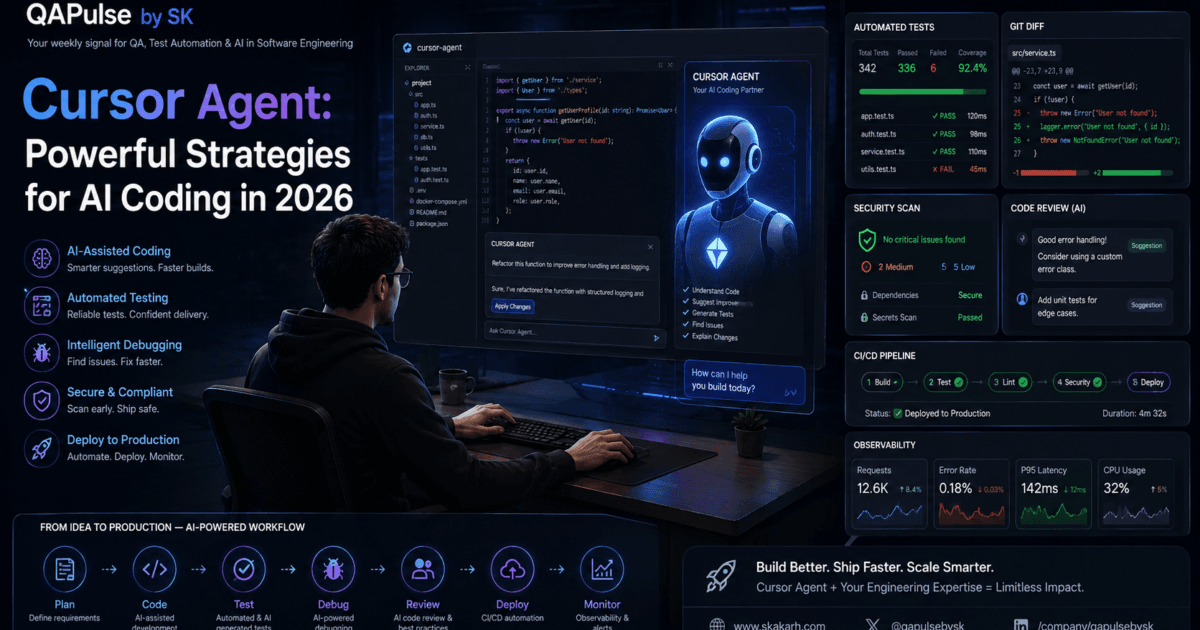
Cursor Agent Modes changes the way developers interact with an AI coding environment because different development tasks require different levels of AI involvement. Understanding Cursor Agent modes is therefore essential for using AI coding workflows effectively without giving an AI system more control than the task actually requires.
A developer investigating an unfamiliar repository does not need the same workflow as someone asking AI to implement a multi-file feature. Similarly, reviewing an architectural idea is different from allowing an AI system to modify the codebase.
The key is choosing the right level of interaction for the job.
Why Cursor Agent Modes Matter
AI coding is not one single activity.
A developer may want to:
Understand existing code
        ↓
Ask questions
        ↓
Explore possible solutions
        ↓
Generate or modify code
        ↓
Run tests
        ↓
Fix failures
        ↓
Complete a feature
These activities require different levels of autonomy.
For example, asking:
Explain how authentication works in this repository.
is fundamentally different from:
Implement OAuth authentication across the application,
update the tests, and fix any resulting failures.
The first task primarily requires understanding.
The second requires execution.
This distinction is the foundation of effective agentic development.
Understanding the Three Core Workflows
A useful mental model is:
| Workflow | Primary Purpose | Typical Developer Intent |
|---|---|---|
| Ask | Understand and investigate | “Explain this.” |
| Agent | Plan, modify, execute, and validate | “Solve this task.” |
| Coding-focused workflow | Generate or transform code efficiently | “Create or change this code.” |
The exact capabilities and interface details can evolve as Cursor develops, but the underlying principle remains stable:
Choose the interaction mode based on the amount of reasoning, repository access, and execution required.
Ask: The Investigation Workflow
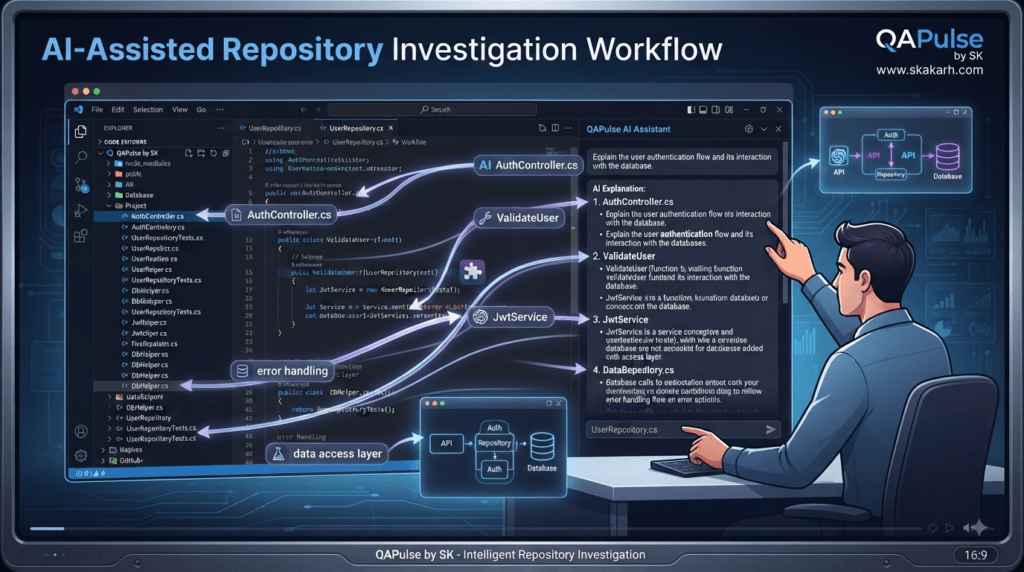
The Ask-style workflow is most useful when the developer wants information before making changes.
Examples include:
How does authentication work here?
Where is the API client implemented?
Why is this function using this repository pattern?
Which files depend on UserService?
These questions are low-risk because the primary objective is understanding.
The agent can inspect the repository and explain relationships without immediately changing the implementation.
When Ask Is the Better Choice
Use an Ask-style interaction when you are uncertain about the codebase.
For example:
I need to modify the checkout flow.

Before making any changes, identify:
- checkout controller
- checkout service
- payment integration
- relevant tests
- database models
- frontend consumers

Explain how these components interact.
Do not modify any files.
This gives the developer an architectural map.
The benefit is significant.
Instead of allowing AI to immediately start editing, you first establish:
What exists?
What depends on what?
Where should the change happen?
What could be affected?
This reduces accidental modifications.
Ask for Repository Discovery
One of the strongest uses of the Ask workflow is repository discovery.
Imagine joining an unfamiliar project.
You could manually search:
src/
tests/
services/
controllers/
models/
utils/
Or ask:
Find the implementation of user authentication.

Show me:
1. Entry point
2. Authentication service
3. Token generation
4. Middleware
5. Database interaction
6. Related tests

Explain the request flow from login to authorization.
The result becomes a working map of the system.
This is especially valuable for large repositories.
Ask for Dependency Analysis
Before changing a shared component:
Analyze UserService.

Identify:
- direct consumers
- indirect consumers
- tests
- API endpoints
- background jobs
- shared utilities

Which areas could be affected if UserService changes?
This is much safer than immediately editing the service.
The developer can make a decision based on evidence.
Ask for Alternatives
The Ask workflow can also be used for design exploration.
For example:
We need to add caching to the product API.

Compare:
1. In-memory caching
2. Redis
3. HTTP caching

Evaluate:
- scalability
- complexity
- consistency
- cost
- failure behavior

Do not modify the code.
Now the AI is functioning as a technical thinking partner.
The human still decides which approach is appropriate.
Agent: The Execution Workflow
The Agent-style workflow becomes more valuable when the task requires multiple actions.
For example:
Implement the wishlist feature.

Requirements:
- authenticated users can add products
- users can remove products
- duplicate products are prevented
- users can retrieve their wishlist

Inspect the existing architecture first.

Reuse existing:
- authentication
- repository patterns
- Product model
- test infrastructure

Add appropriate tests and run them.
This is no longer just a question.
It is a multi-step engineering task.
The agent may need to:
Inspect files
   ↓
Understand architecture
   ↓
Plan changes
   ↓
Modify multiple files
   ↓
Run commands
   ↓
Run tests
   ↓
Analyze failures
   ↓
Correct implementation
That is where agentic behavior becomes especially useful.
Why Agent Workflows Need Constraints
Greater autonomy creates greater responsibility.
Compare:
Build the feature.
with:
Implement the feature.

Constraints:
- Reuse the existing repository pattern.
- Do not add dependencies.
- Do not modify authentication.
- Add unit and API tests.
- Do not modify unrelated modules.

Validation:
- Run the feature tests.
- Run the related regression suite.
- Review the final diff.
The second instruction gives the agent boundaries.
This matters because an agent can discover many possible improvements while working.
Not every improvement should become part of the current task.
Agent Mode for Multi-File Changes
Some tasks naturally require coordinated changes.
For example:
Feature request
     ↓
Database
     ↓
Backend
     ↓
API
     ↓
Frontend
     ↓
Tests
Trying to handle every change manually can be repetitive.
An agentic workflow can coordinate the implementation while maintaining a defined scope.
For example:
Implement profile preferences.

Update:
- database model
- API endpoint
- service
- frontend settings page
- tests

Follow existing architecture.

Do not modify authentication or billing.
The agent can work across the relevant files instead of treating each file as an isolated task.
Coding-Focused Workflows
Not every coding task requires broad agent autonomy.
Sometimes the developer already knows exactly what needs to happen.
For example:
Create a TypeScript interface for this API response.
Or:
Convert this JavaScript function to TypeScript.
Or:
Generate a Playwright Page Object for this page.
These tasks have limited scope.
A focused coding interaction may therefore be more appropriate than asking an autonomous agent to investigate the entire repository.
The principle is:
Small deterministic task
        ↓
Focused coding interaction

Complex multi-step task
        ↓
Agentic workflow
Comparing the Workflows
| Characteristic | Ask | Agent | Focused Coding |
|---|---|---|---|
| Main goal | Understand | Execute | Generate/modify code |
| Repository investigation | Strong | Strong | Usually limited |
| File modification | No/limited | Yes | Yes |
| Multi-step reasoning | Moderate | High | Low–moderate |
| Terminal interaction | Usually unnecessary | Often useful | Task-dependent |
| Test execution | Usually no | Often | Optional |
| Best for | Exploration | Features/debugging | Specific code changes |
| Risk level | Low | Higher | Usually low–medium |
| Human review | Important | Essential | Important |
The important point is not that one workflow is better than another.
The right question is:
Which workflow matches the task?
A Practical Decision Framework
Before interacting with the AI, ask:
Do I need information?
        ↓
      ASK

Do I need implementation?
        ↓
      AGENT

Do I already know exactly what code I need?
        ↓
FOCUSED CODING
There will be overlap.
A complex task may begin with Ask, continue with Agent, and finish with focused coding and review.
That is normal.
Strategy: Start With Ask, Escalate to Agent
One of the safest workflows for unfamiliar systems is:
Ask
 ↓
Understand
 ↓
Plan
 ↓
Agent
 ↓
Implement
 ↓
Validate
For example:
Ask:
How does checkout currently work?
Then:
Ask:
Which files would need to change to add
discount-code support?
Then:
Ask:
What are the risks of this approach?
Then:
Agent:
Implement the approved discount-code approach.
This creates a controlled transition from information gathering to execution.
Strategy: Match Autonomy to Risk
Consider three tasks.
Task 1: Rename a local variable
Risk: Low
A focused coding workflow is sufficient.
Task 2: Refactor a shared service
Risk: Medium
Use:
Ask → Plan → Agent → Test → Review
Task 3: Change authentication
Risk: High
Use:
Ask
 ↓
Architecture review
 ↓
Human approval
 ↓
Agent implementation
 ↓
Security testing
 ↓
Human review
This risk-based approach prevents excessive autonomy where mistakes could have significant consequences.
Interactive Exercise: Choose the Right Workflow
Consider:
“Where is the login token generated?”
Best choice:
Ask
Now:
“Implement refresh-token rotation using
the existing authentication architecture.”
Best choice:
Agent
Now:
“Convert this function from JavaScript to TypeScript.”
Best choice:
Focused coding workflow
The lesson is simple:
Do not use maximum autonomy for every task.
Cursor Agent Modes and SDET Workflows
For SDETs, these workflows can map directly to testing activities.
Investigation
Ask:
Find all existing Playwright fixtures.
Test implementation
Agent:
Add coverage for the checkout workflow
using the existing fixtures.
Focused generation
Coding:
Create an assertion for the expected API response.
Failure analysis
Ask:
Explain why this test is intermittently failing.
Automated correction
Agent:
Investigate and fix the synchronization issue.
Do not add fixed waits.
This creates a practical AI-assisted testing workflow without allowing automation generation to replace test strategy.
Strategy: Ask Before You Refactor
Refactoring is a particularly good example of why workflow selection matters.
Instead of:
Refactor this service.
start with:
Analyze this service.

Identify:
- responsibilities
- dependencies
- duplicated logic
- potential architectural problems
- risky areas

Do not modify anything.
After reviewing the response:
Implement only the approved refactoring.

Preserve behavior.
Add or update tests.
Run the relevant test suite.
This reduces the chance of turning a controlled refactoring task into an uncontrolled rewrite.
Strategy: Use Agent for Execution, Not Authority
An important distinction is:
Agent = execution capability
Human = engineering authority
The agent can decide how to implement within the provided constraints.
The human should still decide:
What should be built?
Why should it be built?
Which architecture is acceptable?
What risks are acceptable?
Is the result ready to ship?
This separation becomes increasingly important as AI coding systems become more capable.
Understanding the Workflow Spectrum
Think of AI coding interactions as a spectrum:
Low Autonomy
─────────────────────────────────►
Ask → Explain → Generate → Edit → Agent → Validate
                                      High Autonomy
The developer should move along this spectrum based on the task.
A simple question should remain simple.
A complex implementation can use deeper agentic capabilities.
A high-risk change should include additional human checkpoints.
Strategy: Build a Personal Mode Selection Habit
Before writing a prompt, classify it:
Category:
[ ] Information
[ ] Exploration
[ ] Code generation
[ ] Code modification
[ ] Debugging
[ ] Refactoring
[ ] Testing
[ ] Multi-file implementation
[ ] Architecture
Then select the interaction style.
For example:
Architecture
→ Ask first

Multi-file implementation
→ Agent

Small code transformation
→ Focused coding

Production failure
→ Ask → Agent → Validate → Review
This small habit can dramatically improve AI-assisted development quality.
The Most Important Principle
The best Cursor workflow is not the one that gives the AI the most control.
It is the workflow that gives the AI the right amount of control for the task.
That means:
Understand first.
Execute deliberately.
Validate continuously.
Review critically.
Cursor Agent: Designing Reliable Agentic Coding Workflows
Cursor Agent becomes significantly more useful when developers stop thinking only in terms of “generate code” and start thinking in terms of context, planning, execution, validation, and control.
The difference between a productive AI coding session and a frustrating one is often not the AI model itself. It is the engineering workflow surrounding it.
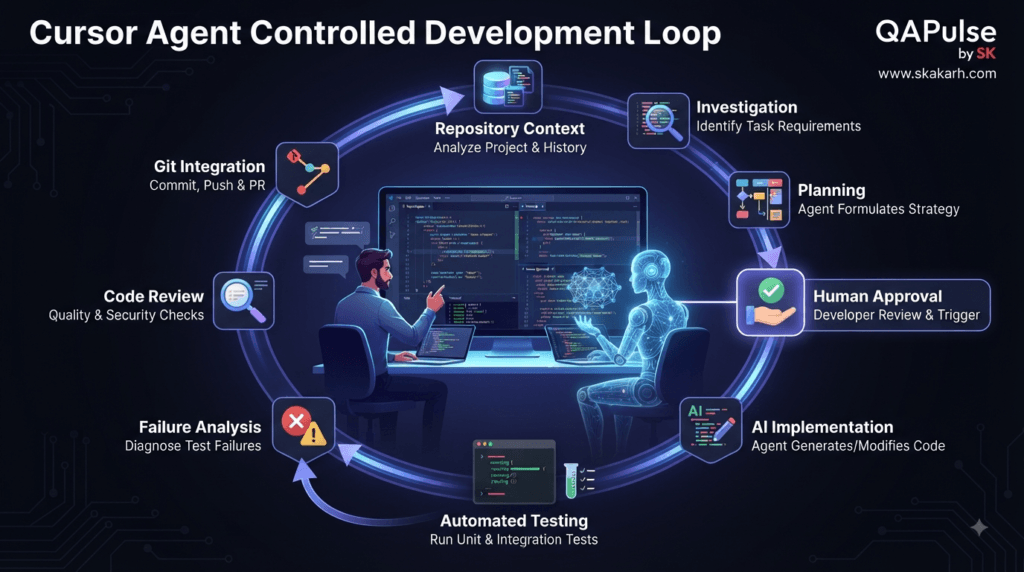
A useful agentic workflow looks like this:
Repository Context
       ↓
Problem Definition
       ↓
Investigation
       ↓
Implementation Plan
       ↓
Controlled Execution
       ↓
Testing
       ↓
Failure Analysis
       ↓
Human Review
The objective is not to make the agent autonomous at every stage.
The objective is to make every stage predictable, observable, and reviewable.
Give Cursor Agent the Right Context
AI coding agents can inspect a repository, but inspection alone does not guarantee understanding.
A developer should provide important context explicitly.
For example:
Project:
E-commerce application

Stack:
- Next.js
- TypeScript
- PostgreSQL
- Playwright

Architecture:
- API routes handle HTTP requests
- Services contain business logic
- Repository layer handles persistence

Task:
Add product filtering.

Constraints:
- Reuse existing repository patterns.
- Do not introduce a new ORM.
- Preserve existing API responses.
- Add automated tests.
This is much stronger than:
Add product filtering.
The first prompt reduces the number of assumptions the agent needs to make.
Context Has Different Levels
Not every task needs the same amount of information.
Level 1: Local Context
Useful for a small change:
Modify this function to handle null values.
Level 2: File Context
Useful when several functions interact:
Review this service and its related tests.
Level 3: Module Context
Useful for feature development:
Inspect the entire authentication module
before implementing password reset.
Level 4: Repository Context
Useful for architectural or cross-cutting changes:
Understand how authentication, authorization,
API middleware, and user persistence interact.
The strategy is simple:
Give Cursor Agent enough context to make a reliable decision, but avoid unnecessary information that increases noise.
Strategy: Let the Agent Explore Before It Edits
A common mistake is immediately saying:
Implement this feature.
A safer approach is:
First inspect the relevant code.

Identify:
- files involved
- existing patterns
- dependencies
- related tests
- possible risks

Do not modify anything yet.
This creates an investigation phase.
The resulting information can then be used to decide whether the proposed implementation makes sense.
For larger repositories, this approach can save substantial rework.
Build an Implementation Plan Before Execution
After investigation, ask for a plan.
Create an implementation plan for the feature.

Include:
1. Files that need modification
2. New files required
3. Existing components to reuse
4. Test changes
5. Potential risks
6. Validation commands

Do not implement anything yet.
A useful plan might look like:
1. Update ProductFilter schema.
2. Extend ProductRepository.
3. Update ProductService.
4. Add API query parameters.
5. Add API tests.
6. Update frontend filter state.
7. Run regression tests.
Now the developer can evaluate the approach before the agent changes the repository.
Why Planning Improves AI Coding
Without planning:
Prompt
  ↓
Code
  ↓
Unexpected changes
  ↓
Debugging
With planning:
Prompt
  ↓
Repository analysis
  ↓
Plan
  ↓
Human review
  ↓
Implementation
  ↓
Validation
The second approach introduces a valuable checkpoint.
That checkpoint becomes especially important for:
- authentication
- payments
- databases
- infrastructure
- security-sensitive code
- shared services
- large refactors
Strategy: Define Explicit Acceptance Criteria
Cursor Agent should not have to guess when the task is complete.
Instead of:
Build a user profile page.
define:
Acceptance criteria:

- Authenticated users can view their profile.
- Users can edit their display name.
- Email cannot be changed from this page.
- Invalid names show validation errors.
- API errors are displayed.
- Loading state is visible.
- Tests cover successful and failed updates.
Now “done” becomes measurable.
Acceptance Criteria vs Prompt
| Weak Instruction | Strong Instruction |
|---|---|
| Build profile page | Define exact profile behavior |
| Fix tests | Identify failure and expected behavior |
| Add API | Define endpoint and response contract |
| Improve performance | Define measurable performance target |
| Refactor service | Define behavior that must remain unchanged |
The stronger version gives the agent an objective rather than an interpretation.
Strategy: Separate Must-Haves From Preferences
This distinction is surprisingly useful.
Must have:
- API remains backward compatible.
- Existing tests must pass.
- Authentication behavior must not change.

Preferred:
- Reuse the existing helper.
- Keep implementation simple.
- Follow the existing naming convention.
This allows the agent to make reasonable implementation decisions without violating critical requirements.
Control Scope With Explicit Boundaries
A powerful prompt section is:
Scope:

Modify:
- src/products/
- tests/products/

Do not modify:
- authentication
- billing
- deployment
- database migrations outside products
This prevents unrelated improvements from silently becoming part of the implementation.
Another useful instruction is:
If you discover improvements outside this scope,
report them separately instead of implementing them.
That single sentence can prevent significant scope expansion.
Strategy: Protect Existing Architecture
AI-generated solutions can sometimes introduce unnecessary abstractions.
For example, the repository already contains:
Controller
    ↓
Service
    ↓
Repository
The agent should not suddenly introduce:
Controller
    ↓
Facade
    ↓
Orchestrator
    ↓
Manager
    ↓
Service
    ↓
Repository
unless there is a strong architectural reason.
A useful instruction is:
Follow the existing architecture.

Prefer extending existing abstractions
over introducing new architectural layers.

Only introduce a new abstraction if the
existing architecture cannot reasonably support
the requirement.
This keeps AI-assisted development aligned with the existing system.
Strategy: Use Constraints as Engineering Guardrails
Constraints should cover more than files.
Consider these categories:
Technology Constraints
Do not introduce new dependencies.
Use the existing HTTP client.
Use TypeScript strict mode.
Architecture Constraints
Reuse the existing service layer.
Do not bypass repository abstractions.
Testing Constraints
Add regression tests.
Do not use fixed waits.
Preserve existing fixtures.
Security Constraints
Never expose secrets.
Do not log credentials.
Validate user-controlled input.
Scope Constraints
Do not modify unrelated modules.
Do not upgrade dependencies.
These constraints reduce unwanted agent behavior.
Strategy: Use the Agent as a Debugging Investigator
Debugging is one of the strongest use cases for AI-assisted development.
Suppose a test reports:
Expected:
200

Received:
500
Instead of:
Fix this test.
use:
Investigate this failure.

Observed:
Expected 200 but received 500.

Determine:
- where the failure originates
- why the expected behavior differs
- whether the test or application is incorrect
- which code path is involved

Do not change code until the root cause
has been identified.
This encourages diagnosis before modification.
Root Cause Before Code Changes
A reliable debugging workflow is:
Failure
   ↓
Reproduce
   ↓
Collect evidence
   ↓
Identify root cause
   ↓
Determine expected behavior
   ↓
Implement correction
   ↓
Run regression tests
Not:
Failure
   ↓
Change random code
   ↓
Run tests
   ↓
Another failure
   ↓
Change more code
The first process is engineering.
The second is trial and error.
Strategy: Ask for Evidence
When debugging, require evidence.
Explain the root cause using:

- failing test
- relevant stack trace
- affected function
- request/response behavior
- state transition
- related implementation

Do not make assumptions without evidence.
This makes the agent’s reasoning more useful to the developer.
Strategy: Use Tests as an Agent Feedback Loop
Once implementation begins, tests become feedback.
Implementation
      ↓
Run targeted test
      ↓
Failure?
   ↙       ↘
 Yes        No
 ↓           ↓
Investigate  Continue
 ↓
Fix
 ↓
Retest
Start with targeted tests:
npm test -- product-filter
Then expand:
npm test
Then, where appropriate:
npm run lint
npm run typecheck
The exact commands depend on the project.
The important principle is:
Start narrow, then validate broadly.
Strategy: Don’t Hide Test Failures
An agent may encounter an unrelated failing test.
Do not simply tell it:
Ignore the failure.
Instead:
Determine whether this failure is:
1. caused by our changes
2. an existing failure
3. an environmental problem

Report the evidence before deciding whether
the failure can be excluded.
This prevents false confidence.
Interactive Challenge: Diagnose the Workflow
Consider this task:
Add retry logic to the payment API.
A weak approach is:
Implement retries.
A stronger approach asks:
What failures are retryable?

What failures must never be retried?

What is the maximum retry count?

What backoff strategy is appropriate?

How are duplicate payments prevented?

How will retries be tested?

What happens when the payment provider
is unavailable?
This example demonstrates why context and constraints matter.
Payment retries are not simply a coding problem.
They are a correctness and risk problem.
Strategy: Ask for Failure Scenarios
For every meaningful feature, ask the agent:
Identify realistic failure scenarios.

Include:
- invalid input
- missing data
- dependency failure
- timeout
- authorization failure
- concurrency problems
- duplicate requests
- unexpected external responses
Then convert useful scenarios into tests.
For example:
it("rejects an expired payment session", async () => {
  // test implementation
});
The agent becomes useful not only for generating the happy path but also for exploring the failure space.
Strategy: Use the Agent for Test Design
Before generating automation code, ask:
Analyze this feature from a QA perspective.

Identify:
- happy paths
- negative scenarios
- boundary conditions
- validation rules
- authorization cases
- integration risks
- regression risks
Then:
Convert the approved scenarios into
Playwright tests using the existing fixtures.

Do not create duplicate test utilities.
This separates test strategy from test implementation.
That distinction is particularly important for SDETs.
Cursor Agent for API Testing
For API work, a useful workflow is:
Requirement
   ↓
API contract analysis
   ↓
Risk analysis
   ↓
Test scenarios
   ↓
Automation
   ↓
Execution
   ↓
Failure investigation
A prompt might be:
Inspect the existing user API tests.

Identify:
- authentication mechanism
- request builders
- response assertions
- test data strategy
- cleanup strategy

Then propose tests for the new endpoint.

Do not implement them yet.
After review:
Implement the approved API tests
using the existing testing patterns.
This prevents the agent from creating an entirely separate testing style.
Strategy: Preserve Existing Test Patterns
Suppose an existing project uses:
fixtures
Page Objects
API clients
test data builders
custom assertions
The agent should reuse them.
A strong instruction is:
Before creating new test infrastructure,
search for an existing equivalent.

Reuse it when possible.
Only introduce a new utility when no suitable
existing abstraction exists.
This reduces duplication.
Comparison: Generic AI Coding vs Engineering-Guided AI Coding
| Generic AI Coding | Engineering-Guided Workflow |
|---|---|
| Generate immediately | Investigate first |
| Broad instructions | Explicit scope |
| Minimal context | Relevant repository context |
| Happy-path focus | Failure-oriented testing |
| “Done” means code generated | “Done” means validated |
| AI decides everything | Human controls key decisions |
| Large changes | Small reviewable changes |
| Tests at the end | Tests throughout |
| Unexplained changes | Evidence-based changes |
| Code generation focus | Outcome and quality focus |
The second approach is more appropriate for production engineering.
Strategy: Make Changes Reviewable
When the agent completes a task, ask:
Summarize:

1. Files changed
2. Purpose of each change
3. Tests added
4. Tests executed
5. Tests passed
6. Tests failed
7. Dependencies added
8. Known limitations
9. Potential risks
This creates an audit trail.
Then inspect:
git diff --stat
git diff
A developer should be able to understand the change without asking:
What did the AI actually do?
Strategy: Treat Unexpected Changes as Signals
Suppose you requested:
Add a filter to the product page.
But the agent modified:
ProductPage.tsx
ProductService.ts
AuthMiddleware.ts
DatabaseConfig.ts
package.json
That should trigger investigation.
Ask:
Explain why each modified file was necessary.

For every file:
- what changed?
- why was it required?
- was the change explicitly requested?
- can the feature work without it?
This is much safer than accepting the entire diff automatically.
Strategy: Use Small Commits
AI-assisted work benefits from small Git commits.
Instead of:
feat: massive application changes
prefer logically separated changes:
git add src/products
git commit -m "feat: add product filtering"

git add tests/products
git commit -m "test: cover product filtering"
The exact commit strategy depends on the team’s workflow, but smaller changes improve:
- review
- rollback
- debugging
- traceability
- collaboration
Strategy: Create a Human Approval Boundary
For high-risk work:
AI investigates
      ↓
AI proposes plan
      ↓
Human approves
      ↓
AI implements
      ↓
Automated validation
      ↓
Human reviews
This is particularly appropriate for:
Authentication
Authorization
Payments
Database migrations
Production infrastructure
Security controls
Personal data
The agent remains productive without becoming the final authority.
Interactive Prompt Builder
A reusable structure for complex Cursor Agent tasks is:
ROLE
You are assisting with a production software project.

CONTEXT
[Describe architecture and relevant technology.]

OBJECTIVE
[Define the desired outcome.]

EXISTING IMPLEMENTATION
[Describe or identify relevant components.]

REQUIREMENTS
- Requirement 1
- Requirement 2
- Requirement 3

CONSTRAINTS
- Do not modify unrelated modules.
- Reuse existing abstractions.
- Do not introduce unnecessary dependencies.

ACCEPTANCE CRITERIA
- Condition 1
- Condition 2
- Condition 3

TESTING
- Add relevant tests.
- Run targeted tests.
- Run regression tests.

REPORT
Return:
- files changed
- implementation summary
- tests executed
- failures
- risks
- limitations
This template can be adapted to frontend, backend, API, automation, and infrastructure tasks.
Strategy: Use Different Prompts for Different Risk Levels
Low-Risk Task
Update this function to handle null input.

Preserve existing behavior.
Run the related tests.
Medium-Risk Task
Implement the requested API change.

First inspect the existing API architecture.

Reuse existing patterns.
Add regression tests.
Do not modify unrelated endpoints.

Report changed files and validation results.
High-Risk Task
Analyze the authentication change first.

Do not modify files.

Identify:
- architecture impact
- security implications
- affected components
- test strategy
- rollback considerations

Return an implementation plan for human review.
The amount of autonomy should increase only when confidence and risk justify it.
A Practical AI Engineering Rule
A useful rule for developers is:
If you don't understand the change,
don't let the agent implement it yet.
Ask questions.
Inspect the architecture.
Review the plan.
Then execute.
This prevents AI from turning uncertainty into code.
Building a Reliable Cursor Agent Habit
Over time, this process can become automatic:
1. Define the outcome.
2. Inspect the repository.
3. Identify constraints.
4. Ask for a plan.
5. Review the plan.
6. Implement the smallest useful change.
7. Run targeted tests.
8. Run broader validation.
9. Inspect the diff.
10. Review risks.
11. Commit the change.
This is the foundation of reliable AI-assisted engineering.
The goal is not to make the AI do everything.
The goal is to make the AI do the right things, within the right boundaries, with enough evidence to trust the result.
Cursor Agent: Advanced Coding, Testing, Debugging, and Review Strategies
Cursor Agent becomes much more powerful when it is treated as an engineering collaborator rather than simply an AI that writes code.
Once a repository has been understood and the implementation boundaries are clear, the real challenge becomes controlling the quality of the generated changes.
Production software requires more than working code.
It requires:
Correctness
Security
Maintainability
Testability
Performance
Observability
Reviewability
That is why an effective AI-assisted development workflow must continue beyond implementation.
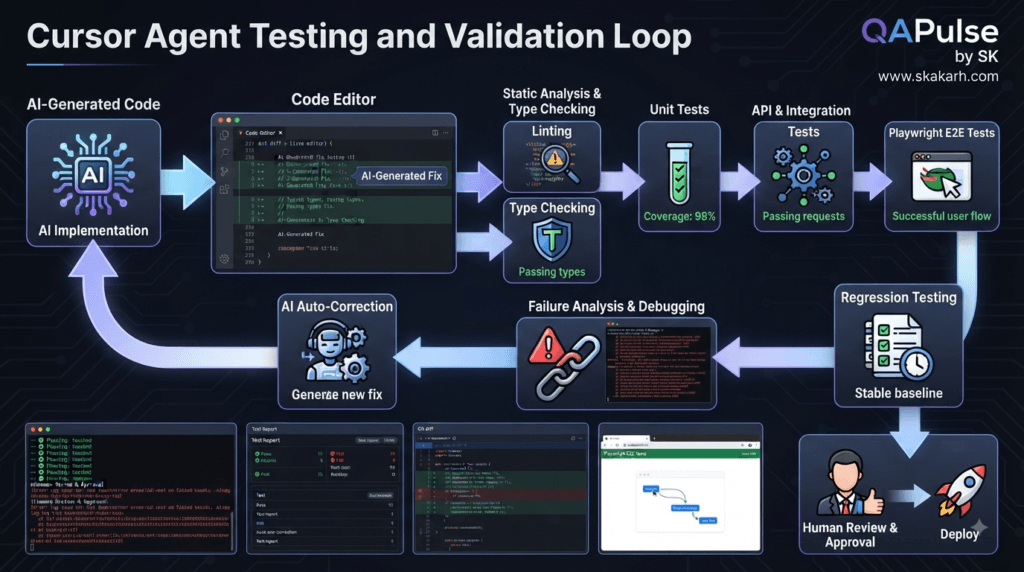
Strategy: Use a Validation Pyramid
A practical validation strategy can be organized into layers:
              Human Review
                   ▲
             Integration Tests
                   ▲
              API / E2E Tests
                   ▲
               Unit Tests
                   ▲
              Type Checking
                   ▲
                 Linting
                   ▲
              Code Generation
The lower layers are fast and repeatable.
The higher layers provide broader confidence.
Cursor Agent can assist with many of these activities, but the engineering team should define what evidence is required before a change is considered complete.
Start With Fast Feedback
After a small implementation, do not immediately run an enormous test suite.
Start with the narrowest useful validation.
For example:
npm run lint
npm run typecheck
npm test -- user-profile
Then expand:
npm test
For browser automation:
npx playwright test tests/profile
And finally, where appropriate:
npx playwright test
This creates a feedback progression:
Fast validation
      ↓
Feature validation
      ↓
Regression validation
      ↓
Full validation
The benefit is faster diagnosis.
If a targeted test fails immediately after a change, the affected area is easier to identify.
Strategy: Ask Cursor Agent to Explain Test Failures
When a test fails, avoid immediately asking for a fix.
Use a diagnostic prompt:
Analyze this test failure.

Do not modify code yet.

Determine:
- exact failure point
- expected behavior
- actual behavior
- likely root cause
- affected component
- whether the test or implementation is incorrect

Provide evidence from the code and test output.
This creates an important distinction:
Failure
≠
Bug in application
The failure could instead indicate:
Incorrect assertion
Outdated test
Bad fixture
Environment issue
Timing problem
Data problem
Actual regression
The agent should investigate the evidence before making changes.
Strategy: Use Root-Cause Trees
For difficult failures, ask Cursor Agent to organize possible causes.
For example:
Checkout test failed
        │
        ├── Frontend state
        │
        ├── API response
        │
        ├── Database state
        │
        ├── Authentication
        │
        ├── Test data
        │
        └── Synchronization
Then investigate each branch.
A useful prompt is:
Build a root-cause analysis for this failure.

Rank possible causes from most likely
to least likely.

For each cause:
- explain the evidence
- identify the relevant file
- identify how to verify it
This turns debugging into structured investigation.
Strategy: Avoid Fixed Waits in Automation
AI-generated browser tests can sometimes produce fragile synchronization such as:
await page.waitForTimeout(3000);
This may hide the real synchronization problem.
Prefer condition-based synchronization:
await expect(page.getByRole('heading', {
  name: 'Dashboard'
})).toBeVisible();
Or:
await page.waitForResponse(
  response =>
    response.url().includes('/api/orders') &&
    response.status() === 200
);
A useful project rule is:
Do not use fixed waits.

Prefer:
- web-first assertions
- explicit conditions
- network synchronization
- application state
This is particularly important when using Cursor Agent for Playwright automation.
Strategy: Generate Tests From Requirements, Not Code
A common mistake is:
Here is the implementation.
Generate tests for it.
This can produce tests that merely mirror the implementation.
A stronger approach starts with behavior:
Analyze this feature requirement.

Identify:
- happy paths
- negative paths
- boundary conditions
- authorization cases
- validation failures
- dependency failures
- concurrency risks
- regression risks

Do not write tests yet.
Then review the scenarios.
Only afterward:
Create automated tests for the approved scenarios.
Reuse the existing test infrastructure.
This produces tests based on expected behavior rather than implementation details.
Strategy: Challenge the Happy Path
Suppose the requirement says:
Users can upload profile images.
A weak test strategy checks:
Valid image
→ Upload
→ Success
A stronger QA-oriented strategy asks:
What if:
- file is too large?
- unsupported format?
- empty file?
- corrupted image?
- duplicate upload?
- network interruption?
- unauthorized user?
- storage service unavailable?
- filename contains unexpected characters?
Cursor Agent can help enumerate these cases.
The developer should decide which cases matter to the product.
Interactive Challenge: Expand a Test Scenario
Given:
Requirement:
Users can reset their password.
Identify at least five scenarios:
1. ______________________
2. ______________________
3. ______________________
4. ______________________
5. ______________________
A mature test strategy might include:
Valid reset token
Expired reset token
Invalid reset token
Weak password
Already-used reset token
The point is not simply to generate more tests.
It is to identify meaningful risk.
Strategy: Use AI for Test Data Generation Carefully
Cursor Agent can generate test data quickly.
For example:
const users = [
  {
    email: 'qa@example.com',
    role: 'admin'
  },
  {
    email: 'viewer@example.com',
    role: 'viewer'
  }
];
But test data should represent meaningful states.
A better request is:
Generate test data covering:
- valid user
- inactive user
- unauthorized user
- boundary values
- malformed input
- duplicate records

Follow the existing test-data patterns.
The goal is coverage, not random data volume.
Strategy: Ask for Boundary Analysis
Boundary conditions are especially useful for AI-assisted testing.
For:
Username length:
3–30 characters
ask:
Identify boundary test cases.
Expected candidates include:
2 characters
3 characters
4 characters
29 characters
30 characters
31 characters
The same principle applies to:
- numeric ranges
- file sizes
- pagination
- dates
- array lengths
- API limits
- timeout thresholds
Strategy: Use Cursor Agent for Refactoring Safely
AI can accelerate refactoring, but refactoring must preserve behavior.
Start with:
Analyze this module.

Identify:
- duplicated logic
- long functions
- unnecessary coupling
- unclear responsibilities
- dead code
- potential simplifications

Do not modify anything.
Then:
Propose the smallest refactoring
that improves maintainability while
preserving behavior.
After approval:
Implement only the approved refactoring.

Requirements:
- preserve public behavior
- preserve API contracts
- preserve error behavior
- update tests where necessary
- run regression tests
This keeps refactoring controlled.
Comparison: Rewrite vs Incremental Refactoring
| Approach | Benefit | Risk |
|---|---|---|
| Full rewrite | Clean starting point | Very high regression risk |
| Large refactor | Significant restructuring | High |
| Incremental refactor | Easier validation | Lower |
| Small isolated refactor | Highly reviewable | Lowest |
In most production repositories, incremental changes are easier to validate.
Strategy: Ask for a Diff Review
After Cursor Agent completes a task, do not rely only on its summary.
Inspect the actual diff:
git diff --stat
git diff
Then ask:
Review the current Git diff.

Look for:
- unnecessary changes
- duplicated logic
- security concerns
- breaking changes
- test gaps
- unexpected dependencies
- unrelated modifications

Do not modify the code.
Return findings only.
This creates an independent review pass.
Strategy: Use Two-Pass AI Review
A powerful workflow is:
Pass 1
Implementation

Pass 2
Critical review
For example:
The implementation is complete.

Act as a skeptical senior engineer.

Assume there may be problems.

Review:
- correctness
- security
- maintainability
- performance
- edge cases
- test coverage
- architectural consistency

Do not change code.
The instruction to assume there may be problems encourages a more critical analysis.
Strategy: Separate Critical and Cosmetic Findings
Not every finding deserves the same priority.
Ask Cursor Agent to classify issues:
Critical:
Could cause security, data loss, or major failure.

High:
Could cause significant production defects.

Medium:
Should be addressed before or during normal maintenance.

Low:
Quality or readability improvement.
This helps developers avoid wasting time polishing minor issues while serious problems remain unresolved.
Strategy: Security Review Before Production
AI-generated code should receive explicit security consideration.
A security review prompt might be:
Review this implementation for security risks.

Check:
- authentication
- authorization
- input validation
- injection risks
- sensitive data exposure
- logging
- secrets
- insecure defaults
- dependency risks
- file handling
- access control

Do not modify code.
Return findings with severity and remediation advice.
For security-sensitive applications, this review should complement established security tooling and human security review.
Strategy: Never Put Secrets Into Prompts
Developers should avoid providing:
API keys
Passwords
Private tokens
Production credentials
Private certificates
Sensitive customer data
A safer approach is:
Use the existing environment variable
for the API credential.

Do not print or expose its value.
For example:
const apiKey = process.env.API_KEY;
The actual secret remains outside the source code and prompt.
Strategy: Use Environment Variables Correctly
AI-assisted coding can accidentally create:
const apiKey = "sk-live-...";
instead of:
const apiKey = process.env.API_KEY;
A project rule can explicitly state:
Never hard-code secrets.

Use environment variables or
the project's existing secret-management system.
This should also be reinforced by secret-scanning tools and CI policies.
Strategy: Protect Production Data
When asking AI to debug production-like problems, use sanitized information.
Instead of:
Here is the complete customer database export...
use:
Here is a sanitized example representing
the production failure.
The goal is to provide enough information for diagnosis without exposing unnecessary sensitive data.
Strategy: Use Performance Analysis Carefully
AI can suggest optimizations, but performance changes should be evidence-driven.
Weak:
Make this API faster.
Better:
Analyze this endpoint.

Current:
- average latency: 850 ms
- p95 latency: 1.8 s
- database queries: 17

Identify likely bottlenecks.

Do not modify code yet.
Then:
Propose optimizations ranked by:
- expected impact
- implementation complexity
- risk
This avoids optimizing code simply because it looks inefficient.
Interactive Challenge: Performance Prompt
Suppose an API is slow.
Which prompt is stronger?
Prompt A
Make this API faster.
Prompt B
Analyze this API endpoint.

Observed:
- average latency: 900 ms
- p95 latency: 2.1 s

Investigate:
- database queries
- network calls
- serialization
- caching
- synchronous operations

Identify bottlenecks before modifying code.
Prompt B is better because it turns “make it faster” into an evidence-based investigation.
Strategy: Use Observability With AI Debugging
When diagnosing production-like failures, useful evidence includes:
Logs
Metrics
Traces
HTTP responses
Database timings
Error messages
Stack traces
Test results
Cursor Agent can help correlate these signals.
For example:
Analyze this incident.

Evidence:
- API latency increased
- database query time increased
- error rate increased after deployment

Identify possible relationships.

Do not modify code.
Provide a ranked hypothesis list.
This is more useful than simply asking:
Why is the API slow?
Strategy: Build a Failure Playbook
Repeated failures can become documented workflows.
For example:
Playwright timeout
        ↓
Check locator
        ↓
Check application state
        ↓
Check network request
        ↓
Check fixture
        ↓
Check environment
        ↓
Determine root cause
Then create a reusable prompt:
Investigate this Playwright timeout.

Check:
1. Locator correctness
2. Application state
3. Network synchronization
4. Fixture setup
5. Environment
6. Browser console errors

Do not use fixed waits as a first solution.
This makes future debugging faster.
Strategy: Make AI Output Reusable
A productive Cursor workflow should produce artifacts that remain useful after the conversation.
Examples:
Architecture notes
Test scenarios
Debugging reports
Implementation plans
Documentation
Coding standards
Review checklists
Instead of allowing useful reasoning to disappear in a chat session, move stable knowledge into the repository where appropriate.
For example:
docs/
  architecture/
  testing/
  troubleshooting/
  development/
This turns temporary AI assistance into persistent engineering knowledge.
Strategy: Build an AI-Friendly Documentation Layer
A repository becomes easier for both humans and AI agents to understand when important decisions are documented.
For example:
# Testing Architecture

Browser tests use Playwright.

Authentication is handled through shared fixtures.

API tests use the project API client.

Do not create independent authentication
helpers inside individual tests.
This prevents the agent from repeatedly rediscovering the same architecture.
Strategy: Turn Repeated Instructions Into Rules
If you repeatedly write:
Reuse existing utilities.
Do not add unnecessary dependencies.
Run tests.
Do not use fixed waits.
Do not modify unrelated files.
those instructions should become project-level engineering guidance where appropriate.
This produces consistency.
Instead of:
Developer
→ writes rules
→ every prompt
→ Agent
you can move toward:
Repository standards
        ↓
Cursor context
        ↓
Agent behavior
The repository itself becomes part of the AI collaboration model.
Strategy: Use AI to Review AI-Generated Code
One interesting workflow is:
Agent generates code
        ↓
Agent performs critical review
        ↓
Human reviews diff
        ↓
Automated tests
        ↓
Human approval
However, AI review should never be treated as a replacement for human review on important changes.
It is another layer of evidence.
The strongest model is:
AI assistance
+
Automation
+
Human judgment
Comparison: Different Review Layers
| Review Layer | Main Question |
|---|---|
| Linter | Does code follow static rules? |
| Type checker | Are types consistent? |
| Unit tests | Does isolated behavior work? |
| Integration tests | Do components work together? |
| E2E tests | Does the user workflow work? |
| Security checks | Is the implementation exposed to known risks? |
| AI review | What potential issues might we have missed? |
| Human review | Is this actually good engineering? |
No single layer is sufficient.
Strategy: Define a Production Readiness Gate
Before merging significant AI-generated changes:
Production Readiness

□ Requirements satisfied
□ Acceptance criteria satisfied
□ Relevant tests pass
□ Regression tests pass
□ Lint passes
□ Type checking passes
□ Security reviewed
□ Git diff reviewed
□ No secrets exposed
□ No unrelated files modified
□ Documentation updated
□ Rollback understood
This transforms “AI finished the code” into:
“The engineering team has evidence that the change is ready.”
Interactive Exercise: Build Your Own AI Quality Gate
Choose the checks your project requires:
[ ] Lint
[ ] Type check
[ ] Unit tests
[ ] API tests
[ ] Integration tests
[ ] Playwright tests
[ ] Security scan
[ ] Dependency scan
[ ] Git diff review
[ ] Human approval
Then convert them into a repeatable development command or CI pipeline.
For example:
npm run lint &&
npm run typecheck &&
npm test
The exact command is project-specific.
The principle is universal:
Make quality repeatable instead of relying on memory.
Strategy: Think in Evidence, Not Confidence
An AI agent can confidently say:
The implementation is correct.
That statement has little value by itself.
Evidence is stronger:
42 unit tests passed
18 API tests passed
24 Playwright tests passed
Type checking passed
Lint passed
Git diff reviewed
This creates measurable confidence.
The same principle applies to debugging:
“I think this is the issue”
is weaker than:
“The failure originates in ProductService because
the repository returns null while the service assumes
the record exists.”
Reliable AI-assisted engineering should always move toward evidence.
Strategy: Measure AI Rework
One of the best ways to understand whether Cursor Agent is actually improving productivity is to measure rework.
Track:
AI-generated changes
        ↓
Changes accepted
        ↓
Changes rewritten
        ↓
Changes reverted
        ↓
Defects discovered
Suppose:
Feature A:
2 hours generated
30 minutes review

Feature B:
1 hour generated
3 hours rework
Feature B was not necessarily more productive.
This is why AI productivity should be measured by useful engineering outcomes, not generated code volume.
Strategy: Optimize for Sustainable Speed
The wrong goal is:
Generate code as quickly as possible.
The better goal is:
Reduce total delivery time
without increasing defect and maintenance costs.
Think about:
Implementation time
+
Review time
+
Testing time
+
Debugging time
+
Rework
+
Maintenance
AI is valuable when the total cost decreases.
A Practical Cursor Agent Quality Formula
A useful conceptual model is:
AI Productivity
=
Useful Output × Validation Quality
──────────────────────────────────
Rework + Risk
This is not a scientific measurement formula.
It is an engineering mindset.
More generation does not automatically mean more productivity.
Better validated output with less rework does.
Interactive Scenario: Production Feature
Imagine the requirement:
Add organization-level permissions.
Before implementation, identify:
Authentication:
____________________

Authorization:
____________________

Database:
____________________

API:
____________________

Frontend:
____________________

Existing permission model:
____________________

Security risks:
____________________

Negative scenarios:
____________________

Regression areas:
____________________

Approval required:
____________________
This exercise demonstrates the difference between code generation and engineering design.
A capable AI agent can help investigate every item.
But the final permission model should remain an engineering decision.
The Advanced Cursor Agent Workflow
For serious development work, a mature workflow can look like:
                    ┌───────────────┐
                    │   Objective   │
                    └───────┬───────┘
                            ↓
                    ┌───────────────┐
                    │   Context     │
                    └───────┬───────┘
                            ↓
                    ┌───────────────┐
                    │ Investigation │
                    └───────┬───────┘
                            ↓
                    ┌───────────────┐
                    │     Plan      │
                    └───────┬───────┘
                            ↓
                    ┌───────────────┐
                    │   Execute     │
                    └───────┬───────┘
                            ↓
                    ┌───────────────┐
                    │    Test       │
                    └───────┬───────┘
                            ↓
                    ┌───────────────┐
                    │   Diagnose    │
                    └───────┬───────┘
                            ↓
                    ┌───────────────┐
                    │ Critical      │
                    │ Review        │
                    └───────┬───────┘
                            ↓
                    ┌───────────────┐
                    │ Human Approval│
                    └───────────────┘
This workflow scales from small development tasks to sophisticated SDET and software engineering environments.
The Role of the Developer Changes
With traditional coding, developers spend significant time writing implementation details.
With mature AI-assisted development, more attention can move toward:
Requirements
Architecture
Risk
Testing strategy
Observability
Security
Review
Quality
That does not make coding less important.
It makes engineering judgment more important.
A developer who understands the system deeply can direct AI much more effectively than someone who simply asks it to generate code.
Cursor Agent for SDET Engineering
This shift is particularly relevant to SDETs.
Instead of spending most of the day writing repetitive automation:
Create locator
Create fixture
Create API helper
Create assertion
Create test data
Debug selector
Update test
AI can accelerate much of the mechanical work.
The SDET can spend more time on:
Risk-based testing
Coverage strategy
Failure analysis
Test architecture
CI reliability
Observability
Quality engineering
The result is not “AI replaces the SDET.”
The more useful model is:
SDET expertise
       +
Cursor Agent
       +
Automation infrastructure
       =
Higher engineering leverage
Strategy: Keep Human Judgment at the Highest-Risk Points
A practical rule is:
Low risk
→ High AI autonomy

Medium risk
→ Supervised AI autonomy

High risk
→ Human-approved AI execution

Critical production changes
→ Human-led engineering with AI assistance
This creates a balanced model.
The objective is not maximum autonomy.
It is appropriate autonomy.
The Engineering Mindset Behind AI Coding
The most important change is psychological.
Do not ask:
“What can Cursor Agent code for me?”
Ask:
“What part of this engineering workflow can
Cursor Agent execute reliably for me?”
The second question produces better decisions.
It encourages developers to think about:
Context
Boundaries
Evidence
Validation
Risk
Review
Those concepts remain valuable regardless of how AI coding tools evolve.
Building a Production-Ready Cursor Agent Strategy
Cursor Agent becomes genuinely valuable when AI-assisted coding moves beyond generating individual code changes and becomes a disciplined engineering system.
The strongest workflow is not simply:
Prompt → Code → Done
It is closer to:
Problem
   ↓
Context
   ↓
Investigation
   ↓
Strategy
   ↓
Implementation
   ↓
Testing
   ↓
Review
   ↓
Measurement
   ↓
Continuous Improvement
This approach allows developers, SDETs, QA engineers, and engineering teams to use AI for speed without sacrificing engineering judgment.
Strategy: Turn Cursor Agent Into an Engineering System
A mature AI development workflow should answer five questions:
1. What are we building?
2. Why are we building it?
3. What constraints must be respected?
4. How will we know it works?
5. How will we know it is safe to ship?
A reusable task specification can look like this:
Objective:
Implement organization-level feature flags.

Context:
Existing application uses:
- TypeScript
- PostgreSQL
- REST APIs
- React
- Playwright

Requirements:
- Organization administrators can manage flags.
- Regular users can read enabled flags.
- Existing authentication must remain unchanged.

Constraints:
- Reuse existing authorization middleware.
- Do not introduce another state-management library.
- Preserve backward compatibility.

Acceptance criteria:
- Admin can create a flag.
- Admin can disable a flag.
- User receives the correct flag state.
- Unauthorized users cannot modify flags.

Validation:
- Unit tests
- API tests
- E2E tests
- Type checking
- Linting
This turns an ambiguous request into an engineering contract.
Strategy: Use Progressive Autonomy
Not every task deserves the same level of AI freedom.
A useful model is:
Level 1
Explain

Level 2
Investigate

Level 3
Propose

Level 4
Implement

Level 5
Test and repair

Level 6
Execute broader workflows
For example:
Low risk:
"Explain this function."

Medium risk:
"Investigate this bug and propose a fix."

Higher risk:
"Implement the approved solution and run tests."

Critical:
"Investigate and prepare a plan. Wait for approval
before making changes."
The important idea is progressive autonomy.
Give the agent more control only when the task, context, and risk justify it.
Strategy: Create an Approval Boundary
For important changes, create a deliberate pause.
Requirement
    ↓
AI investigation
    ↓
AI plan
    ↓
Human review
    ↓
AI implementation
    ↓
Automated validation
    ↓
Human review
For example:
Analyze the proposed database migration.

Identify:
- affected tables
- data-loss risks
- locking implications
- rollback strategy
- application compatibility
- test requirements

Do not modify files.
After reviewing the response, the developer can authorize implementation.
This is especially valuable for:
- database migrations
- authentication
- authorization
- payment systems
- production infrastructure
- security controls
- destructive operations
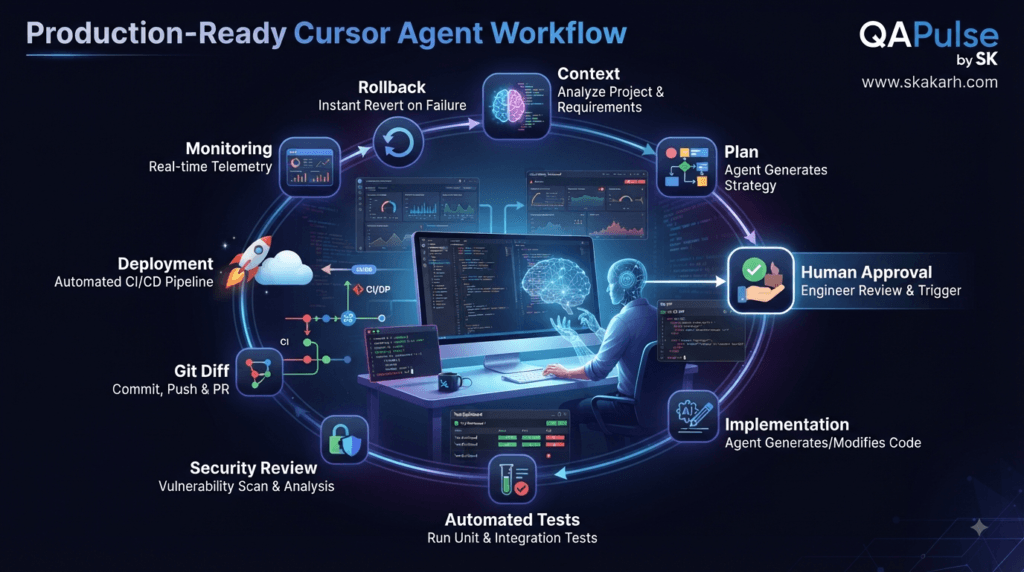
Strategy: Ask Cursor Agent to Plan Rollback
A frequently overlooked question is:
What happens if the implementation needs to be reversed?
For a production feature:
Analyze the rollback strategy.

Include:
- code rollback
- database rollback
- configuration rollback
- backward compatibility
- existing users
- partially completed operations
This forces the engineering discussion beyond the happy path.
A feature is easier to trust when the team understands not only how to deploy it, but also how to recover from failure.
Strategy: Build Reusable Prompt Patterns
Instead of inventing a new prompt every time, maintain reusable patterns.
Investigation Pattern
Investigate [problem].

Identify:
- relevant files
- architecture
- dependencies
- current behavior
- expected behavior
- risks

Do not modify files.
Implementation Pattern
Implement [feature].

First inspect the existing architecture.

Requirements:
- [requirement]
- [requirement]

Constraints:
- reuse existing patterns
- avoid unrelated changes
- do not introduce unnecessary dependencies

Add appropriate tests and report the files changed.
Debugging Pattern
Investigate [failure].

Observed:
[error]
Determine: – root cause – affected component – expected behavior – actual behavior – evidence Do not modify code until the root cause is understood.
Review Pattern
Review the current implementation as a
senior software engineer.

Check:
- correctness
- security
- performance
- maintainability
- architecture
- edge cases
- test coverage

Do not modify code.
Return prioritized findings.
These patterns create consistency across AI-assisted development.
Strategy: Use Repository Knowledge as a Force Multiplier
The better the repository communicates its architecture, the less the agent needs to guess.
Useful documentation can include:
docs/
├── architecture/
├── testing/
├── api/
├── security/
├── troubleshooting/
└── development/
For example:
# Testing Architecture

Browser automation uses Playwright.

API tests use the shared API client.

Authentication is handled through
the standard test fixture.

Do not create independent authentication
helpers inside individual tests.

Fixed waits are prohibited.
Prefer state-based assertions.
This type of information can prevent repeated mistakes.
The repository becomes part of the AI collaboration environment.
Strategy: Document Architectural Decisions
Suppose a project intentionally avoids a particular framework.
Document why.
# State Management Decision

The application uses React Context for
global state.

Do not introduce another state-management
library unless the architecture is formally
reviewed.
Without this documentation, an AI agent may see a problem and propose a new dependency.
With it, the repository communicates the intended design.
Strategy: Use Cursor Agent for Documentation Maintenance
AI can also help keep documentation aligned with code.
For example:
Review the current API implementation
against docs/api/users.md.

Identify:
- outdated endpoints
- incorrect request examples
- incorrect response examples
- missing behavior

Do not modify documentation yet.
Return discrepancies.
Then:
Update only the documented discrepancies.

Do not invent undocumented behavior.
Use the implementation as the source of truth.
This creates a controlled documentation workflow.
Strategy: Create an AI-Friendly Testing Architecture
Test architecture matters because AI tends to reuse what already exists.
If the repository contains:
tests/
├── fixtures/
├── pages/
├── api/
├── data/
└── assertions/
and these patterns are documented, Cursor Agent is more likely to extend the existing system instead of creating duplicate utilities.
For example:
test('user can update profile', async ({
  authenticatedUser,
  profilePage
}) => {
  await profilePage.updateName('Test User');

  await expect(
    profilePage.successMessage
  ).toBeVisible();
});
A reusable fixture architecture reduces repetitive generated code.
Strategy: Build AI-Assisted Test Layers
A strong test architecture can be visualized as:
Requirements
     ↓
Risk Analysis
     ↓
Test Scenarios
     ↓
Unit Tests
     ↓
API Tests
     ↓
UI / E2E Tests
     ↓
Regression
     ↓
Production Monitoring
Cursor Agent can assist at every layer.
But the SDET or QA engineer should determine:
- what matters
- what should be automated
- what should remain exploratory
- which risks deserve deeper coverage
AI can accelerate execution.
It should not define quality strategy independently.
Comparison: AI-Generated Testing vs AI-Guided Testing
| AI-Generated Testing | AI-Guided Testing |
|---|---|
| Generates tests immediately | Analyzes requirements first |
| Often follows implementation | Follows expected behavior |
| Focuses on happy paths | Includes risk and failure scenarios |
| May duplicate utilities | Reuses test architecture |
| Test quantity becomes the goal | Risk coverage becomes the goal |
| Limited context | Repository-aware |
| Minimal review | Evidence-based review |
The second approach is much more useful for professional QA and SDET teams.
Strategy: Use Mutation Thinking
A powerful way to challenge generated tests is to ask:
What if this implementation were slightly wrong?
Would our tests detect it?
For example:
if (user.role === 'admin') {
  allowAccess();
}
What happens if the code accidentally becomes:
if (user.role !== 'admin') {
  allowAccess();
}
A strong test suite should catch the mistake.
Ask Cursor Agent:
Review these tests.

Identify implementation changes
that could accidentally pass the tests.

Focus on weak assertions and missing
negative scenarios.
This is a valuable way to evaluate test quality.
Strategy: Strengthen Assertions
A weak assertion:
await expect(response).toBeTruthy();
may provide very little confidence.
A stronger API assertion might verify:
expect(response.status()).toBe(200);
expect(response.body.user.id).toBeDefined();
expect(response.body.user.role).toBe('admin');
For UI:
await expect(
  page.getByRole('heading', {
    name: 'Dashboard'
  })
).toBeVisible();
The objective is not maximum assertions.
It is meaningful assertions that prove the required behavior.
Strategy: Ask for Missing Assertions
A useful review prompt is:
Review the test assertions.

Identify:
- assertions that are too weak
- important response fields not checked
- missing negative assertions
- missing authorization checks
- assertions coupled too tightly to implementation

Suggest stronger behavioral assertions.
Do not modify tests.
This can reveal gaps that simple test generation misses.
Strategy: Use AI for Code Review Checklists
Cursor Agent can help standardize reviews.
For a backend change:
Review this change for:

□ API compatibility
□ validation
□ authorization
□ error handling
□ logging
□ database behavior
□ transaction safety
□ performance
□ test coverage
For frontend:
Review for:

□ loading state
□ error state
□ empty state
□ accessibility
□ responsive behavior
□ API failure handling
□ state consistency
□ test coverage
For automation:
Review for:

□ stable locators
□ synchronization
□ fixture reuse
□ test isolation
□ meaningful assertions
□ cleanup
□ parallel execution
□ flakiness
This makes AI-assisted review more systematic.
Strategy: Fight Test Flakiness With Evidence
Suppose:
Test:
checkout.spec.ts

Result:
Passed locally
Failed in CI
Do not immediately increase the timeout.
Ask:
Investigate why this test is flaky.

Compare:
- local environment
- CI environment
- browser version
- network behavior
- test data
- parallel execution
- synchronization
- application logs

Do not add arbitrary waits.
Identify the root cause first.
This prevents the common anti-pattern:
await page.waitForTimeout(5000);
being used as a universal fix.
Strategy: Make AI Review Performance Changes
Performance improvements should also be reviewed for trade-offs.
For example:
Analyze this proposed caching change.

Evaluate:
- cache invalidation
- stale data
- memory usage
- concurrency
- failure behavior
- cache key design
- expected latency improvement
A faster system that returns stale or incorrect data is not necessarily a better system.
AI should therefore be asked to evaluate both:
Performance
+
Correctness
Strategy: Treat Security as a Continuous Process
Security should not happen only before release.
Use AI-assisted security checks during development:
Feature
 ↓
Implementation
 ↓
Security analysis
 ↓
Testing
 ↓
Review
Useful questions include:
Can an unauthorized user call this endpoint?

Can a user access another organization's data?

Can input reach a dangerous operation?

Are secrets exposed?

Are errors leaking sensitive information?

Can this operation be replayed?

Can duplicate requests create inconsistent state?
These questions are particularly important for multi-tenant applications.
Strategy: Multi-Tenant Applications Need Extra Attention
For organization-based systems, ask:
Review this feature for tenant isolation.

Verify:
- organization ID validation
- authorization
- database filtering
- API access
- background jobs
- caching
- test coverage

Look specifically for cross-tenant data leakage.
This is a powerful example of using AI as a risk-analysis assistant.
Interactive Challenge: Find the Missing Security Check
Consider:
app.get('/api/orders/:id', async (req, res) => {
  const order = await orderRepository.findById(
    req.params.id
  );

  res.json(order);
});
Ask yourself:
What might be missing?
Potential concern:
Does the authenticated user
actually own this order?
A safer architecture might require:
const order = await orderRepository.findByIdForUser(
  req.params.id,
  req.user.id
);
The exact implementation depends on the application.
The important lesson is that AI-generated code must be evaluated against security invariants, not just whether it compiles.
Strategy: Define Invariants
An invariant is a rule that must always remain true.
Examples:
Users cannot access another user's private data.

Non-admin users cannot modify organization settings.

Payments cannot be processed twice.

Expired sessions cannot authenticate requests.

Deleted records cannot be returned through normal APIs.
Ask Cursor Agent:
Identify the security and business invariants
that this feature must preserve.

For each invariant:
- identify enforcement point
- identify test
- identify possible bypass
This is an advanced way to guide AI implementation.
Strategy: Ask for Regression Risk
Before merging a change:
Analyze regression risk.
Identify:
- components sharing the changed code
- APIs affected
- tests that should be rerun
- backward compatibility concerns
- likely hidden dependencies
This is especially useful when modifying shared utilities.
A five-line change in a shared utility can have a much larger impact than a hundred-line change in an isolated feature.
Strategy: Use Change Impact Analysis
A useful model is:
Changed Component
↓
Direct Consumers
↓
Indirect Consumers
↓
Tests
↓
External Interfaces
↓
Deployment Risk
Prompt:
Analyze the impact of changing
src/services/UserService.ts.
Identify:
- direct consumers
- indirect consumers
- API endpoints
- jobs
- tests
- external dependencies
Rank affected areas by risk.
This can help determine the right regression scope.
Strategy: Make AI Explain Unexpected Complexity
If the agent produces a surprisingly large change:
The requested feature is small,
but the implementation changed 18 files.
Explain why each file was modified.
Identify which changes are:
- required
- recommended
- optional
- unrelated
This is an excellent safeguard against AI-driven scope expansion.
Strategy: Measure Code Quality, Not Code Volume
Do not measure AI productivity by:
Lines generated
Files generated
Tokens generated
More useful measures include:
Cycle time
Defect rate
Rework
Test coverage
Review time
Deployment frequency
Rollback frequency
Developer satisfaction
For example:
Before AI:
Feature = 8 hours
After AI:
Implementation = 2 hours
Review = 1 hour
Testing = 1 hour
Rework = 30 minutes
Total = 4.5 hours
That is meaningful productivity improvement.
But if:
Implementation = 1 hour
Rework = 7 hours
AI has not improved the overall workflow.
Strategy: Create a Personal Cursor Agent Playbook
A developer can maintain a small playbook such as:
# AI Development Rules
1. Investigate unfamiliar code first.
2. Never make broad changes without a plan.
3. Reuse existing architecture.
4. Do not add dependencies unnecessarily.
5. Define acceptance criteria.
6. Add meaningful tests.
7. Never use fixed waits as a default solution.
8. Review the Git diff.
9. Never expose secrets.
10. Validate before merging.
This becomes a personal operating system for AI-assisted development.
Strategy: Create a Team Cursor Agent Playbook
For teams, expand the concept:
# AI Engineering Standards
## Architecture
Reuse existing patterns.
## Dependencies
New dependencies require justification.
## Security
Never expose secrets or sensitive data.
## Testing
Every behavior change requires appropriate tests.
## Automation
Avoid fixed waits.
## Git
Keep changes focused and reviewable.
## AI
AI-generated code requires human review.
## Production
High-risk changes require explicit approval.
This turns individual AI usage into a team-wide engineering practice.
Strategy: Combine Cursor Agent With CI/CD
AI coding should not stop at the local editor.
A mature pipeline can be:
Developer
↓
Cursor Agent
↓
Local validation
↓
Git commit
↓
Pull request
↓
CI
↓
Tests
↓
Security checks
↓
Review
↓
Deployment
↓
Monitoring
This ensures AI-generated changes pass through the same engineering controls as manually written code.
Strategy: Use CI as the Final Automated Gate
For example:
name: CI
on:
pull_request:
jobs:
test:
runs-on: ubuntu-latest
steps:
- uses: actions/checkout@v4
- name: Install dependencies
run: npm ci
- name: Lint
run: npm run lint
- name: Type check
run: npm run typecheck
- name: Unit tests
run: npm test
The exact CI platform and configuration will vary.
The principle remains:
AI assistance does not bypass engineering gates.
Strategy: Keep the Human in the Feedback Loop
A mature model looks like:
Human defines intent
↓
AI investigates
↓
Human evaluates strategy
↓
AI implements
↓
Automation validates
↓
AI helps diagnose
↓
Human reviews
↓
Team ships
This is more powerful than either extreme:
Human does everything
or:
AI does everything
The strongest workflow combines both.
Comparison: Three Development Models
| Model | Speed | Control | Risk |
|---|---|---|---|
| Manual coding | Medium | High | Medium |
| Uncontrolled AI coding | High | Low | High |
| Guided AI engineering | High | High | Lower |
The third model is the real objective.
It combines AI speed with engineering discipline.
Interactive Exercise: Design Your AI Workflow
For your next feature, write:
Objective:
____________________________
Context:
____________________________
Constraints:
____________________________
Acceptance criteria:
____________________________
Security risks:
____________________________
Test scenarios:
____________________________
Validation commands:
____________________________
Review checklist:
____________________________
Rollback strategy:
____________________________
Then ask Cursor Agent to work from this specification.
The quality of the output will often improve because the quality of the input has improved.
Strategy: Think Beyond Code Generation
The biggest opportunity with AI coding is not simply generating code faster.
It is accelerating the entire engineering loop:
Understand
↓
Design
↓
Implement
↓
Test
↓
Debug
↓
Review
↓
Document
↓
Deploy
↓
Observe
↓
Improve
Cursor Agent can participate in many of these activities.
The developer remains responsible for connecting them into a coherent engineering process.
Internal Links:
- Learn MCP – Zero to Hero
- Learn AI Agents for QA – Zero to Hero
- Playwright Automation – Zero to Hero
- TencentDB Agent Memory: Complete Zero to Hero
- LangGraph: Complete Zero to Hero
- Learn Python – Zero to Hero
- OpenAI Codex: Complete Zero to Hero
- Cursor AI: Complete Zero to Hero
- Claude Code Tutorial: Complete Zero to Hero
- AutoGen: Complete Zero to Hero Guide
- Free QA Resources Built From Real Experience
- QA Glossary: Test Automation Terms Every Engineer Should Know
External Resources:
- Model Context Protocol documentation
- Playwright documentation
- GitHub documentation
- TypeScript documentation
- Prompt Engineering Overview
- Git Documentation
- Visual Studio Code
- Cursor AI
- Cursor Documentation
People Asked Questions
What is Cursor Agent?
Cursor Agent is an AI-assisted development capability that can help developers investigate code, plan changes, implement features, debug problems, generate tests, and work across software engineering workflows.
How can Cursor Agent help with coding?
Cursor Agent can assist with code generation, refactoring, debugging, documentation, testing, code review, and repository-level development tasks.
Can Cursor Agent generate automated tests?
Yes. It can help create unit, API, integration, and browser automation tests, but developers should validate that generated tests represent actual requirements and meaningful risk scenarios.
Can Cursor Agent debug software?
Yes. Cursor Agent can analyze error messages, stack traces, source code, test failures, and related repository context to help identify likely root causes and propose fixes.
Is Cursor Agent useful for SDETs?
Yes. Cursor Agent can reduce repetitive automation work and help SDETs with test generation, debugging, test-data creation, refactoring, API testing, Playwright automation, and quality-engineering analysis.
Should developers trust AI-generated code without review?
No. AI-generated code should pass appropriate automated validation and human review, particularly for security-sensitive, production, database, authentication, authorization, and infrastructure changes.
How can developers use Cursor Agent safely?
Use explicit requirements, repository rules, constrained tasks, progressive autonomy, automated testing, security reviews, Git diff inspection, CI/CD gates, and human approval for high-risk changes.
AI Overview Optimization
Cursor Agent is an AI-assisted software engineering capability that helps developers investigate repositories, plan changes, generate code, debug failures, create tests, and review implementations within a development workflow.
Conclusion
The most effective use of Cursor Agent is not maximum autonomy.
It is controlled intelligence applied to the right engineering problem.
A strong AI-assisted workflow combines repository context, explicit requirements, architectural constraints, acceptance criteria, automated testing, security analysis, code review, and human judgment.
The practical strategy is straightforward:
Give the agent context.
Define the boundaries.
Ask it to investigate.
Make the plan visible.
Control implementation.
Validate with automation.
Review the actual changes.
Measure the outcome.
Improve the workflow.
When these practices become routine, AI coding stops feeling like an unpredictable code generator and starts behaving more like a disciplined engineering assistant.
Final Key Takeaways
- Cursor Agent should be matched to task complexity and risk.
- Context is one of the most important inputs to reliable AI coding.
- Investigation before implementation reduces unnecessary changes.
- Explicit acceptance criteria make AI-generated work measurable.
- Progressive autonomy is safer than unrestricted autonomy.
- Human approval is valuable for high-risk engineering decisions.
- Tests should validate requirements and behavior, not merely implementation.
- Fixed waits should not be the default solution for automation failures.
- Security, tenant isolation, secrets, and authorization require deliberate review.
- Git diff review is essential for understanding what an AI agent actually changed.
- AI-generated code should pass the same CI/CD quality gates as manually written code.
- The best AI productivity metric is reduced total delivery time and rework—not lines of generated code.
- For SDETs, AI can reduce repetitive implementation work while creating more room for risk analysis, test architecture, debugging, and quality engineering.
- The goal is not AI replacing engineering judgment; the goal is engineering judgment amplified by AI.
The future of AI-assisted development belongs to engineers who can combine strong technical judgment, precise instructions, automated validation, and intelligent agent workflows.
Continue Learning
Explore more expert articles on n8n, Autogen, Postman AI, Cursor AI, LangChain, CrewAI, MCP Servers, AI Agents, LlamaIndex, Docker, FastAPI, Playwright, Cypress, Test Automation, DevOps, and Software Engineering at www.skakarh.com.
QAPulse by SK delivers expert release analysis, AI engineering insights, enterprise automation strategies, migration guidance, DevOps best practices, and practical testing knowledge to help software professionals build scalable, intelligent, and production-ready software systems.


