QA
QA
Playwright Test Data Management is one of the most important aspects of building a professional automation framework. Regardless of how well your Playwright tests are written, poor test data management leads to unstable tests, duplicate code, inconsistent results, and unreliable CI/CD pipelines. A well-designed Playwright Test Data Management strategy ensures that tests are repeatable, maintainable, independent, and capable of running successfully across multiple environments.
As automation projects grow from a few tests to thousands of regression scenarios, managing usernames, passwords, API payloads, product information, customer records, and environment-specific data becomes increasingly complex. Instead of hardcoding values inside test files, enterprise frameworks separate test data from business logic and organize it using reusable data management techniques.
What is Playwright Test Data Management?
Playwright Test Data Management is the process of organizing, storing, maintaining, generating, and supplying data required for automated tests.
Test data includes every value used during automation, such as:
- User credentials
- Employee records
- Customer information
- Product details
- API request payloads
- Search keywords
- Configuration values
- Payment information
- Environment-specific variables
- Expected validation results
A structured Playwright Test Data Management approach ensures that this information is managed independently of the automation scripts.
Why Is Test Data Management Important?
Consider a login test.
Many beginners write:
await loginPage.login(
    "Admin",
    "admin123"
);
This appears simple, but imagine hundreds of test files using the same credentials.
If the password changes, every test must be updated manually.
Now consider larger applications where thousands of values change frequently.
Without Playwright Test Data Management, maintaining the framework becomes expensive and error-prone.
Problems with Hardcoded Test Data
Hardcoded values introduce several problems.
Duplicate Information
The same usernames, emails, product names, or API payloads appear repeatedly across multiple test files.
Difficult Maintenance
Updating one business value requires editing numerous automation scripts.
Poor Reusability
The same test cannot easily execute against different environments or datasets.
Limited Scalability
Frameworks become increasingly difficult to expand as the amount of data grows.
Security Risks
Sensitive credentials embedded inside source code increase the risk of accidental exposure.
Hardcoded vs Managed Test Data
Without Playwright Test Data Management:
Test

↓

Username

↓

Password

↓

Email

↓

Address

↓

Product

↓

Expected Result
Every test owns its own data.
With Playwright Test Data Management:
Data Source

↓

Business Test

↓

Validation
Tests retrieve only the information they need.
The automation code remains clean and reusable.
Types of Test Data
Professional automation frameworks manage different categories of data.
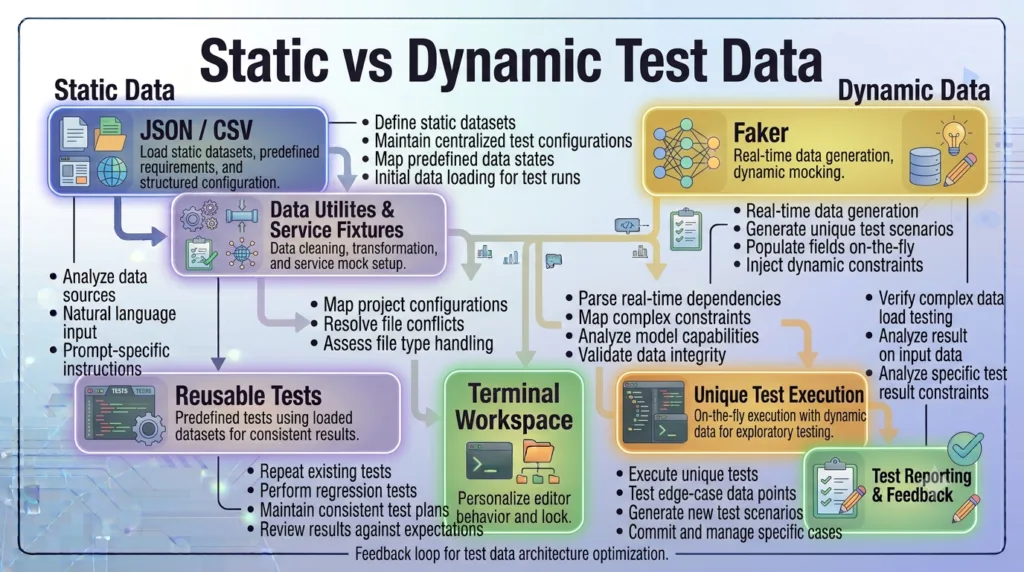
Static Data
Values that rarely change.
Examples:
- Country names
- User roles
- Product categories
- Tax percentages
Dynamic Data
Values generated during execution.
Examples:
- Email addresses
- Customer IDs
- Invoice numbers
- Order references
- Random usernames
Environment Data
Values that differ between environments.
Examples:
- URLs
- API endpoints
- Credentials
- Database connections
- Feature flags
Validation Data
Expected outcomes used for verification.
Examples:
- Success messages
- Error messages
- Status values
- API responses
- Database records
Each category should be managed appropriately within the framework.
Sources of Test Data
Enterprise frameworks obtain test data from multiple sources.
Common options include:
- JSON files
- CSV files
- Excel spreadsheets
- YAML files
- Environment variables
- Databases
- REST APIs
- Configuration files
- Mock services
- Test data generators
Choosing the appropriate source depends on the application’s complexity and testing requirements.
Characteristics of Good Test Data
Effective Playwright Test Data Management follows several key principles.
Reusable
The same dataset should support multiple test scenarios.
Independent
Tests should not rely on data created by previous tests.
Easy to Update
Business changes should require minimal modifications.
Secure
Sensitive information should never be stored directly inside test files.
Consistent
Tests should produce predictable results regardless of execution order.
Scalable
The framework should support thousands of records without becoming difficult to manage.
Relationship with Fixtures and Page Objects
The previous lessons introduced the Playwright Page Object Model and Playwright Fixtures.
Now the architecture becomes more complete.
Test Data

↓

Fixtures

↓

Page Objects

↓

Business Tests
Each layer has a clear responsibility.
- Test Data stores business values.
- Fixtures prepare resources.
- Page Objects perform UI interactions.
- Tests validate business behavior.
This separation results in a highly maintainable automation framework.
Real Enterprise Example
Consider an e-commerce platform.
Automation scenarios include:
- Customer registration
- Product search
- Shopping cart
- Checkout
- Payment
- Order history
- Returns
Each scenario requires different datasets.
Instead of embedding product names, customer emails, and payment information inside the test files, enterprise teams store this information separately and load it when required.
This approach allows the same automation scripts to execute against development, staging, and production-like environments without modification.
When Should You Implement Playwright Test Data Management?
Playwright Test Data Management should be introduced as soon as your automation project begins to reuse business values across multiple test cases.
Typical use cases include:
- Login credentials
- API payloads
- Search data
- Customer records
- Employee information
- Product catalogs
- Environment configuration
- Validation messages
- Test users
- Payment information
Separating data from automation logic at an early stage prevents technical debt and makes future maintenance significantly easier.
Playwright Test Data Management: Using JSON Files for Reusable Test Data
One of the simplest and most widely used approaches to Playwright Test Data Management is storing test data in JSON files. JSON is lightweight, human-readable, easy to maintain, and fully supported by JavaScript and TypeScript. Enterprise automation frameworks frequently use JSON files to manage login credentials, user profiles, API payloads, search data, configuration values, and expected validation results.
Instead of hardcoding business values inside test scripts, you will create reusable JSON datasets that can be shared across hundreds of Playwright tests.
Why Use JSON Files?
Consider the following login test.
await loginPage.login(
    "Admin",
    "admin123"
);
Now imagine the application has multiple user roles.
- Administrator
- HR Manager
- Employee
- Recruiter
- Finance Manager
Hardcoding every username and password inside multiple test files quickly becomes difficult to maintain.
Using Playwright Test Data Management, all credentials can be stored in one JSON file and reused everywhere.
Project Structure
Create a dedicated folder for test data.
playwright-framework/

├── data/

│   ├── users.json

│   ├── products.json

│   ├── employees.json

│   ├── search.json

│   ├── apiPayloads.json

│   └── expectedResults.json

├── tests/

├── pages/

├── fixtures/

└── playwright.config.ts
As the framework grows, different business modules can have their own data files.
Creating Your First JSON File
Create a file named:
data/users.json
Example:
{
    "admin": {
        "username": "Admin",
        "password": "admin123"
    },

    "employee": {
        "username": "employee01",
        "password": "employee123"
    },

    "manager": {
        "username": "manager01",
        "password": "manager123"
    }
}
This file becomes the central location for user credentials.
Importing JSON Data
Playwright allows JSON files to be imported directly.
Example:
import users from '../data/users.json';
Now every object inside the JSON file becomes available.
Example:
users.admin.username

users.admin.password
This approach eliminates hardcoded credentials.
Using JSON Data in Tests
Instead of writing:
await loginPage.login(
    "Admin",
    "admin123"
);
Use:
await loginPage.login(

    users.admin.username,

    users.admin.password

);
The test becomes more flexible and easier to maintain.
If credentials change, only the JSON file needs updating.
Managing Multiple Users
A single JSON file can contain many user roles.
Example:
{
    "admin": { },

    "employee": { },

    "manager": { },

    "recruiter": { },

    "finance": { }
}
Tests simply request the required user.
Example:
await loginPage.login(

    users.manager.username,

    users.manager.password

);
The same login test can execute with different roles without modifying the automation code.
Storing Product Data
JSON is useful for much more than login credentials.
Example:
{
    "laptop": {

        "name": "Gaming Laptop",

        "price": 1500

    },

    "keyboard": {

        "name": "Mechanical Keyboard",

        "price": 120

    }
}
Product search, checkout, and inventory tests can reuse this data across multiple scenarios.
Storing API Payloads
Many automation frameworks use JSON files for API requests.
Example:
{
    "createEmployee": {

        "firstName": "John",

        "lastName": "Smith",

        "department": "QA"

    }
}
The same payload can be used by API tests and UI validation tests.
This keeps business data consistent across different testing layers.
Organizing Large Datasets
Avoid placing every dataset inside one file.
Poor structure:
data/

↓

everything.json
Better structure:
data/

├── users.json

├── products.json

├── employees.json

├── orders.json

├── payments.json

├── search.json

└── apiPayloads.json
Each file manages one business domain.
This improves readability and simplifies maintenance.
Combining JSON with Fixtures
JSON files work exceptionally well with Playwright Fixtures.
Workflow:
JSON Data

↓

Fixture

↓

Page Object

↓

Business Test
The fixture loads the required data before the test executes.
Tests remain focused entirely on business behavior.
Validation Data
JSON files can also store expected values.
Example:
{
    "messages": {

        "loginSuccess": "Dashboard",

        "invalidLogin": "Invalid credentials",

        "employeeCreated": "Employee created successfully"

    }
}
Assertions become cleaner.
Instead of writing:
expect(message).toContain(

    "Employee created successfully"

);
Use:
expect(message).toContain(

    messages.employeeCreated

);
This reduces duplicate validation strings.
Common Mistakes
Avoid these mistakes when implementing Playwright Test Data Management with JSON.
Hardcoding Values After Creating JSON Files
If data exists inside JSON, do not repeat it inside test files.
Creating One Massive JSON File
Separate datasets according to business functionality.
Mixing Configuration with Test Data
Keep environment configuration separate from business datasets.
Storing Sensitive Information
Production credentials should never be committed to source control.
Use secure environment variables or secret management solutions.
Using Duplicate Data
Avoid storing the same usernames, products, or validation messages in multiple files.
Maintain one source of truth.
Enterprise Best Practices
Professional automation frameworks typically use JSON files for:
- User credentials
- Product catalogs
- Search keywords
- API payloads
- Validation messages
- Employee records
- Order information
- Customer profiles
- Test configurations
Combined with Playwright Fixtures and the Playwright Page Object Model, JSON-based Playwright Test Data Management creates a highly maintainable architecture where business data, setup logic, UI interactions, and test scenarios remain cleanly separated.
Playwright Test Data Management: Dynamic Test Data, CSV, Excel, and Faker
While JSON files are ideal for storing reusable business data, enterprise automation frameworks often require dynamic datasets that change during every execution. User registrations, employee creation, order processing, and payment workflows frequently need unique values to avoid duplicate records and validation failures. A mature Playwright Test Data Management strategy combines static datasets with dynamically generated data to create reliable and scalable automation.
In this lesson, you will learn how enterprise teams manage large datasets using CSV files, Excel spreadsheets, Faker libraries, and runtime data generation.
Why Dynamic Test Data Is Important
Consider a registration test.
await registrationPage.register(

    "John",

    "Smith",

    "john@gmail.com"

);
The test succeeds during its first execution.
During the second execution, the application rejects the registration because the email address already exists.
This causes unnecessary test failures.
A better Playwright Test Data Management strategy generates a unique email address every time the test runs.
Static vs Dynamic Test Data
Both approaches have different purposes.
Static Test Data
Static data remains constant.
Examples:
- Countries
- User roles
- Product categories
- Departments
- Tax rates
- Validation messages
These values are usually stored in JSON files.
Dynamic Test Data
Dynamic data changes during execution.
Examples:
- Email addresses
- Customer IDs
- Order numbers
- Invoice references
- Phone numbers
- Usernames
Dynamic data prevents duplication and keeps tests independent.
Runtime Data Generation
Sometimes simple runtime generation is sufficient.
Example:
const email = `user${Date.now()}@example.com`;
Each execution creates a different email address.
This technique is useful for quick uniqueness but becomes difficult to manage in larger frameworks.
Using Faker
Many enterprise frameworks use Faker to generate realistic business data.
Examples include:
- First names
- Last names
- Email addresses
- Phone numbers
- Company names
- Addresses
- Cities
- Countries
- Job titles
Example:
import { faker } from '@faker-js/faker';

const firstName = faker.person.firstName();

const lastName = faker.person.lastName();

const email = faker.internet.email();
Generated data looks realistic and supports more meaningful testing.
Benefits of Faker
Faker improves Playwright Test Data Management by:
- Reducing duplicate values.
- Creating realistic datasets.
- Supporting thousands of executions.
- Simplifying registration and onboarding tests.
- Improving regression reliability.
It is especially valuable for CI/CD pipelines where tests execute repeatedly.
Using CSV Files
CSV files work well when testing large datasets.
Example:
FirstName,LastName,Department

John,Smith,QA

Sarah,Ali,HR

David,Khan,Finance
CSV files are commonly used for:
- Employee imports
- Product catalogs
- Customer records
- Bulk registration
- Data-driven testing
Automation frameworks can iterate through each row and execute the same test with different values.
Advantages of CSV
CSV files offer several benefits.
- Lightweight
- Easy to edit
- Business-friendly
- Compatible with spreadsheets
- Ideal for repetitive datasets
However, CSV files do not support nested objects.
For complex business data, JSON is usually the better option.
Using Excel Files
Many organizations maintain business data in Microsoft Excel.
Examples include:
- Customer databases
- Product inventories
- Employee records
- Financial reports
- Test matrices
Automation frameworks often read these spreadsheets directly.
Example structure:
Employee ID

First Name

Last Name

Department

Salary

Manager
Excel files are particularly useful when business teams manage test data without modifying automation code.
Choosing the Right Data Source
Each data source has its strengths.
| Data Source | Best Use Case |
|---|---|
| JSON | Structured business data |
| CSV | Large tabular datasets |
| Excel | Business-managed datasets |
| Database | Live application data |
| API | Dynamic backend data |
| Faker | Runtime-generated data |
A professional Playwright Test Data Management strategy often combines several of these sources.
Environment-Specific Data
Development, QA, Staging, and Production environments usually require different datasets.
Example:
Development

↓

QA

↓

Staging

↓

Production
Each environment may use:
- Different URLs
- Different users
- Different API endpoints
- Different products
- Different payment gateways
Separating environment data prevents accidental execution against incorrect systems.
Combining Dynamic Data with Fixtures
Dynamic data integrates naturally with Playwright Fixtures.
Example workflow:
Fixture

↓

Generate Data

↓

Create User

↓

Execute Test

↓

Cleanup
Instead of generating data inside every test, fixtures centralize the process.
This keeps test files concise and improves consistency.
Avoid Data Dependency Between Tests
One test should never rely on another test to create data.
Poor workflow:
Test A

↓

Creates User

↓

Test B

↓

Updates User

↓

Test C

↓

Deletes User
If Test A fails, the remaining tests also fail.
Better workflow:
Fixture

↓

Generate User

↓

Execute Test

↓

Cleanup
Each test begins with everything it needs.
This makes regression suites more reliable.
Data Cleanup Strategy
Generating data is only half of Playwright Test Data Management.
Automation frameworks should also remove temporary data after execution.
Examples include:
- Delete created users.
- Remove temporary orders.
- Archive uploaded files.
- Reset modified settings.
- Clean database records.
Proper cleanup prevents databases from filling with unnecessary test data.
Common Mistakes
Avoid these mistakes when implementing Playwright Test Data Management.
Reusing Unique Data
Using the same email address for every registration test eventually causes failures.
Mixing Business Data with Configuration
Store URLs and environment settings separately from business datasets.
Using Production Data
Automation should never modify real production records.
Use dedicated testing environments whenever possible.
Creating Random Data Without Tracking
If a test fails, completely random values can make debugging difficult.
Log generated data whenever practical.
Ignoring Cleanup
Generated users, orders, and transactions should be removed when they are no longer needed.
Enterprise Perspective
Modern enterprise automation frameworks rarely rely on a single data source. Instead, they combine JSON for reusable business data, CSV and Excel for bulk datasets, Faker for realistic runtime generation, APIs for dynamic backend information, and databases for validation. This layered Playwright Test Data Management strategy supports reliable execution across multiple environments, minimizes maintenance, and enables automation suites to scale efficiently as applications continue to evolve.
Playwright Test Data Management: Enterprise Architecture, Best Practices, and Interview Guide
As automation frameworks mature, Playwright Test Data Management becomes a dedicated architectural layer rather than a collection of JSON files or spreadsheets. Enterprise organizations invest significant effort in designing scalable data strategies because reliable test execution depends as much on quality data as it does on quality test scripts. A structured data layer allows thousands of automated tests to run consistently across multiple environments while remaining easy to maintain and extend.
Enterprise Test Data Architecture
A professional Playwright framework should separate business data, configuration, generated data, and utilities into dedicated modules.
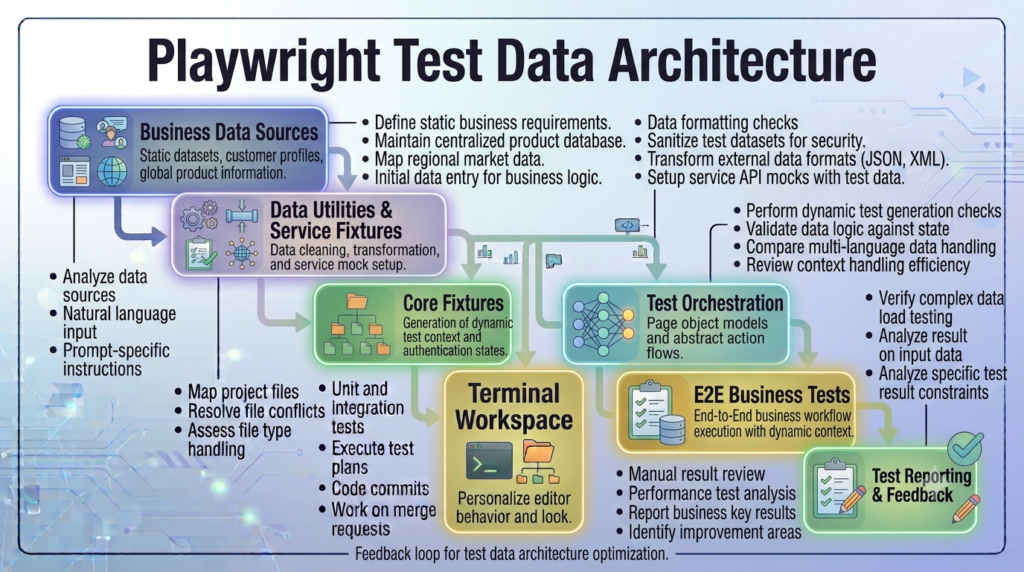
Recommended project structure:
playwright-framework/

├── data/
│   ├── users/
│   ├── products/
│   ├── employees/
│   ├── orders/
│   ├── payments/
│   ├── api/
│   └── expected/

├── fixtures/

├── pages/

├── utils/

├── config/

├── tests/

└── playwright.config.ts
Each folder has a single responsibility, making the framework easier to understand and maintain.
Separate Business Data from Configuration
One of the most common mistakes is storing environment configuration together with business data.
Avoid structures like:
data/

↓

users

↓

URLs

↓

Passwords

↓

API Keys

↓

Products
A better approach is:
config/

↓

Environment Variables

↓

URLs

↓

Timeouts


data/

↓

Business Records

↓

Products

↓

Employees

↓

Customers
Business information and application configuration should evolve independently.
Create a Reusable Data Layer
Instead of reading JSON or CSV files directly inside every test, create a reusable data access layer.
Workflow:
Data File

↓

Data Utility

↓

Fixture

↓

Business Test
The utility is responsible for loading data.
Fixtures prepare the required objects.
Tests focus only on validating business functionality.
This layered architecture improves maintainability and reduces duplicate code.
Organize Data by Business Domain
As applications grow, grouping datasets by feature makes navigation easier.
Example:
data/

├── authentication/

├── employees/

├── recruitment/

├── payroll/

├── inventory/

├── orders/

├── customers/

└── reports/
Each module contains only the information relevant to that business area.
This organization scales well for enterprise applications developed by multiple teams.
Version Test Data
Business rules change over time.
Instead of replacing datasets immediately, consider maintaining versioned data.
Example:
users-v1.json

users-v2.json

products-v1.json

products-v2.json
Versioning supports backward compatibility while new features are being tested.
Use Environment-Specific Data
Applications frequently have multiple deployment environments.
Example:
Development

↓

QA

↓

Staging

↓

Pre-Production
Each environment may require different:
- Users
- URLs
- API endpoints
- Products
- Feature flags
- Payment providers
Keeping datasets environment-specific avoids accidental failures caused by mismatched configurations.
Protect Sensitive Information
Never store confidential information directly inside source code.
Avoid committing:
- Production passwords
- API keys
- Access tokens
- Client secrets
- Database credentials
Instead, use:
- Environment variables
- Secret management platforms
- CI/CD secret stores
- Secure configuration services
Business data can remain inside version control, but sensitive credentials should always be protected.
Keep Test Data Independent
Every automated test should manage its own data.
Poor workflow:
Test A

↓

Creates Customer

↓

Test B

↓

Edits Customer

↓

Test C

↓

Deletes Customer
A failure in one test affects the others.
Better workflow:
Fixture

↓

Generate Customer

↓

Execute Test

↓

Cleanup
Each test becomes repeatable and independent.
Combine Data Management with Fixtures
An enterprise Playwright framework combines multiple architectural layers.
Test Data

↓

Utilities

↓

Fixtures

↓

Page Objects

↓

Business Tests
Each layer performs a specific responsibility.
This separation keeps automation code clean and highly reusable.
Logging Generated Data
Dynamic values such as emails or order numbers should be logged during execution.
Example information:
- Generated email
- Customer ID
- Order number
- Invoice reference
- Transaction ID
Logging improves debugging and makes failed executions easier to reproduce.
Data Cleanup Strategy
Generated records should not remain permanently inside testing environments.
Typical cleanup activities include:
- Delete temporary users.
- Remove test orders.
- Archive uploaded files.
- Reset modified configuration.
- Restore database state.
A proper cleanup strategy keeps environments stable and prevents long-term data pollution.
Common Design Principles
Professional Playwright Test Data Management follows these principles.
Single Source of Truth
Store each business value only once.
Separation of Concerns
Business data, configuration, fixtures, and Page Objects should remain independent.
Reusability
Datasets should support multiple test scenarios.
Scalability
The framework should support thousands of records without restructuring.
Security
Sensitive information must never be exposed inside repositories.
Maintainability
Business changes should require updates in as few places as possible.
Common Mistakes
Avoid these problems when implementing Playwright Test Data Management.
- Hardcoding credentials inside tests.
- Mixing URLs with business datasets.
- Sharing mutable test data between tests.
- Ignoring cleanup after execution.
- Using production records for automated testing.
- Creating duplicate datasets.
- Reading files directly inside every test.
- Generating completely random values without logging them.
Interview Questions
Automation Engineers should be able to answer questions such as:
- What is Playwright Test Data Management?
- Why should test data be separated from test scripts?
- What are the advantages of JSON files?
- When should CSV or Excel files be used?
- What is dynamic test data?
- Why is Faker useful?
- How should environment-specific data be managed?
- Why is cleanup important after test execution?
- What is the role of fixtures in test data management?
- How can sensitive information be protected in automation frameworks?
These questions evaluate architectural thinking in addition to coding knowledge.
Enterprise Checklist
Before considering your data layer production-ready, verify the following:
- Separate data folder
- Modular dataset organization
- JSON-based reusable business data
- Dynamic data generation
- Environment-specific configuration
- Secure credential management
- Reusable data utilities
- Integration with Playwright Fixtures
- Independent test execution
- Automatic cleanup strategy
- Structured logging
- CI/CD compatibility
Following this checklist helps ensure that Playwright Test Data Management remains reliable as both the application and the automation framework continue to grow.
Looking Ahead
The next step is configuring Playwright for different execution environments. You will learn how to use the Playwright configuration file to manage browsers, projects, timeouts, retries, reporters, screenshots, videos, traces, environment variables, and execution settings that support scalable automation across local development, testing, and CI/CD pipelines.
AI Search Optimized Answers
What Is Playwright Test Data Management?
Playwright Test Data Management is the process of organizing, storing, generating, and maintaining test data separately from automation scripts. It improves maintainability, scalability, and reliability by allowing Playwright tests to reuse structured datasets across multiple environments.
Why Should Test Data Be Stored Outside Test Scripts?
Separating test data from automation code reduces duplication, simplifies maintenance, supports data reuse, and allows the same Playwright tests to run against different environments without changing the test logic.
Which Data Formats Are Commonly Used in Playwright?
Enterprise Playwright frameworks commonly use JSON for structured business data, CSV for tabular datasets, Excel for business-managed records, databases for live validation, APIs for dynamic information, and Faker for runtime-generated data.
What Is Dynamic Test Data?
Dynamic test data is generated during execution to create unique values such as email addresses, usernames, customer IDs, or order numbers. It prevents duplicate-record errors and improves test independence.
Can Playwright Use Faker?
Yes. Faker can generate realistic names, email addresses, phone numbers, addresses, companies, and many other values, making automated tests more reliable and suitable for repeated execution in CI/CD pipelines.
Practical Assignment
Create a reusable Playwright Test Data Management layer for your automation framework.
Tasks
- Create a
datafolder in your project. - Add separate JSON files for users, products, and API payloads.
- Import JSON data into your Playwright tests.
- Replace all hardcoded credentials with reusable datasets.
- Generate unique email addresses using Faker.
- Store expected validation messages in a dedicated JSON file.
- Refactor three existing tests to use the new data layer.
Bonus Challenge
Create separate datasets for Development, QA, and Staging environments. Configure your framework to load the correct dataset automatically based on an environment variable and execute the same Playwright tests successfully in all environments.
Common Mistakes
Avoid these mistakes when implementing Playwright Test Data Management:
- Hardcoding business values inside test scripts.
- Storing production credentials in source code.
- Mixing configuration data with business datasets.
- Creating duplicate JSON files containing the same information.
- Ignoring cleanup of dynamically created records.
- Using completely random data without logging generated values.
- Reading data files directly inside every test instead of using reusable utilities.
- Sharing mutable data between parallel tests.
Frequently Asked Questions
What is Playwright Test Data Management?
Playwright Test Data Management is a strategy for organizing and maintaining reusable business data separately from Playwright test scripts.
Is JSON the best format for Playwright test data?
JSON is the most popular format because it supports structured objects, nested data, and direct imports into JavaScript and TypeScript projects. However, CSV, Excel, databases, and APIs are also commonly used depending on project requirements.
When should I use dynamic test data?
Dynamic test data should be used whenever unique values are required, such as user registrations, customer creation, orders, invoices, or transactions that cannot be repeated with identical records.
Can Playwright tests read Excel or CSV files?
Yes. Playwright can read CSV and Excel files using Node.js libraries, making them suitable for data-driven testing and business-managed datasets.
How does Playwright Test Data Management work with Fixtures?
Fixtures load or generate the required data before test execution, allowing business tests to focus only on validation while keeping setup logic and datasets separate.
Internal Links
- Day 1: What is Playwright and Why Everyone is Talking About It
- Day 2: How to Install Playwright: Complete Beginner Setup Guide for 2026
- Day 3: Your First Playwright Test: Understanding Every Line Before You Write Code
- Day 4: How Playwright Works Behind the Scenes: Complete Architecture Guide for Beginners
- Day 5: Playwright Locators: Stop Writing Fragile Selectors Forever
- Day 6: Playwright Auto Waiting: Complete Guide to Reliable Test Synchronization
- Day 7: Playwright Assertions: Complete Guide to Reliable Test Validation
- Day 8: Playwright Test Hooks: Complete Guide to beforeAll, beforeEach, afterEach, and afterAll Explained
- Day 9: Playwright Projects and Multi-Browser Testing: Complete Guide to Cross-Browser Automation
- Day 10: Playwright Page Object Model (POM): Build a Scalable Test Framework
- Day 11: Playwright Fixtures: Build Reusable and Maintainable Test Setup
- Playwright: Zero to Hero Series
External Links
- Playwright Hooks Documentation: https://playwright.dev/docs/api/class-test
- Playwright Test Runner: https://playwright.dev/docs/test-intro
- Playwright Best Practices: https://playwright.dev/docs/best-practices
- Playwright Configuration: https://playwright.dev/docs/test-configuration
- Playwright Projects: https://playwright.dev/docs/test-projects
- Playwright Devices: https://playwright.dev/docs/emulation
Conclusion
Playwright Test Data Management provides a structured approach to organizing static and dynamic datasets for automated testing. By separating business data from test logic and combining JSON files, CSV, Excel, Faker, reusable utilities, and Playwright Fixtures, teams can build scalable, maintainable, and enterprise-ready automation frameworks that execute reliably across multiple environments and integrate seamlessly with modern CI/CD pipelines.
Enjoyed this article? Explore more in-depth guides on AI engineering, automation testing, Model Context Protocol, Playwright, and intelligent software quality at www.skakarh.com. Follow QAPulse by SK for practical, production-focused tutorials designed for QA engineers, SDETs, and AI developers.