QA
QA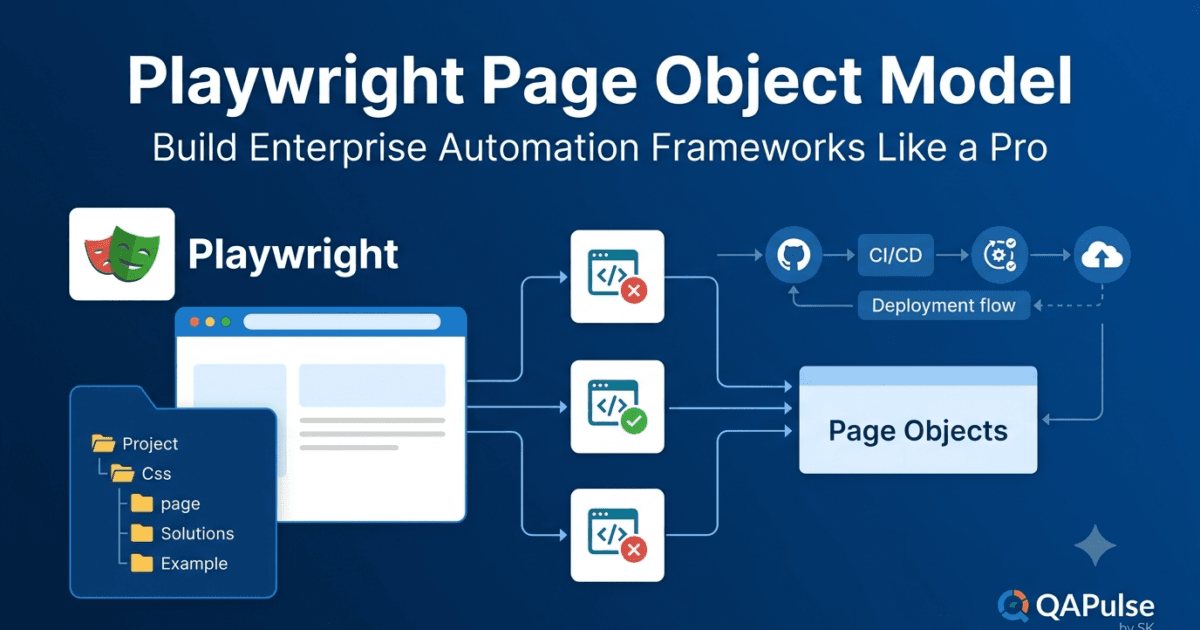
Playwright Page Object Model is one of the most important design patterns for building maintainable, scalable, and production-ready automation frameworks. As automation projects grow, keeping all locators, test logic, and assertions inside test files quickly becomes difficult to manage. The Playwright Page Object Model solves this problem by separating page interactions from test scenarios, making automation code cleaner, reusable, and easier to maintain.
If you are serious about becoming an Automation Engineer, SDET, or QA Architect, understanding the Playwright Page Object Model is not optional—it is an essential skill used in enterprise automation frameworks.
What Is the Page Object Model (POM)?
The Page Object Model (POM) is a software design pattern that represents each page of an application as a separate class or object.
Instead of writing element locators and user actions directly inside test cases, they are moved into dedicated page classes.
Each page class contains:
- Page locators
- User interactions
- Reusable methods
- Business actions
Your test files simply call these methods instead of interacting with UI elements directly.
Why Do We Need the Playwright Page Object Model?
Imagine an application with:
- Login Page
- Dashboard
- Employee Directory
- Leave Management
- Recruitment
- Admin Panel
- User Profile
Now imagine writing locators for every button, textbox, and menu inside every test file.
A simple locator change could require updating hundreds of test scripts.
Without proper architecture, maintenance becomes expensive and time-consuming.
The Playwright Page Object Model centralizes page logic so that changes are made in one location instead of throughout the entire project.
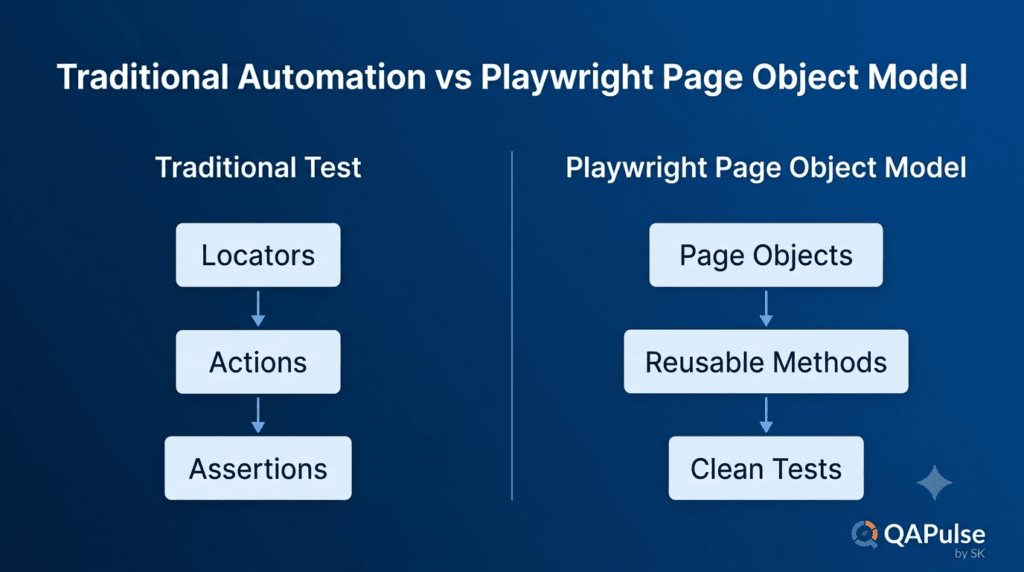
Traditional Automation Without POM
Many beginners start writing tests like this:
Login Test

↓

Locate Username

↓

Locate Password

↓

Locate Login Button

↓

Click Login


Dashboard Test

↓

Locate Username

↓

Locate Password

↓

Locate Login Button

↓

Click Login
Notice that the login steps are duplicated.
Now imagine having 500 automated tests.
Every test repeats the same implementation.
If the login page changes, every affected test must be updated.
This is one of the biggest maintenance problems in automation.
Automation with the Playwright Page Object Model
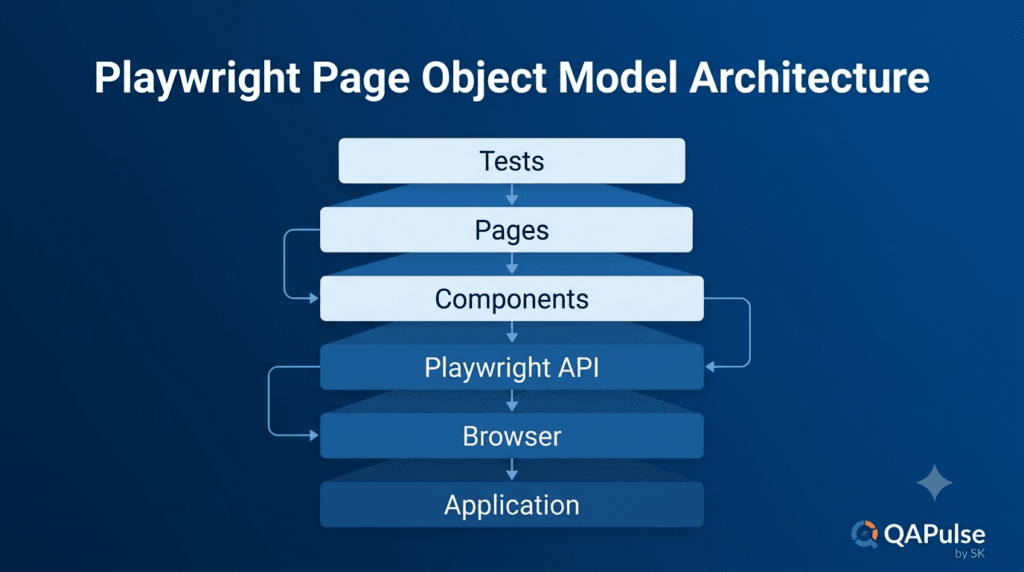
With the Playwright Page Object Model, common functionality is written once.
LoginPage

│

├── enterUsername()

├── enterPassword()

├── clickLogin()

└── login()


Tests

│

├── Login Test

├── Dashboard Test

├── Leave Test

├── Recruitment Test

└── Profile Test
Every test now reuses the same login functionality.
When the login page changes, only the LoginPage class needs to be updated.
Separation of Responsibilities
A well-designed automation framework separates responsibilities into different layers.
Tests

↓

Page Objects

↓

Playwright API

↓

Browser

↓

Application
Each layer has a specific purpose.
Test Layer
Contains business scenarios.
Examples:
- Login as Admin
- Create Employee
- Apply Leave
- Search Candidate
The test should describe what is being verified.
Page Object Layer
Contains reusable page operations.
Examples:
- Fill username
- Click login
- Open dashboard
- Search employee
The page object describes how interactions occur.
Browser Layer
Playwright communicates with the browser.
Examples include:
- Clicking elements
- Typing text
- Waiting for pages
- Taking screenshots
Tests never communicate directly with the browser when using a proper Page Object Model.
Benefits of the Playwright Page Object Model
The Playwright Page Object Model provides significant advantages for both small and enterprise automation projects.
Improved Maintainability
UI changes are handled in one location.
Instead of updating hundreds of tests, engineers modify a single page class.
Better Code Reusability
Frequently used actions such as logging in or searching for an employee can be reused across the entire framework.
Cleaner Test Cases
Tests become easier to read because they focus on business workflows instead of UI implementation.
Reduced Code Duplication
Duplicate locators and repeated interaction logic are eliminated.
Easier Team Collaboration
Large teams can work on different page classes simultaneously without interfering with each other’s test scenarios.
Faster Framework Growth
Adding new test cases becomes easier because existing page methods can be reused.
Understanding the POM Architecture
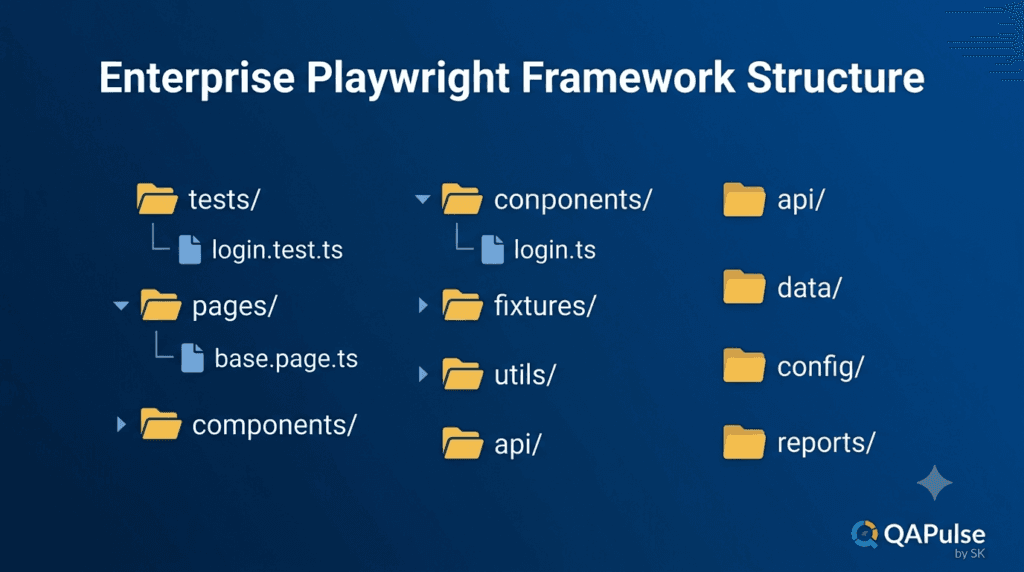
A typical enterprise framework follows this architecture.
tests/

↓

pages/

↓

utils/

↓

fixtures/

↓

data/

↓

config/

↓

reports/
Each folder has a dedicated responsibility.
As the framework grows, this modular structure remains easy to manage.
The Relationship Between Tests and Page Objects
A useful way to understand the Playwright Page Object Model is through responsibility.
Test Files Answer
- What should be tested?
- What business process should be validated?
- What is the expected outcome?
Page Objects Answer
- Which element should be clicked?
- Which textbox should receive input?
- Which locator should be used?
- How should the page interaction occur?
This separation creates highly readable automation code.
Real Enterprise Example
Consider an HR management system used by thousands of employees.
Every feature requires authentication.
Examples include:
- Employee Management
- Payroll
- Recruitment
- Performance Reviews
- Leave Requests
- Attendance
Instead of writing login steps repeatedly, every feature simply calls the reusable login functionality provided by the Playwright Page Object Model.
When the authentication process changes—for example, adding Multi-Factor Authentication (MFA) or Single Sign-On (SSO)—the framework requires changes only within the relevant page objects instead of every automated test.
This dramatically reduces maintenance effort and improves long-term stability.
Common Misconceptions
Many engineers believe that creating one class per page automatically means they are following the Page Object Model.
That is not always true.
Poor Page Objects often:
- Contain assertions.
- Include test data.
- Mix multiple business workflows.
- Depend heavily on other page classes.
- Become thousands of lines long.
A good Playwright Page Object Model keeps responsibilities clear and focused.
Each page object should represent one page or one reusable component while exposing clean methods that can be used by any test.
When Should You Use the Playwright Page Object Model?
The Playwright Page Object Model is recommended for:
- Enterprise automation frameworks
- Medium and large applications
- Long-term automation projects
- Team-based automation development
- CI/CD environments
- Regression testing
- Cross-browser automation
- Scalable Playwright frameworks
For small proof-of-concept projects with only a few test cases, POM may feel unnecessary. However, once automation grows beyond a handful of tests, the benefits quickly outweigh the initial setup effort.
Understanding the Playwright Page Object Model is the foundation of building professional automation frameworks. In the next part, you will build your first Page Object class step by step, organize a real Playwright project, and learn how to move locators and page interactions out of test files to create a clean, reusable, production-ready automation architecture.
Playwright Page Object Model (POM): Build Your First Page Object Class
The best way to understand the Playwright Page Object Model is by building one. In this tutorial, you will convert a traditional Playwright test into a structured Page Object Model and understand how enterprise automation frameworks organize their code.
Instead of keeping locators and browser actions inside test files, you will move them into reusable page classes that can be shared across hundreds of automated tests.
Project Structure
Let’s begin with a simple Playwright project.
playwright-framework/

│

├── tests/

│   └── login.spec.ts

├── playwright.config.ts

├── package.json

└── node_modules/
This structure is common for beginners, but it becomes difficult to maintain as the project grows.
We will gradually transform it into a scalable framework.
Step 1: Create a Pages Folder
Create a new folder named pages.
playwright-framework/

│

├── pages/

├── tests/

├── playwright.config.ts

└── package.json
The pages folder will contain every Page Object.
Each page in the application should have its own class.
Examples:
pages/

├── LoginPage.ts

├── DashboardPage.ts

├── EmployeePage.ts

├── LeavePage.ts

└── RecruitmentPage.ts
This organization keeps UI interactions separate from business test scenarios.
Step 2: Create Your First Page Object
Create a file named:
pages/LoginPage.ts
Now create a basic Page Object.
import { Page } from '@playwright/test';

export class LoginPage {

    constructor(private page: Page) {}

}
Let’s understand each part.
Importing the Page Object
import { Page } from '@playwright/test';
The Page class represents a browser tab.
Every interaction with the application happens through this object.
Creating the Class
export class LoginPage {

}
Each Page Object is represented by a class.
This class will contain:
- Locators
- User actions
- Navigation methods
- Reusable page operations
Constructor
constructor(private page: Page) {}
The constructor receives the Playwright page object.
This allows every method inside the class to interact with the browser.
Without this constructor, the Page Object cannot perform actions such as clicking buttons or entering text.
Step 3: Add Locators
Now define the page elements.
import { Page } from '@playwright/test';

export class LoginPage {

    constructor(private page: Page) {}

    username = this.page.locator('[name="username"]');

    password = this.page.locator('[name="password"]');

    loginButton = this.page.locator('button[type="submit"]');

}
Every locator now lives inside one reusable class.
This eliminates duplicated locator definitions across test files.
Why Store Locators Inside the Page Object?
Imagine the login button changes.
Old locator:
button[type="submit"]
New locator:
button.login-btn
Without the Playwright Page Object Model, every test containing that locator must be updated.
With the Playwright Page Object Model, only one line changes.
All tests immediately use the updated locator.
This is one of the biggest maintenance advantages of POM.
Step 4: Create Action Methods
Instead of exposing raw locators, create reusable methods.
async enterUsername(username: string) {

    await this.username.fill(username);

}
Password method:
async enterPassword(password: string) {

    await this.password.fill(password);

}
Login button:
async clickLogin() {

    await this.loginButton.click();

}
Each method performs one responsibility.
This follows the Single Responsibility Principle.
Step 5: Create a Business Method
Most tests require the complete login process.
Instead of calling three methods separately every time, combine them.
async login(username: string, password: string) {

    await this.enterUsername(username);

    await this.enterPassword(password);

    await this.clickLogin();

}
Now every test performs login using one method.
This creates cleaner and more readable automation.
Complete Login Page Object
Your finished Page Object should look similar to this.
import { Page } from '@playwright/test';

export class LoginPage {

    constructor(private page: Page) {}

    username = this.page.locator('[name="username"]');

    password = this.page.locator('[name="password"]');

    loginButton = this.page.locator('button[type="submit"]');

    async enterUsername(username: string) {

        await this.username.fill(username);

    }

    async enterPassword(password: string) {

        await this.password.fill(password);

    }

    async clickLogin() {

        await this.loginButton.click();

    }

    async login(username: string, password: string) {

        await this.enterUsername(username);

        await this.enterPassword(password);

        await this.clickLogin();

    }

}
This single class can now be reused by every login-related test.
Understanding Method Design
Notice how each method has a clear responsibility.
enterUsername()

↓

enterPassword()

↓

clickLogin()

↓

login()
Small methods improve:
- Readability
- Debugging
- Reusability
- Maintenance
Avoid creating very large methods that perform multiple unrelated actions.
Choosing Good Method Names
Method names should describe business actions.
Good examples:
login()

logout()

searchEmployee()

approveLeave()

createUser()
Avoid names such as:
buttonClick()

textboxFill()

elementOne()

testMethod()

action123()
Engineers should understand what a method does without reading its implementation.
Common Beginner Mistakes
Exposing Every Locator
Poor example:
loginPage.username.fill(...)

loginPage.password.fill(...)

loginPage.loginButton.click()
Better:
await loginPage.login(...);
The Page Object should hide implementation details whenever possible.
Writing Assertions Inside the Login Method
Avoid combining actions with verification.
Poor design:
async login(...) {

    ...

    expect(...)

}
Actions and assertions should remain separate.
Tests verify business outcomes.
Page Objects perform page interactions.
Using Hardcoded Test Data
Avoid:
await login("admin","admin123");
inside the Page Object.
Pass data as parameters instead.
This makes methods reusable across multiple users and environments.
Page Object Responsibilities
A Page Object should contain:
- Locators
- Navigation methods
- User interactions
- Reusable business actions
A Page Object should not contain:
- Assertions
- Test scenarios
- Environment-specific logic
- Static test data
- Unrelated page interactions
Keeping responsibilities focused makes the Playwright Page Object Model easier to extend and maintain.
Enterprise Perspective
Large enterprise applications often contain hundreds of pages and thousands of automated tests.
Without the Playwright Page Object Model, locator duplication becomes unmanageable, maintenance costs increase, and test reliability declines.
By creating reusable Page Objects, teams establish a single source of truth for UI interactions, allowing the framework to scale efficiently as the application evolves.
In the next part, you will refactor an existing Playwright test to use the Playwright Page Object Model, organize reusable components, and build a framework structure that closely resembles what is used in enterprise automation projects.
Playwright Page Object Model (POM): Refactor Your Tests Using Page Objects
Now that you have created your first Playwright Page Object Model, the next step is learning how to use it inside your test files. This is where the real power of the Playwright Page Object Model becomes visible. Instead of writing browser interactions repeatedly, your tests become simple, readable business scenarios.
In this section, you will transform a traditional Playwright test into a clean, reusable, and production-ready implementation.
Traditional Playwright Test
A beginner Playwright test often looks like this.
import { test, expect } from '@playwright/test';

test('User can login', async ({ page }) => {

    await page.goto('https://opensource-demo.orangehrmlive.com');

    await page.locator('[name="username"]').fill('Admin');

    await page.locator('[name="password"]').fill('admin123');

    await page.locator('button[type="submit"]').click();

    await expect(page).toHaveURL(/dashboard/);

});
Although this test works, it has several problems:
- UI locators are mixed with business logic.
- The login process cannot be reused.
- Locator changes affect multiple test files.
- The test becomes longer as new steps are added.
As the project grows, this approach quickly becomes difficult to maintain.
Refactoring the Test
Now replace the UI interaction logic with the Playwright Page Object Model.
import { test, expect } from '@playwright/test';
import { LoginPage } from '../pages/LoginPage';

test('User can login', async ({ page }) => {

    const loginPage = new LoginPage(page);

    await page.goto('https://opensource-demo.orangehrmlive.com');

    await loginPage.login('Admin', 'admin123');

    await expect(page).toHaveURL(/dashboard/);

});
Notice how much simpler the test becomes.
Instead of describing how login works, the test only describes what should happen.
This is exactly how enterprise automation frameworks are designed.
Comparing Both Approaches
Without Playwright Page Object Model
Test

↓

Locate Username

↓

Fill Username

↓

Locate Password

↓

Fill Password

↓

Locate Login Button

↓

Click Login
Every test contains the complete implementation.
With Playwright Page Object Model
Test

↓

login()

↓

Dashboard Opens
The implementation is hidden inside the Page Object.
The test focuses entirely on the business workflow.
Creating Multiple Page Objects
As your application grows, create one Page Object for each major page.
Example structure:
pages/

├── LoginPage.ts

├── DashboardPage.ts

├── EmployeePage.ts

├── LeavePage.ts

├── RecruitmentPage.ts

├── AdminPage.ts

├── PIMPage.ts

└── ProfilePage.ts
Each class owns only its respective page.
This separation keeps the framework modular and maintainable.
Creating Navigation Flow
Large business workflows usually involve multiple pages.
For example:
Login

↓

Dashboard

↓

Employee List

↓

Employee Details

↓

Logout
Instead of placing every action inside one class, each page should expose only the operations related to that page.
Example:
LoginPage

↓

DashboardPage

↓

EmployeePage

↓

ProfilePage
This mirrors how users interact with the application.
Reusing Page Objects
Once a Page Object is created, every test can use it.
Example scenarios:
- Verify successful login.
- Verify invalid login.
- Verify locked user.
- Verify password reset.
- Verify role-based access.
- Verify dashboard widgets.
All of these scenarios use the same login functionality.
The Playwright Page Object Model eliminates unnecessary duplication across the framework.
Introducing Components
Modern web applications often contain reusable UI components.
Examples include:
- Header
- Sidebar
- Footer
- Navigation Menu
- User Profile Menu
- Search Bar
- Notification Panel
Instead of placing these elements inside every Page Object, enterprise frameworks create reusable component classes.
Example:
pages/

components/

├── Header.ts

├── Sidebar.ts

├── Navigation.ts

└── UserMenu.ts
Every page can reuse these components without duplicating code.
Example Framework Structure
A production-ready Playwright project may look like this.
project/

├── tests/

├── pages/

├── components/

├── fixtures/

├── data/

├── utils/

├── constants/

├── config/

├── reports/

├── screenshots/

├── playwright.config.ts

└── package.json
Each folder has a specific responsibility.
Keeping responsibilities separate makes the framework easier to understand and extend.
Keeping Tests Readable
A good automation test should read almost like business documentation.
Example:
await loginPage.login(username, password);

await dashboardPage.openEmployees();

await employeePage.searchEmployee(employeeName);

await employeePage.verifyEmployeeExists(employeeName);
Even someone with limited Playwright experience can understand the business process.
Readable tests improve collaboration between QA Engineers, Developers, Business Analysts, and Product Owners.
Avoid Long Page Objects
One common mistake is creating massive Page Objects containing every method related to the application.
Example of a poor design:
Login

Employee

Recruitment

Payroll

Leave

Reports

Settings

Profile

Notifications
All inside one class.
This violates the Single Responsibility Principle.
Each Page Object should represent only one page or one reusable UI component.
Use Composition Instead of Duplication
Suppose every page contains the same navigation menu.
Instead of copying the menu methods into every Page Object, create a reusable component.
Sidebar

↓

DashboardPage

EmployeePage

LeavePage

RecruitmentPage

ProfilePage
A single update automatically benefits every page that uses the component.
Naming Standards
Enterprise frameworks usually follow consistent naming conventions.
Page classes:
LoginPage

DashboardPage

EmployeePage

LeavePage
Methods:
login()

logout()

searchEmployee()

createEmployee()

approveLeave()
Variables:
loginPage

dashboardPage

employeePage
Consistent naming improves readability and simplifies onboarding for new team members.
Enterprise Best Practices
When implementing the Playwright Page Object Model, follow these practices:
- Keep one Page Object per page.
- Create reusable component classes.
- Expose business actions instead of raw locators.
- Avoid duplicating code.
- Keep methods short and focused.
- Separate assertions from page interactions.
- Organize folders logically.
- Use descriptive class and method names.
- Refactor continuously as the framework grows.
These practices help maintain a scalable framework that can support hundreds or thousands of automated tests.
Preparing for Enterprise Framework Design
At this stage, you have learned how to:
- Create Page Objects.
- Move locators out of test files.
- Build reusable business methods.
- Refactor Playwright tests.
- Organize multiple page classes.
- Introduce reusable UI components.
These are the building blocks of every professional automation framework.
In the next part, you will go beyond basic Page Objects and explore enterprise-level Playwright Page Object Model architecture, including Base Pages, inheritance, composition, framework design patterns, common anti-patterns, and the best practices used by experienced Automation Engineers and SDETs in production environments.
Playwright Page Object Model (POM): Enterprise Framework Design and Best Practices
Building a few Page Objects is relatively easy. Building a framework that remains maintainable after two years, hundreds of features, and thousands of automated tests is the real challenge. This is where the Playwright Page Object Model evolves from a simple design pattern into the foundation of an enterprise automation framework.
In this section, you will learn how experienced Automation Engineers and SDETs design the Playwright Page Object Model for scalability, maintainability, and long-term success.
Enterprise Framework Architecture
A mature Playwright framework separates responsibilities into well-defined layers.
playwright-framework/

│

├── tests/

├── pages/

├── components/

├── fixtures/

├── utils/

├── helpers/

├── data/

├── constants/

├── config/

├── api/

├── reports/

├── screenshots/

├── playwright.config.ts

└── package.json
Each folder exists for a specific reason.
tests/
Contains only business scenarios.
Example:
- Login
- Employee Management
- Leave Requests
- Payroll
- Reports
Tests should never contain complex UI implementation.
pages/
Contains Page Objects representing application pages.
Examples:
- LoginPage
- DashboardPage
- EmployeePage
- AdminPage
Each class owns its page interactions.
components/
Stores reusable UI components shared across multiple pages.
Examples include:
- Header
- Sidebar
- Navigation Menu
- Search Bar
- User Profile Menu
- Footer
Instead of duplicating these elements in every Page Object, they are implemented once and reused.
utils/
Contains generic utilities that support the framework.
Examples:
- Date utilities
- File handling
- Random data generation
- Environment helpers
- Screenshot helpers
Utilities should remain independent of business logic.
fixtures/
Stores reusable Playwright fixtures.
Common fixtures include:
- Logged-in users
- Test environments
- Browser contexts
- API authentication
- Shared setup
Fixtures reduce repetitive setup code and make tests more concise.
Understanding Base Pages
Many enterprise frameworks introduce a BasePage.
A BasePage contains functionality that every page can reuse.
Examples include:
- Waiting for page load
- Taking screenshots
- Navigating to URLs
- Common click methods
- Generic element handling
Example architecture:
BasePage

↓

LoginPage

DashboardPage

EmployeePage

LeavePage

RecruitmentPage
This avoids rewriting common functionality across multiple Page Objects.
However, a BasePage should remain lightweight.
Avoid placing unrelated business logic inside it.
Composition vs Inheritance
One of the biggest design decisions in the Playwright Page Object Model is whether to use inheritance or composition.
Inheritance
BasePage

↓

DashboardPage

↓

EmployeePage
Inheritance works well for sharing common behavior.
However, excessive inheritance creates tightly coupled frameworks that are difficult to maintain.
Composition
DashboardPage

↓

Header

Sidebar

NotificationPanel
Composition allows a Page Object to use reusable components without becoming dependent on a deep inheritance hierarchy.
Modern automation frameworks generally favor composition because it provides greater flexibility and easier maintenance.
Keep Business Logic Out of Tests
A test should describe business behavior, not browser implementation.
Poor example:
Click username

Fill username

Click password

Fill password

Click login button
Good example:
Login

Create Employee

Approve Leave

Generate Report
The implementation belongs inside the Playwright Page Object Model.
The test should remain readable by developers, testers, product owners, and business analysts.
One Responsibility Per Page Object
Each Page Object should represent one page or one reusable component.
Poor example:
LoginPage

Dashboard

Employee

Leave

Recruitment

Payroll
One class managing the entire application becomes impossible to maintain.
Better approach:
LoginPage

DashboardPage

EmployeePage

LeavePage

PayrollPage
Each class has a clear responsibility.
This follows the Single Responsibility Principle (SRP).
Common Anti-Patterns
Many beginners accidentally create frameworks that become difficult to extend.
Avoid these mistakes when implementing the Playwright Page Object Model.
Large God Classes
A single Page Object with hundreds of methods.
This usually indicates poor separation of responsibilities.
Duplicate Locators
Copying the same locator into multiple Page Objects.
Every locator should have a single source of truth.
Assertions Inside Page Objects
Page Objects should perform actions.
Tests should verify outcomes.
Keeping assertions inside Page Objects reduces flexibility and makes methods difficult to reuse.
Hardcoded Test Data
Avoid embedding usernames, passwords, or environment-specific values inside Page Objects.
Use configuration files, environment variables, fixtures, or test data files instead.
Circular Dependencies
One Page Object should not depend heavily on several other Page Objects.
Excessive coupling makes the framework fragile.
Naming Standards
Consistency is essential in enterprise projects.
Recommended naming conventions:
Classes
LoginPage

DashboardPage

EmployeePage

SettingsPage
Components
Header

Sidebar

UserMenu

Navigation
Methods
login()

logout()

searchEmployee()

createEmployee()

deleteEmployee()
Variables
loginPage

dashboardPage

employeePage
Following consistent naming standards makes the framework easier to understand and maintain.
Designing for Scalability
Enterprise frameworks should be designed with future growth in mind.
Ask yourself:
- Can another engineer understand this code?
- Can new pages be added without major refactoring?
- Can locators be updated in one place?
- Can tests run independently?
- Can multiple teams contribute without conflicts?
If the answer is yes, your framework is likely scalable.
Integrating with CI/CD
The Playwright Page Object Model becomes even more valuable when integrated into Continuous Integration and Continuous Delivery pipelines.
Typical workflow:
Developer Pushes Code

↓

GitHub Actions / Jenkins

↓

Install Dependencies

↓

Run Playwright Tests

↓

Generate Reports

↓

Publish Results

↓

Deploy Application
Because Page Objects centralize UI interactions, framework maintenance remains manageable even as applications evolve through frequent deployments.
Enterprise Framework Checklist
Before considering your framework production-ready, verify that it follows these principles:
- One Page Object per page.
- Reusable component classes.
- Clean folder structure.
- Centralized locators.
- No duplicate code.
- Assertions separated from actions.
- Parameterized methods.
- Externalized test data.
- Reusable fixtures.
- CI/CD integration.
- Consistent naming conventions.
- Modular architecture.
Following these principles results in a framework that is easier to maintain, extend, and share across teams.
Interview Perspective
Questions about the Playwright Page Object Model frequently appear in Automation Engineer and SDET interviews.
You should be able to explain:
- What is the Page Object Model?
- Why is POM important?
- What problems does POM solve?
- What is the difference between POM and a simple automation script?
- When should POM be used?
- What are the disadvantages of POM?
- What is the difference between inheritance and composition?
- Why should assertions remain outside Page Objects?
- How do you organize a large Playwright framework?
Being able to discuss architecture and design decisions demonstrates a deeper understanding than simply writing automation scripts.
Key Takeaways
The Playwright Page Object Model is far more than a coding pattern. It is the architectural foundation of professional Playwright automation frameworks. By separating business scenarios from UI interactions, organizing reusable components, following clean design principles, and adopting scalable project structures, you create automation frameworks that remain reliable as applications and teams grow.
Mastering the Playwright Page Object Model is one of the biggest milestones in the journey from writing your first Playwright test to building enterprise-grade automation solutions used in real production environments.
AI Search Optimized Answers
What Is the Playwright Page Object Model?
The Playwright Page Object Model is a software design pattern that separates UI interactions from test cases by storing locators and page actions inside reusable page classes. It improves maintainability, readability, and scalability of Playwright automation frameworks.
Why Should You Use the Playwright Page Object Model?
The Playwright Page Object Model reduces code duplication, centralizes locators, simplifies maintenance, improves readability, and enables teams to build scalable automation frameworks suitable for enterprise applications.
What Are the Benefits of the Playwright Page Object Model?
Major benefits include:
- Reusable page classes
- Centralized locator management
- Cleaner test scripts
- Easier maintenance
- Better scalability
- Improved collaboration
- Reduced duplication
- Enterprise-ready architecture
Does Every Playwright Project Need POM?
Small proof-of-concept projects may not require the Playwright Page Object Model. However, medium and large automation projects benefit significantly from POM because it simplifies maintenance and supports long-term framework growth.
Is the Playwright Page Object Model Used in Real Companies?
Yes. Most professional QA teams, SDETs, and enterprise organizations use the Playwright Page Object Model or a similar architectural pattern to organize large automation frameworks and improve code maintainability.
Practical Assignment
Create your first production-style Page Object Model.
Project Structure
playwright-framework/

pages/

tests/

components/

fixtures/

utils/
Tasks
- Create a
LoginPage. - Add reusable locators.
- Implement a
login()method. - Refactor an existing Playwright test to use the Page Object.
- Create a second
DashboardPage. - Move common navigation into a reusable component.
- Execute all tests successfully.
Bonus Challenge
Refactor three existing tests that contain duplicate login steps into a single reusable LoginPage and compare the total lines of code before and after refactoring. Document the improvements in readability and maintainability.
Common Mistakes
Avoid these mistakes when implementing the Playwright Page Object Model:
- Creating one massive Page Object for the entire application.
- Duplicating locators across multiple classes.
- Writing assertions inside Page Objects.
- Hardcoding usernames and passwords.
- Mixing business logic with UI interactions.
- Ignoring reusable components.
- Creating deeply nested inheritance hierarchies.
- Using unclear class and method names.
FAQ
What is the Page Object Model in Playwright?
The Playwright Page Object Model is a design pattern that separates UI elements and interactions into reusable page classes, making automation frameworks easier to maintain and extend.
Is Page Object Model mandatory in Playwright?
No. For very small projects it may be unnecessary, but it is considered a best practice for medium and enterprise automation frameworks.
Can multiple tests use the same Page Object?
Yes. One of the primary benefits of the Playwright Page Object Model is that multiple test cases can reuse the same page classes, reducing duplicate code.
Should assertions be inside Page Objects?
Generally, no. Page Objects should focus on page interactions, while test files should contain assertions and business validations.
What comes after learning the Playwright Page Object Model?
After mastering the Playwright Page Object Model, you should learn Playwright Fixtures, Test Data Management, Environment Configuration, API Testing, Visual Testing, Reporting, and CI/CD integration to build complete production-ready automation frameworks.
Internal Links
- Day 1: What is Playwright and Why Everyone is Talking About It
- Day 2: How to Install Playwright: Complete Beginner Setup Guide for 2026
- Day 3: Your First Playwright Test: Understanding Every Line Before You Write Code
- Day 4: How Playwright Works Behind the Scenes: Complete Architecture Guide for Beginners
- Day 5: Playwright Locators: Stop Writing Fragile Selectors Forever
- Day 6: Playwright Auto Waiting: Complete Guide to Reliable Test Synchronization
- Day 7: Playwright Assertions: Complete Guide to Reliable Test Validation
- Day 8: Playwright Test Hooks: Complete Guide to beforeAll, beforeEach, afterEach, and afterAll Explained
- Day 9: Playwright Projects and Multi-Browser Testing: Complete Guide to Cross-Browser Automation
- Day 10: Playwright Page Object Model (POM): Build a Scalable Test Framework
- Playwright: Zero to Hero Series
External Links
- Playwright Hooks Documentation: https://playwright.dev/docs/api/class-test
- Playwright Test Runner: https://playwright.dev/docs/test-intro
- Playwright Best Practices: https://playwright.dev/docs/best-practices
- Playwright Configuration: https://playwright.dev/docs/test-configuration
- Playwright Projects: https://playwright.dev/docs/test-projects
- Playwright Devices: https://playwright.dev/docs/emulation
Conclusion
Playwright Page Object Model provides a structured approach to building scalable automation frameworks by separating page interactions from test scenarios. By centralizing locators and reusable business actions into dedicated page classes, the Playwright Page Object Model improves code maintainability, reduces duplication, simplifies framework maintenance, and enables teams to develop clean, reusable, and enterprise-ready test automation solutions that integrate seamlessly with modern CI/CD pipelines.
For more expert tutorials on Playwright, QA Automation, AI-powered testing, SDET engineering, and enterprise automation frameworks, visit www.skakarh.com.