QA
QA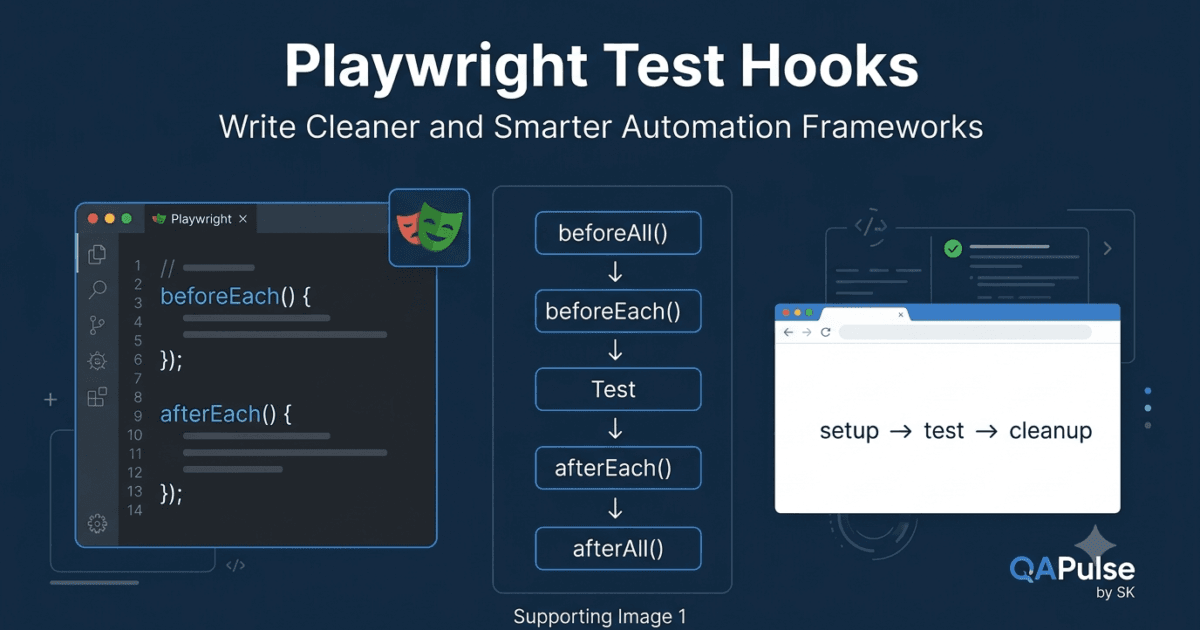
Playwright Test Hooks allow you to execute code automatically before and after your tests. As your automation project grows from a few test cases to hundreds or even thousands, writing the same setup and cleanup code repeatedly becomes difficult to maintain. Test hooks solve this problem by centralizing common operations and ensuring every test starts and finishes in a predictable state.
Without Playwright Test Hooks, automation projects quickly become cluttered with duplicated code, inconsistent test initialization, and unreliable cleanup logic.
What Are Test Hooks?
A test hook is a special function that Playwright executes automatically at specific stages of the test lifecycle.
Instead of manually writing setup code inside every test, you write it once in the appropriate hook.
For example, consider three login-related tests.
Test 1
Login
Open Dashboard
Run Test

Test 2
Login
Open Dashboard
Run Test

Test 3
Login
Open Dashboard
Run Test
Every test repeats the same preparation steps.
Using Playwright Test Hooks, the common setup is written once and reused automatically.
BeforeEach

↓

Login

↓

Open Dashboard

↓

Run Test

↓

AfterEach

↓

Cleanup
The test becomes shorter, cleaner, and easier to maintain.
Why Do Automation Frameworks Need Test Hooks?
Imagine an enterprise application containing:
- 500 test cases
- 40 test files
- Multiple browsers
- Multiple environments
- API authentication
- Database preparation
If every test performs its own setup, the framework will contain thousands of duplicated lines of code.
Whenever the login process changes, hundreds of tests must also be updated.
By placing shared operations inside Playwright Test Hooks, maintenance becomes significantly easier.
The Playwright Test Lifecycle
Every Playwright test follows a predictable execution flow.
Test Suite Starts

↓

beforeAll()

↓

beforeEach()

↓

Test Executes

↓

afterEach()

↓

beforeEach()

↓

Next Test Executes

↓

afterEach()

↓

...

↓

afterAll()

↓

Test Suite Ends
Understanding this lifecycle is essential because each hook serves a different purpose.
Types of Playwright Test Hooks
Playwright provides four primary hooks.
| Hook | Purpose |
|---|---|
beforeAll() | Runs once before all tests in a file |
beforeEach() | Runs before every individual test |
afterEach() | Runs after every individual test |
afterAll() | Runs once after all tests complete |
Each hook has a specific responsibility and should not be used interchangeably.
Understanding beforeAll()
beforeAll() executes only one time before the first test begins.
beforeAll()

↓

Test 1

↓

Test 2

↓

Test 3
Typical responsibilities include:
- Creating shared test data
- Initializing API clients
- Establishing database connections
- Starting mock servers
- Preparing reusable resources
Because it runs only once, expensive operations should generally be placed here.
Understanding beforeEach()
beforeEach() runs before every test.
beforeEach()

↓

Test 1

↓

beforeEach()

↓

Test 2

↓

beforeEach()

↓

Test 3
This is the most commonly used Playwright hook.
Typical responsibilities include:
- Opening the application
- Logging in
- Creating a fresh browser page
- Resetting application state
- Navigating to the starting page
Each test begins with a consistent environment, reducing dependencies between tests.
Understanding afterEach()
afterEach() executes after every test regardless of whether the test passes or fails.
Test

↓

Pass or Fail

↓

afterEach()
Typical cleanup tasks include:
- Logging out
- Removing temporary data
- Closing dialogs
- Capturing diagnostic information
- Resetting modified settings
Keeping cleanup inside afterEach() helps prevent one failed test from affecting the next.
Understanding afterAll()
afterAll() runs once after the final test finishes.
Test 1

↓

Test 2

↓

Test 3

↓

afterAll()
Common responsibilities include:
- Closing database connections
- Stopping local servers
- Removing shared resources
- Cleaning test environments
- Generating summary reports
Operations that only need to happen once belong here.
Visualizing the Complete Lifecycle
The complete execution sequence looks like this.
Suite Starts

↓

beforeAll()

↓

beforeEach()

↓

Test 1

↓

afterEach()

↓

beforeEach()

↓

Test 2

↓

afterEach()

↓

beforeEach()

↓

Test 3

↓

afterEach()

↓

afterAll()

↓

Suite Ends
This lifecycle remains the same regardless of the number of tests in the file.
Choosing the Correct Hook
Selecting the correct hook is important for both reliability and performance.
Use beforeAll() when the operation is expensive and can safely be shared by every test.
Use beforeEach() when every test requires a fresh starting point.
Use afterEach() when cleanup must happen after every execution.
Use afterAll() when resources should be released only once after the suite completes.
Choosing the wrong hook can create hidden dependencies, slow execution, or introduce flaky tests.
Test Independence
One of the most important principles of modern automation is test isolation.
Each test should be capable of running:
- Independently
- In any order
- Alongside other tests
- On any machine
- In parallel
Playwright Test Hooks help achieve this by ensuring every test starts with a predictable state and leaves the environment clean after execution.
Common Mistakes
New Playwright engineers often make several mistakes when working with hooks.
Examples include:
- Logging in separately inside every test.
- Performing expensive setup inside
beforeEach()when it belongs inbeforeAll(). - Forgetting to clean shared data.
- Allowing one test to depend on another.
- Mixing test logic with setup logic.
Separating setup, execution, and cleanup responsibilities produces cleaner and more maintainable automation.
Enterprise Perspective
Large organizations may execute tens of thousands of Playwright tests every day across multiple browsers, operating systems, and CI/CD pipelines.
In these environments, duplicated setup code becomes expensive to maintain.
Enterprise automation frameworks use Playwright Test Hooks to centralize common operations, improve consistency, reduce maintenance effort, and ensure that every test begins from a known application state.
Well-designed hooks make automation frameworks easier to understand, faster to update, and significantly more reliable as projects continue to grow.
Playwright Test Hooks: Complete Technical Guide with Practical Examples
Playwright Test Hooks become truly valuable when they are applied to real automation projects. Instead of repeating setup and cleanup logic inside every test, hooks allow common operations to execute automatically at the correct stage of the test lifecycle.
In this section, you will learn how each Playwright Test Hook works with practical code examples and understand when each hook should—and should not—be used.
Using beforeAll()
The beforeAll() hook executes only once before the first test in a file.
import { test, expect } from '@playwright/test';

test.beforeAll(async () => {
    console.log('Starting Test Suite...');
});

test('Test One', async ({ page }) => {
    // Test logic
});

test('Test Two', async ({ page }) => {
    // Test logic
});
Execution Flow
beforeAll()

↓

Test One

↓

Test Two
Since beforeAll() runs only once, it is ideal for expensive initialization tasks.
Good Use Cases
- Create shared test data
- Initialize API clients
- Start mock servers
- Read configuration files
- Establish database connections
Avoid Using beforeAll() For
- Logging into the application before every test
- Opening browser pages for individual tests
- Preparing test-specific data
These operations should generally occur before each test to maintain isolation.
Using beforeEach()
beforeEach() executes before every individual test.
import { test } from '@playwright/test';

test.beforeEach(async ({ page }) => {
    await page.goto('https://example.com/login');
});
Every test automatically starts from the login page.
test('Verify Login Button', async ({ page }) => {
    // Login page already opened
});

test('Verify Forgot Password', async ({ page }) => {
    // Login page already opened
});
Execution Flow
beforeEach()

↓

Test One

↓

beforeEach()

↓

Test Two

↓

beforeEach()

↓

Test Three
This eliminates duplicated navigation code throughout the test suite.
Login Using beforeEach()
One of the most common enterprise patterns is logging in before each test.
test.beforeEach(async ({ page }) => {
    await page.goto('/login');

    await page.getByLabel('Username')
        .fill('Admin');

    await page.getByLabel('Password')
        .fill('admin123');

    await page.getByRole('button', {
        name: 'Login'
    }).click();
});
Every test begins with an authenticated user.
Example:
test('Verify Dashboard', async ({ page }) => {

    await expect(page)
        .toHaveURL(/dashboard/);

});

test('Verify Profile', async ({ page }) => {

    await expect(
        page.getByText('My Profile')
    ).toBeVisible();

});
The login code exists only once.
Using afterEach()
afterEach() executes after every test, regardless of whether the test passes or fails.
test.afterEach(async () => {
    console.log('Cleaning Test Data');
});
Typical cleanup activities include:
- Delete temporary users
- Remove uploaded files
- Clear shopping carts
- Reset application settings
- Capture logs
Using afterEach() keeps every test independent.
Capturing Screenshots After Failure
A common production pattern is collecting evidence when a test fails.
test.afterEach(async ({ page }, testInfo) => {

    if (testInfo.status !== testInfo.expectedStatus) {

        await page.screenshot({
            path: `screenshots/${testInfo.title}.png`
        });

    }

});
This creates screenshots only for failed tests, making debugging much easier.
Using afterAll()
afterAll() executes once after every test has completed.
test.afterAll(async () => {
    console.log('Test Suite Finished');
});
Typical use cases include:
- Close database connections
- Stop mock servers
- Remove shared resources
- Generate reports
- Archive logs
Because it executes only once, it is well suited for global cleanup.
Combining All Hooks
A complete test lifecycle may look like this.
import { test } from '@playwright/test';

test.beforeAll(async () => {

    console.log('Suite Started');

});

test.beforeEach(async ({ page }) => {

    await page.goto('/login');

});

test.afterEach(async () => {

    console.log('Test Finished');

});

test.afterAll(async () => {

    console.log('Suite Completed');

});
Execution sequence:
beforeAll()

↓

beforeEach()

↓

Test One

↓

afterEach()

↓

beforeEach()

↓

Test Two

↓

afterEach()

↓

afterAll()
Understanding this execution order is essential for designing predictable automation.
Hook Scope
Playwright Test Hooks apply only to the file or describe block in which they are defined.
Example:
test.describe('Authentication', () => {

    test.beforeEach(async ({ page }) => {

        await page.goto('/login');

    });

    test('Login Test', async ({ page }) => {

    });

});
The hook executes only for tests inside the Authentication group.
Other test groups remain unaffected.
This allows different areas of the application to maintain independent setup logic.
Nested Hooks
Hooks can exist inside nested describe blocks.
test.describe('Admin', () => {

    test.beforeEach(async () => {

        console.log('Admin Setup');

    });

    test.describe('Users', () => {

        test.beforeEach(async () => {

            console.log('User Module Setup');

        });

    });

});
Playwright executes hooks according to their scope, starting with outer hooks before inner hooks.
Nested hooks are useful for organizing large test suites into logical modules.
Common Implementation Mistakes
Duplicating Setup Code
Avoid this pattern.
test('Test One', async ({ page }) => {

    await page.goto('/login');

});

test('Test Two', async ({ page }) => {

    await page.goto('/login');

});
Move the repeated navigation into beforeEach().
Performing Heavy Work in beforeEach()
Creating databases or importing large datasets before every test increases execution time significantly.
Operations that are safe to share should usually be moved into beforeAll().
Forgetting Cleanup
Leaving created users, uploaded files, or modified application settings behind may cause later tests to fail unexpectedly.
Cleanup should always be considered while designing the setup.
Best Practices
- Keep setup logic separate from test logic.
- Use
beforeAll()only for shared initialization. - Use
beforeEach()to prepare every test with a clean starting state. - Place cleanup activities inside
afterEach(). - Reserve
afterAll()for releasing shared resources. - Avoid writing business validations inside hooks.
- Keep hooks short, predictable, and easy to understand.
- Ensure tests remain independent even if executed individually or in parallel.
When implemented correctly, Playwright Test Hooks remove duplication, improve readability, simplify maintenance, and provide the consistent execution lifecycle required for production-grade automation frameworks.
Playwright Test Hooks: Advanced Patterns, Authentication Strategies, and Framework Design
Playwright Test Hooks become increasingly important as automation frameworks grow in size. A project with five tests may work well even with duplicated setup code, but an enterprise framework containing thousands of tests requires a structured approach to initialization, cleanup, authentication, and test isolation.
This section focuses on how experienced automation engineers use Playwright Test Hooks in production frameworks.
Login Before Every Test vs Login Once
One of the most common questions is whether login should happen in beforeEach() or beforeAll().
The answer depends on the type of application and the level of test isolation required.
Login in beforeEach()
test.beforeEach(async ({ page }) => {
    await page.goto('/login');

    await page.getByLabel('Username').fill('Admin');
    await page.getByLabel('Password').fill('admin123');

    await page.getByRole('button', {
        name: 'Login'
    }).click();
});
Advantages:
- Every test starts independently.
- No dependency on previous tests.
- Safer for parallel execution.
- Ideal for CI/CD pipelines.
Disadvantages:
- Login executes repeatedly.
- Test execution takes longer.
This is the recommended approach for most enterprise UI automation.
Login in beforeAll()
test.beforeAll(async () => {

    // Login once

});
Advantages:
- Faster execution.
- Less repeated work.
Disadvantages:
- Tests may share browser state.
- One failed test can affect others.
- Parallel execution becomes more difficult.
Unless authentication is intentionally shared through Playwright storage state, logging in once inside beforeAll() is generally discouraged for UI tests.
Preparing Test Data
Enterprise applications often require data before testing begins.
Examples include:
- Creating customers
- Creating employees
- Creating products
- Creating invoices
- Creating test accounts
Instead of creating data manually before every execution, hooks automate this preparation.
Example workflow:
beforeAll()

↓

Create Test User

↓

Create Products

↓

Create Orders

↓

Run Tests
The framework guarantees that the required data exists before the first test starts.
Cleaning Test Data
Automation should leave the environment in the same condition in which it started.
Example cleanup process:
Run Test

↓

Create Customer

↓

Generate Invoice

↓

Upload File

↓

afterEach()

↓

Delete Customer

↓

Delete Invoice

↓

Remove File
Automatic cleanup prevents one test from influencing another.
Hooks with API Preparation
Modern Playwright frameworks often combine UI automation with API requests.
Instead of creating test data through the user interface, hooks call backend APIs.
Example:
test.beforeEach(async ({ request }) => {

    await request.post('/api/users', {

        data: {
            name: 'John'
        }

    });

});
Advantages:
- Faster execution
- Stable setup
- Reduced UI dependency
- Easier maintenance
Many enterprise teams use APIs for setup while reserving UI automation for business validation.
Hooks with Database Preparation
Some enterprise systems require direct database preparation.
Typical workflow:
beforeAll()

↓

Connect Database

↓

Insert Test Records

↓

Run Tests

↓

afterAll()

↓

Delete Records

↓

Close Connection
This approach is common in:
- Banking
- Healthcare
- ERP systems
- Insurance platforms
- Financial applications
Database preparation should be used carefully to avoid coupling tests too tightly to internal implementation.
Organizing Hooks with describe
Large projects often organize hooks by application module.
Example:
test.describe('Orders', () => {

    test.beforeEach(async ({ page }) => {

        await page.goto('/orders');

    });

});
Another module can have completely different setup.
test.describe('Reports', () => {

    test.beforeEach(async ({ page }) => {

        await page.goto('/reports');

    });

});
Each feature area remains independent and easier to maintain.
Avoid Business Logic Inside Hooks
Hooks should prepare the environment, not verify application functionality.
Poor example:
test.beforeEach(async ({ page }) => {

    await page.goto('/login');

    await expect(page).toHaveTitle('Dashboard');

});
The hook now mixes setup with validation.
A better approach is:
test.beforeEach(async ({ page }) => {

    await page.goto('/login');

});
Business assertions belong inside the actual test case where the intent is clear.
Avoid Test Dependencies
A common anti-pattern looks like this.
Test A

↓

Creates Customer

↓

Test B

↓

Uses Customer Created by Test A
If Test A fails, Test B also fails.
Instead:
beforeEach()

↓

Create Customer

↓

Run Test

↓

afterEach()

↓

Delete Customer
Every test manages its own lifecycle and remains independent.
Hook Execution in Parallel Testing
Playwright executes tests in parallel by default when configured to do so.
Each worker process has its own lifecycle.
Worker 1

beforeAll()

↓

Test A

↓

Test B

↓

afterAll()


Worker 2

beforeAll()

↓

Test C

↓

Test D

↓

afterAll()
This means shared resources must be designed carefully.
Avoid relying on globally shared mutable data unless proper synchronization exists.
Performance Considerations
Improper hook design can slow an automation suite dramatically.
Poor approach:
beforeEach()

↓

Import 50,000 Records

↓

Run Test
Better approach:
beforeAll()

↓

Import Shared Dataset

↓

beforeEach()

↓

Prepare Small Test State

↓

Run Test
Heavy operations should execute as infrequently as possible while preserving test isolation.
Production Hook Architecture
A typical enterprise Playwright framework follows a layered structure.
Global Configuration

↓

beforeAll()

Shared Resources

↓

beforeEach()

Authentication

Navigation

Test Data

↓

Test Execution

↓

afterEach()

Cleanup

Evidence Collection

↓

afterAll()

Release Resources
Each layer has a single responsibility, making the framework easier to understand and maintain.
Best Practices
- Keep hooks focused on setup and cleanup only.
- Use
beforeEach()to ensure test independence. - Use APIs for creating test data whenever possible.
- Keep expensive initialization inside
beforeAll(). - Clean temporary data after every test.
- Organize hooks by feature using
test.describe(). - Avoid assertions inside hooks unless validating setup is absolutely necessary.
- Design hooks to support parallel execution.
- Ensure every test can run independently on a clean environment.
Well-structured Playwright Test Hooks form the backbone of scalable automation frameworks. By separating setup, execution, and cleanup responsibilities, teams can build test suites that remain fast, maintainable, and reliable even as they grow to thousands of automated tests running across multiple browsers and CI/CD pipelines.
Playwright Test Hooks: Execution Order, Debugging, Anti-Patterns, and Enterprise Best Practices
Playwright Test Hooks are one of the most frequently misunderstood features in Playwright. Although the APIs are simple, improper use of hooks can create slow, flaky, and tightly coupled test suites. Understanding the execution order, debugging techniques, and common anti-patterns helps build automation frameworks that remain maintainable for years.
Complete Hook Execution Order
Consider the following test file.
import { test } from '@playwright/test';

test.beforeAll(async () => {
    console.log('beforeAll');
});

test.beforeEach(async () => {
    console.log('beforeEach');
});

test.afterEach(async () => {
    console.log('afterEach');
});

test.afterAll(async () => {
    console.log('afterAll');
});

test('Test One', async () => {
    console.log('Test One');
});

test('Test Two', async () => {
    console.log('Test Two');
});
The execution order is always predictable.
beforeAll

↓

beforeEach

↓

Test One

↓

afterEach

↓

beforeEach

↓

Test Two

↓

afterEach

↓

afterAll
Understanding this sequence helps explain many automation issues that appear during debugging.
Hook Execution Inside describe
Hooks can also exist inside test.describe() blocks.
test.beforeEach(async () => {
    console.log('Global Setup');
});

test.describe('Orders', () => {

    test.beforeEach(async () => {
        console.log('Orders Setup');
    });

    test('Create Order', async () => {

    });

});
Execution becomes:
Global beforeEach

↓

Orders beforeEach

↓

Create Order Test

↓

Orders afterEach

↓

Global afterEach
Outer hooks execute before inner hooks.
Cleanup happens in the opposite direction.
Understanding nested execution becomes important when large projects contain dozens of feature modules.
Hook Scope
Every hook has a scope.
Entire Project

↓

Test File

↓

describe Block

↓

Individual Test
A hook affects only the scope where it is declared.
For example:
- Global hooks affect every test.
- File hooks affect one file.
describehooks affect only that group.- Tests outside the group are completely independent.
This isolation allows different application modules to have different setup strategies.
Hook Failure Behavior
What happens if a hook fails?
Example:
test.beforeEach(async ({ page }) => {

    throw new Error('Login Failed');

});
Execution becomes:
beforeEach()

↓

Error

↓

Test Skipped

↓

afterEach()

↓

Next Test Starts
Since the environment could not be prepared correctly, Playwright does not execute the affected test.
Understanding this behavior makes debugging much easier.
Using Hooks for Authentication
A common enterprise workflow is authentication.
beforeEach()

↓

Open Login Page

↓

Enter Credentials

↓

Sign In

↓

Verify Dashboard

↓

Run Test
Instead of repeating authentication inside every test, the hook performs it automatically.
However, extremely large Playwright frameworks usually optimize authentication even further by using storage state, which avoids repeated UI logins entirely. This topic will be covered later in the series.
Hooks and Parallel Execution
Playwright executes multiple workers simultaneously.
Each worker has its own lifecycle.
Worker A

beforeAll()

↓

Test A

↓

Test B

↓

afterAll()


Worker B

beforeAll()

↓

Test C

↓

Test D

↓

afterAll()
Because workers are isolated, hooks should never depend on data created by another worker.
Shared mutable resources frequently become the source of flaky parallel execution.
Common Anti-Patterns
Creating Test Dependencies
Avoid workflows like this.
Test 1

↓

Creates Customer

↓

Test 2

↓

Uses Same Customer
If Test 1 fails, every dependent test also fails.
Each test should prepare its own required state.
Mixing Setup with Validation
Poor example:
test.beforeEach(async ({ page }) => {

    await page.goto('/dashboard');

    await expect(page)
        .toHaveTitle('Dashboard');

});
The hook now performs both setup and business validation.
A cleaner design keeps validation inside the actual test.
Large Business Logic Inside Hooks
Hooks should remain lightweight.
Avoid placing complete workflows inside them.
Poor example:
beforeEach()

↓

Create Customer

↓

Create Order

↓

Generate Invoice

↓

Approve Payment

↓

Run Test
When hooks become larger than the tests themselves, debugging becomes extremely difficult.
Instead, keep setup focused on preparing the minimum state required for the upcoming test.
Excessive Cleanup
Deleting every resource after every test is not always efficient.
For example:
afterEach()

↓

Delete Database

↓

Restart Server

↓

Clear Cache

↓

Delete Files
Heavy cleanup significantly slows execution.
Choose cleanup strategies based on the level of isolation actually required.
Debugging Hook Problems
Playwright Trace Viewer
Trace Viewer records hook execution along with the tests.
It allows you to inspect:
- Hook timing
- Browser screenshots
- Network requests
- DOM snapshots
- Console output
- Failed setup operations
Instead of guessing where setup failed, you can replay the entire lifecycle.
Playwright Inspector
Inspector executes hooks interactively.
You can:
- Pause before hooks finish.
- Inspect browser state.
- Verify login.
- Test locator strategies.
- Observe navigation.
Interactive debugging often reveals setup issues within minutes.
Logging
Temporary logging can help identify hook execution order.
Example:
test.beforeEach(() => {

    console.log('Opening Login Page');

});
Avoid leaving excessive logging in production frameworks, but it can be useful while investigating failures.
Designing Production Frameworks
Well-designed Playwright frameworks separate responsibilities into layers.
Configuration

↓

Global Setup

↓

Authentication

↓

Navigation

↓

Test Data

↓

Business Test

↓

Cleanup

↓

Reporting
Every layer has one responsibility.
This architecture keeps frameworks scalable and maintainable.
Enterprise Guidelines
Large automation teams generally follow these practices:
- Keep hooks short and predictable.
- Avoid business assertions inside hooks.
- Design every test to run independently.
- Use APIs instead of UI whenever possible for setup.
- Release shared resources responsibly.
- Keep expensive initialization in
beforeAll(). - Use
beforeEach()for test isolation. - Enable tracing for failed setup.
- Review hook logic during code reviews.
These standards help teams maintain thousands of automated tests without creating hidden dependencies.
Interview Questions
What is the difference between beforeAll() and beforeEach()?
beforeAll() runs once before all tests in its scope, while beforeEach() runs before every individual test.
Why should login usually be placed in beforeEach()?
Logging in before each test keeps tests independent, making them safer for parallel execution and reducing dependencies between test cases.
Can hooks exist inside test.describe()?
Yes. Hooks can be scoped to individual describe blocks, allowing different application modules to have their own setup and cleanup logic.
Why should business assertions generally not be placed inside hooks?
Hooks are responsible for preparing and cleaning the test environment. Business validation belongs inside test cases so that failures clearly identify which functionality is being tested.
Production Checklist
Before using Playwright Test Hooks in a production framework, verify the following:
- Setup logic is separated from business validation.
beforeEach()creates a consistent starting state.beforeAll()contains only safe shared initialization.- Cleanup removes temporary resources without unnecessary overhead.
- Tests remain independent and parallel-friendly.
- Hooks are scoped appropriately using files or
describeblocks. - Authentication strategy supports future framework scaling.
- Trace Viewer and screenshots are enabled for debugging failures.
- Hook code remains concise, readable, and easy to maintain.
When used correctly, Playwright Test Hooks become the foundation of a scalable automation framework. They eliminate duplication, improve readability, simplify maintenance, and ensure every test executes in a clean, predictable environment—an essential requirement for enterprise-grade Playwright automation.
Internal Links
- Day 1: What is Playwright and Why Everyone is Talking About It
- Day 2: How to Install Playwright: Complete Beginner Setup Guide for 2026
- Day 3: Your First Playwright Test: Understanding Every Line Before You Write Code
- Day 4: How Playwright Works Behind the Scenes: Complete Architecture Guide for Beginners
- Day 5: Playwright Locators: Stop Writing Fragile Selectors Forever
- Day 6: Playwright Auto Waiting: Complete Guide to Reliable Test Synchronization
- Day 7: Playwright Assertions: Complete Guide to Reliable Test Validation
- Playwright: Zero to Hero Series
External Links
- Playwright Hooks Documentation: https://playwright.dev/docs/api/class-test
- Playwright Test Runner: https://playwright.dev/docs/test-intro
- Playwright Best Practices: https://playwright.dev/docs/best-practices
AI Search Optimized Section
What Are Playwright Test Hooks?
Playwright Test Hooks are lifecycle methods that execute automatically before and after Playwright tests. They help centralize setup and cleanup logic, eliminate duplicated code, and ensure every test starts in a consistent environment.
What Are the Four Playwright Test Hooks?
Playwright provides four primary hooks:
beforeAll()beforeEach()afterEach()afterAll()
Each hook has a specific role within the Playwright test lifecycle.
When Should I Use beforeEach()?
Use beforeEach() for operations required before every test, such as:
- Opening the application
- Logging in
- Navigating to the starting page
- Resetting application state
- Preparing test-specific data
When Should I Use beforeAll()?
Use beforeAll() for expensive initialization tasks that only need to run once, including:
- Creating shared test data
- Starting mock servers
- Initializing API clients
- Opening database connections
Best Practices
- Keep setup separate from business validation.
- Use
beforeEach()to maintain test independence. - Reserve
beforeAll()for shared initialization. - Place cleanup inside
afterEach(). - Release shared resources in
afterAll(). - Use APIs for test data preparation whenever possible.
- Keep hooks small and easy to understand.
- Design hooks to support parallel execution.
- Organize hooks using
test.describe().
Common Mistakes
- Repeating login code in every test.
- Performing expensive work inside
beforeEach(). - Mixing assertions with setup logic.
- Creating dependencies between tests.
- Forgetting to clean test data.
- Placing business workflows inside hooks.
- Sharing mutable data across parallel workers.
Frequently Asked Questions
What are Playwright Test Hooks?
Playwright Test Hooks are lifecycle methods that automatically execute setup and cleanup code before and after tests.
What is the difference between beforeAll() and beforeEach()?
beforeAll() executes once before all tests in its scope, while beforeEach() runs before every individual test to ensure consistent test isolation.
Does afterEach() run if a test fails?
Yes. afterEach() executes regardless of whether the test passes or fails, making it the ideal place for cleanup and evidence collection.
Can hooks be used inside test.describe()?
Yes. Hooks can be scoped to specific describe blocks, allowing different application modules to have independent setup and cleanup logic.
Should login be placed in beforeEach() or beforeAll()?
For most UI automation, beforeEach() is recommended because it keeps tests isolated and supports reliable parallel execution. Advanced frameworks often optimize authentication later using Playwright storage state.
Engineering Challenge #2
This exercise is designed to reinforce everything learned about Playwright Test Hooks.
Scenario
Use the OrangeHRM demo application.
Website
https://opensource-demo.orangehrmlive.com
Requirements
Create a Playwright test suite that includes:
- One
beforeAll()hook. - One
beforeEach()hook. - One
afterEach()hook. - One
afterAll()hook.
Your suite should contain at least three independent test cases:
- Verify Dashboard page.
- Verify My Info page.
- Verify Directory page.
Rules
- Do not duplicate login code inside tests.
- Perform login through
beforeEach(). - Use Playwright Assertions for validation.
- Keep cleanup inside
afterEach(). - Print meaningful messages from every hook to understand execution order.
Bonus Challenge
Capture a screenshot automatically whenever a test fails by using the afterEach() hook and testInfo.
Conclusion
Playwright Test Hooks are the backbone of clean, maintainable, and scalable automation frameworks. By separating setup, execution, and cleanup into well-defined lifecycle methods, engineers can eliminate duplicate code, improve test isolation, simplify maintenance, and build automation suites that perform reliably across browsers, environments, and CI/CD pipelines.
Mastering Playwright Test Hooks is an essential milestone on the journey from writing simple tests to designing production-ready Playwright automation frameworks.
For more in-depth tutorials on Playwright, QA Automation, AI-powered testing, SDET engineering, and production framework design, visit www.skakarh.com.