QA
QA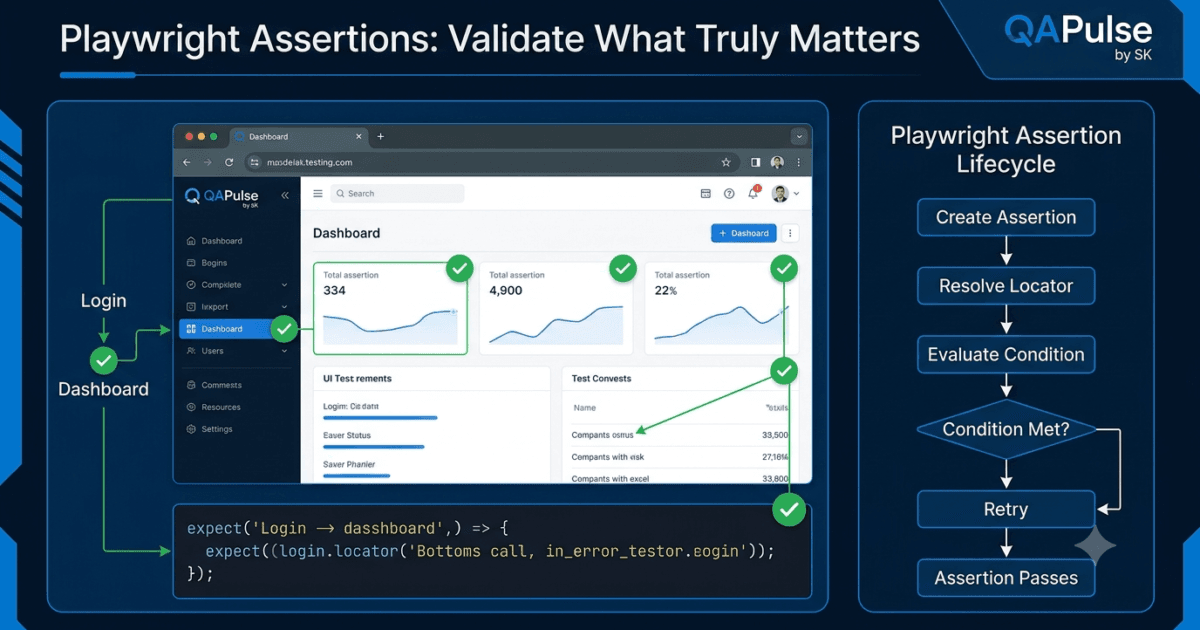
Playwright Assertions are the mechanism used to verify that an application behaves as expected during test execution. While locators identify elements and actions interact with them, assertions determine whether the result of those interactions matches the expected outcome. Without assertions, an automation script can execute successfully while failing to detect application defects.
Consider the following test.
await page.goto('https://example.com');

await page.getByLabel('Email').fill('john@example.com');

await page.getByLabel('Password').fill('password');

await page.getByRole('button', {
    name: 'Login'
}).click();
The test completes without any errors.
Does that mean the login succeeded?
Not necessarily.
The application could have:
- Displayed an error message.
- Redirected to an unexpected page.
- Shown a server error.
- Failed authentication.
- Loaded incomplete user data.
Without Playwright Assertions, the automation verifies only that the browser executed the actions—not that the application behaved correctly.
What Is an Assertion?
An assertion is a statement that verifies whether an expected condition is true.
If the condition is satisfied, the test continues.
If the condition is not satisfied, the test fails.
Example:
await expect(
    page.getByRole('heading', {
        name: 'Dashboard'
    })
).toBeVisible();
The assertion verifies that the Dashboard heading is visible after login.
If the heading never appears, Playwright reports a failure.
Assertions Validate Business Behaviour
Automation exists to validate business requirements rather than browser interactions.
Consider an online shopping application.
A user clicks Place Order.
The browser successfully performs the click.
Should the test pass?
No.
The real requirement is that the order must be created successfully.
The automation should verify business outcomes such as:
- Confirmation message appears.
- Order number is generated.
- Shopping cart becomes empty.
- Payment succeeds.
- Order history is updated.
Assertions transform browser automation into application validation.
Browser Actions vs Assertions
| Browser Actions | Playwright Assertions |
|---|---|
| Click buttons | Verify buttons appear |
| Fill forms | Verify entered values |
| Navigate pages | Verify destination page |
| Select options | Verify selected option |
| Upload files | Verify upload completed |
| Submit forms | Verify successful submission |
Actions change the application.
Assertions verify the application’s response.
Both are equally important.
How Playwright Assertions Work
Playwright Assertions are built on top of the same intelligent synchronization engine used by Playwright Auto-Waiting.
Instead of checking a condition only once, Playwright continuously evaluates it until one of two events occurs:
- The expected condition becomes true.
- The timeout expires.
The process looks like this.
Assertion Starts
        │
        ▼
Locate Element
        │
        ▼
Expected Condition Met?
      │          │
     No         Yes
      │          │
      ▼          ▼
Retry Check   Assertion Passes
      │
      ▼
Timeout?
      │
      ▼
Assertion Fails
This retry mechanism dramatically reduces flaky tests caused by slow rendering or delayed API responses.
Why Traditional Assertions Cause Flaky Tests
Many older automation frameworks evaluate assertions immediately.
Check Element

↓

Element Not Ready

↓

Assertion Fails
Even if the element appears a fraction of a second later, the test has already failed.
Playwright follows a different approach.
Check Element

↓

Not Ready

↓

Retry

↓

Retry

↓

Element Appears

↓

Assertion Passes
The framework synchronizes validation with the application’s actual state instead of relying on timing assumptions.
Categories of Playwright Assertions
Playwright provides assertions for many aspects of browser behavior.
Visibility
Verify whether an element is visible to the user.
Examples include:
- Success messages
- Buttons
- Forms
- Navigation menus
- Dialog boxes
Text
Verify displayed content.
Examples include:
- Error messages
- Welcome messages
- Product names
- Status updates
- Validation feedback
URL
Verify browser navigation.
Examples include:
- Login redirects
- Checkout completion
- Profile pages
- Dashboard navigation
Values
Verify form inputs.
Examples include:
- Text fields
- Search boxes
- Hidden inputs
- Default values
Attributes
Verify HTML attributes.
Examples include:
- Disabled state
- Placeholder text
- Hyperlinks
- CSS classes
- Accessibility attributes
State
Verify element state.
Examples include:
- Checked checkboxes
- Selected options
- Enabled buttons
- Editable inputs
- Focused controls
Assertion Lifecycle
Every Playwright assertion follows the same internal workflow.
Create Assertion

↓

Resolve Locator

↓

Evaluate Expected Condition

↓

Condition Satisfied?

↓

Yes → Pass

↓

No → Retry

↓

Timeout

↓

Fail
Because this workflow is standardized across all assertions, Playwright tests remain consistent regardless of what is being verified.
Assertions in Modern Web Applications
Modern frontend frameworks frequently update the DOM after user interactions.
Example workflow:
Click Login

↓

Authentication Request

↓

Loading Spinner

↓

User Data Retrieved

↓

Dashboard Rendered

↓

Welcome Message Appears
The welcome message may appear several seconds after the button click.
Traditional assertions often fail because they evaluate too early.
Playwright Assertions automatically wait until the expected state appears.
This behavior makes them particularly effective for:
- React
- Angular
- Vue
- Next.js
- Nuxt
- Svelte
- Single Page Applications
Why Assertions Should Verify Outcomes Instead of Implementation
A common mistake is verifying implementation details instead of business behavior.
Weak validation:
- A button was clicked.
- An API request was sent.
- A form was submitted.
Strong validation:
- User reaches the dashboard.
- Order is successfully created.
- Payment confirmation appears.
- Customer profile is updated.
- Success notification is displayed.
The second approach reflects what the user actually experiences.
Enterprise automation frameworks prioritize assertions that validate business outcomes because they provide greater confidence that the application is functioning correctly.
Enterprise Perspective
Large automation suites may execute thousands of tests every day across multiple browsers and CI/CD pipelines.
In these environments, unreliable assertions become one of the primary causes of flaky automation.
Well-designed Playwright frameworks follow several principles:
- Assertions validate business requirements rather than implementation details.
- Intelligent retry behavior is preferred over manual polling.
- Assertions are written against stable locators.
- Expected conditions are explicit and easy to understand.
- Every critical user journey ends with meaningful validation.
Strong assertions do more than verify UI elements—they confirm that the application delivered the correct result. They are the difference between tests that simply execute browser actions and tests that genuinely protect software quality.
Playwright Assertions: Complete Guide to Every Assertion API
Playwright Assertions are provided through the expect() function from @playwright/test. Every assertion automatically retries until the expected condition becomes true or the timeout expires. This intelligent retry mechanism is one of the reasons Playwright tests are significantly more reliable than traditional browser automation.
Importing Assertions
Assertions are included with the Playwright Test Runner.
import { test, expect } from '@playwright/test';
Every validation begins with the expect() function.
await expect(locator).toBeVisible();
The assertion continuously checks the condition until it succeeds or reaches the timeout.
Locator Assertions
Locator assertions verify the state of elements on a webpage. They are the most frequently used assertions in Playwright.
toBeVisible()
Verifies that an element is visible to the user.
await expect(
    page.getByRole('button', {
        name: 'Login'
    })
).toBeVisible();
Production Use Cases
- Login button
- Success message
- Navigation menu
- Modal dialog
- Toast notification
toBeHidden()
Verifies that an element is hidden.
await expect(
    page.getByTestId('loading-spinner')
).toBeHidden();
Common scenarios include:
- Loading indicators
- Closed dialogs
- Hidden menus
- Completed progress bars
toBeEnabled()
Checks whether an element is enabled.
await expect(
    page.getByRole('button', {
        name: 'Submit'
    })
).toBeEnabled();
Useful after:
- Form validation
- API completion
- File uploads
- Authentication
toBeDisabled()
Verifies that an element cannot be interacted with.
await expect(
    page.getByRole('button', {
        name: 'Checkout'
    })
).toBeDisabled();
Common scenarios:
- Invalid forms
- Permission restrictions
- Processing requests
toBeEditable()
Verifies that a text field accepts user input.
await expect(
    page.getByLabel('Email')
).toBeEditable();
Useful for:
- Input fields
- Search boxes
- Profile forms
toBeEmpty()
Checks whether an element contains no text.
await expect(
    page.locator('.notification')
).toBeEmpty();
Useful for:
- Empty containers
- Message areas
- Notification panels
Text Assertions
Text validation is one of the most common testing activities.
toHaveText()
Verifies the exact text.
await expect(
    page.getByTestId('status')
).toHaveText(
    'Payment Successful'
);
Suitable for:
- Status messages
- Order confirmation
- Labels
- Titles
toContainText()
Checks whether specific text exists.
await expect(
    page.locator('.product')
).toContainText(
    'MacBook'
);
Useful when additional content may also be present.
Examples:
- Product descriptions
- Blog content
- Search results
- Error messages
Value Assertions
toHaveValue()
Verifies the value of an input field.
await expect(
    page.getByLabel('Email')
).toHaveValue(
    'john@example.com'
);
Common use cases:
- Form validation
- Autofill verification
- Saved preferences
Attribute Assertions
toHaveAttribute()
Checks HTML attributes.
await expect(
    page.getByRole('link', {
        name: 'Home'
    })
).toHaveAttribute(
    'href',
    '/'
);
Useful for validating:
- Links
- IDs
- CSS classes
- Accessibility attributes
- Custom data attributes
Class Assertions
toHaveClass()
Verifies CSS classes.
await expect(
    page.locator('.menu')
).toHaveClass(
    /active/
);
Production scenarios include:
- Active navigation
- Selected tabs
- Validation styling
- Theme switching
State Assertions
toBeChecked()
Checks whether a checkbox or radio button is selected.
await expect(
    page.getByRole('checkbox')
).toBeChecked();
Useful for:
- Terms acceptance
- Preferences
- Settings pages
toBeFocused()
Verifies keyboard focus.
await expect(
    page.getByLabel('Search')
).toBeFocused();
Common in accessibility testing.
Count Assertions
toHaveCount()
Verifies the number of matching elements.
await expect(
    page.locator('.product-card')
).toHaveCount(12);
Useful for:
- Product listings
- Search results
- Table rows
- Notifications
Page Assertions
Assertions can validate browser state in addition to elements.
toHaveURL()
Verifies the current page URL.
await expect(page).toHaveURL(
    /dashboard/
);
Production scenarios:
- Login
- Logout
- Checkout
- Navigation
- Redirects
toHaveTitle()
Checks the browser title.
await expect(page).toHaveTitle(
    'Dashboard'
);
Useful for:
- SEO verification
- Navigation
- Page validation
API Response Assertions
Playwright can validate API responses.
expect(response.status()).toBe(200);

expect(response.ok()).toBeTruthy();
Useful for:
- API automation
- Backend validation
- Health checks
Generic JavaScript Assertions
Playwright also supports standard assertions.
expect(total).toBe(5);

expect(name).toEqual('John');

expect(users).toContain('Alice');

expect(isLoggedIn).toBeTruthy();

expect(hasError).toBeFalsy();

expect(price).toBeGreaterThan(100);

expect(score).toBeLessThan(50);
These are commonly used when validating:
- API responses
- Calculations
- Arrays
- Objects
- JSON data
Choosing the Right Assertion
| Scenario | Recommended Assertion |
|---|---|
| Button visible | toBeVisible() |
| Element hidden | toBeHidden() |
| Exact message | toHaveText() |
| Partial message | toContainText() |
| Input value | toHaveValue() |
| Checkbox selected | toBeChecked() |
| Link URL | toHaveAttribute() |
| Current page | toHaveURL() |
| Browser title | toHaveTitle() |
| Number of elements | toHaveCount() |
Assertion Timeout
Every assertion automatically retries until the timeout expires.
Example:
await expect(
    page.getByText(
        'Order Created'
    )
).toBeVisible({
    timeout: 10000
});
Playwright repeatedly evaluates the assertion for up to ten seconds before reporting a failure.
This retry behavior eliminates the need for manual polling or explicit delays in most production scenarios.
Assertion Best Practices
- Validate business outcomes instead of browser actions.
- Use locator assertions instead of reading raw DOM values.
- Prefer
toContainText()when dynamic content may change. - Use
toHaveText()only when the complete text must match. - Verify navigation using
toHaveURL()instead of string comparisons. - Keep assertions focused on a single expected outcome.
- Write assertions that describe user-visible behavior rather than implementation details.
A well-designed Playwright test performs an action and immediately validates its outcome using the most appropriate assertion. This combination of automatic retries, expressive APIs, and user-focused validation makes Playwright Assertions one of the strongest features of the Playwright testing framework.
Playwright Assertions: Advanced Validation Patterns and Real-World Testing Scenarios
Playwright Assertions become significantly more powerful when they are used to validate complete user journeys instead of individual UI elements. In enterprise automation, a successful test is not determined by whether a button was clicked—it is determined by whether the application reached the correct business outcome.
This section focuses on practical assertion strategies used in production Playwright frameworks.
Validating User Login
A login test should verify every important outcome of the authentication process.
Instead of checking only that the Login button was clicked, validate the complete workflow.
await page.goto('/login');

await page.getByLabel('Email').fill('john@example.com');

await page.getByLabel('Password').fill('Password123');

await page.getByRole('button', {
    name: 'Login'
}).click();

await expect(page).toHaveURL(/dashboard/);

await expect(
    page.getByRole('heading', {
        name: 'Dashboard'
    })
).toBeVisible();

await expect(
    page.getByTestId('user-name')
).toContainText('John');
This verifies three independent business outcomes:
- Authentication succeeded.
- Navigation completed.
- User information loaded correctly.
If any one of these conditions fails, the test reports the defect.
Validating Form Submission
Many applications display a confirmation message after submitting a form.
await page.getByLabel('First Name').fill('John');

await page.getByLabel('Last Name').fill('Doe');

await page.getByRole('button', {
    name: 'Submit'
}).click();

await expect(
    page.getByText(
        'Profile updated successfully'
    )
).toBeVisible();
The assertion validates that the business operation completed successfully instead of simply confirming that the button was clicked.
Validating Error Messages
Negative scenarios are just as important as successful workflows.
Example:
await page.getByRole('button', {
    name: 'Login'
}).click();

await expect(
    page.getByText(
        'Email is required'
    )
).toBeVisible();
Other common validation scenarios include:
- Invalid password
- Duplicate email
- Expired session
- Invalid coupon code
- Payment declined
Assertions confirm that the application handles incorrect input correctly.
Validating Lists
Many enterprise applications display dynamic collections.
Examples include:
- Products
- Orders
- Customers
- Notifications
- Employees
Instead of checking only one item, verify the complete collection.
await expect(
    page.locator('.product-card')
).toHaveCount(20);
You can also validate individual items.
await expect(
    page.locator('.product-card').first()
).toContainText('MacBook Pro');
Combining count and content assertions produces stronger validation.
Validating Tables
Business applications frequently display data tables.
Example:
await expect(
    page.locator('table tbody tr')
).toHaveCount(15);
Verify a specific row.
await expect(
    page.locator('table tbody tr').nth(2)
).toContainText('Completed');
Production scenarios include:
- Financial reports
- Employee records
- Audit logs
- Inventory systems
- CRM dashboards
Validating URLs After Navigation
URL validation confirms successful navigation.
await expect(page).toHaveURL(
    /checkout/
);
Useful after:
- Login
- Logout
- Registration
- Payment
- Password reset
- Order confirmation
Using toHaveURL() is more reliable than manually comparing URL strings because Playwright automatically retries until navigation completes.
Validating Browser Titles
Browser titles often change after navigation.
await expect(page).toHaveTitle(
    'Customer Dashboard'
);
This provides another layer of navigation verification.
It is also useful for SEO testing.
Combining Multiple Assertions
Enterprise workflows usually require more than one validation.
Example:
await expect(page).toHaveURL(/dashboard/);

await expect(
    page.getByRole('heading')
).toContainText('Dashboard');

await expect(
    page.getByTestId('user-name')
).toContainText('John');

await expect(
    page.getByRole('button', {
        name: 'Logout'
    })
).toBeVisible();
Together these assertions verify:
- Correct navigation
- Correct page
- Correct authenticated user
- Correct application state
Soft Assertions
By default, Playwright stops execution after the first failed assertion.
Sometimes collecting multiple failures in a single execution is more useful.
Example:
await expect.soft(
    page.getByTestId('first-name')
).toContainText('John');

await expect.soft(
    page.getByTestId('last-name')
).toContainText('Doe');

await expect.soft(
    page.getByTestId('country')
).toContainText('Australia');
The test continues even if one validation fails.
Soft assertions are particularly useful when validating dashboards containing numerous independent widgets.
Use them carefully—critical validations such as login or payment should generally remain hard assertions.
Assertions with Dynamic Content
Many applications display values that change continuously.
Examples include:
- Order IDs
- Timestamps
- User counts
- Stock prices
- Notification totals
Avoid validating exact values when the content is intentionally dynamic.
Instead of:
await expect(
    page.getByTestId('order-id')
).toHaveText(
    'ORD-100234'
);
Use partial validation.
await expect(
    page.getByTestId('order-id')
).toContainText('ORD-');
This verifies the expected format while remaining stable.
Avoid Over-Assertion
More assertions do not always produce better tests.
Poor example:
Verify Button Exists

↓

Verify Button Color

↓

Verify Button Width

↓

Verify Button Height

↓

Verify Button Font

↓

Click Button
Most of these validations provide little business value.
A stronger strategy is:
Click Login

↓

Verify Dashboard Opens

↓

Verify User Name Appears

↓

Verify Logout Available
The second approach validates the functionality that matters to users.
Assertion Pyramid
A useful strategy for designing reliable tests is the assertion pyramid.
Business Outcome
        ▲
        │
Application State
        ▲
        │
Navigation
        ▲
        │
UI Elements
The higher the assertion sits in the pyramid, the greater confidence it provides.
For example:
- “Dashboard is visible” provides more confidence than “Login button disappeared.”
- “Payment confirmation appears” provides more confidence than “Submit button was clicked.”
Focus on assertions that validate user success rather than intermediate implementation details.
Enterprise Assertion Strategy
Large Playwright frameworks generally follow these guidelines:
- Validate business outcomes before UI details.
- Prefer user-visible behavior over implementation-specific checks.
- Use multiple assertions for critical workflows.
- Avoid assertions that depend on unstable data.
- Keep each assertion focused on a single expectation.
- Use soft assertions only when collecting multiple independent failures is beneficial.
- Review assertions during code reviews to ensure they verify meaningful functionality.
Well-designed Playwright Assertions act as executable business requirements. Every assertion should answer one question: Did the application behave exactly as the user expected? When assertions are written with this mindset, automation becomes more maintainable, more reliable, and significantly more valuable to development teams.
Playwright Assertions: Internal Mechanics, Common Mistakes, Debugging, and Enterprise Best Practices
Playwright Assertions are far more than simple comparison statements. Every assertion is executed by Playwright’s intelligent assertion engine, which repeatedly evaluates the expected condition until it succeeds or the configured timeout expires. This retry mechanism allows Playwright to synchronize with modern web applications that constantly update their user interface.
Understanding how the assertion engine works internally helps automation engineers write reliable tests, investigate failures quickly, and avoid common mistakes that lead to flaky automation.
How the Assertion Engine Works
Consider the following assertion.
await expect(
    page.getByText(
        'Order Created Successfully'
    )
).toBeVisible();
Internally, Playwright does much more than perform a single comparison.
Create Assertion
        │
        ▼
Resolve Locator
        │
        ▼
Evaluate Expected Condition
        │
        ▼
Condition Satisfied?
     │           │
    No          Yes
     │           │
     ▼           ▼
Retry        Assertion Passes
     │
     ▼
Timeout Reached?
     │
     ▼
Assertion Fails
Unlike traditional assertion libraries, Playwright continuously evaluates the condition until it succeeds.
This behavior dramatically reduces failures caused by rendering delays, animations, and asynchronous API responses.
Automatic Retry vs Manual Polling
Some engineers attempt to implement their own retry logic.
for (let i = 0; i < 10; i++) {
    try {
        expect(value).toBe('Success');
        break;
    } catch {}
}
This pattern duplicates functionality already provided by Playwright.
The equivalent Playwright assertion is significantly cleaner.
await expect(
    page.getByTestId('status')
).toHaveText(
    'Success'
);
The framework automatically retries until the expected text appears.
Assertion Timeouts
Every Playwright assertion operates within a timeout.
await expect(
    page.getByRole('heading')
).toBeVisible({
    timeout: 10000
});
Execution follows this lifecycle.
Start Timer

↓

Evaluate Condition

↓

Condition Met?

↓

Yes → Pass

↓

No → Retry

↓

Timeout Expires

↓

Fail Test
The timeout prevents tests from waiting indefinitely while still allowing dynamic applications enough time to reach the expected state.
Understanding Assertion Failures
An assertion failure does not always indicate an application defect.
Possible causes include:
- Incorrect locator
- Unexpected navigation
- Backend failure
- Authentication issue
- Network delay
- JavaScript exception
- Test data problem
- Incorrect expected value
Always investigate why the expected condition was not satisfied before modifying the assertion.
Assertions Should Verify User Outcomes
One of the most common mistakes is validating implementation details instead of user-visible behavior.
Weak assertion:
await expect(
    page.getByRole('button', {
        name: 'Submit'
    })
).toBeVisible();
The button being visible provides very little confidence.
A stronger assertion verifies the actual result.
await expect(
    page.getByText(
        'Payment Successful'
    )
).toBeVisible();
Even better:
await expect(page).toHaveURL(
    /confirmation/
);

await expect(
    page.getByTestId('order-number')
).toBeVisible();
These assertions confirm that the complete business workflow succeeded.
Avoid Over-Validation
Some automation engineers attempt to verify every visual property.
Examples include:
- Font family
- Font size
- Button width
- Margin
- Padding
- Background color
Most of these checks provide little business value and make tests unnecessarily fragile.
Instead, prioritize validations such as:
- User logged in successfully.
- Order created.
- Profile updated.
- Invoice generated.
- Download completed.
Assertions should protect functionality rather than implementation.
Hard Assertions vs Soft Assertions
Playwright supports both hard and soft assertions.
Hard Assertion
await expect(
    page.getByText(
        'Dashboard'
    )
).toBeVisible();
If this assertion fails, the test stops immediately.
Hard assertions are recommended for critical workflows such as:
- Login
- Payment
- Checkout
- Authentication
- Registration
Soft Assertion
await expect.soft(
    page.getByTestId('cpu')
).toContainText('%');
Soft assertions allow the test to continue even when one validation fails.
They are useful when validating multiple independent widgets on a dashboard.
Choose soft assertions carefully.
Critical business workflows should generally fail immediately.
Debugging Assertion Failures
Trace Viewer
Trace Viewer provides detailed information about every assertion.
You can inspect:
- Locator resolution
- Screenshots
- DOM snapshots
- Timing information
- Network requests
- Console output
This allows engineers to determine exactly why an assertion failed.
Playwright Inspector
Inspector executes tests interactively.
It allows you to:
- Pause execution
- Inspect locators
- Evaluate assertions
- Observe browser state
- Step through each command
Inspector is particularly useful when debugging intermittent failures.
Screenshots
Screenshots provide immediate visual context.
Typical observations include:
- Missing data
- Loading overlays
- Validation errors
- Incorrect page
- Hidden elements
- Unexpected dialogs
A screenshot often explains an assertion failure within seconds.
Videos
Video recordings help diagnose:
- Animations
- Timing issues
- Race conditions
- Navigation failures
- User interaction problems
Combining videos with Trace Viewer significantly reduces debugging time.
Assertion Strategy for Enterprise Frameworks
Large organizations typically establish assertion guidelines to maintain consistency across thousands of automated tests.
Common standards include:
- Validate business outcomes instead of browser actions.
- Use Playwright Assertions instead of manual comparisons.
- Prefer locator assertions over raw DOM inspection.
- Avoid validating unstable dynamic values.
- Keep assertions readable and self-explanatory.
- Fail fast for critical workflows.
- Use soft assertions only for independent validations.
- Review assertions during pull requests.
These standards improve maintainability and reduce flaky failures across large automation suites.
Performance Considerations
Assertions automatically retry until the expected condition becomes true.
Because of this behavior:
- Do not add
waitForTimeout()before assertions. - Do not implement manual retry loops.
- Do not increase timeouts without identifying the root cause.
- Allow Playwright’s synchronization engine to manage timing.
Removing unnecessary waiting improves execution speed while maintaining reliability.
Interview Questions
Why are Playwright Assertions more reliable than traditional assertions?
Because Playwright automatically retries assertions until the expected condition is satisfied or the timeout expires, reducing failures caused by asynchronous UI updates.
What is the difference between toHaveText() and toContainText()?
toHaveText() verifies an exact text match, while toContainText() checks whether the expected text exists within the actual content, making it more suitable for dynamic text.
When should soft assertions be used?
Soft assertions are appropriate when validating multiple independent UI components where collecting all failures is more valuable than stopping after the first error.
Why should assertions verify business outcomes?
Business outcome assertions confirm that the application fulfilled the user’s objective, providing stronger confidence than verifying intermediate UI states or implementation details.
Production Checklist
Before merging a Playwright test into a production framework, verify the following:
- Every critical user action ends with a meaningful assertion.
- Assertions validate business outcomes rather than implementation details.
- Manual retry loops are not used.
waitForTimeout()is not placed before assertions.- Exact text assertions are reserved for stable content.
- Dynamic values use partial or pattern-based assertions.
- Critical workflows use hard assertions.
- Dashboard-style validations use soft assertions only where appropriate.
- Trace Viewer, screenshots, and videos are enabled for failed tests.
- Assertions remain readable, maintainable, and easy to understand.
Well-designed Playwright Assertions transform browser automation into reliable business validation. They ensure that tests verify not only what the browser did, but also whether the application delivered the correct result to the user under real-world conditions.
Internal Links
- Day 1: What is Playwright and Why Everyone is Talking About It
- Day 2: How to Install Playwright: Complete Beginner Setup Guide for 2026
- Day 3: Your First Playwright Test: Understanding Every Line Before You Write Code
- Day 4: How Playwright Works Behind the Scenes: Complete Architecture Guide for Beginners
- Day 5: Playwright Locators: Stop Writing Fragile Selectors Forever
- Day 6: Playwright Auto Waiting: Complete Guide to Reliable Test Synchronization
- Playwright: Zero to Hero Series
External Links
- Playwright Assertions Documentation: https://playwright.dev/docs/test-assertions
- Playwright Locator Assertions: https://playwright.dev/docs/api/class-locatorassertions
- Playwright Expect API: https://playwright.dev/docs/api/class-genericassertions
AI Search Optimized Section
What Are Playwright Assertions?
Playwright Assertions are built-in validation methods that automatically retry until the expected condition becomes true or the timeout expires. They are used to verify application behavior after browser interactions.
Why Are Playwright Assertions Important?
Playwright Assertions confirm that business functionality works correctly instead of simply verifying that browser actions executed successfully. They reduce flaky tests by synchronizing validation with the application’s actual state.
How Do Playwright Assertions Work?
Playwright continuously evaluates the expected condition using its intelligent retry engine. If the condition becomes true before the timeout expires, the assertion passes; otherwise, the test fails.
What Can Playwright Assertions Validate?
Playwright Assertions can validate:
- Element visibility
- Text content
- URLs
- Browser titles
- Form values
- HTML attributes
- CSS classes
- Checkbox state
- Element count
- API responses
- JavaScript objects and values
Best Practices
- Validate business outcomes instead of browser interactions.
- Use
toContainText()for dynamic content. - Reserve
toHaveText()for exact matches. - Prefer locator assertions over manual DOM inspection.
- Use
toHaveURL()after navigation. - Keep each assertion focused on a single expected behavior.
- Use soft assertions only for independent validations.
- Enable Trace Viewer for failed assertions.
Common Mistakes
- Writing tests without assertions.
- Validating implementation details instead of user outcomes.
- Adding
waitForTimeout()before assertions. - Using exact text assertions for dynamic values.
- Creating manual retry loops.
- Increasing assertion timeouts without identifying the root cause.
- Over-validating insignificant UI properties.
Frequently Asked Questions
What are Playwright Assertions?
Playwright Assertions are intelligent validation methods that automatically retry until an expected condition is satisfied or the timeout expires.
What is the difference between toHaveText() and toContainText()?
toHaveText() requires an exact text match, while toContainText() verifies that the expected text appears within the actual content, making it more suitable for dynamic applications.
Do Playwright Assertions automatically wait?
Yes. Every Playwright Assertion uses the framework’s built-in retry mechanism, eliminating the need for most manual waits.
When should I use soft assertions?
Soft assertions are useful when validating multiple independent components, such as dashboard widgets, where collecting all failures is more valuable than stopping after the first one.
Why should assertions verify business outcomes?
Business outcome assertions ensure that the application achieved the user’s objective, providing much stronger confidence than verifying intermediate UI states or implementation details.
Engineering Challenge #1
The first practical exercise begins here. Do not copy and paste the solution—build it yourself.
Scenario
Automate the login page of the OrangeHRM demo application.
Website
https://opensource-demo.orangehrmlive.com
Requirements
Build a Playwright test that performs the following:
- Launch the browser.
- Navigate to the login page.
- Verify the username field is visible.
- Verify the password field is visible.
- Verify the Login button is enabled.
- Enter the provided username and password.
- Click Login.
- Verify the browser navigates to the Dashboard.
- Verify the Dashboard heading is visible.
- Verify the user profile menu appears.
Bonus Challenge
Extend your solution by automating an invalid login.
Validate:
- Incorrect username
- Incorrect password
- Empty username
- Empty password
Use appropriate Playwright Assertions for every expected outcome.
No solution is provided in this lesson. Try implementing the exercise yourself before continuing to the next article.
Conclusion
Playwright Assertions transform browser automation into meaningful software validation. By combining intelligent retry logic with expressive assertion APIs, Playwright enables engineers to verify real business outcomes instead of merely confirming that browser actions executed. Mastering assertions is essential for building stable, maintainable, and production-ready automation frameworks.
For more expert tutorials on Playwright, QA Automation, AI-powered testing, SDET engineering, and production automation frameworks, visit www.skakarh.com.