QA
QA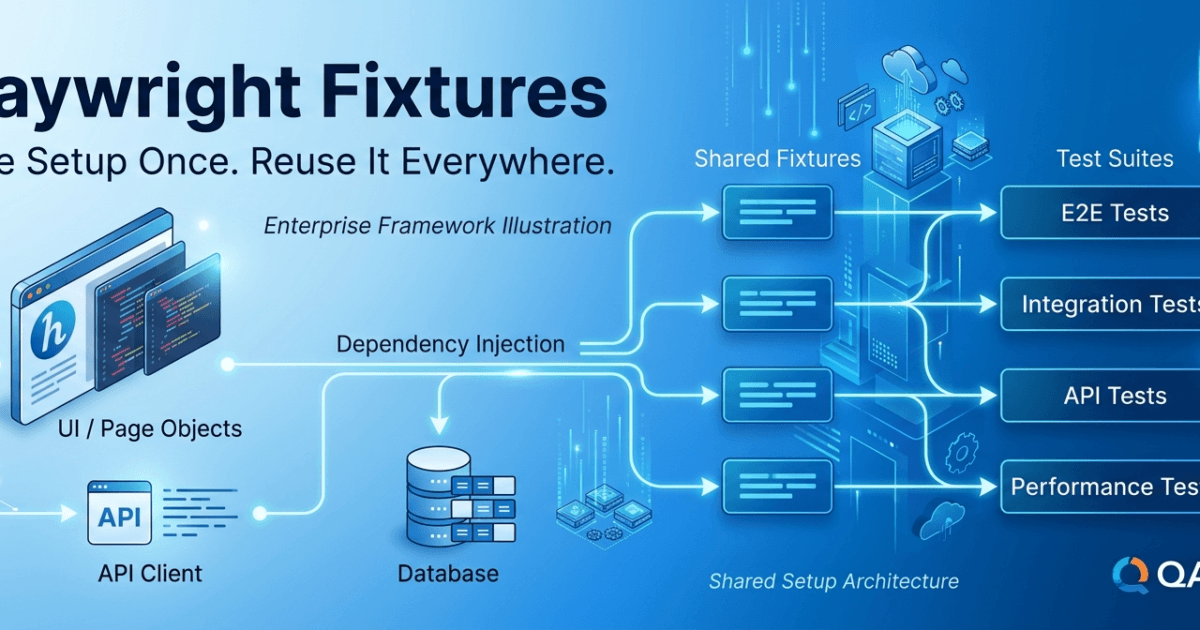
Playwright Fixtures are one of the most powerful features in Playwright because they eliminate repetitive setup code and provide a clean, reusable mechanism for managing test dependencies. Whether you need a logged-in user, a browser context, test data, API authentication, or database initialization, Playwright Fixtures allow you to prepare these resources once and reuse them across hundreds of automated tests.
Without Playwright Fixtures, automation frameworks quickly become cluttered with duplicated setup and teardown logic. Every test repeats the same browser initialization, authentication, navigation, and cleanup steps, making the framework harder to maintain and scale. By introducing fixtures, Playwright encourages modular test design where each test focuses only on the business scenario while shared resources are managed automatically.
What Are Playwright Fixtures?
A fixture is a reusable piece of setup and cleanup logic that Playwright automatically provides to your tests.
Instead of manually creating objects inside every test, fixtures prepare those objects before the test starts and dispose of them after the test finishes.
Think of fixtures as dependency providers for your test cases.
A fixture can create:
- Browser instances
- Browser contexts
- Pages
- Logged-in users
- API clients
- Test data
- Database connections
- Mock services
- Utility classes
- Page Objects
Every test receives only the resources it requires.
Why Do We Need Playwright Fixtures?
Consider a login test.
Without fixtures, every test performs the following steps:
Launch Browser

↓

Create Context

↓

Open Page

↓

Navigate to Login

↓

Enter Credentials

↓

Login

↓

Execute Test

↓

Close Browser
Now imagine you have 500 automated tests.
Each test repeats the same initialization logic.
This results in:
- Duplicate code
- Longer test files
- Difficult maintenance
- Increased execution time
- Poor framework organization
Playwright Fixtures solve this problem by moving common setup into reusable components.
Testing Without Fixtures
Many beginners start with tests like this:
Test 1

↓

Launch Browser

↓

Login

↓

Execute Test

↓

Close Browser


Test 2

↓

Launch Browser

↓

Login

↓

Execute Test

↓

Close Browser


Test 3

↓

Launch Browser

↓

Login

↓

Execute Test

↓

Close Browser
Although functional, this approach violates the Don’t Repeat Yourself (DRY) principle.
Every modification to the login process requires updating multiple tests.
Testing with Playwright Fixtures
With Playwright Fixtures, the workflow changes significantly.
Fixture

↓

Browser

↓

Login

↓

Shared Resources

↓

Test 1

Test 2

Test 3
The setup is written once.
Every test automatically receives the prepared resources.
This makes automation cleaner and easier to maintain.
Built-in Playwright Fixtures
Playwright already provides several built-in fixtures.
Common examples include:
browsercontextpagerequestbrowserName
These fixtures are available without additional configuration.
For example, when writing:
test('Example Test', async ({ page }) => {

});
the page object is already a built-in Playwright fixture.
You have been using fixtures since your very first Playwright test, even if you were unaware of it.
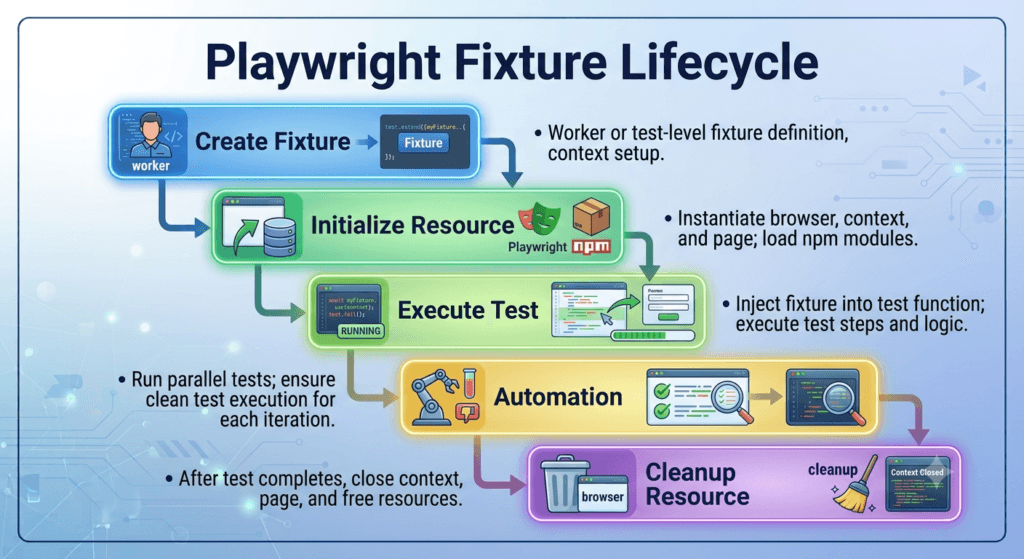
Understanding Fixture Lifecycle
Every fixture follows a predictable lifecycle.
Create Fixture

↓

Initialize Resource

↓

Run Test

↓

Cleanup Resource
Playwright automatically manages this lifecycle.
Developers do not need to manually create and destroy every dependency.
This reduces boilerplate code and minimizes resource leaks.
Types of Fixtures
Playwright supports different categories of fixtures depending on how they are shared.
Built-in Fixtures
Provided by Playwright itself.
Examples:
- Browser
- Context
- Page
- API Request Context
Custom Fixtures
Created by the automation engineer.
Examples:
- Logged-in User
- Admin User
- Employee Dashboard
- Database Helper
- API Client
- Test Data Generator
- Utility Classes
Custom fixtures allow teams to standardize common testing operations.
Benefits of Playwright Fixtures
Using Playwright Fixtures provides several important advantages.
Reduced Code Duplication
Common setup logic is written once and reused throughout the framework.
Improved Readability
Tests become shorter and easier to understand because setup details are hidden inside fixtures.
Better Maintainability
Changes to authentication, browser setup, or shared resources are made in one location.
Faster Development
Engineers spend less time rewriting initialization code.
Consistent Test Environment
Every test starts from a predictable and controlled state.
Enterprise Scalability
Large teams can share fixtures across multiple modules and projects without duplicating implementation.
Fixtures and the Page Object Model
The Playwright Fixtures feature works exceptionally well with the Playwright Page Object Model introduced in the previous lesson.
Instead of manually creating Page Objects inside every test, fixtures can prepare them automatically.
This creates a cleaner architecture where:
Fixtures

↓

Page Objects

↓

Business Tests
Tests become focused entirely on validating business functionality rather than framework setup.
Real Enterprise Example
Consider an HR management system where almost every feature requires user authentication.
Without fixtures, each test performs login before executing its business scenario.
With Playwright Fixtures, authentication can be centralized.
Every test immediately starts with a logged-in session, allowing engineers to focus on validating features such as employee management, leave requests, payroll, or recruitment instead of repeatedly performing the same setup steps.
This approach significantly reduces maintenance effort while improving test consistency across the entire automation framework.
When Should You Use Playwright Fixtures?
Playwright Fixtures are recommended whenever multiple tests require the same setup, shared resources, or reusable dependencies.
Typical use cases include:
- Browser initialization
- User authentication
- API clients
- Test data preparation
- Environment configuration
- Page Object creation
- Database setup
- Mock services
- Utility classes
As your automation framework grows, fixtures become an essential architectural component for maintaining clean, scalable, and production-ready Playwright projects.
Playwright Fixtures: Creating Your First Custom Fixture
In the previous lesson, you learned the purpose of Playwright Fixtures and why they are essential for building maintainable automation frameworks. In this section, you will create your first custom fixture and understand how Playwright injects reusable objects into your tests automatically.
The goal is to stop creating the same objects repeatedly inside every test and instead let Playwright manage them for you.
Understanding test.extend()
The foundation of custom Playwright Fixtures is the test.extend() method.
It allows you to create new fixtures while keeping all built-in Playwright fixtures such as page, browser, and context.
Basic syntax:
import { test as base } from '@playwright/test';

export const test = base.extend({

});
Here:
baserepresents the original Playwright test object.extend()creates additional fixtures.- The new
testobject includes both built-in and custom fixtures.
Every test that imports this new test object automatically receives your custom fixtures.
Step 1: Create a Fixtures Folder
Organize your project by creating a dedicated folder.
playwright-framework/

├── fixtures/

│   └── fixtures.ts

├── pages/

├── tests/

└── playwright.config.ts
As your framework grows, this folder will contain reusable setup logic shared across multiple test suites.
Step 2: Create Your First Custom Fixture
Suppose every test needs a LoginPage.
Instead of creating it inside every test file, create a fixture.
import { test as base } from '@playwright/test';
import { LoginPage } from '../pages/LoginPage';

export const test = base.extend({

    loginPage: async ({ page }, use) => {

        await use(new LoginPage(page));

    }

});
This creates a fixture named loginPage.
Whenever a test requests loginPage, Playwright automatically creates the object and provides it to the test.
Understanding the Fixture Function
Consider this code.
loginPage: async ({ page }, use) => {

    await use(new LoginPage(page));

}
Each part has a specific responsibility.
page
The built-in Playwright fixture.
It represents the active browser page.
new LoginPage(page)
Creates a new Page Object using the current browser page.
use()
The use() function passes the created object to the test.
Once the test finishes, Playwright continues executing any cleanup code placed after use().
This lifecycle management is one of the biggest advantages of Playwright Fixtures.
Step 3: Import the Fixture
Instead of importing Playwright’s default test, import your customized version.
import { test, expect } from '../fixtures/fixtures';
From this point onward, every test has access to your custom fixtures.
Step 4: Use the Fixture
Your test becomes much cleaner.
test('User Login', async ({ page, loginPage }) => {

    await page.goto('https://opensource-demo.orangehrmlive.com');

    await loginPage.login('Admin', 'admin123');

});
Notice that you never created the LoginPage object manually.
Playwright handled everything automatically.
Comparing Both Approaches
Without Playwright Fixtures
const loginPage = new LoginPage(page);

await loginPage.login(...);
Every test repeats this initialization.
With Playwright Fixtures
test('User Login', async ({ loginPage }) => {

    await loginPage.login(...);

});
Initialization disappears completely.
Tests become shorter and easier to read.
Adding Multiple Fixtures
A framework rarely contains only one fixture.
You can register several fixtures together.
export const test = base.extend({

    loginPage: ...

    dashboardPage: ...

    employeePage: ...

});
Now every test can request only the resources it needs.
Example:
test('Employee Search', async ({

    loginPage,

    employeePage

}) => {

});
Playwright injects both fixtures automatically.
Fixture Dependency
Fixtures can depend on other fixtures.
Example workflow:
Browser

↓

Page

↓

LoginPage

↓

DashboardPage

↓

EmployeePage
Playwright resolves these dependencies automatically before executing the test.
This makes framework initialization predictable and reliable.
Understanding the use() Lifecycle
One of the most important concepts in Playwright Fixtures is the position of the use() function.
fixture: async ({ page }, use) => {

    // Setup

    await use(resource);

    // Cleanup

}
Everything before use() is setup.
Everything after use() is cleanup.
Example:
database: async ({}, use) => {

    await connectDatabase();

    await use(database);

    await disconnectDatabase();

}
This ensures resources are always released properly.
Creating Reusable Login Fixtures
Many enterprise applications require authentication before testing begins.
Instead of performing login inside every test, create a fixture that returns an authenticated Page Object.
Workflow:
Browser

↓

Login

↓

Dashboard

↓

Execute Test
Every test starts from the same authenticated state.
This reduces duplicate code and improves execution consistency.
Common Beginner Mistakes
Creating Objects Inside Every Test
Avoid repeatedly writing:
const loginPage = new LoginPage(page);
Move object creation into fixtures.
Mixing Setup with Business Logic
Tests should verify business functionality.
Fixtures should prepare resources.
Keeping these responsibilities separate improves readability.
Creating Unnecessary Fixtures
Not every helper function needs to become a fixture.
Only create fixtures for reusable dependencies shared across multiple tests.
Organizing Fixture Files
As the framework expands, split fixtures logically.
Example:
fixtures/

├── pages.ts

├── users.ts

├── api.ts

├── database.ts

├── auth.ts

└── fixtures.ts
This modular approach keeps fixture definitions organized and easy to maintain.
Enterprise Perspective
Large Playwright frameworks may contain dozens of custom fixtures.
Examples include:
- Login fixtures
- Admin users
- Customer users
- API clients
- Database connections
- Mock servers
- Test data generators
- Payment gateways
- Email services
- Reporting utilities
By centralizing setup logic inside Playwright Fixtures, enterprise teams eliminate repetitive initialization code and ensure every test executes in a consistent environment.
Playwright Fixtures: Advanced Fixtures, Scope, and Dependency Injection
After creating your first custom Playwright Fixtures, the next step is understanding how enterprise automation frameworks manage shared resources efficiently. Large Playwright projects may contain dozens of fixtures that depend on one another, and understanding fixture scope and dependency injection is essential for building fast, scalable, and maintainable test automation frameworks.
How Playwright Resolves Fixtures
One of the biggest advantages of Playwright Fixtures is automatic dependency resolution.
Consider this test.
test('Create Employee', async ({

    loginPage,

    dashboardPage,

    employeePage

}) => {

});
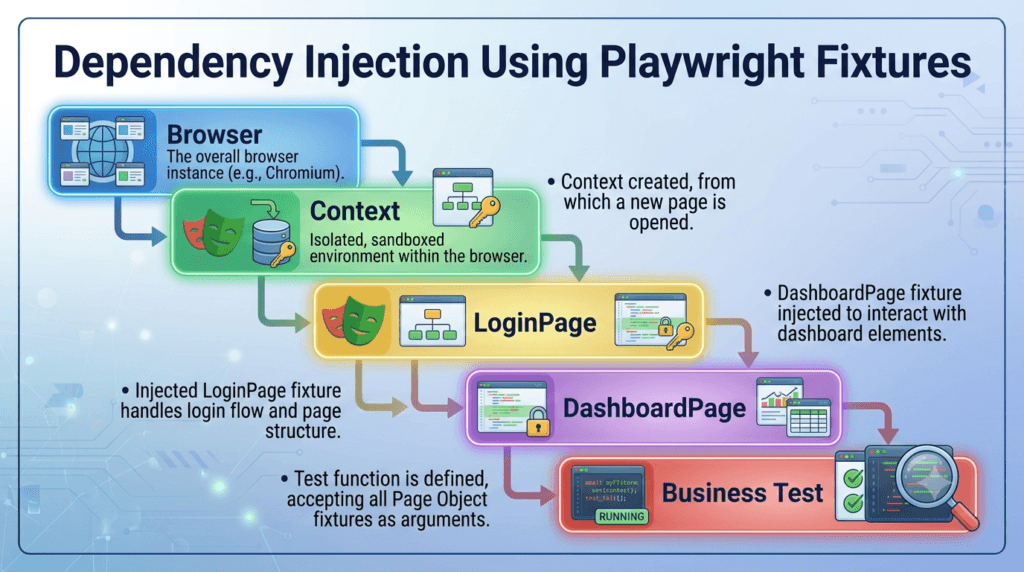
Before the test starts, Playwright automatically determines which fixtures are required.
The execution flow looks like this:
Browser

↓

Browser Context

↓

Page

↓

LoginPage

↓

DashboardPage

↓

EmployeePage

↓

Execute Test
Each dependency is created only when required.
This process is known as Dependency Injection.
What is Dependency Injection?
Dependency Injection (DI) is a software design principle where objects receive the resources they need instead of creating those resources themselves.
Without Dependency Injection:
const loginPage = new LoginPage(page);

const dashboardPage = new DashboardPage(page);

const employeePage = new EmployeePage(page);
Every test manually creates objects.
With Playwright Fixtures:
test('Employee Search', async ({

    loginPage,

    employeePage

}) => {

});
Playwright creates the required objects automatically.
The test simply requests them.
Fixture Scope
Not every fixture should be created before every test.
Playwright supports different fixture scopes to optimize execution.
The two most important scopes are:
- Test Scope
- Worker Scope
Understanding the difference can significantly improve execution speed.
Test-Scoped Fixtures
A test-scoped fixture is created separately for every test.
Execution flow:
Test 1

↓

Create Fixture

↓

Execute Test

↓

Destroy Fixture


Test 2

↓

Create Fixture

↓

Execute Test

↓

Destroy Fixture
Every test receives a fresh resource.
This provides excellent isolation and prevents one test from affecting another.
Examples:
- Page Objects
- Temporary files
- Test data
- Browser pages
Worker-Scoped Fixtures
Worker-scoped fixtures are created once for an entire worker process.
Execution flow:
Worker Starts

↓

Create Fixture

↓

Test 1

↓

Test 2

↓

Test 3

↓

Destroy Fixture
The same resource is shared across multiple tests.
Examples:
- Database connection
- API authentication token
- Test server
- Shared configuration
- Mock services
Worker fixtures reduce initialization time and improve execution performance.
Choosing the Correct Scope
Use test scope when:
- Every test requires complete isolation.
- Resources should not be shared.
- Data changes frequently.
Use worker scope when:
- Setup is expensive.
- Resources are read-only.
- Multiple tests can safely share the same object.
Choosing the appropriate scope improves both reliability and execution speed.
Fixture Dependencies
Fixtures can depend on other fixtures.
Example:
Browser

↓

Context

↓

Page

↓

LoginPage

↓

DashboardPage

↓

EmployeePage

↓

ReportsPage
Playwright creates these dependencies automatically in the correct order.
You do not need to manage initialization manually.
Sharing Authentication
Authentication is one of the most common uses of Playwright Fixtures.
Instead of logging in before every test, create an authenticated fixture.
Workflow:
Browser

↓

Login

↓

Authenticated Session

↓

Execute Tests
Every test begins with a valid session.
Benefits include:
- Faster execution
- Cleaner test files
- Consistent environment
- Reduced duplicate code
Combining Fixtures with Page Objects
Enterprise frameworks typically combine fixtures with the Playwright Page Object Model.
Example architecture:
Fixtures

↓

LoginPage

↓

DashboardPage

↓

EmployeePage

↓

Business Tests
Tests never create Page Objects manually.
Fixtures inject the required Page Objects automatically.
This creates highly readable and maintainable test code.
Lazy Fixture Creation
Playwright creates fixtures only when they are requested.
Example:
test('Login Test', async ({

    loginPage

}) => {

});
Only loginPage is created.
If another fixture exists but is not requested:
employeePage
Playwright does not create it.
This lazy initialization reduces unnecessary resource usage.
Fixture Cleanup
Every fixture has two phases.
Setup

↓

Execute Test

↓

Cleanup
Cleanup is automatic.
Typical cleanup operations include:
- Closing browser contexts
- Removing temporary files
- Disconnecting databases
- Resetting test data
- Releasing external resources
Proper cleanup prevents flaky tests and resource leaks.
Building a Shared Framework
As your framework grows, organize fixtures into reusable modules.
Example:
fixtures/

├── auth.ts

├── pages.ts

├── api.ts

├── users.ts

├── database.ts

├── environment.ts

└── fixtures.ts
Each file manages a specific responsibility.
This modular approach keeps the framework organized and easy to maintain.
Common Design Patterns
Experienced Automation Engineers typically follow these patterns when implementing Playwright Fixtures.
Authentication Fixture
Creates authenticated users.
Page Object Fixture
Creates reusable Page Objects.
API Fixture
Provides authenticated API clients.
Database Fixture
Handles database setup and cleanup.
Test Data Fixture
Generates reusable test data.
Environment Fixture
Loads configuration for different execution environments.
Separating these responsibilities makes the framework easier to extend.
Common Mistakes
Avoid these mistakes when working with Playwright Fixtures:
- Creating unnecessary fixtures.
- Sharing mutable data across tests.
- Using worker scope for data that changes frequently.
- Writing business assertions inside fixtures.
- Mixing setup logic with business workflows.
- Ignoring fixture cleanup.
- Creating circular fixture dependencies.
Following clean architectural principles helps keep automation frameworks stable as they grow.
Enterprise Perspective
Modern enterprise automation frameworks rely heavily on Playwright Fixtures to manage complex test environments. Authentication, Page Objects, API clients, databases, configuration, and shared utilities are all injected automatically rather than created manually inside test files.
This dependency injection model reduces code duplication, simplifies maintenance, improves execution speed, and enables large QA teams to build scalable automation frameworks capable of supporting thousands of reliable tests across multiple browsers, environments, and CI/CD pipelines.
Playwright Fixtures: Enterprise Best Practices, Framework Architecture, and Interview Guide
As automation frameworks grow, Playwright Fixtures become much more than a setup mechanism. They evolve into the backbone of dependency management, ensuring every test executes in a predictable, isolated, and reusable environment. Well-designed fixtures improve maintainability, reduce framework complexity, and allow teams to scale from a few tests to thousands without rewriting initialization logic.
Designing an Enterprise Fixture Architecture
A production-ready framework should organize fixtures according to their responsibilities rather than placing everything in a single file.
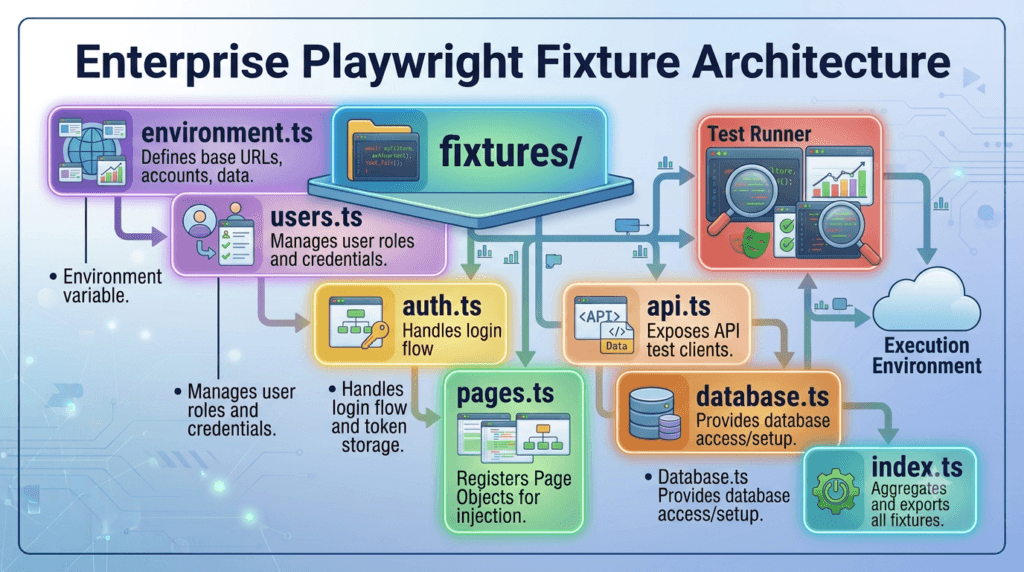
Recommended structure:
playwright-framework/

├── fixtures/
│   ├── auth.ts
│   ├── pages.ts
│   ├── api.ts
│   ├── database.ts
│   ├── users.ts
│   ├── environment.ts
│   ├── storageState.ts
│   └── index.ts

├── pages/

├── components/

├── tests/

└── playwright.config.ts
Each fixture file should manage only one area of the framework.
This makes the project easier to understand and extend.
Build Small, Focused Fixtures
A fixture should perform one responsibility.
Good examples:
- Create a logged-in user
- Initialize an API client
- Create Page Objects
- Connect to a database
- Load environment configuration
Avoid creating one fixture that performs multiple unrelated operations.
Poor example:
Login

↓

Create Employee

↓

Generate Test Data

↓

Call API

↓

Verify Dashboard

↓

Cleanup Database
A fixture should prepare resources, not execute business workflows.
Keep Tests Independent
Every automated test should be able to run independently.
Avoid creating tests that depend on previous test execution.
Poor workflow:
Test 1

↓

Creates Employee

↓

Test 2

↓

Updates Employee

↓

Test 3

↓

Deletes Employee
If Test 1 fails, the remaining tests also fail.
Better approach:
Fixture

↓

Prepare Employee

↓

Run Test

↓

Cleanup
Each test starts with everything it needs.
Use Fixtures with the Page Object Model
The Playwright Fixtures feature integrates naturally with the Playwright Page Object Model.
Recommended architecture:
Fixtures

↓

Page Objects

↓

Business Scenarios
A test should never create Page Objects manually.
Instead of:
const loginPage = new LoginPage(page);

const dashboardPage = new DashboardPage(page);
Use injected fixtures:
test('Employee Search', async ({

    loginPage,

    dashboardPage

}) => {

});
The framework manages object creation automatically.
Separate Test Data from Fixtures
Fixtures should prepare resources.
They should not contain hardcoded business data.
Avoid:
await loginPage.login(

    'Admin',

    'admin123'

);
A better approach is to load credentials from:
- Environment variables
- Configuration files
- Secure secret managers
- Test data files
This improves security and supports multiple environments.
Avoid Deep Fixture Chains
Although fixtures can depend on each other, long dependency chains increase complexity.
Poor example:
Fixture A

↓

Fixture B

↓

Fixture C

↓

Fixture D

↓

Fixture E
If one fixture changes, several others may be affected.
Keep dependencies as simple as possible.
Name Fixtures Clearly
Choose names that describe their purpose.
Good examples:
loginPage

dashboardPage

employeePage

apiClient

database

adminUser
Avoid generic names such as:
helper

manager

service

object

data
Descriptive names improve readability and reduce confusion.
Minimize Duplicate Setup
If the same setup appears in multiple test files, move it into a fixture.
Instead of:
Launch Browser

↓

Navigate

↓

Login

↓

Open Dashboard
Repeated dozens of times, create one reusable fixture that performs the shared initialization.
This keeps test files concise and focused.
Use Worker Fixtures Carefully
Worker-scoped fixtures improve performance by sharing expensive resources.
Suitable examples:
- Database connection
- API authentication token
- Mock server
- Environment configuration
Avoid sharing resources that can be modified by multiple tests simultaneously, as this may introduce inconsistent results.
Organize Fixtures by Domain
As frameworks expand, group fixtures by business area.
Example:
fixtures/

├── authentication/

├── users/

├── api/

├── database/

├── payments/

├── reports/

├── notifications/

└── shared/
This structure scales well for enterprise applications with multiple development teams.
Common Mistakes
Avoid these problems when implementing Playwright Fixtures.
Creating Large Fixture Files
Split fixtures into multiple modules.
Mixing Business Logic with Setup
Fixtures prepare resources.
Tests verify business behavior.
Ignoring Cleanup
Always release temporary resources after execution.
Sharing Mutable Data
Avoid sharing objects that one test can modify while another test is using them.
Creating Fixtures That Nobody Uses
Review fixture usage regularly.
Unused fixtures increase framework complexity without providing value.
Enterprise Workflow
A typical enterprise execution pipeline looks like this:
Developer Commit

↓

CI/CD Pipeline

↓

Install Dependencies

↓

Initialize Fixtures

↓

Launch Browser

↓

Inject Page Objects

↓

Execute Tests

↓

Generate Reports

↓

Publish Results
Because initialization is centralized inside Playwright Fixtures, the pipeline remains consistent regardless of how many tests are executed.
Interview Questions
Experienced Automation Engineers should be able to answer questions such as:
- What are Playwright Fixtures?
- Why are fixtures important?
- What is the difference between built-in and custom fixtures?
- How does
test.extend()work? - What is Dependency Injection?
- What is the difference between test scope and worker scope?
- When should worker fixtures be used?
- How do fixtures integrate with the Page Object Model?
- Why should setup logic be separated from business tests?
- How do fixtures improve CI/CD execution?
Understanding these concepts demonstrates architectural knowledge rather than simply knowing Playwright syntax.
Enterprise Checklist
A production-ready framework should satisfy the following checklist:
- Reusable fixture architecture
- Clear folder organization
- Modular fixture files
- Dependency Injection
- Independent tests
- Centralized authentication
- Page Object integration
- Externalized test data
- Proper cleanup
- Minimal duplication
- Descriptive naming conventions
- CI/CD compatibility
Following these principles ensures that Playwright Fixtures remain scalable as the application, automation suite, and engineering team continue to grow.
Looking Ahead
The next step in building a professional Playwright framework is learning how to manage test data effectively. You will explore strategies for storing, organizing, generating, and maintaining reusable datasets that work seamlessly with Playwright Fixtures, Page Objects, and enterprise automation frameworks while supporting reliable execution across multiple environments and CI/CD pipelines.
AI Search Question/Answers
What Are Playwright Fixtures?
Playwright Fixtures are reusable setup and teardown components that automatically provide resources such as browser pages, Page Objects, authenticated users, API clients, and test data to Playwright tests. They reduce duplicate code and simplify framework maintenance.
What Is test.extend() in Playwright?
test.extend() is a Playwright API used to create custom fixtures. It extends the default Playwright test object with reusable resources that are automatically injected into test cases.
What Is the Difference Between Built-in and Custom Playwright Fixtures?
Built-in Playwright Fixtures such as page, browser, and context are provided by Playwright. Custom fixtures are created by developers to provide reusable resources like Page Objects, authenticated users, API clients, and database connections.
What Is Dependency Injection in Playwright Fixtures?
Dependency Injection allows Playwright to create and inject required resources automatically into tests instead of requiring developers to instantiate them manually. This results in cleaner, shorter, and more maintainable automation code.
When Should Worker Fixtures Be Used?
Worker-scoped Playwright Fixtures should be used for expensive resources that can safely be shared across multiple tests, such as database connections, authentication tokens, mock servers, and environment configuration.
Practical Assignment
Build a reusable fixture architecture for your Playwright framework.
Tasks
- Create a
fixturesfolder. - Implement a custom fixture using
test.extend(). - Inject a
LoginPageinto your tests. - Create a
DashboardPagefixture. - Refactor three existing tests to use fixtures instead of manually creating Page Objects.
- Separate setup logic from business validation.
- Execute the entire test suite successfully.
Bonus Challenge
Create a worker-scoped fixture for an authenticated API client and a test-scoped fixture for a logged-in user. Compare execution time with and without the worker fixture, then document the performance improvement.
Common Mistakes
Avoid these mistakes when working with Playwright Fixtures:
- Writing business logic inside fixtures.
- Creating unnecessary fixtures.
- Using worker scope for mutable data.
- Forgetting cleanup after resource creation.
- Hardcoding credentials inside fixtures.
- Duplicating setup code across test files.
- Creating circular fixture dependencies.
- Mixing test assertions with setup logic.
FAQ
What are Playwright Fixtures?
Playwright Fixtures are reusable setup and teardown mechanisms that automatically provide shared resources to Playwright tests.
Are Playwright Fixtures mandatory?
No. Small projects may work without them, but fixtures are strongly recommended for medium and enterprise automation frameworks because they improve maintainability and reduce duplication.
Can Playwright Fixtures create Page Objects?
Yes. One of the most common uses of Playwright Fixtures is automatically creating and injecting Page Objects into test cases.
What is the difference between test-scoped and worker-scoped fixtures?
Test-scoped fixtures are created for every individual test, while worker-scoped fixtures are created once per worker process and shared across multiple tests to improve execution efficiency.
Do Playwright Fixtures work with the Page Object Model?
Yes. Playwright Fixtures and the Playwright Page Object Model complement each other by automatically injecting reusable Page Objects into business-focused test cases.
Internal Links
- Day 1: What is Playwright and Why Everyone is Talking About It
- Day 2: How to Install Playwright: Complete Beginner Setup Guide for 2026
- Day 3: Your First Playwright Test: Understanding Every Line Before You Write Code
- Day 4: How Playwright Works Behind the Scenes: Complete Architecture Guide for Beginners
- Day 5: Playwright Locators: Stop Writing Fragile Selectors Forever
- Day 6: Playwright Auto Waiting: Complete Guide to Reliable Test Synchronization
- Day 7: Playwright Assertions: Complete Guide to Reliable Test Validation
- Day 8: Playwright Test Hooks: Complete Guide to beforeAll, beforeEach, afterEach, and afterAll Explained
- Day 9: Playwright Projects and Multi-Browser Testing: Complete Guide to Cross-Browser Automation
- Playwright: Zero to Hero Series
External Links
- Playwright Hooks Documentation: https://playwright.dev/docs/api/class-test
- Playwright Test Runner: https://playwright.dev/docs/test-intro
- Playwright Best Practices: https://playwright.dev/docs/best-practices
- Playwright Configuration: https://playwright.dev/docs/test-configuration
- Playwright Projects: https://playwright.dev/docs/test-projects
- Playwright Devices: https://playwright.dev/docs/emulation
Conclusion
Playwright Fixtures provide a reusable dependency injection mechanism for modern automation frameworks by centralizing setup, cleanup, authentication, Page Objects, API clients, and shared resources. By separating initialization logic from business test scenarios, Playwright Fixtures improve code maintainability, eliminate duplication, accelerate test development, and enable scalable, enterprise-ready Playwright automation frameworks that integrate seamlessly with CI/CD pipelines.