QA
QA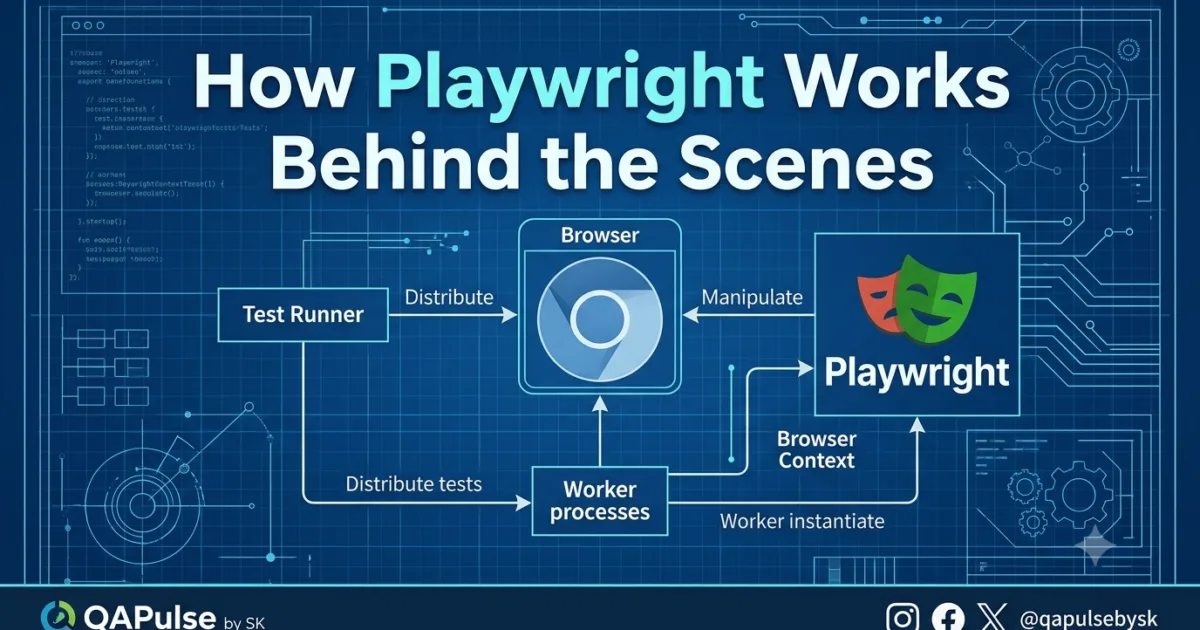
How Playwright Works Behind the Scenes is one of the most important concepts every automation engineer should understand before writing dozens—or thousands—of automated tests. Many engineers know how to use Playwright’s APIs, but far fewer understand what happens internally between running npx playwright test and seeing a passing test.
This lesson is not about learning another API.
It is about understanding the architecture that makes Playwright fast, reliable, and suitable for enterprise-scale automation.
Once you understand how Playwright works behind the scenes, advanced topics such as fixtures, parallel execution, API mocking, authentication, visual testing, and CI/CD pipelines become much easier to learn because you’ll understand the system rather than memorizing commands.
Why Understanding the Architecture Matters
Many automation failures are not caused by Playwright itself.
They are caused by incorrect assumptions about how Playwright executes tests.
For example, beginners often ask questions like:
- Why are my tests isolated?
- Why doesn’t one test remember the previous login?
- Why are cookies disappearing?
- Why does Playwright launch a new browser context?
- Why can tests run in parallel without interfering with each other?
All of these questions have the same answer:
Playwright’s architecture was intentionally designed to create reliable, isolated, and repeatable tests.
If you only learn the APIs, these behaviors may seem confusing.
If you understand the architecture, they become logical design decisions.
Browser Automation Has Evolved
Older browser automation solutions often depended on additional components to communicate with browsers.
This increased setup complexity and introduced extra points where communication could become slower or less reliable.
Playwright takes a different approach.
It communicates with modern browser engines through dedicated automation protocols, allowing it to perform browser interactions efficiently while supporting modern web applications.
The result is an automation platform designed around today’s browsers rather than the web applications of a decade ago.
This architectural decision is one of the biggest reasons Playwright feels responsive and dependable.
Think of Playwright as an Operating System for Tests
One common misconception is that Playwright is simply a library that clicks buttons.
That description dramatically understates what it does.
A better analogy is this:
Playwright behaves like a miniature operating system dedicated to test execution.
It is responsible for:
- Discovering tests
- Managing browser instances
- Creating isolated environments
- Injecting fixtures
- Synchronizing browser actions
- Capturing screenshots
- Recording traces
- Managing retries
- Producing reports
- Cleaning up resources
Your test file is only one small part of a much larger execution environment.
Understanding this perspective changes the way you design automation.
The High-Level Architecture
Every Playwright execution follows a structured pipeline.
Developer

↓

Playwright CLI

↓

Configuration

↓

Test Runner

↓

Workers

↓

Browser

↓

Browser Context

↓

Page

↓

Actions

↓

Assertions

↓

Reports
Each component has a specific responsibility.
Removing any one of them would reduce Playwright’s reliability or scalability.
Over the next several lessons, we’ll examine every layer in detail.
The Playwright CLI Is the Entry Point
Every execution begins with a command such as:
npx playwright test
Although it appears simple, this command starts an entire execution pipeline.
The CLI validates your project, loads configuration, discovers test files, prepares workers, and hands control to the Playwright Test Runner.
Nothing in your test executes immediately.
Preparation comes first.
Understanding this sequence helps explain why configuration files, retries, reporters, and projects influence execution before your code even starts.
The Test Runner Is the Brain
The Playwright Test Runner is responsible for orchestrating every test.
It decides:
- Which tests should run.
- Which browser project should be used.
- Whether tests execute sequentially or in parallel.
- How fixtures are initialized.
- When retries should occur.
- How failures are reported.
Your test file describes behavior.
The Test Runner decides how and when that behavior is executed.
This separation of responsibilities is one reason Playwright scales effectively in enterprise environments.
Browser Contexts Are the Secret to Reliable Testing
One of Playwright’s defining architectural features is the Browser Context.
Instead of sharing a single browser session across all tests, Playwright creates isolated browser contexts.
Each context has its own:
- Cookies
- Local Storage
- Session Storage
- Authentication state
- Cache
This isolation prevents one test from affecting another.
Imagine testing two users with different permissions.
Without isolated contexts, cookies and session data could leak between tests, producing inconsistent results.
Browser contexts eliminate this problem and make parallel execution practical.
We’ll dedicate an entire lesson to Browser Contexts later in this series because they are central to understanding how Playwright works behind the scenes.
Every Test Lives in Its Own Environment
A useful way to think about Playwright is to imagine that every test receives a clean workspace.
When a test begins, Playwright prepares the environment.
When the test finishes, Playwright cleans it up.
The next test starts with a fresh environment again.
This repeatable lifecycle is one of the reasons Playwright tests remain predictable even as test suites grow.
Enterprise teams rely on this behavior to execute thousands of tests across multiple machines every day.
Architecture Before APIs
Many beginners jump directly into learning methods like click(), fill(), or locator().
Those APIs are important, but they are easier to understand once you know the system that executes them.
A strong architectural understanding helps you answer questions such as:
- Why does Playwright automatically wait?
- Why are fixtures injected?
- Why does parallel execution work?
- Why are traces so detailed?
- Why do browser contexts exist?
Instead of memorizing isolated features, you’ll understand how they fit into a coherent design.
Common Misconceptions About How Playwright Works Behind the Scenes
Several myths appear repeatedly in automation communities.
Myth 1: Playwright simply launches a browser and clicks elements.
In reality, Playwright coordinates configuration, workers, contexts, fixtures, synchronization, assertions, reporting, and cleanup before and after every interaction.
Myth 2: Faster automation comes from removing waits.
Playwright’s reliability comes from intelligent synchronization, not from skipping essential waiting.
Myth 3: One browser instance means one shared session.
Browser contexts provide isolation even when tests use the same browser process.
Understanding these distinctions helps engineers avoid many common automation problems.
Best Practices Before Learning Advanced Playwright Features
Before moving into advanced APIs, establish these habits:
- Learn the architecture before memorizing commands.
- Think in terms of execution flow rather than individual methods.
- Understand the responsibilities of the Test Runner.
- Treat Browser Contexts as isolated environments.
- Design tests that remain independent.
- Build automation around business behavior rather than UI mechanics.
These practices create a strong foundation for the production-ready framework we’ll build later in this series.
How Playwright Works Behind the Scenes: Following a Test from Start to Finish
How Playwright Works Behind the Scenes becomes much easier to understand when we follow a single test through its complete execution lifecycle. In Part 1A, we explored the architecture and the purpose of each major component. In this lesson, we’ll trace every important step that occurs after you execute npx playwright test.
Most developers only see the browser opening.
Behind the scenes, however, Playwright performs dozens of coordinated operations before your first line of test code is executed.
Understanding this lifecycle is one of the biggest differences between someone who writes Playwright scripts and someone who designs enterprise automation frameworks.
Our Example Test
We’ll use a simple example throughout this lesson.
import { test, expect } from '@playwright/test';

test('homepage title', async ({ page }) => {

    await page.goto('https://playwright.dev');

    await expect(page).toHaveTitle(/Playwright/);

});
Although this test contains only a few lines, Playwright performs an extensive amount of work before and after these statements execute.
Step 1: The Command-Line Interface Starts Everything
Execution begins with:
npx playwright test
This command launches the Playwright CLI.
The CLI is responsible for preparing the testing environment before any browser is opened.
Its responsibilities include:
- Reading command-line options
- Loading Playwright
- Validating configuration
- Discovering test files
- Preparing projects
- Passing control to the Test Runner
At this stage, your test has not started yet.
Step 2: Configuration Is Loaded
Next, Playwright searches for:
playwright.config.ts
or
playwright.config.js
The configuration defines how your entire automation framework behaves.
Typical settings include:
export default defineConfig({

    testDir: './tests',

    timeout: 30000,

    retries: 2,

    workers: 4,

    reporter: 'html',

    use: {

        headless: true,

        screenshot: 'only-on-failure',

        trace: 'retain-on-failure'

    }

});
Think of this file as the central control panel for your framework.
Instead of repeating settings inside every test, Playwright reads them once and applies them consistently.
Step 3: Test Discovery
Playwright now searches your project.
It identifies:
- test folders
- spec files
- matching patterns
- projects
- tags
- filters
For example:
tests/

    login.spec.ts

    checkout.spec.ts

    search.spec.ts

    profile.spec.ts
Every discovered test becomes part of an execution queue.
Only after discovery finishes does Playwright decide what should actually run.
Step 4: Worker Processes Are Created
One of Playwright’s greatest strengths is parallel execution.
Instead of executing every test sequentially, Playwright creates worker processes.
A simplified view:
Worker 1

    login.spec.ts

    search.spec.ts

Worker 2

    checkout.spec.ts

Worker 3

    profile.spec.ts
Each worker operates independently.
This architecture dramatically reduces execution time while preventing interference between tests.
Because workers are isolated, one crashing worker usually doesn’t stop the remaining suite.
Step 5: Browser Launch
Only now does Playwright launch the browser.
For example:
chromium.launch();
Depending on configuration, this may be:
- Chromium
- Firefox
- WebKit
Notice something important.
Playwright doesn’t launch a new browser for every single interaction.
Instead, it manages browser resources efficiently throughout execution.
Step 6: Browser Context Creation
This is arguably the most important architectural concept inside Playwright.
A Browser Context is an isolated browser session.
Each context contains:
- Cookies
- Cache
- Local Storage
- Session Storage
- Authentication state
- Permissions
Think of Browser Contexts as independent browser profiles.
Browser

├── Context A

│      User A

├── Context B

│      User B

├── Context C

│      Guest User
Because every test receives its own isolated context, tests cannot accidentally affect one another.
This isolation is one reason Playwright remains highly reliable even in large automation suites.
Step 7: Page Creation
Inside every Browser Context, Playwright creates a Page.
Browser

↓

Browser Context

↓

Page
A Page represents a browser tab.
When you receive:
async ({ page })
Playwright has already completed the setup work for you.
The Test Runner injects the Page fixture into your test function, allowing you to focus on business logic rather than browser initialization.
Step 8: Your Test Finally Begins
Only after all previous steps have completed does Playwright execute your code.
await page.goto("https://playwright.dev");
Navigation itself is more sophisticated than simply requesting a webpage.
Playwright waits for several browser events before continuing.
Depending on configuration, it may wait for:
- DOM content loaded
- network activity
- document readiness
- navigation completion
This intelligent synchronization removes much of the manual waiting that older automation tools required.
Step 9: Assertions Execute
Next comes:
await expect(page).toHaveTitle(/Playwright/);
This is far more than a comparison statement.
Playwright repeatedly evaluates the expected condition until one of two outcomes occurs:
- The expectation becomes true.
- The timeout expires.
This polling behavior is one of the reasons Playwright tests are significantly less flaky.
Instead of failing immediately because the title hasn’t changed yet, Playwright waits intelligently within the configured timeout.
Step 10: Reporting
Once execution finishes, Playwright collects valuable artifacts.
Depending on your configuration, this may include:
- HTML reports
- Screenshots
- Videos
- Traces
- Console logs
- Error messages
- Timing information
These reports become invaluable during debugging and CI/CD execution.
Rather than asking “Why did the test fail?”, engineers can inspect detailed execution evidence.
Step 11: Cleanup
Finally, Playwright performs automatic cleanup.
Resources are released in reverse order.
Page

↓

Browser Context

↓

Browser

↓

Worker
Automatic cleanup prevents:
- memory leaks
- session contamination
- leftover cookies
- hanging browser processes
This lifecycle allows thousands of tests to execute consistently across long-running pipelines.
Visualizing the Complete Lifecycle
Putting everything together gives us the following architecture.
npx playwright test

↓

CLI

↓

Configuration

↓

Test Discovery

↓

Worker Process

↓

Browser Launch

↓

Browser Context

↓

Page

↓

Your Test

↓

Assertions

↓

Reports

↓

Cleanup
This is how Playwright works behind the scenes every time you execute a test.
Whether your project contains one test or ten thousand, the same architectural principles remain in place.
Common Mistakes Engineers Make
Understanding how Playwright works behind the scenes also helps avoid common problems.
Assuming every test shares one browser session
Browser Contexts isolate test data.
Never rely on state from previous tests.
Creating unnecessary browser instances
Playwright already manages browser resources efficiently.
Launching additional browsers unnecessarily increases execution time.
Ignoring the Test Runner
The Test Runner controls execution, retries, workers, fixtures, and reporting.
Treat it as the orchestration layer of your automation framework.
Fighting Auto-Waiting
Avoid unnecessary hard waits.
Playwright’s synchronization engine already handles most timing challenges.
Enterprise Best Practices
Production automation frameworks usually follow these principles:
- Keep tests independent.
- Use Browser Contexts for isolation.
- Configure retries carefully.
- Enable traces on failure.
- Generate HTML reports for every pipeline.
- Use multiple workers for scalability.
- Design tests around business behavior.
- Let Playwright manage synchronization.
These practices allow teams to scale from dozens to thousands of automated tests without sacrificing reliability.
Internal Links
- Day 1: What is Playwright and Why Everyone is Talking About It
- Day 2: How to Install Playwright: Complete Beginner Setup Guide for 2026
- Day 3: Your First Playwright Test: Understanding Every Line Before You Write Code
- Day 4: How Playwright Works Behind the Scenes: Complete Architecture Guide for Beginners
- Day 5: Playwright Locators: Stop Writing Fragile Selectors Forever
- Playwright: Zero to Hero Series
External Links
- Playwright Documentation: https://playwright.dev/docs/intro
- Browser Contexts: https://playwright.dev/docs/browser-contexts
- Playwright Test Runner: https://playwright.dev/docs/test-intro
Why is Understanding How Playwright Works Behind the Scenes Important?
Understanding How Playwright Works Behind the Scenes helps automation engineers build scalable, maintainable, and reliable test frameworks. Instead of memorizing Playwright APIs, engineers gain a mental model of the execution pipeline, making advanced topics such as parallel execution, fixtures, authentication, and CI/CD significantly easier to understand.
How Playwright Works Behind the Scenes
A simplified execution lifecycle is:
- Execute
npx playwright test - Load configuration
- Discover tests
- Create worker processes
- Launch browser
- Create Browser Context
- Create Page
- Execute test
- Perform assertions
- Generate reports
- Clean up resources
Key Takeaways
- The Playwright CLI starts the execution process.
- The Test Runner orchestrates the complete test lifecycle.
- Worker processes enable parallel execution.
- Browser Contexts isolate every test.
- Pages represent browser tabs inside Browser Contexts.
- Assertions use intelligent polling instead of immediate failure.
- Automatic cleanup prevents session contamination and memory leaks.
- Understanding How Playwright Works Behind the Scenes makes advanced Playwright concepts much easier to master.
Frequently Asked Questions
What does “How Playwright Works Behind the Scenes” mean?
It refers to the internal execution lifecycle of Playwright, including the CLI, Test Runner, worker processes, Browser Contexts, pages, assertions, reporting, and cleanup that occur whenever a Playwright test runs.
Why are Browser Contexts important in Playwright?
Browser Contexts isolate cookies, local storage, session storage, permissions, and authentication state, allowing Playwright tests to execute independently and reliably.
What is the role of the Playwright Test Runner?
The Test Runner discovers tests, creates workers, manages fixtures, controls retries, executes projects, generates reports, and coordinates the entire automation lifecycle.
Does Playwright launch a new browser for every test?
Not necessarily. Playwright efficiently manages browser instances while creating separate Browser Contexts for individual tests, balancing performance with isolation.
Why should beginners learn How Playwright Works Behind the Scenes?
Learning How Playwright Works Behind the Scenes helps beginners understand why Playwright behaves the way it does, reducing confusion when working with Browser Contexts, fixtures, parallel execution, synchronization, and advanced framework design.
Call to Action
If you now understand How Playwright Works Behind the Scenes, you’re ready to move beyond writing simple automation scripts and begin thinking like an automation framework engineer.
This lesson is part of the Playwright Automation Zero to Hero series by QAPulse by SK, where you’ll progress from understanding Playwright fundamentals to building a production-ready automation framework with advanced locators, fixtures, Page Object Models, API testing, visual testing, authentication, Docker, reporting, parallel execution, and CI/CD.
For more in-depth QA, AI, SDET, and automation engineering content, visit www.skakarh.com and continue following the Playwright Zero to Hero series.