QA
QA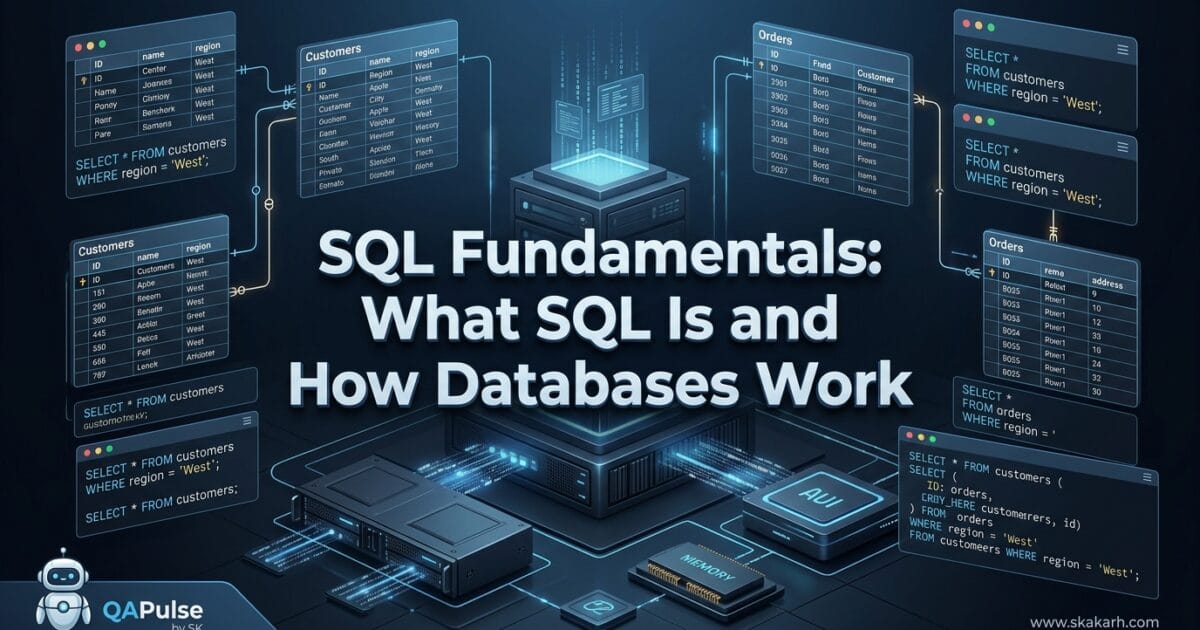
Why SQL Fundamentals Matter Before Learning SQL Syntax
SQL is often introduced as a list of commands:
SELECT
INSERT
UPDATE
DELETE
CREATE
ALTER
DROP
That approach teaches syntax, but it does not necessarily teach understanding.
A stronger learning path begins with a more fundamental question:
What problem is SQL solving?
Modern applications constantly create, retrieve, modify, and delete information.
A banking application needs customer and transaction data.
An e-commerce application needs products, customers, orders, payments, and inventory.
A testing system needs test cases, executions, defects, environments, and results.
The application needs a reliable place to store that information and a structured way to communicate with it.
That is where databases and SQL enter the picture.
Understanding SQL fundamentals therefore means understanding the complete relationship between:
Application → Database → DBMS → SQL → Query → Result
Once that mental model is clear, SQL commands become much easier to learn.
What is SQL?
SQL stands for Structured Query Language.
It is a standardized language used to interact with relational databases.
SQL allows applications and engineers to perform operations such as:
- Retrieving data
- Inserting data
- Updating existing data
- Deleting data
- Creating database structures
- Modifying database structures
- Controlling access
- Managing transactions
A simple query looks like this:
SELECT name, email
FROM customers
WHERE country = 'Pakistan';
Conceptually, the query says:
Find the
nameand
SQL is therefore not the database itself.
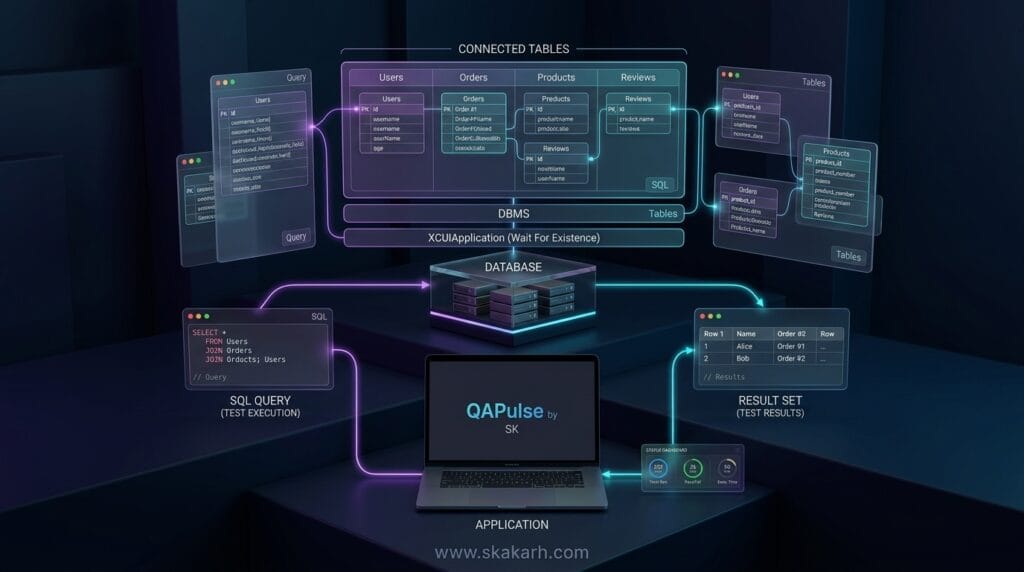
This distinction is critical.
SQL is the language.
The database stores the data.
The DBMS manages the database.
For example, PostgreSQL, MySQL, Microsoft SQL Server, and Oracle Database are database management systems that support SQL.
SQL is Declarative
One of the most important concepts in SQL fundamentals is that SQL is primarily declarative.
You describe what data you want, rather than manually specifying every step the database must execute.
For example:
SELECT *
FROM orders
WHERE status = 'PAID';
The engineer specifies the desired result.
The database engine decides how to retrieve it efficiently.
This is different from writing an algorithm that manually loops through every record and checks its status.
What is a Database?
A database is an organized collection of data designed to allow information to be stored, managed, retrieved, and modified efficiently.
Consider an online shopping system.
It might contain:
| Entity | Example Data |
|---|---|
| Customers | Names, emails, addresses |
| Products | Names, prices, inventory |
| Orders | Order dates, customers, totals |
| Payments | Payment status, transaction details |
| Reviews | Ratings and comments |
Instead of putting everything into one enormous file, a relational database organizes information into structured tables.
A simplified database might look like:
E-Commerce Database
│
├── customers
├── products
├── orders
├── order_items
├── payments
└── reviews
Each table represents a particular type of entity or relationship.
Database vs DBMS vs RDBMS
These terms are frequently confused.
| Concept | Meaning |
|---|---|
| Database | Organized collection of stored data |
| DBMS | Software that manages databases |
| RDBMS | DBMS based on the relational model |
| SQL | Language used to interact with relational databases |
Database
The database contains the information.
DBMS
The Database Management System provides the software infrastructure for storing and manipulating that information.
RDBMS
A Relational Database Management System organizes data using relational concepts such as tables, keys, and relationships.
Common relational database systems include:
- PostgreSQL
- MySQL
- Microsoft SQL Server
- Oracle Database
- SQLite
The exact implementation differs between systems, but the fundamental relational concepts remain highly transferable.
How Relational Databases Organize Data
A relational database represents information through tables.
Consider a customers table:
| customer_id | name | country | |
|---|---|---|---|
| 101 | Ali Khan | ali@example.com | Pakistan |
| 102 | Sara Ahmed | sara@example.com | UAE |
| 103 | John Smith | john@example.com | UK |
The table consists of:
- Columns — describe attributes
- Rows — represent individual records
- Values — actual pieces of stored data
Columns
A column represents one attribute.
Examples:
customer_id
name
email
country
Rows
A row represents one record.
For example:
101 | Ali Khan | ali@example.com | PakistanValues
Individual values occupy the cells.
This basic table model is one of the most important SQL fundamentals concepts because almost every beginner SQL query operates against this structure.
Primary Keys: How Databases Identify Records
A primary key uniquely identifies a row.
For example:
CREATE TABLE customers (
    customer_id INT PRIMARY KEY,
    name VARCHAR(100),
    email VARCHAR(255),
    country VARCHAR(100)
);
Here:
customer_idis the primary key.
A valid primary key should uniquely identify each record.
For example:
101
102
103
Two customers should not normally share the same primary key.
Why Primary Keys Matter
Primary keys are important because they allow systems to:
- Identify individual records
- Prevent duplicate identities
- Create relationships between tables
- Update specific records
- Delete specific records
For example:
UPDATE customers
SET country = 'Pakistan'
WHERE customer_id = 101;
The customer_id allows the database to identify the intended customer.
Foreign Keys and Relationships
Relational databases become powerful when tables can be connected.
Suppose we have:
customers
orders
A customer can have multiple orders.
The orders table might contain:
| order_id | customer_id | amount |
|---|---|---|
| 5001 | 101 | 2500 |
| 5002 | 101 | 1800 |
| 5003 | 102 | 3200 |
Here customer_id in orders refers to customer_id in customers.
That creates a relationship.
Conceptually:
customers
   │
   │ customer_id
   ▼
orders
A foreign key is used to represent this relationship.
CREATE TABLE orders (
    order_id INT PRIMARY KEY,
    customer_id INT,
    amount DECIMAL(10, 2),
    FOREIGN KEY (customer_id)
        REFERENCES customers(customer_id)
);
Common Relationship Types
| Relationship | Example |
|---|---|
| One-to-One | User → Profile |
| One-to-Many | Customer → Orders |
| Many-to-Many | Students ↔ Courses |
Understanding relationships is essential before learning joins.
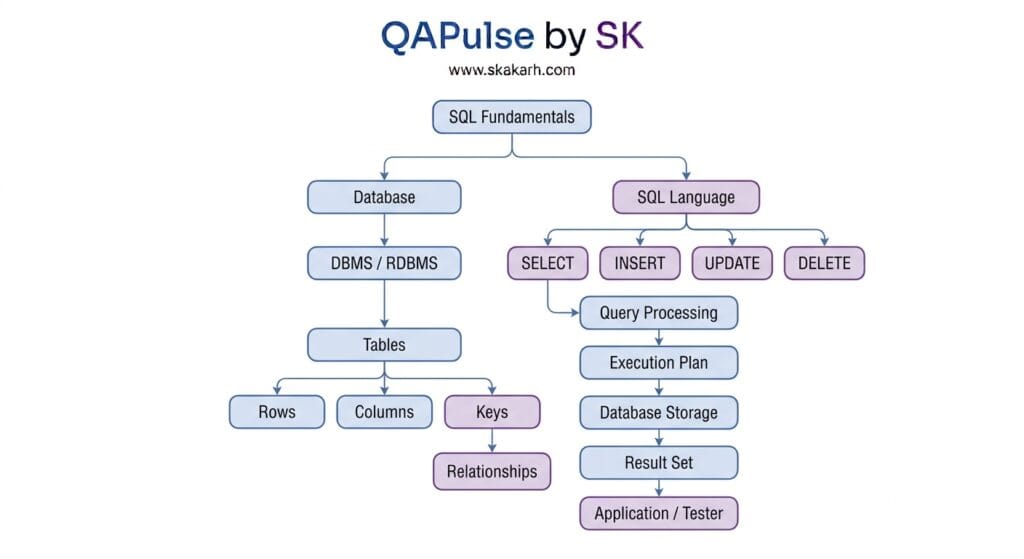
The 6 Core Pillars of SQL Fundamentals
The foundation of SQL can be understood through six core pillars:
- Database and DBMS Architecture
- Tables, Rows, and Columns
- Primary and Foreign Keys
- Relationships and Data Modeling
- SQL Command Categories
- Query Execution and Results
These pillars provide the mental model needed to move from beginner SQL syntax toward advanced querying.
SQL Command Categories
SQL commands can be grouped into several categories.
| Category | Purpose | Examples |
|---|---|---|
| DQL | Retrieve data | SELECT |
| DML | Manipulate data | INSERT, UPDATE, DELETE |
| DDL | Define structures | CREATE, ALTER, DROP |
| DCL | Control permissions | GRANT, REVOKE |
| TCL | Manage transactions | COMMIT, ROLLBACK |
DQL — Data Query Language
The most familiar example is:
SELECT *
FROM customers;
DML — Data Manipulation Language
INSERT INTO customers
(customer_id, name, email, country)
VALUES
(104, 'Ayesha Khan', 'ayesha@example.com', 'Pakistan');
Updating:
UPDATE customers
SET country = 'Pakistan'
WHERE customer_id = 104;
Deleting:
DELETE FROM customers
WHERE customer_id = 104;
DDL — Data Definition Language
Creating a table:
CREATE TABLE products (
    product_id INT PRIMARY KEY,
    product_name VARCHAR(200),
    price DECIMAL(10, 2)
);
DDL focuses on database structures rather than individual records.
Your First SQL Query
Consider:
SELECT name, email
FROM customers
WHERE country = 'Pakistan';
Break it down:
SELECT
Specifies which columns should be returned.
FROM
Specifies the table.
WHERE
Filters records.
Conceptually:
customers
    ↓
Filter country = Pakistan
    ↓
Select name + email
    ↓
Result Set
The output might be:
| name | |
|---|---|
| Ali Khan | ali@example.com |
| Ayesha Khan | ayesha@example.com |
This is the fundamental SQL interaction model:
Request data → Database processes request → Database returns result set
What Happens When a SQL Query Runs?
A beginner often imagines that SQL simply searches a table.
Internally, database systems perform substantially more work.
A simplified lifecycle looks like this:
SQL Query
   ↓
Parsing
   ↓
Validation
   ↓
Optimization
   ↓
Execution Plan
   ↓
Storage Access
   ↓
Filtering / Joining / Sorting
   ↓
Result Set
For example:
SELECT name
FROM customers
WHERE country = 'Pakistan';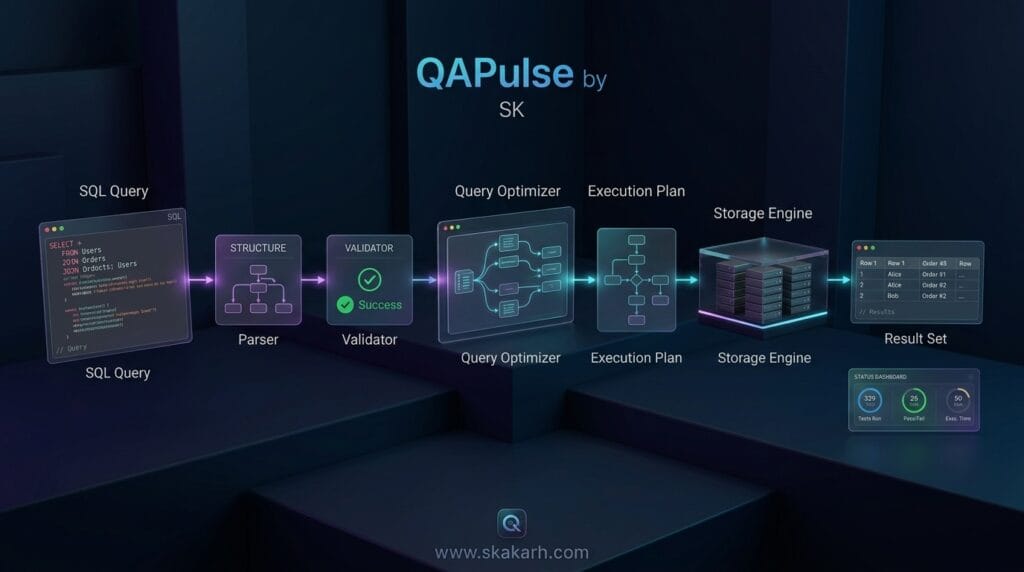
The database may:
- Parse the SQL syntax
- Validate table and column names
- Check permissions
- Determine possible execution strategies
- Build or select an execution plan
- Access required data
- Apply the filter
- Produce the result
- Return the result set
The exact implementation depends on the database engine.
Why Query Optimization Matters
Suppose a table contains 10 million customers.
This query:
SELECT *
FROM customers
WHERE email = 'ali@example.com';
may require significant work if the database has no useful index.
An index can allow the database to locate matching records much more efficiently.
For example:
CREATE INDEX idx_customers_email
ON customers(email);
The important beginner lesson is not to memorize index syntax immediately.
Instead, understand the principle:
Database structure can dramatically influence query performance.
This becomes particularly important for SDETs testing systems that operate against large datasets.
SQL and Data Integrity
Databases do more than store information.
They enforce rules.
For example:
CREATE TABLE users (
    user_id INT PRIMARY KEY,
    email VARCHAR(255) UNIQUE NOT NULL
);
This design can enforce:
user_idmust be uniqueemailcannot be duplicatedemailcannot be null
Constraints help protect the quality of stored data.
Common constraints include:
| Constraint | Purpose |
|---|---|
| PRIMARY KEY | Uniquely identifies records |
| FOREIGN KEY | Enforces relationships |
| UNIQUE | Prevents duplicate values |
| NOT NULL | Requires a value |
| CHECK | Enforces a condition |
| DEFAULT | Supplies a default value |
SQL Transactions: A Critical Foundation
A transaction groups database operations into a logical unit of work.
For example:
BEGIN;

UPDATE accounts
SET balance = balance - 500
WHERE account_id = 101;

UPDATE accounts
SET balance = balance + 500
WHERE account_id = 202;

COMMIT;
If something goes wrong, the transaction can potentially be rolled back:
ROLLBACK;Transactions are especially important in systems such as:
- Banking
- Payments
- Order processing
- Inventory
- Booking systems
The broader concept is commonly explained through ACID properties:
| Property | Meaning |
|---|---|
| Atomicity | Transaction succeeds completely or fails as a unit |
| Consistency | Data remains valid according to defined rules |
| Isolation | Concurrent transactions are controlled |
| Durability | Committed changes persist |
SQL Fundamentals for QA and SDET Engineers
SQL is not only a developer skill.
For QA engineers and SDETs, SQL is a critical validation tool.
Imagine an API creates a new customer.
The API response says:
{
  "customerId": 105,
  "status": "created"
}
A tester should not necessarily stop at the API response.
The database can be validated:
SELECT customer_id, name, email
FROM customers
WHERE customer_id = 105;
This enables database-level verification.
Example Validation Flow
Test Action
    ↓
API Request
    ↓
Application Logic
    ↓
Database Update
    ↓
SQL Validation
    ↓
Expected vs Actual
This is one reason SQL fundamentals are valuable for automation engineers.
Production-Grade API-to-Database Validation Example
A test might perform:
response = create_customer(
    name="Ali Khan",
    email="ali@example.com"
)

customer_id = response["customerId"]

db_record = execute_query(
    """
    SELECT customer_id, name, email
    FROM customers
    WHERE customer_id = %s
    """,
    (customer_id,)
)

assert db_record["name"] == "Ali Khan"
assert db_record["email"] == "ali@example.com"
The important architecture is:
API Layer
   ↓
Service Layer
   ↓
Database
   ↓
SQL Validation
A mature SDET does not treat the database as an isolated technical component.
It becomes part of the complete system-under-test validation strategy.
SQL vs Database: The Difference You Must Remember
| SQL | Database |
|---|---|
| Language | Data storage system |
| Used to communicate | Stores organized data |
| Defines queries and commands | Contains tables and records |
| Does not itself store application data | Stores application data |
| Used by applications and engineers | Managed by a DBMS |
A simple analogy:
SQL is the language you use to communicate with the database.
The database is where the information lives.
The DBMS is the software responsible for managing that environment.
SQL Fundamentals: Benefits and Limitations
Benefits
- Standardized approach to relational data
- Powerful data retrieval
- Supports complex relationships
- Strong data integrity mechanisms
- Transaction support
- Mature ecosystem
- Widely used across software engineering
- Extremely valuable for testing and debugging
Limitations
SQL is not a universal solution for every data problem.
Relational databases can become challenging when workloads require:
- Massive horizontal distribution
- Highly unstructured data
- Specialized graph relationships
- Certain high-scale event workloads
That is why database technologies such as document, key-value, graph, and wide-column databases also exist.
However, learning SQL remains one of the strongest foundations for understanding structured data.
Common Beginner Mistakes
Mistake 1: Memorizing syntax without understanding tables
Knowing:
SELECT * FROM users;does not mean you understand relational data.
Mistake 2: Ignoring relationships
Foreign keys and relationships become extremely important once queries involve multiple tables.
Mistake 3: Using SELECT * everywhere
Although useful while learning, production queries should generally request only the columns needed.
Mistake 4: Forgetting WHERE
This is dangerous:
UPDATE users
SET status = 'inactive';
Without a WHERE clause, the statement may update every row.
Mistake 5: Treating SQL as application logic
SQL expresses data operations. Business logic can involve many layers beyond the database.
Mistake 6: Ignoring data integrity
A query can return technically valid data while the underlying database design remains poor.
20. Practical SQL Fundamentals Learning Path
A strong progression is:
Database Concepts
      ↓
Tables / Rows / Columns
      ↓
Primary Keys / Foreign Keys
      ↓
SELECT
      ↓
WHERE
      ↓
ORDER BY
      ↓
GROUP BY
      ↓
Aggregate Functions
      ↓
JOINs
      ↓
Subqueries
      ↓
CTEs
      ↓
Window Functions
      ↓
Indexes
      ↓
Transactions
      ↓
Query Optimization
      ↓
Advanced SQL
This progression prevents the common mistake of jumping directly into advanced queries without understanding relational concepts.
SDET Perspective: Why SQL Becomes a Testing Superpower
For an SDET, SQL is more than a database skill.
It connects application behavior with backend state.
Consider an automated checkout test.
A UI assertion might verify:
"Order placed successfully"But a stronger test can validate:
UI
 ↓
API
 ↓
Order Service
 ↓
Database
 ↓
Order Record
 ↓
Payment Record
 ↓
Inventory Update
SQL enables the tester to validate backend consequences.
What SDETs Commonly Validate With SQL
- User creation
- Authentication records
- Order creation
- Payment status
- Inventory changes
- Audit records
- API persistence
- Data migration
- ETL results
- Reporting data
- Cleanup operations
- Referential integrity
This is why SQL fundamentals should be considered part of a serious SDET’s technical foundation.
AI Overview & Answer Engine Optimization
What is SQL?
SQL, or Structured Query Language, is a standardized language used to communicate with and manage data in relational databases. It can retrieve, insert, update, and delete data and can also define database structures.
What is a database?
A database is an organized collection of data designed to be stored, managed, retrieved, and updated efficiently.
What is an RDBMS?
An RDBMS, or Relational Database Management System, is software that manages data using relational concepts such as tables, rows, columns, keys, and relationships.
What is the difference between SQL and a database?
SQL is the language used to communicate with a relational database, while the database stores the actual data.
Why is SQL important for QA engineers?
SQL allows QA engineers and SDETs to validate backend data, verify API persistence, check database state, investigate defects, and automate database-level assertions.
AI Summary
SQL Fundamentals provide the foundation for understanding how relational databases store, organize, retrieve, and modify structured data. SQL is the communication language, the database contains the data, and the DBMS manages the environment. Tables organize records, keys establish identity and relationships, and SQL queries request or manipulate information. For SDETs, SQL is particularly valuable for validating backend state and verifying application behavior beyond the UI or API layer.
People Asked Questions
What does SQL stand for?
SQL stands for Structured Query Language.
Is SQL a database?
No. SQL is a language used to communicate with relational databases.
What is the difference between SQL and MySQL?
SQL is a language, while MySQL is a relational database management system that supports SQL.
Is SQL difficult for beginners?
The basic concepts are approachable. Understanding tables, relationships, filtering, and simple queries provides a strong starting point.
Why should QA engineers learn SQL?
QA engineers use SQL to validate backend data, investigate defects, verify API persistence, and perform database-level automation.
What should I learn after SQL fundamentals?
A practical next step is SELECT, filtering, sorting, aggregation, joins, subqueries, CTEs, window functions, indexes, transactions, and query optimization.
Conclusion
SQL Fundamentals are not about memorizing dozens of database commands.
They are about understanding the relationship between an application, a database, a DBMS, tables, relationships, queries, and results.
Once you understand that SQL is the language used to communicate with relational databases, the rest of SQL becomes much easier to reason about.
The essential mental model is:
Application
    ↓
SQL Query
    ↓
DBMS
    ↓
Query Processing
    ↓
Database Tables
    ↓
Result Set
    ↓
Application / Tester
For developers, SQL enables powerful data operations.
For QA engineers and SDETs, it provides a way to look behind the interface and validate what the system actually persisted.
That makes SQL more than another technology to add to a resume.
It becomes a foundation for understanding how software systems manage data.
Internal Blog Links
- 50 Playwright Commands Every QA Engineer Should Know
- What is QA Engineering? A Practical Guide to Modern Software Quality
- What is Playwright? A Powerful Guide to Modern Web Testing and QA Engineers
- QA Engineer vs SDET vs Quality Engineer: What’s the Difference?
- QA Engineer Portfolio: 7 Powerful Projects That Get Interviews in 2026
- Graph Engineering: The Powerful Layer After Loop Engineering
- Graph Testing: The Critical QA Layer After Loop-Based Test Automation
- Agentic Test Creation vs AI Test Generation: What’s the Real Difference?
- AI Test Automation With Humans in the Loop: Governance, Metrics, and the Practical Guide
Internal Series Links
- Learn MCP – Zero to Hero
- Learn AI Agents for QA – Zero to Hero
- Playwright Automation – Zero to Hero
- TencentDB Agent Memory: Complete Zero to Hero
- LangGraph: Complete Zero to Hero
- Learn Python – Zero to Hero
- OpenAI Codex: Complete Zero to Hero
- Cursor AI: Complete Zero to Hero
- Claude Code Tutorial: Complete Zero to Hero
- AutoGen: Complete Zero to Hero Guide
- Free QA Resources Built From Real Experience
- QA Glossary: Test Automation Terms Every Engineer Should Know
External Link
- PostgreSQL Documentation — official PostgreSQL documentation for SQL and relational database concepts.
- MySQL Documentation — official MySQL documentation and SQL reference.
- Microsoft SQL Server Documentation — official SQL Server documentation.
- SQLite Documentation — official SQLite documentation and SQL resources.
- Oracle Database Documentation — official Oracle Database documentation.
Continue Learning
Explore more expert articles on Mobile Testing, Backend & API, AI & Agentic, AI Tools, n8n, LangChain, CrewAI, MCP Servers, AI Agents, LlamaIndex, Docker, FastAPI, Playwright, Cypress, Test Automation, DevOps, and Software Engineering at www.skakarh.com.
QAPulse by SK delivers expert release analysis, AI engineering insights, enterprise automation strategies, migration guidance, DevOps best practices, and practical testing knowledge to help software professionals build scalable, intelligent, and production-ready software systems.