QA
QA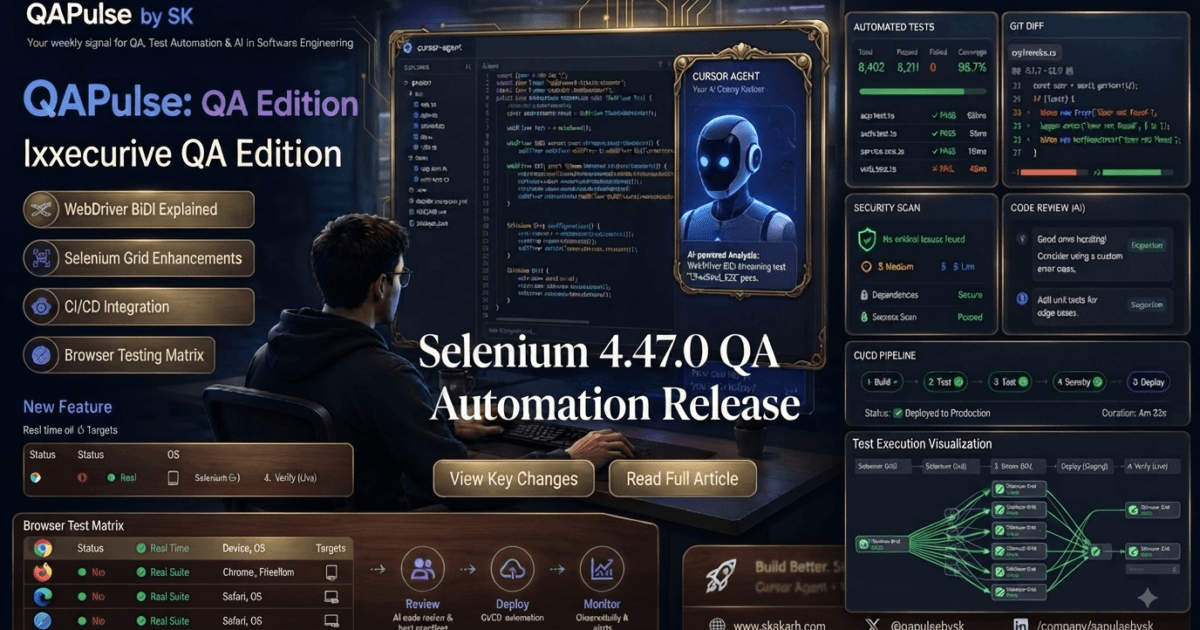
Selenium 4.47.0 is officially here, bringing another important step in the evolution of Selenium’s WebDriver and WebDriver BiDi capabilities. Released on August 10, 2026, Selenium 4.47.0 is now listed as the stable release across the core Selenium language bindings, including Java, Python, .NET, Ruby, and JavaScript, while Selenium Server/Grid is also at version 4.47.0. (Selenium)
For QA engineers and SDETs, this is not simply another version-number update. The most interesting work in Selenium 4.47.0 is around WebDriver BiDi, generated BiDi modules, event subscriptions, transport infrastructure, and improvements across Selenium’s language-specific implementations.
The release therefore deserves attention from teams that are building modern browser automation frameworks, especially those increasingly moving beyond traditional request-response WebDriver workflows toward richer browser automation capabilities.
What’s New in Selenium 4.47.0?
Selenium 4.47.0 was released on August 10, 2026. The official Selenium downloads page identifies 4.47.0 as the stable version for Java, Python, .NET, Ruby, and JavaScript, as well as the latest stable Selenium Server release. (Selenium)
At a high level, the release includes changes across several areas:
- WebDriver BiDi infrastructure
- Generated BiDi modules
- Event subscription handling
- Transport-layer improvements
- Java BiDi implementation
- Selenium Manager and browser-management improvements
- Python, Ruby, JavaScript, .NET, and Grid-related changes
- Build and dependency maintenance
One of the clearest themes is that Selenium continues investing heavily in its BiDi architecture.
That matters because WebDriver BiDi is designed to provide more bidirectional browser communication than the traditional WebDriver model, enabling automation frameworks to work with browser events and other capabilities that are difficult to model using a simple command-response approach.
Selenium 4.47.0 at a Glance
| Area | Selenium 4.47.0 |
|---|---|
| Release date | August 10, 2026 |
| Stable version | 4.47.0 |
| Java | 4.47.0 |
| Python | 4.47.0 |
| .NET | 4.47.0 |
| Ruby | 4.47.0 |
| JavaScript | 4.47.0 |
| Selenium Server/Grid | 4.47.0 |
| Major direction | WebDriver BiDi and generated module infrastructure |
| Upgrade type | Regular stable release |
The official Selenium release information confirms that 4.47.0 is the current stable release across the supported client bindings and Selenium Server. (Selenium)
The Biggest Story: Selenium’s WebDriver BiDi Architecture
If you are a QA engineer who primarily uses Selenium for commands such as:
driver.get("https://example.com")
driver.find_element(By.ID, "login").click()
you might look at the 4.47.0 changes and wonder why some of the internal BiDi work matters to you.
The answer is that Selenium’s architecture is evolving.
Traditional WebDriver automation generally follows a model like this:
Test Code
   ↓
WebDriver API
   ↓
Browser Driver
   ↓
Browser
   ↓
Response
WebDriver BiDi introduces a richer communication model:
Test Code
   ↕
WebDriver BiDi
   ↕
Browser
   ↕
Events + Commands
That bidirectional model becomes particularly valuable when automation needs to react to browser-side events rather than simply execute a sequence of commands.
The Selenium project has been actively developing generated BiDi modules and the infrastructure behind them. Recent project changes around the 4.47.0 release include a Java BiDi transport layer intended for generated BiDi modules, event subscription parameters, and tracking event subscriptions using subscription IDs. (Chromium Git Repositories)
For SDETs, the important takeaway is not necessarily that you need to rewrite your framework today.
It is that Selenium is continuing to build the underlying architecture needed for more capable browser automation.
Key Improvement #1 — A Transport Layer for Generated BiDi Modules
One of the notable changes associated with Selenium 4.47.0 is the addition of a transport layer that will be used by generated BiDi modules in Java.
This is important because generated APIs need a consistent way to communicate with the underlying BiDi infrastructure.
Instead of every generated module having to independently understand communication details, a dedicated transport abstraction can provide a cleaner foundation.
Conceptually:
Generated BiDi Module
        ↓
BiDi Transport Layer
        ↓
BiDi Connection
        ↓
Browser
This separation can make the implementation easier to evolve as Selenium’s BiDi support expands.
From a QA engineering perspective, this is primarily an architecture-level improvement, rather than a feature that immediately changes how every existing Selenium test is written.
That distinction matters.
Not every important release change introduces a new assertion method or locator API. Some changes strengthen the framework underneath the tests you will write tomorrow.
Key Improvement #2 — Better Event Subscription Handling
Another important change is related to passing subscription parameters for events in Java’s BiDi implementation. The Selenium project also tracks event subscriptions using subscription IDs as part of its ongoing BiDi development. (Chromium Git Repositories)
This is significant because browser automation increasingly needs to deal with events.
A conventional Selenium workflow might look like:
Open page
   ↓
Click button
   ↓
Wait
   ↓
Read result
An event-driven workflow can instead look more like:
Subscribe to browser event
          ↓
Perform browser action
          ↓
Browser emits event
          ↓
Automation receives event
          ↓
Validate or react
That opens the door to more sophisticated automation patterns.
For example, an SDET may eventually want to observe browser-side behavior such as network activity, console-related events, log events, or other browser signals without relying entirely on indirect polling techniques.
This is one reason BiDi deserves attention even when a particular 4.47.0 change is mostly internal.
What This Means for QA Engineers
For most QA engineers, Selenium 4.47.0 should be viewed as a modernization release rather than a disruptive rewrite.
The stable release is available across the major Selenium language bindings, so teams can evaluate the update within their existing automation stacks. (Selenium)
The biggest practical areas to watch are:
1. Existing WebDriver Tests Should Remain the Primary Concern
If your framework is built around standard Selenium WebDriver commands, you do not need to redesign your entire test architecture simply because 4.47.0 was released.
Your first step should be straightforward:
Current Selenium Version
        ↓
Upgrade in a branch
        ↓
Run regression suite
        ↓
Review failures
        ↓
Validate CI/Grid
        ↓
Promote to production
This is especially important for large enterprise suites where thousands of tests may depend on subtle browser-driver behavior.
2. BiDi Users Have More Reason to Evaluate the Release
Teams already experimenting with WebDriver BiDi should pay closer attention.
The continued work around generated modules, transport infrastructure, event subscriptions, and BiDi implementation boundaries indicates that Selenium’s BiDi architecture is actively evolving. (Chromium Git Repositories)
If your organization has a roadmap for:
- Browser event monitoring
- Network-aware automation
- Event-driven testing
- Advanced browser instrumentation
- Modern browser automation APIs
then Selenium 4.47.0 is worth evaluating in a dedicated branch.
3. Selenium Grid Teams Should Test the Server Upgrade Separately
Selenium 4.47.0 is also the latest stable Selenium Server version. (Selenium)
For teams running Selenium Grid, upgrading the client library and upgrading the Grid server should be treated as related but independently validated changes.
A production Grid upgrade should include checks for:
Session creation
Browser compatibility
Parallel execution
Node registration
Session routing
CI/CD connectivity
Grid observability
Test execution stability
Don’t assume that a successful local test run automatically validates your distributed Grid environment.
Is Selenium 4.47.0 a Major Upgrade?
From a semantic-versioning perspective, Selenium 4.47.0 is a minor release within Selenium 4, not a Selenium 5 major release.
However, “minor” does not mean “ignore it.”
The release contains architectural work that may be more important to future Selenium capabilities than its version number suggests.
The Selenium project is simultaneously documenting a Selenium 5 release charter, while continuing to evolve BiDi infrastructure in the Selenium 4.x line. (Chromium Git Repositories)
That makes 4.47.0 an interesting point for teams that want to understand where Selenium automation is heading.
Should QA Engineers Upgrade Immediately?
My recommendation is:
Yes for evaluation, but don’t blindly upgrade production on day one.
For a new automation project, starting with the latest stable Selenium release is generally reasonable.
For an existing enterprise automation framework, use a controlled upgrade process:
Selenium 4.47.0
       ↓
Create upgrade branch
       ↓
Update dependencies
       ↓
Run smoke tests
       ↓
Run regression suite
       ↓
Validate browsers
       ↓
Validate Selenium Grid
       ↓
Validate CI/CD
       ↓
Production rollout
The key is to distinguish between “available” and “production validated.”
A release can be stable while still exposing compatibility problems in a particular organization’s browser matrix, Grid infrastructure, framework wrappers, or dependency stack.
How to Upgrade Selenium 4.47.0
Python
For Python-based Selenium projects:
pip install --upgrade selenium
Then verify the installed version:
pip show selenium
or:
python -c "import selenium; print(selenium.__version__)"
You should see:
4.47.0
Java
For Maven projects, update the Selenium dependency to 4.47.0:
<dependency>
    <groupId>org.seleniumhq.selenium</groupId>
    <artifactId>selenium-java</artifactId>
    <version>4.47.0</version>
</dependency>
Then run your normal Maven verification:
mvn clean test
JavaScript / Node.js
For Selenium’s JavaScript bindings:
npm install selenium-webdriver@latest
Then verify your dependency tree:
npm list selenium-webdriver
.NET
For .NET projects, update the Selenium WebDriver package to 4.47.0 through your normal NuGet workflow.
The official Selenium downloads page lists 4.47.0 as the stable release for .NET as well as the other major bindings. (Selenium)
A Practical Upgrade Strategy for SDETs
Don’t make the upgrade decision based only on the release notes.
Use your own automation suite as the validation mechanism.
A useful approach is to compare the old and new versions across four dimensions:
| Validation Area | What to Check |
|---|---|
| Functional | Existing tests still pass |
| Compatibility | Browser/driver combinations work |
| Infrastructure | Grid and CI remain stable |
| Performance | Execution time and stability remain acceptable |
For larger frameworks, also compare:
Pass Rate
Failure Rate
Flaky Test Rate
Execution Duration
Browser Startup Time
Grid Session Creation
CI Pipeline Duration
This turns a dependency upgrade into an engineering decision rather than a guess.
Official Selenium Resources
For the authoritative release information, use Selenium’s official downloads and release resources rather than relying solely on third-party summaries. Selenium’s downloads page lists the 4.47.0 clients, server packages, release date, and previous releases. (Selenium)
The Selenium project repository also provides the underlying development history and pull requests associated with the release. (Chromium Git Repositories)
Official Selenium Downloads:
Selenium Downloads
Selenium GitHub Repository:
SeleniumHQ/selenium
Selenium 4.47.0 Release:
Selenium 4.47.0 Release on GitHub
Quick Takeaway
Selenium 4.47.0 is not primarily about giving QA engineers a completely new WebDriver API overnight. Its more interesting story is the continued strengthening of Selenium’s WebDriver BiDi architecture, including transport infrastructure and event-subscription capabilities.
For SDETs, the practical strategy is simple:
Upgrade in a controlled environment, run your real regression suite, validate Grid and CI/CD, and pay particular attention if your team is adopting WebDriver BiDi.
The release is stable as of August 10, 2026, across Selenium’s major language bindings and Selenium Server. (Selenium)
Part 1B continues directly from Part 1A, with deeper technical analysis of the Selenium 4.47.0 changes and what they mean for real-world QA/SDET workflows. The official release lists the BiDi transport-layer and event-subscription changes among the release highlights. (GitHub)
Understanding the Selenium 4.47.0 Changes at a Technical Level
The most useful way to evaluate Selenium 4.47.0 is to separate the release into two categories.
The first category contains changes that most Selenium users will notice immediately: dependency updates, bug fixes, language-binding changes, and behavior corrections.
The second category is more architectural: improvements that strengthen Selenium’s WebDriver BiDi implementation and provide a foundation for capabilities that modern browser automation increasingly needs.
For QA engineers, the second category is particularly interesting.
Selenium’s traditional WebDriver model remains extremely useful, but modern browser testing increasingly requires automation to observe what happens inside the browser rather than simply issue commands to it.
That is where BiDi becomes important.
WebDriver Commands vs. Event-Driven Automation
Consider a traditional Selenium test:
from selenium import webdriver
from selenium.webdriver.common.by import By

driver = webdriver.Chrome()

driver.get("https://example.com")

driver.find_element(By.ID, "login").click()

driver.quit()
The automation controls the browser through explicit commands.
The flow is essentially:
Test
  ↓
Command
  ↓
Browser
  ↓
Response
  ↓
Next Command
This works extremely well for functional UI automation.
However, some testing scenarios require the automation framework to observe asynchronous browser activity.
For example:
Test
  ↓
Navigate
  ↓
Browser generates events
  ↓
Network / console / browser event
  ↓
Automation receives event
  ↓
Assertion
That is a fundamentally different interaction pattern.
WebDriver BiDi is designed around this richer communication model.
Selenium 4.47.0 continues strengthening the infrastructure required for that model, particularly around generated BiDi modules and event subscriptions. (GitHub)
Why the New BiDi Transport Layer Matters
One of the headline changes in Selenium 4.47.0 is:
A transport layer for generated BiDi modules.
At first glance, this sounds like an internal implementation detail.
For most test engineers today, it is.
But architecture-level improvements can have a major long-term effect on a framework.
Think about the difference between these two designs.
Without a Shared Transport Abstraction
BiDi Module A ─────→ Connection
BiDi Module B ─────→ Connection
BiDi Module C ─────→ Connection
BiDi Module D ─────→ Connection
Each generated component potentially needs to understand more of the communication infrastructure.
With a Transport Layer
BiDi Module A ──┐
BiDi Module B ──┤
BiDi Module C ──┼──→ Transport Layer ──→ BiDi Connection ──→ Browser
BiDi Module D ──┘
The second architecture provides a cleaner boundary.
The Selenium 4.47.0 release explicitly identifies the transport layer as infrastructure for generated BiDi modules. (GitHub)
For SDETs, the important point is therefore not:
“I need to change all my tests because of this transport layer.”
The better interpretation is:
“Selenium is making its BiDi implementation easier to extend and maintain.”
That distinction prevents unnecessary migration work.
Generated BiDi Modules: Why Generation Matters
Generated APIs can provide consistency across a growing protocol surface.
Instead of manually implementing every protocol domain and command, Selenium can generate portions of the API from protocol definitions.
Conceptually:
WebDriver BiDi Specification
          ↓
Protocol Definitions
          ↓
Code Generation
          ↓
BiDi Modules
          ↓
Language Binding
          ↓
QA Automation
This approach can become increasingly valuable as the number of BiDi commands, events, parameters, and browser capabilities grows.
For a test automation framework, consistency matters.
You want the same underlying concepts to behave predictably rather than having every new feature introduce an entirely different programming model.
Selenium 4.47.0’s transport-layer work should therefore be viewed as part of the framework’s broader BiDi engineering direction rather than as an isolated feature. (GitHub)
Event Subscription Gets More Flexible
Another notable 4.47.0 change is the ability in Java BiDi APIs to pass subscription parameters for events. (GitHub)
Why does that matter?
Because event-driven testing becomes significantly more useful when an automation framework can control what it subscribes to rather than simply receiving a broad stream of events.
Imagine a test that needs to observe only a specific category of browser activity.
Instead of:
Subscribe to everything
        ↓
Receive many events
        ↓
Filter manually
        ↓
Find relevant event
        ↓
Assert
a more targeted model can become:
Define subscription
        ↓
Browser emits matching event
        ↓
Automation receives event
        ↓
Validate
This can reduce unnecessary processing and make event-driven tests easier to reason about.
The exact APIs available to you will depend on the language binding and BiDi capability you are using, so teams should validate their implementation against the current Selenium API documentation rather than assuming that a Java capability maps identically to Python, JavaScript, Ruby, or .NET.
A Practical QA Example: Network-Aware Testing
Consider a login test.
A conventional UI test might verify:
Enter username
      ↓
Enter password
      ↓
Click Login
      ↓
Wait for dashboard
      ↓
Assert dashboard visible
That verifies the user-facing behavior.
But an advanced automation suite may also want to verify what happened underneath:
Click Login
      ↓
Observe network activity
      ↓
Identify authentication request
      ↓
Check response
      ↓
Validate UI
This creates a richer test.
Instead of checking only:
“Did the dashboard appear?”
you can eventually build tests that reason about:
“Did the authentication workflow produce the expected browser-side behavior?”
That distinction is particularly useful for sophisticated SDET frameworks.
Selenium 4.47.0 and the Future of Browser Observability
Browser automation is moving toward a model where UI interaction is only one part of the test.
A modern browser test can potentially combine:
UI Interaction
      +
Network Observation
      +
Browser Events
      +
Console / Logging Signals
      +
Application State
      +
Assertions
This is one of the reasons WebDriver BiDi is strategically important.
The Selenium 4.47.0 changes do not suddenly transform every existing WebDriver test into an event-driven test.
Instead, they strengthen the infrastructure needed for teams that want to build these capabilities.
That makes this release more interesting to SDETs building automation platforms than to teams that simply maintain a collection of UI regression scripts.
Python-Specific Change Worth Watching
Selenium 4.47.0 also contains a Python fix for add_request_handler where URL patterns could be ignored on the callback path. (GitHub)
This is a good example of why release notes should be read beyond the headline BiDi work.
Not every valuable change is a new feature.
A bug fix can directly affect test reliability.
For teams using Python Selenium APIs around request handling, this particular change deserves regression testing around existing request interception or handler-based workflows.
A useful validation test would compare:
Before upgrade
    ↓
Request handler registration
    ↓
Expected URL pattern
    ↓
Callback execution
against:
After upgrade
    ↓
Request handler registration
    ↓
Expected URL pattern
    ↓
Callback execution
    ↓
Verify matching behavior
This is exactly the type of change that should be covered by a focused upgrade test rather than discovered unexpectedly inside a large regression suite.
Ruby Gets an Interesting BiDi Improvement
The release also includes Ruby work supporting WebDriver BiDi on Safari Preview and moving BiDi onto the driver. (GitHub)
This matters because browser automation is not only a Chromium problem.
Cross-browser automation requires teams to think about:
- Chromium
- Firefox
- Safari
- Browser-specific behavior
- Driver capabilities
- CI operating systems
- Browser versions
A BiDi capability that works in one browser but behaves differently in another can create a new class of cross-browser testing problems.
For organizations maintaining multi-browser test matrices, this makes targeted compatibility testing essential.
Selenium 4.47.0: What Should You Actually Test?
Don’t run your entire regression suite blindly and hope the upgrade works.
Build an upgrade validation matrix.
| Test Area | Priority | What to Validate |
|---|---|---|
| Browser startup | High | Sessions start correctly |
| Locators | High | Existing selectors behave normally |
| Navigation | High | Page navigation remains stable |
| Waits | High | Explicit/implicit waits behave as expected |
| Screenshots | Medium | Capture functionality works |
| JavaScript execution | High | Scripts execute correctly |
| Request handling | High for affected Python users | URL patterns and callbacks |
| BiDi | High for BiDi users | Commands/events/subscriptions |
| Selenium Grid | High | Distributed sessions work |
| CI/CD | High | Pipelines remain stable |
| Cross-browser | High | Chrome/Firefox/Safari matrix |
| Reporting | Medium | Test reporting remains intact |
This is much more useful than simply asking:
“Did my tests pass?”
A dependency upgrade should validate the automation system, not only individual test cases.
Before vs. After: How to Think About the Upgrade
| Area | Earlier Selenium 4.x Workflow | Selenium 4.47.0 Direction |
|---|---|---|
| Standard WebDriver | Mature command-based automation | Continues |
| BiDi infrastructure | Evolving | Further strengthened |
| Generated BiDi modules | Developing | Dedicated transport support |
| Event subscriptions | Evolving | More subscription parameter support |
| Python request handling | Existing API | Specific bug fix |
| Ruby BiDi | Developing | Safari Preview-related work |
| Upgrade strategy | Regression validation | Regression + BiDi validation where relevant |
The important word in this table is direction.
Selenium 4.47.0 should not be interpreted as a complete replacement for traditional WebDriver.
Instead, it shows Selenium continuing to evolve both models.
Should You Start Using BiDi Because of Selenium 4.47.0?
Not automatically.
If your organization has a stable Selenium WebDriver framework with thousands of reliable tests, rewriting those tests simply to use BiDi would create unnecessary risk.
A better strategy is incremental adoption.
Existing WebDriver Suite
          ↓
Keep stable tests
          ↓
Identify advanced scenarios
          ↓
Evaluate BiDi
          ↓
Build focused BiDi utilities
          ↓
Validate browser compatibility
          ↓
Expand where valuable
For example, don’t migrate a simple:
driver.find_element(By.ID, "submit").click()
test to BiDi just because BiDi exists.
Instead, consider BiDi when the test needs capabilities that are better represented through browser events or bidirectional communication.
That is where the technology can provide real value.
A Better SDET Architecture
A mature Selenium framework in 2026 does not have to be “WebDriver versus BiDi.”
It can be:
                 Automation Framework
                         │
          ┌──────────────┴──────────────┐
          ↓                             ↓
    WebDriver Layer                BiDi Layer
          ↓                             ↓
UI Interaction                  Browser Events
Navigation                      Network Signals
Locators                        Logs / Events
Assertions                      Advanced Observability
          └──────────────┬──────────────┘
                         ↓
                   Test Assertions
This hybrid approach is often more practical.
Use WebDriver where it is excellent.
Use BiDi where its event-driven and bidirectional capabilities provide additional value.
That is a much stronger strategy than treating every new Selenium capability as a reason to rewrite existing automation.
What About Breaking Changes?
The official 4.47.0 release notes do not identify a broad breaking-change headline among the listed changes. The release highlights are primarily BiDi infrastructure, event subscription behavior, Python fixes, Ruby BiDi work, and build/dependency changes. (GitHub)
However, QA teams should not interpret that as:
“There can be no compatibility issues.”
Your environment can still expose problems caused by:
- Browser versions
- Driver/browser combinations
- Selenium Grid configuration
- Third-party framework wrappers
- Custom Selenium utilities
- Dependency conflicts
- CI environment differences
- Language-specific APIs
- Experimental BiDi usage
Therefore, the correct engineering question is not:
“Is Selenium 4.47.0 breaking?”
It is:
“Does Selenium 4.47.0 remain compatible with my automation ecosystem?”
That is something your CI pipeline should answer.
Recommended Upgrade Experiment
For an enterprise SDET team, create a small upgrade branch:
git checkout -b upgrade/selenium-4-47-0
Update Selenium.
Then run a controlled sequence:
1. Dependency installation
        ↓
2. Unit tests
        ↓
3. Selenium smoke tests
        ↓
4. Critical UI flows
        ↓
5. Full regression
        ↓
6. Cross-browser tests
        ↓
7. Grid tests
        ↓
8. CI pipeline
        ↓
9. Performance comparison
        ↓
10. Production rollout
Record the results.
For a mature QA organization, maintain an upgrade scorecard:
| Metric | Previous | 4.47.0 | Result |
|---|---|---|---|
| Pass rate | — | — | Compare |
| Flaky tests | — | — | Compare |
| Execution time | — | — | Compare |
| Browser startup | — | — | Compare |
| Grid failures | — | — | Compare |
| CI duration | — | — | Compare |
This transforms a version upgrade from a developer task into a measurable engineering change.
The Bigger Selenium 4.47.0 Story
The most important lesson from Selenium 4.47.0 is not a single new API.
It is the direction of the project.
Selenium continues to preserve its mature WebDriver foundation while investing in WebDriver BiDi and the infrastructure required to expose richer browser capabilities.
The release’s transport-layer work for generated BiDi modules and improved event subscription support are good examples of this architectural evolution. (GitHub)
For QA engineers, that means the Selenium skill set is gradually expanding.
Knowing how to:
Find an element
        +
Click a button
        +
Assert a page
is still fundamental.
But modern SDETs increasingly need to understand:
Browser automation
        +
Protocol-level communication
        +
Events
        +
Network behavior
        +
Observability
        +
Distributed execution
        +
CI/CD
Selenium 4.47.0 fits into that larger transition.
The release is therefore worth evaluating—not because every test needs to change, but because the automation platform underneath those tests continues to evolve.
Part 1C focuses on practical adoption, migration strategy, Selenium 4.47.0 vs. other automation approaches, and how QA teams can make the upgrade decision strategically. No conclusion or final key takeaways are included here.
Making Selenium 4.47.0 Useful in a Real QA Strategy
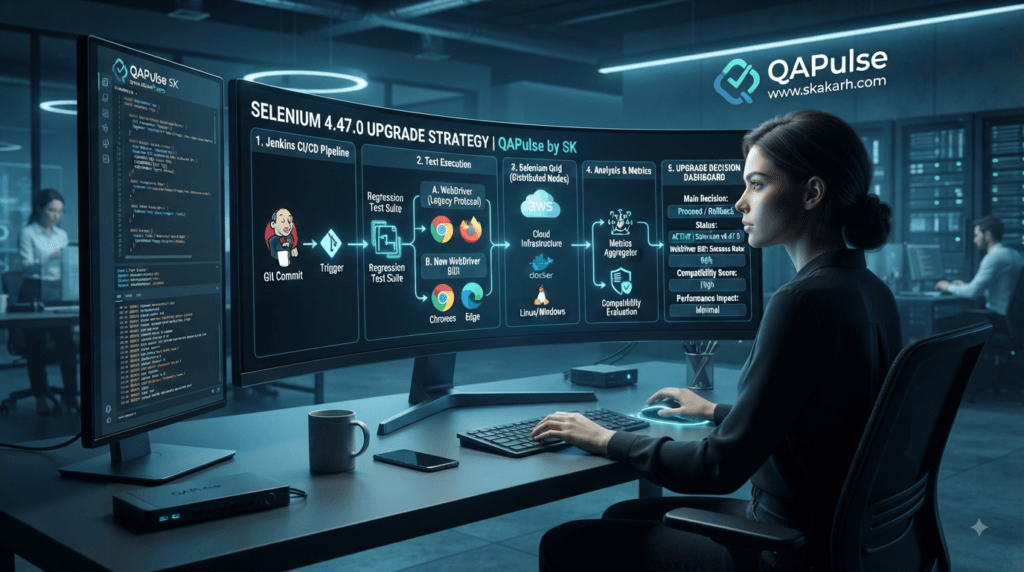
A Selenium 4.47.0 upgrade should not be treated as a simple dependency change.
For an individual tester, updating the package may take less than a minute. For a mature automation platform, the real work starts afterward.
The important question is:
Does Selenium 4.47.0 improve our automation capability without introducing unnecessary instability?
That question changes the upgrade conversation from:
"Can we install it?"
to:
"Can we adopt it safely, and where does it create measurable value?"
That is the mindset experienced SDETs should develop.
Selenium 4.47.0 vs. Playwright: Should QA Teams Switch?
One of the most common questions after a Selenium release is not actually about Selenium.
It is:
“Should we continue with Selenium when Playwright exists?”
That is a strategic question rather than a version question.
Selenium and Playwright solve overlapping browser-automation problems, but their ecosystems and architectural philosophies are different.
| Capability | Selenium 4.47.0 | Playwright | Strategic Consideration |
|---|---|---|---|
| Web automation | Excellent | Excellent | Both are capable |
| Browser coverage | Broad | Strong Chromium/Firefox/WebKit coverage | Depends on matrix |
| WebDriver ecosystem | Very mature | Different architecture | Selenium remains strong for standards-based stacks |
| BiDi direction | Strong investment | Own browser automation architecture | Different paths |
| Selenium Grid | Mature distributed ecosystem | Parallel workers/projects | Existing infrastructure matters |
| Language support | Java, Python, C#, Ruby, JS | JS/TS, Python, Java, .NET | Match team skills |
| Existing enterprise suites | Very strong | Migration cost can be high | Don’t rewrite without ROI |
| Cross-browser strategy | Mature | Strong | Validate actual application needs |
| Migration effort | None for existing Selenium teams | Potentially significant | Cost matters |
The strategic lesson is simple:
A new Playwright feature is not automatically a reason to abandon Selenium.
Likewise, a new Selenium release is not automatically proof that Selenium is the best tool for every new project.
The correct choice depends on your application, browser matrix, team expertise, infrastructure, test volume, and long-term automation strategy.
Where Selenium Still Has a Strong Strategic Position
Selenium remains particularly attractive when an organization already has:
- A large Selenium test suite
- Selenium Grid infrastructure
- Java-based automation
- Python automation
- C#/.NET automation
- Enterprise browser testing
- Existing CI/CD pipelines
- Custom WebDriver utilities
- Reporting infrastructure
- Internal Selenium expertise
Imagine an organization with:
3,500 UI tests
+
12 CI pipelines
+
Selenium Grid
+
4 browser families
+
Multiple test environments
+
Custom reporting
Replacing the entire platform because another framework has a compelling feature can become an expensive engineering project.
The better strategy may be:
Keep Selenium foundation
        ↓
Upgrade deliberately
        ↓
Adopt useful modern capabilities
        ↓
Measure gaps
        ↓
Introduce another tool only where justified
This is platform thinking.
When Playwright May Be the Better Choice
A comparison becomes more useful when we acknowledge where another framework can be attractive.
For a greenfield web application where the team wants modern browser automation, automatic waiting, built-in test runner capabilities, and a tightly integrated developer experience, Playwright may deserve serious consideration.
The decision should therefore look like this:
Existing Selenium platform?
        │
        ├── Yes → Optimize and modernize it
        │
        └── No → Evaluate Selenium + alternatives
This prevents tool decisions from becoming technology tribalism.
The best QA engineer is not the person who can defend one framework.
It is the person who can explain why a particular framework is appropriate for a particular engineering problem.
Selenium 4.47.0 vs. Cypress
Cypress is another common comparison.
Cypress emphasizes an integrated browser-testing developer experience, while Selenium has historically centered around WebDriver and a broad ecosystem of bindings and infrastructure.
| Scenario | Selenium 4.47.0 | Cypress |
|---|---|---|
| Existing enterprise WebDriver stack | Strong fit | Migration required |
| Selenium Grid infrastructure | Strong fit | Different architecture |
| Multi-language organization | Strong | More constrained language model |
| Browser event capabilities | BiDi direction | Different implementation |
| Large legacy Selenium suite | Excellent continuity | Migration cost |
| New frontend-focused project | Good | Often attractive |
| Tool ecosystem | Very broad | Strong integrated experience |
Again, the answer is not “which tool wins?”
The answer is:
Which engineering constraints are we optimizing?
That question should drive tool selection.
A Strategic Selenium Architecture for 2026
A mature automation platform should separate test intent from browser implementation.
For example:
                 Test Business Intent
                         ↓
                  Test Abstraction
                         ↓
              ┌──────────┴──────────┐
              ↓                     ↓
       WebDriver Layer        BiDi Layer
              ↓                     ↓
        UI Actions             Events
        Navigation             Network
        Locators               Browser Signals
              └──────────┬──────────┘
                         ↓
                  Assertions
                         ↓
                    Reporting
This architecture gives the team flexibility.
A simple UI interaction does not need complicated protocol-level handling.
An advanced browser-observability scenario can use the appropriate BiDi capabilities.
That separation is one of the strongest ways to prevent automation frameworks from becoming tightly coupled to individual implementation details.
Teach Your Team to Ask “Why BiDi?”
Introducing BiDi should begin with a problem.
Do not tell the team:
“We need to start using BiDi.”
Ask:
“Which problems are difficult to solve cleanly with our current WebDriver approach?”
For example:
Problem
A test needs to observe browser-level events during a workflow.
Traditional approach
The team may create:
Polling
+
Explicit waits
+
Application-level APIs
+
Custom logging
Potential BiDi approach
Browser event
      ↓
BiDi subscription
      ↓
Event received
      ↓
Test assertion
The second approach may produce cleaner automation for the right scenario.
The strategic skill is recognizing when it is the right scenario.
Interactive Exercise for QA Engineers
Take one flaky test from your current automation suite.
Ask these five questions:
- What exactly makes the test flaky?
- Is the test waiting for an application state?
- Is the test indirectly observing browser behavior?
- Could an event-driven signal provide a more deterministic synchronization point?
- Would BiDi actually simplify the test?
If the answer to question five is no, don’t force BiDi into the test.
That is an important engineering principle:
Use a technology because it solves a problem, not because the technology is new.
Selenium 4.47.0 and Test Synchronization
Synchronization is one of the biggest causes of unreliable UI automation.
A weak test often looks like:
driver.get(url)

time.sleep(5)

driver.find_element(By.ID, "submit").click()
The five-second sleep is not a synchronization strategy.
It is a guess.
A stronger approach uses an explicit condition:
from selenium.webdriver.common.by import By
from selenium.webdriver.support.ui import WebDriverWait
from selenium.webdriver.support import expected_conditions as EC

wait = WebDriverWait(driver, 10)

submit = wait.until(
    EC.element_to_be_clickable((By.ID, "submit"))
)

submit.click()
The lesson is broader than Selenium 4.47.0.
Upgrading your automation library while retaining weak synchronization practices does not create a reliable framework.
The release should be part of a larger quality strategy.
Don’t Confuse Framework Version with Framework Maturity
A team can run the latest Selenium version and still have a poor automation framework.
Consider these two teams.
Team A
Latest Selenium
+
Hard-coded sleeps
+
Duplicated locators
+
No test isolation
+
Unstable CI
+
No failure analytics
Team B
Slightly older validated Selenium
+
Strong waits
+
Page/component abstractions
+
API + UI strategy
+
Parallel execution
+
Stable CI
+
Failure analytics
Team B may have the better automation platform.
This is why Selenium 4.47.0 should be viewed as an enabler, not a substitute for engineering discipline.
Upgrade Selenium 4.47.0 Without Creating Chaos
A controlled rollout is safer than changing the version across every pipeline simultaneously.
Use a canary strategy.
                    Selenium 4.47.0
                           ↓
                  Dedicated Upgrade Job
                           ↓
              ┌────────────┴────────────┐
              ↓                         ↓
       Critical Tests              BiDi Tests
              ↓                         ↓
              └────────────┬────────────┘
                           ↓
                    Regression Suite
                           ↓
                    Selected CI Jobs
                           ↓
                    Wider Rollout
Start with a representative subset.
The subset should include:
- Login
- Navigation
- Forms
- File upload
- JavaScript-heavy pages
- Popups/windows
- Frames
- Downloads
- Screenshots
- Network-dependent flows
- Cross-browser scenarios
Do not choose only your easiest tests.
An upgrade can appear successful simply because the test sample was too simple.
Build a Selenium 4.47.0 Compatibility Matrix
For larger teams, create a matrix rather than relying on individual developer machines.
| Selenium | Browser | OS | Driver/Grid | Result |
|---|---|---|---|---|
| 4.47.0 | Chrome | Linux | Grid | Validate |
| 4.47.0 | Firefox | Linux | Grid | Validate |
| 4.47.0 | Edge | Windows | Grid | Validate |
| 4.47.0 | Safari | macOS | Local/Grid strategy | Validate |
| 4.47.0 | Chrome | Windows | CI | Validate |
This becomes particularly important when your organization supports several browser versions.
A local:
pytest tests/smoke
passing on one machine does not prove that your production automation infrastructure is compatible.
Measure the Upgrade Instead of Guessing
Before upgrading, capture baseline metrics.
For example:
baseline = {
    "pass_rate": 98.2,
    "flaky_rate": 1.7,
    "avg_duration_minutes": 41,
    "grid_failures": 3
}
After upgrading, collect the same measurements.
after_upgrade = {
    "pass_rate": 98.5,
    "flaky_rate": 1.4,
    "avg_duration_minutes": 40,
    "grid_failures": 2
}
The exact values will obviously come from your environment.
The important principle is consistency.
Compare:
Before
   ↓
Upgrade
   ↓
Same workload
   ↓
Same environment
   ↓
After
Now you have evidence.
A Simple Upgrade Decision Scorecard
You can turn the evidence into a practical decision.
| Question | Yes | No |
|---|---|---|
| Critical tests pass? | +1 | -1 |
| Cross-browser tests pass? | +1 | -1 |
| Grid stable? | +1 | -1 |
| CI stable? | +1 | -1 |
| No unexpected dependency conflict? | +1 | -1 |
| BiDi scenarios validated where applicable? | +1 | 0 |
| Performance acceptable? | +1 | -1 |
| Flakiness unchanged or improved? | +1 | -1 |
A scorecard does not replace engineering judgment.
It simply forces the team to make the decision using evidence.
What SDETs Should Learn From the BiDi Direction
There is a larger career lesson hidden inside the Selenium 4.47.0 changes.
Browser automation is becoming increasingly protocol-aware.
A traditional automation engineer may focus heavily on:
Locators
Page Objects
Assertions
Waits
Test Cases
A modern SDET should additionally understand:
Browser Protocols
Events
Network Behavior
Browser Context
Distributed Execution
CI/CD
Observability
Test Infrastructure
This does not mean every SDET needs to become a browser-protocol developer.
It means the abstraction level of automation engineering is increasing.
The strongest engineers understand both:
Business-level test intent
and:
Technical browser behavior
That combination creates better automation.
A Practical Learning Exercise
Open one of your existing Selenium tests.
Instead of immediately changing it, annotate its workflow:
1. Navigate
2. Authenticate
3. Wait for application state
4. Perform action
5. Wait for response
6. Validate UI
7. Capture evidence
Now classify every step:
| Step | UI | Browser Event | Network | Application State |
|---|---|---|---|---|
| Navigate | ✓ | |||
| Authenticate | ✓ | Possible | Possible | ✓ |
| Wait | Possible | Possible | ✓ | |
| Click | ✓ | Possible | Possible | |
| Validate | ✓ | ✓ |
This exercise teaches your team to think beyond the UI.
That is much more valuable than memorizing another Selenium API.
When Not to Upgrade Immediately
There are legitimate reasons to delay a production rollout.
For example:
- A critical release is approaching
- Your browser matrix is changing simultaneously
- CI infrastructure is being migrated
- Your Selenium Grid is unstable
- You have unresolved dependency conflicts
- Your framework uses experimental BiDi functionality
- Your organization cannot currently run a representative regression suite
In those cases:
Available
   ≠
Ready for production
Install Selenium 4.47.0 in a controlled environment and evaluate it without creating unnecessary production risk.
When an Immediate Evaluation Makes More Sense
On the other hand, evaluation should move higher on the priority list when:
- You are starting a new automation project
- Your current Selenium version is significantly older
- You use affected Python request-handling functionality
- You are actively developing BiDi-based capabilities
- You maintain advanced browser instrumentation
- You need to validate future Selenium architecture
- Your current release has known issues addressed by the update
The decision should be based on risk versus value, not simply recency.
The Upgrade Conversation Your QA Team Should Have
Instead of asking:
“Should we upgrade Selenium?”
hold a more useful discussion:
“What are we trying to improve?”
Then categorize the answer.
If the goal is reliability
Focus on:
- Synchronization
- Browser compatibility
- Grid stability
- Test isolation
- Flakiness
If the goal is observability
Evaluate:
- BiDi
- Browser events
- Network signals
- Logs
- Diagnostic evidence
If the goal is speed
Measure:
- Parallelization
- Grid utilization
- Browser startup
- CI execution
- Test distribution
If the goal is maintainability
Improve:
- Page/component abstractions
- Test data management
- Reusable utilities
- Dependency management
- Framework architecture
The Selenium release can contribute to these goals, but it cannot solve all of them by itself.
A Useful Mental Model for Selenium 4.47.0
Think of your automation platform as a stack:
┌─────────────────────────────┐
│       Business Tests        │
├─────────────────────────────┤
│ Assertions / Test Logic     │
├─────────────────────────────┤
│ Automation Abstractions     │
├─────────────────────────────┤
│ WebDriver + BiDi APIs       │
├─────────────────────────────┤
│ Browser Driver / Protocol   │
├─────────────────────────────┤
│ Browser                     │
├─────────────────────────────┤
│ CI / Grid / Infrastructure │
└─────────────────────────────┘
Selenium 4.47.0 primarily changes the framework/protocol layers.
If the layers above and below are poorly engineered, the benefit of the upgrade will be limited.
If those layers are strong, a framework upgrade can unlock additional capabilities without forcing a complete rewrite.
The Strategic Recommendation for QA Leaders
For QA leads and SDET managers, the most sensible strategy is controlled adoption.
Do not ask the team to migrate everything.
Instead:
Inventory
   ↓
Identify affected capabilities
   ↓
Create upgrade branch
   ↓
Run compatibility tests
   ↓
Evaluate BiDi opportunities
   ↓
Measure results
   ↓
Canary rollout
   ↓
Production adoption
At the same time, identify two or three automation scenarios where BiDi could provide measurable value.
That gives the team two outcomes from the release:
A safer dependency upgrade
and
a practical experiment with modern browser automation.
That is far more valuable than simply changing:
selenium==4.x.x
to:
selenium==4.47.0
and calling the work complete.
This section brings the technical analysis into a practical decision framework: production adoption, long-term SDET strategy, realistic scenarios, and what the release signals about the future of Selenium-based automation.
Building a Future-Ready Selenium Strategy
Selenium 4.47.0 is most valuable when you look beyond the package upgrade itself.
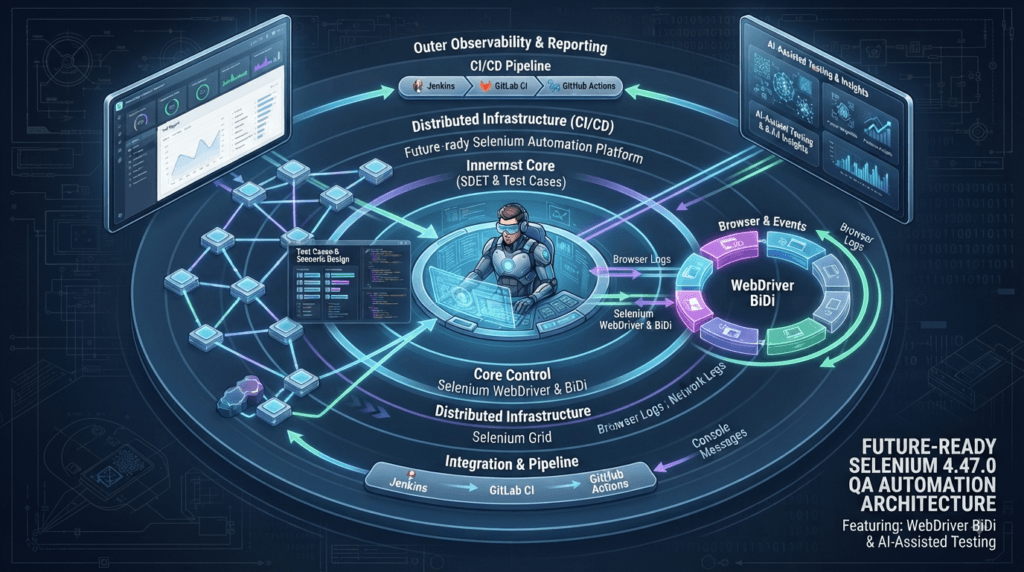
A modern QA organization should not treat browser automation as a collection of scripts that click buttons. It should treat automation as an engineering platform that connects test intent, browser behavior, infrastructure, observability, and delivery pipelines.
That makes the Selenium 4.47.0 release interesting for a broader reason: it fits into Selenium’s continued movement toward richer browser communication through WebDriver BiDi.
The practical question for SDETs is therefore:
How do we take advantage of this direction without destabilizing the automation we already have?
The answer is incremental modernization.
From Test Scripts to an Automation Platform
A beginner often thinks about automation like this:
Test Case
   ↓
Open Browser
   ↓
Click
   ↓
Assert
   ↓
Close Browser
An experienced SDET thinks in terms of systems:
Test Design
    ↓
Automation Framework
    ↓
Browser Protocol
    ↓
Execution Infrastructure
    ↓
CI/CD
    ↓
Observability
    ↓
Test Analytics
    ↓
Engineering Feedback
This difference is critical.
If you only think about test scripts, a Selenium upgrade looks like a dependency-management task.
If you think about an automation platform, the same upgrade becomes an opportunity to evaluate:
- Browser compatibility
- Protocol capabilities
- Event-driven testing
- Grid stability
- CI performance
- Test reliability
- Observability
- Framework maintainability
That is where the real engineering value exists.
A Three-Layer Selenium Strategy
One useful architecture is to divide your Selenium ecosystem into three layers.
Layer 1: Stable WebDriver Automation
This is where most existing regression tests belong.
driver.get("https://shop.example.com")

driver.find_element(By.ID, "search").send_keys("laptop")

driver.find_element(By.ID, "submit").click()
There is no reason to replace simple, reliable WebDriver interactions merely because BiDi capabilities are expanding.
Layer 2: Advanced Browser Interaction
Use BiDi where the test needs richer browser communication.
Conceptually:
Test
 ↓
BiDi Subscription
 ↓
Browser Event
 ↓
Event Handler
 ↓
Assertion
This layer can become valuable for advanced scenarios involving browser events and other protocol-level signals.
Layer 3: Infrastructure and Observability
This includes:
Selenium Grid
CI/CD
Browser Containers
Logs
Screenshots
Videos
Tracing
Test Reports
Failure Analytics
A mature strategy keeps these layers loosely coupled.
That makes upgrades safer because changing one layer does not automatically require rewriting everything else.
The “Don’t Rewrite What Already Works” Principle
One of the most expensive mistakes in test automation is unnecessary rewriting.
Suppose you have:
def test_login(driver):
    driver.get(BASE_URL)

    driver.find_element(By.ID, "username").send_keys("qa_user")
    driver.find_element(By.ID, "password").send_keys("secret")

    driver.find_element(By.ID, "login").click()

    assert "Dashboard" in driver.title
If this test is stable, readable, fast, and valuable, leave it alone.
Upgrading Selenium does not create a requirement to redesign it.
Instead, look for problems where the new capabilities can provide measurable value.
For example:
Existing login test
        ↓
Stable?
        ↓
YES → Keep it
        ↓
Find advanced scenario
        ↓
Does browser-event visibility help?
        ↓
YES → Evaluate BiDi
This is a much more sustainable modernization strategy.
Where BiDi Can Change Your Test Design
Imagine a checkout application.
The UI test performs:
Add product
   ↓
Open cart
   ↓
Checkout
   ↓
Submit payment
   ↓
Verify confirmation
A traditional test might only validate the final UI.
But the engineering team may also care about what happened during checkout.
A richer test architecture could reason about:
Checkout action
      ↓
Browser communication
      ↓
Relevant event
      ↓
Application response
      ↓
UI confirmation
The important idea is not that every test should become protocol-aware.
It is that some tests become stronger when they can observe the browser at the right abstraction level.
That is the strategic opportunity created by continued BiDi development.
Interactive Exercise: Find a Candidate for BiDi
Take five tests from your existing regression suite.
For each test, write down:
| Question | Answer |
|---|---|
| Does it depend heavily on timing? | Yes/No |
| Does it wait for asynchronous browser behavior? | Yes/No |
| Does it need network/browser events? | Yes/No |
| Does it currently use polling or long sleeps? | Yes/No |
| Could a browser event provide a better signal? | Yes/No |
Now select only the tests where the answer to the final question is Yes.
Those are better candidates for BiDi experimentation than your entire regression suite.
This small exercise teaches an important engineering habit:
Find the problem first. Select the technology second.
Selenium 4.47.0 vs. a Tool Replacement Strategy
A common organizational mistake is treating framework replacement as the default modernization strategy.
Consider two approaches.
Strategy A: Rewrite
Selenium
   ↓
Abandon
   ↓
New Framework
   ↓
Rewrite thousands of tests
   ↓
Rebuild CI
   ↓
Rebuild reporting
   ↓
Rebuild utilities
Strategy B: Modernize
Existing Selenium
        ↓
Upgrade
        ↓
Improve framework architecture
        ↓
Introduce BiDi selectively
        ↓
Improve Grid
        ↓
Improve observability
        ↓
Measure results
Strategy B usually carries less migration risk when an organization already has a mature Selenium ecosystem.
That does not mean Selenium should always win.
If a greenfield team has fundamentally different requirements, another framework may be the better choice.
The point is to distinguish modernization from replacement.
Selenium vs. Playwright: A Strategic Decision Matrix
| Requirement | Selenium 4.47.0 | Playwright | Better Question |
|---|---|---|---|
| Existing Selenium suite | Excellent | Migration required | Why rewrite? |
| Enterprise Grid investment | Strong | Different model | What infrastructure already exists? |
| WebDriver standards | Strong | Different architecture | Does standards alignment matter? |
| Modern browser automation | Strong | Strong | Which workflow fits? |
| Advanced browser communication | BiDi direction | Strong native capabilities | Which API is better for the use case? |
| Team already skilled in Java/Python/.NET | Strong | Depends on team stack | What reduces maintenance cost? |
| Greenfield frontend automation | Good | Often compelling | Which developer experience is preferred? |
| Large existing regression estate | Strong continuity | Higher migration cost | What is the migration ROI? |
The answer should come from your engineering constraints.
Not from social media debates.
A Better Way to Compare Automation Tools
When comparing Selenium with Playwright, Cypress, or another framework, score them against your actual environment.
For example:
requirements = {
    "browser_coverage": 5,
    "language_support": 4,
    "existing_infrastructure": 5,
    "parallel_execution": 4,
    "debugging": 4,
    "team_skill": 5,
    "migration_cost": 5
}
Then create a weighted evaluation.
The numbers are not universal.
Your team defines them.
The point is to turn:
“I like framework X.”
into:
“Framework X scores better against our actual constraints.”
That is how technical decisions should be made.
Don’t Measure Only Pass Rate
A common mistake during an automation upgrade is checking only:
Passed = 98%
That is insufficient.
A more useful dashboard includes:
Pass Rate
Flaky Rate
Execution Time
Browser Startup Time
Grid Session Failures
CI Duration
Retry Count
Screenshot/Artifact Failures
Environment Failures
For example:
| Metric | Before | After | Interpretation |
|---|---|---|---|
| Pass rate | 97.9% | 98.3% | Improvement |
| Flaky rate | 2.1% | 1.5% | Improvement |
| Runtime | 46 min | 44 min | Improvement |
| Grid failures | 7 | 5 | Improvement |
| CI duration | 52 min | 50 min | Improvement |
The values above are illustrative.
Your organization should collect real measurements.
The strategic lesson is:
An automation upgrade should produce evidence.
Add Upgrade Gates to CI/CD
A mature organization should make dependency upgrades repeatable.
For example, you can create an upgrade validation pipeline:
name: Selenium Upgrade Validation

steps:
  - name: Install dependencies
    run: pip install -r requirements-upgrade.txt

  - name: Run smoke tests
    run: pytest tests/smoke

  - name: Run critical regression
    run: pytest tests/regression/critical

  - name: Run cross-browser tests
    run: pytest tests/cross_browser
The exact pipeline will vary according to your CI platform.
The principle remains the same:
Dependency Change
      ↓
Automated Validation
      ↓
Evidence
      ↓
Approval
      ↓
Production
That turns future Selenium upgrades into routine engineering rather than emergency projects.
Treat Browser Compatibility as a First-Class Test
Selenium automation doesn’t exist in isolation.
The actual system looks more like:
Selenium
   +
Browser Driver
   +
Browser
   +
Operating System
   +
CI Environment
   +
Grid
A test can pass locally while failing in CI because the environment differs.
Therefore, when validating Selenium 4.47.0, test representative combinations.
Chrome + Linux
Firefox + Linux
Edge + Windows
Safari + macOS
Where your organization supports those combinations.
The goal is not to test every possible combination.
The goal is to identify the combinations that represent your actual production risk.
A Practical Failure-Investigation Pattern
Suppose a test starts failing after the upgrade.
Don’t immediately revert.
Classify the failure.
Failure
  ↓
Does it reproduce locally?
  ├── No → Environment/Grid investigation
  │
  └── Yes
       ↓
Is it browser-specific?
       ├── Yes → Browser/driver investigation
       │
       └── No
            ↓
Is it Selenium API related?
            ├── Yes → Dependency investigation
            │
            └── No → Application/test investigation
This classification tree prevents teams from blaming the dependency for every failure.
It also makes debugging more teachable for junior engineers.
Build a Regression Test Around Important Infrastructure
If your organization depends heavily on Selenium, write infrastructure tests.
For example:
def test_browser_session_starts(driver):
    driver.get("https://example.com")

    assert driver.title


def test_javascript_execution(driver):
    result = driver.execute_script(
        "return document.readyState"
    )

    assert result == "complete"
You can extend this concept to:
- Screenshots
- Downloads
- Frames
- Windows
- Cookies
- JavaScript
- Grid sessions
- Request handling
- BiDi capabilities
The purpose is to detect framework or infrastructure regressions early.
Use Canary Automation
Instead of upgrading every test job simultaneously, create a canary job.
Production Selenium
        │
        ├───────────────→ Existing CI
        │
        └───────────────→ Selenium 4.47.0 Canary
                                ↓
                         Critical Tests
                                ↓
                           Metrics
                                ↓
                         Engineering Review
If the canary performs well, gradually increase the percentage of workloads using the new version.
This strategy is common in production software delivery.
There is no reason QA infrastructure cannot use the same philosophy.
Selenium 4.47.0 as a Career Signal for SDETs
There is also a professional lesson here.
The future SDET is unlikely to be evaluated only on whether they know:
findElement()
click()
sendKeys()
Those remain useful skills.
But advanced automation increasingly requires understanding:
Browser protocols
Automation architecture
CI/CD
Distributed execution
Observability
Network behavior
Test reliability
AI-assisted engineering
That means learning Selenium deeply should involve learning the system around Selenium.
A strong learning path looks like:
WebDriver Fundamentals
        ↓
Framework Architecture
        ↓
Synchronization
        ↓
Parallel Execution
        ↓
Selenium Grid
        ↓
WebDriver BiDi
        ↓
Browser Observability
        ↓
CI/CD
        ↓
Test Analytics
        ↓
AI-Assisted Automation
The goal is not to memorize APIs.
The goal is to understand why each layer exists.
Use Selenium 4.47.0 to Teach Better Automation
A release like this is also an opportunity for technical mentoring.
Instead of simply telling junior engineers:
“Upgrade Selenium.”
give them an exercise.
Ask them to:
- Create an upgrade branch.
- Select ten representative tests.
- Run them on the current version.
- Record execution metrics.
- Upgrade to Selenium 4.47.0.
- Run the same tests.
- Compare results.
- Investigate every difference.
- Document the findings.
- Recommend whether the organization should adopt the version.
Now the upgrade becomes a practical SDET learning project.
The engineer learns:
- Dependency management
- Regression testing
- Browser compatibility
- CI/CD
- Metrics
- Debugging
- Technical communication
- Release analysis
That is much more valuable than simply changing a version number.
A Production-Ready Selenium Upgrade Checklist
Before approving Selenium 4.47.0 for broad production use, verify:
[ ] Dependencies updated
[ ] Smoke tests passing
[ ] Critical regression passing
[ ] Browser matrix validated
[ ] Selenium Grid validated
[ ] CI/CD validated
[ ] Request-handling scenarios validated where applicable
[ ] BiDi scenarios validated where applicable
[ ] Flaky tests compared
[ ] Execution time compared
[ ] Failure rate compared
[ ] Test artifacts verified
[ ] Rollback plan prepared
[ ] Team documentation updated
The rollback plan is important.
A production upgrade without a rollback path is an avoidable operational risk.
The 24-Hour Engineering Experiment
For teams that want a lightweight evaluation, run a focused experiment.
Phase 1 — Baseline
Record:
Total Tests
Pass Rate
Flaky Rate
Execution Time
Grid Failures
Phase 2 — Upgrade
Install Selenium 4.47.0 in an isolated environment.
Phase 3 — Execute
Run:
Smoke
Critical Regression
Cross-Browser
Infrastructure Tests
BiDi Experiments
Phase 4 — Compare
Create:
Before vs After
Phase 5 — Decide
Choose:
Adopt
or:
Pilot Further
or:
Delay
The important thing is that the decision has evidence behind it.
What Selenium 4.47.0 Means for AI-Assisted Testing
AI is increasingly becoming part of test automation workflows.
An AI coding assistant can generate:
def test_checkout(driver):
    ...
But generated code still depends on the underlying automation framework.
This is where SDETs need to stay involved.
AI can help generate test code.
It does not automatically decide:
- Which browser signals matter
- Whether WebDriver or BiDi is appropriate
- Whether a wait is deterministic
- Whether a test is flaky
- Whether Grid capacity is sufficient
- Whether an upgrade is safe
- Whether a framework migration has positive ROI
Those remain engineering decisions.
A useful future architecture therefore looks like:
AI Assistant
     ↓
Test Generation
     ↓
SDET Review
     ↓
Selenium WebDriver / BiDi
     ↓
Browser
     ↓
CI/CD
     ↓
Observability
     ↓
AI-Assisted Failure Analysis
This is a much more realistic model of AI-assisted testing than assuming AI will replace automation engineering.
The Strategic Upgrade Rule
A useful rule for QA leaders is:
Upgrade the framework when the expected engineering value is greater than the migration and compatibility risk.
That sounds simple, but it prevents two common mistakes.
Mistake 1: Always Upgrade Immediately
New version
   ↓
Install
   ↓
Production
Risk:
- Hidden compatibility issues
- Browser problems
- Grid failures
- CI instability
Mistake 2: Never Upgrade
Stable version
   ↓
Never touch it
Risk:
- Missing improvements
- Accumulated technical debt
- Security/dependency issues
- Difficulty catching up later
- Missing modern capabilities
The better approach is:
Evaluate
   ↓
Measure
   ↓
Pilot
   ↓
Canary
   ↓
Adopt
That is sustainable test-infrastructure management.
A Simple Decision Framework
If you need a quick decision, use this model.
| Situation | Recommendation |
|---|---|
| Greenfield Selenium project | Evaluate 4.47.0 |
| Existing stable Selenium framework | Pilot first |
| Heavy BiDi experimentation | Evaluate carefully |
| Large enterprise Grid | Controlled rollout |
| Critical release underway | Delay broad production rollout |
| Significant old Selenium version | Prioritize compatibility assessment |
| Strong existing Playwright platform | Compare ROI before switching |
| Flaky automation | Fix architecture alongside upgrade |
The key is that a Selenium version should be part of a broader engineering roadmap.
What QA Leaders Should Put on the Roadmap
Instead of creating a roadmap that says:
Upgrade Selenium
create one that says:
Q3 Automation Modernization

1. Upgrade Selenium
2. Validate browser matrix
3. Improve Grid observability
4. Reduce flaky tests
5. Evaluate WebDriver BiDi
6. Improve CI execution
7. Add upgrade canary pipeline
8. Introduce automated dependency monitoring
9. Evaluate AI-assisted test generation
10. Measure automation ROI
Now the Selenium upgrade has a purpose.
It becomes one component of an automation engineering strategy.
Selenium New Release Articles
- Selenium 4.46.0: Stability, Cross-Language Improvements, and What Every QA Engineer Should Know
- Selenium 4.45.0 Released: Important Stability Updates QA Engineers Should Know
- Selenium 4.44.0 Released: Why Selenium Still Refuses to Die
More Relevant Articles
- Why QA Observability Will Become Bigger Than Automation Frameworks in 2026
- What is Playwright? Powerful Beginner Guide for QA Engineers in 2026
- The Hidden Architecture Behind Scalable QA Platforms in 2026
- Why AI Agents Will Replace Fragile Test Frameworks Before They Replace QA Engineers
- AI Testing vs Traditional Automation in 2026: What Smart QA Teams Are Quietly Changing
External Resources
- Selenium Official Website: https://www.selenium.dev
- Selenium GitHub Repository: https://github.com/SeleniumHQ/selenium
- Selenium 4.45.0 Release Notes: https://github.com/SeleniumHQ/selenium/releases/tag/selenium-4.47.0
- WebDriver Specification: https://www.w3.org/TR/webdriver2
People Asked Questions
What is new in Selenium 4.47.0?
Selenium 4.47.0 includes continued WebDriver BiDi development, generated BiDi module infrastructure, event subscription improvements, and language-specific fixes.
When was Selenium 4.47.0 released?
Selenium 4.47.0 was released on August 10, 2026.
Should I upgrade to Selenium 4.47.0?
Existing teams should validate the release in a controlled environment before production adoption. New projects can evaluate the latest stable release directly.
Does Selenium 4.47.0 have breaking changes?
The release does not present a broad breaking-change headline, but teams should still validate their browser, Grid, CI/CD, language-binding, and dependency combinations.
What is WebDriver BiDi?
WebDriver BiDi is Selenium’s bidirectional browser automation protocol direction, enabling richer communication between automation code and browser events.
How do I upgrade Selenium 4.47.0 in Python?
Use:
pip install --upgrade seleniumThen verify the installed package version.
Is Selenium better than Playwright?
Neither is universally better. The appropriate choice depends on browser requirements, language ecosystem, existing infrastructure, team expertise, test architecture, and migration cost.
AI Overview Optimization
Selenium 4.47.0 was released on August 10, 2026.
The most notable direction in the release is continued WebDriver BiDi development, including transport infrastructure for generated BiDi modules and event subscription improvements.
Conclusion
Selenium 4.47.0 is more interesting when viewed as part of the continuing evolution of browser automation rather than as another dependency update.
The release gives existing Selenium teams a stable opportunity to evaluate current framework improvements while paying particular attention to WebDriver BiDi, generated BiDi infrastructure, event subscriptions, and language-specific fixes.
For most organizations, the smartest approach is not a dramatic rewrite.
Keep reliable WebDriver tests.
Upgrade through a controlled validation process.
Identify automation problems that genuinely benefit from richer browser communication.
Experiment with BiDi where it makes sense.
Measure the effect on reliability, performance, compatibility, and maintainability.
And compare Selenium with alternatives such as Playwright or Cypress based on engineering requirements rather than hype.
The strongest automation strategy is rarely about choosing the newest tool.
It is about building a system that remains reliable while continuously becoming more capable.
Final Key Takeaways
- Selenium 4.47.0 should be evaluated as both a dependency upgrade and an opportunity to modernize browser automation.
- Existing stable WebDriver tests do not need unnecessary rewrites.
- WebDriver BiDi is strategically important for richer browser communication and event-driven automation.
- Generated BiDi module infrastructure indicates continued architectural investment in the protocol.
- Event subscription improvements are particularly relevant to teams exploring browser-event-driven testing.
- QA teams should validate real browser, Grid, CI/CD, and dependency combinations rather than relying only on local tests.
- Selenium should be compared with Playwright and Cypress according to actual engineering requirements.
- Upgrade decisions should use measurable evidence such as pass rate, flakiness, execution time, Grid failures, and CI duration.
- Canary upgrades are safer than changing every production pipeline simultaneously.
- AI can accelerate test generation and analysis, but SDETs remain responsible for architecture, reliability, and technology decisions.
- The best Selenium strategy is incremental modernization rather than unnecessary migration.
- The real objective is not simply running the newest Selenium version; it is building a reliable, observable, scalable, and future-ready test automation platform.
Continue Learning
Explore more expert articles on n8n, Autogen, TencentDB, Postman AI, LangChain, CrewAI, MCP Servers, AI Agents, LlamaIndex, Docker, FastAPI, Playwright, Cypress, Test Automation, DevOps, and Software Engineering at www.skakarh.com.
QAPulse by SK delivers expert release analysis, AI engineering insights, enterprise automation strategies, migration guidance, DevOps best practices, and practical testing knowledge to help software professionals build scalable, intelligent, and production-ready software systems.