QA
QA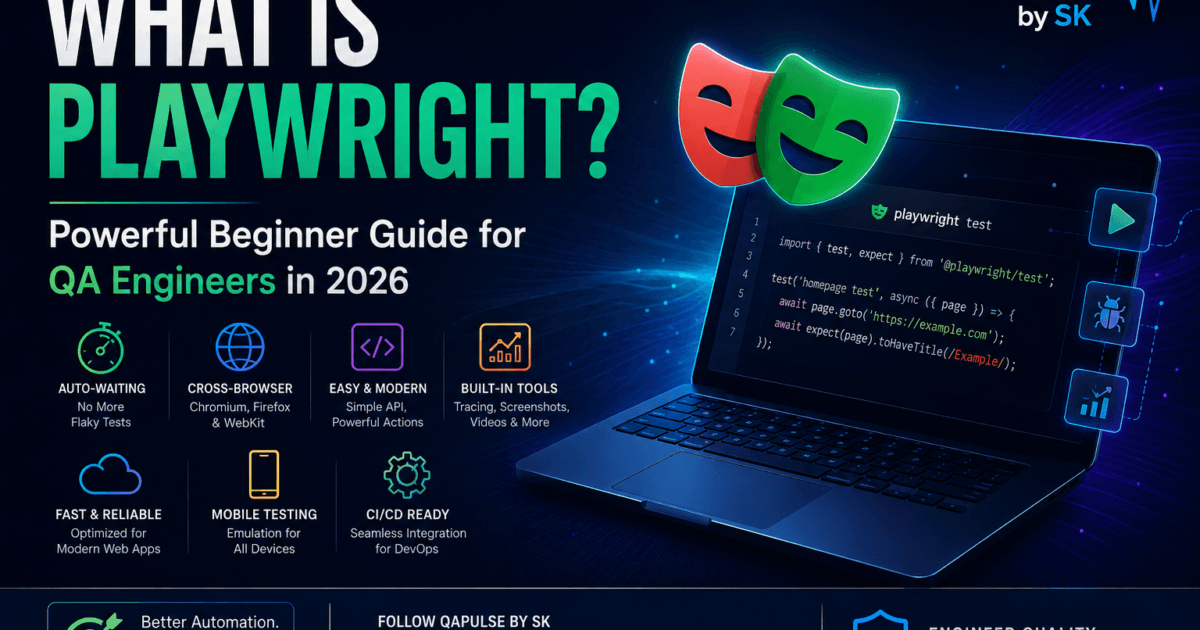
What is Playwright and Why Is Everyone Talking About It?
If you are entering modern test automation in 2026, one question appears everywhere:
What is Playwright?
And honestly?
There is a reason Playwright became one of the fastest-growing automation frameworks in modern QA engineering.
Because modern applications changed dramatically.
Applications today increasingly involve:
- dynamic rendering
- SPAs
- micro-frontends
- real-time APIs
- asynchronous UI behavior
- distributed architectures
Older automation approaches often struggle badly with these systems.
That is exactly where Playwright became extremely powerful.
What is Playwright?
Short Answer
Playwright is an open-source automation framework created by Microsoft for end-to-end web testing, browser automation, API testing, and modern cross-browser application validation.
In Simple Words
Playwright allows QA engineers and developers to:
- automate browsers
- test web applications
- simulate user interactions
- validate UI behavior
- capture screenshots
- test APIs
- run parallel automation
using modern programming languages like:
- JavaScript
- TypeScript
- Python
- Java
- .NET
Why Playwright Became So Popular
Modern web applications became:
- faster
- more dynamic
- highly asynchronous
- JavaScript-heavy
Traditional automation tools often required:
too many manual waits and workarounds
Playwright solved many of these pain points using:
- auto-waiting
- intelligent synchronization
- modern browser control
- parallel execution
- built-in tracing
That dramatically improved automation reliability.
Key Features of Playwright
Core Features Overview
| Feature | Why It Matters |
|---|---|
| Auto-waiting | Reduces flaky tests |
| Parallel execution | Faster pipelines |
| Cross-browser support | Chromium, Firefox, WebKit |
| Built-in tracing | Easier debugging |
| Screenshots & videos | Better failure analysis |
| API testing | Backend validation |
| Mobile emulation | Responsive testing |
| Headless execution | CI/CD optimization |
How Playwright Works
At a high level, Playwright directly communicates with browsers using modern automation protocols.
Basic Playwright Workflow
Test Script
↓
Playwright API
↓
Browser Engine
↓
Application Under Test
This architecture provides:
- faster execution
- stable synchronization
- reliable browser interaction
Supported Browsers in Playwright
One major advantage of Playwright is native support for multiple browsers.
| Browser | Supported |
|---|---|
| Chromium | ✅ |
| Firefox | ✅ |
| WebKit | ✅ |
This helps teams validate:
- Chrome
- Edge
- Safari
- Firefox
using a single framework.
What Makes Playwright Different From Selenium?
This is one of the most common beginner questions.
Playwright vs Selenium — Quick Comparison
Core Features Overview
| Feature | Playwright | Selenium |
|---|---|---|
| Auto-waiting | Built-in | Limited |
| Setup complexity | Easier | Moderate |
| Parallel execution | Native | External setup often needed |
| Browser communication | Modern | WebDriver-based |
| Tracing tools | Built-in | Limited |
| Speed | Faster generally | Slower comparatively |
| Network interception | Strong | Limited |
| Modern SPA support | Excellent | Good |
Important Reality Check
Selenium is still extremely important in enterprise ecosystems.
But Playwright became popular because it better fits:
- modern frontend architectures
- fast CI/CD pipelines
- cloud-native testing systems
How to Install Playwright
Step 1 — Install Node.js
Download from:
Step 2 — Create a Project
mkdir playwright-project
cd playwright-project
npm init -y
Step 3 — Install Playwright
npm init playwright@latest
This automatically installs:
- Playwright
- browser binaries
- starter framework structure
Your First Playwright Test
Below is a beginner-friendly example.
const { test, expect } = require('@playwright/test');

test('homepage test', async ({ page }) => {
  await page.goto('https://example.com');

  await expect(page).toHaveTitle(/Example/);
});
What This Test Does
Step-by-Step Breakdown
| Step | Action |
|---|---|
test() | Creates a test case |
page.goto() | Opens website |
expect() | Validates behavior |
toHaveTitle() | Checks page title |
Why Auto-Waiting is a Massive Advantage
Traditional automation often required:
Thread.sleep(5000);
This creates:
- flaky tests
- slower pipelines
- unstable execution
Playwright intelligently waits automatically.
Example:
await page.click('#submit');
Playwright automatically waits until:
- element becomes visible
- clickable
- stable
This dramatically improves reliability.
Playwright Architecture Explained
Modern Playwright systems typically include:
- test layer
- execution layer
- browser layer
- reporting layer
Playwright Execution Architecture
| Layer | Responsibility |
|---|---|
| Test Scripts | Business validation |
| Playwright Runner | Test orchestration |
| Browser Engines | UI execution |
| Reporting Tools | Logs/traces/screenshots |
| CI/CD Pipeline | Automation workflows |
What Is Playwright Trace Viewer?
One of Playwright’s strongest features is:
Trace Viewer
Trace Viewer allows engineers to:
- replay tests visually
- inspect network activity
- analyze execution steps
- debug failures faster
Enable Tracing
use: {
  trace: 'on'
}
This is incredibly valuable for:
- flaky debugging
- CI/CD investigation
- failure analysis
How Playwright Improves CI/CD Pipelines
Modern teams increasingly use Playwright inside:
- GitHub Actions
- Jenkins
- GitLab CI
- Azure DevOps
because Playwright supports:
- headless execution
- fast startup
- parallel testing
- modern browser control
Example GitHub Actions Workflow
name: Playwright Tests

on: [push]

jobs:
  test:
    runs-on: ubuntu-latest

    steps:
    - uses: actions/checkout@v3

    - uses: actions/setup-node@v3
      with:
        node-version: 18

    - run: npm install
    - run: npx playwright test
What Is Playwright Used For?
Playwright supports multiple testing types.
Common Playwright Use Cases
| Use Case | Example |
|---|---|
| UI automation | Login testing |
| Regression testing | Release validation |
| API testing | Backend verification |
| Mobile emulation | Responsive testing |
| Visual testing | Screenshot comparison |
| End-to-end testing | Full workflows |
Playwright API Testing Example
Many beginners don’t realize Playwright also supports API automation.
Example:
const response = await request.get('https://api.example.com/users');

expect(response.status()).toBe(200);
This helps combine:
- UI testing
- API validation
inside one framework.
Playwright Best Practices for Beginners
Recommended Best Practices
| Best Practice | Why It Matters |
|---|---|
| Use locators properly | Stable automation |
| Avoid hard waits | Reduce flakiness |
| Enable tracing | Easier debugging |
| Run parallel tests | Faster execution |
| Use page objects | Cleaner code |
| Store test data separately | Better maintainability |
Common Beginner Mistakes in Playwright
Mistakes to Avoid
| Mistake | Problem |
|---|---|
| Using XPath everywhere | Fragile locators |
| Hardcoded waits | Slow unstable tests |
| Massive test files | Poor maintainability |
| Shared state between tests | Random failures |
| Ignoring retries | CI/CD instability |
Example Page Object Model in Playwright
Page Object Model improves:
- maintainability
- reusability
- scalability
Example:
class LoginPage {
  constructor(page) {
    this.page = page;
  }

  async login(email, password) {
    await this.page.fill('#email', email);
    await this.page.fill('#password', password);
    await this.page.click('#login');
  }
}
Playwright for Modern QA Teams
Modern engineering teams increasingly prefer Playwright because it aligns well with:
- agile delivery
- CI/CD
- cloud-native systems
- distributed execution
- fast feedback loops
Why QA Teams Prefer Playwright
| Advantage | Impact |
|---|---|
| Faster execution | Shorter pipelines |
| Better debugging | Faster root-cause analysis |
| Easier setup | Faster onboarding |
| Stable synchronization | Fewer flaky tests |
| Built-in tooling | Less external dependency |
What is Playwright Really Solving?
Playwright is not simply:
another browser automation tool
It is solving a much bigger engineering problem:
modern web application complexity
because modern frontend systems increasingly involve:
- asynchronous rendering
- dynamic UI
- API-heavy workflows
- distributed architecture
And Playwright was designed specifically for this modern ecosystem.
How Playwright Fits Into Modern QA Architecture
Modern QA ecosystems increasingly combine:
- Playwright
- CI/CD
- Docker
- Kubernetes
- observability
- AI-assisted debugging
This creates:
modern intelligent automation platforms
instead of isolated test scripts.
Beginner FAQ — What Is Playwright
What is Playwright Used For?
Playwright is used for:
- browser automation
- UI testing
- API testing
- regression testing
- cross-browser validation
- CI/CD automation
Is Playwright Better Than Selenium?
It depends on your requirements.
Playwright is often better for:
- modern web apps
- fast CI/CD pipelines
- async UI systems
Selenium still remains extremely important for:
- enterprise ecosystems
- legacy systems
- large existing frameworks
Which Languages Does Playwright Support?
Playwright supports:
- JavaScript
- TypeScript
- Python
- Java
- .NET
Is Playwright Good for Beginners?
Yes.
Many beginners find Playwright easier because:
- setup is simpler
- auto-waiting reduces flakiness
- debugging tools are strong
- documentation is excellent
Does Playwright Support Mobile Testing?
Playwright supports:
- mobile emulation
- responsive testing
but real-device mobile automation still often uses:
- Appium
What is Playwright and Why It Matters in 2026
The modern What Is Playwright discussion is no longer simply about choosing another automation framework. In 2026, Playwright increasingly represents the shift toward intelligent, scalable, cloud-native automation systems built for modern web architectures, distributed CI/CD pipelines, observability-driven debugging, and fast engineering feedback loops across rapidly evolving frontend ecosystems.
More Relevant Articles
- The Self-Healing Load Test: How k6 + AI Auto-Tunes Thresholds & Fixes Performance Regressions
- Load Testing Microservices with AI Personas: k6 + LLM-Generated User Journeys
- How I Built a Postman Bot That Detects Breaking API Changes Before Deployment (Using LLM)
External Resources on What is Playwright
Playwright Zero to Hero Series — Coming Soon
This article is just the beginning.
We are officially launching our:
Playwright Zero to Hero Series
A complete hands-on Playwright learning roadmap for:
- QA Engineers
- SDETs
- Automation Engineers
- Developers entering modern testing
The series will cover:
- Playwright fundamentals
- Real-world framework design
- API testing
- CI/CD integration
- Parallel execution
- Debugging & tracing
- Page Object Model
- AI-powered automation workflows
- Enterprise-scale testing strategies
👉 Follow the upcoming series here: Playwright Zero to Hero Series
⚡ Stay Tuned
New tutorials, architecture guides, code examples, and real-world Playwright engineering content are coming very soon on:
This is not just another automation tutorial series.
It’s a complete roadmap to becoming a modern Playwright engineer in 2026.
Final Thoughts
The future of QA automation increasingly depends on:
- fast execution
- reliable synchronization
- scalable CI/CD integration
- intelligent debugging
- modern browser architecture
And that is exactly why Playwright became one of the most important automation frameworks in modern QA engineering.
Playwright is not just popular because it is newer.
It became popular because modern software architecture demanded a different kind of automation framework.