 QA
QA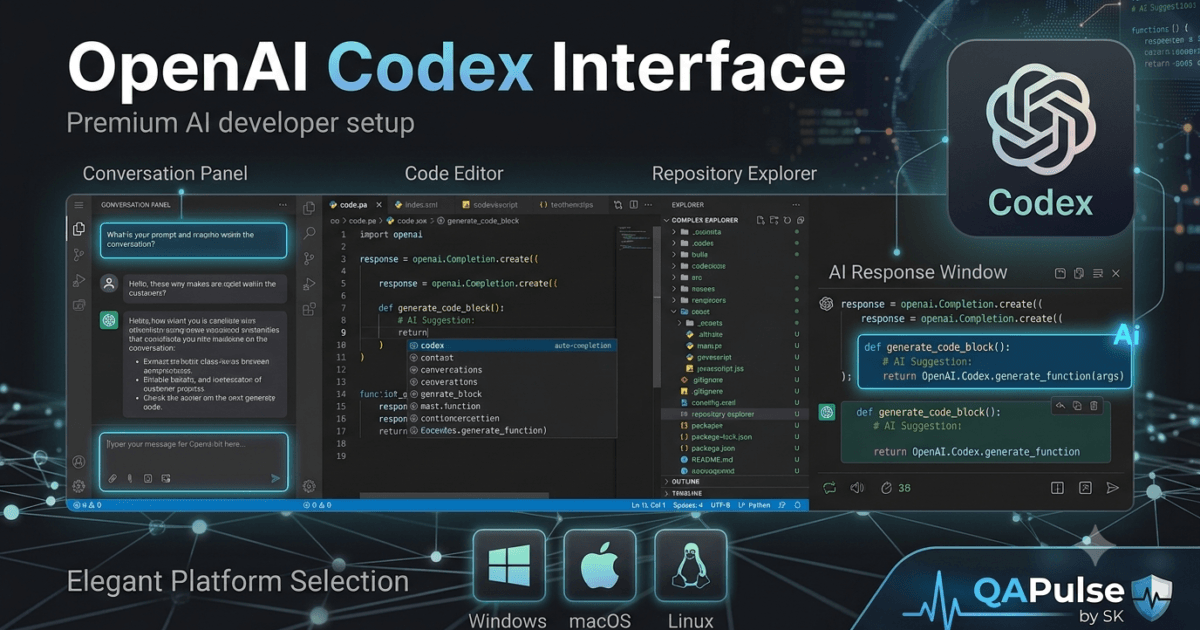
Why Learning the OpenAI Codex Interface Is Important
After you successfully install OpenAI Codex, the next step is understanding how to navigate its workspace efficiently. Many developers focus on writing prompts immediately after installation, but spending time learning the OpenAI Codex Interface significantly improves productivity and makes AI-assisted development more effective.
The interface is where developers interact with AI, review generated code, manage development tasks, understand project context, and collaborate with the coding agent. Knowing where each component is located and how they work together reduces context switching and creates a smoother development workflow.
Whether you are developing web applications, APIs, automation frameworks, or enterprise software, mastering the OpenAI Codex Interface helps you work faster while maintaining high code quality.
What is the OpenAI Codex Interface?
The OpenAI Codex Interface is the environment where developers communicate with Codex, manage coding sessions, review AI responses, execute development tasks, and interact with their software projects.
Unlike traditional chat applications, the interface is designed specifically for software engineering workflows. It combines conversational AI with project awareness, allowing developers to ask questions, generate code, review implementations, and solve programming problems within a structured workspace.
Instead of copying code between multiple applications, developers can work directly alongside their projects using a unified AI-assisted environment.
Main Components of the OpenAI Codex Interface
Although the exact layout may evolve over time, the OpenAI Codex Interface generally consists of several core components that work together during development.
These components include:
- Conversation area
- Prompt input section
- Project context
- File references
- Task execution panel
- Response window
- Session history
Each component contributes to creating an efficient AI-assisted development experience.
High-Level Interface Overview
A simplified representation of the OpenAI Codex Interface looks like this:
Project Workspace

↓

Conversation Panel

↓

Prompt Input

↓

OpenAI Codex

↓

Generated Response

↓

Developer Review

↓

Implementation
Instead of functioning as separate tools, these components continuously exchange information throughout the development process.
Conversation Panel
The Conversation Panel is the primary communication channel between the developer and OpenAI Codex.
Here you can:
- Ask programming questions
- Request code generation
- Explain existing code
- Review implementations
- Debug applications
- Generate documentation
- Create automated tests
The conversation history allows developers to continue working without repeatedly explaining previous requirements.
Prompt Input Area
Every interaction begins with a prompt.
The prompt input area allows developers to describe tasks using natural language instead of programming syntax.
Examples include:
- Create a REST API.
- Explain this Python function.
- Refactor this service.
- Generate Playwright tests.
- Optimize this SQL query.
- Review this implementation.
Well-structured prompts produce significantly better responses.
Project Context
One of the strengths of the OpenAI Codex Interface is its ability to understand project context.
Rather than treating every request independently, Codex can analyze:
- Project structure
- Existing files
- Folder hierarchy
- Programming language
- Coding patterns
- Documentation
- Repository organization
This context enables more accurate and relevant code generation.
Response Panel
The response panel displays everything generated by OpenAI Codex.
Depending on the request, responses may include:
- Source code
- Explanations
- Refactoring suggestions
- Debugging guidance
- Documentation
- Testing strategies
- Architecture recommendations
Developers should carefully review every response before integrating it into production code.
Session History
Every coding session contains valuable context.
The session history helps developers:
- Continue previous discussions
- Review earlier solutions
- Compare implementations
- Restore previous ideas
- Track project evolution
Maintaining context reduces repetitive prompting and improves collaboration with AI.
File References
Many development tasks involve multiple files.
The OpenAI Codex Interface can reference project files while generating responses, allowing developers to work with larger codebases more efficiently.
Instead of describing every implementation manually, developers can provide file references so Codex understands how different parts of the application interact.
How Information Flows Through the Interface
Every request follows a structured process.
Developer Prompt

↓

Context Analysis

↓

Repository Understanding

↓

AI Processing

↓

Response Generation

↓

Developer Validation

↓

Code Integration
Understanding this workflow helps developers write better prompts and obtain more accurate results.
Benefits of Understanding the OpenAI Codex Interface
Developers who understand the interface can:
- Navigate projects more efficiently.
- Collaborate naturally with AI.
- Reduce repetitive development tasks.
- Understand large repositories faster.
- Improve prompt quality.
- Generate more accurate code.
- Maintain development context across sessions.
- Increase overall software development productivity.
A strong understanding of the OpenAI Codex Interface forms the foundation for learning advanced features such as prompt engineering, code review workflows, debugging techniques, multi-file development, and AI-assisted software architecture later in this series.
OpenAI Codex Interface: Exploring Every Workspace Component in Detail
Understanding the OpenAI Codex Interface Layout
The OpenAI Codex Interface is designed to help developers interact with AI while remaining focused on software development. Every section of the interface has a specific purpose, from writing prompts and reviewing AI-generated code to managing project context and tracking development sessions.
Rather than thinking of the interface as a simple chat window, it should be viewed as a complete AI-assisted development workspace where multiple components work together to improve productivity.
Understanding each workspace component helps developers navigate faster, ask better questions, and build software more efficiently.
Conversation Workspace
The Conversation Workspace is the central area of the OpenAI Codex Interface.
Every interaction with Codex begins here.
Developers use this area to:
- Ask programming questions
- Generate code
- Explain existing implementations
- Review architecture
- Debug applications
- Create documentation
- Generate automated tests
Each conversation builds upon previous context, allowing more natural collaboration throughout a development session.
Best Practices
- Keep one conversation focused on one feature.
- Start a new conversation for unrelated tasks.
- Provide enough context before requesting code.
- Review previous responses before asking follow-up questions.
Organized conversations produce more consistent results.
Prompt Input Panel
The Prompt Input Panel is where developers communicate with OpenAI Codex using natural language.
Instead of writing detailed implementation code, developers describe what they want to achieve.
Examples include:
- Create an authentication API.
- Explain this SQL query.
- Optimize this algorithm.
- Generate Playwright tests.
- Review this controller.
- Improve performance.
The quality of the prompt directly influences the quality of the generated response.
Writing Better Prompts
Effective prompts usually include:
- Programming language
- Framework
- Existing architecture
- Business requirements
- Expected output
- Performance considerations
Specific instructions consistently produce better implementations than vague requests.
Project Context Area
One of the biggest strengths of the OpenAI Codex Interface is its awareness of project context.
Instead of generating isolated code snippets, Codex can analyze:
- Repository structure
- Existing source files
- Folder hierarchy
- Configuration
- Documentation
- Dependencies
- Programming language
- Existing coding style
Understanding project context allows Codex to generate code that integrates more naturally into existing applications.
Response Window
The Response Window displays everything generated by OpenAI Codex.
Depending on the request, responses may contain:
- Source code
- Explanations
- Refactoring suggestions
- Documentation
- Testing strategies
- Debugging recommendations
- Performance improvements
Developers should carefully review every response before integrating it into production projects.
Task Progress
Some development requests involve multiple steps.
The interface helps developers understand task progression by showing how requests evolve during the conversation.
A simplified workflow looks like this:
Developer Request

↓

Task Analysis

↓

Code Generation

↓

Review

↓

Modification

↓

Final Solution
Following this workflow makes it easier to refine generated code through multiple iterations.
Repository References
Modern software projects often consist of hundreds or thousands of files.
The OpenAI Codex Interface can reference existing project files while generating responses.
Typical references include:
- Source files
- Configuration files
- Documentation
- API specifications
- Database models
- Test suites
Repository awareness allows Codex to provide suggestions that align with the application’s architecture instead of producing generic implementations.
Session History
Maintaining conversation history improves productivity during long development sessions.
Developers can:
- Continue previous discussions.
- Revisit earlier solutions.
- Compare different implementations.
- Restore previous ideas.
- Track project evolution.
Session history reduces repetitive prompting and helps maintain consistency across complex development tasks.
Code Review Area
One valuable use of the OpenAI Codex Interface is reviewing existing code.
Developers frequently ask Codex to:
- Identify bugs.
- Explain complex logic.
- Suggest refactoring.
- Improve readability.
- Detect duplicated code.
- Recommend best practices.
Using AI as an additional reviewer helps identify improvements before code reaches production.
Navigation Workflow
A typical interaction with the OpenAI Codex Interface follows this sequence:
Open Project

↓

Understand Context

↓

Write Prompt

↓

Generate Response

↓

Review Code

↓

Test Changes

↓

Apply Improvements
This structured workflow encourages careful review instead of blindly accepting AI-generated code.
Personalizing Your Workflow
Every developer has different working habits.
To improve productivity:
- Keep prompts focused.
- Work on one feature at a time.
- Use descriptive project structures.
- Organize conversations logically.
- Review generated code immediately.
- Save important responses for future reference.
Small workflow improvements often lead to significant productivity gains during long development sessions.
Using the Interface Efficiently
Developers who become comfortable with the OpenAI Codex Interface typically spend less time searching for information and more time solving engineering problems.
Instead of switching between documentation, search engines, and multiple development tools, they use Codex as a central workspace for understanding code, generating implementations, reviewing solutions, and accelerating software development while maintaining full control over the final product.
OpenAI Codex Interface: Practical Workspace Walkthrough and Daily Development Workflow
Starting Your First Session with the OpenAI Codex Interface
Learning the layout of the OpenAI Codex Interface is only the beginning. To gain the maximum benefit from AI-assisted software development, you must know how to use the interface throughout an entire development session.
Professional developers follow a structured workflow. Instead of opening the interface and immediately asking for code, they first understand the project, gather context, define requirements, and then collaborate with OpenAI Codex to implement solutions incrementally.
This disciplined approach produces cleaner code, fewer bugs, and more accurate AI responses.
Preparing Your Development Environment
Before opening the OpenAI Codex Interface, ensure your development environment is ready.
Verify the following:
- Project repository is cloned.
- Dependencies are installed.
- Environment variables are configured.
- Application starts successfully.
- Existing tests pass.
- Documentation is available.
Starting with a working project allows OpenAI Codex to focus on feature development instead of resolving unrelated setup issues.
Opening an Existing Repository
Most developers spend more time maintaining existing applications than creating new ones.
When working with an established codebase:
- Open the project’s root directory.
- Review the folder structure.
- Read the project documentation.
- Understand the application’s architecture.
- Identify the feature you want to modify.
Beginning with a high-level understanding makes future AI interactions significantly more effective.
Example repository:
project/

├── src/

├── api/

├── services/

├── database/

├── tests/

├── docs/

├── package.json

└── README.md
A well-organized repository provides better context for OpenAI Codex.
Beginning the Conversation
Instead of requesting an entire feature immediately, begin by asking OpenAI Codex to explain the existing implementation.
Useful examples include:
- Explain the authentication flow.
- Where is user registration implemented?
- How does this API communicate with the database?
- Which files handle authorization?
- Explain this service class.
Understanding the existing implementation before making changes reduces the likelihood of introducing inconsistencies.
Planning Before Implementation
Once you understand the project, define the work into manageable tasks.
Example feature:
Add Password Reset
Break it into smaller components:
- API endpoint
- Email service
- Token generation
- Database update
- User interface
- Automated tests
- Documentation
This modular approach makes both development and AI collaboration more effective.
Implementing Features Incrementally
The OpenAI Codex Interface performs best when developers solve one problem at a time.
A recommended workflow is:
Understand Feature

↓

Generate Component

↓

Review Code

↓

Improve Logic

↓

Write Tests

↓

Validate Feature

↓

Commit Changes
Each iteration improves the quality of the implementation while keeping the project maintainable.
Reviewing Generated Code
Never assume AI-generated code is ready for production.
Review every implementation for:
- Business logic
- Code readability
- Security
- Error handling
- Performance
- Scalability
- Coding standards
Human review remains essential regardless of the quality of the generated response.
Generating Automated Tests
Testing should be integrated into every feature.
The OpenAI Codex Interface can help generate:
- Unit tests
- Integration tests
- API tests
- End-to-end tests
- Mock objects
- Edge-case scenarios
Generating tests immediately after implementation reduces the risk of future regressions.
Refactoring Existing Code
AI-assisted refactoring is another practical use case.
Developers often request improvements such as:
- Simplify complex functions.
- Remove duplicated logic.
- Improve naming conventions.
- Increase code readability.
- Optimize performance.
Refactoring incrementally makes applications easier to maintain without introducing unnecessary risk.
Managing Long Development Sessions
Large projects may require hours of continuous work.
To stay productive:
- Focus each conversation on one feature.
- Keep prompts concise but detailed.
- Save important responses.
- Review generated code frequently.
- Validate progress with automated tests.
Maintaining an organized workflow helps preserve context throughout the session.
Daily Workflow Using the OpenAI Codex Interface
A practical development routine looks like this:
Open Repository

↓

Review Current Task

↓

Understand Existing Code

↓

Plan Solution

↓

Collaborate with OpenAI Codex

↓

Review Implementation

↓

Run Tests

↓

Commit Code
Following the same routine each day builds consistency and reduces avoidable mistakes.
Common Workflow Mistakes
Developers new to AI-assisted coding often make similar errors.
Asking for Complete Applications
Large, all-in-one requests frequently produce inconsistent results.
Instead, develop one feature or module at a time.
Skipping Context
OpenAI Codex performs better when it understands the surrounding codebase.
Always provide relevant project information whenever possible.
Ignoring Existing Architecture
Generated code should follow the application’s current design patterns and coding standards.
Delaying Testing
Run automated tests after each meaningful change instead of waiting until the feature is complete.
Practical Recommendations
Developers who consistently achieve the best results with the OpenAI Codex Interface typically:
- Explore the repository before writing prompts.
- Understand existing implementations.
- Break work into small, manageable tasks.
- Review every AI-generated response.
- Generate tests alongside new code.
- Keep documentation current.
- Commit changes frequently.
- Treat AI as a collaborative engineering assistant rather than a replacement for software development expertise.
Adopting these habits transforms the OpenAI Codex Interface into a reliable partner for building, maintaining, and improving high-quality software projects.
OpenAI Codex Interface: Best Practices, Common Mistakes, and Professional Developer Workflow
Why Your Workflow Matters
Learning the features of the OpenAI Codex Interface is important, but knowing how to use them efficiently has an even greater impact on your productivity. Two developers may use the same AI tool, yet achieve very different results based on how they organize their workspace, structure their prompts, review generated code, and integrate AI into their daily workflow.
Professional software engineers treat AI as a collaborative development partner rather than an automated code generator. They maintain control over architecture, coding standards, testing, and security while using OpenAI Codex to accelerate repetitive and time-consuming tasks.
Developing consistent habits from the beginning will help you produce cleaner code, reduce bugs, and make AI-assisted development more reliable.
Best Practices for Using the OpenAI Codex Interface
Understand the Code Before Making Changes
Before asking OpenAI Codex to modify a project, spend time understanding the existing implementation.
Review:
- Project architecture
- Folder structure
- Coding standards
- Business logic
- Existing documentation
- Automated tests
The more context you understand, the better you can guide OpenAI Codex toward accurate solutions.
Write Clear and Specific Prompts
Prompt quality directly affects response quality.
Instead of asking:
Fix my application.
Provide useful information such as:
- Programming language
- Framework
- Existing code
- Error messages
- Expected behavior
- Current behavior
- Performance requirements
Detailed prompts consistently produce more useful responses.
Solve One Problem at a Time
Avoid combining multiple unrelated requests into a single prompt.
Instead, divide work into smaller tasks.
Example workflow:
Identify Problem

↓

Generate Solution

↓

Review Output

↓

Improve Implementation

↓

Test Changes

↓

Commit Code
Smaller iterations make development easier to review and maintain.
Keep Conversations Focused
Each development session should focus on a single feature or technical objective.
For example:
- Authentication
- Payment processing
- Reporting
- API development
- Test automation
Keeping conversations focused helps OpenAI Codex maintain better context throughout the session.
Reviewing AI-Generated Code
Every response from the OpenAI Codex Interface should be treated as a draft until it has been validated.
Review for:
- Business logic
- Code readability
- Error handling
- Security
- Performance
- Maintainability
- Compliance with coding standards
Never merge AI-generated code into production without review.
Managing Large Projects
Enterprise repositories often contain thousands of files.
To work efficiently:
- Open the project root directory.
- Read project documentation.
- Understand folder organization.
- Explore existing modules.
- Identify reusable components.
Providing repository context allows OpenAI Codex to generate recommendations that better match your application’s architecture.
Common Mistakes Developers Make
Treating AI as a Search Engine
OpenAI Codex is designed for interactive software development, not just answering isolated programming questions.
Instead of requesting generic examples, ask repository-specific questions such as:
- Where is authentication implemented?
- Which service handles notifications?
- Explain this controller.
- Review this database model.
Project-aware questions usually produce more valuable responses.
Accepting Every Suggestion
AI-generated code should never bypass human review.
Always verify:
- Correctness
- Security
- Performance
- Business requirements
- Test coverage
Engineering responsibility always remains with the developer.
Ignoring Existing Coding Standards
Every project has established conventions.
Generated code should follow:
- Naming conventions
- Folder structure
- Formatting rules
- Error handling patterns
- Testing standards
Consistency improves long-term maintainability.
Delaying Documentation
Documentation should evolve alongside the codebase.
Whenever a significant feature is added or modified:
- Update the README.
- Document APIs.
- Explain configuration changes.
- Record architectural decisions.
- Add meaningful code comments where appropriate.
Well-maintained documentation benefits both developers and AI tools working with the repository.
Daily Development Routine
A structured workflow helps developers remain productive throughout the day.
Open Repository

↓

Review Active Task

↓

Explore Relevant Files

↓

Write Prompt

↓

Analyze Response

↓

Implement Changes

↓

Run Tests

↓

Commit Changes

↓

Update Documentation
Following the same process each day reduces context switching and improves software quality.
Productivity Tips
Developers can get more value from the OpenAI Codex Interface by following a few practical habits.
Keep Repositories Organized
Maintain a logical project structure that separates:
- Source code
- Tests
- Documentation
- Configuration
- Assets
- Scripts
A clean repository is easier for both developers and AI to navigate.
Test Frequently
Instead of waiting until the end of development:
- Run unit tests regularly.
- Execute integration tests after major changes.
- Validate API behavior.
- Verify edge cases.
Frequent testing identifies problems earlier and reduces debugging time.
Commit Small Changes
Large commits make code reviews more difficult.
Instead:
- Complete one task.
- Review the changes.
- Run tests.
- Commit with a meaningful message.
Small commits create a clearer project history and simplify collaboration.
Team Collaboration Best Practices
Organizations adopting OpenAI Codex should establish shared development guidelines.
Recommended standards include:
- Consistent project structure
- Shared coding conventions
- Standard prompt-writing practices
- Mandatory code reviews
- Automated testing requirements
- Documentation policies
These practices ensure AI-generated contributions remain consistent across the entire engineering team.
Key Takeaways
The OpenAI Codex Interface is far more than a chat window—it is a complete AI-assisted development environment that supports coding, debugging, testing, documentation, and code review.
Developers who consistently achieve the best results understand their projects before prompting, write clear instructions, work in small iterations, review every AI-generated implementation, maintain organized repositories, test continuously, and follow established engineering standards. By combining disciplined software development practices with AI assistance, OpenAI Codex becomes a powerful tool for building reliable, maintainable, and production-ready applications.
Internal Links:
- Learn MCP – Zero to Hero
- Learn AI Agents for QA – Zero to Hero
- Playwright Automation – Zero to Hero
- Learn Python – Zero to Hero
- Cursor AI: Complete Zero to Hero
- Claude Code Tutorial: Complete Zero to Hero
- Free QA Resources Built From Real Experience
- QA Glossary: Test Automation Terms Every Engineer Should Know
External Resources:
- OpenAI Codex – Get Started: OpenAI Codex Get Started
- OpenAI Codex CLI – Getting Started: OpenAI Codex CLI Guide
- OpenAI Codex GitHub Repository: OpenAI Codex GitHub Repository
- Using OpenAI Codex with ChatGPT: Using Codex with ChatGPT
- OpenAI Codex CLI Authentication: Codex CLI Sign-in Guide
People Also Ask
What is the OpenAI Codex Interface?
The OpenAI Codex Interface is the workspace where developers interact with OpenAI Codex to generate code, understand repositories, review implementations, debug applications, and collaborate with AI throughout the software development lifecycle.
Is the OpenAI Codex Interface suitable for beginners?
Yes. The OpenAI Codex Interface is designed for both beginners and experienced developers. It combines natural language interaction with project-aware AI assistance, making it easier to learn, build, and maintain software.
Can I use the OpenAI Codex Interface with existing projects?
Yes. The OpenAI Codex Interface works with existing repositories, allowing developers to explore project structures, understand codebases, and generate context-aware code suggestions.
Does the OpenAI Codex Interface support team development?
Yes. It integrates well into collaborative development workflows by assisting with code reviews, documentation, debugging, and feature implementation while developers continue using Git and standard engineering practices.
Why should I learn the OpenAI Codex Interface?
Understanding the OpenAI Codex Interface helps developers navigate projects efficiently, write better prompts, reduce repetitive work, and collaborate more effectively with AI during software development.
Featured Snippet
What Is the OpenAI Codex Interface?
The OpenAI Codex Interface is an AI-powered development workspace where programmers communicate with Codex using natural language. It provides project context, repository awareness, code generation, debugging assistance, documentation support, and code review capabilities within a unified environment.
AI Overview Answer
The OpenAI Codex Interface is the primary workspace for AI-assisted software development. It combines conversation history, prompt input, repository context, AI-generated responses, and workflow management to help developers write, review, debug, and maintain code more efficiently while keeping human oversight at the center of the development process.
Enjoyed this article? Explore more in-depth guides on AI engineering, automation testing, Model Context Protocol, Playwright, and intelligent software quality at www.skakarh.com. Follow QAPulse by SK for practical, production-focused tutorials designed for QA engineers, SDETs, and AI developers.


