QA
QA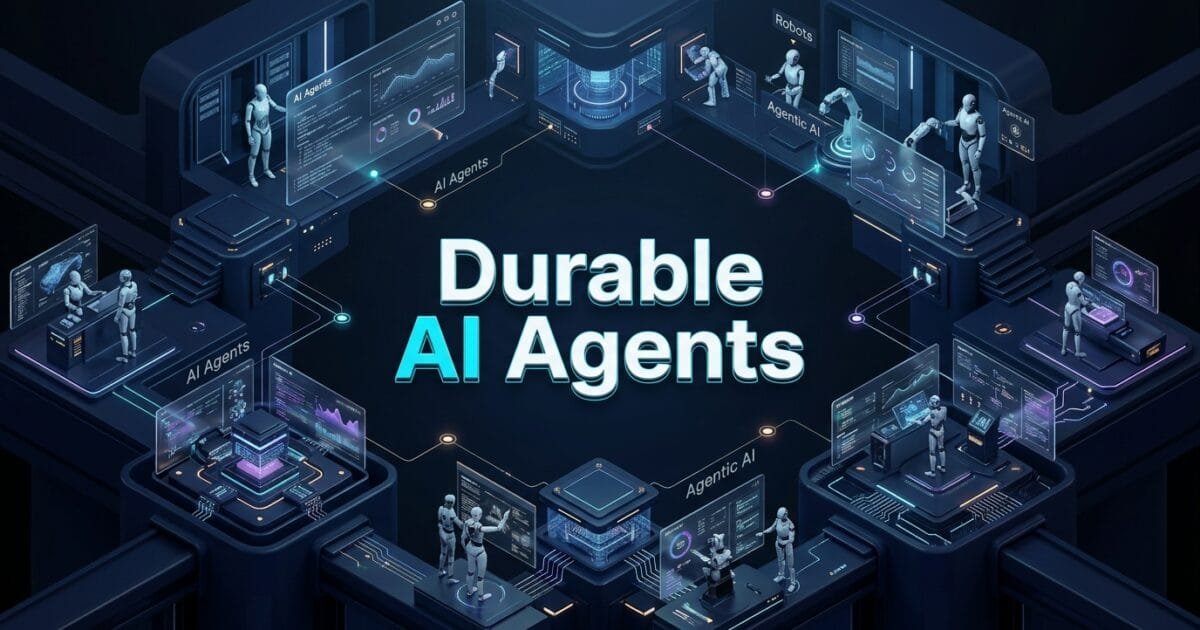
Picture this: your AI agent has been running for ten minutes. It has searched through forty documents, called an LLM six times, and drafted 90% of a final answer. Then, one API call times out.
You rerun the job.
And you wait ten more minutes for your durable AI agents to redo work they already finished.
For a small background task, this is a mild annoyance. But for a long-running AI agent workflow the kind that touches databases, sends emails, waits on human approval, and calls multiple external APIs restarting from scratch isn’t just wasteful. It’s dangerous. If your agent already sent an email or charged a card before it failed, running the whole thing again can repeat those actions.
This is exactly the problem that durable AI agents are built to solve. In this guide, we’ll break down why traditional job queues fall short for AI workflows, what durable execution actually means, and how to build agents that pick up exactly where they left off instead of starting over every time something breaks.
What is an AI Agent, Really?
Most people are familiar with an AI chatbot: you ask a question, the model answers, and the interaction ends. Durable AI agents work differently. Instead of stopping after one response, an agent keeps working toward a goal, deciding what to do next as the task unfolds.
Give a research agent a topic, and it might:
- Search for relevant sources
- Extract key evidence
- Draft a summary
- Wait for a human reviewer
- Publish the final result
The problem is that this work rarely finishes in a single request. It spans multiple steps, calls external systems, sometimes pauses for hours or days, and can fail at any point along the way. Once an agent starts behaving like a real multi-step workflow, simply “retrying the request” stops being a viable strategy.
That’s where the need for durable AI agents becomes obvious.
Why AI Agents Need Durable Execution
A simple, self-contained background job like resizing an image or sending a single email is easy to retry from scratch. But an agent run chains together LLM calls, tool calls, database reads, and external API requests, and any one of them can fail independently.
Here’s what makes agent workflows fundamentally different from ordinary background jobs.
1. Individual Steps Are Slow and Expensive
A single LLM call can take several seconds and cost real money in tokens. Re-running five completed steps just to reach the one that failed isn’t a rounding error it’s wasted time, wasted compute, and wasted spend. This is one of the strongest business cases for durable AI agents: every restart has a dollar cost attached to it.
2. Outputs Are Not Deterministic
LLM outputs vary between executions, even with the same prompt. Rerunning a completed step doesn’t guarantee the same result, which means restarting the whole workflow can silently change the outcome. Durable execution avoids this by reusing the actual result that was already produced.
3. Some Steps Create Real Side Effects
If your agent already sent an email, updated a customer record, or charged a card before failing, restarting the workflow risks repeating those actions. A duplicate charge isn’t a retry inconvenience it’s a correctness bug that can cost you customers and money.
4. Some Steps Wait on People
A workflow pausing for editor approval might stay paused for hours or days. Holding a worker process open the entire time doesn’t scale, and a basic job queue has no concept of “where a multi-step workflow was waiting” so it can resume later.
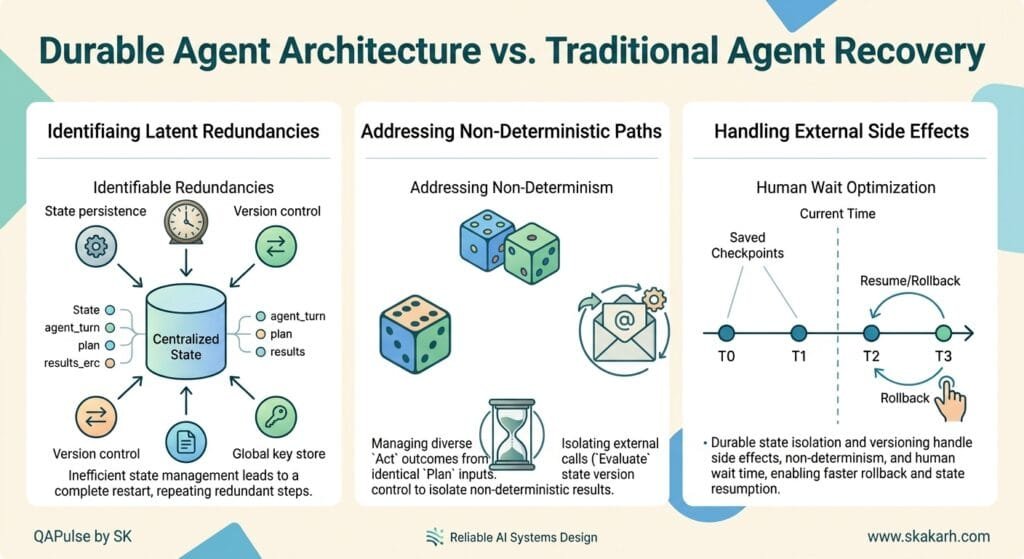
When an Agent Fails Mid-Workflow
Consider a research agent that retrieves sources, extracts evidence, generates a draft, waits for editor approval, and then publishes the result.
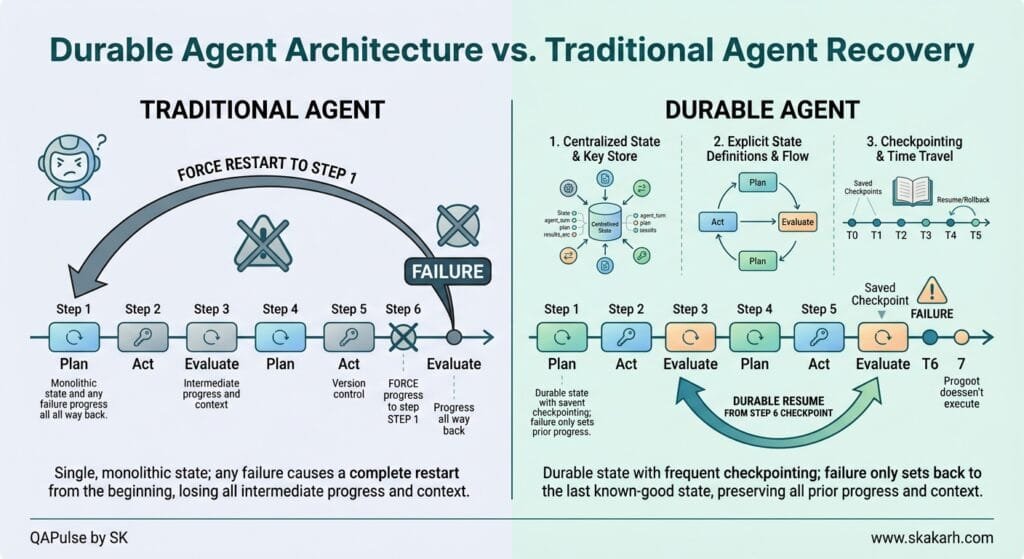
Now imagine the model provider times out during the drafting step. Retrieval and extraction already finished successfully. In a system with no memory of progress, the entire workflow restarts from zero and the completed steps rerun for no reason. If any side effects fired before the failure, those repeat too.
This is the core insight behind durable AI agents: reliability isn’t just a property of the model or the agent framework. It also depends heavily on the execution layer running underneath them.
Why Traditional Job Queues Aren’t Enough
The basic queue model is simple: an event creates a job, the job enters a queue, a worker processes it, and failures trigger a retry. For simple, self-contained work, restarting the entire job from the beginning is perfectly reasonable.
The problem gets difficult when a “job” actually represents a long-running workflow with several dependent steps. AI agent workflows amplify this problem because a single run can involve many LLM calls, tool calls, external APIs, intermediate results, and side effects.
Queue vs. Workflow: What’s the Difference?
- A queue focuses on getting work to a worker and giving failed work another chance.
- A workflow needs to remember what happened along the way which steps finished, which failed, and what needs to happen next.
Popular queue systems give you useful building blocks: workers, retries, rate limiting, job dependencies, and parent-child flows. But once you need checkpointing, resumability, human-in-the-loop coordination, or a complete history of every step, you’re no longer just using a queue you’re building a workflow system around it.
This is precisely the gap that durable AI agents infrastructure is designed to fill.
What Durable Execution Actually Means
Durable execution is a simple idea with a lot of engineering underneath it: the system remembers what has already been completed, so when something fails, execution resumes from the last successful step instead of starting from zero.
Checkpointing
A checkpoint records a completed unit of work. When a step finishes successfully, its result is saved. If the process crashes, restarts, or a deployment happens mid-workflow, that result is still available when execution continues. The workflow reuses the completed result instead of running the same step again and each step can retry independently, so a later failure doesn’t undo earlier progress.
Resumability
Checkpointing enables resumability: a workflow doesn’t need to stay tied to the same process or machine while it runs. If the process disappears, execution continues using the progress already saved. This matters even more for long-running tasks that might run for hours, pause for an external event, or survive a deployment mid-execution.
In other words, the workflow is the job. The process is just what happens to be running it at any given moment.
Why Retries Alone Aren’t Enough
Retries and checkpoints solve different problems. A retry reruns a failed task. A checkpoint remembers completed tasks.
Go back to the research agent example: retrieval and extraction already succeeded, then the drafting step times out. With a plain retry, the whole workflow reruns from the beginning, repeating retrieval and extraction. With true durable execution, those completed steps stay saved and reusable only the failed drafting step needs to run again.
For agent workflows specifically, this distinction can save significant time and real money on LLM costs.
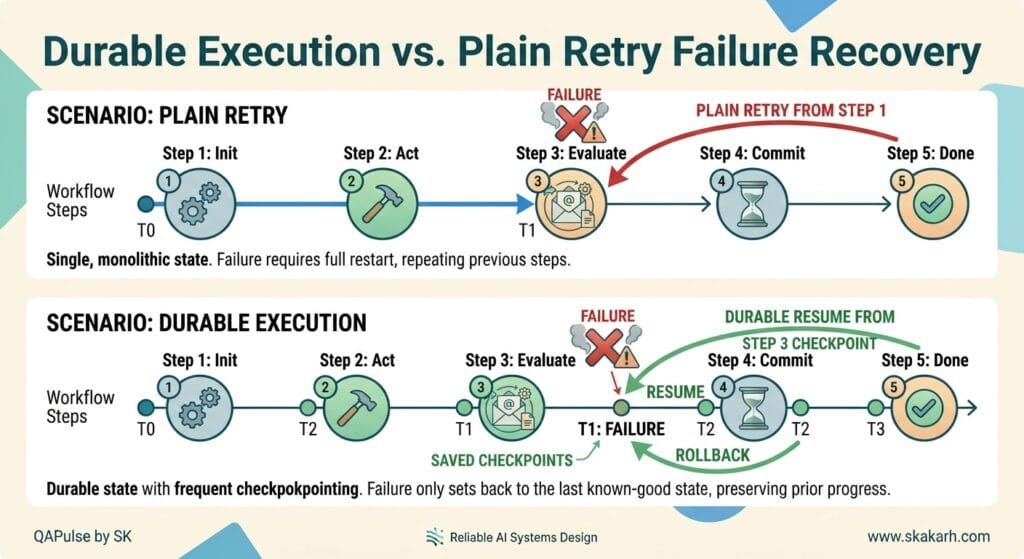
How to Build Durable Execution Yourself
If you want to build durable AI agents from scratch, you need to solve six distinct problems.
1. Persisting Workflow State
You need somewhere to store workflow progress outside the process actually running it. If a step’s result only lives in memory, a crash or deployment takes that progress down with it. Each result needs to be connected to the right workflow and step ID so execution knows exactly where to continue.
2. Retries and Recovery
Not every failure deserves a retry. You need retry rules, backoff between attempts, and a defined path for when those attempts run out. Just as important: when a retry does occur, the workflow needs to know which work is already finished so it doesn’t repeat it.
3. Idempotency
This is the trickiest piece. Imagine an agent sends an email and then fails immediately afterward. When the step reruns, does the application know it’s safe (or unsafe) to send that email again? Idempotency keys, upserts, existence checks, and deterministic identifiers all help here but protecting the side effect is ultimately the application’s responsibility, not the execution engine’s.
4. Waiting and Scheduling
Long-running workflows need somewhere to wait. An agent might finish a draft and then sit for days while an editor reviews it. Keeping a worker alive the entire time wastes resources, so the workflow should save its state, release the compute, and resume only when the relevant event arrives. You also need a defined path for what happens if approval never comes, arrives too late, or gets rejected outright.
5. Flow Control
A workflow that recovers correctly can still cause problems if too much work arrives at once. A single customer triggering thousands of agent runs can consume shared capacity and blow through an LLM provider’s rate limits — and the resulting failures can trigger even more retries, compounding the problem.
The flow-control tools that matter most:
- Concurrency — limits how much work runs simultaneously, so no single workflow or customer monopolizes capacity
- Throttling — spreads bursts of work over time instead of sending it all at once
- Rate limiting — keeps requests within limits imposed by external providers
- Per-tenant isolation — stops one customer’s traffic from starving everyone else
6. Observability
Finally, you need enough history to understand what happened when something breaks. A basic queue tells you a job failed. A long-running workflow needs far more context: which steps completed, which retried, and exactly where execution stopped. Without this, you’re stuck piecing together the story from scattered queue logs, application logs, and tracing tools.
A Practical Example: The Durable Research Agent
Let’s walk through how all of this comes together in a real workflow.
Workflow starts. The agent retrieves its sources and extracts the evidence it needs. Each part runs as its own step, and once a step finishes, its result is saved immediately.
Failure and recovery. The agent moves on to drafting, but the model provider times out halfway through. The workflow doesn’t start over only the drafting step retries, while the retrieval and extraction results stay untouched. Once the draft succeeds, its result is saved and the workflow moves forward.
Waiting for human input. The draft now needs editor approval, so the workflow pauses and waits for an event. Nothing needs to keep running while the editor decides. Two days later, the approval arrives, and the workflow continues exactly where it left off straight into the publishing step.
Execution history and replay. Once publishing finishes, the run still has a complete execution history: how the workflow progressed, where it retried, and how long each part took. If the final answer turns out to be weak, a quality score can be attached to the run later and if a bug needs to be tested against past executions, those runs can be replayed instead of manually rebuilt.
By the end, this single workflow has survived a model failure and a two-day wait without losing a shred of progress the defining trait of durable AI agents done right.
Comparing Approaches: Queue-First vs Workflow-First vs Application-Code-First
There isn’t one universally “correct” way to build durable execution the right approach depends on your team’s size, expertise, and workflow complexity.
Queue-first tools give you fine-grained control over background work and make sense when your team already has the infrastructure expertise to operate them. You get retries, rate limiting, and job dependencies out of the box, but checkpointing, resumability, and human-in-the-loop coordination become your responsibility to build.
Workflow-first platforms take a dedicated workflow-modeling approach. Their advantage shows up most clearly when workflows become deeply interconnected, calling and depending on many other workflows. The tradeoff is added complexity for both developers and operators.
Application-code-first platforms keep your workflow logic inside your existing application code, treating steps as the basic unit of durable work. Completed steps are saved and reused automatically during recovery, and failed steps retry independently without you needing to build a separate workflow infrastructure layer. The tradeoff is somewhat less low-level control compared to a pure queue-first system.
The right question isn’t “which tool has the most features” it’s “how much control and complexity does my workflow actually need?”
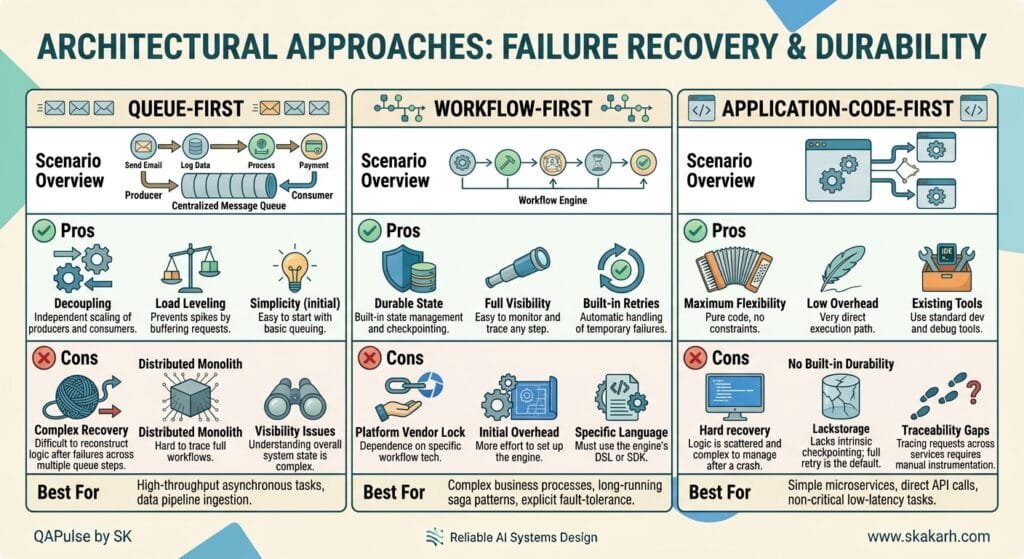
What You Still Have to Handle Yourself
Even the best durable execution infrastructure won’t solve everything. A few responsibilities always remain with your application:
Idempotent side effects. A step can rerun after an error, so the code inside it needs to be safe to repeat. Inserting a new user twice can create duplicate records if the first write succeeded but the response never made it back. Upserts and deterministic identifiers make retries harmless.
Good step boundaries and stable step identities. How you split a workflow into steps is a design decision that matters. Cram too much into one step, and a retry repeats more work than necessary. Split everything into tiny steps, and the workflow becomes hard to reason about. Step IDs also need to stay stable changing one effectively creates a “new” step in the eyes of the execution engine.
Retry and failure policies. Automatic retries are only useful if your team decides when a retry actually makes sense. A network timeout is usually worth retrying; an invalid API key is not. Permanent errors should be marked non-retriable, with a clear failure path an alert, a fallback, or a message to the end user once retries are exhausted.
Data consistency across external systems. Durable execution keeps track of a workflow’s internal progress, but it doesn’t wrap multiple external systems into one atomic transaction. If a workflow records a payment and then fails before creating the corresponding order, retrying won’t automatically undo the payment. Idempotency, compensating actions, and careful sequencing are still on you.
Key Takeaways for Building Durable AI Agents
- Durable execution saves progress. Completed steps get reused after a failure instead of rerunning the entire workflow from scratch.
- Retries need protection. Idempotency, backoff, and clear failure paths keep retries from creating bigger problems than they solve.
- Waiting is part of the workflow. Human approvals and external events can take hours or days without keeping compute running the whole time.
- Flow control is part of reliability. Concurrency limits, throttling, and rate limiting keep one traffic spike from degrading service for everyone else.
- Execution history matters. Knowing exactly what ran, what failed, and what retried makes debugging dramatically easier.
- A successful run isn’t always a good run. Scoring and evaluation are still necessary to measure whether the outcome was actually good, separate from whether execution technically completed.
Final Thoughts
Reliable AI agents need more than a model that produces good answers on a good day. Once an agent starts running long workflows, calling external tools, waiting on people, and handling real production traffic, the execution layer underneath it becomes just as important as the model itself.
Building durable AI agents means treating failure as a normal, expected part of the system not an exception that wipes out everything that came before it. Whether you build this infrastructure yourself with queue primitives, adopt a dedicated workflow engine, or use an application-code-first durable execution platform, the underlying goal is the same: when something breaks, your agent should pick up exactly where it left off.
People Asked Questions
Q1: What makes an AI agent durable?
Answer: A durable AI agent can preserve its execution state, recover from failures, resume interrupted workflows, and retain relevant memory instead of restarting from the beginning. In LangGraph, persistence and checkpoints are key mechanisms for achieving this behavior.
Q2: How do AI agents resume after a failure?
Answer: Durable agents save execution state at defined checkpoints. When a failure occurs, the workflow can resume from the latest successful checkpoint instead of repeating every previous step. LangGraph checkpointing supports this fault-tolerant execution model.
Q3: What is the difference between AI agent memory and agent state?
Answer: Agent state represents information required by the current workflow or thread, while long-term memory stores information that should remain available across conversations or sessions. LangGraph uses checkpointers for thread-level state and stores for cross-thread long-term memory.
Q4: Why do AI agents restart from zero?
Answer: Agents commonly restart from zero when execution state exists only in process memory or when workflow progress is not persisted. For example, in-memory checkpoint implementations lose their state when the application process restarts, so production systems need durable persistence.
Q5: How does checkpointing make an AI agent more reliable?
Answer: Checkpointing creates recoverable snapshots of workflow state. If a node fails, the system can resume from a successful checkpoint rather than recomputing the entire workflow. Checkpoints also enable human approval, state inspection, replay, and time-travel debugging.
Q6: Can an AI agent remember information across different sessions?
Answer: Yes. Long-term memory allows an agent to store and retrieve information across conversations and sessions. In LangGraph-based architectures, long-term memory is typically implemented through stores rather than relying only on thread-scoped checkpoints.
Q7: What is the best database for durable AI agent state?
Answer: There is no universal best database. The appropriate choice depends on workload, consistency requirements, scale, latency, operational constraints, and the framework’s persistence integrations. For LangGraph production workflows, database-backed checkpointers such as PostgreSQL can provide durable thread-level state instead of process-local memory.
Q8: Should SDETs test AI agent persistence?
Answer: Yes. Persistence should be tested as a first-class reliability feature. SDETs should verify recovery after crashes, checkpoint correctness, thread isolation, retry behavior, duplicate side effects, state corruption, and whether an agent resumes from the expected point rather than restarting from the beginning.
Q9: Can a durable AI agent replay a previous execution?
Answer: Yes. LangGraph supports replaying execution from previous checkpoints and forking from a checkpoint with modified state. Nodes before the selected checkpoint do not need to be re-executed, while subsequent nodes are executed again.
AI Overview & AEO Optimization
Durable AI agents are agents designed to preserve execution state, checkpoints, memory, and recovery information so they can continue from meaningful progress after failures, interruptions, or process restarts. Instead of rebuilding context from zero, the agent restores its latest durable state and continues the workflow from the appropriate recovery point.
AI Overview Key Points
For search engines and AI answer engines, the article should establish these seven concepts clearly:
- Persist execution state so workflow progress survives process failures.
- Use checkpoints to create recoverable execution boundaries.
- Assign stable thread or workflow identifiers so previous state can be retrieved.
- Separate short-term state from long-term memory instead of treating all context as one database record.
- Make retries idempotent so recovery does not duplicate external side effects.
- Design human-in-the-loop workflows around persisted state so approval does not destroy execution context.
- Test recovery paths, not only successful first-run execution.
External Links
- LangGraph Overview — Official Documentation — architecture, durable execution, stateful agents, and human-in-the-loop capabilities. LangGraph Overview
- LangGraph Persistence — Official Documentation — checkpoints, threads, recovery, persistence, replay, and fault tolerance. LangGraph Persistence
- LangGraph Long-Term Memory — Official Documentation — storing and retrieving information across conversations and sessions. LangGraph Long-Term Memory
- LangGraph Memory — Official Documentation — short-term and long-term memory architecture. LangGraph Memory
- LangGraph Time Travel — Official Documentation — replaying and forking previous executions from checkpoints. LangGraph Time Travel
- LangGraph GitHub Repository — source code and implementation details for LangGraph. LangGraph on GitHub
Internal Series Links
- Learn MCP – Zero to Hero
- Learn AI Agents for QA – Zero to Hero
- Playwright Automation – Zero to Hero
- TencentDB Agent Memory: Complete Zero to Hero
- LangGraph: Complete Zero to Hero
- Learn Python – Zero to Hero
- OpenAI Codex: Complete Zero to Hero
- Cursor AI: Complete Zero to Hero
- Claude Code Tutorial: Complete Zero to Hero
- AutoGen: Complete Zero to Hero Guide
- Free QA Resources Built From Real Experience
- QA Glossary: Test Automation Terms Every Engineer Should Know
Internal Blog Links
- 50 Playwright Commands Every QA Engineer Should Know
- What is QA Engineering? A Practical Guide to Modern Software Quality
- What is Playwright? A Powerful Guide to Modern Web Testing and QA Engineers
- QA Engineer vs SDET vs Quality Engineer: What’s the Difference?
- QA Engineer Portfolio: 7 Powerful Projects That Get Interviews in 2026
- Graph Engineering: The Powerful Layer After Loop Engineering
- Graph Testing: The Critical QA Layer After Loop-Based Test Automation
- Agentic Test Creation vs AI Test Generation: What’s the Real Difference?
- AI Test Automation With Humans in the Loop: Governance, Metrics, and the Practical Guide
Continue Learning
Explore more expert articles on Mobile Testing, Backend & API, AI & Agentic, AI Tools, n8n, LangChain, CrewAI, MCP Servers, AI Agents, LlamaIndex, Docker, FastAPI, Playwright, Cypress, Test Automation, DevOps, and Software Engineering at www.skakarh.com.
QAPulse by SK delivers expert release analysis, AI engineering insights, enterprise automation strategies, migration guidance, DevOps best practices, and practical testing knowledge to help software professionals build scalable, intelligent, and production-ready software systems.