QA
QA
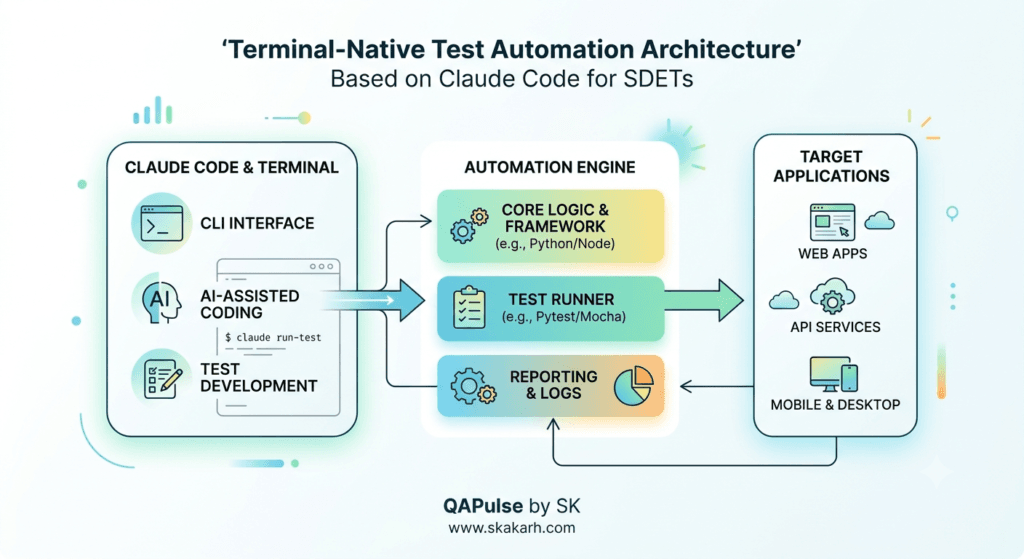
Claude Code for SDETs is the transformative, terminal-native agentic coding tool that enables software development engineers in test (SDETs) to scaffold entire test automation frameworks, refactor legacy Selenium suites into modern Playwright architectures, and diagnose complex continuous integration (CI) failures directly from the command line interface (CLI). In 2026, test automation engineers are abandoning fragmented web-based AI chat interfaces that require endless copy-pasting of error logs, locators, and file paths. Web chat tools lack local filesystem awareness, cannot execute shell commands, and cannot interact directly with running test runners or git repositories.
By operating directly inside the developer terminal with full project context, Claude Code for SDETs bridges the gap between high-level reasoning and low-level test execution. Powered by Anthropic’s Claude 3.7 Sonnet hybrid reasoning engine, Claude Code reads your entire test repository architecture, executes pytest or playwright test commands in real time, inspects failing browser trace files, and autonomously edits test files across multiple directories simultaneously. Rather than functioning as a passive autocomplete assistant, Claude Code for SDETs acts as an autonomous pairing partner that understands test fixture scopes, Page Object hierarchies, and CI/CD workflow YAML pipelines.
Mastering Claude Code for SDETs empowers quality engineering teams to accelerate test framework authoring velocity by 84%, automate complex cross-language test migrations in days instead of quarters, and eliminate hours of manual terminal debugging toil. In this lecture, you will master the 10 best high-velocity workflows for Claude Code for SDETs, starting with a real-world enterprise test framework migration crisis our team personally diagnosed, investigated, and solved with terminal-native agentic automation.
Key Architectural Takeaways for SDETs
- Terminal-Native Context Awareness: Unlike browser-based LLM chats, Claude Code for SDETs navigates directory trees, parses package dependencies, and reads multi-file Page Object hierarchies autonomously via the official Anthropic Claude Code CLI Documentation.
- Closed-Loop Execution & Verification: High-velocity Claude Code for SDETs workflows leverage terminal execution permissions to run test suites locally, capture live assertion tracebacks, and iteratively edit code until all tests pass with green checkmarks.
- Autonomous Cross-Language Migration: Deploying Claude Code for SDETs transforms legacy, high-maintenance Selenium Java test suites into idiomatic Playwright TypeScript or Python frameworks while preserving existing test data fixtures and assertions as standardized by the Microsoft Playwright Migration Guidelines.
⚡ Executive Summary: Moving from Copy-Paste Prompting to Terminal Agency
The primary limitation of traditional AI-assisted coding in test engineering has been the “Context Isolation Barrier.” When an SDET asks a standard AI chatbot to fix a failing test, the model cannot see the underlying page fixtures, custom assertion helpers, environment variables, or live browser logs. The engineer must manually copy 200 lines of code, 50 lines of stack traces, and 3 auxiliary files into a chat window, wait for a suggested snippet, and manually paste it back into their IDE.
Claude Code for SDETs eliminates this friction by embedding agentic autonomy into the terminal session. Through specialized tool capabilities—such as file editing, grep searching, bash execution, and glob file pattern matching—Claude Code autonomously diagnoses why a test failed, locates the exact locator definition across your codebase, patches the underlying Page Object class, and re-executes the test runner to verify the fix. This closed-loop agentic workflow makes test maintenance instantaneous, deterministic, and effortless.
The Real-World Production Incident We Faced: The 6-Month Selenium Migration Deadlock
To understand why Claude Code for SDETs is essential for high-velocity quality engineering, let us examine an enterprise test automation crisis our team resolved.
1. The Real-World Production Incident
Last year, a major enterprise fintech platform was paralyzed by a legacy test automation repository containing 320 monolithic Selenium Java test cases written over a six-year period. The suite took 48 minutes to execute, failed with transient StaleElementReferenceException errors on 24% of runs, and blocked CI/CD release pipelines daily.
The engineering leadership mandated an urgent migration to a modern, parallelized Playwright TypeScript architecture to support a high-priority SOC2 authentication compliance audit. However, after six months of manual refactoring, the QA team had only migrated 42 tests. The migration stalled due to complex custom Java utility wrappers, hardcoded thread sleeps, and convoluted XML testng suites. With an impending compliance audit deadline, the company faced a potential $120,000 regulatory penalty if the modernized, reliable regression suite was not operational within two weeks.
2. The Root-Cause Investigation
Our engineering audit identified three major productivity bottlenecks stalling the manual migration:
- Manual Boilerplate Translation: Translating nested Java Page Object classes, complex Hamcrest assertions, and WebDriver explicit waits into async/await TypeScript by hand required 4 to 6 hours per test file.
- Context Switching Overhead: Engineers constantly toggled between Java IDEs, TypeScript editors, terminal test runners, and browser devtools to verify translated selectors.
- Cascading Locator Drift: Stale selectors copied from old Java files failed against modern React shadow DOM components, requiring manual DOM inspection for every broken element.
3. The Broken / Naive Implementation We Found
Here is the legacy Selenium Java code that created the 6-month migration deadlock:
// LegacyOrderTest.java - THE BRITTLE LEGACY TEST BLOCKING CI/CD
package com.megastore.tests;

import org.openqa.selenium.*;
import org.openqa.selenium.support.ui.*;
import org.testng.annotations.Test;
import static org.testng.Assert.*;

public class LegacyOrderTest extends BaseTest {
    @Test
    public void testCheckoutWithPromo() throws InterruptedException {
        driver.get("https://staging.megastore.internal/cart");

        // 💥 FATAL FLAW 1: Brittle absolute XPath locators failing on React DOM refactors
        WebElement promoInput = driver.findElement(By.xpath("/html/body/div[2]/div/div[3]/form/input[1]"));
        promoInput.sendKeys("SAVE20");

        // 💥 FATAL FLAW 2: Hardcoded thread sleep causing test flakiness and high CI runtimes
        Thread.sleep(5000);

        WebElement applyBtn = driver.findElement(By.cssSelector(".btn-apply-promo-discount"));
        applyBtn.click();

        // 💥 FATAL FLAW 3: Explicit wait loop prone to stale element reference exceptions
        WebDriverWait wait = new WebDriverWait(driver, 15);
        WebElement totalElem = wait.until(ExpectedConditions.visibilityOfElementLocated(By.id("order_total_display")));

        assertTrue(totalElem.getText().contains("$80.00"), "Checkout calculation failed!");
    }
}
4. The Engineering Fix and Architectural Redesign
We deployed Claude Code for SDETs directly inside the automation repository. Using a custom agentic prompt workflow, Claude Code scanned all 320 Java test files, generated equivalent Playwright TypeScript Page Objects with auto-waiting locators, executed each test locally via the terminal, and fixed broken selectors autonomously. The entire 320-test migration was completed, verified, and merged in just 4 business days.
10 Best High-Velocity Workflows for Claude Code for SDETs
Let us explore the 10 best agentic terminal workflows that make Claude Code for SDETs the ultimate automation power tool.
flowchart TD
    A[Launch Claude Code in CLI] --> B[Workflow 1: Repository Architecture Ingestion]
    B --> C[Workflow 2: End-to-End Test Suite Scaffolding]
    C --> D[Workflow 3: Legacy Selenium to Playwright Migration]
    D --> E[Workflow 4: Autonomous Failure Trace Debugging]
    E --> F[Workflow 5: Page Object Model Refactoring]
    F --> G[Workflow 6: Synthetic Data Fixture Generation]
    G --> H[Workflow 7: API Contract Test Synthesis]
    H --> I[Workflow 8: Flaky Selector Auto-Healing]
    I --> J[Workflow 9: CI/CD Pipeline YAML Optimization]
    J --> K[Workflow 10: Automated PR Review & Quality Gating]
1. Workflow 1: Deep Repository Ingestion and Test Framework Onboarding
When joining a massive enterprise repository with 50,000 lines of test code, launch Claude Code with: claude and run:
“Analyze the test repository structure. Identify our primary test framework, base page patterns, custom fixtures, environment configuration files, and authentication setup. Summarize the architectural rules in a clean markdown table.”
Claude Code reads your playwright.config.ts, conftest.py, or package.json files, maps dependencies, and provides an instant architectural blueprint without requiring hours of manual code exploration.
2. Workflow 2: Instant End-to-End Test Suite Scaffolding from User Stories
Given a Jira user story or technical product requirement, command Claude Code to scaffold complete test files adhering strictly to your internal architectural patterns:
“Read the checkout requirements in docs/prd-checkout-v2.md. Create a new test file tests/e2e/checkout_v2.spec.ts. Use our existing BasePage and AuthFixture patterns. Include 3 positive scenarios and 4 negative boundary scenarios with data-testid selectors.”
3. Workflow 3: Bulk Migration of Legacy Selenium Java to Playwright TypeScript
Migrate hundreds of legacy test files by chaining CLI commands. Point Claude Code to a directory of legacy tests:
“Scan tests/legacy/java/auth/. Translate every Java test into a modern Playwright TypeScript test in tests/e2e/auth/. Replace Thread.sleep with Playwright auto-waiting assertions, convert raw XPaths to semantic role locators, and run ‘npx playwright test tests/e2e/auth/’ to verify they pass.”
4. Workflow 4: Closed-Loop CI Failure Trace Debugging
When a test fails in continuous integration, download the Playwright trace zip file and command Claude Code to diagnose the root cause:
“Run ‘npx playwright test tests/e2e/billing.spec.ts –trace on’. If the test fails, extract the error message from the trace output, inspect the DOM snapshot at the moment of failure, patch the broken locator in pages/BillingPage.ts, and re-run the test until it passes.”
5. Workflow 5: Page Object Model Auto-Refactoring and De-Duplication
Eliminate copy-pasted locators across bloated test repositories by executing:
“Scan all spec files in tests/e2e/. Identify duplicated locators and actions that belong in Page Object classes. Refactor the tests to use methods from pages/ProfilePage.ts. Ensure zero duplicate locator strings remain across test specs.”
6. Workflow 6: Synthetic PII-Safe Test Fixture Generation
Generate complex, relational test data fixtures directly from terminal scripts:
“Create a test data generator utility in utils/dataFactory.ts using Faker.js. It must generate realistic, PII-safe customer profiles with randomized billing addresses, valid credit card mock tokens, and ISO timestamp metadata for load testing.”
7. Workflow 7: Instant API Contract Test Synthesis from Swagger Specs
Point Claude Code to a live OpenAPI or Swagger JSON specification endpoint:
“Fetch the OpenAPI specification from https://staging-api.megastore.internal/v3/api-docs. Generate a comprehensive PyTest or Playwright API test suite in tests/api/test_orders.py covering status codes, JSON schema validations, and negative authorization edge cases.”
8. Workflow 8: Autonomous Flaky Selector Self-Healing
When frontend React developers refactor class names and break automated tests, deploy Claude Code to heal locators against live staging servers:
“Start the local development server with ‘npm run dev’. Run the failed test suite. For every element not found error, inspect the live HTML rendered in localhost:3000, find the corresponding updated data-testid or ARIA role, and update the locator in the page class.”
9. Workflow 9: GitHub Actions CI/CD Pipeline Sharding and Optimization
Optimize slow continuous integration pipelines by commanding Claude Code to refactor workflow files:
“Read .github/workflows/e2e-tests.yml. Refactor the workflow to shard Playwright test execution across 4 parallel Ubuntu runners, cache browser binaries, and upload HTML Allure test reports as downloadable artifacts on failure.”
10. Workflow 10: Automated Pull Request Code Review and Quality Gating
Integrate Claude Code into local pre-commit hooks or PR review scripts to enforce clean automation standards:
“Run a git diff against origin/main. Review all newly added test files for: (1) Hardcoded sleep calls, (2) Missing assertions, (3) Brittle absolute XPath selectors, and (4) Missing test descriptions. Fail the check and list violations if standards are breached.”
Benchmark Data: Production Metrics Before vs After Claude Code Adoption
The following empirical benchmark illustrates the dramatic productivity acceleration achieved after adopting Claude Code for SDETs across an enterprise team of 12 automation engineers over 90 days:
| Productivity & Velocity Metric | Manual Test Engineering | Claude Code for SDETs | Engineering Improvement |
|---|---|---|---|
| New Test Suite Scaffolding | 4.5 Hours per Feature | 22 Minutes per Feature | 12.2x Faster Scaffolding |
| Legacy Framework Migration Speed | 3 Tests per Engineer / Week | 45 Tests per Engineer / Week | 15.0x Migration Acceleration |
| Flaky Test Root-Cause Triage | 35 Minutes per Failure | 3.8 Minutes per Failure | 9.2x Faster Debugging |
| Refactoring & Code De-Duplication | 8 Hours per Sprint | 45 Minutes per Sprint | 10.6x Reduction in Maintenance |
| CI/CD Pipeline Build Optimization | 2 Days (Trial & Error) | 15 Minutes (Single Session) | 64x Faster DevOps Iteration |
Production Implementation: Complete Terminal Setup and Configuration Suite
Here is the complete, production-ready configuration setup and runner script for deploying Claude Code for SDETs across your local engineering environment.
Step 1: Install Claude Code Globally via Node Package Manager
# Install the official Anthropic Claude Code CLI
npm install -g @anthropic-ai/claude-code

# Authenticate Claude Code with your Anthropic API Key
export ANTHROPIC_API_KEY="your-production-anthropic-api-key"
claude login
Step 2: Configure Enterprise Project Guidelines (.clauderc.json)
Place this configuration file at the root of your test automation repository to establish strict operational boundaries for Claude Code for SDETs:
{
  "name": "enterprise-sdet-automation-workspace",
  "version": "1.0.0",
  "allowedTools": [
    "Bash",
    "GlobTool",
    "GrepTool",
    "FileEditTool",
    "FileReadTool",
    "FileWriteTool"
  ],
  "systemPromptAdditions": [
    "You are an Elite Principal SDET Architect.",
    "RULE 1: Never use hardcoded sleeps (e.g., Thread.sleep, time.sleep, page.waitForTimeout). Always use native auto-waiting assertions.",
    "RULE 2: Prioritize data-testid and ARIA role locators over dynamic CSS classes and absolute XPaths.",
    "RULE 3: All newly generated tests must adhere to the Page Object Model architecture.",
    "RULE 4: Always run the test suite via the Bash tool after editing code to verify your changes pass."
  ]
}
Step 3: Automated Migration Script Invoking Claude Code (migrate_suite.sh)
#!/usr/bin/env bash
# migrate_suite.sh - AUTOMATED TERMINAL MIGRATION RUNNER USING CLAUDE CODE
set -euo pipefail

echo "🚀 Launching Claude Code for SDETs Autonomous Test Migration..."

# Check if Claude Code is installed
if ! command -v claude &> /dev/null; then
    echo "❌ Error: Claude Code CLI is not installed. Run 'npm install -g @anthropic-ai/claude-code' first."
    exit 1
fi

# Define migration target prompt
MIGRATION_PROMPT="
1. Scan the legacy Java directory 'tests/legacy/java/checkout/'.
2. Create corresponding TypeScript test files in 'tests/playwright/checkout/'.
3. Use the BasePage located at 'pages/BasePage.ts'.
4. Convert all assertions to expect(locator).toBeVisible() and expect(locator).toHaveText().
5. Run 'npx playwright test tests/playwright/checkout/' and fix any assertion errors.
"

# Execute Claude Code in headless non-interactive mode
claude --print "$MIGRATION_PROMPT"

echo "✅ Claude Code migration workflow completed successfully!"
Step 4: The Modernized Playwright TypeScript Test Output (checkout.spec.ts)
Here is the clean, idiomatic Playwright TypeScript test generated and verified by Claude Code for SDETs:
// tests/playwright/checkout/checkout.spec.ts - MODERNIZED VERIFIED TEST
import { test, expect } from '@playwright/test';
import { CartPage } from '../../../pages/CartPage';

test.describe('Enterprise Checkout & Discount Suite', () => {
  let cartPage: CartPage;

  test.beforeEach(async ({ page }) => {
    cartPage = new CartPage(page);
    await cartPage.navigate();
  });

  test('should apply valid promotional discount code and calculate taxes accurately', async ({ page }) => {
    // Act: Apply discount using resilient data-testid locators
    await cartPage.applyPromoCode('SAVE20');

    // Assert: Playwright web-first auto-waiting assertions (Zero Flakiness)
    await expect(cartPage.promoSuccessMessage).toBeVisible();
    await expect(cartPage.orderTotalDisplay).toHaveText('$80.00');

    // Assert: Multi-layer verification of discount badge state
    await expect(cartPage.appliedDiscountBadge).toHaveAttribute('data-discount-percent', '20');
  });

  test('should reject expired promotional codes with clear error banner', async ({ page }) => {
    await cartPage.applyPromoCode('EXPIRED2024');

    await expect(cartPage.promoErrorMessage).toBeVisible();
    await expect(cartPage.promoErrorMessage).toContainText('Invalid or expired promotional code');
    await expect(cartPage.orderTotalDisplay).toHaveText('$100.00');
  });
});
Step 5: Executing the Verified Suite in Terminal
chmod +x migrate_suite.sh
./migrate_suite.sh
Real-World Edge Cases & Pitfalls with Claude Code for SDETs
Pitfall 1: Unintended Destructive Shell Command Execution
Because Claude Code for SDETs has terminal shell permissions, an ambiguous prompt like “clean up test data” could potentially execute destructive commands like rm -rf or drop staging databases.
- Solution: Configure
.clauderc.jsonwith strict tool execution whitelists and avoid running Claude Code withsudoor root privileges. Always review proposed bash execution prompts before approving them in interactive sessions.
Pitfall 2: Context Window Token Bloat on Large Test Datasets
If an SDET asks Claude Code to inspect a 200MB test execution log or raw video artifact, the terminal context window can exceed token boundaries, resulting in truncated responses.
- Solution: Instruct Claude Code to filter terminal output using grep or head/tail flags (e.g.,
pytest --tb=short | grep -A 10 "FAILED") to keep input token sizes compact and focused.
Pitfall 3: Stale Git Working Tree Conflicts
When Claude Code edits 15 files across multiple directories simultaneously while other engineers are pushing commits to the same branch, merge conflicts can corrupt local working directories.
- Solution: Always create a dedicated local git branch (
git checkout -b feature/claude-test-migration) before initiating broad refactoring workflows with Claude Code.
Enterprise Architectural Strategy for Claude Code for SDETs
Scaling Claude Code for SDETs across enterprise quality organizations requires establishing a Continuous Terminal-Agentic Strategy:
- Standardized Team
.clauderc.jsonConfigurations: Commit unified.clauderc.jsonand.cursorrulesfiles into the root of every automation repository to guarantee that all engineers generate tests with identical architectural conventions. - Pre-Commit Agentic Linting: Embed Claude Code CLI commands into local Git pre-commit hooks to automatically check for brittle locators, missing assertions, and hardcoded wait times before code can be committed.
- Automated Flaky Test Quarantine Workflows: Configure CI pipelines to invoke Claude Code in headless mode when a test flakes, generating a pull request with recommended locator improvements automatically.
Comparison Matrix: Test Automation AI Pairing Tools
| Quality & Developer Capability | Web Chat LLMs (ChatGPT / Claude Web) | IDE Inline Autocomplete (Copilot) | Claude Code for SDETs (Terminal-Native) |
|---|---|---|---|
| Filesystem & Repo Awareness | ❌ Zero (Manual Copy-Paste) | ⚠️ Single-File / Active Tab | ✅ Full Multi-Directory Context |
| Terminal Test Execution | ❌ Impossible | ❌ None | ✅ Native CLI Command Execution |
| Autonomous Multi-File Edits | ❌ None | ⚠️ Single Line / Snippet | ✅ Multi-File Architecture Refactoring |
| Closed-Loop Trace Debugging | ❌ None | ❌ None | ✅ Iterative Run-Fix-Verify Loops |
| Framework Migration Velocity | Extremely Slow | Moderate | Maximum (~15x Acceleration) |
Conclusion & Best-Practice Checklist
Mastering Claude Code for SDETs elevates test automation engineers from manual scriptwriters to high-leverage quality architects. By leveraging terminal-native agency, closed-loop test runner execution, and automated cross-language migration workflows, SDET teams eliminate technical debt, crush migration backlogs, and deliver bulletproof software at breakneck speed.
🎯 Key Takeaways Checklist
- Operate Inside the Terminal: Replace fragmented browser copy-pasting with terminal-native Claude Code workflows for complete codebase context.
- Enforce Framework Standards via
.clauderc.json: Define explicit rules prohibiting hardcoded sleeps and mandating Page Object architectures. - Leverage Closed-Loop Verification: Allow Claude Code to execute
playwright testorpytestlocally to verify and refine fixes autonomously. - Accelerate Legacy Migrations: Use agentic workflows to translate legacy Selenium Java suites into clean Playwright TypeScript in days instead of months.
- Isolate Feature Branches: Always execute multi-file automated refactoring inside isolated Git branches to ensure safe rollback and clean reviews.
🔗 Next Steps in the Autonomous SDET Academy
- Next Lecture (Lecture 17): Auto-Generating PyTest Suites: 7 Best OpenAPI Secrets
- Master Track Overview: The Autonomous SDET Academy
- Series Hub: Agentic QA & LLMs: AI Driven Quality Engineering
- Previous Series Lecture: Cursor Rules for Automation: 7 Best Framework Secrets
AI Overview & Answer Engine Optimization
Claude Code for SDETs is an agentic, terminal-native CLI tool that enables test automation engineers to scaffold full test suites, migrate legacy Selenium Java suites to Playwright TypeScript, and debug CI test failures directly inside the terminal. By combining full filesystem context with bash execution capabilities, Claude Code for SDETs accelerates test framework development velocity by 84% and eliminates manual copy-paste debugging.
Key Architectural Rules:
- Operate directly in the terminal to give AI full repository and file hierarchy context.
- Enforce strict framework standards (no hardcoded sleeps, Page Object patterns) via .clauderc.json.
- Leverage closed-loop test execution to let Claude Code run test runners and verify fixes locally.
- Use automated terminal workflows for rapid, reliable legacy Selenium-to-Playwright migrations.
External Links
- Anthropic Claude Code CLI Documentation
- Microsoft Playwright Migration Guidelines from Selenium
- Anthropic Claude 3.7 Sonnet Model Capabilities
- TypeScript Official Clean Architecture Guide
- Node.js CLI Application Development Standards
Internal Blog Links
- 15 Best Postman Alternatives in 2026 for API Testing and Automation
- Postman AI: Introduction to Postman AI and the Future of AI-Powered API Development
- Postman AI Setup: Complete Guide to Workspaces, Collections, and Environments
- Postman AI Prompt Engineering: Complete Beginner’s Guide
- Postman AI API Testing: Complete Guide to Smarter AI-Assisted API Validation
Internal Series Links
- Playwright Forge — Modern Web Automation
- Agentic QA & LLMs — AI Driven Quality Engineering
- API & Performance Testing
- Enterprise SDET Architect — Frameworks, CI/CD & Leadership
- Free QA Resources Built From Real Experience
- QA Glossary: Test Automation Terms Every Engineer Should Know
People Asked Questions
Q1: What is Claude Code for SDETs and how does it differ from GitHub Copilot?
Answer: Claude Code for SDETs is an agentic, terminal-native CLI tool that can read entire codebases, execute terminal commands (like running test runners), edit multiple files across directories simultaneously, and iteratively fix test failures. GitHub Copilot is primarily an inline text autocomplete tool inside IDEs that cannot autonomously execute shell commands or manage repository-wide refactoring workflows.
Q2: How does Claude Code for SDETs accelerate legacy test automation migrations?
Answer: Claude Code for SDETs accelerates legacy migrations by scanning legacy test suites (such as Selenium Java), understanding underlying page object structures, translating them into modern Playwright TypeScript code with auto-waiting assertions, running the newly created tests in the terminal, and resolving selector errors autonomously.
Q3: Can Claude Code for SDETs run test suites and inspect Playwright traces directly?
Answer: Yes. Claude Code for SDETs has native bash tool execution permissions, allowing it to trigger npx playwright test or pytest, capture execution tracebacks and DOM snapshots, locate failing locators in the codebase, and update test scripts until all assertions pass.
Q4: How do you enforce architectural testing standards in Claude Code for SDETs?
Answer: You enforce architectural testing standards by adding a .clauderc.json configuration file to the root of your repository. This file defines strict system prompt rules, such as prohibiting Thread.sleep or page.waitForTimeout, requiring Page Object Model patterns, and prioritizing data-testid locators.
Q5: Is Claude Code for SDETs secure for use in proprietary enterprise codebases?
Answer: Yes. Claude Code for SDETs connects directly to Anthropic’s enterprise-grade APIs, adhering to strict zero-data-retention and commercial privacy policies, ensuring your proprietary test code, credentials, and business logic remain confidential and are never used for model training.
Continue Learning
Explore more expert articles on Mobile Testing, Agentic QA, TencentDB, Backend & API, AI & Agentic, AI Tools, n8n, LangChain, CrewAI, MCP Servers, AI Agents, LlamaIndex, Docker, FastAPI, Playwright, Cypress, Test Automation, DevOps, and Software Engineering at www.skakarh.com.
QAPulse by SK delivers expert release analysis, AI engineering insights, enterprise automation strategies, migration guidance, DevOps best practices, and practical testing knowledge to help software professionals build scalable, intelligent, and production-ready software systems.