QA
QA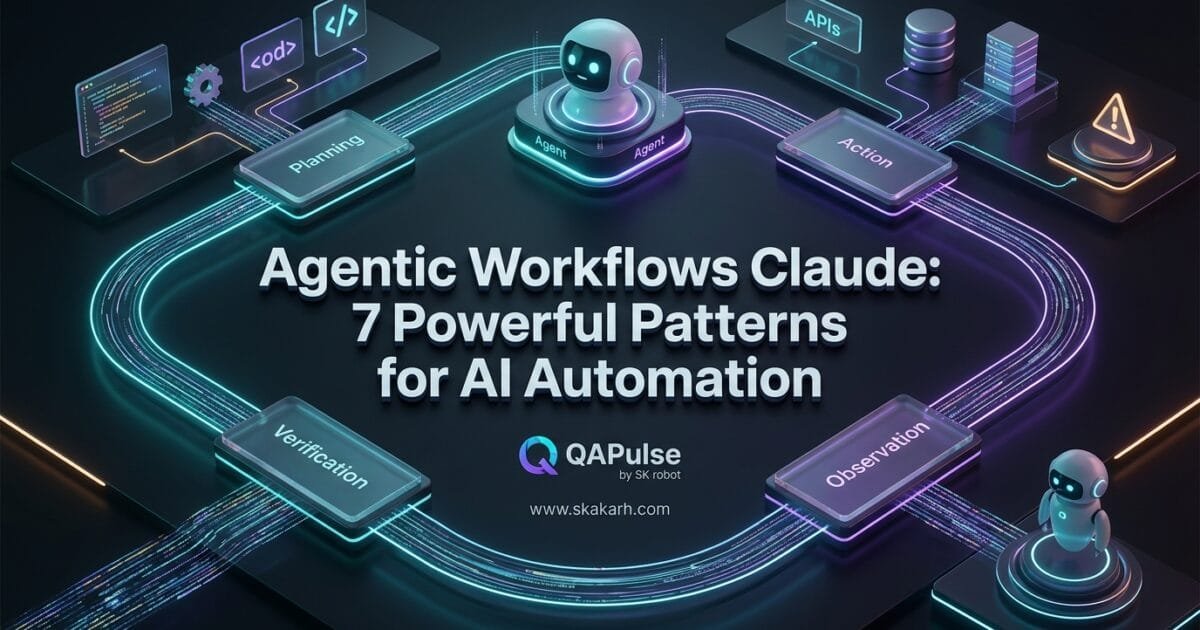
Agentic Workflows Claude represent a shift from using AI as a simple question-and-answer assistant to designing systems where Claude can reason through a goal, use tools, execute multiple steps, evaluate intermediate results, and continue until the workflow reaches a defined outcome.
The important distinction is that an agentic workflow is not simply a longer prompt. It is an execution system in which the model can participate in decision-making while software, tools, state, permissions, validation, and human approval provide the boundaries around that decision-making. Modern agentic systems increasingly combine tool use, multi-step execution, subagents, memory, verification, and controlled autonomy.
For software engineers, QA engineers, SDETs, developers, and technical creators, this distinction matters because the real opportunity is not merely asking Claude to generate an answer. It is designing a workflow that can plan → act → observe → verify → adapt.
Why Agentic Workflows Claude Matter in 2026
Traditional AI interactions generally look like this:
User
  ↓
Prompt
  ↓
Claude
  ↓
Response
  ↓
User
That model is useful, but it puts most of the responsibility on the human.
The human decides:
- What should happen first
- Which tool should be used
- What information should be collected
- Whether the result is correct
- What should happen next
- When the task is complete
An agentic architecture changes the interaction:
Goal
  ↓
Claude
  ↓
Plan
  ↓
Tool
  ↓
Observe
  ↓
Reason
  ↓
Next Action
  ↓
Verify
  ↓
Complete / Retry / Escalate
Anthropic’s tooling supports Claude interacting with external tools, while Claude Code also exposes controls such as maximum agentic turns, permission modes, session continuation, and structured JSON output that can be useful when building controlled automation.
The key idea is therefore simple:
An agentic workflow gives an AI system a controlled way to pursue an objective rather than merely generate a response.
What is an Agentic Workflow?
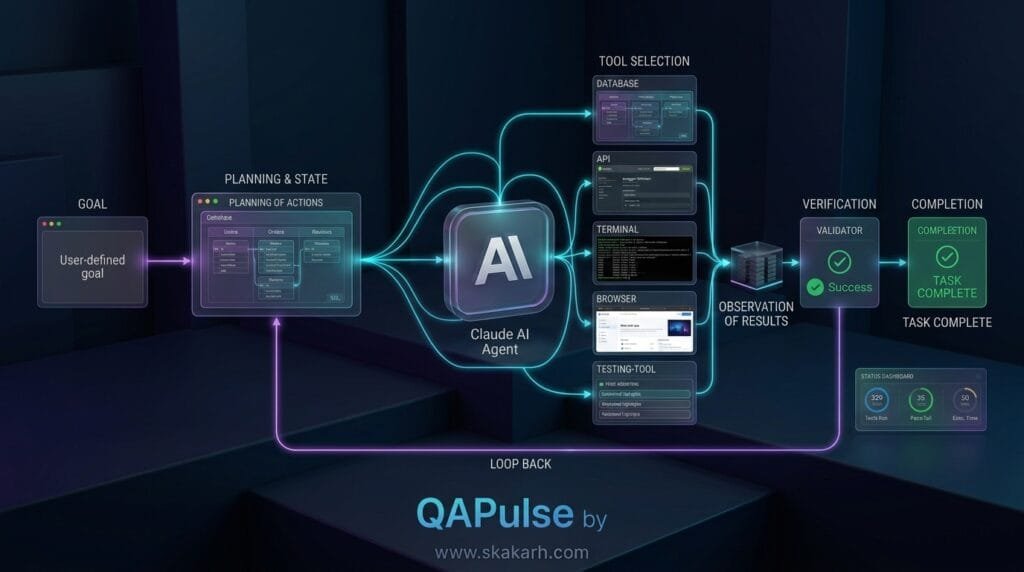
An agentic workflow is a multi-step system in which an AI model can make decisions during execution, invoke tools, inspect results, and determine what action should happen next.
A deterministic workflow might look like:
Trigger
  ↓
Step 1
  ↓
Step 2
  ↓
Step 3
  ↓
Step 4
  ↓
Result
An agentic workflow can instead look like:
Goal
  ↓
Agent
  ↓
Choose Action
  ↓
Execute Tool
  ↓
Inspect Result
  ↓
Is Goal Satisfied?
  ├── Yes → Finish
  └── No  → Choose Next Action
That decision point is what makes the architecture fundamentally different.
The workflow does not necessarily know every action beforehand.
It defines the objective, available capabilities, constraints, state, and success criteria, while the model determines appropriate actions within those boundaries.
Recent production-oriented guidance around agentic systems emphasizes bounded execution, tool allowlists, human approval for consequential actions, observability, and regression evaluation rather than unrestricted autonomy.
Agentic Workflows Claude vs Traditional Automation
The distinction becomes clearer when comparing traditional automation with an agentic workflow.
| Capability | Traditional Automation | Agentic Workflow |
|---|---|---|
| Execution path | Mostly predefined | Partially determined at runtime |
| Decision-making | Code/rules | Model + rules |
| Tool selection | Developer-defined | Agent can select from permitted tools |
| Adaptation | Explicit branches | Model can reason over observations |
| Error handling | Predefined conditions | Can diagnose and choose another action |
| State | Usually explicit | Explicit state + contextual reasoning |
| Human approval | Optional | Can be strategically inserted |
| Autonomy | Low to moderate | Potentially high |
| Testing | Mostly deterministic | Requires evaluations and behavioral testing |
| Governance | Code permissions | Code + model + tool permissions |
This does not mean agentic systems should replace deterministic automation.
In fact, strong architectures usually combine both.
A useful principle is:
Use code for what must be deterministic. Use agents for what requires judgment.
That distinction becomes extremely important in production.
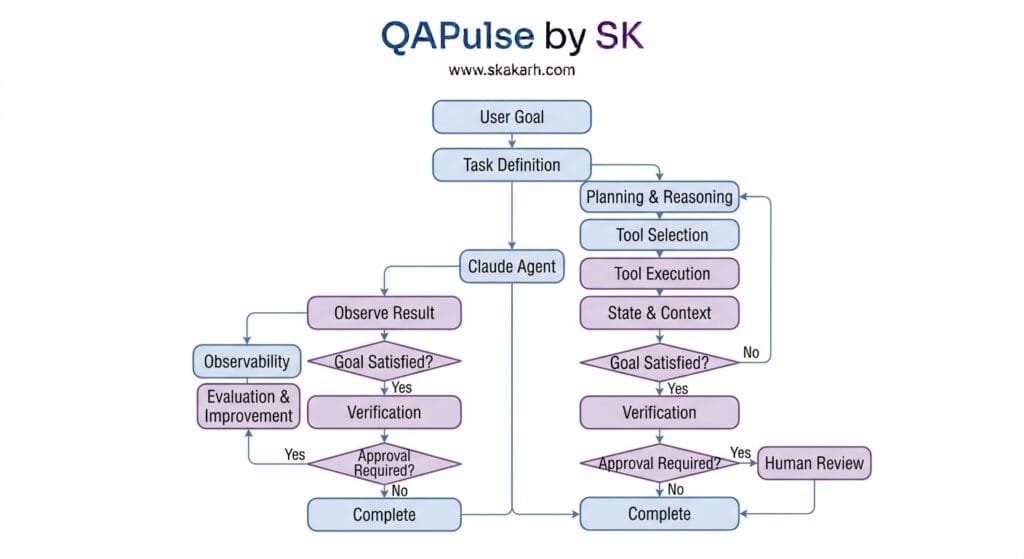
The 7 Core Pillars of Agentic Workflows Claude
A robust implementation can be understood through seven architectural pillars:
- Goal and Task Definition
- Reasoning and Planning
- Tool Use
- State and Context
- Verification and Self-Correction
- Human-in-the-Loop Governance
- Observability and Evaluation
These pillars transform a chatbot interaction into an engineered agentic system.
1. Goal and Task Definition
The first pillar is the objective.
A weak agentic request might be:
Build something useful for testing.
There is too much ambiguity.
A stronger objective is:
Analyze the latest API regression results,
identify failures introduced by the current build,
group failures by probable root cause,
and produce a prioritized report.
Do not modify source code.
Now the agent has:
- A goal
- An input
- A scope
- A restriction
- An expected output
This matters because autonomy without boundaries quickly becomes unpredictable.
Define Success Before Execution
An agent should know what “done” means.
For example:
Success criteria:

1. All regression failures are collected.
2. Duplicate failures are grouped.
3. Each group has a probable root cause.
4. High-risk failures are prioritized.
5. No production data is modified.
6. A final report is generated.
This creates an evaluation target.
Without explicit success criteria, an agent may continue working even after producing a useful result—or stop before completing the actual task.
2. Reasoning and Planning
The second pillar is planning.
Claude can be used as a reasoning component that determines what should happen next based on the current objective and observations.
Consider an SDET task:
Investigate why the checkout regression suite
has started failing after the latest release.
A useful agent may determine that it needs to:
1. Read recent test results.
2. Group failures.
3. Inspect application logs.
4. Check recent code changes.
5. Compare API responses.
6. Query relevant test data.
7. Form hypotheses.
8. Validate the strongest hypothesis.
9. Produce a root-cause report.
The important point is that the workflow is goal-oriented rather than merely prompt-oriented.
Planning Does Not Mean Unlimited Reasoning
Production agents should not be allowed to reason and act indefinitely.
A practical system establishes limits such as:
- Maximum turns
- Maximum execution time
- Maximum tool calls
- Token budget
- Cost budget
- Allowed tools
- Maximum retries
Claude Code, for example, exposes --max-turns for limiting agentic turns in non-interactive usage.
The principle is:
Every autonomous loop needs an exit condition.
3. Tool Use
Reasoning alone does not make an agent useful.
Tools give the agent the ability to interact with the environment.
Potential tools include:
Filesystem
Git
Browser
Database
API
Terminal
CI/CD
Issue Tracker
Documentation
Search
Monitoring
Test Runner
Anthropic’s tool-use architecture allows Claude to work with defined tools through structured tool calls and tool results.
For example, a testing agent could have:
run_tests()
get_test_report()
get_git_diff()
query_database()
read_logs()
create_bug()
Claude decides which permitted capability is appropriate.
Tool Design Is More Important Than Tool Count
Do not expose every available system capability to an agent.
A production agent should receive the smallest useful toolset.
Instead of:
terminal()
you may prefer:
run_tests()
get_logs()
read_file()
This reduces the blast radius.
A good rule is:
Give the agent capabilities, not unrestricted power.
4. State and Context
A multi-step agent needs memory of what has already happened during the workflow.
Consider:
Task:
Investigate failing checkout tests.
The agent might discover:
Observation 1:
Payment API returns 500.

Observation 2:
Only cards using currency EUR fail.

Observation 3:
Failure began after commit abc123.

Observation 4:
The currency conversion service changed.
The workflow needs to preserve these observations.
A conceptual state object might look like:
state = {
    "goal": "Investigate checkout failures",
    "failures": [],
    "observations": [],
    "hypotheses": [],
    "evidence": [],
    "actions_taken": [],
    "status": "investigating"
}
The model can reason over this state while the application remains responsible for persistence and control.
Context Is Not the Same as Memory
This distinction is important.
Context is information available during the current execution.
Memory usually refers to information intentionally retained across interactions or sessions.
A production agent may require both.
Current Task State
        +
Relevant Historical Knowledge
        +
Current Tool Results
        ↓
      Agent
Without disciplined context management, long-running agents can become expensive, confused, or inconsistent.
5. Verification and Self-Correction
One of the biggest mistakes in agentic systems is assuming:
The model generated it, therefore it must be correct.
That is unsafe.
A better architecture introduces verification.
Generate
   ↓
Check
   ↓
Pass?
 ├── Yes → Continue
 └── No  → Correct
For example, an agent asked to modify a test could:
1. Inspect test.
2. Modify test.
3. Run test.
4. Analyze failure.
5. Correct implementation.
6. Run test again.
7. Stop after success or retry limit.
This creates a feedback loop.
Example SDET Workflow
result = run_tests()

if result.failed:
    diagnosis = claude_analyze(result)
    apply_change(diagnosis)
    verification = run_tests()

    if verification.failed:
        escalate_to_human()
The model does not become the final authority.
The test system becomes the verifier.
This is a much stronger design.
6. Human-in-the-Loop Governance
Not every action should be autonomous.
A useful architecture separates actions by risk.
| Action | Recommended Control |
|---|---|
| Read documentation | Autonomous |
| Analyze test results | Autonomous |
| Run local tests | Autonomous |
| Create draft bug | Autonomous |
| Modify source code | Review depending on environment |
| Merge production code | Human approval |
| Delete production data | Human approval |
| Send external communication | Human approval |
| Deploy production | Human approval |
This creates controlled autonomy.
A human checkpoint might look like:
Agent
 ↓
Prepare Action
 ↓
Risk Assessment
 ↓
Human Approval
 ↓
Execute
Production agentic-workflow guidance similarly emphasizes human checkpoints for irreversible or consequential operations.
The objective is not maximum autonomy.
The objective is:
Maximum useful autonomy within acceptable risk.
7. Observability and Evaluation
The final pillar is often neglected.
If an agent fails, you need to understand:
- What did it decide?
- Which tools did it call?
- What inputs did it receive?
- What results came back?
- How many iterations occurred?
- Why did it stop?
- How much did the execution cost?
- Did it satisfy the objective?
A useful trace might look like:
Run ID: 82731

Goal:
Investigate checkout failures

Turn 1:
Read regression report

Turn 2:
Group failures

Turn 3:
Inspect API logs

Turn 4:
Query database

Turn 5:
Generate hypothesis

Turn 6:
Verify hypothesis

Result:
Root cause identified
This information becomes essential for debugging and evaluation.
An agent that works once is a demo.
An agent whose behavior can be measured, reproduced, evaluated, and improved is an engineering system.
Building a Practical Agentic Workflow With Claude
Let’s design a realistic SDET example.
Problem
Every morning, the regression pipeline produces hundreds of failures.
The QA team wants an AI system to analyze the results and produce a triage report.
Workflow
CI Pipeline
   ↓
Test Results
   ↓
Claude Agent
   ↓
Analyze Failures
   ↓
Group Similar Failures
   ↓
Read Logs
   ↓
Inspect Recent Changes
   ↓
Check API / DB Evidence
   ↓
Generate Root-Cause Hypotheses
   ↓
Verify Evidence
   ↓
Prioritize
   ↓
Generate Report
The agent does not need unrestricted access to the entire environment.
It might receive only:
get_test_results
read_log
get_git_diff
query_test_database
create_triage_report
This is a much safer architecture.
A Simplified Agent Loop
A conceptual implementation could look like this:
def run_agent(task, tools, max_turns=8):
    state = {
        "task": task,
        "observations": [],
        "actions": [],
        "status": "running"
    }

    for turn in range(max_turns):
        decision = claude_decide(
            task=state["task"],
            observations=state["observations"],
            available_tools=tools
        )

        if decision["action"] == "finish":
            return decision["result"]

        tool = tools[decision["tool"]]

        result = tool(**decision["arguments"])

        state["actions"].append(decision)
        state["observations"].append(result)

    return {
        "status": "stopped",
        "reason": "maximum turns reached"
    }
This example deliberately keeps the architecture simple.
The critical design pattern is:
Decide
  ↓
Act
  ↓
Observe
  ↓
Update State
  ↓
Decide Again
That loop is the heart of many agentic architectures.
Claude Code as an Agentic Engineering Environment
Claude Code is particularly relevant for software-engineering workflows because it can operate around a codebase rather than being limited to generating isolated code snippets.
Its CLI includes features such as session continuation, permission modes, maximum agentic turns, verbose execution information, and JSON output for automation.
This makes workflows such as the following possible:
Issue
 ↓
Claude Code
 ↓
Inspect Repository
 ↓
Plan Change
 ↓
Modify Code
 ↓
Run Tests
 ↓
Inspect Failure
 ↓
Fix
 ↓
Run Tests Again
 ↓
Review Diff
 ↓
Final Report
The important engineering lesson is that Claude Code is not itself the entire architecture.
You still need:
- Repository controls
- Permission boundaries
- Testing
- Version control
- CI
- Evaluation
- Logging
- Human review
Anthropic’s current Claude ecosystem also positions its models for production agentic workflows and long-running knowledge work, reinforcing the shift toward systems where models operate across multiple actions rather than producing isolated responses.
Agentic Workflows Claude for QA and SDET
This is where the concept becomes particularly interesting for software testers.
A conventional AI testing assistant might generate:
10 test cases for the login page.
An agentic testing workflow can potentially do much more:
Requirement
   ↓
Analyze Specification
   ↓
Identify Test Scenarios
   ↓
Inspect Existing Tests
   ↓
Generate Missing Tests
   ↓
Implement Tests
   ↓
Run Tests
   ↓
Analyze Failures
   ↓
Fix Test Issues
   ↓
Generate Report
The agent is no longer simply generating test cases.
It participates in the testing lifecycle.
Example: Automated Regression Triage
Input:
Analyze today's failed regression suite.
The agent could:
- Load the test report.
- Group duplicate failures.
- Identify environment-related failures.
- Inspect logs.
- Compare recent commits.
- Search for similar historical failures.
- Identify likely root causes.
- Prioritize failures.
- Produce a triage report.
The workflow becomes a testing assistant that performs investigation rather than simply answering questions.
Agentic Workflows Claude and MCP
Model Context Protocol can further expand what an agent can access.
Conceptually:
                    ┌── Git
                    │
                    ├── Jira
                    │
Claude Agent ───────┼── Database
                    │
                    ├── Browser
                    │
                    ├── CI
                    │
                    └── Test Framework
The agent can reason about the task while MCP-connected capabilities provide structured access to external systems.
However, connectivity should not automatically mean unrestricted access.
A mature implementation defines:
- Which MCP servers are available
- Which tools are exposed
- Which operations are read-only
- Which operations require approval
- Which credentials are available
- Which environments can be accessed
The architecture should always follow the principle:
Capability must be proportional to responsibility.
Deterministic Workflow vs Agentic Workflow
A common misconception is that agentic systems should replace normal workflows.
They should not.
Consider payment processing.
You do not want an LLM deciding whether a financial transaction should be committed based purely on free-form reasoning.
Instead:
Agent
 ↓
Prepare Payment Action
 ↓
Deterministic Payment Service
 ↓
Validation Rules
 ↓
Authorization
 ↓
Transaction
The agent can help with:
- Investigation
- Classification
- Planning
- Exception handling
- Human communication
The deterministic system should control:
- Money movement
- Authentication
- Authorization
- Data integrity
- Transaction boundaries
- Safety-critical actions
This hybrid approach is often stronger than trying to make everything autonomous.
Common Agentic Workflow Failure Modes
1. Unlimited Loops
The agent keeps calling tools without reaching a conclusion.
Solution: maximum turns, timeouts, and explicit completion criteria.
2. Excessive Tool Access
The agent can modify too much.
Solution: least-privilege tool access.
3. No Verification
The agent assumes its own output is correct.
Solution: deterministic validators, tests, and external checks.
4. Context Explosion
Too much information is passed into every step.
Solution: structured state, summarization, retrieval, and selective context.
5. Hidden Costs
The agent makes hundreds of expensive calls.
Solution: token budgets, cost ceilings, and tool-call limits.
6. Poor Observability
Nobody knows why the agent made a decision.
Solution: structured traces and execution logs.
7. Human Approval at the Wrong Place
Approval is required for harmless actions but missing for dangerous ones.
Solution: risk-based approval gates.
8. Treating Prompts as Architecture
A giant prompt is expected to solve every problem.
Solution: separate model reasoning from state, tools, business rules, verification, and orchestration.
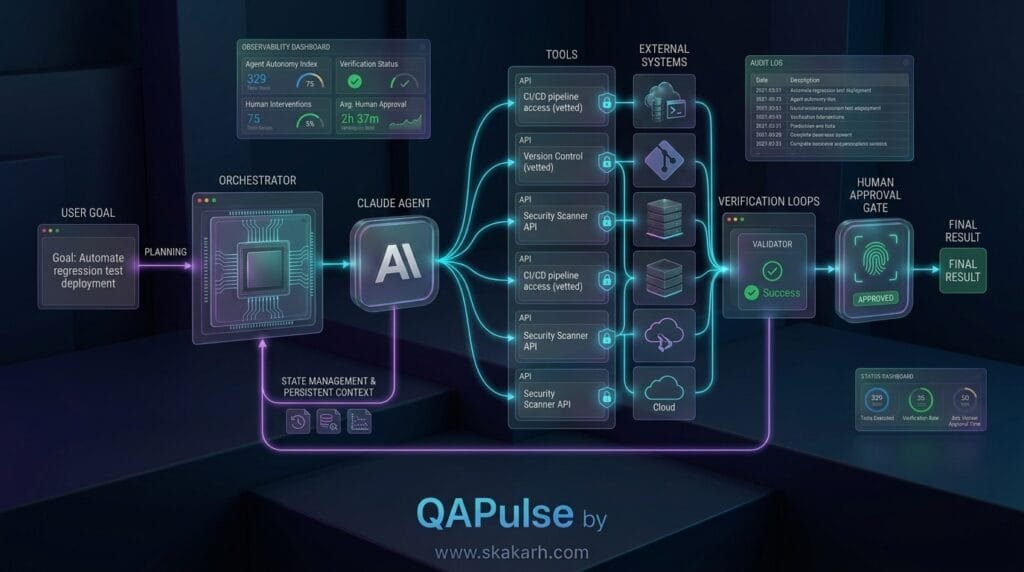
Production Architecture
A production-oriented architecture can look like:
                         ┌──────────────────┐
                         │     User Goal    │
                         └────────┬─────────┘
                                  ↓
                         ┌──────────────────┐
                         │   Orchestrator   │
                         └────────┬─────────┘
                                  ↓
                         ┌──────────────────┐
                         │      Claude      │
                         │ Reason / Decide  │
                         └────────┬─────────┘
                                  ↓
                    ┌─────────────┴─────────────┐
                    ↓                           ↓
             ┌──────────────┐            ┌──────────────┐
             │    Tools     │            │    State     │
             └──────┬───────┘            └──────┬───────┘
                    ↓                           ↓
             External Systems             Context Store
                    │                           │
                    └─────────────┬─────────────┘
                                  ↓
                         ┌──────────────────┐
                         │    Validator     │
                         └────────┬─────────┘
                                  ↓
                           Goal Satisfied?
                            /           \
                          No             Yes
                          ↓               ↓
                   Retry / Plan       Approval
                                          ↓
                                       Result
This architecture separates responsibilities instead of allowing the model to control everything.
Cost and Performance Optimization
Agentic systems can consume substantially more resources than a single model response because one task may involve multiple model turns and tool calls.
Optimization strategies include:
Use the Right Model for the Right Task
Not every step requires the most capable model.
For example:
Complex Planning → Strong Model
Simple Classification → Smaller Model
Formatting → Smaller Model
Final Review → Strong Model
Reduce Unnecessary Context
Do not repeatedly send huge files, logs, and historical conversations when only a small subset is relevant.
Cache Stable Information
Documentation and configuration that rarely change can often be handled more efficiently than repeatedly retrieved from scratch.
Set Hard Limits
Define:
max_turns
max_tool_calls
max_runtime
max_tokens
max_cost
These controls make the system predictable.
Testing Agentic Workflows
This is one of the biggest differences between traditional software and agentic systems.
Traditional software might have:
Input
 ↓
Expected Output
Agentic software can have many valid execution paths.
For example:
Path A:
Tool 1 → Tool 2 → Result

Path B:
Tool 2 → Tool 3 → Tool 1 → Result
Both might produce a correct outcome.
Therefore, evaluation should test more than exact text.
Test the Agent on:
- Goal completion
- Tool selection
- Tool arguments
- Safety boundaries
- Error recovery
- Hallucination resistance
- Context handling
- Maximum-turn behavior
- Human approval enforcement
- Final output quality
SDET Evaluation Model
A useful evaluation record could be:
{
  "task_completed": true,
  "correct_tools_used": true,
  "unsafe_action_attempted": false,
  "verification_passed": true,
  "human_approval_required": false,
  "final_output_quality": 0.92
}
This turns an AI workflow into something that can actually be regression-tested.
How to Start Building Agentic Workflows Claude
Do not begin with a complicated multi-agent architecture.
Start with one goal.
Step 1: Choose a Real Problem
For example:
Analyze failed automated tests.
Step 2: Define the Success Criteria
Every failure must be classified.
Duplicate failures must be grouped.
Critical failures must be prioritized.
Step 3: Give Claude Minimal Tools
get_test_results
read_logs
get_git_diff
Step 4: Add State
Track:
observations
actions
hypotheses
results
Step 5: Add Verification
Require evidence before accepting a conclusion.
Step 6: Add Limits
Set:
maximum turns
maximum tool calls
execution timeout
Step 7: Add Human Approval
Only where risk justifies it.
Step 8: Measure Every Run
Record:
duration
tokens
tool calls
success
failure
reason
This incremental approach is much more reliable than attempting to build a fully autonomous multi-agent platform on day one.
When You Should NOT Use an Agentic Workflow
Agentic architecture is not automatically better.
Avoid it when the task is:
- Completely deterministic
- Simple enough for a normal script
- Extremely latency-sensitive
- Safety-critical without appropriate controls
- Better expressed as a fixed pipeline
- More expensive than the value it provides
For example:
total = price * quantity
does not need an AI agent.
A deterministic function is faster, cheaper, easier to test, and more reliable.
Agentic architecture becomes valuable when the problem contains ambiguity, dynamic decision-making, tool selection, investigation, adaptation, or complex multi-step reasoning.
The Future: From AI Assistant to AI Operator
The evolution can be visualized as:
Chatbot
  ↓
AI Assistant
  ↓
Tool-Using Assistant
  ↓
Agent
  ↓
Agentic Workflow
  ↓
Multi-Agent System
  ↓
AI Engineering Organization
The important transition is not simply better models.
It is the movement from:
“AI gives me an answer.”
to:
“AI helps execute the work.”
Claude’s current product direction increasingly reflects this broader agentic model, including long-running workflows and capabilities designed for multi-step knowledge and coding work.
But autonomy creates responsibility.
The future of agentic engineering will therefore depend not only on stronger models, but on better:
- Workflow design
- Tool governance
- Evaluation
- Observability
- Security
- State management
- Human oversight
Key Architectural Takeaways for SDETs
If you remember only a few principles from this article, remember these:
- An agentic workflow is an execution system, not simply a prompt.
- Claude provides reasoning; tools provide capabilities.
- State should be explicit and manageable.
- Deterministic systems should handle deterministic decisions.
- Agents need bounded autonomy.
- Every important action should have verification.
- High-risk operations should have human approval.
- Agent behavior must be observable and evaluable.
- SDETs should test agent behavior, not just final text.
- The best agentic systems combine AI flexibility with software-engineering discipline.
AI Overview & Answer Engine Optimisation
What are agentic workflows Claude?
Agentic workflows Claude are multi-step AI workflows where Claude can reason about a goal, use permitted tools, inspect results, maintain context, and decide the next action until a defined objective is completed.
How do agentic workflows with Claude work?
They typically follow: Goal → Plan → Tool → Action → Observe → Verify → Complete or Continue. This allows Claude to participate in multi-step tasks rather than generating only a single response.
What is the difference between a Claude prompt and an agentic workflow?
A prompt primarily requests an AI response, while an agentic workflow gives Claude a controlled environment with tools, state, decision points, verification, and execution boundaries.
Can Claude Code be used for agentic workflows?
Yes. Claude Code can support agentic software-engineering workflows involving repository analysis, code changes, test execution, debugging, and iterative verification.
How can SDETs use Claude agentic workflows?
SDETs can use them for regression triage, test failure investigation, root-cause analysis, test maintenance, API validation, log analysis, and automated defect preparation.
What makes an agentic workflow reliable?
Reliable workflows combine clear goals, controlled tools, explicit state, execution limits, verification, observability, evaluation, and human approval for high-risk actions.
AEO takeaway:
Agentic workflows Claude combine Claude’s reasoning with tools, state, verification, and controlled autonomy to execute complex multi-step tasks. For SDETs, they can automate testing investigations and regression workflows while keeping critical actions governed by deterministic controls and human approval.
People Asked Questions
What are agentic workflows Claude?
Agentic workflows Claude are multi-step AI workflows where Claude can reason about an objective, select permitted tools, inspect results, maintain workflow state, and determine subsequent actions rather than simply returning a single response.
How are agentic workflows different from normal Claude prompts?
A normal prompt generally produces a response. An agentic workflow creates an execution loop in which the model can make decisions, call tools, observe results, and continue until a defined completion condition is reached.
Can Claude Code be used to build agentic workflows?
Yes. Claude Code provides an agentic coding environment with capabilities such as tool interaction, permission controls, session continuation, maximum-turn limits, and structured output options that can support automated engineering workflows.
Are agentic workflows fully autonomous?
They can be designed with varying levels of autonomy, but production systems should generally use explicit boundaries, permission controls, verification, and human approval for high-risk operations.
Are agentic workflows useful for QA and SDET teams?
Yes. They can support tasks such as test generation, regression triage, log analysis, root-cause investigation, test maintenance, API validation, documentation analysis, and defect preparation.
Do agentic workflows replace traditional automation?
No. The strongest architecture typically combines deterministic automation with AI reasoning. Code should handle predictable operations while agents handle tasks involving ambiguity, investigation, and dynamic decisions.
What should I learn before building agentic workflows?
A strong foundation includes APIs, Python or TypeScript, prompt engineering, tool calling, state management, testing, observability, Git, CI/CD, and basic AI-agent architecture.
Conclusion
Agentic workflows Claude are best understood as an engineering pattern for turning Claude from a response generator into a controlled participant in multi-step work.
- The model can reason.
- Tools allow it to act.
- State gives it continuity.
- Verification checks its work.
- Governance controls its authority.
- Observability makes its behavior measurable.
That combination creates something far more powerful than a chatbot.
For SDETs and software engineers, the opportunity is especially significant. Instead of asking AI to generate another test case or explain another failure, you can build workflows that investigate failures, interact with engineering systems, validate evidence, and prepare actionable results.
But the goal should never be maximum autonomy.
The better goal is:
Maximum useful autonomy with minimum uncontrolled risk.
That is the foundation on which reliable agentic systems will be built.
Internal Blog Links
- 50 Playwright Commands Every QA Engineer Should Know
- What is QA Engineering? A Practical Guide to Modern Software Quality
- What is Playwright? A Powerful Guide to Modern Web Testing and QA Engineers
- QA Engineer vs SDET vs Quality Engineer: What’s the Difference?
- QA Engineer Portfolio: 7 Powerful Projects That Get Interviews in 2026
- Graph Engineering: The Powerful Layer After Loop Engineering
- Graph Testing: The Critical QA Layer After Loop-Based Test Automation
- Agentic Test Creation vs AI Test Generation: What’s the Real Difference?
- AI Test Automation With Humans in the Loop: Governance, Metrics, and the Practical Guide
Internal Series Links
- Learn MCP – Zero to Hero
- Learn AI Agents for QA – Zero to Hero
- Playwright Automation – Zero to Hero
- TencentDB Agent Memory: Complete Zero to Hero
- LangGraph: Complete Zero to Hero
- Learn Python – Zero to Hero
- OpenAI Codex: Complete Zero to Hero
- Cursor AI: Complete Zero to Hero
- Claude Code Tutorial: Complete Zero to Hero
- AutoGen: Complete Zero to Hero Guide
- Free QA Resources Built From Real Experience
- QA Glossary: Test Automation Terms Every Engineer Should Know
External Links
- Anthropic Claude Documentation — official Claude documentation.
- Anthropic Tool Use Documentation — official tool-use documentation.
- Claude Code CLI Reference — official CLI capabilities and controls.
- Anthropic Claude — official Claude platform information.
Continue Learning
Explore more expert articles on Mobile Testing, Backend & API, AI & Agentic, AI Tools, n8n, LangChain, CrewAI, MCP Servers, AI Agents, LlamaIndex, Docker, FastAPI, Playwright, Cypress, Test Automation, DevOps, and Software Engineering at www.skakarh.com.
QAPulse by SK delivers expert release analysis, AI engineering insights, enterprise automation strategies, migration guidance, DevOps best practices, and practical testing knowledge to help software professionals build scalable, intelligent, and production-ready software systems.