 QA

LangGraph human in the loop code review means pausing an automated review workflow at key checkpoints so a developer can approve, edit, or reject the agent’s suggestions before anything is posted or applied. You place interrupt() inside a review node, compile the graph with a checkpointer, and resume execution with Command(resume=...). The result is an agent that flags potential bugs and drafts refactor patches, while engineers keep final sign-off over inline PR comments or repository edits.
Who this is for: SDETs and QA engineers building AI-assisted test workflows in Python. Prerequisites: Python 3.10+, basic LangGraph concepts (state, nodes, edges). Applies to: LangGraph 1.x (current release line: 1.2). Last updated: November 22, 2026.
LangGraph human in the loop testing solves the biggest problem with AI test agents: they’re fast, confident and sometimes wrong. An agent that writes tests straight into your repo, or files bugs from a single flaky run, creates more work than it saves.
The fix isn’t to drop the agent. It’s to decide exactly where a human must sign off, and make the workflow pause there and wait, for minutes or days, without losing its place.
In this guide we’ll build that workflow step by step: an agent drafts a test plan, a reviewer approves or edits it, approved tests get written, and a second checkpoint gates bug filing. You’ll also see how to unit-test the graph itself.

What is LangGraph Human in the Loop Testing?
LangGraph human in the loop testing is a workflow design where an AI agent’s testing steps pause at defined checkpoints for human review, and resume with the reviewer’s decision.
LangGraph makes this practical with three pieces:
interrupt(): called inside a node, it pauses the graph and hands a JSON payload to whoever is reviewing. LangGraph saves the graph state and waits indefinitely until you resume (LangGraph docs: Interrupts).- A checkpointer: stores the paused state. Examples use
InMemorySaver, but production needs a durable, database-backed one. Command(resume=...): resumes the run. Whatever you pass becomes the return value ofinterrupt()inside the node.
A thread_id ties it together. Resuming with the same thread ID picks up the same paused run, while a new ID starts fresh. That’s what lets a reviewer approve a test plan the next morning without the agent starting over.
Why AI Testing Workflows Need Human Checkpoints
An AI agent is cheap to run and expensive to clean up after. In 2025, 46% of developers said they distrust the accuracy of AI tool output (Stack Overflow Developer Survey 2025). A checkpoint turns that distrust into a defined review step instead of an afterthought.
In testing workflows, four moments carry most of the risk:
- Before generated tests enter the repo. AI-drafted tests often pass while asserting almost nothing. I covered how to spot them in SDET Skills 2027.
- Before a bug is filed. One red run might be a real defect, a flaky test or a broken environment. Auto-filed tickets from flaky runs bury the real ones; see Playwright flaky tests for how to tell them apart.
- Before changing shared state. Resetting a staging database, deleting test users or rotating credentials affects everyone on the team.
- Before an “auto-heal” merges. A healed locator can silently point at the wrong element and keep the test green for the wrong reason.
Everything else, like exploring the app, drafting plans, running read-only checks and summarising results, can stay fully automated. The skill is putting checkpoints only where a wrong move is costly.

How to Build LangGraph Human in the Loop Testing: Step-by-Step
We’ll build a small but complete workflow: an agent drafts a test plan for a requirement, a reviewer approves, edits, retries or rejects it, and only approved plans get written to disk. The code below runs as-is on LangGraph 1.2.
Step 1: Install LangGraph and define the state
pip install "langgraph>=1.2" pytestThe state holds the requirement, the agent’s draft plan, and a note recording the reviewer’s decision.
# hitl_graph.py
from pathlib import Path
from typing import Literal, TypedDict

from langgraph.checkpoint.memory import InMemorySaver
from langgraph.graph import END, START, StateGraph
from langgraph.types import Command, interrupt


class TestState(TypedDict):
    requirement: str
    test_plan: list[str]
    review_note: str
Step 2: Add the agent node
draft_test_plan stands in for your LLM call, so the example runs without an API key. It also reads any reviewer feedback, which the retry path uses later.
def draft_test_plan(requirement: str, feedback: str = "") -> list[str]:
    # Stand-in for an LLM call. Swap in your model here.
    plan = [
        f"Happy path: {requirement}",
        "Rejects an empty email field",
        "Shows an error for a wrong password",
    ]
    if feedback:
        plan.append(f"Reviewer request: {feedback}")
    return plan


def generate_plan(state: TestState) -> dict:
    return {"test_plan": draft_test_plan(state["requirement"], state.get("review_note", ""))}
Step 3: Add the human review checkpoint
This is the core of LangGraph human in the loop testing. interrupt() pauses the run and sends the plan to the reviewer. The reviewer’s answer comes back as the return value, and Command(goto=...) routes to the next step.
def human_review(
    state: TestState,
) -> Command[Literal["write_tests", "generate_plan", "__end__"]]:
    decision = interrupt(
        {
            "question": "Approve, edit, retry or reject this test plan?",
            "test_plan": state["test_plan"],
        }
    )
    action = decision["action"]

    if action == "approve":
        return Command(goto="write_tests")
    if action == "edit":
        return Command(goto="write_tests", update={"test_plan": decision["test_plan"]})
    if action == "retry":
        return Command(goto="generate_plan", update={"review_note": decision["reason"]})
    return Command(goto=END, update={"review_note": decision.get("reason", "rejected")})
The payload is plain, JSON-serialisable data. That matters because it’s saved by the checkpointer and usually shown in a review UI.
Step 4: Put side effects after the checkpoint
When a paused node resumes, LangGraph runs it again from the beginning, so any code before interrupt() runs twice (LangGraph docs: Interrupts). Keep anything that writes files, calls APIs or files tickets in its own node after the review.
def write_tests(state: TestState) -> dict:
    # Side effects live AFTER the interrupt, in their own node.
    lines = [f"- [ ] {case}" for case in state["test_plan"]]
    Path("generated_test_plan.md").write_text("\n".join(lines) + "\n")
    return {"review_note": "approved"}
Step 5: Wire the graph with a checkpointer
The review node routes itself with Command, so it needs no outgoing edges. The checkpointer is required: without one, there’s nowhere to save the paused state.
builder = StateGraph(TestState)
builder.add_node("generate_plan", generate_plan)
builder.add_node("human_review", human_review)
builder.add_node("write_tests", write_tests)
builder.add_edge(START, "generate_plan")
builder.add_edge("generate_plan", "human_review")
builder.add_edge("write_tests", END)

graph = builder.compile(checkpointer=InMemorySaver())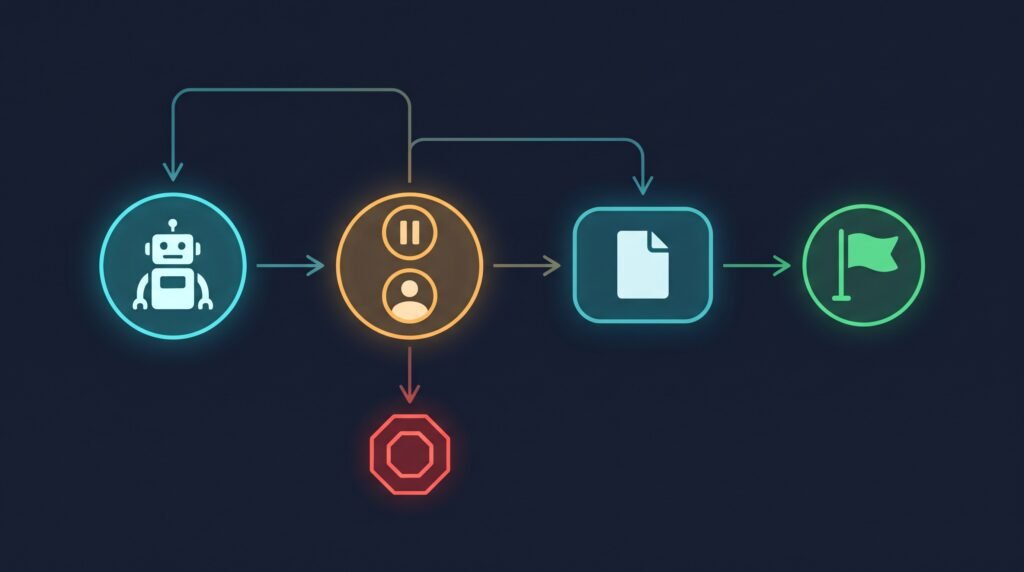
Step 6: Run, pause and resume
The first call runs until the interrupt and returns the payload under __interrupt__. The second call resumes the same thread with the reviewer’s decision.
if __name__ == "__main__":
    config = {"configurable": {"thread_id": "login-feature-001"}}
    start = {"requirement": "User can log in with email and password", "test_plan": [], "review_note": ""}

    result = graph.invoke(start, config)
    print("Paused for review:", result["__interrupt__"][0].value)

    final = graph.invoke(Command(resume={"action": "approve"}), config)
    print("Outcome:", final["review_note"])
Paused for review: {'question': 'Approve, edit, retry or reject this test plan?', 'test_plan': ['Happy path: User can log in with email and password', 'Rejects an empty email field', 'Shows an error for a wrong password']}
Outcome: approvedIn a real setup, the reviewer sees the payload in Slack, a web form or a pull-request comment, and your app calls graph.invoke(Command(resume=...), config) with their choice, hours later if needed.
Step 7: Use a durable checkpointer in production
InMemorySaver loses every paused run when the process restarts. For real review queues, use a database-backed checkpointer such as Postgres:
# pip install langgraph-checkpoint-postgres
from langgraph.checkpoint.postgres import PostgresSaver

DB_URI = "postgresql://user:pass@localhost:5432/langgraph"

with PostgresSaver.from_conn_string(DB_URI) as checkpointer:
    checkpointer.setup()  # creates the tables on first run
    graph = builder.compile(checkpointer=checkpointer)
Step 8: Test the workflow itself
A human-in-the-loop graph is code, so it needs tests. These pytest cases check that nothing gets written before approval, and that each decision takes the right path.
# test_hitl_graph.py
import uuid

from langgraph.types import Command

from hitl_graph import graph

START_STATE = {"requirement": "User can log in", "test_plan": [], "review_note": ""}


def new_thread() -> dict:
    return {"configurable": {"thread_id": str(uuid.uuid4())}}


def test_pauses_before_writing(tmp_path, monkeypatch):
    monkeypatch.chdir(tmp_path)
    result = graph.invoke(START_STATE, new_thread())

    assert "__interrupt__" in result
    assert not (tmp_path / "generated_test_plan.md").exists()


def test_approve_writes_plan(tmp_path, monkeypatch):
    monkeypatch.chdir(tmp_path)
    config = new_thread()
    graph.invoke(START_STATE, config)

    final = graph.invoke(Command(resume={"action": "approve"}), config)

    assert final["review_note"] == "approved"
    assert (tmp_path / "generated_test_plan.md").exists()


def test_reject_writes_nothing(tmp_path, monkeypatch):
    monkeypatch.chdir(tmp_path)
    config = new_thread()
    graph.invoke(START_STATE, config)

    final = graph.invoke(Command(resume={"action": "reject", "reason": "out of scope"}), config)

    assert final["review_note"] == "out of scope"
    assert not (tmp_path / "generated_test_plan.md").exists()


def test_edit_uses_reviewer_plan(tmp_path, monkeypatch):
    monkeypatch.chdir(tmp_path)
    config = new_thread()
    graph.invoke(START_STATE, config)

    graph.invoke(Command(resume={"action": "edit", "test_plan": ["Locks account after 5 failed logins"]}), config)

    assert "Locks account" in (tmp_path / "generated_test_plan.md").read_text()
$ python -m pytest -q
.... [100%]
4 passed in 0.20sEach test uses a fresh thread_id, so runs never share paused state. The same pattern extends to a second checkpoint before bug filing: add a triage_review node that interrupts with the failure summary, and route to file_bug, mark_flaky or fix_test based on the answer.
Human in the Loop Patterns Compared
LangGraph supports several review shapes. Pick the lightest one that still protects the risky step.
| Pattern | How it works in LangGraph | Testing use case | Watch out for |
|---|---|---|---|
| Approve or reject | interrupt() returns a yes/no; Command(goto=...) routes | Gate bug filing or a CI config change | Rejections need a clear end state and a logged reason |
| Edit state | Reviewer returns corrected data; node passes it on with Command(update=...) | Fix an AI-drafted test plan before it’s written | Validate the edited payload before trusting it |
| Retry with feedback | Route back to the agent node with the reviewer’s note | “Add negative cases for locked accounts” | Cap retries so a loop can’t run forever |
| Review a tool call | Interrupt inside the tool before it acts | Approve a database reset or a ticket creation | Re-read external state after a long pause |
| Validate human input | Interrupt once, then loop back with a conditional edge | Make sure a reviewer’s severity is a valid value | Don’t put interrupt() in a while True loop |
| Static breakpoints | interrupt_before / interrupt_after at compile time | Step through a graph while debugging | The docs don’t recommend these for human-in-the-loop workflows |
The last row matters. Static breakpoints are handy for debugging, but LangGraph’s docs point to dynamic interrupt() calls for real review flows (LangGraph docs: Interrupts).
Edge Cases and Production Pitfalls
Most bugs in human-in-the-loop graphs come from forgetting that a paused node runs again on resume. The rest come from treating the review step as free.
- Duplicate side effects. Code before
interrupt()runs again on resume. Symptom: two tickets or two LLM charges for one review. Fix: move side effects into a node after the checkpoint, or make them idempotent. - A bare
try/exceptaroundinterrupt(). The pause works by raising an exception internally, so a broadexcept Exceptionswallows it. Symptom: the graph never pauses. Fix: catch only specific exception types near interrupt calls. - Shifting interrupt order. When a node has several interrupts, resume values are matched by position. Symptom: an answer lands on the wrong question. Fix: never skip interrupts conditionally, and keep their order stable between runs.
- Stale data after a long pause. A reviewer approves on Monday what the agent saw on Friday. Symptom: the action runs against a build or environment that has since changed. Fix: re-read external state, such as the latest build or environment health, right before the action.
- Lost reviews on restart.
InMemorySaverkeeps paused runs only for the life of the process. Symptom: reviewers click “approve” and nothing happens. Fix: use a database-backed checkpointer in every shared environment. - Reused thread IDs. Reusing a
thread_idresumes old state. Symptom: a new requirement shows last week’s plan. Fix: generate one thread ID per review item, and store it with the item. - Review fatigue. Too many checkpoints train reviewers to click approve without reading. Symptom: approvals in seconds. Fix: gate only high-risk steps, and show reviewers a short diff, not the whole state.
The rules behind the first four come straight from the LangGraph docs (LangGraph docs: Interrupts).
LangGraph Human in the Loop Testing Checklist
Run through this before a human-in-the-loop workflow goes to your team.
- Each checkpoint guards a step that is costly to undo: code changes, bug filing, shared data or merges.
- Every
interrupt()payload is small, JSON-serialisable and readable by a reviewer. - No side effects run before an
interrupt()in the same node. - No broad
try/exceptwraps an interrupt call. - Interrupt order inside a node never changes between runs.
- Production uses a database-backed checkpointer, not
InMemorySaver. - Each review item has its own
thread_id, stored alongside it. - Retry loops have a maximum count.
- External state is re-read before any action that follows a long pause.
- pytest covers the approve, edit, retry and reject paths, and asserts nothing happens before approval.
External Links
- Interrupts, LangGraph documentation
- Human-in-the-loop, LangGraph documentation
- Persistence, LangGraph documentation
- Developer Survey 2025: AI, Stack Overflow
Internal Blog Links
- How to Build a Reliable Test Automation Architecture: 7 Powerful Pillars for SDETs
- Claude Code for SDETs: 10 Best High-Velocity Workflows
- QA Engineer vs SDET vs Quality Engineer: What’s the Difference?
- 7 Powerful AI Agent Workflows Every Modern SDET Should Learn
- Test Automation Framework vs Test Suite: 7 Powerful Truths
Internal Series Links
- Learn Python – Zero to Hero
- Playwright Forge — Modern Web Automation
- Agentic QA & LLMs — AI Driven Quality Engineering
- API & Performance Testing
- Enterprise SDET Architect — Frameworks, CI/CD & Leadership
- LangGraph: Complete Zero to Hero
- Claude Code Tutorial: Complete Zero to Hero
- Learn MCP – Zero to Hero
- Cursor AI: Complete Zero to Hero
- OpenAI Codex: Complete Zero to Hero
- AutoGen: Complete Zero to Hero Guide
- AI Agents for QA: Zero to Hero
- Python for Data Science: Complete Zero to Hero
- Learn Playwright – Zero to Hero
- Learn Cypress Testing – Zero to Hero
- Learn Selenium WebDriver – Zero to Hero
- Postman AI: Complete Zero to Hero
- XCUITest iOS Testing: Complete Zero to Hero
- Appium: Complete Zero to Hero
- Detox React Native Testing: Complete Zero to Hero
- EarlGrey: Complete Zero to Hero
- Espresso Android Testing: Complete Zero to Hero
- Flutter Integration Testing: Complete Zero to Hero
- Maestro Mobile Testing: Complete Zero to Hero
- Robot Framework Appium: Complete Zero to Hero
- UI Automator: Complete Zero to Hero
- WebdriverIO Mobile: Complete Zero to Hero
- SQL Mastery: From Basics to Advanced
- TencentDB Agent Memory: Complete Zero to Hero
- DataRobot: Complete Zero to Hero
- Deepnote AI: Complete Zero to Hero
- Jupyter AI: Complete Zero to Hero
- AWS Q Developer: Complete Zero to Hero
- Azure AI DevOps: Complete Zero to Hero
- Docker AI: Complete Zero to Hero
- GitHub Actions AI: Complete Zero to Hero
- Google Cloud AI: Complete Zero to Hero
- Kubernetes AI: Complete Zero to Hero
- Terraform AI: Complete Zero to Hero
- Free QA Resources Built From Real Experience
- QA Glossary: Test Automation Terms Every Engineer Should Know
People Asked Questions
What is the difference between interrupt() and interrupt_before in LangGraph?
interrupt() is called inside a node and pauses with a payload you choose, so it fits real review flows. interrupt_before and interrupt_after are set at compile time and pause around whole nodes. LangGraph’s docs recommend those static breakpoints for debugging, not for human-in-the-loop workflows.
Do I need a checkpointer for human in the loop in LangGraph?
Yes. The checkpointer is where LangGraph saves the paused state, so without one there’s nothing to resume. Use InMemorySaver for local experiments and tests, and a database-backed checkpointer such as Postgres for anything shared or long-running.
How long can a LangGraph interrupt wait for a human?
Indefinitely. LangGraph saves the state and waits until you resume with the same thread_id. In practice, the limit is your checkpointer: in-memory state vanishes on restart, while a database-backed one keeps paused runs for as long as you retain the data.
Can I use LangGraph human in the loop testing with TypeScript?
Yes. The JavaScript package @langchain/langgraph exposes the same interrupt function and Command class, with the same resume pattern. The concepts in this guide carry over directly; only the syntax changes.
How do I test a LangGraph human-in-the-loop workflow?
Use pytest with a fresh thread_id per test. Invoke once and assert the result contains __interrupt__ and that no side effects happened yet. Then resume with each decision, such as approve, edit or reject, and assert the right path ran.
Conclusion
LangGraph human in the loop testing gives you the speed of an AI test agent without handing it the keys. Three primitives do the work: interrupt() to pause, a checkpointer to remember, and Command(resume=...) to continue with a human’s decision.
Start with one checkpoint where a mistake costs the most, usually before generated tests enter the repo. Write the pytest cases for each decision path, swap in a durable checkpointer, and only then add a second gate before bug filing.
For more on agent design, see the AI Agents Zero to Hero series and agentic test creation vs AI test generation. If you want help putting controlled agents into your QA pipeline, see agentic QA services or book a call.