QA
QA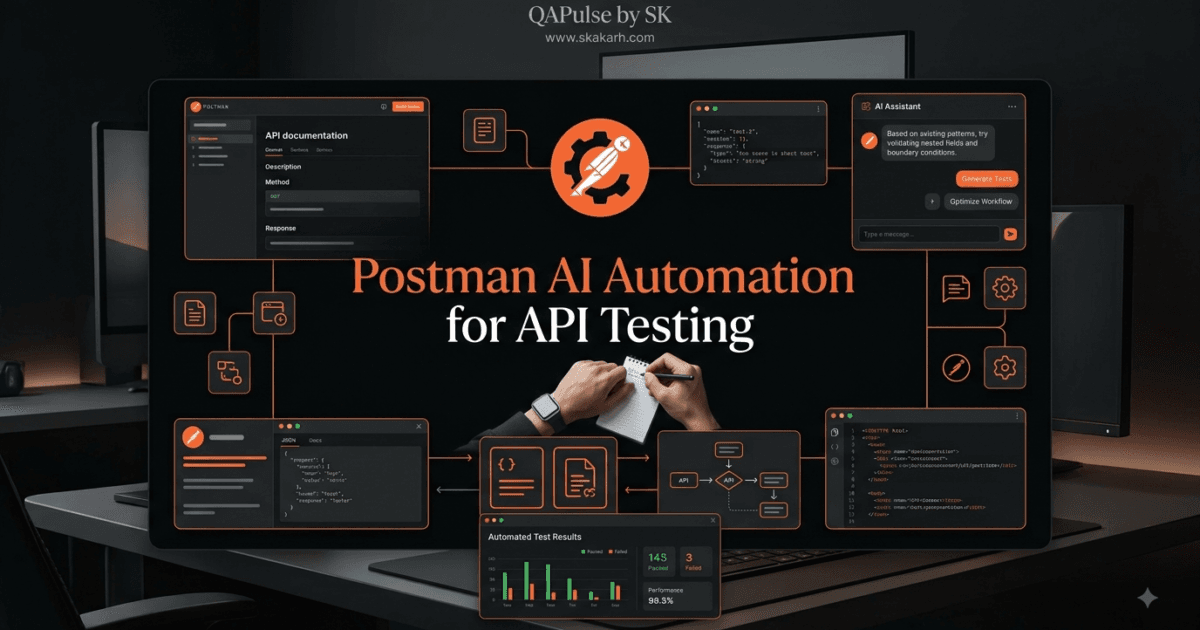
Postman AI Automation changes the way engineers can approach API automation. Instead of starting every automated test from an empty script editor, you can use AI to accelerate test design, generate validation ideas, explain scripts, improve assertions, and help transform manual API checks into repeatable automated workflows.
But there is an important distinction:
AI can accelerate automation engineering, but it does not replace automation engineering.
A generated test can be syntactically correct and still validate the wrong business rule. A beautifully written assertion can pass while an important defect remains undetected. The real advantage comes from combining AI assistance with API knowledge, testing strategy, and human verification.
That mindset is essential if you want to build reliable API automation rather than simply generate more scripts.
What is Postman AI Automation?
Postman AI Automation refers to using AI-assisted capabilities within an API development and testing workflow to reduce repetitive automation work and help engineers create, understand, and improve automated API tests.
A traditional workflow often looks like this:
Understand API
     ↓
Create Request
     ↓
Write Test Script
     ↓
Run Test
     ↓
Analyze Failure
     ↓
Modify Script
     ↓
Repeat
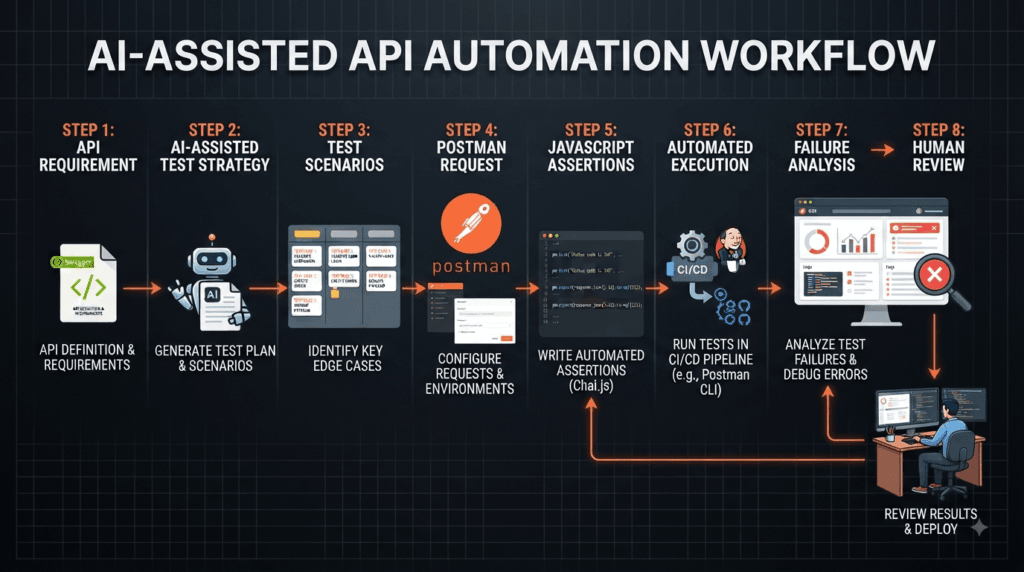
An AI-assisted workflow can introduce intelligence into several of these stages:
API Specification
       ↓
AI-Assisted Test Design
       ↓
Postman Request
       ↓
AI-Assisted Script Creation
       ↓
Automated Validation
       ↓
Failure Analysis
       ↓
Human Review
       ↓
Continuous Improvement
The difference is not simply speed. The objective is to move repetitive work toward AI while keeping important engineering decisions under human control.
Why API Automation Needs AI Assistance
API automation has traditionally required engineers to manually write JavaScript assertions, manage test data, understand response structures, handle dependencies, and maintain collections.
Consider a response such as:
{
  "id": 1042,
  "status": "active",
  "emailVerified": true,
  "role": "customer"
}
A tester may want to verify:
pm.test("Status code is 200", function () {
    pm.response.to.have.status(200);
});

pm.test("Customer is active", function () {
    const response = pm.response.json();

    pm.expect(response.status).to.eql("active");
});

pm.test("Email is verified", function () {
    const response = pm.response.json();

    pm.expect(response.emailVerified).to.eql(true);
});
The code itself is not particularly difficult.
The difficult question is:
Are these the right validations?
Perhaps the business requirement also says that:
idmust always exist.rolemust be one of the approved roles.- Email verification must be required before certain operations.
- Sensitive fields must never appear.
- Response time must remain below an agreed threshold.
This is where AI assistance becomes strategically useful. It can help engineers think beyond the obvious status-code check and identify additional validation opportunities.
AI Should Assist the Tester, Not Replace the Tester
A useful mental model is:
             HUMAN
               │
       Strategy & Judgment
               │
               ▼
              AI
               │
     Generation & Assistance
               │
               ▼
           AUTOMATION
               │
       Repeatable Execution
The human determines what should be tested.
AI can help determine how it could be tested.
The automation framework handles repeated execution.
This distinction prevents one of the most common mistakes in AI-assisted testing: assuming that a generated script automatically represents good test coverage.
Postman AI Automation vs Traditional API Automation
| Area | Traditional Approach | AI-Assisted Approach |
|---|---|---|
| Test creation | Mostly manual | AI can accelerate generation |
| Assertions | Written manually | AI can suggest assertions |
| Script explanation | Engineer analyzes code | AI can explain logic |
| Edge cases | Tester identifies manually | AI can suggest additional cases |
| Debugging | Manual investigation | AI can assist failure analysis |
| Maintenance | Engineer-driven | AI can assist refactoring |
| Decision making | Human | Human |
| Final validation | Human | Human |
The goal is therefore not to eliminate traditional automation.
It is to make the automation engineer more productive.
Your First AI-Assisted API Automation Experiment
Let’s start with something practical.
Imagine you have a login endpoint:
POST /api/login
Request:
{
  "email": "user@example.com",
  "password": "Password123!"
}
Expected successful response:
{
  "token": "eyJhbGciOi...",
  "user": {
    "id": 101,
    "email": "user@example.com"
  }
}
Before writing any script, ask yourself:
What should actually be validated?
Try answering this yourself before looking at the suggestions below.
Think about:
- HTTP status.
- Response structure.
- Authentication token.
- User identity.
- Response data types.
- Security considerations.
- Response time.
This small exercise changes your mindset from “How do I write a test?” to “What evidence proves this API works correctly?”
That is the mindset of an automation engineer.
Generating an Initial Test Strategy
You can provide an AI assistant with a structured request such as:
Act as a Senior API Automation Engineer.

Analyze this login endpoint.

Identify:

1. Positive test scenarios
2. Negative test scenarios
3. Boundary scenarios
4. Security validations
5. Response validations
6. Automation candidates

Do not generate code yet.
First explain what should be tested and why.
Notice the final instruction:
Do not generate code yet.
This is intentional.
A common mistake is asking AI to immediately generate hundreds of lines of automation code. A better strategy is to establish the testing model first.
Requirement
    ↓
Test Strategy
    ↓
Test Scenarios
    ↓
Assertions
    ↓
Automation Code
    ↓
Execution
    ↓
Evidence
Code should come after understanding.
Interactive Challenge
Before continuing, imagine that the login API returns HTTP 200 but the response does not contain a token.
Would your test pass?
If your only assertion is:
pm.test("Status code is 200", function () {
    pm.response.to.have.status(200);
});
the answer is yes.
And that is exactly the problem.
A successful HTTP status does not necessarily mean a successful business transaction.
Try improving the test yourself.
A stronger validation might be:
pm.test("Login succeeds", function () {
    pm.response.to.have.status(200);

    const response = pm.response.json();

    pm.expect(response).to.have.property("token");
    pm.expect(response.token).to.be.a("string").and.not.empty;
});
Now the test verifies evidence that the authentication operation actually produced the expected result.
Strategic Rule #1
Never measure API automation quality by the number of generated tests.
Measure it by the quality of the risks those tests cover.
Ten intelligently designed tests can provide more value than one hundred automatically generated assertions that validate trivial behavior.
When using Postman AI Automation, always ask:
“What defect would this test detect?”
If you cannot answer that question, reconsider whether the test deserves to exist.
Practical Exercise
Take one API endpoint from your own Postman collection.
Do not write code yet.
Create three columns:
| Business Requirement | Possible Risk | Automation Validation |
|---|---|---|
| User can log in | Invalid authentication accepted | Verify authentication failure |
| Customer is created | Duplicate customer allowed | Verify duplicate response |
| Product is updated | Incorrect data persisted | Verify returned resource |
Now ask AI to identify additional risks.
Compare its suggestions with your own.
The objective is not to determine whether AI is “right.”
The objective is to discover testing blind spots.
That is where AI becomes genuinely valuable to an automation engineer.
Key Principle
Good AI-assisted automation follows this sequence:
Think → Ask → Review → Implement → Execute → Verify → Improve
Not:
Ask AI → Copy → Paste → Trust
The first approach produces engineering value.
The second approach simply produces code faster.
Postman AI Automation becomes significantly more powerful when you move beyond generating individual test scripts and start designing reusable automation patterns. The real objective is not to produce JavaScript quickly; it is to create tests that are readable, maintainable, deterministic, and capable of detecting meaningful API failures.
A useful API automation strategy therefore has three layers:
Test Strategy
     ↓
Automation Design
     ↓
Implementation
AI can contribute to all three, but the engineer remains responsible for deciding whether the resulting automation actually represents the intended quality strategy.
From Manual API Checks to Automated Assertions
Consider a manual validation:
Send a POST request to create a customer and verify that the API returns HTTP 201 and the created customer ID.
A beginner may automate only the status code:
pm.test("Customer created", function () {
    pm.response.to.have.status(201);
});
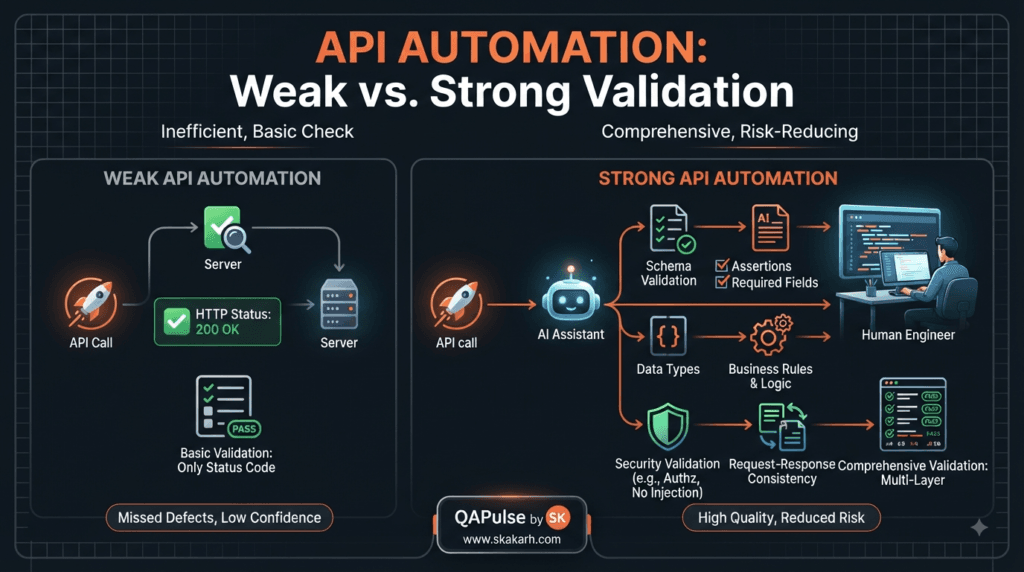
This is better than having no automation, but it is incomplete.
A stronger test validates the actual response:
pm.test("Customer is created successfully", function () {
    pm.response.to.have.status(201);

    const response = pm.response.json();

    pm.expect(response).to.have.property("id");
    pm.expect(response.id).to.be.a("number");
});
Now the test verifies two important pieces of evidence:
- The server reports successful creation.
- The response contains the identifier required to represent the newly created resource.
This distinction is fundamental to effective API automation.
Status-Code Testing vs Contract-Level Testing
There is a major difference between checking whether an API returned 200 and validating whether the response actually conforms to the expected contract.
Compare these approaches.
Basic validation
pm.test("Request succeeded", function () {
    pm.response.to.have.status(200);
});
Stronger validation
pm.test("Customer response is valid", function () {
    pm.response.to.have.status(200);

    const response = pm.response.json();

    pm.expect(response).to.have.property("id");
    pm.expect(response.id).to.be.a("number");

    pm.expect(response).to.have.property("email");
    pm.expect(response.email).to.be.a("string");

    pm.expect(response).to.have.property("status");
    pm.expect(response.status).to.be.oneOf([
        "active",
        "inactive"
    ]);
});
The second approach provides considerably more evidence.
This is where AI assistance can be useful. You can provide the API response and ask AI to identify fields that should be validated, then review the recommendations against the actual requirements.
Asking AI for Assertions Instead of Blindly Generating Tests
A strategic prompt is more valuable than a generic prompt.
Avoid:
Write tests for this API.
Try:
Act as a Senior SDET.

Analyze this API response and recommend assertions for:

- HTTP status
- Required fields
- Data types
- Business rules
- Security-sensitive fields
- Boundary conditions
- Unexpected values

For every recommendation, explain what defect the assertion could detect.

Do not generate code until the validation strategy is defined.
The final sentence is particularly important.
You are forcing the AI to reason about test intent before implementation.
That makes the interaction much more useful for learning and automation design.
Using AI to Generate a First Draft of a Postman Test Script
Once the validation strategy is understood, you can ask for implementation.
For example:
Create a Postman JavaScript test script for these approved validations:

1. Status must be 201.
2. Response must contain id.
3. id must be numeric.
4. status must equal "active".
5. email must match the submitted email.

Keep the script readable and use separate pm.test blocks.
A possible result:
const response = pm.response.json();

pm.test("Status code is 201", function () {
    pm.response.to.have.status(201);
});

pm.test("Response contains customer ID", function () {
    pm.expect(response).to.have.property("id");
});

pm.test("Customer ID is numeric", function () {
    pm.expect(response.id).to.be.a("number");
});

pm.test("Customer is active", function () {
    pm.expect(response.status).to.eql("active");
});

pm.test("Returned email matches request", function () {
    const request = JSON.parse(pm.request.body.raw);

    pm.expect(response.email).to.eql(request.email);
});
Do not immediately copy the script into a production collection.
Review it first.
Ask:
- Does the property actually exist?
- Is the expected value correct?
- Is the request body always JSON?
- Can the field be optional?
- Is the business rule accurate?
- Could the test become flaky?
- Does the assertion detect a meaningful defect?
AI-generated code is a draft implementation, not an automatically approved test.
Building Reusable Assertions
One of the biggest automation improvements comes from reducing repetitive code.
Suppose multiple endpoints need to verify response time.
Instead of repeatedly writing:
pm.test("Response time is acceptable", function () {
    pm.expect(pm.response.responseTime).to.be.below(2000);
});
you can establish a consistent convention across your collection.
For example:
const MAX_RESPONSE_TIME = 2000;

pm.test("Response time is below threshold", function () {
    pm.expect(pm.response.responseTime)
        .to.be.below(MAX_RESPONSE_TIME);
});
The threshold is now easy to understand and maintain.
You can ask AI:
Review these Postman test scripts.

Identify duplicated assertion patterns.

Suggest a reusable strategy without changing the test behavior.
This is a much better use of AI than repeatedly asking it to generate unrelated scripts.
Data-Driven API Automation
Real applications rarely work with a single data combination.
Consider a customer registration API.
You may need:
Valid customer
Duplicate email
Invalid email
Missing email
Empty password
Short password
Maximum-length name
Unicode name
Invalid date
Instead of creating completely independent tests, think about the data model.
A simplified approach could use Postman variables:
const email = pm.iterationData.get("email");
const expectedStatus = Number(
    pm.iterationData.get("expectedStatus")
);

pm.test("Expected status returned", function () {
    pm.response.to.have.status(expectedStatus);
});
This allows the same automation structure to execute against different datasets.
AI can help identify useful combinations, but your requirements should determine which datasets are actually necessary.
AI-Assisted Negative Testing
Positive scenarios are usually easy to identify.
Negative scenarios are where automation teams often discover valuable defects.
Suppose an endpoint expects:
{
  "quantity": 5
}
Possible negative scenarios include:
{
  "quantity": 0
}
{
  "quantity": -1
}
{
  "quantity": "five"
}
{
  "quantity": null
}
{}
Ask AI:
Analyze this API contract.

Generate negative test ideas for every input field.

For each scenario, explain:

- Invalid condition
- Expected behavior
- Expected status code
- Potential defect
This encourages AI to contribute to coverage discovery rather than simply producing code.
Comparing AI-Assisted and Traditional Automation
| Area | Manual Script Creation | AI-Assisted Engineering |
|---|---|---|
| Initial script | Engineer writes from scratch | AI can provide a draft |
| Test ideas | Engineer identifies scenarios | AI can suggest additional risks |
| Assertions | Manually designed | AI can recommend candidates |
| Debugging | Engineer investigates | AI can explain possible causes |
| Refactoring | Engineer identifies duplication | AI can highlight patterns |
| Final decision | Human | Human |
| Quality responsibility | Engineer | Engineer |
The important point is that AI changes how quickly you reach a solution, not who owns the quality decision.
Interactive Exercise: Find the Missing Assertion
Consider this test:
pm.test("Login successful", function () {
    pm.response.to.have.status(200);
});
The API response is:
{
  "token": "",
  "user": {
    "id": 0,
    "email": "attacker@example.com"
  }
}
The test passes.
But should it?
No.
The HTTP status is only one piece of evidence.
Try identifying at least three missing assertions before reading further.
A stronger implementation could be:
const response = pm.response.json();

pm.test("Login returns a token", function () {
    pm.expect(response.token)
        .to.be.a("string")
        .and.not.empty;
});

pm.test("User ID is valid", function () {
    pm.expect(response.user.id)
        .to.be.a("number")
        .and.greaterThan(0);
});

pm.test("User email is returned", function () {
    pm.expect(response.user.email)
        .to.be.a("string")
        .and.not.empty;
});
This exercise illustrates an important lesson:
Automation should verify system behavior, not merely server communication.
Using AI to Explain Existing Scripts
AI is also useful when you inherit an existing Postman collection.
Suppose you find:
pm.test("Check response", function () {
    const jsonData = pm.response.json();

    pm.expect(jsonData.data[0].attributes.status)
        .to.eql("completed");
});
Instead of trying to understand the script manually, ask:
Explain this Postman test script line by line.

Then identify:

- What it validates
- What assumptions it makes
- What could cause it to fail
- What edge cases are not covered
- How it could be improved
This is particularly valuable for teams maintaining large collections written by different engineers.
AI-Assisted Debugging
Automation becomes especially useful when tests fail.
Imagine:
Expected: 201
Actual:   400
Do not immediately ask AI:
Fix this test.
Instead provide context:
Analyze this failed Postman test.

Expected status: 201
Actual status: 400

Request:
<request details>

Response:
<response details>

Test script:
<script>

Identify the most likely causes.

Separate:

1. API defect
2. Test defect
3. Test-data defect
4. Environment/configuration issue
This classification is strategically important.
A failed test does not automatically mean the application is broken.
It could be:
Test Failure
     │
     ├── Product Defect
     ├── Test Defect
     ├── Data Defect
     └── Environment Defect
AI can help investigate the evidence, but the engineer must verify the conclusion.
A Practical Rule for AI-Assisted Debugging
Before changing a failing test, ask:
Did the application behavior change, or did my expectation become incorrect?
This single question prevents teams from “fixing” tests that were correctly exposing a regression.
Hands-on Challenge
Open an existing Postman collection and select five requests.
For each request:
- Identify the current assertions.
- Determine what they actually validate.
- Ask AI to identify missing validations.
- Compare AI suggestions with your requirements.
- Add only valuable assertions.
- Execute the tests.
- Review failures manually.
Record the results:
| Request | Existing Assertions | New Assertions | Valuable? |
|---|---|---|---|
| Login | 1 | 4 | Yes |
| Customer Create | 2 | 5 | Yes |
| Product Search | 1 | 3 | Yes |
| Order Update | 2 | 4 | Review |
| Logout | 1 | 2 | Yes |
The purpose is not to maximize the number of assertions.
The purpose is to increase meaningful coverage.
Strategic Takeaway
The strongest API automation engineers do not ask:
“How much code can AI generate?”
They ask:
“How much repetitive engineering work can AI remove while preserving test quality?”
That distinction changes everything.
Use AI for:
- Test idea generation
- Assertion suggestions
- Script drafts
- Code explanation
- Refactoring
- Debugging assistance
- Edge-case discovery
- Documentation
Keep human ownership over:
- Risk prioritization
- Business requirements
- Expected behavior
- Security decisions
- Test approval
- Production readiness
The result is not simply faster automation. It is a more deliberate and maintainable automation engineering process.
Postman AI Automation becomes even more valuable when it is applied to test data, environment variables, request chaining, reusable workflows, and realistic API scenarios. These are the areas where API automation starts moving from isolated tests toward a maintainable testing system.
A single automated request is useful.
A connected, data-driven, reusable workflow is much more powerful.
From Individual Tests to Automation Workflows
Consider an e-commerce API.
A realistic test might need to execute:
Create User
    ↓
Authenticate User
    ↓
Create Product
    ↓
Add Product to Cart
    ↓
Create Order
    ↓
Process Payment
    ↓
Verify Order
Testing each endpoint independently does not prove that the complete business workflow works.
This is where API automation becomes more strategic.
The automation needs to understand dependencies between requests.
For example, the order request may require:
{
  "customerId": "{{customerId}}",
  "productId": "{{productId}}",
  "quantity": 2
}
The customerId and productId may have been generated by previous requests.
A reliable automation workflow therefore needs to capture those values dynamically.
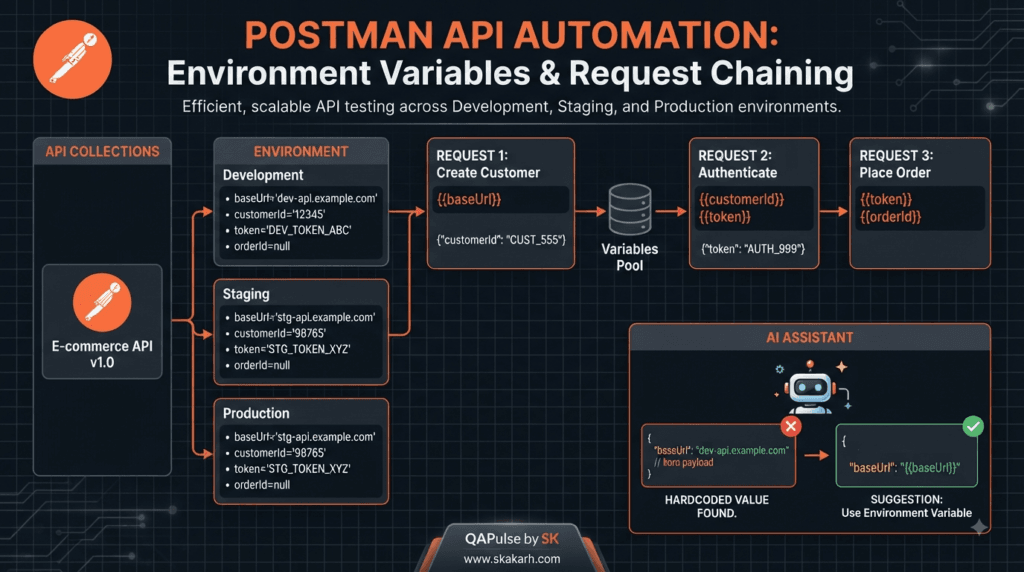
Using Variables to Connect API Requests
Postman variables are fundamental for creating reusable automation.
For example, after creating a customer:
const response = pm.response.json();

pm.test("Customer created", function () {
    pm.response.to.have.status(201);
});

pm.environment.set("customerId", response.id);
The next request can consume that value:
GET /customers/{{customerId}}
This creates a dependency:
Create Customer
      │
      │ customerId
      ▼
Get Customer
      │
      │ customerId
      ▼
Update Customer
AI can help identify these dependencies when working with large collections.
Try a prompt such as:
Analyze these Postman requests.

Identify:

1. Variables produced by each request.
2. Variables required by later requests.
3. Request dependencies.
4. Opportunities for request chaining.
5. Potential dependency failures.

Present the result as an execution flow.
This is much more useful than asking AI to generate unrelated scripts.
Environment Variables and Test Portability
One of the most common API automation mistakes is hardcoding environment-specific information.
Avoid:
const baseUrl = "https://production.example.com";
Prefer:
{{baseUrl}}
Then configure environments such as:
Development
    baseUrl = https://dev.example.com

Staging
    baseUrl = https://staging.example.com

Production
    baseUrl = https://api.example.com
The same collection can now be executed against different environments without modifying request definitions.
You can ask AI to review a collection for hardcoded values:
Review this Postman collection.

Identify:

- Hardcoded URLs
- Hardcoded IDs
- Environment-specific values
- Secrets
- Values that should become variables

Explain why each value should be parameterized.
This is an excellent example of using AI for automation quality rather than simply code generation.
Managing Authentication Tokens
Authentication is another common dependency.
Suppose the login response returns:
{
  "accessToken": "eyJhbGciOi..."
}
The authentication test can save it:
const response = pm.response.json();

pm.test("Authentication succeeded", function () {
    pm.response.to.have.status(200);
    pm.expect(response.accessToken)
        .to.be.a("string")
        .and.not.empty;
});

pm.environment.set(
    "accessToken",
    response.accessToken
);
Subsequent requests can use:
Authorization: Bearer {{accessToken}}
This creates a reusable authentication workflow.
The important engineering question is not merely:
“Can AI generate this script?”
It is:
“Is this token-management strategy safe, maintainable, and appropriate for the environment?”
AI can help generate the implementation, but security decisions require human review.
Data-Driven API Testing
Testing one customer is rarely enough.
Suppose an API accepts customer registration data.
A meaningful dataset could contain:
valid@example.com
duplicate@example.com
invalid-email
missing-email
very-long-email
uppercase@example.com
unicode@example.com
The automation should execute the same logical test against multiple scenarios.
Postman iteration data can be accessed through:
const email = pm.iterationData.get("email");
const expectedStatus =
    Number(pm.iterationData.get("expectedStatus"));
The request body could use:
{
  "email": "{{email}}",
  "password": "{{password}}"
}
This approach separates test logic from test data.
That separation is extremely important for maintainability.
Asking AI to Design Test Data
AI can help identify useful combinations.
For example:
Analyze this API contract.

Create a test-data strategy for the following fields:

email
age
country
accountType
password

For each field identify:

- Valid values
- Invalid values
- Boundary values
- Missing values
- Null values
- Unexpected values
- Security-related values

Prioritize the scenarios by risk.
Notice that we are asking for a strategy, not blindly generating hundreds of records.
More data does not automatically mean better testing.
High-value data matters more than high-volume data.
Boundary Testing with AI Assistance
Consider:
{
  "quantity": 10
}
Suppose the business rule says:
Minimum = 1
Maximum = 10
A good test strategy includes:
0       → Invalid
1       → Valid boundary
2       → Valid
9       → Valid
10      → Valid boundary
11      → Invalid
AI can help discover these scenarios:
The quantity field accepts values from 1 to 10.

Generate boundary-value test scenarios.

Explain the defect each scenario could detect.
The engineer should then confirm that the stated range actually matches the business requirement.
Comparing Hardcoded Automation with Data-Driven Automation
| Approach | Hardcoded Tests | Data-Driven Tests |
|---|---|---|
| Test data | Inside scripts | Externalized |
| Reuse | Low | High |
| Maintenance | Difficult | Easier |
| Scenario expansion | Manual | Easier |
| Environment portability | Limited | Strong |
| Large datasets | Poor | Better |
| AI assistance | Useful | Highly useful |
Data-driven testing is particularly valuable when an API has many combinations of business rules.
Creating Reusable Test Helpers
Large collections can become difficult to maintain when the same logic appears everywhere.
For example:
function assertRequiredProperty(object, property) {
    pm.expect(object).to.have.property(property);
}
Then:
const response = pm.response.json();

assertRequiredProperty(response, "id");
assertRequiredProperty(response, "email");
assertRequiredProperty(response, "status");
This reduces repetitive code.
You can ask AI:
Review these Postman scripts.

Find repeated validation patterns.

Suggest reusable helper functions while preserving the existing behavior.

Explain the trade-offs of each suggestion.
The phrase “preserving the existing behavior” is important.
Refactoring should improve maintainability without accidentally changing what the test actually validates.
Workflow Testing vs Endpoint Testing
There is an important difference between these approaches.
Endpoint-level testing
POST /customers
GET /customers/{id}
PUT /customers/{id}
DELETE /customers/{id}
Each request is tested independently.
Workflow-level testing
Create Customer
      ↓
Capture ID
      ↓
Retrieve Customer
      ↓
Update Customer
      ↓
Verify Update
      ↓
Delete Customer
      ↓
Verify Deletion
Endpoint-level tests answer:
“Does this API operation work?”
Workflow tests answer:
“Does this business process work from beginning to end?”
A mature API automation strategy normally needs both.
Interactive Challenge: Identify the Dependency
Imagine these requests:
1. POST /users
2. POST /login
3. GET /users/{id}
4. POST /orders
5. GET /orders/{orderId}
Which requests depend on earlier results?
Think about it before reading the answer.
A possible dependency model is:
POST /users
     │
     ├── userId
     │
     ▼
POST /login
     │
     └── accessToken
             │
             ├───────────────┐
             ▼               ▼
       GET /users/{id}   POST /orders
                              │
                              └── orderId
                                    │
                                    ▼
                             GET /orders/{orderId}
This dependency graph is much more informative than a simple list of requests.
AI-Assisted Failure Analysis
Suppose a workflow suddenly fails at:
POST /orders
Expected: 201
Actual: 401
Possible causes include:
- Expired token.
- Missing authorization header.
- Incorrect environment variable.
- Authentication request failed.
- Token was not extracted correctly.
- Wrong environment selected.
- API security configuration changed.
Instead of immediately modifying the order test, ask AI:
Analyze this workflow failure.

The order API returned 401.

Trace the dependency chain from authentication to order creation.

Identify possible causes related to:

- Token generation
- Token extraction
- Environment variables
- Authorization headers
- Request execution order

Do not modify the test yet.
This encourages investigation before modification.
Designing a Reliable Automation Workflow
A strong workflow should contain clear stages:
Setup
  ↓
Authentication
  ↓
Test Data
  ↓
Business Operation
  ↓
Assertions
  ↓
Cleanup
For example:
Environment Setup
       ↓
Authenticate
       ↓
Create Test Customer
       ↓
Create Order
       ↓
Validate Order
       ↓
Delete Test Data
Cleanup is frequently forgotten.
If automated tests continuously create customers, orders, or other resources without removing them, the environment eventually becomes polluted.
AI can help identify missing cleanup opportunities:
Review this Postman workflow.

Identify resources created during testing.

Recommend cleanup operations and explain where they should execute.
When AI Should Not Generate the Automation
There are situations where immediate AI generation is counterproductive.
Do not begin with code when:
- Requirements are unclear.
- Business rules are still changing.
- Expected behavior is undefined.
- Security requirements are unknown.
- API contracts are incomplete.
- Test data is unreliable.
- The environment is unstable.
In these situations, the first task is clarification.
A sophisticated automation engineer knows when not to automate.
Hands-on Exercise
Take one multi-request Postman workflow.
Identify:
Request
Dependency
Produced Variable
Consumed Variable
Validation
Cleanup
For example:
| Request | Produces | Consumes | Validation |
|---|---|---|---|
| Login | accessToken | credentials | Token exists |
| Create User | userId | accessToken | ID returned |
| Get User | user data | userId | Data matches |
| Delete User | — | userId | Status verified |
Then ask AI to review your dependency model.
Do not automatically accept its recommendations.
Compare them with your actual application architecture.
Assignment
Build a small data-driven workflow containing at least four API requests.
Your workflow should:
- Authenticate.
- Generate or retrieve test data.
- Pass variables between requests.
- Validate every important response.
- Use environment variables.
- Include at least one negative scenario.
- Include cleanup.
- Run successfully in more than one environment.
Then use AI to review the workflow for:
- Hardcoded values
- Missing assertions
- Dependency problems
- Weak test data
- Missing negative scenarios
- Cleanup gaps
- Repeated code
Document which AI recommendations you accepted and which you rejected.
That final step is important because it turns AI usage into an engineering learning exercise rather than a copy-and-paste activity.
Postman AI Automation becomes truly useful when it is treated as an engineering discipline rather than a code-generation shortcut. The strongest results come from combining AI-assisted test design, reusable Postman workflows, meaningful assertions, data-driven scenarios, debugging, and human review.
The objective is simple:
Build automation that detects meaningful defects repeatedly, reliably, and with minimal unnecessary maintenance.
Designing an AI-Assisted API Automation Strategy
Before building a large collection, define what the automation is supposed to achieve.
A practical strategy can be organized into five layers:
Business Risks
      ↓
Test Scenarios
      ↓
Automation Design
      ↓
Automated Execution
      ↓
Quality Evidence
For example, consider an order API.
The business requirement might be:
Customers cannot create an order for an unavailable product.
Instead of creating only a successful-order test, identify the risks:
Available product
Unavailable product
Invalid product ID
Zero quantity
Negative quantity
Excessive quantity
Unauthenticated request
Expired authentication
Duplicate request
The automation strategy should then prioritize those risks.
This is where AI can help expand your thinking.
A useful prompt is:
Act as a Senior SDET and API Test Architect.

Analyze the following order API requirement.

Identify:
- Critical business risks
- Positive scenarios
- Negative scenarios
- Boundary scenarios
- Security scenarios
- Data-dependency risks
- Regression candidates

Prioritize each scenario as Critical, High, Medium, or Low.

Explain why each scenario deserves automation.
The important output is not the generated list itself.
The important output is the reasoning behind the prioritization.
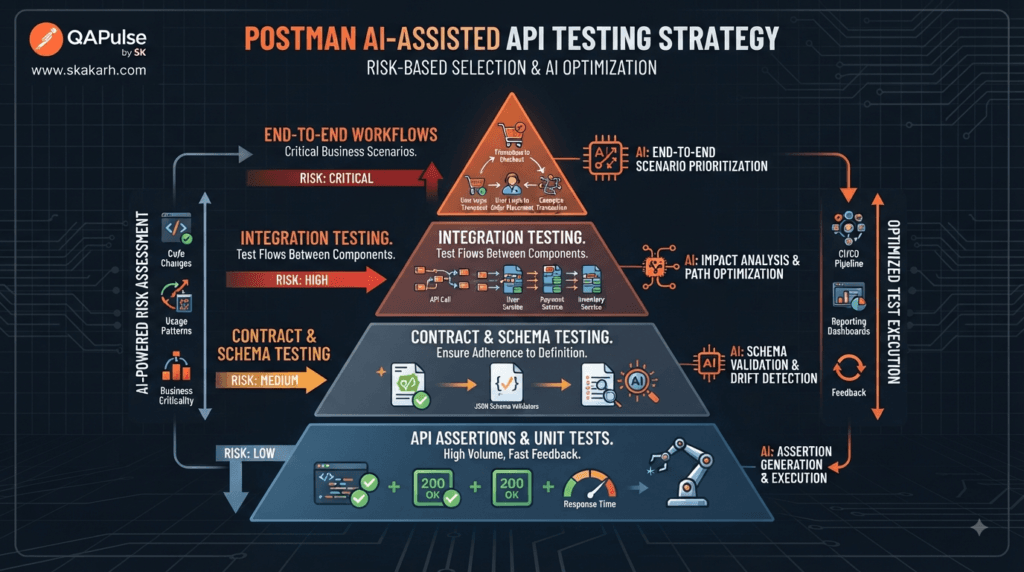
Risk-Based Automation Is Better Than Maximum Automation
A common beginner mistake is trying to automate everything.
That sounds impressive, but it can create a large collection containing hundreds of low-value tests.
Compare:
| Strategy | Maximum Automation | Risk-Based Automation |
|---|---|---|
| Goal | Automate everything | Automate important risks |
| Test count | Often very high | Controlled |
| Maintenance | High | More manageable |
| Business alignment | Variable | Strong |
| Execution time | Potentially high | Optimized |
| Defect detection | Not necessarily better | Usually more targeted |
Suppose an application has 500 API endpoints.
You do not necessarily need 500 complex end-to-end workflows.
Some endpoints may require:
Smoke test
Regression test
Security test
Contract validation
Performance test
while others may only require basic availability and contract checks.
The right automation strategy depends on risk.
Creating an Automation Pyramid for APIs
A useful API testing strategy separates fast, focused checks from expensive end-to-end scenarios.
             ┌─────────────────────┐
             │ End-to-End Workflows│
             └─────────────────────┘
                    ▲
             ┌─────────────────────┐
             │ Integration Tests   │
             └─────────────────────┘
                    ▲
             ┌─────────────────────┐
             │ Contract / Schema   │
             └─────────────────────┘
                    ▲
             ┌─────────────────────┐
             │ API Assertions      │
             └─────────────────────┘
The lower layers should generally contain more fast-running tests.
The upper layers should focus on critical business journeys.
AI can assist in identifying which scenarios belong at which level.
Try:
Analyze these API test scenarios.

Classify each one as:

- Smoke
- Functional
- Contract
- Integration
- End-to-end
- Security
- Performance

Explain the reasoning for each classification.
This encourages you to think about test architecture, not just test scripts.
Building a Maintainable Postman Collection
A collection should be understandable by another engineer.
A useful structure might be:
E-Commerce API
│
├── Authentication
│   ├── Login
│   └── Refresh Token
│
├── Customers
│   ├── Create Customer
│   ├── Get Customer
│   ├── Update Customer
│   └── Delete Customer
│
├── Products
│   ├── Create Product
│   ├── Get Product
│   └── Update Product
│
└── Orders
    ├── Create Order
    ├── Get Order
    └── Cancel Order
This is better than placing dozens of requests into a single unstructured folder.
Ask AI to review collection organization:
Review this Postman collection structure.

Evaluate:
- Naming consistency
- Folder organization
- Request duplication
- Authentication strategy
- Environment usage
- Workflow dependencies

Suggest improvements while preserving existing functionality.
Again, review before applying changes.
Naming Standards Matter
Poor naming:
test1
login2
API test
new request
final request
final request updated
Better naming:
POST Create Customer
GET Customer By ID
PUT Update Customer
DELETE Delete Customer
POST Authenticate User
Good names make automation easier to maintain, debug, report, and understand.
AI can help identify inconsistent names across a large collection.
Designing Assertions That Produce Useful Failures
An assertion should tell you what failed.
Compare:
pm.test("Test passed", function () {
    pm.response.to.have.status(200);
});
with:
pm.test("Customer retrieval returns HTTP 200", function () {
    pm.response.to.have.status(200);
});

pm.test("Customer response contains ID", function () {
    const response = pm.response.json();

    pm.expect(response)
        .to.have.property("id");
});
The second version provides more useful diagnostic information.
A good failure message should help an engineer quickly understand:
What failed?
Where did it fail?
What was expected?
What was received?
You can ask AI to improve assertion readability:
Review these Postman assertions.

Improve their names and failure clarity without changing their behavior.

The result should help an SDET diagnose failures quickly.
Avoiding Flaky API Automation
Reliability is more important than test count.
A flaky test might:
- Depend on shared data.
- Depend on execution order.
- Use expired tokens.
- Assume static IDs.
- Depend on unstable external services.
- Rely on timing assumptions.
- Leave test data behind.
- Use inconsistent environments.
Consider:
pm.test("Response is fast", function () {
    pm.expect(pm.response.responseTime)
        .to.be.below(1000);
});
This could become problematic if the environment occasionally experiences normal network variation.
A better approach is to define realistic thresholds based on requirements and environment characteristics.
Ask AI:
Review these API tests for possible sources of flakiness.

Identify:
- Timing assumptions
- Shared-state dependencies
- Static data
- Execution-order dependencies
- Environment dependencies

For each issue, suggest a more reliable design.
Do not blindly increase timeout thresholds simply to make tests pass.
That hides problems rather than solving them.
AI-Assisted Regression Selection
Large API collections can contain hundreds or thousands of tests.
Running everything after every small change may not always be efficient.
Suppose a developer modifies:
Customer Address API
A useful regression scope might include:
Customer creation
Customer retrieval
Customer update
Order creation
Shipping calculation
Invoice generation
because these areas may depend on customer address information.
AI can help analyze relationships:
The Customer Address API has changed.

Given the following API collection and dependencies:

Identify the most relevant regression tests.

Rank them:
1. Critical
2. High
3. Medium
4. Low

Explain the dependency behind each recommendation.
The engineer should verify the dependency graph rather than trusting AI’s assumptions.
From Test Generation to Test Intelligence
This is an important transition.
Basic AI usage:
Generate a Postman test.
Better usage:
Analyze this requirement and identify risks.
Even better:
Analyze this API change.

Identify:
- affected workflows
- regression risks
- missing assertions
- test-data requirements
- security implications
- likely failure points

Then recommend the minimum high-value automation required.
The third approach is closer to test intelligence.
The AI is being used to support engineering decisions rather than simply producing code.
Measuring Automation Quality
Do not measure success only by the number of automated tests.
Useful metrics include:
Defect Detection
How many meaningful defects are discovered before production?
Failure Signal Quality
How often does a failed test represent a genuine issue?
Flakiness
How frequently do tests fail without an actual product defect?
Execution Time
How quickly can critical regression coverage complete?
Maintenance Effort
How much engineering time is required to keep the suite healthy?
Coverage of Business Risk
How many important business risks are protected by automation?
A simple model is:
Automation Value
      =
Risk Coverage
×
Failure Signal Quality
×
Reliability
A 2,000-test suite with poor reliability may provide less value than a 300-test suite with excellent risk coverage.
Interactive Challenge: Evaluate the Test Suite
Imagine you have two API automation suites.
Suite A
1,500 tests
12% flaky
45-minute execution
Many duplicated assertions
Limited negative testing
Suite B
500 tests
1% flaky
12-minute execution
Strong business coverage
Data-driven
Clear failure messages
Which one would you choose?
Suite B is generally the stronger engineering solution.
The objective is not:
“We automated 1,500 tests.”
The objective is:
“Our automation reliably protects the most important application behavior.”
Using AI as an Automation Reviewer
One of the most valuable applications is asking AI to critique your work.
For example:
Act as a skeptical Senior SDET reviewing this Postman automation suite.

Do not rewrite the tests yet.

Look specifically for:

- False confidence
- Weak assertions
- Missing negative scenarios
- Duplicate coverage
- Flaky patterns
- Hardcoded data
- Security gaps
- Poor naming
- Workflow dependencies
- Cleanup problems

Rank findings by severity.
This changes the relationship with AI.
Instead of asking it to tell you that your work is good, you ask it to challenge your assumptions.
That is much more useful for learning.
Human Review Gate
Every AI-assisted automation change should pass a simple review gate:
AI Suggestion
      ↓
Technical Review
      ↓
Requirement Verification
      ↓
Test Execution
      ↓
Failure Analysis
      ↓
Approval
Before accepting generated automation, ask:
Does this test reflect a real requirement?
Does it detect a meaningful defect?
Can it become flaky?
Does it depend on unstable data?
Does it expose sensitive information?
Can another engineer understand it?
Will it remain useful six months from now?
If the answer to several questions is no, the automation needs improvement.
A Practical AI Automation Review Prompt
Save a reusable prompt such as:
You are reviewing an API automation suite as a Senior SDET.

Analyze the supplied Postman collection and identify:

1. Missing critical assertions
2. Weak assertions
3. Duplicate tests
4. Missing negative scenarios
5. Boundary-value gaps
6. Hardcoded values
7. Environment dependencies
8. Request-order dependencies
9. Potential flaky tests
10. Authentication risks
11. Data-cleanup problems
12. Opportunities for reusable helpers

For every finding:

- Explain the risk.
- Explain what defect it could allow.
- Assign severity.
- Recommend a practical improvement.

Do not rewrite the entire collection.
Prioritize the highest-value improvements first.
This prompt is useful because it establishes a role, scope, priorities, and output expectations.
Assignment: Build an AI-Assisted API Automation Review
Choose an existing Postman collection containing at least 10 requests.
Perform the following exercise:
Step 1
Inventory the requests.

Step 2
Identify dependencies.

Step 3
Review existing assertions.

Step 4
Identify missing negative scenarios.

Step 5
Externalize hardcoded values.

Step 6
Review test data.

Step 7
Identify flaky patterns.

Step 8
Ask AI for an independent review.

Step 9
Compare AI findings with your own.

Step 10
Implement only justified improvements.
Create a simple report:
| Finding | AI Recommendation | Your Decision | Reason |
|---|---|---|---|
| Weak status-only assertion | Add response validation | Accept | Improves defect detection |
| Static customer ID | Use generated ID | Accept | Reduces dependency |
| Response threshold | Increase threshold | Reject | Requirement supports current limit |
| Duplicate test | Remove duplicate | Accept | Reduces maintenance |
The decision column is important.
It proves that you are evaluating AI rather than blindly following it.
What Good AI-Assisted Automation Looks Like
A mature workflow looks like this:
                    ┌───────────────┐
                    │ Requirements  │
                    └───────┬───────┘
                            ↓
                    ┌───────────────┐
                    │ Risk Analysis │
                    └───────┬───────┘
                            ↓
                    ┌───────────────┐
                    │ AI Assistance │
                    └───────┬───────┘
                            ↓
                    ┌───────────────┐
                    │ Human Review  │
                    └───────┬───────┘
                            ↓
                    ┌───────────────┐
                    │ Automation    │
                    └───────┬───────┘
                            ↓
                    ┌───────────────┐
                    │ Test Evidence │
                    └───────┬───────┘
                            ↓
                    ┌───────────────┐
                    │ Improvement   │
                    └───────────────┘
This model keeps engineering judgment at the center while using AI where it provides the greatest leverage.
Internal Links:
- Learn MCP – Zero to Hero
- Learn AI Agents for QA – Zero to Hero
- Playwright Automation – Zero to Hero
- TencentDB Agent Memory: Complete Zero to Hero
- LangGraph: Complete Zero to Hero
- Learn Python – Zero to Hero
- OpenAI Codex: Complete Zero to Hero
- Cursor AI: Complete Zero to Hero
- Claude Code Tutorial: Complete Zero to Hero
- AutoGen: Complete Zero to Hero Guide
- Free QA Resources Built From Real Experience
- QA Glossary: Test Automation Terms Every Engineer Should Know
External Resources:
- Postman Official Documentation: https://learning.postman.com/docs
- Postman Learning Center: https://learning.postman.com
- Postman AI Documentation: https://learning.postman.com/docs/postman-ai/postman-ai-overview
- OpenAPI Specification: https://spec.openapis.org/oas/latest.html
- HTTP Semantics (IETF RFC 9110): https://www.rfc-editor.org/rfc/rfc9110
- OWASP API Security Top 10: https://owasp.org/API-Security
AI Overview Optimization
Postman AI Automation is the use of AI-assisted capabilities to accelerate API test design, script generation, assertion creation, workflow development, debugging, and automation review while keeping test strategy and quality decisions under human control.
People Asked Questions
What is Postman AI Automation?
Postman AI Automation refers to using AI-assisted capabilities to accelerate API test design, script creation, test analysis, debugging, workflow development, and automation maintenance within Postman-based API testing.
Can Postman AI automate API testing?
AI can assist with API testing and automation by helping engineers generate test ideas, create script drafts, analyze responses, identify edge cases, and improve existing automation. Human validation is still essential.
How do I use AI for Postman test scripts?
Start by describing the API behavior and required validations. Ask AI to propose test scenarios and assertions first, then generate a JavaScript implementation that you review and execute in Postman.
Is Postman AI Automation useful for SDETs?
Yes. SDETs can use AI assistance for test design, assertion generation, debugging, refactoring, data-driven scenarios, workflow analysis, and identifying gaps in API automation.
Can AI replace API automation engineers?
No. AI can reduce repetitive work, but automation engineers still need to understand requirements, risks, architecture, security, business logic, test reliability, and production quality.
How can AI improve API automation?
AI can help identify additional scenarios, suggest assertions, explain scripts, analyze failures, detect duplicated logic, review test data, and recommend improvements to automation architecture.
What should I automate in an API?
Prioritize business-critical workflows, high-risk functionality, frequently changed APIs, regression-prone functionality, security-sensitive operations, and scenarios that provide reliable automated evidence.
What is the biggest mistake with AI-generated API tests?
The biggest mistake is accepting generated tests without validating whether they actually represent the application’s requirements and meaningful business risks.
Conclusion
Postman AI Automation is most effective when it is integrated into a disciplined API testing strategy. AI can help identify scenarios, generate script drafts, discover edge cases, analyze dependencies, review collections, suggest reusable patterns, and investigate failures.
However, the quality of automation still depends on engineering judgment.
A generated assertion is not automatically a good assertion.
A generated test is not automatically valuable.
A passing test is not automatically evidence that the feature works correctly.
The strongest approach is to combine AI speed with human reasoning.
Final Key Takeaways
- Postman AI Automation should accelerate engineering rather than replace engineering judgment.
- Start with business risks and requirements, not generated code.
- Use AI to discover test scenarios and potential blind spots.
- Validate important response properties instead of checking only HTTP status codes.
- Use variables and request chaining to create realistic workflows.
- Separate test data from test logic whenever possible.
- Include negative and boundary-value scenarios.
- Avoid hardcoded environment-specific values.
- Design collections for readability and maintainability.
- Treat flaky tests as an engineering problem rather than simply increasing timeouts.
- Use AI to review and challenge your automation, not just generate it.
- Measure automation by risk coverage, reliability, failure quality, and maintenance cost, not test count.
- Always review AI-generated scripts against actual requirements.
- Keep security, business logic, and production-readiness decisions under human control.
- The ultimate goal is not more automated tests; it is better automated evidence about software quality.
Continue Learning
Explore more expert articles on n8n, LangChain, CrewAI, MCP Servers, AI Agents, LlamaIndex, Docker, FastAPI, Playwright, Cypress, Test Automation, DevOps, and Software Engineering at www.skakarh.com.
QAPulse by SK delivers expert release analysis, AI engineering insights, enterprise automation strategies, migration guidance, DevOps best practices, and practical testing knowledge to help software professionals build scalable, intelligent, and production-ready software systems.