Postman AI API Workflows: Automate Smarter Multi-Step Testing
Discover how Postman AI API Workflows can transform multi-step API testing by combining reusable workflows, intelligent assertions, state validation, negative scenarios, test-data management, and AI-assisted failure analysis.
Postman AI API Workflows automate smarter multi-step API testing by simulating real application behavior beyond isolated requests. These workflows validate how APIs work together in a sequence, ensuring critical data like user IDs correctly pass between requests to prevent failures in complete business scenarios, with AI helping identify dependencies and generate scripts.
Postman AI API Workflows are where API testing starts moving beyond isolated requests and becomes a realistic simulation of how applications actually behave.
A real application rarely performs one API call and stops.
A customer registration flow might look like this:
Create User
    ↓
Authenticate User
    ↓
Get User Profile
    ↓
Update User
    ↓
Create Order
    ↓
Get Order
    ↓
Cancel Order
Testing each endpoint independently can tell you whether individual requests work.
It does not necessarily tell you whether they work together.
That distinction is critical.
An API can pass every isolated test while the complete business workflow still fails.
For example:
POST /users        → 201 ✅
POST /login        → 200 ✅
GET /users/{id}    → 200 ✅
POST /orders       → 201 ✅
Yet the workflow might fail because the user ID produced during registration is not correctly passed into the order request.
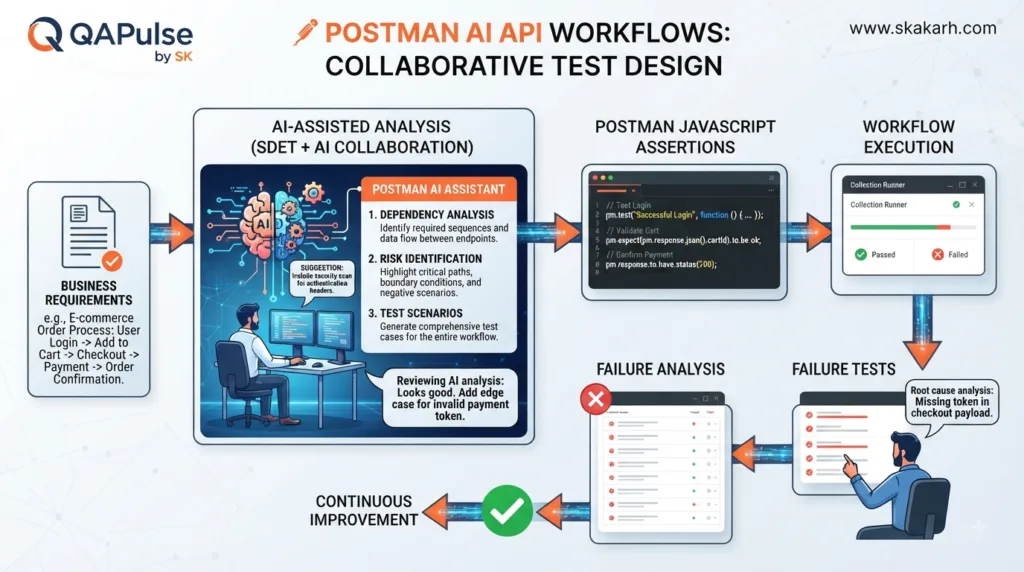
This is where Postman AI API Workflows become strategically useful: AI can help identify dependencies, suggest missing transitions, generate scripts, analyze failures, and improve the design of multi-request API workflows.
Why API Workflows Matter
Imagine testing an e-commerce system.
You could test:
POST /products
GET /products
POST /customers
GET /customers/{id}
POST /orders
GET /orders/{id}
DELETE /orders/{id}
Individually, each request may pass.
But the actual user journey is closer to:
Customer Registration
        ↓
Login
        ↓
Retrieve Product
        ↓
Create Order
        ↓
Verify Order
        ↓
Cancel Order
The second approach validates relationships between APIs.
That is the difference between endpoint testing and workflow testing.
Endpoint Testing
Workflow Testing
Tests one request
Tests multiple requests
Focuses on individual behavior
Focuses on business behavior
Usually simpler
More state-dependent
Easier to debug
Requires dependency analysis
Limited data sharing
Dynamic data flows between requests
Good for unit-like API checks
Better for end-to-end API scenarios
Neither approach replaces the other.
A strong API automation strategy uses both.
The Anatomy of a Multi-Step API Workflow
A workflow normally contains five important elements:
Request
   ↓
Response
   ↓
Extract Data
   ↓
Store Data
   ↓
Use Data in Next Request
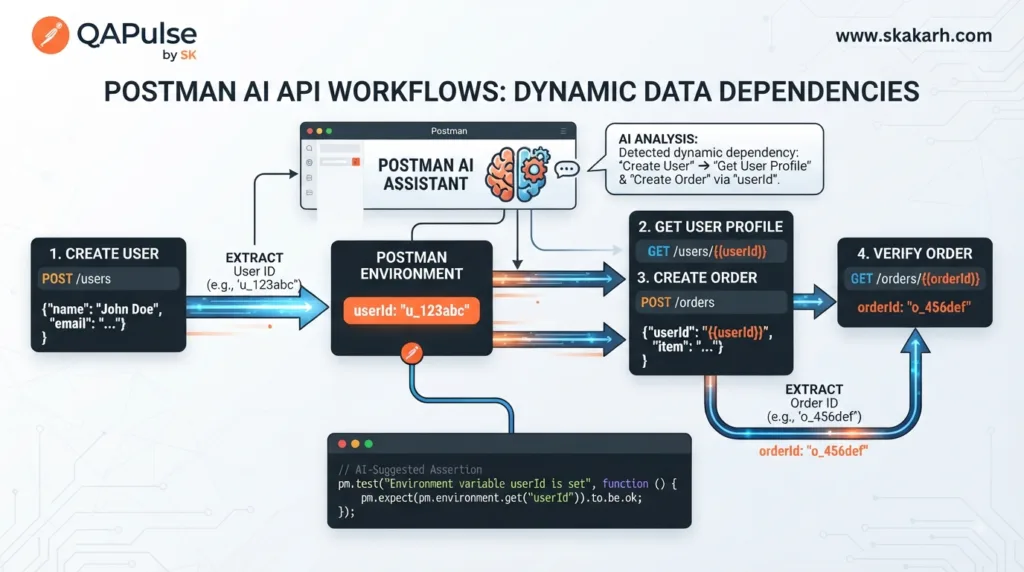
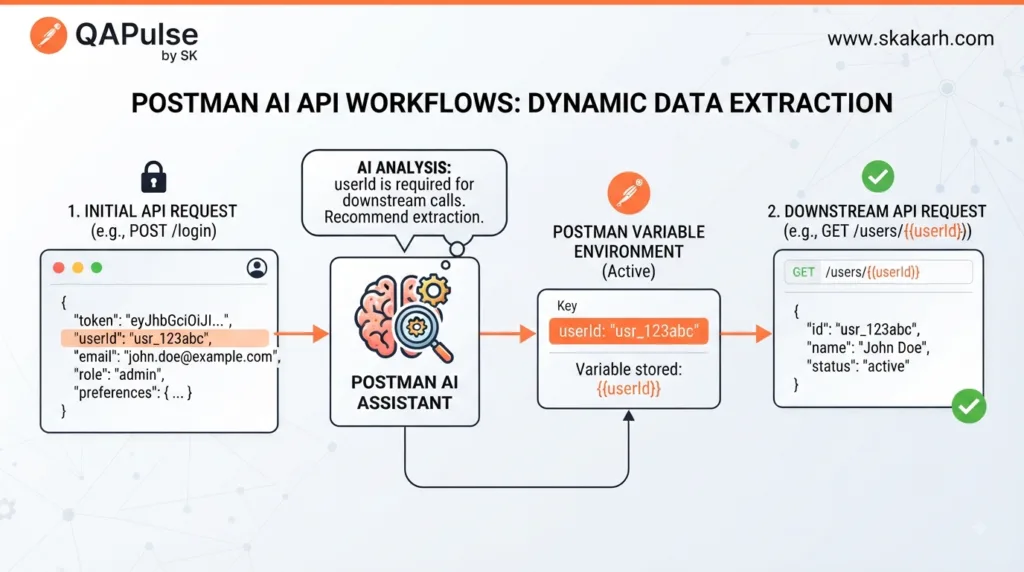
allows the workflow to use the identifier generated by the previous request.
A complete script might look like:
const response = pm.response.json();

pm.test("User was created", function () {
    pm.response.to.have.status(201);
});

pm.test("User ID exists", function () {
    pm.expect(response.id)
        .to.be.a("number")
        .and.above(0);
});

pm.environment.set("userId", response.id);
Now the next request can consume the generated value.
This is much more powerful than copying values manually between requests.
Postman AI API Workflows passing dynamic data between dependent API requests
Think in Data Dependencies
A workflow is not simply a sequence of URLs.
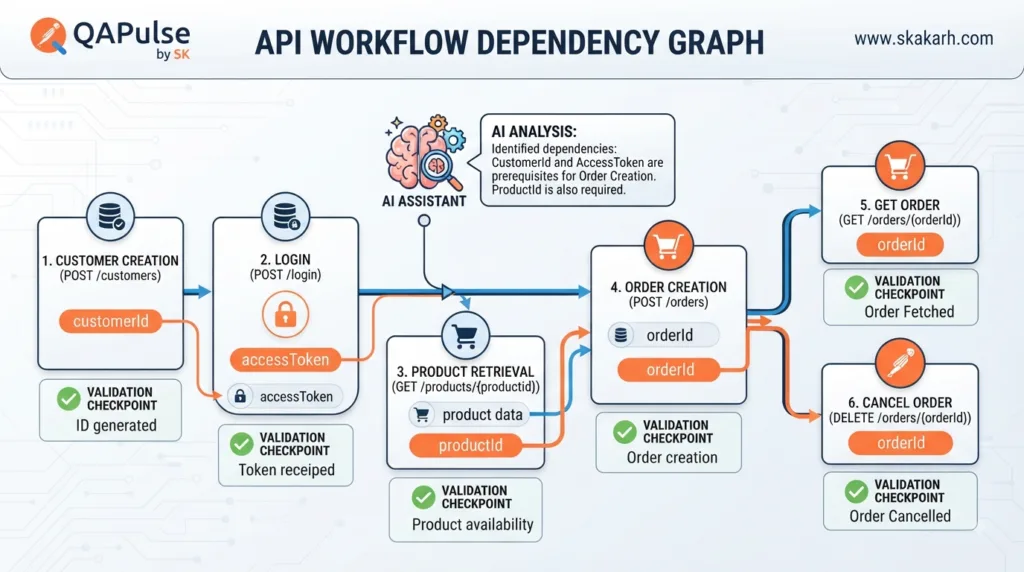
It is a dependency graph.
For example:
Create User
    │
    └── userId
          ↓
       Login
          │
          └── accessToken
                ↓
             Create Order
                │
                └── orderId
                      ↓
                  Get Order
Three values control the workflow:
userId
accessToken
orderId
If one dependency breaks, multiple downstream requests can fail.
This is why identifying data dependencies before writing scripts is so important.
Ask AI to Discover Workflow Dependencies
Instead of immediately asking AI to generate an entire collection, provide your endpoints and requirements:
Analyze these API endpoints and identify their dependencies.

Endpoints:

POST /users
POST /login
GET /users/{userId}
POST /orders
GET /orders/{orderId}

Identify:
1. Which requests depend on previous requests
2. Values that must be extracted
3. Values that should become variables
4. Authentication dependencies
5. Possible workflow failure points

Do not generate code yet.
This is a better prompt because it asks AI to reason about the architecture before producing implementation.
The result might identify:
POST /users
    ↓
userId

POST /login
    ↓
accessToken

POST /orders
    ↓
orderId

GET /orders/{orderId}
    ↓
depends on orderId
Now you have a workflow design rather than a pile of requests.
Workflow State Matters
A workflow can fail even when the endpoint itself works.
Consider an order lifecycle:
Created
   ↓
Pending
   ↓
Confirmed
   ↓
Shipped
   ↓
Delivered
Suppose the API correctly rejects:
Delivered → Pending
with:
409 Conflict
That is not an API failure.
It may actually be the correct behavior.
Your workflow should therefore understand expected state transitions.
For example:
pm.test("Order starts in pending state", function () {
    pm.expect(response.status)
        .to.eql("pending");
});
After confirmation:
pm.test("Order becomes confirmed", function () {
    pm.expect(response.status)
        .to.eql("confirmed");
});
Then after shipment:
pm.test("Order becomes shipped", function () {
    pm.expect(response.status)
        .to.eql("shipped");
});
The workflow becomes a business-process validator.
Sequential Does Not Always Mean Correct
A common beginner workflow is:
Request 1
   ↓
Request 2
   ↓
Request 3
   ↓
Request 4
But not every API workflow is strictly sequential.
Consider:
Create User
     ↓
     ├── Get Profile
     ├── Get Preferences
     └── Get Notifications
These requests all depend on the same userId.
Conceptually:
             ┌── Get Profile
             │
Create User ─┼── Get Preferences
             │
             └── Get Notifications
Thinking in dependency graphs helps you distinguish:
Sequential dependencies
Independent requests
Shared dependencies
Conditional branches
State-dependent operations
This is where AI can help analyze larger API collections.
Postman AI API Workflows vs Manual Chaining
Compare three approaches.
Manual chaining
An engineer manually copies:
User ID → next request
Token → next request
Order ID → next request
This is simple for exploration.
It becomes painful for repeatable automation.
Script-based chaining
Postman scripts automatically extract:
pm.environment.set("userId", response.id);
This is much more repeatable.
AI-assisted workflow design
AI can analyze a collection and help identify:
dependencies
variables
state transitions
missing validations
failure scenarios
Approach
Setup
Repeatability
Scale
Manual copying
Easy
Low
Low
Script chaining
Medium
High
High
AI-assisted design
Medium
High
Very high
AI does not eliminate the need for scripts.
It helps engineers design and maintain them more efficiently.
Build a Workflow Around Business Intent
Avoid designing workflows only around available endpoints.
Start with the business scenario.
For example:
A new customer registers, authenticates, creates an order, verifies the order, and cancels it.
Convert that into:
1. Create customer
2. Validate customer creation
3. Extract customer ID
4. Authenticate
5. Extract token
6. Create order
7. Validate order
8. Extract order ID
9. Retrieve order
10. Cancel order
11. Verify cancellation
Now every API call has a reason.
This is much better than:
Run all endpoints sequentially.
The first approach tests a business workflow.
The second merely executes requests.
Interactive Exercise
Imagine you receive these APIs:
POST /customers
POST /auth/login
GET /products/{productId}
POST /orders
GET /orders/{orderId}
POST /orders/{orderId}/cancel
Before writing any code, identify:
What data comes from /customers?

What data comes from /auth/login?

What data comes from /products/{productId}?

What data comes from /orders?

Which values must become variables?

Which request should fail if authentication is missing?

Which state should the order have before cancellation?

What should happen after cancellation?
Write your answers first.
Then ask AI:
Review my proposed API workflow.

Do not generate code.

Identify:
- Missing dependencies
- Incorrect request ordering
- Missing validations
- Missing negative scenarios
- State transition risks
- Authentication risks

Explain each recommendation.
This teaches you to use AI as a reviewer rather than blindly accepting generated automation.
Postman AI API Workflows dependency graph connecting IDs, tokens, and order states
The Core Principle
The best workflow is not necessarily the longest one.
A 20-request workflow may be less valuable than a six-request workflow that validates a critical business journey.
Think in terms of:
Business Risk
     ↓
Business Scenario
     ↓
API Dependencies
     ↓
Data Flow
     ↓
Assertions
     ↓
Workflow Validation
That sequence creates meaningful automation.
When AI is introduced into this process, it can help accelerate each analytical step without taking ownership of the business decision.
Start Designing Workflows Like an SDET
When looking at a new API collection, don’t immediately ask:
“Which request should I run first?”
Ask:
“What business behavior am I trying to prove?”
Then identify:
What creates the state?
What changes the state?
What data is produced?
What data is consumed?
What can fail?
What should happen when it fails?
What must never happen?
Those questions transform a collection of endpoints into a real API testing system.
The strongest Postman AI API Workflows therefore combine API dependencies, dynamic variables, state transitions, assertions, negative scenarios, and business intent rather than simply executing requests one after another.
Designing Reliable Data Flow Between API Requests
Postman AI API Workflows become significantly more powerful when you stop thinking about requests as isolated steps and start thinking about data flow.
A workflow may contain ten requests, but what actually connects those requests?
Usually, it is data.
A user-registration workflow might produce:
User creation
    ↓
userId
    ↓
Login
    ↓
accessToken
    ↓
Order creation
    ↓
orderId
    ↓
Order verification
If the data is not transferred correctly, the workflow breaks even when every individual endpoint works perfectly.
This makes variable management one of the most important skills in multi-step API automation.
The Three Types of Data You Should Track
When designing a workflow, classify data into three groups.
1. Input Data
Values required to start the workflow:
email
password
productId
quantity
2. Generated Data
Values created by the API:
userId
accessToken
orderId
transactionId
3. Derived Data
Values calculated from other data:
totalPrice
expectedStatus
authorizationHeader
A useful workflow model is:
Input
  ↓
API
  ↓
Generated Data
  ↓
Transformation
  ↓
Next API
This distinction helps you decide which values should be hardcoded, parameterized, extracted, or calculated.
Hardcoded Data vs Dynamic Data
Consider:
const userId = 4821;
This may work during development.
But it creates a hidden dependency on a specific database record.
The exact scope should reflect how the value is used.
Avoid putting everything into global variables simply because they are convenient.
Authentication Is a Workflow Dependency
Authentication frequently sits at the center of API workflows.
Consider:
Login
  ↓
accessToken
  ↓
Create Order
  ↓
Get Order
  ↓
Cancel Order
The token becomes a dependency for every protected request.
A login response might contain:
{
  "access_token": "eyJ...",
  "expires_in": 3600
}
Extract it:
const response = pm.response.json();

pm.test("Access token is returned", function () {
    pm.expect(response.access_token)
        .to.be.a("string")
        .and.not.empty;
});

pm.environment.set(
    "accessToken",
    response.access_token
);
Then configure subsequent requests to use:
{{accessToken}}
This creates a reusable authentication chain.
Don’t Validate Only That the Token Exists
A weak test:
pm.expect(response.access_token).to.exist;
A stronger approach also considers:
Does login return the expected status?
Is the token non-empty?
Is the token type correct?
Is expiration information present?
Does the protected request actually authenticate successfully?
For example:
pm.test("Login succeeds", function () {
    pm.response.to.have.status(200);
});

pm.test("Token is returned", function () {
    pm.expect(response.access_token)
        .to.be.a("string")
        .and.not.empty;
});

pm.test("Expiration is provided", function () {
    pm.expect(response.expires_in)
        .to.be.a("number")
        .and.above(0);
});
The final proof is still the downstream protected request.
Postman AI API Workflows and Conditional Logic
Not every workflow should execute every request.
Consider:
Create Order
    ↓
Is order accepted?
   / \
 Yes  No
 ↓     ↓
Pay   Validate Error
This is a conditional workflow.
The testing strategy changes depending on the response.
The next request should only depend on the generated orderId when the order was actually accepted.
This is more realistic than blindly executing:
Request 1
Request 2
Request 3
Request 4
AI Can Help Identify Conditional Branches
Give AI the business rules:
An order can be:
- accepted
- rejected
- pending

Only accepted orders receive an orderId.

Analyze this workflow and identify:
1. Required branches
2. Data dependencies
3. Requests that should not execute after rejection
4. Assertions for each branch
5. Important negative scenarios

Do not generate code.
This forces the AI to reason about behavior before implementation.
That is much more useful than asking it to generate a long script immediately.
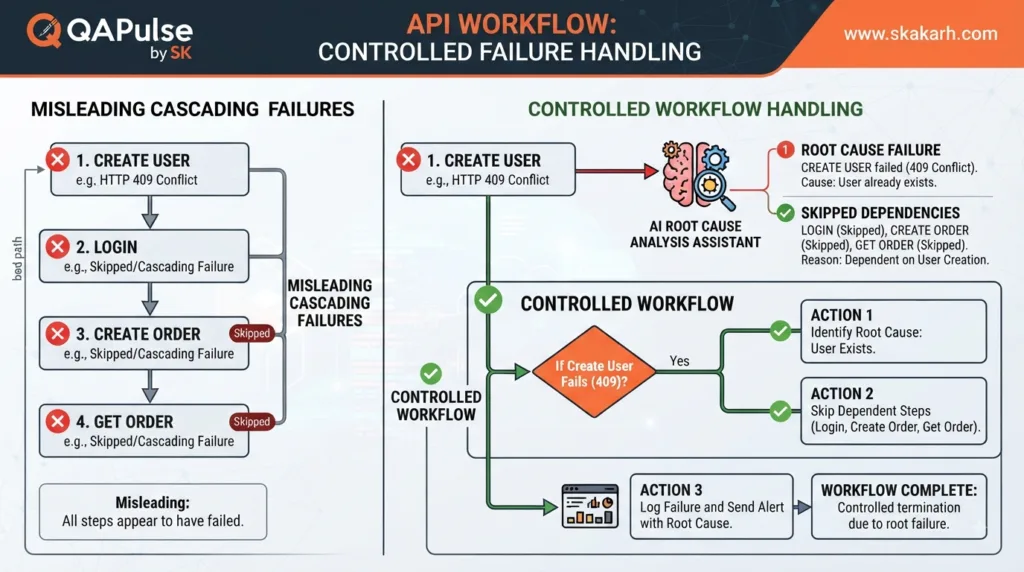
Workflow Failures Are Often Cascading Failures
Consider:
Create User
    ↓
Login
    ↓
Create Order
    ↓
Get Order
If Create User fails:
Create User ❌
      ↓
Login ❌
      ↓
Create Order ❌
      ↓
Get Order ❌
Four failures may actually represent one root cause.
This is why workflow diagnostics matter.
A mature test report should distinguish:
Root failure:
User creation returned 500

Downstream failures:
Login could not authenticate
Order could not be created
Order could not be retrieved
Otherwise, your automation may make one defect look like four unrelated defects.
Compare Workflow Failure Strategies
There are several ways to handle dependent requests.
Continue regardless
Request 1 fails
     ↓
Request 2 runs
     ↓
Request 3 runs
Advantage:
More information collected
Disadvantage:
Creates cascading noise
Stop immediately
Request 1 fails
     ↓
Workflow stops
Advantage:
Clear root failure
Disadvantage:
You lose downstream information
Controlled continuation
Request 1
   ↓
Validate prerequisite
   ↓
If valid → continue
If invalid → record failure and skip dependent operations
For business workflows, controlled continuation is often the most useful strategy.
Postman AI API Workflows handling root failures and dependent API request failures
Design Workflow Assertions at Every Critical Boundary
A workflow should not wait until the final request to determine whether something went wrong.
Validate after each important operation.
For example:
pm.test("Customer creation succeeded", function () {
    pm.response.to.have.status(201);
});
Then validate the generated identifier:
pm.test("Customer ID is generated", function () {
    pm.expect(response.id)
        .to.be.a("number")
        .and.above(0);
});
Then store it:
pm.environment.set("customerId", response.id);
This creates a checkpoint.
Think of the workflow as:
Request
  ↓
Assertion
  ↓
Data extraction
  ↓
Checkpoint
  ↓
Next request
Without checkpoints, debugging becomes much harder.
Request-Response Consistency Is a High-Value Check
Suppose you send:
{
  "quantity": 4,
  "unitPrice": 25
}
and receive:
{
  "quantity": 4,
  "unitPrice": 25,
  "total": 100
}
You should validate the relationship:
pm.test("Total is calculated correctly", function () {
    pm.expect(response.total)
        .to.eql(
            response.quantity * response.unitPrice
        );
});
Now imagine the API returns:
{
  "quantity": 4,
  "unitPrice": 25,
  "total": 80
}
A schema test may still pass.
The types are correct.
The fields exist.
The JSON is valid.
But the business behavior is wrong.
This is why workflow testing should combine structure validation with semantic validation.
Think About Data Lineage
For every important variable, you should be able to answer:
Where was it created?
Where was it extracted?
Where was it stored?
Where was it consumed?
What happens if it is missing?
For example:
userId

Created:
POST /users

Extracted:
response.id

Stored:
environment variable

Consumed:
GET /users/{{userId}}

Failure:
Skip dependent requests
This is data lineage.
It becomes increasingly important as collections grow.
Review this Postman API workflow.

For every variable:
- Identify where it originates
- Identify where it is stored
- Identify where it is consumed
- Identify whether its scope is appropriate
- Identify what happens if the value is missing
- Identify possible stale-data problems

Do not rewrite the scripts.
Return a dependency table first.
The phrase “return a dependency table first” is important.
It makes the AI explain its reasoning before modifying your automation.
Stale Variables Can Create False Results
Imagine:
Run 1:
orderId = 9001

Run 2:
order creation fails
If the old orderId remains available, a later request might accidentally use:
{{orderId}} = 9001
and retrieve an old order.
Your workflow might appear successful even though the new order was never created.
This is a dangerous class of test defect.
The workflow needs clear variable lifecycle management.
Now the variable represents a successful current execution rather than leftover state.
Compare Static Fixtures With Generated Data
There are two common approaches to API workflow data.
Static fixtures
{
  "productId": 501,
  "customerId": 1001
}
Advantages:
Predictable
Easy to debug
Useful for controlled scenarios
Disadvantages:
Can become stale
Environment-dependent
Less realistic
Generated data
Create Customer
      ↓
customerId
      ↓
Create Order
Advantages:
Dynamic
Repeatable
More realistic
Less dependent on existing records
Disadvantages:
More setup
More cleanup
More state management
The best strategy is often hybrid:
Stable test configuration
+
Generated transactional data
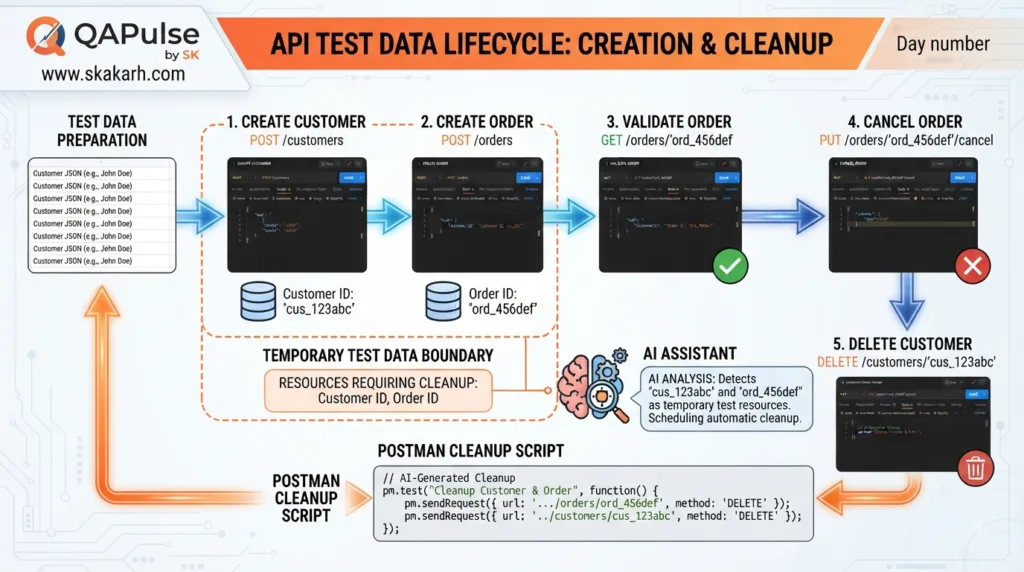
Use Cleanup as Part of the Workflow
A workflow that creates data should consider what happens afterward.
For example:
Create Customer
      ↓
Create Order
      ↓
Validate Order
      ↓
Cancel Order
      ↓
Delete Customer
Cleanup is not merely housekeeping.
It prevents test pollution.
Without cleanup, repeated runs may create:
Customer 1
Customer 2
Customer 3
Customer 4
...
which can eventually affect other tests.
AI can help identify resources created during a workflow and suggest cleanup operations, but the engineer should decide which resources are safe to remove.
Postman AI API Workflows test data lifecycle and API cleanup strategy
A Strong Workflow Has Four Layers
A useful mental model is:
Layer 1 — Transport
HTTP status
Headers
Authentication

Layer 2 — Structure
JSON fields
Types
Schema

Layer 3 — Business
Rules
Calculations
State

Layer 4 — Workflow
Dependencies
Data flow
Transitions
Cleanup
Weak automation often stops at Layer 1.
Better automation reaches Layer 2.
Production-quality API automation should deliberately address Layers 3 and 4 for high-value workflows.
The Strategic Role of AI
AI should not simply produce:
pm.test(...)
pm.test(...)
pm.test(...)
Its higher-value role is helping you ask:
What depends on what?

What state exists here?

What data should move forward?

What happens when this request fails?

What branch am I missing?

What stale data could affect this workflow?

What should be cleaned up?

Which assertions actually prove the business behavior?
Those questions lead to better automation architecture.
The code becomes the final implementation of the reasoning.
Build Your Workflow Like a System
A mature API workflow should be understandable as a system:
Business Scenario
       ↓
API Dependency Map
       ↓
Data Flow
       ↓
Authentication
       ↓
State Transitions
       ↓
Assertions
       ↓
Failure Handling
       ↓
Cleanup
This structure makes your collection easier to maintain, debug, review, and scale.
The goal of Postman AI API Workflows is therefore not simply to connect requests.
It is to create a reliable, observable representation of a real API business process.
Building Intelligent Workflow Validation With AI
Postman AI API Workflows become much more valuable when AI is used not merely to generate request scripts, but to analyze whether the workflow actually proves the intended business behavior.
Consider a payment workflow:
Create Order
    ↓
Calculate Total
    ↓
Authorize Payment
    ↓
Capture Payment
    ↓
Verify Order
A basic automation approach might simply execute every request.
A stronger approach asks:
Was the order actually created?
Was the calculated amount correct?
Was the payment authorized for the same amount?
Was the payment captured only once?
Did the order state change correctly?
What happens if authorization fails?
That difference separates request execution from workflow intelligence.
From Request Automation to Workflow Intelligence
Traditional API automation often follows a predictable pattern:
Request
  ↓
Expected Status
  ↓
Response Assertion
That is useful, but complex systems require more.
A workflow-oriented model looks like:
Business Goal
      ↓
Workflow State
      ↓
API Dependency
      ↓
Data Dependency
      ↓
Expected Behavior
      ↓
Assertion
      ↓
Failure Decision
AI can assist at several points in this chain.
For example, give an AI assistant:
POST /orders
POST /payments/authorize
POST /payments/capture
GET /orders/{orderId}

Business rule:
An order must not become paid unless payment authorization succeeds.

Analyze this workflow and identify:
- dependencies
- state transitions
- missing assertions
- negative scenarios
- data consistency checks
Instead of immediately producing hundreds of lines of JavaScript, the AI can first identify the logical structure.
That is a much safer approach.
Use AI as a Test Designer, Not Just a Code Generator
There is an important difference between these prompts.
Weak prompt
Generate Postman tests for these APIs.
The AI may generate syntactically valid assertions, but those assertions could be shallow.
Better prompt
Analyze this API workflow as an experienced SDET.

Identify:
1. Critical business rules
2. Request dependencies
3. Data that must flow between requests
4. Positive scenarios
5. Negative scenarios
6. Boundary cases
7. State transitions
8. Assertions that prove the workflow

Do not generate code yet.
This encourages reasoning before implementation.
Then follow with:
Now generate Postman JavaScript tests
for the identified high-risk assertions.

For every assertion:
- explain what defect it detects
- identify the expected behavior
- keep the test independent where possible
The second prompt is much more useful for serious automation.
Postman AI API Workflows using AI to design API tests before generating assertions
Discover Missing Test Scenarios
One of the strongest uses of AI is finding scenarios that developers or testers may overlook.
const response = pm.response.json();

pm.test("Order total remains consistent", function () {
    pm.expect(response.total)
        .to.eql(
            Number(pm.environment.get("createdOrderTotal"))
        );
});
This is the kind of defect that isolated endpoint tests can easily miss.
Postman AI API Workflows for Contract Drift
APIs evolve.
A response that originally contained:
{
  "id": 1001,
  "status": "active"
}
might later become:
{
  "id": 1001,
  "state": "active"
}
The endpoint may still return 200.
But consumers expecting status can break.
AI can help compare:
Previous response contract
vs.
Current response
and identify:
removed fields
renamed fields
new fields
type changes
nullable changes
behavior changes
A useful prompt:
Compare these two API responses.

Identify:
- removed fields
- renamed fields
- new fields
- data type changes
- semantic changes
- potentially breaking changes

Classify each change as:
SAFE
WARNING
BREAKING
This makes AI useful as a contract-change reviewer.
Compare Schema Testing With Workflow Testing
These two approaches are complementary.
Schema testing
Checks:
Does the response have the correct structure?
Example:
id → number
name → string
status → string
Workflow testing
Checks:
Does the response make sense within the business process?
Example:
Created order total
=
Retrieved order total
Capability
Schema Test
Workflow Test
Field existence
Excellent
Good
Data types
Excellent
Good
Business rules
Limited
Excellent
Cross-request consistency
Limited
Excellent
State transitions
Limited
Excellent
API dependencies
No
Yes
Contract drift
Excellent
Good
End-to-end behavior
Limited
Excellent
The strongest API automation strategy uses both.
Test Failure Semantics
A failed request does not always mean the API is broken.
For example:
POST /orders
with an invalid quantity may correctly return:
400 Bad Request
The test should pass if that is the expected behavior.
Therefore, assertions must be based on intent.
Weak:
pm.test("Request succeeded", function () {
    pm.response.to.have.status(200);
});
Better:
pm.test("Invalid quantity is rejected", function () {
    pm.response.to.have.status(400);
});
And stronger:
const response = pm.response.json();

pm.test("Invalid quantity is rejected", function () {
    pm.response.to.have.status(400);
});

pm.test("Validation message identifies quantity", function () {
    pm.expect(response.message)
        .to.include("quantity");
});
Now the test proves expected error behavior rather than simply expecting success.
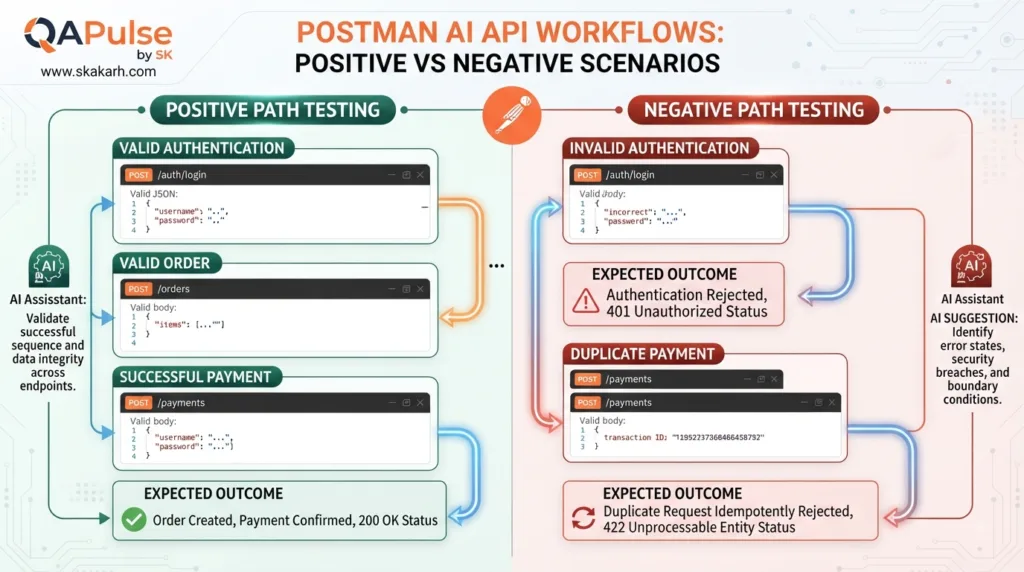
Build Positive and Negative Workflow Pairs
A powerful pattern is to create pairs.
Positive workflow
Valid User
   ↓
Valid Authentication
   ↓
Valid Order
   ↓
Successful Payment
Negative workflow
Valid User
   ↓
Invalid Authentication
   ↓
Order Request
   ↓
Expected Authorization Failure
pm.test("Duplicate payment is handled safely", function () {
    pm.expect([200, 201, 409])
        .to.include(pm.response.code);
});
The exact expected status depends on the API contract.
The important point is that the second request must be tested deliberately.
Ask AI to Find Workflow Security Risks
AI can also review workflows from a security perspective.
For example:
Review this API workflow for security-sensitive test scenarios.

Focus on:
- broken authentication
- authorization bypass
- IDOR
- privilege escalation
- sensitive data exposure
- token reuse
- missing access control
- insecure state transitions

Rank findings by severity.

Do not generate exploit code.
Return test scenarios and expected secure behavior.
pm.test("Valid order response", function () {
    pm.expect(response.status).to.eql("confirmed");
});
don’t simply paste it into your collection.
Ask:
Explain exactly what defect this assertion would detect.

What requirement does it represent?

What could make this assertion invalid?

Is there a stronger assertion?
This simple practice prevents AI-generated test code from becoming unexplained automation debt.
Requirement:
Only authenticated users can create orders.

Scenario:
Unauthenticated user attempts order creation.

Request:
POST /orders

Expected:
401 Unauthorized

Assertion:
pm.response.to.have.status(401)
Now someone reviewing the test can understand why it exists.
When a workflow contains many requests, failures need context.
A useful diagnostic output should tell you:
Workflow:
Create Order

Request:
POST /orders

Status:
500

Expected:
201

Dependency:
customerId = 7821

Root Cause Candidate:
Inventory service unavailable

Downstream Requests:
Skipped
This is much more actionable than:
Test failed.
AI can help summarize large failure outputs, but the underlying automation should still produce structured evidence.
Interactive Challenge
Take this workflow:
POST /users
POST /login
POST /orders
POST /payments
GET /orders/{orderId}
Now imagine:
POST /orders → 201
POST /payments → 500
GET /orders/{orderId} → 200
Ask yourself:
Should the workflow continue after payment failure?
Should the order remain pending?
Should the order automatically become cancelled?
Should the payment failure be retried?
What should happen if the retry succeeds?
What happens if the retry also fails?
Which state should GET /orders/{orderId} return?
These questions expose the real complexity of workflow automation.
A good test doesn’t just verify HTTP responses.
It verifies system behavior under changing states.
Use AI to Challenge Your Workflow Design
Once you have designed your workflow, reverse the perspective.
Ask:
Act as a skeptical senior SDET.

Review this API workflow and try to break its test strategy.

Find:
- assumptions
- missing assertions
- weak validations
- hidden dependencies
- stale variable risks
- missing negative cases
- incorrect state transitions
- cleanup problems
- duplicate execution risks
- authentication gaps

Prioritize findings by impact.
This is one of the most productive ways to use AI.
Instead of asking AI:
“Write my tests.”
you ask:
“Challenge my testing strategy.”
That encourages critical thinking.
The Strategic Pattern
A strong AI-assisted workflow can follow this repeatable model:
1. Define business scenario
        ↓
2. Map API dependencies
        ↓
3. Identify generated data
        ↓
4. Define state transitions
        ↓
5. Identify high-risk behavior
        ↓
6. Ask AI for missing scenarios
        ↓
7. Review AI recommendations
        ↓
8. Implement assertions
        ↓
9. Execute workflow
        ↓
10. Analyze failures
        ↓
11. Improve coverage
This creates a continuous improvement loop rather than a one-time script-generation exercise.
Business requirements
Risk decisions
Expected behavior
Security priorities
Production impact
Test acceptance
That division produces much safer automation.
Postman AI API Workflows should ultimately help engineers build workflows that understand dependencies, preserve state, validate business behavior, expose hidden failures, and continuously improve test coverage.
The objective is not to generate more tests.
The objective is to generate more meaningful evidence that the API works correctly as a system.
Turning API Workflows Into Maintainable Automation
Postman AI API Workflows become genuinely useful in a team when they are designed for more than one successful execution. A workflow that works once on a developer’s machine is not necessarily good automation.
The real test is whether it remains:
Repeatable
Understandable
Diagnosable
Environment-independent
Safe to execute repeatedly
Easy to extend
Useful in CI/CD
A practical workflow should therefore be designed as a small testing system rather than a sequence of requests.
Build Workflows Around Reusable Components
Consider this workflow:
Create User
    ↓
Login
    ↓
Create Order
    ↓
Verify Order
    ↓
Cancel Order
Instead of treating it as one giant script, divide its responsibilities:
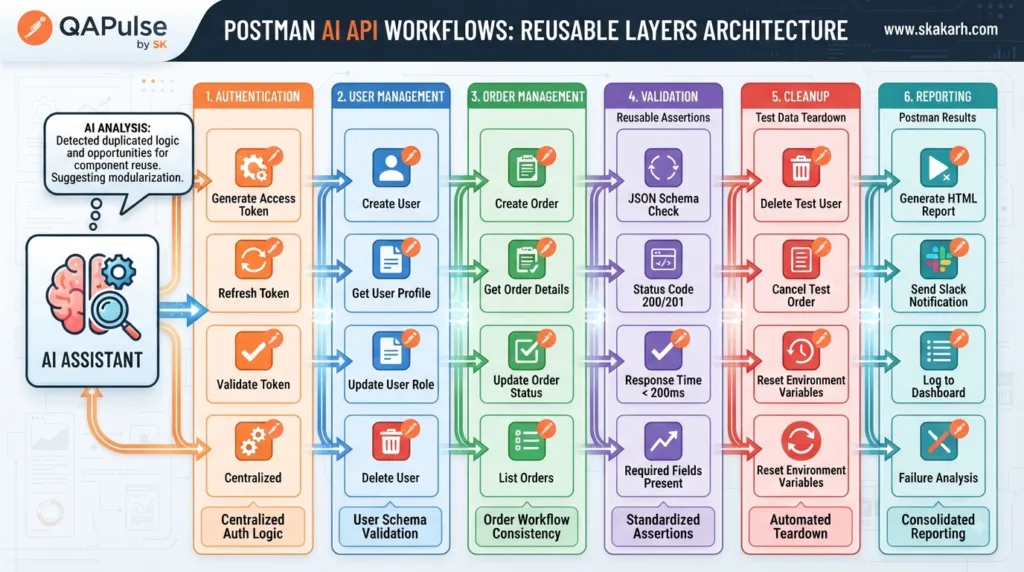
Authentication
      ↓
User Management
      ↓
Order Management
      ↓
Validation
      ↓
Cleanup
This makes failures easier to understand.
If authentication fails, you should immediately know that the problem belongs to the authentication layer rather than wondering whether the order API caused the failure.
A useful design principle is:
One workflow should represent one meaningful business objective, while individual requests should have one clear responsibility.
Workflow Naming Is More Important Than It Looks
Compare:
Test API 1
Test API 2
Test API 3
with:
Create Customer
Authenticate Customer
Create Customer Order
Verify Order Persistence
Cancel Customer Order
The second approach communicates intent.
This becomes especially valuable when a collection contains hundreds of requests.
Use names that explain business behavior, not implementation details.
For example:
Create Order — Valid Customer
Create Order — Invalid Product
Create Order — Unauthorized User
Create Order — Duplicate Request
This immediately communicates the purpose of each scenario.
Postman AI API Workflows organized into maintainable reusable API testing components
Avoid the Giant Workflow Problem
A common mistake is creating one enormous workflow:
Login
↓
Create User
↓
Create Product
↓
Update Product
↓
Create Order
↓
Payment
↓
Shipment
↓
Invoice
↓
Notification
↓
Refund
↓
Delete User
It may look impressive.
It can also become extremely difficult to maintain.
If the payment API changes, the entire workflow may become difficult to diagnose.
A better strategy is to create focused workflows:
Customer Lifecycle
Order Lifecycle
Payment Lifecycle
Refund Lifecycle
Then connect them logically where necessary.
Giant Workflow
Focused Workflows
Difficult to debug
Easier to debug
Long execution time
Faster targeted execution
High dependency count
Controlled dependencies
Large failure surface
Smaller failure surface
Difficult maintenance
Easier maintenance
Poor reuse
Better reuse
The goal is not to minimize the number of requests.
The goal is to minimize unnecessary coupling.
Use Setup and Cleanup Intentionally
A repeatable workflow normally has three conceptual phases:
SETUP
   ↓
TEST
   ↓
CLEANUP
For example:
Setup:
Create test customer
Generate authentication token

Test:
Create order
Validate order
Cancel order

Cleanup:
Delete customer
Remove temporary data
This prevents the test environment from becoming polluted.
Suppose every run creates:
Customer A
Customer B
Customer C
Customer D
After thousands of executions, the test database can become difficult to manage.
Cleanup is therefore part of test architecture.
Make Cleanup Failure Visible
Cleanup should not silently hide problems.
Imagine:
Test passes
   ↓
Delete test customer fails
The business test may have succeeded, but the environment is now polluted.
Record that separately:
Business validation: PASS
Cleanup validation: FAIL
This distinction helps teams understand what actually happened.
A useful cleanup assertion could be:
pm.test("Test customer was removed", function () {
    pm.response.to.have.status(204);
});
The expected status should always come from the API contract.
Prevent Stale State
State is one of the biggest sources of unreliable workflow tests.
Imagine this sequence:
Run 1
orderId = 5001
Then:
Run 2
Create Order fails
If orderId still contains 5001, a later request could accidentally operate on the previous run’s order.
Prevent this by clearing values when appropriate:
pm.environment.unset("orderId");
Then set the value only after successful creation:
This is useful when the API requires unique emails, usernames, order references, or external IDs.
However, random data should not replace deterministic testing completely.
A good strategy is:
Deterministic data
+
Controlled dynamic data
Use predictable values when you need reproducible tests.
Use generated values when uniqueness is required.
Postman AI API Workflows and Data Factories
For larger automation systems, think of test data as a separate capability.
Instead of embedding test data everywhere:
const user = {
    name: "John",
    email: "john@example.com"
};
you can centralize generation:
function createTestUser() {
    return {
        name: `QA-${Date.now()}`,
        email: `qa-${Date.now()}@example.com`
    };
}

const user = createTestUser();
Now multiple scenarios can reuse the same concept.
AI can help design these utilities.
A useful prompt is:
Design a reusable Postman test-data strategy for an API automation suite.

Requirements:
- unique users
- predictable test users
- reusable product data
- environment independence
- cleanup support
- minimal duplication

Explain the architecture before generating JavaScript.
This is more maintainable than asking AI to generate random data in every request.
Compare Test Data Strategies
Strategy
Best For
Main Risk
Hardcoded data
Simple deterministic tests
Collisions/staleness
Environment variables
Configuration
Scope mistakes
Generated data
Unique scenarios
Reproducibility
Fixtures
Controlled scenarios
Data becoming stale
API-created data
Realistic workflows
Cleanup complexity
Hybrid
Large suites
More design effort
For serious API automation, a hybrid model usually provides the best balance.
Make Authentication Reusable
Authentication should not be rewritten in every request.
Instead, design it as a reusable workflow component.
Likely root cause:
Database timeout

Secondary effects:
Order creation failed
Payment request skipped
Order retrieval skipped
A useful prompt:
Analyze these Postman workflow failures.

Group related failures.

Identify:
- likely root cause
- downstream failures
- independent failures
- environmental failures
- assertion defects

Do not assume every failure represents a separate product defect.
This is a strong use of AI because humans often spend more time triaging failures than writing the original tests.
Avoid False Confidence From Green Tests
Suppose your workflow reports:
100 requests
100 passed
That does not automatically mean:
API is correct
You should ask:
What did we actually validate?
Maybe the workflow checked only:
200 OK
for every endpoint.
A stronger suite might validate:
HTTP behavior
Schema
Business rules
Security
State
Data consistency
Negative cases
Workflow dependencies
The number of passing tests is not a quality metric by itself.
Measure Coverage by Behavior
Instead of saying:
“We automated 90% of endpoints.”
consider:
Authentication scenarios: 90%
Order lifecycle: 85%
Payment failure paths: 70%
Authorization scenarios: 60%
State transitions: 80%
This gives a much better picture of testing maturity.
A useful workflow coverage model is:
Endpoint Coverage
+
Scenario Coverage
+
State Coverage
+
Negative Coverage
+
Business Rule Coverage
This is much more meaningful than request count alone.
Use AI for Coverage Gap Analysis
Give AI your workflow inventory:
Review these API workflows against the following business capabilities:

- registration
- authentication
- order creation
- order cancellation
- payment
- refund
- authorization
- reporting

Identify:
1. covered capabilities
2. partially covered capabilities
3. missing capabilities
4. high-risk gaps
5. recommended new workflows

Prioritize by business impact.
This turns AI into a coverage-review assistant.
Compare Traditional API Automation With AI-Assisted Workflows
Capability
Traditional Automation
AI-Assisted Approach
Request creation
Manual/scripted
AI can accelerate
Assertions
Manual
AI can suggest
Dependency discovery
Manual
AI can analyze
Scenario discovery
Manual
AI can expand
Failure analysis
Manual
AI can summarize
Coverage analysis
Manual
AI can identify gaps
Business decisions
Human
Human
Risk ownership
Human
Human
The important lesson is that AI should augment engineering judgment, not replace it.
A Practical Workflow Review Checklist
Before calling a workflow production-ready, ask:
□ Does it represent a meaningful business scenario?
□ Are request dependencies documented?
□ Are dynamic values extracted safely?
□ Are variable scopes intentional?
□ Are stale variables prevented?
□ Are positive cases covered?
□ Are negative cases covered?
□ Are important state transitions tested?
□ Are cross-request values validated?
□ Is authentication behavior tested?
□ Is cleanup implemented?
□ Are failures diagnosable?
□ Are retries intentional?
□ Is sensitive data protected?
□ Can the workflow run repeatedly?
□ Can it run in another environment?
□ Can it eventually run in CI/CD?
This checklist is more valuable than simply asking whether every request returns 200.
A Production-Oriented Workflow Architecture
A mature workflow can be visualized as:
                    BUSINESS SCENARIO
                           ↓
                    TEST DATA SETUP
                           ↓
                    AUTHENTICATION
                           ↓
                    API WORKFLOW
                           ↓
             ┌─────────────┼─────────────┐
             ↓             ↓             ↓
         Assertions     State         Data Flow
             ↓             ↓             ↓
             └─────────────┼─────────────┘
                           ↓
                    FAILURE ANALYSIS
                           ↓
                       CLEANUP
                           ↓
                    TEST REPORTING
AI can assist around almost every analytical boundary:
Review this inventory-to-order workflow as a senior SDET.

Try to identify defects that the current tests would miss.

Focus on:
- race conditions
- insufficient inventory
- duplicate orders
- negative quantities
- zero quantity
- stale inventory
- authorization
- price changes
- concurrent requests
- partial failures

Prioritize the scenarios that could cause real business impact.
This is where AI becomes a strategic testing partner.
The Most Important Shift
The biggest mistake in AI-assisted API automation is measuring success by how much code AI generates.
That is the wrong metric.
A better measurement is:
Before AI:
20 known scenarios

After AI review:
20 known scenarios
+
8 missing high-risk scenarios
+
3 state-transition gaps
+
2 data-consistency checks
The value came from better thinking, not more JavaScript.
That is the real opportunity behind Postman AI API Workflows.
Postman AI API Workflows are multi-step API testing workflows that use AI-assisted scenario discovery, assertion generation, state validation, failure analysis, and workflow optimization to test API behavior across dependent requests.
Why use AI for API workflows?
AI can help identify missing scenarios, suggest assertions, analyze dependencies, review coverage, and summarize failures, while engineers retain responsibility for expected behavior and risk decisions.
What should an API workflow validate?
A strong workflow should validate HTTP behavior, response structure, business rules, state transitions, cross-request data consistency, authentication, negative scenarios, and cleanup.
People Asked Questions
What are Postman AI API Workflows?
Postman AI API Workflows are multi-step API testing workflows that connect dependent requests, test data, assertions, state transitions, and business rules while using AI to accelerate test design, scenario discovery, and failure analysis.
How can AI improve Postman API workflow testing?
AI can help identify missing test scenarios, suggest assertions, analyze API dependencies, discover workflow risks, review test coverage, and summarize failures. Testers should still verify the expected behavior and business requirements before accepting AI-generated recommendations.
How do you create a multi-step API workflow in Postman?
Start with a business scenario, identify the API dependencies, execute requests in the required order, capture dynamic values such as IDs and tokens, pass those values between requests, and add assertions for both API responses and business behavior.
What should a Postman API workflow validate?
A strong workflow should validate HTTP status codes, response structure, data types, business rules, authentication, authorization, state transitions, cross-request data consistency, negative scenarios, and cleanup behavior.
Can Postman AI generate API test scenarios?
Yes. AI can help generate positive, negative, boundary, security, state-transition, and failure scenarios from API requirements or workflow descriptions. These scenarios should be reviewed by an experienced tester before becoming automated tests.
What is the difference between API testing and API workflow testing?
API testing can validate an individual endpoint, while workflow testing validates how multiple API operations behave together. Workflow testing is particularly useful for checking dependencies, state changes, data propagation, and end-to-end business processes.
How do you pass data between Postman requests?
Postman requests can pass dynamic values through variables. For example, a response can provide an order ID that is stored in an environment variable and later consumed by another request.
Provide AI with the API workflow, business rules, existing scenarios, and known risks. Ask it to identify missing positive, negative, boundary, security, state-transition, and data-consistency scenarios. The resulting recommendations can then be prioritized according to business risk.
Should AI-generated Postman tests be used without review?
No. AI-generated tests can contain incorrect assumptions, weak assertions, redundant scenarios, or validations that do not represent actual business requirements. AI should accelerate test engineering rather than replace engineering judgment.
Can Postman API workflows test negative scenarios?
Yes. Negative workflow testing is important for validating behavior such as invalid authentication, insufficient permissions, invalid input, duplicate requests, unavailable resources, invalid state transitions, and business-rule violations.
How do you test API state transitions in Postman?
First define the valid and invalid states and transitions. Then execute API operations that attempt those transitions and verify both the response and resulting system state.
The test should verify that invalid transitions are rejected and that the resource remains in the correct state.
Can Postman AI API Workflows be used in CI/CD?
Yes. Postman collections and automated API tests can be incorporated into CI/CD pipelines. The workflow should be designed to run consistently across environments, use controlled test data, avoid hardcoded secrets, and produce actionable test results.
How can AI help analyze failed Postman workflows?
AI can analyze failure logs and group related failures, identify likely root causes, distinguish downstream failures from independent failures, and summarize patterns. This can significantly reduce manual failure-triage effort.
How do you prevent flaky Postman API workflows?
Use deterministic test data where possible, generate unique data when necessary, control variable scopes, avoid stale variables, make dependencies explicit, validate cleanup, and avoid adding retries merely to make failures disappear.
Why shouldn’t API workflows only check for HTTP 200?
A 200 OK response does not prove that the business operation was correct. A workflow should also validate response data, business rules, state transitions, relationships between requests, security behavior, and other requirements.
What is the biggest advantage of Postman AI API Workflows?
The biggest advantage is not simply generating JavaScript faster. AI can help testers discover scenarios, analyze dependencies, identify coverage gaps, challenge assumptions, and understand failures, allowing engineers to build more meaningful API automation.
Quick Answer
Postman AI API Workflows combine multi-step API automation with AI-assisted test design, scenario discovery, assertion generation, workflow analysis, and failure triage. The strongest implementations validate business behavior and state—not just HTTP status codes.
Conclusion
Postman AI API Workflows are most effective when they are treated as maintainable testing systems rather than collections of chained requests.
The strongest workflows connect business intent with API behavior through:
Business Scenario
      ↓
Data Dependencies
      ↓
State Transitions
      ↓
Assertions
      ↓
Failure Handling
      ↓
Cleanup
      ↓
Reporting
AI can accelerate scenario discovery, dependency analysis, assertion design, failure triage, and coverage review.
But engineers still need to define what correctness means.
The best automation therefore follows a simple principle:
Let AI accelerate the analysis, but let engineering own the truth.
Final Key Takeaways
Postman AI API Workflows should represent meaningful business scenarios, not arbitrary request sequences.
Dynamic data should flow between requests through deliberate variable management.
Authentication, state transitions, cleanup, and failure handling are part of workflow design.
Avoid giant workflows with unnecessary dependencies; prefer focused business workflows.
Use AI to discover missing scenarios and challenge your assumptions.
Do not blindly accept AI-generated assertions.
Validate business relationships, not only HTTP status codes.
Prevent stale variables and test-data collisions.
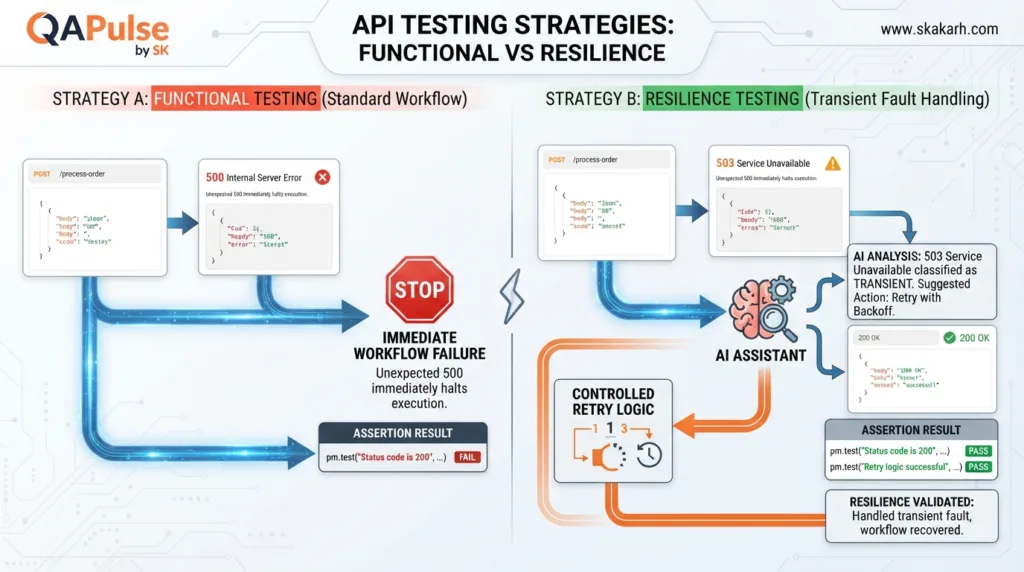
Treat retries as intentional resilience behavior rather than a universal solution.
Measure coverage by behavior, state, business rules, and negative scenarios—not request count.
The real benefit of AI is better test strategy and faster analysis, not simply generating more code.
Continue Learning
Explore more expert articles on n8n, LangChain, CrewAI, MCP Servers, AI Agents, LlamaIndex, Docker, FastAPI, Playwright, Cypress, Test Automation, DevOps, and Software Engineering at www.skakarh.com.
QAPulse by SK delivers expert release analysis, AI engineering insights, enterprise automation strategies, migration guidance, DevOps best practices, and practical testing knowledge to help software professionals build scalable, intelligent, and production-ready software systems.
Frequently Asked Questions
What are Postman AI API Workflows?
Postman AI API Workflows move beyond testing isolated requests to simulate how applications actually behave. They validate relationships between APIs by testing multiple requests in a sequence, focusing on business behavior and dynamic data flows.
Why are API workflows critical for robust testing?
API workflows are critical because an API can pass every isolated test while the complete business workflow still fails. They ensure that individual requests work together correctly, passing data between steps, which is vital for end-to-end API scenarios.
What are the key elements of a multi-step API workflow?
A multi-step API workflow normally contains five important elements: a request, a response, extracting data from the response, storing that data, and then using the stored data in the next request.
10+ years in software development and QA, with the last 5 years focused on test automation. Building production-grade frameworks with Playwright, Cypress, Selenium and PyTest for clients worldwide. PhD candidate. Founder of QA Pulse.
 QA
QA