QA
QA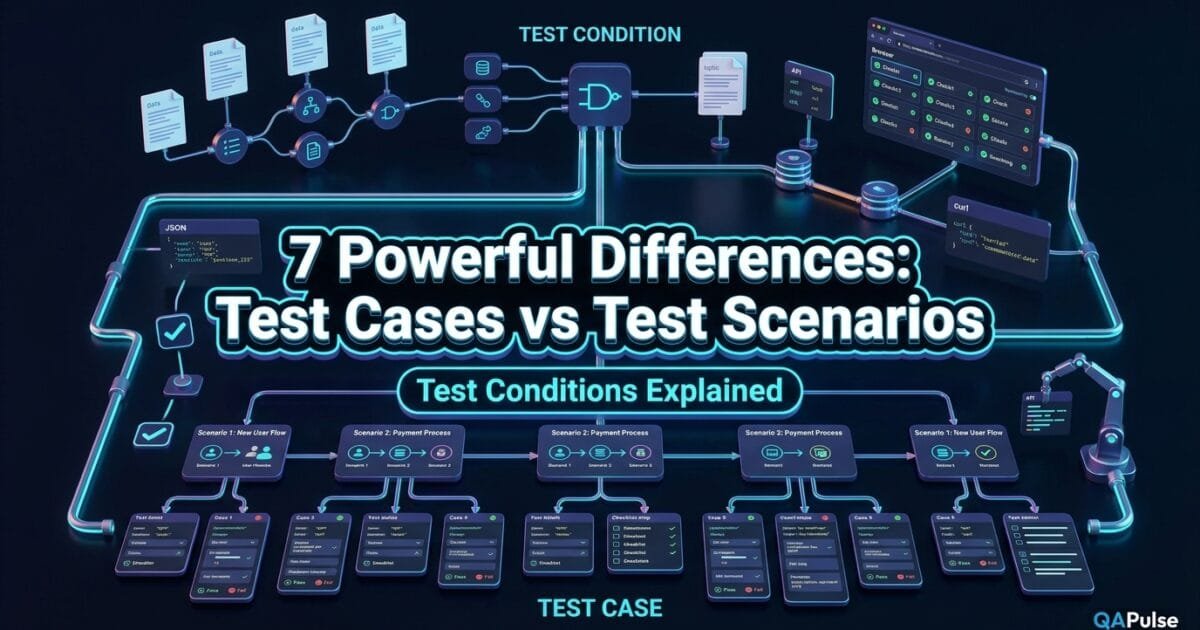
Test Cases vs Test Scenarios is one of the most common points of confusion in software testing, especially when a QA engineer moves from writing simple test steps to designing a complete test strategy. Add test conditions to the discussion, and the terminology becomes even harder: one team may call something a scenario, another may call it a condition, and a third may immediately turn it into a test case.
The problem is not merely vocabulary. These three concepts operate at different levels of test design. A test condition identifies what needs to be verified. A test scenario describes a broader testing situation or sequence, depending on the team’s terminology. A test case turns a specific testing objective into executable inputs, actions, expected results, and preconditions.
For SDETs, QA engineers, developers, and test leads, understanding that relationship matters because poorly defined testing artifacts create duplicated coverage, missing edge cases, weak traceability, and automation that validates implementation details instead of business behavior.
Key Architectural Takeaways for SDETs
- Test conditions define the testing target: They identify the feature, behavior, risk, rule, transaction, or quality attribute that needs verification.
- Test scenarios provide behavioral context: They help describe a meaningful user or system flow that should be explored or validated.
- Test cases provide executable evidence: They specify the concrete setup, inputs, actions, and expected results required to verify a particular objective.
⚡ Executive Summary: What Is the Real Difference?
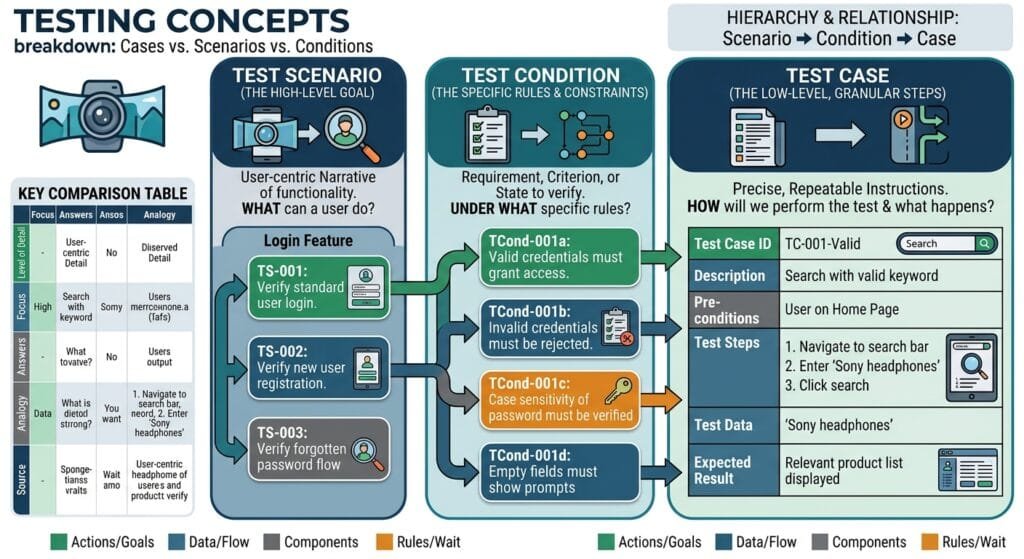
The simplest way to understand test cases vs test scenarios is to stop treating them as three competing names for the same artifact.
Think about testing as moving from what to where/how broadly to how exactly.
A test condition answers:
What specific aspect of the system must be verified?
A test scenario answers:
What meaningful situation, behavior, or flow are we going to explore or validate?
A test case answers:
What exact inputs, actions, preconditions, and expected results will we use to verify it?
Consider an online banking application.
The requirement says:
A customer should be able to transfer money between eligible accounts.
Possible test conditions include:
- Transfer from an active account.
- Transfer to an eligible beneficiary.
- Transfer amount within the daily limit.
- Transfer amount above the daily limit.
- Transfer with insufficient balance.
- Transfer to a blocked beneficiary.
A broader test scenario could be:
Customer transfers money from a current account to an existing beneficiary.
That scenario can then produce several detailed test cases:
- Transfer PKR 10,000 with sufficient balance.
- Transfer the exact daily limit.
- Transfer one rupee above the daily limit.
- Transfer when available balance is lower than the requested amount.
- Attempt transfer to a blocked beneficiary.
This gives us the fundamental relationship:
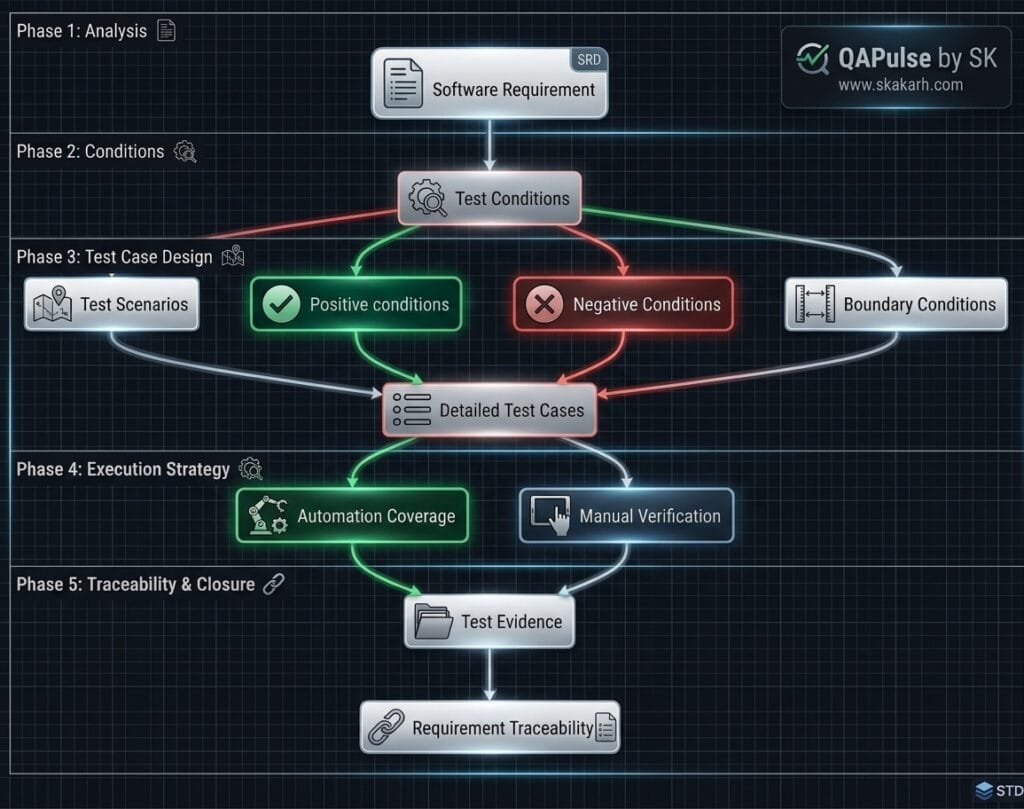
Requirement → Test Condition → Test Scenario → Test Case
That is not an absolute universal hierarchy because organizations and testing methodologies use these terms differently. In particular, ISTQB defines a test condition as an item or event that can be verified by one or more test cases, while its glossary definition of a test case includes inputs, execution preconditions, expected results, and postconditions. (ISTQB Glossary)
The practical lesson is more important than memorizing terminology:
Do not start with detailed test cases before you know what you are trying to cover.
The Core Problem: Why QA Teams Confuse These Three Concepts
The confusion usually starts because all three artifacts are related to the same requirement.
Suppose a product owner writes:
Users can reset their password using a registered email address.
A junior tester might immediately create:
Test Case: Reset password with registered email
That is not necessarily wrong. The problem is that the tester may have skipped the analysis stage.
Before writing detailed steps, a stronger test designer asks:
- What exactly needs verification?
- Which user states matter?
- Which inputs are valid?
- Which inputs are invalid?
- What security controls apply?
- What happens when the token expires?
- What happens when the email is not registered?
- What happens when the reset link is reused?
- What happens if the user requests multiple reset links?
- What happens if the password violates policy?
These questions expose the testing dimensions.
The Antipattern: Writing Test Cases Directly From Requirements
A common weak workflow looks like this:
Requirement
   ↓
Write one or two test cases
   ↓
Execute
   ↓
Mark requirement as covered
The result is usually superficial coverage.
A better workflow is:
Requirement
   ↓
Identify testable conditions
   ↓
Identify meaningful scenarios
   ↓
Derive detailed test cases
   ↓
Execute
   ↓
Measure coverage and risk
This distinction becomes particularly important when the application has dozens of business rules.
Imagine a checkout requirement:
Customers can apply a promotional coupon during checkout.
A weak test case might be:
1. Login
2. Add product
3. Enter coupon
4. Click Apply
5. Verify discount
It proves one path.
It does not tell you whether the testing scope includes:
- Valid coupon
- Expired coupon
- Coupon not yet active
- Invalid coupon
- Coupon already used
- Coupon restricted to a product
- Coupon restricted to a customer segment
- Minimum order requirement
- Maximum discount
- Percentage discount
- Fixed-value discount
- Coupon combined with another promotion
- Coupon removed after cart modification
- Coupon applied concurrently from multiple sessions
The missing ingredient is not more test steps.
The missing ingredient is test analysis.
7 Core Pillars of Test Cases vs Test Scenarios
Let us explore the 7 core pillars for Test Cases vs Test Scenarios architectures.
1. Test Conditions Define What Must Be Verified
A test condition is best understood as a specific testable aspect of the system.
For example, consider an authentication system.
The feature may be:
User Login
Possible test conditions include:
- Valid username and password
- Invalid username
- Invalid password
- Empty username
- Empty password
- Locked account
- Disabled account
- Expired password
- Password containing special characters
- Multiple failed attempts
- Login from an untrusted device
Each condition can lead to one or more test cases.
ISTQB describes a test condition as an item or event of a component or system that could be verified by one or more test cases, such as a function, transaction, feature, quality attribute, or structural element. (ISTQB Glossary)
This makes test conditions extremely useful during test analysis.
Instead of asking:
How many test cases should I write?
Start with:
What are the important things that must be verified?
That change in thinking produces better coverage.
2. Test Scenarios Describe Meaningful Testing Situations
A test scenario generally operates at a broader behavioral level than a detailed test case.
For example:
Scenario: Customer completes checkout using a valid credit card.
That scenario might include:
- Login.
- Search for a product.
- Add product to cart.
- Apply shipping address.
- Select payment method.
- Enter valid card details.
- Submit payment.
- Verify order confirmation.
However, terminology varies between organizations. Some teams use “test scenario” for a high-level test idea, while others use it for a sequence of actions or test script. The ISTQB glossary has historically defined a test scenario as a document specifying a sequence of actions for executing a test. (ISTQB Glossary)
Therefore, do not create a false universal rule that every organization must use “scenario” in exactly one way.
Instead, define the team’s vocabulary explicitly.
For practical QA work, a scenario should communicate the meaningful behavior or flow being tested without necessarily containing every concrete data value and verification step.
3. Test Cases Turn Testing Intent Into Execution
A test case is much more concrete.
A properly designed test case normally contains information such as:
- Test case ID
- Objective
- Preconditions
- Test data
- Actions
- Expected results
- Postconditions
- Priority
- Requirement reference
- Environment
- Tags or labels
A simplified test case could look like this:
| Field | Example |
|---|---|
| ID | LOGIN-001 |
| Objective | Verify successful login |
| Preconditions | Registered active user exists |
| Input | Valid username/password |
| Action | Submit login form |
| Expected result | User reaches dashboard |
| Priority | High |
| Requirement | AUTH-REQ-01 |
The critical difference is precision.
A scenario says:
Verify successful login.
A test case says:
Use this user, enter these credentials, perform these actions, and verify this exact outcome.
ISTQB’s definition similarly treats a test case as a set of inputs, execution preconditions, expected results, and execution postconditions developed for a particular objective or test condition. (ISTQB Glossary)
4. One Test Condition Can Produce Multiple Test Cases
This is one of the most important relationships to understand.
Suppose the condition is:
Password validation
That single condition can produce multiple test cases:
| Test Case | Input | Expected Result |
|---|---|---|
| TC-01 | Valid password | Accepted |
| TC-02 | Too short | Rejected |
| TC-03 | Missing uppercase | Rejected |
| TC-04 | Missing number | Rejected |
| TC-05 | Missing special character | Rejected |
| TC-06 | Contains username | Rejected |
| TC-07 | Boundary-length password | Accepted/rejected according to rule |
If a tester creates only one test case called “Verify password validation,” the test artifact may look complete while coverage is actually poor.
This is why test conditions are useful as a coverage-planning layer.
They help answer:
Have we identified everything worth testing?
Test cases answer:
Have we defined exactly how we will test it?
5. One Scenario Can Contain Multiple Test Cases
The relationship also works from the scenario side.
Consider:
Scenario: User completes checkout.
Possible test cases:
- Checkout with one product
- Checkout with multiple products
- Checkout with valid payment
- Checkout with declined payment
- Checkout with expired card
- Checkout with insufficient wallet balance
- Checkout with invalid address
- Checkout after inventory changes
- Checkout with promotional discount
- Checkout after coupon expiration
The scenario provides behavioral context.
The individual test cases provide concrete variations.
This is especially valuable for end-to-end automation because a single business flow can have multiple independent data and decision paths.
6. Test Scenarios Are Broader; Test Cases Are More Precise
A useful mental model is:
| Artifact | Main Question | Typical Detail |
|---|---|---|
| Requirement | What does the product need? | Business-level |
| Test Condition | What needs verification? | Test-analysis level |
| Test Scenario | What meaningful behavior/flow are we validating? | High to medium |
| Test Case | Exactly how do we verify it? | Detailed |
| Test Script | What executable sequence runs? | Execution-level |
This model prevents another common mistake: assuming that scenario and test case are always interchangeable.
They are not necessarily interchangeable.
A scenario can remain intentionally broad.
A test case normally needs enough information to support repeatable execution.
That distinction becomes even more important when automation enters the picture.
7. Automation Should Start From Test Intent, Not From Test Steps
A frequent automation mistake is converting every manual test case directly into a UI script.
For example:
test('user can checkout', async ({ page }) => {
  await page.goto('/login');
  await page.fill('#email', 'user@example.com');
  await page.fill('#password', 'Password123!');
  await page.click('#login');

  await page.click('#products');
  await page.click('text=Product A');
  await page.click('text=Add to cart');

  await page.click('#checkout');
  await page.fill('#card', '4111111111111111');
  await page.click('#pay');

  await expect(page.getByText('Order confirmed')).toBeVisible();
});
The script may work, but the important question is:
What condition is this test actually covering?
If the answer is only “checkout works,” the automation design is too vague.
A better approach is to map the automation to explicit conditions and risks:
import { test, expect } from '@playwright/test';

test.describe('Checkout payment conditions', () => {
  test('accepts a valid payment', async ({ page }) => {
    // Arrange
    await page.goto('/checkout');

    // Act
    await page.getByLabel('Card number').fill('4111111111111111');
    await page.getByRole('button', { name: 'Pay now' }).click();

    // Assert
    await expect(
      page.getByRole('heading', { name: 'Order confirmed' })
    ).toBeVisible();
  });

  test('rejects an invalid payment', async ({ page }) => {
    // Arrange
    await page.goto('/checkout');

    // Act
    await page.getByLabel('Card number').fill('invalid-card');
    await page.getByRole('button', { name: 'Pay now' }).click();

    // Assert
    await expect(
      page.getByText('Enter a valid card number')
    ).toBeVisible();
  });
});
The automation is now easier to understand because each test corresponds to a meaningful condition.
Benchmark Data: How the Three Artifacts Affect Test Design
The following is an engineering model rather than a measured industry benchmark. It illustrates how increasing specificity changes the role of each artifact.
| Attribute | Test Condition | Test Scenario | Test Case |
|---|---|---|---|
| Primary purpose | Identify what to verify | Describe behavior/flow | Define exact execution |
| Detail | Low | Medium | High |
| Typical owner | QA/Analyst | QA/Analyst/SDET | QA/SDET |
| Inputs | Usually abstract | May be abstract | Concrete |
| Expected result | General | Behavioral | Explicit |
| Automation-ready | No | Sometimes | Yes |
| Traceability value | High | High | Very high |
| Coverage planning | Excellent | Good | Execution-focused |
| Reuse | Very high | High | Medium/high |
The key observation is that these artifacts should not compete.
They should complement one another.
Production Implementation: From Requirement to Automated Coverage
Consider this requirement:
A registered customer can reset their password using a valid, unexpired reset token.
First identify the test conditions.
Condition 1: Registered user
Condition 2: Valid reset request
Condition 3: Valid token
Condition 4: Expired token
Condition 5: Invalid token
Condition 6: Reused token
Condition 7: Password meets policy
Condition 8: Password violates policy
Now define a scenario:
Scenario: Registered customer resets a forgotten password.
Then derive concrete test cases.
TC-01: Reset password with valid token and valid password
TC-02: Reject expired reset token
TC-03: Reject invalid reset token
TC-04: Reject reused reset token
TC-05: Reject password that violates password policy
The automated implementation can then represent those test cases without losing the original testing intent.
import { test, expect } from '@playwright/test';

test.describe('Password reset', () => {
  test('accepts a valid reset token and valid password', async ({ page }) => {
    await page.goto('/reset-password?token=valid-token');

    await page.getByLabel('New password').fill('StrongPassword123!');
    await page.getByLabel('Confirm password').fill('StrongPassword123!');

    await page.getByRole('button', { name: 'Reset password' }).click();

    await expect(
      page.getByText('Password reset successfully')
    ).toBeVisible();
  });

  test('rejects an expired reset token', async ({ page }) => {
    await page.goto('/reset-password?token=expired-token');

    await expect(
      page.getByText('Reset link has expired')
    ).toBeVisible();
  });

  test('rejects a password that violates policy', async ({ page }) => {
    await page.goto('/reset-password?token=valid-token');

    await page.getByLabel('New password').fill('123');
    await page.getByLabel('Confirm password').fill('123');

    await page.getByRole('button', { name: 'Reset password' }).click();

    await expect(
      page.getByText('Password does not meet the requirements')
    ).toBeVisible();
  });
});
The important engineering principle is not the Playwright syntax.
It is the traceability:
Requirement
   ↓
Test Conditions
   ↓
Test Scenario
   ↓
Test Cases
   ↓
Automation
   ↓
Execution Evidence
That structure scales much better than simply accumulating scripts.
Real-World Edge Cases & Pitfalls
Pitfall 1: Treating One Scenario as One Test Case
This happens frequently.
A tester writes:
Scenario: Test login functionality
Then creates one test case:
Verify login works.
That is insufficient.
Login may involve:
- Valid credentials
- Invalid credentials
- Locked accounts
- Disabled accounts
- Empty fields
- Password expiration
- Rate limiting
- MFA
- Session creation
- Concurrent sessions
- Remember-me behavior
- Browser refresh
- Logout
The scenario is the behavioral umbrella.
The cases provide the concrete coverage.
Pitfall 2: Confusing Test Conditions With Input Conditions
A test condition is not simply a prerequisite such as:
User is logged in.
That may be a precondition for a test case.
A stronger test condition is:
Authenticated user can access account settings.
The difference is subtle but important.
A precondition describes the state required before execution.
A test condition describes something being verified.
For example:
Test condition: User can change their email address.
Precondition: User is authenticated and currently has access to account settings.
Test case: Change the email from user@example.com to new@example.com and verify confirmation.
Pitfall 3: Creating Hundreds of Test Cases Without Coverage Analysis
More test cases do not automatically mean better testing.
A suite containing 500 nearly identical cases may provide less risk coverage than 100 carefully designed cases.
The right question is not:
How many cases did we create?
It is:
Which important conditions and risks are covered?
For automation, this distinction is even more important because every automated test has a maintenance cost.
Comparison Matrix: Test Cases vs Test Scenarios vs Test Conditions
| Dimension | Test Condition | Test Scenario | Test Case |
|---|---|---|---|
| Core question | What should be tested? | What behavior/flow should be explored? | How exactly will it be tested? |
| Abstraction | High | Medium/high | Low |
| Business readability | High | Very high | Medium |
| Technical detail | Low | Medium | High |
| Concrete test data | Usually no | Sometimes | Yes |
| Preconditions | Usually not detailed | May be implied | Explicit |
| Actions | No | High-level | Detailed |
| Expected result | General | Behavioral | Explicit |
| Coverage planning | Excellent | Excellent | Good |
| Execution | Not directly executable | Sometimes | Directly executable |
| Automation mapping | Indirect | Moderate | Direct |
| Traceability | Strong | Strong | Very strong |
| Best use | Test analysis | Flow/risk communication | Verification |
The most useful distinction is therefore:
Condition = what to verify.
Scenario = meaningful behavior or flow to validate.
Case = exact verification procedure.
How to Build Them From a Single Requirement
Let’s use a real-world e-commerce requirement:
Customers can receive a discount when the cart total reaches the configured promotion threshold.
Start with the requirement.
Step 1: Identify Test Conditions
Cart below threshold
Cart exactly at threshold
Cart above threshold
Expired promotion
Inactive promotion
Eligible customer
Ineligible customer
Eligible product
Excluded product
Maximum discount reached
Step 2: Group Conditions Into Scenarios
Scenario 1:
Customer qualifies for a promotion.

Scenario 2:
Customer does not qualify for a promotion.

Scenario 3:
Promotion has expired.

Scenario 4:
Promotion is restricted by product/customer eligibility.
Step 3: Create Test Cases
TC-01:
Cart total = $99
Threshold = $100
Expected: No discount

TC-02:
Cart total = $100
Threshold = $100
Expected: Discount applied

TC-03:
Cart total = $101
Threshold = $100
Expected: Discount applied

TC-04:
Valid cart + expired promotion
Expected: Discount rejected

TC-05:
Eligible product + valid promotion
Expected: Discount applied

TC-06:
Excluded product + valid promotion
Expected: Discount rejected
Step 4: Automate the High-Value Cases
A Playwright test might use data-driven coverage:
import { test, expect } from '@playwright/test';

const promotionCases = [
  {
    name: 'below threshold',
    total: 99,
    expectedDiscount: '0',
  },
  {
    name: 'at threshold',
    total: 100,
    expectedDiscount: '10',
  },
  {
    name: 'above threshold',
    total: 101,
    expectedDiscount: '10',
  },
];

for (const testCase of promotionCases) {
  test(`promotion: ${testCase.name}`, async ({ page }) => {
    await page.goto('/checkout');

    // Test setup would normally create the required cart
    // through API fixtures or controlled test data.

    await expect(page.getByTestId('discount')).toHaveText(
      testCase.expectedDiscount
    );
  });
}
This is where good test analysis directly improves automation architecture.
Instead of duplicating dozens of scripts, the automation represents a meaningful set of test conditions.
When Should You Create a Test Condition?
Create or identify a test condition when you are analyzing a requirement and need to determine what is worth verifying.
Use conditions when:
- Breaking down requirements
- Performing risk analysis
- Designing coverage
- Building traceability
- Identifying positive and negative paths
- Planning regression coverage
- Preparing automation scope
- Reviewing acceptance criteria
A condition is particularly valuable before detailed test-case writing.
When Should You Create a Test Scenario?
Use a scenario when stakeholders or engineers need to understand a meaningful behavior, user journey, or testing flow without reading every implementation detail.
Scenarios are useful for:
- End-to-end flows
- Business workflows
- Acceptance testing
- Exploratory testing
- Test planning
- Regression planning
- Communication with product owners
- High-level automation planning
A scenario should be understandable without requiring someone to inspect 20 individual test cases.
When Should You Create a Test Case?
Create a detailed test case when you need repeatable, explicit verification.
Test cases are useful when:
- Manual execution must be repeatable
- Evidence is required
- Requirements require traceability
- Regression testing is formalized
- Test data must be controlled
- Multiple testers execute the same verification
- Automation will be mapped to explicit test objectives
- Compliance or auditability matters
Not every exploratory test needs a traditional detailed test case. Not every automated check needs a manually maintained spreadsheet row either.
The artifact should match the testing strategy.
The SDET Perspective: Don’t Automate the Artifact, Automate the Risk
One of the biggest mistakes in modern QA is assuming that every test case should become an automated UI test.
That creates bloated suites.
Instead, SDETs should ask:
What risk does this test case represent?
For example:
Condition:
Payment authorization succeeds.

Scenario:
Customer completes checkout with card payment.

Test Cases:
Valid card
Declined card
Expired card
Insufficient funds
Invalid card number
3DS challenge failure
Payment timeout
The automation strategy may distribute these checks across layers:
Unit tests
   ↓
Payment calculation/business rules

API tests
   ↓
Authorization and payment service behavior

Integration tests
   ↓
Payment provider contract

UI tests
   ↓
Critical customer checkout journey
This is much more efficient than creating eight full UI tests simply because eight manual test cases exist.
The test case is a testing artifact.
The risk and behavior are what the automation architecture should optimize for.
A Practical Traceability Model for Enterprise QA
For a mature QA organization, the three concepts can fit into a broader traceability model:
| Layer | Example |
|---|---|
| Requirement | Customer can reset password |
| Risk | Unauthorized reset or inaccessible account |
| Test Condition | Reset token validation |
| Test Scenario | Customer resets forgotten password |
| Test Case | Expired token is rejected |
| Automation | Playwright/API test |
| Evidence | Test result + logs |
| Defect | Expired token incorrectly accepted |
This provides much stronger traceability than a spreadsheet containing only:
TC-001 — Password Reset — Pass
A modern SDET should be able to explain not only what was tested, but why it was tested.
Conclusion & Best-Practice Checklist
The difference between test cases vs test scenarios becomes much easier once each artifact has a clear purpose.
A test condition identifies what needs to be verified.
A test scenario communicates a meaningful testing behavior or flow.
A test case defines the concrete verification procedure.
Use them together instead of treating them as competing terminology.
- Identify conditions before writing dozens of test cases.
- Use scenarios to communicate meaningful business and system flows.
- Use test cases when repeatable, concrete execution is required.
- Map automation to risk and behavior rather than blindly converting every manual case into a UI script.
- Maintain traceability from requirements to conditions, scenarios, cases, automation, and defects.
- Define terminology inside your organization because “test scenario” is not used identically by every testing team or framework.
The strongest QA teams are not the teams with the largest number of test cases.
They are the teams that can explain:
What are we testing? Why are we testing it? Which risk does it cover? How will we verify it? And where is the evidence?
That is the real value of understanding test cases, test scenarios, and test conditions.
AI Overview & AEO Snippet
Test conditions identify what needs to be verified, test scenarios describe broader testing behaviors or flows, and test cases define the exact inputs, actions, preconditions, and expected results used for verification. A single condition or scenario can produce multiple detailed test cases.
Key Architectural Rules:
- Identify test conditions before expanding into detailed test cases.
- Use scenarios to communicate meaningful user or system behavior.
- Use test cases for concrete, repeatable verification.
- Map automated checks to risk and behavior rather than blindly automating every manual case.
External Links
- ISTQB Glossary — authoritative reference for software-testing terminology.
- ISTQB Test Case Definition — reference for the formal definition of a test case.
- ISTQB Test Condition Definition — reference for the formal definition of a test condition.
The ISTQB glossary specifically describes test conditions as items/events that can be verified by one or more test cases and defines test cases around inputs, preconditions, expected results, and postconditions. (ISTQB Glossary)
Internal Blog Links
- 50 Playwright Commands Every QA Engineer Should Know
- What is QA Engineering? A Practical Guide to Modern Software Quality
- What is Playwright? A Powerful Guide to Modern Web Testing and QA Engineers
- QA Engineer vs SDET vs Quality Engineer: What’s the Difference?
- QA Engineer Portfolio: 7 Powerful Projects That Get Interviews in 2026
- Graph Engineering: The Powerful Layer After Loop Engineering
- Graph Testing: The Critical QA Layer After Loop-Based Test Automation
- Agentic Test Creation vs AI Test Generation: What’s the Real Difference?
- AI Test Automation With Humans in the Loop: Governance, Metrics, and the Practical Guide
Internal Series Links
- Learn MCP – Zero to Hero
- Learn AI Agents for QA – Zero to Hero
- Playwright Automation – Zero to Hero
- TencentDB Agent Memory: Complete Zero to Hero
- LangGraph: Complete Zero to Hero
- Learn Python – Zero to Hero
- OpenAI Codex: Complete Zero to Hero
- Cursor AI: Complete Zero to Hero
- Claude Code Tutorial: Complete Zero to Hero
- AutoGen: Complete Zero to Hero Guides
- Free QA Resources Built From Real Experiences
- QA Glossary: Test Automation Terms Every Engineer Should Know
People Asked Questions
Q1: What is the difference between test cases and test scenarios?
Answer: A test scenario describes a broader behavior, flow, or testing situation, while a test case defines the concrete inputs, preconditions, actions, and expected results used for verification. One scenario can therefore contain multiple test cases.
Q2: What is a test condition in software testing?
Answer: A test condition is a specific testable aspect of a component or system that can be verified through one or more test cases. It can represent a feature, function, transaction, quality attribute, or other testing target.
Q3: Can one test condition have multiple test cases?
Answer: Yes. A single test condition can produce multiple test cases when different inputs, boundaries, states, risks, or expected outcomes must be verified. This is one of the main reasons test conditions are useful during test analysis.
Q4: Are test scenarios and test cases the same thing?
Answer: No, although organizations sometimes use the terms interchangeably. A scenario is generally broader and focuses on a meaningful behavior or flow, while a test case contains the concrete information required to execute and verify a specific test objective.
Q5: Should every test case be automated?
Answer: No. Automation should be based on risk, repeatability, business value, execution frequency, and maintenance cost. High-value regression checks are often strong automation candidates, while exploratory or highly volatile tests may not need traditional automated coverage.
Continue Learning
Explore more expert articles on Mobile Testing, Backend & API, AI & Agentic, AI Tools, n8n, LangChain, CrewAI, MCP Servers, AI Agents, LlamaIndex, Docker, FastAPI, Playwright, Cypress, Test Automation, DevOps, and Software Engineering at www.skakarh.com.
QAPulse by SK delivers expert release analysis, AI engineering insights, enterprise automation strategies, migration guidance, DevOps best practices, and practical testing knowledge to help software professionals build scalable, intelligent, and production-ready software systems.