QA
QA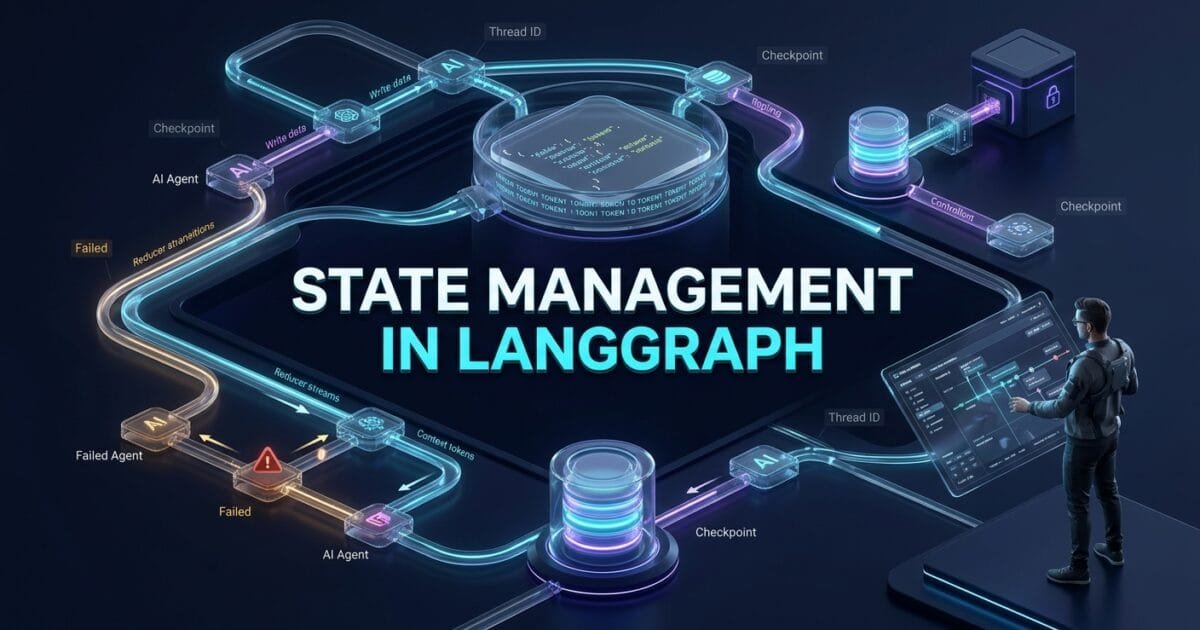
State management in LangGraph is the mechanism that allows an Agent workflow to preserve, update, share, and persist the information that nodes need while the workflow moves from one decision to another.
For an SDET, this is one of the most important LangGraph concepts to understand because an Agent is rarely a single LLM call. A production workflow may analyze a requirement, call tools, retrieve information, validate results, ask for human approval, retry a failed operation, and eventually produce a final decision. Every one of those steps depends on reliable state.
If that state is poorly designed, the Agent can lose context, overwrite important information, create conflicting updates, duplicate messages, or resume with the wrong data.
LangGraph’s StateGraph is specifically built around nodes that read from and write to shared state. Each state key can have its own reducer controlling how updates are applied. Without an explicit reducer, a new value replaces the existing value for that key. (Docs by LangChain)
That makes state management more than a Python typing exercise.
It becomes the data architecture of the Agent.
Key Architectural Takeaways for SDETs
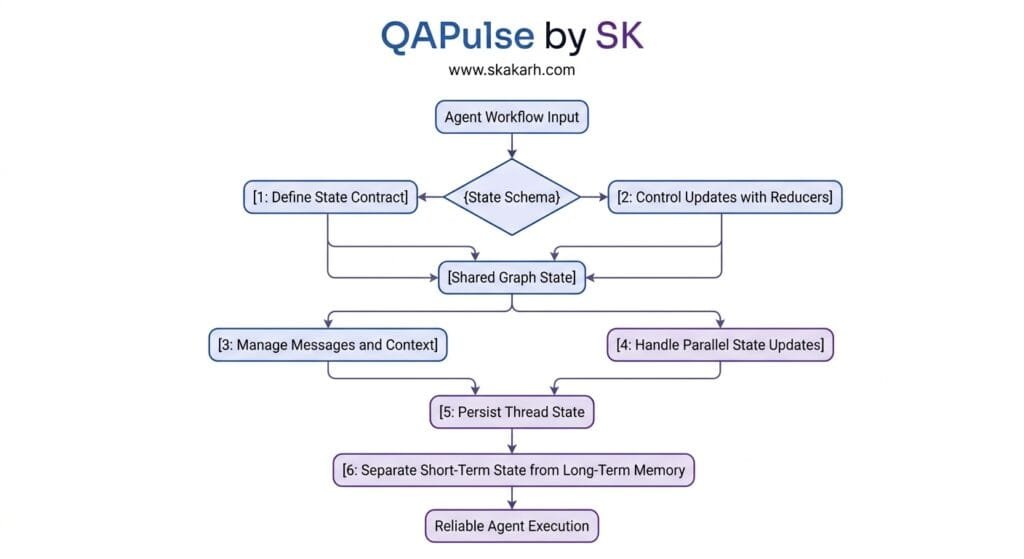
- Design state as a contract: Define what information the workflow actually needs instead of dumping every intermediate result into one object.
- Choose update semantics deliberately: Replacement and accumulation are different behaviors, and reducers determine which one happens.
- Separate short-term state from long-term memory: A thread’s working state is not the same thing as durable information that should survive across conversations.
- Test state transitions, not only final outputs: A correct final answer can still hide incorrect intermediate state.
- Design for parallel execution: Concurrent nodes updating the same key require appropriate reducers or the graph can fail with concurrent-update errors.
- Treat persistence as part of reliability: Checkpoints allow workflows to continue, recover, inspect, and support longer-running Agent behavior.
⚡ Executive Summary: State Is the Agent’s Working Memory
Think of a LangGraph Agent as a distributed workflow whose nodes communicate through a shared state object.
A simplified workflow might look like this:
User Request
     ↓
Initial State
     ↓
Planner
     ↓
Updated State
     ↓
Research Agent
     ↓
Updated State
     ↓
Validator
     ↓
Updated State
     ↓
Human Approval
     ↓
Updated State
     ↓
Executor
     ↓
Final State
The nodes do not need to manually pass every variable to one another.
Instead, they read the state they need and return partial updates.
For example:
def analyze_requirement(state):
    return {
        "requirement_type": "API",
        "risk": "high"
    }
The node does not need to return the complete state.
LangGraph applies the returned update to the relevant state keys according to their reducers. By default, a state key is overwritten by the new value; custom reducers can instead accumulate or otherwise combine updates. (Docs by LangChain)
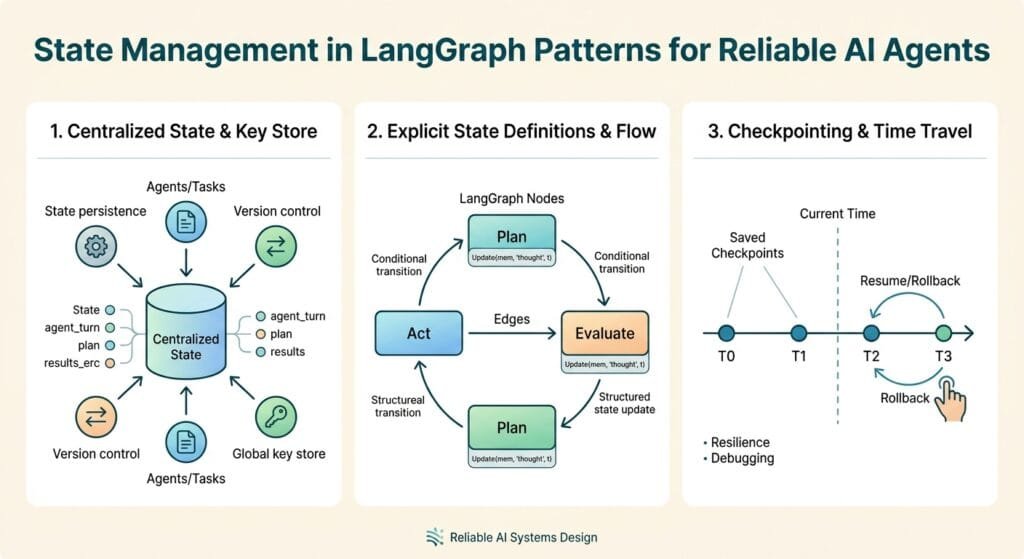
This seemingly simple mechanism becomes extremely powerful when you combine it with:
- message history;
- tool results;
- counters;
- validation results;
- Agent plans;
- human decisions;
- checkpoints;
- subgraphs;
- retries;
- long-term stores.
LangGraph’s persistence architecture further separates thread-scoped checkpoints from long-term stores, allowing applications to maintain current workflow state separately from information that should survive across threads. (Docs by LangChain)
The Core Problem: Why Agent State Becomes Difficult at Scale
A toy Agent might have state like:
class State(TypedDict):
    question: str
    answer: str
That works.
A real QA Agent might need:
user request
requirements
test cases
browser state
API responses
database findings
failure information
retrieved documents
tool calls
tool results
risk level
approval status
retry count
validation results
final report
Now state design becomes an architectural problem.
Imagine a workflow:
Requirement
    ↓
Test Planner
    ↓
API Explorer
    ↓
Database Validator
    ↓
Browser Executor
    ↓
Failure Analyzer
    ↓
Human Reviewer
Every node may need different information.
The API Explorer may need:
requirement
auth context
API specification
The Browser Executor may need:
test plan
environment
browser configuration
The Human Reviewer may need:
risk
proposed action
evidence
validation result
If everything is placed into one unstructured dictionary, the Agent quickly becomes difficult to reason about and test.
The Antipattern: Treating State Like a Global Dump
A common beginner pattern is:
state = {
    "everything": "...",
    "llm_response": "...",
    "tool_result": "...",
    "temporary_data": "...",
    "debug_data": "...",
    "random_variable": "..."
}
Then every node modifies whatever it wants.
This creates several problems:
- unclear ownership;
- accidental overwrites;
- difficult serialization;
- large checkpoints;
- difficult debugging;
- difficult testing;
- unpredictable reducer behavior.
Instead, think of state as an explicit contract between nodes.
                 ┌───────────────┐
                 │ Graph State   │
                 └───────┬───────┘
                         │
          ┌──────────────┼──────────────┐
          ↓              ↓              ↓
       Planner        Validator       Executor
          │              │              │
          └──────────────┼──────────────┘
                         ↓
                    State Update
Each node should have a clear reason for reading or writing each field.
6 Core Pillars of State Management in LangGraph
1. State Management in LangGraph Starts With a Strong State Schema
The first step is defining the state.
A simple QA Agent could use:
from typing_extensions import TypedDict


class QAState(TypedDict):
    requirement: str
    test_case: str
    execution_status: str
    failure_reason: str
Then create the graph:
from langgraph.graph import StateGraph


builder = StateGraph(QAState)
The state schema describes what information the graph can carry.
LangGraph’s StateGraph is explicitly designed around nodes that communicate by reading and writing shared state. (LangChain Reference Docs)
A node receives the current state:
def generate_test(state: QAState):
    return {
        "test_case": (
            f"Validate requirement: "
            f"{state['requirement']}"
        )
    }
Another node can then consume the updated value:
def execute_test(state: QAState):
    test_case = state["test_case"]

    # Execute the generated test here.

    return {
        "execution_status": "passed"
    }
Notice something important.
Neither node needs to know how the previous node internally generated its result.
They communicate through the state contract.
That is exactly the kind of separation SDETs want in maintainable automation architecture.
State Should Represent Meaningful Workflow Data
Good:
class QAState(TypedDict):
    requirement: str
    test_case: str
    execution_status: str
Less useful:
class QAState(TypedDict):
    data1: str
    temp: str
    result2: str
    output: str
Names matter because state is effectively an API between nodes.
A useful rule is:
If a future engineer cannot determine why a state key exists by reading its name, the state design probably needs improvement.
Input, State, and Output Are Not Always the Same
Another important design consideration is avoiding the assumption that every piece of information belongs in the same public interface.
For example:
class InputState(TypedDict):
    requirement: str


class OverallState(TypedDict):
    requirement: str
    test_case: str
    execution_status: str
    failure_reason: str


class OutputState(TypedDict):
    execution_status: str
This lets the workflow maintain richer internal information while exposing only what downstream consumers need.
That becomes valuable when building larger Agent systems where internal reasoning data should not automatically become part of an external API.
2. Reducers Decide How State Changes
This is where state management in LangGraph becomes particularly interesting.
Suppose the state contains:
class State(TypedDict):
    tags: list[str]
A node returns:
return {
    "tags": ["api"]
}
Another node returns:
return {
    "tags": ["security"]
}
Without a custom reducer, the later update replaces the earlier value.
LangGraph’s default reducer behaves as an overwrite operation. (Docs by LangChain)
If you want accumulation:
from operator import add
from typing import Annotated
from typing_extensions import TypedDict


class State(TypedDict):
    tags: Annotated[list[str], add]
Now:
Initial:
["api"]

Update:
["security"]

Result:
["api", "security"]
The reducer receives the existing value and the node’s update and determines the resulting state value. (Docs by LangChain)
Why Reducers Matter for QA Automation
Imagine an Agent executing multiple validation checks:
Security Agent ──────┐
                     │
API Agent ────────────┼──→ validation_results
                     │
Performance Agent ────┘
Each branch might return:
{
    "validation_results": [
        {
            "type": "security",
            "status": "passed"
        }
    ]
}
and:
{
    "validation_results": [
        {
            "type": "api",
            "status": "passed"
        }
    ]
}
If the state key simply overwrites values, one branch can replace another.
With an appropriate reducer, the results can be accumulated.
This is why reducers should be treated as part of the data contract, not as a minor implementation detail.
add_messages Is Different From Simple List Concatenation
Message state has additional requirements.
You may want to:
- append new messages;
- update an existing message;
- preserve message IDs;
- accept common message formats.
LangGraph provides add_messages for this purpose. The official documentation explains that it merges message lists while correctly handling updates to messages with existing IDs. (Docs by LangChain)
Example:
from typing import Annotated
from typing_extensions import TypedDict

from langchain.messages import AnyMessage
from langgraph.graph.message import add_messages


class State(TypedDict):
    messages: Annotated[list[AnyMessage], add_messages]
This is generally preferable to blindly applying:
operator.addto message history when your workflow needs message-aware updates.
3. State Management in LangGraph Must Handle Parallel Updates
Now consider a fan-out workflow.
                 ┌→ API Tester
                 │
Input → Planner ─┼→ UI Tester
                 │
                 └→ Security Tester
All three branches finish during the same execution step.
Suppose they all write:
{
    "status": "passed"
}
Which one wins?
If the state key has no appropriate reducer, LangGraph can raise a concurrent graph update error because it cannot determine how multiple updates should be combined. The official troubleshooting documentation recommends defining a reducer for state keys receiving concurrent writes. (Docs by LangChain)
For accumulating results:
from operator import add
from typing import Annotated


class State(TypedDict):
    results: Annotated[list[dict], add]
Now each branch can contribute:
return {
    "results": [
        {
            "suite": "api",
            "status": "passed"
        }
    ]
}
and:
return {
    "results": [
        {
            "suite": "security",
            "status": "passed"
        }
    ]
}
The final state can contain both results.
Test the Parallel Case Explicitly
For an SDET, this deserves a dedicated test.
def test_parallel_results_are_not_lost():
    result = graph.invoke({
        "results": []
    })

    assert len(result["results"]) == 3
But don’t stop there.
Also validate uniqueness:
suites = {
    item["suite"]
    for item in result["results"]
}

assert suites == {
    "api",
    "ui",
    "security"
}
A graph that completes successfully while silently dropping one branch’s state is still defective.
4. Message State Is Not the Same as Agent Memory
One of the most common conceptual mistakes is treating every form of memory as the same thing.
LangGraph distinguishes between short-term thread-level persistence and long-term memory. Its persistence documentation describes checkpointers as storing thread-scoped graph state, while stores can hold application-defined information across threads. (Docs by LangChain)
Think about three different layers:
┌──────────────────────────────┐
│ Current Node State           │
│ Temporary workflow context   │
└──────────────┬───────────────┘
               ↓
┌──────────────────────────────┐
│ Thread / Checkpoint State    │
│ Conversation + execution     │
└──────────────┬───────────────┘
               ↓
┌──────────────────────────────┐
│ Long-Term Store              │
│ User / application memory    │
└──────────────────────────────┘
These layers solve different problems.
Short-Term State
Example:
Current test execution:
test = checkout_payment
environment = staging
status = running
This belongs to the current workflow.
Thread-Level Persistence
Suppose the Agent is handling:
thread_id = qa-incident-8472The workflow may need to remember:
- previous messages;
- current execution state;
- tool results;
- approval state;
- checkpoints.
This is thread-scoped persistence.
Long-Term Memory
Now suppose a QA Agent learns:
This project uses Playwright for browser automation.That information may be useful in future threads.
It should not necessarily be copied into every checkpoint.
LangGraph’s persistence model explicitly supports this separation: checkpointers provide short-term thread-scoped memory, while stores provide long-term cross-thread memory. (Docs by LangChain)
That distinction prevents a common architectural mistake:
Putting permanent knowledge into temporary workflow state.
5. Checkpoints Turn State Into Recoverable Execution
State is useful during one graph run.
Persistence makes it useful across time.
LangGraph’s persistence layer stores graph state as checkpoints. These checkpoints support use cases including conversation continuity, human-in-the-loop workflows, time travel, and fault tolerance. (Docs by LangChain)
A simple development setup might use:
from langgraph.checkpoint.memory import InMemorySaver


checkpointer = InMemorySaver()

graph = builder.compile(
    checkpointer=checkpointer
)
Then invoke with a thread:
config = {
    "configurable": {
        "thread_id": "qa-1001"
    }
}

result = graph.invoke(
    {
        "requirement": "Verify payment retry behavior"
    },
    config=config
)
The thread ID is important because the persisted state is associated with that workflow thread.
Production Persistence
For production applications, LangGraph’s documentation shows database-backed checkpointers such as PostgresSaver. (Docs by LangChain)
For example:
from langgraph.checkpoint.postgres import PostgresSaver


DB_URI = (
    "postgresql://postgres:postgres@localhost:5432/"
    "postgres?sslmode=disable"
)

with PostgresSaver.from_conn_string(DB_URI) as checkpointer:
    graph = builder.compile(
        checkpointer=checkpointer
    )
The important architectural idea is not PostgreSQL itself.
It is that Agent state should survive beyond the lifetime of a single Python process when the workflow requires durable execution.
This matters for:
- human approvals;
- long-running Agents;
- retries;
- crash recovery;
- multi-step investigations;
- debugging;
- auditability.
6. State Management Must Be Designed for Mutation, Recovery, and Testing
The final pillar is where state management becomes an SDET problem.
A stateful Agent can fail in ways that a conventional stateless API cannot.
Consider:
Node A
 ↓
State updated
 ↓
Node B
 ↓
Failure
 ↓
Retry
What happens to the state?
Does the retry:
- overwrite previous data?
- append duplicate data?
- recreate a tool result?
- increment a counter twice?
- duplicate messages?
- execute an external side effect again?
These are testable behaviors.
Example: Retry Counter
class State(TypedDict):
    retry_count: int
Node:
def retry_node(state: State):
    return {
        "retry_count": state["retry_count"] + 1
    }
Test:
def test_retry_counter():
    result = graph.invoke({
        "retry_count": 0
    })

    assert result["retry_count"] == 1
But production testing should go further:
Retry 1
Retry 2
Retry 3
Maximum retry
Recovery
The state machine must enforce the expected boundary.
State-Based Assertions Are Powerful
Instead of only checking:
assert response.status_code == 200test:
assert state["execution_status"] == "passed"
assert state["retry_count"] == 0
assert state["validation_status"] == "passed"
This exposes defects that might otherwise remain hidden.
Production Implementation: A Stateful QA Agent
Let’s combine the concepts into a practical workflow.
The Agent will:
- receive a requirement;
- create a test plan;
- execute validation;
- collect results;
- make a final decision.
from typing import Annotated
from operator import add
from typing_extensions import TypedDict

from langgraph.graph import (
    StateGraph,
    START,
    END,
)

from langgraph.checkpoint.memory import InMemorySaver


class QAState(TypedDict):
    requirement: str
    test_plan: str
    results: Annotated[list[dict], add]
    retry_count: int
    final_status: str


def create_test_plan(state: QAState):
    return {
        "test_plan": (
            "Validate functional, negative, "
            "and regression behavior."
        )
    }


def run_functional_tests(state: QAState):
    return {
        "results": [
            {
                "suite": "functional",
                "status": "passed"
            }
        ]
    }


def run_regression_tests(state: QAState):
    return {
        "results": [
            {
                "suite": "regression",
                "status": "passed"
            }
        ]
    }


def finalize(state: QAState):
    failed = [
        item
        for item in state["results"]
        if item["status"] != "passed"
    ]

    return {
        "final_status": (
            "failed"
            if failed
            else "passed"
        )
    }


builder = StateGraph(QAState)

builder.add_node(
    "create_test_plan",
    create_test_plan
)

builder.add_node(
    "run_functional_tests",
    run_functional_tests
)

builder.add_node(
    "run_regression_tests",
    run_regression_tests
)

builder.add_node(
    "finalize",
    finalize
)

builder.add_edge(
    START,
    "create_test_plan"
)

builder.add_edge(
    "create_test_plan",
    "run_functional_tests"
)

builder.add_edge(
    "run_functional_tests",
    "run_regression_tests"
)

builder.add_edge(
    "run_regression_tests",
    "finalize"
)

builder.add_edge(
    "finalize",
    END
)

checkpointer = InMemorySaver()

graph = builder.compile(
    checkpointer=checkpointer
)
Invoke it:
config = {
    "configurable": {
        "thread_id": "qa-run-2026-001"
    }
}

result = graph.invoke(
    {
        "requirement": (
            "Payment retry must recover "
            "after a temporary gateway failure."
        ),
        "test_plan": "",
        "results": [],
        "retry_count": 0,
        "final_status": ""
    },
    config=config
)

print(result["final_status"])
The architecture is deliberately simple.
The important part is that each node updates only the state it owns.
results uses a reducer because multiple test stages can contribute results. This follows LangGraph’s documented reducer model for accumulating updates. (Docs by LangChain)
Real-World Edge Cases & Pitfalls
Pitfall 1: Accidentally Overwriting Accumulated State
This:
class State(TypedDict):
    results: list
means updates to results use replacement semantics unless another mechanism changes that behavior.
If you need accumulation:
results: Annotated[list, add]or another appropriate reducer.
Pitfall 2: Using a Reducer That Is Too Aggressive
Not every list should be append-only.
For example, if the state represents:
current_status: stryou probably want:
running → passednot:
running + passedReducers should represent the business semantics of the field.
Pitfall 3: Mixing Temporary Data With Durable Memory
Do not assume:
state = memoryin every sense.
Thread state and long-term memory solve different problems. LangGraph explicitly separates checkpoint-based short-term persistence from store-based long-term memory. (Docs by LangChain)
Pitfall 4: Ignoring Concurrent Writes
If multiple nodes write to the same key in parallel without an appropriate reducer, LangGraph can produce an INVALID_CONCURRENT_GRAPH_UPDATE error. (Docs by LangChain)
Test fan-out workflows deliberately.
Pitfall 5: Assuming Checkpoints Mean Unlimited Storage
Persistent state can grow.
Long-running Agents that continually accumulate messages, tool results, or intermediate information can eventually create large checkpoint histories.
State should therefore be actively managed.
LangGraph’s memory documentation includes mechanisms for trimming messages, deleting messages, summarizing conversations, and managing checkpoints. (Docs by LangChain)
Pitfall 6: Ignoring Subgraph State
Multi-agent systems often introduce subgraphs.
For example:
Main Agent
   ↓
Research Agent
   ↓
QA Agent
   ↓
Security Agent
The persistence behavior of subgraphs matters.
LangGraph supports different subgraph persistence modes, including per-invocation and per-thread behavior. The parent graph needs a checkpointer for subgraph persistence features such as interrupts and state inspection. (Docs by LangChain)
The wrong choice can cause a specialist Agent either to:
- forget everything between calls;
or:
- unexpectedly retain information across calls.
Both behaviors can be correct depending on the use case.
State Management Testing Strategy for SDETs
A serious test strategy should cover state itself.
State Schema Tests
Validate:
Required fields
Field types
Default values
Invalid values
Unexpected updates
Reducer Tests
Test:
empty + update
existing + update
multiple updates
duplicate update
parallel update
invalid update
For an accumulator:
def test_results_are_accumulated():
    state = []

    update_1 = [{"suite": "api"}]
    update_2 = [{"suite": "ui"}]

    result = state + update_1 + update_2

    assert result == [
        {"suite": "api"},
        {"suite": "ui"}
    ]
Persistence Tests
Validate:
Invoke
 ↓
Checkpoint
 ↓
Process restart
 ↓
Resume
 ↓
State preserved
Thread Isolation Tests
This is critical for multi-user Agents.
Thread A → User A data
Thread B → User B data
Assert:
assert state_a["user_id"] != state_b["user_id"]and, more importantly, verify that information from A never appears in B.
Recovery Tests
Simulate:
Node 1 succeeds
Node 2 succeeds
Node 3 crashes
Node 3 retries
Then verify that previous state is preserved and retry behavior does not duplicate information or side effects.
Benchmark Data: State Architecture Trade-Offs
These are architectural comparisons rather than vendor performance benchmarks.
| State Strategy | Simplicity | Persistence | Parallel Safety | Long-Term Memory | Best Use |
|---|---|---|---|---|---|
| Plain dictionary | High | Low | Low | No | Small prototypes |
| TypedDict StateGraph | High | With checkpointer | With reducers | No | Most graph workflows |
| Message-aware state | Medium | Yes | With reducers | No | Conversational Agents |
| Checkpointed state | Medium | High | High | Thread-level | Production workflows |
| Store + checkpoint | Higher | High | High | Yes | Production Agents with memory |
| Unstructured global state | High initially | Unclear | Poor | Unclear | Avoid |
The key lesson is that more state is not automatically better state.
A mature Agent architecture stores the smallest amount of information necessary to make the workflow deterministic, observable, recoverable, and useful.
Comparison Matrix: LangGraph State Concepts
| Concept | Scope | Purpose | Persistence | Example |
|---|---|---|---|---|
| Graph State | Workflow | Share data between nodes | Optional | test_plan |
| Reducer | State key | Control updates | N/A | add |
| Message State | Conversation | Track messages | Optional | messages |
| Checkpointer | Thread | Save graph state | Yes | PostgreSQL |
| Thread ID | Execution | Identify workflow state | Yes | qa-1001 |
| Store | Application | Cross-thread memory | Yes | User preference |
| Subgraph State | Subworkflow | Isolate/retain specialist context | Configurable | Security Agent |
Time Travel and State Inspection
One of the more powerful capabilities for SDETs is the ability to inspect historical state.
LangGraph supports retrieving state history and using update_state to create a new checkpoint branch rather than mutating the original execution history. The official documentation describes this as a way to fork execution from an earlier checkpoint. (Docs by LangChain)
That opens an interesting debugging workflow:
Production Agent Run
        ↓
Failure
        ↓
Inspect Checkpoint
        ↓
Identify Incorrect State
        ↓
Fork State
        ↓
Modify State
        ↓
Replay
        ↓
Compare Result
For AI testing, this can be extremely valuable.
Instead of reproducing an entire workflow from scratch, an engineer can inspect the state immediately before a problematic node and experiment with a modified branch.
That changes Agent debugging from:
“Try the whole thing again.”
to:
“Reproduce the exact state transition that failed.”
That is a much stronger engineering workflow.
Why State Management Matters for AI Test Automation
Traditional test automation often follows:
Input
 ↓
Action
 ↓
Assertion
Agent testing increasingly looks like:
Input
 ↓
State
 ↓
LLM Decision
 ↓
Tool Call
 ↓
State Update
 ↓
Another Decision
 ↓
State Update
 ↓
Validation
The output alone does not tell you whether the Agent behaved correctly.
Suppose the final answer is:
Payment test passed.You still need to know:
- Did the Agent use the correct environment?
- Did it call the correct API?
- Did it preserve the original requirement?
- Did it overwrite an earlier failure?
- Did it accidentally mix another user’s state?
- Did a retry duplicate a tool call?
- Did parallel validation lose a result?
- Did the Agent resume from the correct checkpoint?
These are state correctness questions.
This is why state management deserves dedicated test coverage.
Conclusion & Best-Practice Checklist
State management in LangGraph is the foundation that allows complex Agent workflows to behave like reliable systems rather than disconnected LLM calls.
The most important principles are:
- Define a deliberate state schema.
- Treat every state key as part of a contract.
- Understand that default updates overwrite values.
- Use reducers when accumulation or merging is required.
- Use
add_messagesfor message-aware state updates. - Design reducers for parallel execution.
- Separate current workflow state from long-term memory.
- Use checkpoints for durable thread-level execution.
- Use stable thread identifiers.
- Test state transitions independently from final responses.
- Test recovery, retries, concurrency, and thread isolation.
- Inspect historical checkpoints when debugging complex Agent behavior.
The biggest shift for SDETs is conceptual.
Do not test an Agent only as:
Prompt → ResponseTest it as:
Request
 ↓
State Initialization
 ↓
Node
 ↓
State Update
 ↓
Reducer
 ↓
Checkpoint
 ↓
Next Node
 ↓
State Update
 ↓
Validation
Once you start treating Agent state as a first-class testing surface, many defects that previously looked like “LLM unpredictability” become ordinary engineering problems that can be modeled, reproduced, asserted, and fixed.
That is the real value of understanding state management in LangGraph.
Internal Blog Links
- LangGraph: Understanding Stateful AI Agent Workflows and Graph-Based Orchestration
- LangGraph State Management: Understanding the Foundation of Stateful AI Applications
- LangGraph Nodes: Understanding the Building Blocks of AI Workflows
- LangGraph Checkpointing: Building Fault-Tolerant and Persistent AI Workflows
- LangGraph Human in the Loop: Building AI Workflows That Collaborate with People
- LangGraph Multi-Agent Systems: Building AI Teams That Solve Complex Problems
- LangGraph Conditional Edges: Building Dynamic AI Agent Workflows
- LangGraph Subgraphs: Building Modular and Reusable AI Workflows
Internal Series Links
- Learn MCP – Zero to Hero
- Learn AI Agents for QA – Zero to Hero
- Playwright Automation – Zero to Hero
- TencentDB Agent Memory: Complete Zero to Hero
- LangGraph: Complete Zero to Hero
- Learn Python – Zero to Hero
- OpenAI Codex: Complete Zero to Hero
- Cursor AI: Complete Zero to Hero
- Claude Code Tutorial: Complete Zero to Hero
- AutoGen: Complete Zero to Hero Guide
- Free QA Resources Built From Real Experience
- QA Glossary: Test Automation Terms Every Engineer Should Know
External Links
- LangGraph Graph API — Official Documentation
- LangGraph StateGraph Reference
- LangGraph Persistence — Official Documentation
- LangGraph Memory — Official Documentation
- LangGraph Subgraphs — Official Documentation
- LangGraph Time Travel — Official Documentation
- LangGraph Concurrent Graph Update Troubleshooting
- LangGraph Quickstart
AI Overview & Answer Engine Optimisation
State management in LangGraph is the system used to define, share, update, and persist information across Agent workflow nodes.
StateGraphdefines the state schema, reducers control how updates are combined, and checkpointers persist thread-level state for continuity, recovery, and human-in-the-loop workflows.
Key Architectural Rules:
- Define an explicit state schema before building complex nodes.
- Use replacement semantics when a value represents current state.
- Use reducers when multiple updates must be accumulated or merged.
- Use
add_messagesfor message-aware state handling. - Use checkpointers for durable thread-level state.
- Keep long-term memory separate from transient workflow state.
- Test concurrency, retries, persistence, isolation, and state transitions.
People Asked Questions
Q1: What is state management in LangGraph?
State management in LangGraph is the mechanism used to store and update information shared between graph nodes during Agent execution. StateGraph defines the state schema, while reducers determine how updates to individual state keys are applied. (Docs by LangChain)
Q2: What happens when a LangGraph node updates state?
A node can return a partial state update instead of returning the entire state. LangGraph applies that update to the corresponding state keys. If no reducer is specified, the new value replaces the existing value for that key. (Docs by LangChain)
Q3: What is a reducer in LangGraph?
A reducer is a function that determines how a state key combines its current value with a new update. Reducers are especially important when state should accumulate information or when multiple nodes can update the same key. (Docs by LangChain)
Q4: What is the difference between LangGraph state and memory?
Graph state represents information used during workflow execution. Checkpoints provide thread-level persistence, while LangGraph stores can retain application-defined information across threads for long-term memory. (Docs by LangChain)
Q5: Why do parallel LangGraph nodes sometimes cause state update errors?
If multiple nodes running in parallel update the same state key and no appropriate reducer is defined, LangGraph may not know how to combine those updates and can raise a concurrent graph update error. (Docs by LangChain)
Q6: How does LangGraph persist state?
LangGraph uses checkpointers to save graph state as checkpoints associated with threads. Production applications can use database-backed checkpointers such as PostgreSQL instead of in-memory persistence. (Docs by LangChain)
Q7: Can LangGraph state be inspected or replayed?
Yes. LangGraph supports state-history inspection and time-travel workflows where an earlier checkpoint can be used as the basis for a new execution branch. This is particularly useful for debugging and testing Agent behavior. (Docs by LangChain)
Q8: Should SDETs test LangGraph state separately from Agent responses?
Yes. State correctness should be tested independently because an Agent can produce a superficially correct final response while losing intermediate data, overwriting state, duplicating updates, mixing thread data, or mishandling retries.
Continue Learning
Explore more expert articles on Mobile Testing, Backend & API, AI & Agentic, AI Tools, n8n, LangChain, CrewAI, MCP Servers, AI Agents, LlamaIndex, Docker, FastAPI, Playwright, Cypress, Test Automation, DevOps, and Software Engineering at www.skakarh.com.
QAPulse by SK delivers expert release analysis, AI engineering insights, enterprise automation strategies, migration guidance, DevOps best practices, and practical testing knowledge to help software professionals build scalable, intelligent, and production-ready software systems.