QA
QA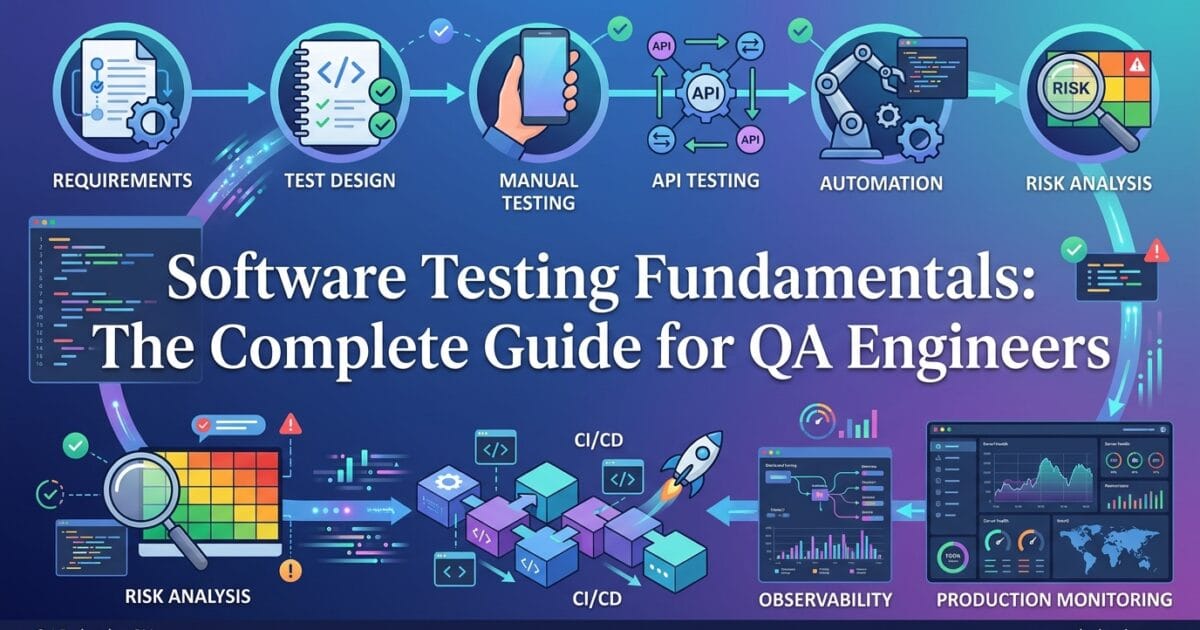
Software Testing Fundamentals begin with a simple idea: testing is not about proving that software has no defects. It is about collecting useful evidence about how a system behaves, where it can fail, how serious those failures could be, and whether the remaining risk is acceptable for release.
That distinction changes how a QA engineer approaches almost every testing decision.
A beginner may ask, “What test cases should I execute?”
An experienced QA engineer asks:
- What business behavior are we protecting?
- What can realistically go wrong?
- Which users or systems could be affected?
- Which test technique can expose that risk?
- At which testing level should the check live?
- What evidence will tell us whether the release is safe?
That mindset is the foundation of effective software testing fundamentals. Testing is a lifecycle activity involving planning, analysis, design, implementation, execution, evaluation, and communication rather than simply clicking through an application. International testing guidance and standards also distinguish testing levels from testing types and emphasize that testing activities can span the software lifecycle.
The practical objective is therefore not to create the largest possible test suite. It is to create the right evidence for the right risks at the right point in the delivery lifecycle.
What Are Software Testing Fundamentals?
Software testing fundamentals are the core concepts, principles, techniques, levels, and practices that help a team evaluate software systematically.
At the simplest level, testing compares an expected outcome with an observed outcome.
For example:
Requirement:
A customer with valid credentials can sign in.

Test:
1. Open the login page.
2. Enter a registered email address.
3. Enter the correct password.
4. Submit the form.

Expected:
The customer is authenticated and reaches the dashboard.

Observed:
The application returns an authentication error.
The test has discovered a difference between expected and actual behavior.
But the real engineering work starts after that discovery.
Is the problem in the UI?
Is the authentication API returning an error?
Is the user record missing?
Did a recent deployment change password validation?
Is the test environment configured incorrectly?
Is the requirement itself ambiguous?
This is why software testing fundamentals are not limited to test execution. A good tester investigates the behavior behind the result and communicates enough evidence for the team to make a decision.
A useful model is:
Requirement
     ↓
Expected Behavior
     ↓
Risk Identification
     ↓
Test Design
     ↓
Execution
     ↓
Observed Behavior
     ↓
Evidence
     ↓
Decision
This model works whether the test is manual, automated, API-based, integration-level, or end-to-end.
Testing Is Not the Same as Quality Assurance
One common beginner mistake is treating testing and quality assurance as identical.
Testing primarily evaluates a product or system and provides information about its quality and risks.
Quality assurance is broader and focuses on improving the processes used to build quality into the product.
For example, finding that ten developers repeatedly introduce the same validation defect is useful. But an even stronger quality-engineering response is to ask why the defect keeps appearing.
Perhaps:
- the requirement template is unclear;
- developers lack shared validation rules;
- code review does not cover the relevant behavior;
- unit tests are missing;
- API contracts are poorly defined;
- test environments differ from production.
Testing can expose the symptom. Quality engineering tries to improve the system that produced the symptom.
That distinction is important because a mature QA engineer does not measure success only by the number of defects reported.
What Are the Basics of Software Testing?
The basics can be understood through five connected activities:
1. Understand the Test Basis
Before designing tests, understand what the software is supposed to do.
The test basis can include:
- Requirements
- User stories
- Acceptance criteria
- API contracts
- Architecture documentation
- Business rules
- Regulatory requirements
- Existing behavior
- Product designs
Suppose a requirement says:
Customers receive free shipping when their order exceeds $100.
A superficial test might check:
$120 → Free shippingA stronger analysis immediately asks:
$99.99 → Paid shipping?
$100.00 → Free shipping?
$100.01 → Free shipping?
Then additional questions appear:
Does tax count toward $100?

Does a discount reduce the qualifying amount?

Does the rule apply to every country?

What happens when a customer changes quantity?

What happens when an item becomes unavailable?

What happens when the order currency is not USD?
The quality of the test depends heavily on the quality of the questions asked before execution.
2. Identify Test Conditions
A test condition is something that can be evaluated.
For a password field, conditions could include:
- Valid password
- Invalid password
- Empty password
- Minimum length
- Maximum length
- Special characters
- Unicode characters
- Expired password
- Locked account
- Rate-limited attempts
This is where boundary-value analysis and equivalence-partition thinking become useful.
Instead of testing hundreds of random values, divide the input space into meaningful groups and concentrate additional effort around boundaries.
For a field accepting 8–64 characters:
7 characters   → Invalid
8 characters   → Valid boundary
9 characters   → Valid
63 characters  → Valid
64 characters  → Valid boundary
65 characters  → Invalid
This is much more powerful than randomly entering strings until something fails.
3. Design Tests
A test should have a clear purpose.
Consider:
test('rejects a password shorter than the minimum length', async ({ page }) => {
  await page.goto('/signup');

  await page.getByLabel('Password').fill('abc');
  await page.getByRole('button', { name: 'Create account' }).click();

  await expect(
    page.getByText('Password must be at least 8 characters')
  ).toBeVisible();
});
The important part is not the Playwright syntax.
The test communicates a business rule:
Input:
Password shorter than allowed boundary

Expected:
Registration is rejected with an appropriate validation message
A good automated test should therefore be understandable even to someone who did not write it.
4. Execute and Observe
Execution produces evidence.
The evidence might be:
- A response body
- HTTP status
- UI state
- Database record
- Log entry
- Performance measurement
- Screenshot
- Trace
- Security finding
A test that only says “passed” provides limited information.
A useful result tells the team what behavior was checked and why the result matters.
5. Evaluate the Result
A failed test is not automatically a product defect.
Possible causes include:
Product defect
Test defect
Environment failure
Test-data problem
Dependency outage
Configuration problem
Timing/race condition
Requirement ambiguity
This distinction is essential in practical software testing fundamentals because blindly converting every failed assertion into a product defect creates noise.
The tester’s responsibility is to investigate enough to determine what the evidence actually means.
What Should Every QA Engineer Know About Testing?
A QA engineer should understand that testing is fundamentally an exercise in risk discovery and evidence generation.
Knowing how to use a test automation framework is valuable, but framework knowledge alone does not make someone a strong tester.
A capable QA engineer should understand:
| Capability | Why It Matters |
|---|---|
| Requirement analysis | Reveals ambiguity before implementation |
| Test design | Converts behavior into meaningful checks |
| Risk analysis | Focuses effort where failure matters most |
| Test levels | Places checks at appropriate architectural layers |
| Test types | Evaluates different quality characteristics |
| Automation | Provides repeatable and fast feedback |
| API testing | Validates service behavior efficiently |
| Debugging | Determines why failures occur |
| Test data | Makes results realistic and reproducible |
| CI/CD | Integrates feedback into delivery |
| Observability | Connects failures to system behavior |
| Communication | Converts findings into decisions |
One of the most important software testing fundamentals is understanding that coverage is not the same as confidence.
Imagine a login suite with 500 tests.
If all 500 tests repeatedly validate valid credentials, the suite may have a large test count but weak behavioral coverage.
A smaller suite might be stronger if it covers:
Valid credentials
Invalid password
Unknown user
Locked account
Expired credentials
Rate limiting
Session expiration
Authorization boundaries
API failure
Dependency timeout
The question is therefore not:
How many tests do we have?
The better question is:
Which important risks do these tests actually protect?
What Are the Main Types of Software Testing?
Testing types describe different testing objectives or characteristics. They should not be confused with testing levels.
A useful distinction is:
Testing Level = WHERE in the system/lifecycle we test

Testing Type = WHAT characteristic or behavior we evaluate

Testing Method/Technique = HOW we design or perform the test
For example, security testing can be performed against an API, a component, or an entire system.
Functional testing checks whether required behavior works.
Examples include:
- Login
- Search
- Checkout
- Payment
- Notifications
- User permissions
Non-functional testing evaluates characteristics such as:
- Performance
- Security
- Reliability
- Accessibility
- Compatibility
- Usability
- Scalability
Change-related testing includes activities such as:
- Regression testing
- Confirmation testing
- Smoke testing
- Sanity checks
Structural approaches can examine implementation or internal behavior.
This means these categories can overlap.
For example:
API + Functional Testing
API + Security Testing
API + Performance Testing

System + Functional Testing
System + Security Testing
System + Accessibility Testing
That is why memorizing isolated testing-type lists is less useful than understanding how the dimensions fit together.
Manual Testing vs Automated Testing
Manual and automated testing are not competing philosophies. They are different ways of obtaining evidence.
Manual testing provides human observation and judgment.
It is especially useful for:
- Exploratory testing
- Usability assessment
- Investigating unexpected behavior
- Rapidly changing functionality
- Discovering scenarios that were not anticipated during test design
Automation provides repeatable execution.
It is particularly valuable for:
- Regression checks
- Stable workflows
- API validation
- Data-driven scenarios
- Smoke tests
- CI pipelines
- Repeated verification
Consider a new checkout feature.
During early development, a tester may manually explore:
Add product
→ Apply discount
→ Change quantity
→ Remove product
→ Re-add product
→ Change address
→ Return to cart
→ Checkout
The tester may discover unexpected behavior that was never specified.
After the workflow stabilizes, the team can automate high-value regression scenarios.
That is a better automation strategy than immediately converting every exploratory action into a script.
| Situation | Manual Testing | Automation |
|---|---|---|
| Exploratory testing | Excellent | Limited |
| Stable regression | Expensive over time | Excellent |
| Usability judgment | Excellent | Supporting role |
| Repeated API checks | Inefficient | Excellent |
| New unstable feature | Usually better initially | May be premature |
| Critical smoke suite | Useful for investigation | Excellent for repeatability |
| Unexpected behavior discovery | Strong | Limited without deliberate modeling |
The practical principle is simple:
Automate repeatable checks; preserve human attention for investigation, exploration, judgment, and risk.
What Are the Four Levels of Software Testing?
The commonly taught four-level model consists of:
- Unit testing
- Integration testing
- System testing
- Acceptance testing
Some modern testing frameworks and curricula describe additional or differently named levels, so terminology should be interpreted in context. The important concept is that tests can be organized from small components toward complete systems and business acceptance.
Unit Testing
Unit testing checks a small piece of software, often in isolation.
Example:
function calculateTotal(price, quantity) {
  return price * quantity;
}
A unit-level test can validate:
expect(calculateTotal(50, 2)).toBe(100);
expect(calculateTotal(50, 0)).toBe(0);
Unit tests are valuable because failures can often be localized quickly.
Integration Testing
Integration testing evaluates interactions between components.
For an order system:
Order Service
     ↓
Payment Service
     ↓
Database
An integration test might verify that a successful payment results in the correct order state being persisted.
This catches problems that isolated unit tests cannot see.
System Testing
System testing evaluates the integrated application as a complete system against specified requirements.
For an e-commerce application, this might include:
Login
→ Search
→ Product Details
→ Cart
→ Checkout
→ Payment
→ Order Confirmation
System testing provides broader confidence but usually requires more infrastructure and realistic environments.
Acceptance Testing
Acceptance testing evaluates whether the system is acceptable for its intended users, customers, or business stakeholders.
The question changes from:
Does the implementation work?
to:
Does the delivered solution satisfy the intended business need?
For example, a finance team might accept an invoicing system only when invoices meet defined business, regulatory, and operational requirements.
Comparing the Four Testing Levels
| Level | Main Focus | Typical Scope | Feedback | Example |
|---|---|---|---|---|
| Unit | Individual logic/component | Very small | Very fast | Tax calculation |
| Integration | Component interaction | Several components | Fast/medium | Order + database |
| System | Complete application | Broad | Medium/slower | Complete checkout |
| Acceptance | Business/user acceptance | Business capability | Variable | Invoice approval workflow |
The important lesson is that these levels complement each other.
A system-level test should not be expected to replace unit testing. Similarly, thousands of unit tests cannot completely prove that a user can successfully complete an end-to-end business journey.
Strong software testing fundamentals therefore depend on layered confidence.
The Testing Pyramid: Choosing the Right Layer
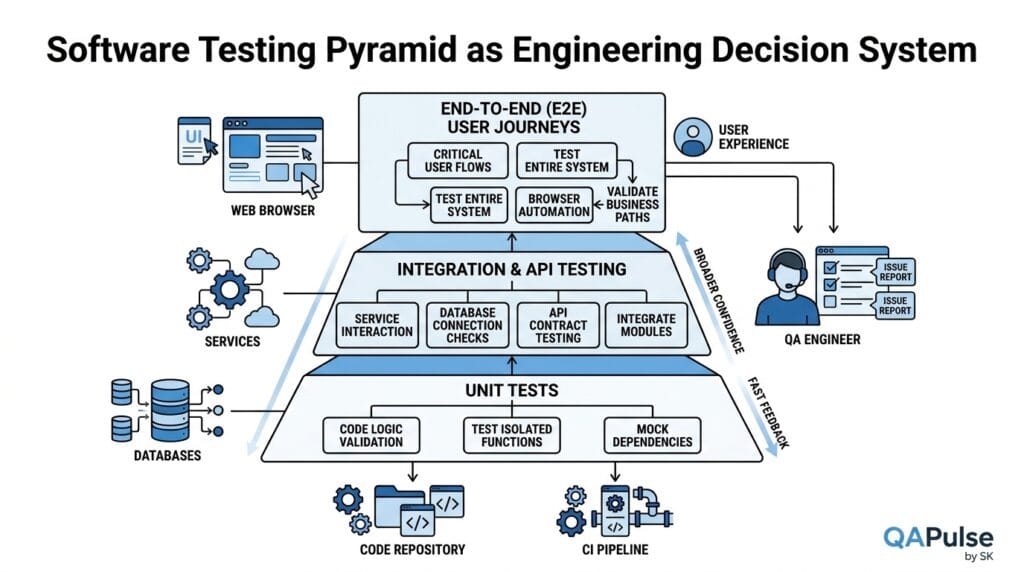
The testing pyramid is a useful way to visualize why teams generally benefit from having many fast, focused tests and fewer broad, expensive tests.
             /\
            /  \
           / E2E\
          /------\
         /  API   \
        /----------\
       / Integration\
      /--------------\
     /      Unit      \
    /------------------\
The exact shape should not be treated as a universal law.
Modern architectures may use component testing, contract testing, service virtualization, API checks, accessibility testing, visual testing, and other layers.
The deeper principle is more useful:
Detect a risk at the lowest reliable layer that can provide sufficient evidence.
Suppose a calculation is wrong.
Testing the calculation through a complete browser checkout may eventually detect the problem, but a unit test can usually identify it faster and explain the failure more precisely.
Now consider a different risk:
Can a customer complete checkout when the payment service, order service, inventory service, and frontend work together?
That risk requires broader integration or end-to-end coverage.
This is where experienced testing differs from simply increasing the number of automated tests.
A Practical Testing-Layer Decision
Before writing a test, ask:
What am I trying to prove?

        ↓

Can a unit test prove it?
        ↓
       Yes → Test at unit level

       No

Can an API/component/integration test prove it?
        ↓
       Yes → Use that layer

       No

Does the risk require a complete user journey?
        ↓
       Yes → Use targeted E2E coverage
This prevents the common mistake of turning every business requirement into a browser test.
It also reduces the risk of building a slow, fragile test suite that becomes difficult to maintain.
A Real-World Example: Testing an Online Payment Feature
Consider a payment feature where a customer purchases a $500 product.
A weak testing approach may create one E2E test:
Login
→ Add product
→ Checkout
→ Enter card
→ Pay
→ Verify confirmation
That test is useful, but it leaves many questions unanswered.
A stronger strategy distributes the risks across multiple layers:
| Risk | Appropriate Test Layer | Example |
|---|---|---|
| Payment calculation | Unit | Total = subtotal + tax − discount |
| Request validation | API | Invalid payment payload rejected |
| Payment/order interaction | Integration | Successful payment creates order |
| Payment provider failure | Integration/API | Timeout handled safely |
| Duplicate payment | API/integration | Idempotency behavior |
| Customer checkout journey | E2E | User completes purchase |
| Accessibility | UI/accessibility | Keyboard and screen-reader checks |
| Performance | Performance layer | Payment endpoint under load |
| Security | Security testing | Authorization and sensitive-data checks |
This is what makes a testing strategy scalable.
Instead of asking one enormous E2E test to prove everything, each layer contributes a different piece of evidence.
That is the practical meaning of software testing fundamentals: use the right test for the right risk rather than treating every requirement as the same testing problem.
A useful industry reference for the broader discipline is ISO/IEC/IEEE 29119, whose current Part 1 defines general software-testing concepts and whose related parts address test processes, documentation, and test techniques. The standard is not a replacement for engineering judgment; it is a structured reference for organizing testing concepts and processes.
The same principle appears in established testing education: test levels describe groups of test activities organized around a development level, while test types address particular characteristics or objectives.
The QA Engineer’s Mental Model
At this point, the most useful mental model is not a list of definitions.
Think of a software system as a set of risks.
                    BUSINESS GOAL
                         ↓
                    USER BEHAVIOR
                         ↓
                    SYSTEM BEHAVIOR
                         ↓
              ┌──────────┼──────────┐
              ↓          ↓          ↓
             UI         API       Database
              ↓          ↓          ↓
              └──────────┼──────────┘
                         ↓
                       Risk
                         ↓
                  Testing Evidence
                         ↓
                  Release Decision
When a QA engineer understands this model, testing becomes much more strategic.
Instead of asking:
“What should I automate?”
the better question is:
“Which repeatable risk deserves automated protection, and at what layer can I detect it most efficiently?”
Instead of asking:
“How many test cases do we need?”
ask:
“Which important behaviors remain insufficiently covered?”
Instead of asking:
“Why did this test fail?”
ask:
“What does this failure actually tell us about the product, the test, or the environment?”
These questions are the practical heart of software testing fundamentals.
The result is a QA approach that is less focused on test-count inflation and more focused on risk, evidence, feedback, and confidence.
From Testing Concepts to Testing Strategy
Understanding testing concepts is only the beginning. The difficult engineering question is deciding what deserves testing, how deeply it should be tested, where the test should run, and how the team should respond when evidence indicates a problem.
A mature testing strategy does not treat every requirement equally.
A payment failure, for example, can directly affect revenue and customer trust. A minor visual alignment issue on an internal administration page may have a much smaller business impact. Both can be defects, but they should not automatically receive identical testing effort.
This is where risk, coverage, automation, isolation, API testing, CI/CD, and failure analysis become connected.
What Is Risk-Based Testing?
Risk-based testing is an approach in which testing effort is prioritized according to the probability and impact of potential failures.
A simple risk model is:
Risk = Probability of Failure × Impact of FailureIt is not necessary to treat this as a mathematically precise formula. Its value is in forcing the team to discuss likelihood and consequence rather than simply counting requirements.
Consider these two features.
Feature A: Payment Processing
Business Impact:    Very High
Failure Impact:     Very High
Change Frequency:   High
External Dependency: Yes
Data Sensitivity:   High

Testing Strategy:
✓ Unit tests
✓ API tests
✓ Integration tests
✓ Critical E2E tests
✓ Negative scenarios
✓ Contract validation
✓ CI execution
✓ Production monitoring
Feature B: Internal Dashboard Icon
Business Impact:    Low
Failure Impact:     Low
Change Frequency:   Low
External Dependency: No
Data Sensitivity:   Low

Testing Strategy:
✓ Targeted functional check
✓ Visual verification where appropriate
✓ Basic regression coverage
The difference is important.
The objective is not to test Feature A “more” simply because it is important. The objective is to test its important failure modes more intelligently.
A risk-based strategy asks:
- What can fail?
- How likely is failure?
- What happens if it fails?
- Who is affected?
- How quickly would we detect the problem?
- Can the failure cause financial, security, regulatory, or reputational damage?
- How frequently does the feature change?
- How complex are its dependencies?
That produces a more defensible testing strategy than “every story gets ten test cases.”
Risk-Based Testing in Practice
Suppose an application introduces a password-reset workflow.
A basic checklist might contain:
✓ Valid email
✓ Invalid email
✓ Reset password
Risk-based analysis expands the important scenarios:
Account Enumeration
    ↓
Can attackers discover whether an account exists?

Token Security
    ↓
Can a reset token be reused?

Token Expiration
    ↓
What happens after the token expires?

Authorization
    ↓
Can one user's token affect another account?

Rate Limiting
    ↓
Can attackers request thousands of reset emails?

Session Handling
    ↓
What happens to existing sessions after password reset?
The number of scenarios increases because the risk model changed, not because the tester wanted a larger test suite.
This is one of the strongest practical applications of software testing fundamentals: testing effort follows risk instead of being distributed blindly.
How Should a QA Engineer Prioritize Testing?
When time is limited—which is normal in real software projects—prioritization becomes unavoidable.
A useful priority model combines:
| Factor | Question |
|---|---|
| Business criticality | What happens if this fails? |
| User impact | How many users could be affected? |
| Probability | How likely is the failure? |
| Change size | How much changed? |
| Technical complexity | How many components interact? |
| Dependency risk | Are external systems involved? |
| Historical defects | Has this area failed before? |
| Data sensitivity | Could sensitive information be exposed? |
| Observability | Would we detect failure quickly? |
| Recovery | Can the system recover safely? |
Imagine a release contains 20 changed components but only three are involved in payment, authentication, and order fulfillment.
Testing effort should not necessarily be distributed as 5% per component.
A more realistic strategy might look like:
Authentication      → High
Payment             → Critical
Order fulfillment   → High
Search UI           → Medium
Admin icon          → Low
This is not permission to ignore low-risk areas. It is a mechanism for making trade-offs explicit.
A strong QA engineer should be able to explain why particular areas received deeper coverage.
What Is Test Coverage?
Test coverage describes how much of a defined testing scope has been exercised or evaluated.
But “coverage” can mean different things.
Common forms include:
- Requirements coverage
- Feature coverage
- Code coverage
- Branch coverage
- Statement coverage
- API endpoint coverage
- Risk coverage
- User-journey coverage
- Device/browser coverage
This distinction matters because one coverage metric cannot represent the complete quality of an application.
Consider:
Code Coverage:       95%
Requirement Coverage: 90%
Critical Risk Coverage: 45%
Would you call the system highly protected?
Probably not.
The 95% code coverage number tells you that a large amount of code was executed by tests. It does not prove that the most important business risks were adequately evaluated.
Code Coverage Is Useful but Not Sufficient
Consider:
function calculateShipping(total) {
  if (total >= 100) {
    return 0;
  }

  return 10;
}
A test suite might achieve excellent line coverage:
expect(calculateShipping(100)).toBe(0);
expect(calculateShipping(50)).toBe(10);
But important business questions could remain:
What about exactly 99.99?
What about 100.01?
What currency is used?
What if total is negative?
What if total is NaN?
What if discounts change the qualifying amount?
The code has been executed. The business behavior may still be insufficiently tested.
This is why experienced teams treat coverage metrics as signals, not quality certificates.
A Better Coverage Model
Instead of looking at one number, create a coverage matrix.
| Risk / Behavior | Unit | API | Integration | E2E | Status |
|---|---|---|---|---|---|
| Price calculation | ✓ | Covered | |||
| Payment validation | ✓ | ✓ | Covered | ||
| Payment provider failure | ✓ | ✓ | ✓ | Covered | |
| Complete checkout | ✓ | Covered | |||
| Accessibility | ✓ | Targeted | |||
| Duplicate transaction | ✓ | ✓ | Covered | ||
| Recovery after timeout | ✓ | ✓ | ✓ | Targeted |
This gives the team more useful information than simply saying:
“Our automation coverage is 82%.”
The better question is:
“Which important risks are protected, and which remain exposed?”
That is the difference between measurement and meaningful coverage.
Why Is Test Automation Important?
Test automation is important because software teams repeatedly need feedback.
A manually executed regression test that takes four hours may be acceptable once. If the same regression must run after every pull request, release candidate, and deployment, repeating the work manually becomes expensive and slow.
Automation can provide:
- Faster feedback
- Repeatable execution
- Consistent assertions
- Parallel execution
- CI integration
- Regression protection
- Large-scale data-driven testing
- Historical test results
But automation also creates costs.
Every automated test requires:
Design
  ↓
Implementation
  ↓
Execution Infrastructure
  ↓
Maintenance
  ↓
Debugging
  ↓
Review
  ↓
Eventual Retirement
Therefore, the correct question is not:
“Can we automate this?”
Almost anything can eventually be automated.
The better question is:
“Is automating this behavior worth the cost of building and maintaining the check?”
What Makes a Good Automated Test?
A good automated test should be understandable, deterministic, isolated, meaningful, and maintainable.
Consider this example:
test('customer sees an error for an invalid password', async ({ page }) => {
  await page.goto('/login');

  await page.getByLabel('Email').fill('customer@example.com');
  await page.getByLabel('Password').fill('wrong-password');

  await page.getByRole('button', { name: 'Sign in' }).click();

  await expect(
    page.getByRole('alert')
  ).toContainText('Invalid email or password');
});
The test has a clear purpose.
It does not merely click through the application. It validates a meaningful behavior.
A useful automated-test quality checklist is:
Purpose
  ↓
Reliable Setup
  ↓
Focused Action
  ↓
Meaningful Assertion
  ↓
Useful Failure Message
  ↓
Independent Cleanup
Weak vs Strong Automation
| Weak Automation | Strong Automation |
|---|---|
| Tests implementation details | Tests observable behavior |
| Depends on previous tests | Independently establishes state |
| Uses arbitrary waits | Waits for meaningful conditions |
| Has vague assertions | Has business-relevant assertions |
| Uses fragile selectors | Uses resilient locators |
| Shares mutable state | Controls its own test data |
| Produces unclear failures | Produces diagnostic failures |
| Tests everything through UI | Uses the appropriate testing layer |
For example, this is usually a poor synchronization strategy:
await page.waitForTimeout(5000);The test is saying:
“I hope five seconds is enough.”
A better strategy waits for the condition that actually matters:
await expect(page.getByRole('heading', {
  name: 'Order confirmed'
})).toBeVisible();
The second test is synchronized with application behavior rather than elapsed time.
Test Isolation: The Hidden Foundation of Reliable Automation
As automation suites grow, test isolation becomes increasingly important.
A test should ideally control the state it depends on.
Suppose Test B only passes because Test A created a customer:
Test A
  ↓
Creates Customer 101
  ↓
Test B
  ↓
Uses Customer 101
Now Test A fails.
Test B may fail even though its own functionality works correctly.
The result is a misleading failure chain.
A better design is:
Test A → Creates its own required state
Test B → Creates its own required state
Test C → Creates its own required state
For API-driven applications, test setup can often be performed through service endpoints rather than expensive UI flows.
For example:
test.beforeEach(async ({ request }) => {
  const response = await request.post('/api/test-data/users', {
    data: {
      email: `test-${Date.now()}@example.com`,
      role: 'customer'
    }
  });

  expect(response.ok()).toBeTruthy();
});
The exact implementation depends on the system, but the principle is stable:
Tests should own the state they require whenever practical.
Isolation improves parallel execution, debugging, repeatability, and confidence.
Why Tests Become Flaky
A flaky test sometimes passes and sometimes fails without a relevant product change.
This is particularly dangerous because repeated false failures can train a team to ignore the test suite.
Common causes include:
Timing problems
     ↓
Race conditions
     ↓
Shared state
     ↓
Unstable test data
     ↓
External dependencies
     ↓
Environment instability
     ↓
Poor synchronization
     ↓
Flaky result
For example:
await page.waitForTimeout(2000);
await page.getByRole('button', { name: 'Submit' }).click();
The fixed delay may work on a developer’s machine and fail under CI load.
A more reliable approach synchronizes against application state:
await expect(
  page.getByRole('button', { name: 'Submit' })
).toBeEnabled();

await page.getByRole('button', { name: 'Submit' }).click();
Flaky-Test Investigation
Do not immediately “fix” a flaky test by adding retries.
Start with evidence.
Failure Frequency
      ↓
Failure Pattern
      ↓
CI vs Local Comparison
      ↓
Trace / Screenshot / Logs
      ↓
Identify Root Cause
      ↓
Fix Synchronization / State / Dependency
      ↓
Monitor Stability
Retries can sometimes reduce noise for genuinely transient infrastructure failures, but excessive retries can hide real defects.
A test that fails three times and passes on the fourth has not necessarily become reliable. It may simply have become harder to notice when the system is broken.
API Testing as an Engineering Layer
API testing is one of the most effective ways to validate business behavior without driving every scenario through a browser.
Suppose the application exposes:
POST /api/ordersA test can validate the contract directly:
const response = await request.post('/api/orders', {
  data: {
    productId: 1001,
    quantity: 2
  }
});

expect(response.status()).toBe(201);

const body = await response.json();

expect(body.status).toBe('created');
expect(body.items).toHaveLength(1);
expect(body.items[0].quantity).toBe(2);
Negative testing is equally important:
const response = await request.post('/api/orders', {
  data: {
    productId: 1001,
    quantity: 0
  }
});

expect(response.status()).toBe(400);
Now consider an authentication API:
POST /api/login

Valid credentials
→ 200

Invalid password
→ 401

Missing credentials
→ 400

Locked account
→ Appropriate authorization response

Excessive attempts
→ Rate limiting
API tests can provide fast feedback on business rules that would otherwise require expensive browser workflows.
The key is not to replace E2E testing completely. It is to move appropriate validation closer to the service layer.
Integration Testing vs End-to-End Testing
Integration and E2E tests answer different questions.
Integration testing asks:
Do these components work correctly together?
End-to-end testing asks:
Can the complete business workflow work across the system?
Consider an order service.
An integration test might validate:
Order Service
    +
Payment Service
    +
Database
An E2E test might validate:
Browser
  ↓
Frontend
  ↓
API Gateway
  ↓
Order Service
  ↓
Payment Service
  ↓
Database
  ↓
Confirmation UI
The second scenario has more moving parts.
| Characteristic | Integration Testing | E2E Testing |
|---|---|---|
| Scope | Several components | Complete workflow |
| Speed | Usually faster | Usually slower |
| Failure localization | Easier | Harder |
| Infrastructure needs | Moderate | Higher |
| Business confidence | Targeted | Broad |
| Maintenance | Moderate | Higher |
| Best use | Component boundaries | Critical journeys |
Neither should be considered universally better.
If the defect is in payment-to-order integration, a focused integration test may provide better diagnostic value.
If the concern is whether a real customer can successfully purchase a product, an E2E test is appropriate.
Designing a Balanced Automation Portfolio
A mature automation suite might look conceptually like this:
                    Critical E2E
                       ▲
                      / \
                     /   \
                UI / Component
                   ▲
                  / \
                 API  Contract
                ▲
               / \
       Integration
          ▲
         / \
       Unit
The exact proportions should depend on the architecture and risks.
For a backend-heavy product, API and integration coverage may dominate.
For a highly interactive frontend, component and UI-level testing may have greater value.
For a distributed financial workflow, contract and integration tests may be critical alongside carefully selected E2E scenarios.
The important point is to avoid treating the testing pyramid as a rigid mathematical formula.
It is a decision framework.
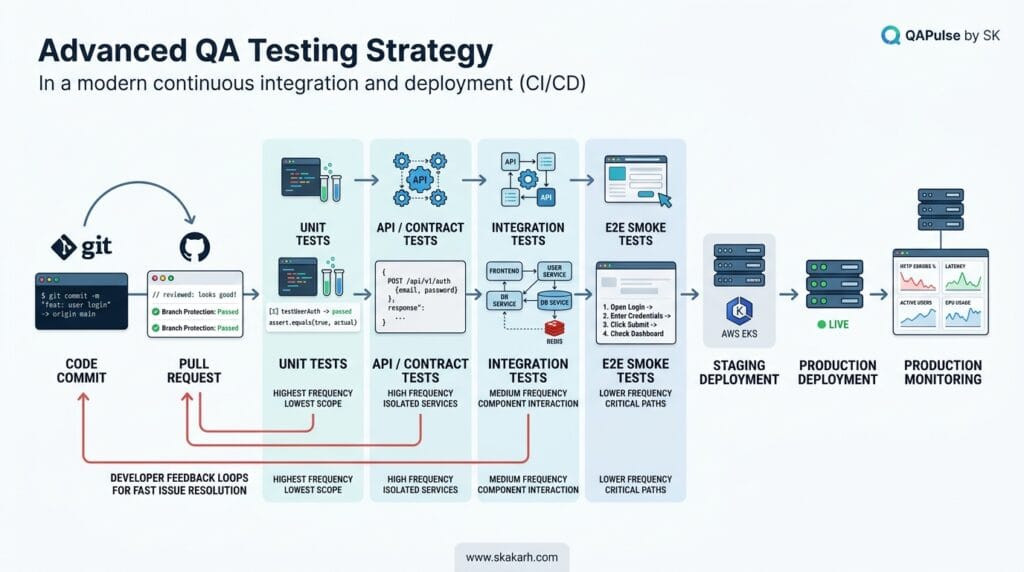
How Does Testing Fit Into CI/CD?
Testing becomes significantly more valuable when feedback reaches developers close to the change that introduced the risk.
A practical CI/CD flow might look like:
Developer Commit
       ↓
Pull Request
       ↓
Static Checks
       ↓
Unit Tests
       ↓
API / Contract Tests
       ↓
Integration Tests
       ↓
Build Artifact
       ↓
Deployment to Test Environment
       ↓
Critical E2E / Smoke Tests
       ↓
Release Decision
       ↓
Production
Not every test should execute at every stage.
A common mistake is putting the entire test suite into the pull-request pipeline.
If 8,000 browser tests take several hours, developers will wait too long for feedback. That slows delivery and encourages teams to bypass the pipeline.
A better strategy is to classify tests by feedback value.
| Pipeline Stage | Typical Checks | Primary Goal |
|---|---|---|
| Pre-commit | Lint/unit checks | Immediate feedback |
| Pull request | Unit/API/component | Detect regressions early |
| Build | Integration/contract | Validate interactions |
| Test environment | Critical E2E/smoke | Validate deployment |
| Pre-production | Broader regression | Release confidence |
| Production | Synthetic/monitoring | Detect live problems |
This is where software testing fundamentals connect directly to delivery engineering.
The goal is not to make CI “run all tests.”
The goal is to make CI provide the right feedback at the right speed.
A Practical CI Strategy
Imagine a Playwright project with:
1,500 unit tests
350 API tests
120 integration tests
180 UI component tests
80 E2E tests
Running all 2,230 tests for every small pull request may be unnecessary.
Instead:
Pull Request
├── Unit
├── Relevant API
├── Component
└── Critical smoke

Merge
├── Full API
├── Integration
└── Broader UI

Release Candidate
├── Full regression
├── Critical E2E
├── Accessibility
└── Performance/security gates where appropriate
This design provides faster developer feedback while preserving broader release confidence.
The actual split should depend on risk, architecture, execution time, and organizational needs.
The Testing Strategy Decision Framework
Before adding a new automated test, ask six questions:
1. What risk does this test protect?

2. How frequently does that behavior change?

3. How frequently do we need feedback?

4. What is the lowest reliable test layer?

5. How expensive will this test be to maintain?

6. What evidence will the failure provide?
If a test cannot answer these questions, it may not deserve to become part of the permanent automation suite.
For example:
Requirement:
Customer cannot purchase an unavailable product.

Risk:
High — inventory inconsistency can create failed orders.

Best coverage:
Unit → inventory rule
API → order validation
Integration → inventory/order interaction
E2E → critical checkout journey
The same business rule can therefore be protected at multiple levels without duplicating exactly the same test everywhere.
This is a more sustainable strategy than translating every acceptance criterion directly into an E2E script.
From Test Execution to Engineering Evidence
A high-quality testing strategy produces more than pass/fail statistics.
It creates evidence that helps answer:
What changed?
What did we test?
What risks were covered?
What failed?
Why did it fail?
How severe is the failure?
Can we reproduce it?
What remains unknown?
Is the release risk acceptable?
This is where good reporting matters.
A useful automated test report should help an engineer move from:
FAILED: checkout.spec.jsto something closer to:
Scenario:
Customer completes checkout using a valid payment method.

Failure:
Order confirmation was not displayed.

Observed:
POST /api/payment returned 200.
POST /api/orders returned 500.

Environment:
Staging

Trace:
<correlation identifier>

Likely Failure Domain:
Order service persistence

Impact:
Critical checkout workflow unavailable.
The second result is much more actionable.
It reduces the distance between test failure and root-cause investigation.
That is ultimately what separates a test suite that merely executes from an engineering system that provides useful quality feedback.
Building a Sustainable Automation Strategy
A sustainable test suite should evolve with the product.
Tests should be reviewed when:
- Requirements change
- Architecture changes
- APIs are deprecated
- UI behavior changes
- Defects reveal missing coverage
- Tests become consistently slow
- Tests become flaky
- Business priorities change
A useful maintenance lifecycle is:
Create
  ↓
Run
  ↓
Observe
  ↓
Measure
  ↓
Refactor
  ↓
Retire obsolete checks
  ↓
Add coverage for newly discovered risks
Automation is therefore not a one-time project.
It is a living engineering asset.
The strongest teams periodically ask:
Which tests still provide meaningful information?
Which tests duplicate other checks?
Which failures are routinely ignored?
Which critical risks have no automated protection?
Which tests are expensive without providing proportional value?
These questions keep the automation portfolio healthy as the system grows.
Practical QA Engineering Exercise
Take any feature from your current application and complete this exercise.
Feature:
____________________________

Most Important Business Risk:
____________________________

Potential Failure:
____________________________

User Impact:
____________________________

Highest-Value Test Layer:
____________________________

Automation Candidate:
____________________________

Manual/Exploratory Coverage:
____________________________

CI Execution Point:
____________________________

Failure Evidence Required:
____________________________
Now compare your answer with another engineer’s answer.
If the two strategies are completely different, that is not necessarily a problem. It may reveal assumptions about risk that the team needs to discuss.
That is a valuable testing conversation.
The purpose of software testing fundamentals is not to produce identical test plans from every engineer. It is to provide enough shared reasoning that teams can explain and challenge their testing decisions.
A mature testing strategy therefore combines risk prioritization, appropriate test levels, meaningful automation, reliable test isolation, targeted API and integration coverage, carefully selected E2E workflows, and fast CI feedback.
The result is not simply more tests.
It is better evidence, faster diagnosis, and more informed release decisions.
From Test Execution to Modern Software Quality
Testing becomes significantly more valuable when it is connected to the entire software delivery lifecycle.
A team can have thousands of automated checks and still discover serious problems in production if those checks are concentrated around the wrong risks. Modern quality engineering therefore extends beyond regression execution into security, reliability, observability, production feedback, continuous delivery, and intelligent use of AI.
The objective is not to test everything everywhere.
The objective is to continuously reduce important uncertainty about the software.
That requires a shift in thinking:
Traditional Testing View

Build
  ↓
Test
  ↓
Find Defects
  ↓
Release


Modern Quality View

Discover Risk
      ↓
Design Quality In
      ↓
Test Continuously
      ↓
Observe Behavior
      ↓
Learn From Production
      ↓
Improve the System
This broader model is consistent with current testing guidance. The current ISTQB Foundation Level syllabus distinguishes test levels from test types and describes test activities across development levels rather than treating testing as a single final phase. (ISTQB)
What Is Shift-Left Testing?
Shift-left testing means moving appropriate quality activities earlier in the software development lifecycle.
The idea is straightforward:
Find important problems before they become expensive to discover.
Consider a requirement for password recovery.
A traditional workflow might look like:
Requirement
    ↓
Development
    ↓
QA Testing
    ↓
Security Problem Found
    ↓
Fix
A stronger workflow introduces quality thinking much earlier:
Requirement
    ↓
Risk Analysis
    ↓
Threat Modeling
    ↓
API Contract
    ↓
Implementation
    ↓
Unit/API/Security Checks
    ↓
Integration
    ↓
System Testing
The earlier workflow does not eliminate later testing. It reduces the probability that obvious or high-impact problems survive until the expensive stages.
Shift-Left Does Not Mean “QA Tests Earlier”
This distinction matters.
Shift-left is sometimes misunderstood as:
“Make QA start testing before development finishes.”
That is too narrow.
Quality activities can move left through:
- Better requirements
- Acceptance criteria
- Architecture reviews
- Threat modeling
- API contract design
- Unit testing
- Static analysis
- Component testing
- Test-data design
- Automation
- Developer-level validation
- Pairing between developers and testers
For example, an ambiguous requirement can be a defect source before a single line of production code exists.
Suppose the requirement says:
Users can cancel an order within 30 minutes.
A quality-focused discussion should immediately clarify:
30 minutes from what event?

Order creation?
Payment?
Shipment confirmation?

What happens if cancellation occurs at 29:59?

What happens at exactly 30:00?

Can an already shipped order be cancelled?

Does cancellation trigger a refund?

What happens if the payment provider is unavailable?
These questions are testing activities even though no test script has been executed.
The current OWASP Web Security Testing Guide similarly treats security testing as a lifecycle activity spanning definition and design, development, deployment, and maintenance rather than limiting it to a final penetration test. (OWASP)
Shift-Left vs Traditional Testing
| Approach | Traditional Model | Shift-Left Model |
|---|---|---|
| Requirements | Mostly reviewed for completeness | Examined for ambiguity and risk |
| Security | Often later activity | Considered during design |
| Testability | Discovered during QA | Designed into the system |
| Unit tests | Developer responsibility | Integrated into development workflow |
| API contracts | May emerge after implementation | Designed and validated early |
| Defect discovery | Often later | Earlier where practical |
| Feedback cost | Potentially higher | Potentially lower |
The important word is appropriate.
Not every test should be pushed as far left as possible.
A realistic user journey may still require system-level validation. Production behavior may still require monitoring and synthetic checks.
That leads to the complementary idea of shift-right.
What Is Shift-Right Testing?
Shift-right testing extends quality activities into deployment, production, and real-world operation.
Instead of asking only:
“Did we test the software before release?”
the team also asks:
“How is the software behaving with real traffic, real dependencies, and real usage patterns?”
A simplified model is:
Pre-Production
      ↓
Release
      ↓
Production
      ↓
Telemetry
      ↓
Real-World Behavior
      ↓
Investigation
      ↓
Learning
      ↓
Engineering Improvement
Shift-right practices can include:
- Production monitoring
- Synthetic transactions
- Canary releases
- Feature flags
- Real-user monitoring
- Error monitoring
- Performance monitoring
- Reliability measurement
- Controlled experiments
- Production diagnostics
- Post-release validation
The goal is not to turn production into an uncontrolled testing laboratory.
The goal is to observe and validate real behavior safely.
Shift-Left and Shift-Right Work Together
These approaches are not alternatives.
| Shift-Left | Shift-Right |
|---|---|
| Earlier feedback | Real-world feedback |
| Prevents defects | Detects unexpected behavior |
| Requirement/design focus | Production/operations focus |
| Unit/API/integration/security checks | Monitoring/synthetic/canary/telemetry |
| Controlled environments | Real usage conditions |
| “Can we prevent this?” | “Is this happening?” |
Consider an API that passes every pre-production performance test.
After deployment, real traffic produces a previously unseen combination of requests that causes latency spikes.
Shift-left helped verify expected behavior.
Shift-right reveals unexpected real-world behavior.
A mature quality strategy needs both.
How Does CI/CD Change Software Testing?
Continuous integration and continuous delivery change testing from an occasional activity into a continuous feedback mechanism.
A modern pipeline can distribute checks according to speed, risk, and purpose:
                 Developer Change
                       ↓
                Pull Request
                       ↓
        ┌──────────────┼──────────────┐
        ↓              ↓              ↓
      Lint          Unit Tests     Static Checks
        └──────────────┼──────────────┘
                       ↓
                 API / Contract
                       ↓
                  Integration
                       ↓
                 Build Artifact
                       ↓
              Test Environment
                       ↓
             Critical E2E Tests
                       ↓
                    Deploy
                       ↓
             Production Signals
The important design decision is not how many tests the pipeline runs.
It is how quickly the pipeline provides useful information.
For example:
Pull Request
→ Fast, deterministic checks

Merge
→ Broader integration validation

Release Candidate
→ Full regression + critical E2E

Production
→ Synthetic + telemetry + alerts
If every pull request waits two hours for a massive browser suite, the pipeline becomes a productivity problem.
If pull requests run only a tiny set of checks and serious regressions are discovered after deployment, the pipeline becomes a quality problem.
The engineering solution is a balanced feedback architecture.
Testing Gates Should Be Risk-Aware
Not every failure should block a release automatically.
Consider:
Critical payment API test
→ FAIL
→ Release should probably be blocked


Low-priority visual regression
→ FAIL
→ Investigate according to business policy


Known flaky infrastructure test
→ FAIL
→ Quarantine/investigate rather than blindly treating it as product failure
The exact release policy belongs to the organization, but the principle is important:
A CI/CD pipeline should distinguish meaningful risk from meaningless noise.
A useful release gate can be modeled as:
Test Result
     ↓
Failure Classification
     ↓
Risk Assessment
     ↓
Release Policy
     ↓
Block / Investigate / Accept
This is much stronger than:
Any Red Test → Stop EverythingSecurity Testing Is Part of Software Quality
Security should not be treated as a separate activity that begins only when a penetration tester arrives.
Security concerns can be incorporated into everyday testing:
Authentication
Authorization
Session Management
Input Validation
Error Handling
Business Logic
Sensitive Data
Configuration
Dependencies
API Exposure
For example, an API test should not only ask whether an authorized user can access an endpoint.
It should also ask:
Can User A access User B's resource?

Can an unauthenticated user access it?

Can a lower-privileged user perform an administrator operation?

Can identifiers be manipulated?

Does an error response expose sensitive information?
The OWASP Web Security Testing Guide provides a comprehensive framework covering areas such as authentication, authorization, session management, input validation, error handling, business logic, and client-side testing. It also explicitly describes integrating security testing throughout the software development lifecycle. (OWASP)
A practical API authorization test might look conceptually like:
const response = await request.get(
  `/api/users/${anotherUserId}/orders`,
  {
    headers: {
      Authorization: `Bearer ${regularUserToken}`
    }
  }
);

expect(response.status()).toBe(403);
The important assertion is not merely the HTTP status.
The test is protecting an authorization boundary.
That is the difference between testing an API response and testing a security risk.
Reliability Testing: What Happens When Things Go Wrong?
Reliable software is not software that never encounters failure.
Reliable software is software that behaves predictably when failures occur.
Modern systems depend on:
Database
Payment Provider
Authentication Service
Message Queue
Cache
Object Storage
Third-Party APIs
Network
DNS
Every dependency introduces failure possibilities.
A useful reliability test asks:
What happens when this dependency becomes slow, unavailable, inconsistent, or partially successful?
For example:
Payment Provider Timeout
        ↓
Application receives timeout
        ↓
Payment status becomes uncertain
        ↓
Customer retries
        ↓
Potential duplicate transaction
A weak system might create two payments.
A stronger system uses idempotency and state management:
Request
  ↓
Idempotency Key
  ↓
Payment Processing
  ↓
Persist Transaction State
  ↓
Retry Safely
A test can verify the expected behavior:
const first = await pay({
  amount: 500,
  idempotencyKey: 'order-123-payment'
});

const second = await pay({
  amount: 500,
  idempotencyKey: 'order-123-payment'
});

expect(second.transactionId)
  .toBe(first.transactionId);
The exact implementation differs by payment provider, but the testing principle is broadly applicable.
A QA engineer should therefore test not only successful behavior but also failure recovery.
Negative Testing and Failure Recovery
A mature test strategy deliberately asks:
What happens if...

the database is slow?

the API times out?

the queue is unavailable?

the same request arrives twice?

the network connection drops?

the user refreshes during payment?

the service returns malformed data?

a dependency returns HTTP 500?

the deployment is only partially successful?
These scenarios often reveal more about system resilience than another happy-path test.
Consider file upload.
A basic test checks:
Valid file → Upload succeedsA broader strategy checks:
Empty file
Oversized file
Unsupported format
Corrupted file
Interrupted upload
Duplicate upload
Malicious filename
Slow connection
Storage failure
Expired upload session
This is where practical experience becomes visible in the content: real systems fail at boundaries and dependencies, not only at idealized user journeys.
Flaky Tests Are a Quality Signal
A flaky test is not merely an annoying automation problem.
A growing flaky-test population can indicate deeper engineering issues:
Flaky Tests
     ↓
Ignored Failures
     ↓
Reduced Trust
     ↓
Developers Stop Reacting
     ↓
Real Defects Become Easier to Ignore
That makes test reliability itself a quality concern.
Track useful indicators such as:
| Signal | What It Can Reveal |
|---|---|
| Failure frequency | Stability problems |
| Retry rate | Hidden intermittent failures |
| Mean test duration | Pipeline inefficiency |
| Failure clustering | Environment/dependency issues |
| Quarantine count | Growing automation debt |
| Pass-after-retry rate | Potential flakiness |
| Defects found by automation | Test effectiveness |
The goal is not to achieve a visually perfect dashboard.
The goal is to identify when the testing system is becoming unreliable enough to undermine engineering decisions.
How Does Observability Improve Testing?
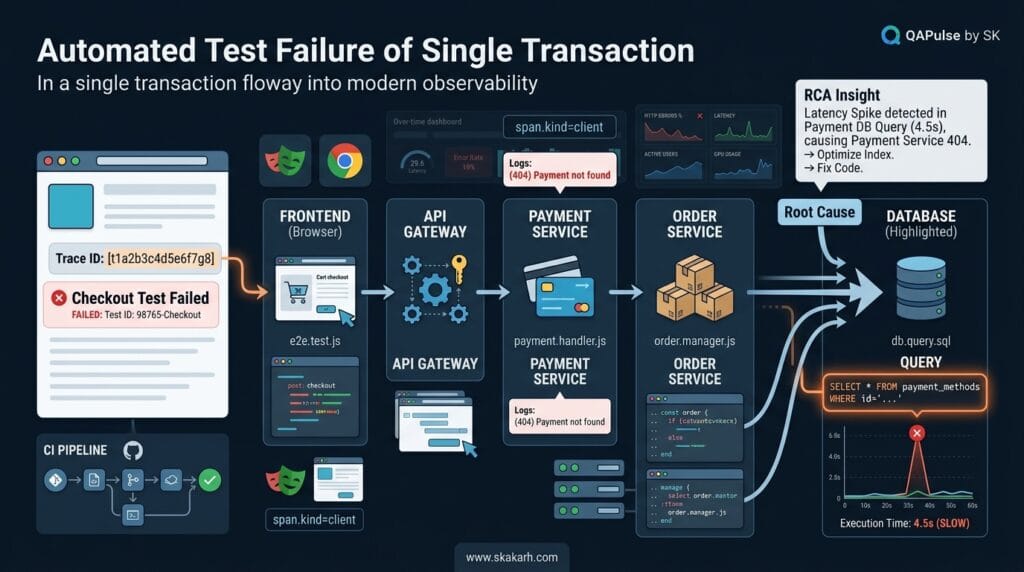
Observability becomes particularly valuable when a test detects a failure but cannot explain why it happened.
OpenTelemetry describes observability through signals such as traces, metrics, and logs, allowing teams to understand system behavior from its outputs and investigate problems that may not have been anticipated beforehand. (OpenTelemetry)
Consider an E2E test:
Customer
   ↓
Checkout
   ↓
Payment
   ↓
Order
The test reports:
FAILED:
Order confirmation not displayed
That is useful, but incomplete.
With observability:
Test Failure
     ↓
Trace ID
     ↓
Distributed Trace
     ↓
Checkout Service
     ↓
Payment Service
     ↓
Order Service
     ↓
Database
     ↓
Error / Slow Query
     ↓
Root Cause
Now the test has become an entry point into system diagnosis.
Example: From Test Failure to Root Cause
Suppose Playwright reports:
Expected:
Order confirmation visible

Received:
Timeout after 30 seconds
Instead of immediately rerunning the test, inspect the trace.
You might discover:
Frontend
  120 ms
     ↓
Checkout API
  180 ms
     ↓
Payment API
  240 ms
     ↓
Order API
  28,000 ms
     ↓
Database Query
  27,500 ms
The browser test did not fail because the browser was broken.
It failed because an order-service database query became extremely slow.
That distinction saves enormous debugging time.
Connecting Automated Tests With Telemetry
A practical architecture is:
Automated Test
      ↓
Correlation / Trace ID
      ↓
Application
      ↓
OpenTelemetry Instrumentation
      ↓
Traces + Metrics + Logs
      ↓
Observability Backend
      ↓
Failure Investigation
OpenTelemetry is designed as a vendor-neutral framework for generating, collecting, and exporting telemetry such as traces, metrics, and logs. (OpenTelemetry)
The important engineering insight is this:
Testing tells you that something is wrong. Observability helps you understand what the system was doing when it went wrong.
These capabilities reinforce each other.
Production Testing Without Turning Production Into a Playground
Production testing requires controlled risk.
Useful approaches include:
Synthetic Testing
A controlled automated transaction periodically verifies that critical functionality works.
For example:
Synthetic User
     ↓
Login
     ↓
Search
     ↓
Add Item
     ↓
Checkout Simulation
     ↓
Verify
The transaction should use safe test data and appropriate safeguards.
Canary Releases
A new version can initially receive a controlled portion of traffic.
Users
  ↓
Traffic Router
  ├── 95% → Stable Version
  └── 5%  → New Version
Monitor:
Error Rate
Latency
Conversion
Resource Usage
Business Metrics
If the new version behaves abnormally, traffic can be reduced or rolled back.
Feature Flags
Feature flags allow functionality to be activated for controlled audiences.
if (featureFlags.newCheckout) {
  return newCheckout();
}

return legacyCheckout();
This can reduce release risk by separating deployment from broad feature exposure.
The testing strategy then extends beyond:
“Did the code deploy?”
to:
“Does the new behavior perform acceptably for the users who are receiving it?”
AI-Assisted Testing: Where It Helps and Where It Does Not
AI is becoming increasingly useful in testing, but it should be treated as an engineering accelerator rather than an automatic quality oracle.
Useful applications include:
- Generating test ideas
- Expanding edge-case scenarios
- Producing test-data variations
- Explaining stack traces
- Summarizing failures
- Drafting automation
- Suggesting API test cases
- Detecting patterns in test failures
- Generating documentation
- Assisting exploratory analysis
For example, a tester can give an AI assistant this requirement:
Users can transfer money between accounts.
Transfers above $10,000 require additional verification.
Instead of asking only for happy-path tests, ask:
Generate test conditions for:
- boundary values
- authorization
- concurrency
- duplicate requests
- insufficient funds
- verification requirements
- timeout recovery
- audit logging
- currency handling
The resulting ideas can accelerate analysis.
But the QA engineer still needs to evaluate whether those scenarios are relevant.
AI can generate a plausible test that protects the wrong assumption.
That is why human judgment remains essential.
The strongest workflow is:
Human Risk Analysis
        ↓
AI-Assisted Exploration
        ↓
Engineer Validation
        ↓
Automated / Manual Test
        ↓
Evidence
        ↓
Human Decision
The tool accelerates thinking.
It does not replace responsibility for the testing decision.
Quality Engineering: The Bigger Picture
Quality engineering extends the mindset from “testing the product” toward engineering systems that make quality easier to achieve and failures easier to detect.
That can involve:
Requirements
     ↓
Architecture
     ↓
Development
     ↓
Testing
     ↓
CI/CD
     ↓
Deployment
     ↓
Observability
     ↓
Production Feedback
     ↓
Continuous Improvement
A QA engineer operating in this model can contribute beyond traditional test execution.
For example, instead of waiting for an API defect to reach QA, the engineer might help establish:
- API contracts
- Testability requirements
- Service-level test strategies
- CI quality gates
- Test-data management
- Observability requirements
- Security checks
- Reliability scenarios
- Failure diagnostics
This is why modern QA roles increasingly intersect with software engineering, DevOps, security, reliability, and AI-assisted development.
The fundamentals have not disappeared.
The engineering surface around them has expanded.
A Modern Quality Decision Matrix
When evaluating a feature, use multiple dimensions rather than one testing checklist.
| Question | Low-Risk Example | High-Risk Example |
|---|---|---|
| Business impact | Internal label | Payment |
| User impact | Small admin group | All customers |
| Data sensitivity | Public content | Financial data |
| Dependency complexity | Single service | Multiple external services |
| Failure recovery | Easy retry | Irreversible transaction |
| Security exposure | Internal UI | Public authentication API |
| Automation need | Occasional | Every deployment |
| Production monitoring | Basic | Critical alerts |
| E2E requirement | Optional | Critical workflow |
| Release gate | Advisory | Blocking |
This matrix encourages the team to build a strategy around the feature rather than blindly applying the same test suite everywhere.
A Practical Modern Testing Workflow
For a new high-risk feature, a QA engineer can work through this sequence:
1. Understand the business outcome
            ↓
2. Identify failure modes
            ↓
3. Assess business and technical risk
            ↓
4. Review requirements and contracts
            ↓
5. Identify security concerns
            ↓
6. Select testing layers
            ↓
7. Automate stable repeatable checks
            ↓
8. Add integration and critical E2E coverage
            ↓
9. Integrate feedback into CI/CD
            ↓
10. Add production observability
            ↓
11. Monitor real behavior
            ↓
12. Feed production learning back into testing
This creates a closed quality loop:
Build
 ↓
Test
 ↓
Deploy
 ↓
Observe
 ↓
Learn
 ↓
Improve
 ↓
Test Again
That loop is more valuable than treating testing as a one-time activity before release.
Interactive Challenge: Design Your Own Quality Strategy
Take a feature you are currently testing and answer these questions:
Feature:
________________________________

Most expensive possible failure:
________________________________

Most likely failure:
________________________________

Most security-sensitive behavior:
________________________________

Best unit-level check:
________________________________

Best API-level check:
________________________________

Best integration check:
________________________________

Critical E2E workflow:
________________________________

Production signal to monitor:
________________________________

Failure evidence needed:
________________________________

What would make you stop the release?
________________________________
Now ask another engineer to independently answer the same questions.
Compare the results.
If your answers differ, do not immediately decide that one person is wrong.
The difference may expose:
- undocumented assumptions;
- unclear requirements;
- different risk perceptions;
- missing observability;
- missing test coverage;
- unclear release criteria.
That conversation itself is valuable quality engineering.
The Most Important Testing Principles to Carry Forward
A QA engineer does not need to memorize every testing technique to become effective.
The more durable principles are:
Test risks, not just requirements
A requirement describes intended behavior.
Risk analysis identifies how that behavior could fail and what the consequences would be.
Put tests at the right layer
Do not turn every requirement into an E2E test.
Use unit, component, API, integration, system, and E2E checks according to the risk being evaluated.
Automate for value
Automation should provide repeatable feedback that is worth its maintenance cost.
Treat flaky tests as engineering problems
A permanently unreliable test suite eventually becomes background noise.
Test failure behavior
Systems are defined not only by what happens when everything works, but also by what happens when dependencies fail, requests repeat, networks disappear, or data becomes invalid.
Connect tests to observability
A failed test becomes significantly more useful when engineers can move from the failure to traces, logs, metrics, and the affected service.
Move quality throughout the lifecycle
Shift-left helps prevent and detect problems earlier.
Shift-right helps reveal behavior under real operating conditions.
Use AI as an accelerator
AI can expand test ideas and reduce repetitive work, but engineers must validate its assumptions and decisions.
Internal Blog Links
- 50 Playwright Commands Every QA Engineer Should Know
- What is QA Engineering? A Practical Guide to Modern Software Quality
- What is Playwright? A Powerful Guide to Modern Web Testing and QA Engineers
- QA Engineer vs SDET vs Quality Engineer: What’s the Difference?
- QA Engineer Portfolio: 7 Powerful Projects That Get Interviews in 2026
- Graph Engineering: The Powerful Layer After Loop Engineering
- Graph Testing: The Critical QA Layer After Loop-Based Test Automation
- Agentic Test Creation vs AI Test Generation: What’s the Real Difference?
- AI Test Automation With Humans in the Loop: Governance, Metrics, and the Practical Guide
Internal Series Links
- Learn MCP – Zero to Hero
- Learn AI Agents for QA – Zero to Hero
- Playwright Automation – Zero to Hero
- TencentDB Agent Memory: Complete Zero to Hero
- LangGraph: Complete Zero to Hero
- Learn Python – Zero to Hero
- OpenAI Codex: Complete Zero to Hero
- Cursor AI: Complete Zero to Hero
- Claude Code Tutorial: Complete Zero to Hero
- AutoGen: Complete Zero to Hero Guide
- Free QA Resources Built From Real Experience
- QA Glossary: Test Automation Terms Every Engineer Should Know
External Links
- Testing Terminology: ISTQB Testing Glossary
Conclusion
Software testing fundamentals are not a collection of definitions that a QA engineer memorizes and then leaves behind.
They are the reasoning framework used to decide what to test, why to test it, where to test it, how to automate it, how to interpret failures, and how to turn test evidence into better engineering decisions.
The progression is important.
Start with the behavior.
Then identify the risk.
Then choose the appropriate testing level.
Then automate what deserves repeatable protection.
Then integrate useful feedback into CI/CD.
Then observe what happens in real environments.
Then use what production teaches you to improve future testing.
The result is a quality system that looks more like:
                 BUSINESS RISK
                      ↓
                TEST STRATEGY
                      ↓
        ┌─────────────┼─────────────┐
        ↓             ↓             ↓
      UNIT           API        INTEGRATION
        ↓             ↓             ↓
        └─────────────┼─────────────┘
                      ↓
                  CRITICAL E2E
                      ↓
                    CI/CD
                      ↓
                 PRODUCTION
                      ↓
              OBSERVABILITY
                      ↓
                 REAL SIGNALS
                      ↓
               NEW INSIGHTS
                      ↓
             BETTER TESTING
That is the difference between having a collection of tests and having an engineering approach to software quality.
The strongest QA engineers are not necessarily the people who write the most tests.
They are the people who can look at a system, identify its meaningful risks, choose the most effective evidence, explain what the evidence means, and help the team make a better decision.
Final Key Takeaways
- Testing is about evidence and risk, not simply test execution.
- Risk-based testing helps concentrate effort where failures matter most.
- Test coverage should be interpreted across requirements, risks, behavior, and architecture—not through one percentage.
- Unit, API, integration, system, and E2E tests provide different kinds of confidence.
- Automation is valuable when repeatability and feedback justify its maintenance cost.
- Good automated tests are isolated, deterministic, focused, readable, and diagnostically useful.
- Flaky tests reduce trust and should be treated as engineering problems.
- API and integration testing can detect many risks more efficiently than excessive browser-level testing.
- CI/CD should deliver the right feedback at the right speed rather than simply running every test everywhere.
- Shift-left moves appropriate quality activities earlier into requirements, design, development, and validation.
- Shift-right uses production feedback, monitoring, synthetic checks, and controlled releases to understand real behavior.
- Security testing should be integrated throughout the lifecycle rather than postponed until the end.
- Reliability testing must examine dependency failures, retries, timeouts, recovery, and duplicate operations.
- Observability connects test failures with traces, metrics, logs, and system behavior, making root-cause analysis faster.
- AI can accelerate test design, analysis, automation, and investigation, but engineers remain responsible for validating the result.
- Quality engineering expands testing from defect detection toward designing systems that produce better quality and better feedback.
- The ultimate goal is not maximum test count; it is maximum useful confidence for the risks that matter.
For terminology and formal testing concepts, the ISTQB Foundation Level syllabus and ISTQB Testing Glossary provide authoritative references. For web security testing, the OWASP Web Security Testing Guide provides a lifecycle-oriented testing framework. For observability concepts and telemetry, the OpenTelemetry documentation provides vendor-neutral technical guidance. (ISTQB)
Continue Learning
Explore more expert articles on Mobile Testing, Backend & API, AI & Agentic, AI Tools, n8n, LangChain, CrewAI, MCP Servers, AI Agents, LlamaIndex, Docker, FastAPI, Playwright, Cypress, Test Automation, DevOps, and Software Engineering at www.skakarh.com.
QAPulse by SK delivers expert release analysis, AI engineering insights, enterprise automation strategies, migration guidance, DevOps best practices, and practical testing knowledge to help software professionals build scalable, intelligent, and production-ready software systems.