QA
QA
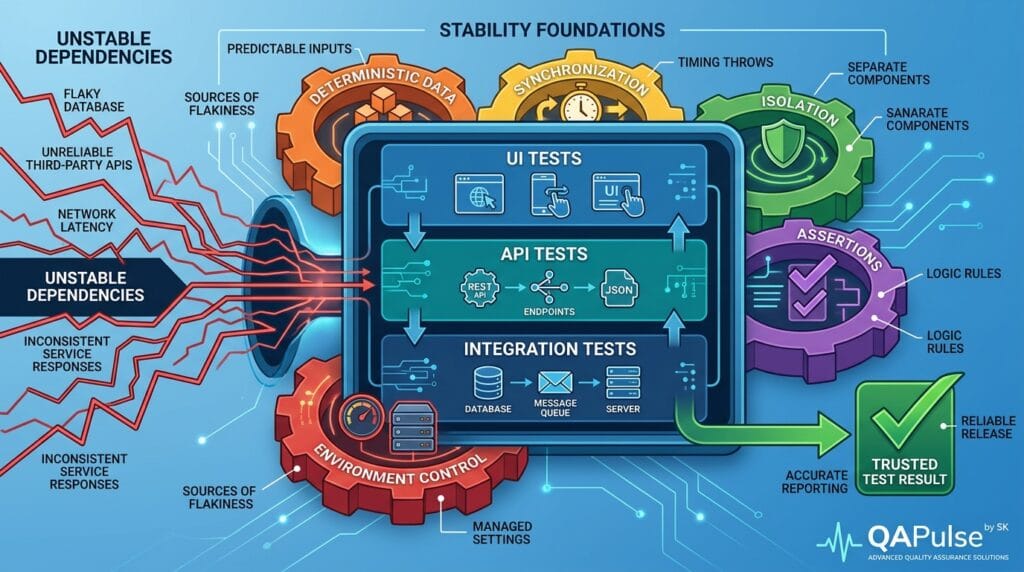
Stable Automated Tests are not created by adding more waits, retries, or assertions. They are engineered through deterministic test data, reliable synchronization, isolated environments, meaningful assertions, and a clear understanding of where instability enters the system.
A test that passes 99 times out of 100 may look impressive on a dashboard, but that single unexplained failure can be more damaging than it appears. When engineers stop trusting automation, they begin rerunning failed tests manually, ignoring red builds, increasing retry counts, and eventually treating the entire automation suite as background noise.
That is the real problem this guide addresses: stable automated tests are not simply tests that pass frequently. They are tests that produce trustworthy results repeatedly under controlled conditions.
The important question is therefore not:
“How can I make this test pass?”
It is:
“How can I make this test produce the same trustworthy result whenever the software behaves the same way?”
That change in thinking separates test scripting from test engineering.
What Makes an Automated Test Stable?
A stable test produces a predictable result when the system under test behaves predictably.
Consider a simple UI test:
await page.goto('/login');

await page.getByLabel('Email').fill('qa@example.com');
await page.getByLabel('Password').fill('Password123');

await page.getByRole('button', { name: 'Sign in' }).click();

await expect(page.getByRole('heading', { name: 'Dashboard' }))
  .toBeVisible();
There is nothing inherently wrong with this test. But its stability depends on several things:
- Is the application ready before the interaction?
- Is the test account available?
- Is the database in the expected state?
- Does another test modify the same account?
- Is the selector tied to stable application semantics?
- Is the backend response deterministic?
- Does the CI environment behave differently from the developer machine?
The test code is only one part of the equation.
A useful way to think about stability is:
Test stability = deterministic inputs + controlled dependencies + reliable synchronization + meaningful assertions + isolated execution
If one of these foundations is weak, your test may become flaky even when the test code looks clean.
The Difference Between a Passing Test and a Stable Test
A passing test tells you what happened during one execution.
A stable test gives you confidence that the same behavior will be detected consistently.
Imagine two automation suites.
| Characteristic | Suite A | Suite B |
|---|---|---|
| Pass rate | 99% | 97% |
| Retries | 3 | 0 |
| Test data | Shared | Isolated |
| Selectors | CSS implementation details | User-facing semantics |
| Synchronization | Fixed sleeps | State-based |
| Failures | Difficult to diagnose | Evidence-rich |
| CI behavior | Environment-dependent | Reproducible |
| Trust level | Low | High |
At first glance, Suite A appears better because its pass rate is higher.
In practice, Suite B may be far more valuable.
Why?
Because a test that fails for a real defect should fail, while a test that fails because an animation took 200 milliseconds longer should not.
This is why a high pass rate alone is not a sufficient stability metric.
Why UI Tests Become Flaky
UI automation is often the first place engineers notice instability because the browser sits on top of many moving components.
A UI test can depend on:
Browser
   ↓
Frontend
   ↓
API
   ↓
Authentication
   ↓
Database
   ↓
External services
The more uncontrolled dependencies involved, the more opportunities exist for nondeterministic behavior.
The Fixed-Wait Trap
One of the most common mistakes is replacing synchronization with sleep.
await page.click('#submit');

await page.waitForTimeout(3000);

await expect(page.locator('.success')).toBeVisible();
This looks simple, but it creates two problems.
If the application needs four seconds, the test fails.
If the application needs 500 milliseconds, the test wastes 2.5 seconds.
A state-based approach is stronger:
await page.getByRole('button', { name: 'Submit' }).click();

await expect(page.getByRole('alert')).toHaveText('Saved successfully');
The test now waits for evidence of the required state instead of guessing how long the application needs.
This principle is fundamental to stable automated tests: synchronize against application state, not arbitrary time.
Stable Selectors Are an Architecture Decision
Selectors are another major source of UI instability.
Compare these approaches:
page.locator('div.container > div:nth-child(2) > button')
and:
page.getByRole('button', { name: 'Save' })
The first selector describes implementation structure.
The second describes user-visible behavior.
If the frontend team changes the DOM hierarchy without changing the functionality, the first selector may break while the second continues to work.
A practical selector hierarchy is:
- Accessible role and accessible name
- Explicit test identifier
- Stable label or semantic attribute
- Stable business identifier
- CSS structure
- XPath based on implementation structure
The goal is not to avoid every selector change. The goal is to reduce unnecessary coupling between tests and implementation details.
API Tests Can Be More Stable Than UI Tests
One strategic improvement is to move suitable validation below the browser layer.
Suppose your UI test creates a customer and then verifies that the customer exists.
You could perform the entire operation through the UI:
Open browser
→ Login
→ Navigate
→ Fill form
→ Submit
→ Wait
→ Search customer
→ Verify customer
Or you could establish the required state through an API:
API creates customer
→ UI opens customer page
→ UI verifies presentation
The second strategy can significantly reduce execution time and remove unnecessary UI dependencies.
For example:
const response = await request.post('/api/customers', {
  data: {
    name: 'Automation Customer',
    email: 'automation@example.com'
  }
});

expect(response.ok()).toBeTruthy();
Then the UI test can focus on what the UI actually needs to prove.
This leads to an important architecture principle:
Test each behavior at the lowest practical layer.
Do not make the browser prove something that an API test can validate faster and more deterministically.
UI vs API vs Integration Testing
The three layers solve different problems.
| Layer | Best for | Typical instability | Strategic role |
|---|---|---|---|
| UI | User journeys and presentation | Timing, selectors, browser state | Smaller critical-path suite |
| API | Business behavior and service contracts | Data and environment dependencies | Broad functional coverage |
| Integration | Component interaction | Databases, queues, services | Dependency confidence |
A mature automation architecture does not attempt to put every test into the UI.
Instead, it distributes coverage intelligently.
For example:
             UI
          /       \
       API       Integration
        \           /
          Unit Tests
A large number of fast lower-level tests can protect business behavior while a smaller UI layer validates critical user journeys.
This is one of the most effective ways to build stable automated tests without sacrificing coverage.
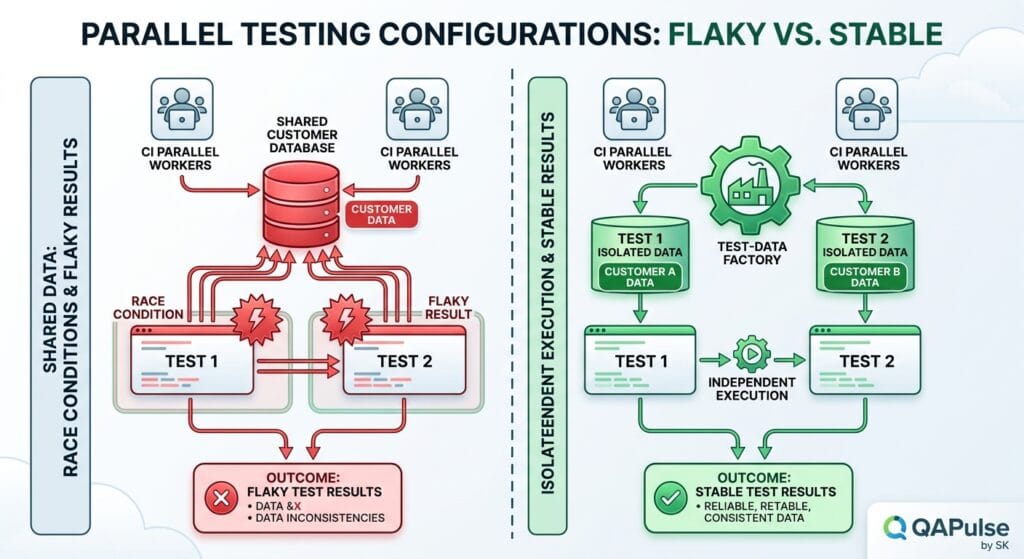
The Test Data Problem
Many unstable tests are actually data-management problems disguised as automation problems.
Consider this scenario:
Test A → updates customer #1001
Test B → deletes customer #1001
Test C → expects customer #1001
Run these tests sequentially and everything might pass.
Run them in parallel and the result becomes unpredictable.
The test itself did not suddenly become broken. Its dependency model was broken.
A better approach is to create isolated data:
const customer = await createCustomer({
  email: `qa-${Date.now()}@example.com`
});
Even better, use a deterministic test-data factory:
const customer = await customerFactory.create({
  status: 'active'
});
Now the test explicitly owns the state it requires.
Shared Data vs Isolated Data
| Approach | Speed | Parallel safety | Debugging | Recommended |
|---|---|---|---|---|
| Shared static records | High | Low | Difficult | No |
| Random data | High | Medium | Difficult | Sometimes |
| Timestamp-based data | High | High | Medium | Good |
| Factory-generated data | High | High | High | Excellent |
| Disposable environment | Medium | Very high | Excellent | Best for critical pipelines |
The strategic goal is not merely creating unique records.
It is creating predictable, explainable, disposable state.
Integration Tests Need Dependency Discipline
Integration tests become unstable when external dependencies are allowed to behave unpredictably.
Imagine an order service communicating with:
Order API
   ↓
Payment Service
   ↓
Inventory Service
   ↓
Message Broker
   ↓
Database
If every test depends on live external systems, a failure could originate anywhere.
Was the order service broken?
Was the payment provider slow?
Did the database connection timeout?
Did the message queue contain stale messages?
The test failure becomes difficult to interpret.
A more controlled strategy is to decide which dependencies should be real and which should be controlled.
| Dependency | Unit Test | Integration Test | E2E |
|---|---|---|---|
| Database | Mock/fake | Real controlled DB | Real |
| Payment provider | Mock | Sandbox/mock | Sandbox |
| Message broker | Mock | Real controlled broker | Real where required |
| Internal API | Mock | Real | Real |
| Browser | No | Usually no | Real |
The correct choice depends on the behavior being tested.
The objective is not “mock everything.”
The objective is:
Control every dependency that does not need to be real for the behavior under test.
Assertions Should Prove Behavior, Not Implementation
A weak test may assert that an element exists:
await expect(page.locator('.order-status')).toBeVisible();
A stronger test validates the expected business state:
await expect(page.getByTestId('order-status'))
  .toHaveText('Confirmed');
For API testing, the same principle applies.
Weak:
expect(response.status()).toBe(200);
Stronger:
expect(response.status()).toBe(200);

const body = await response.json();

expect(body.status).toBe('confirmed');
expect(body.total).toBe(149.99);
expect(body.items).toHaveLength(2);
The 200 assertion proves that the HTTP operation succeeded.
The additional assertions prove that the application behaved correctly.
That distinction is essential when designing stable automated tests because meaningful assertions reduce false confidence.
Avoid the Retry Trap
Retries can be useful for infrastructure-related transient failures.
They are dangerous when used to hide flaky automation.
Consider:
Test fails
   ↓
Retry
   ↓
Passes
   ↓
Pipeline green
The pipeline may look healthy.
But the underlying test remains unstable.
A better model is:
Test fails
   ↓
Capture diagnostics
   ↓
Classify failure
   ↓
Determine root cause
   ↓
Fix instability
Retries should be a safety mechanism, not a stability strategy.
Useful retry candidates may include transient infrastructure failures.
Poor retry candidates include:
- incorrect selectors
- race conditions
- bad test data
- incorrect assertions
- broken application behavior
- hidden dependencies
If retry count keeps increasing, the team should investigate the underlying architecture instead of celebrating a higher pass rate.
A Practical Stability Scorecard
Before calling a test reliable, ask:
| Question | Yes/No |
|---|---|
| Does the test control its required data? | |
| Can it run safely in parallel? | |
| Does it avoid arbitrary sleeps? | |
| Are selectors based on stable semantics? | |
| Are external dependencies controlled? | |
| Does it assert meaningful behavior? | |
| Can failures be diagnosed from artifacts? | |
| Can the test run repeatedly in CI? | |
| Does it avoid unnecessary UI interaction? | |
| Is retry masking an underlying problem? |
If a test receives only six “yes” answers, it should not automatically be considered production-grade automation.
This scorecard can also be applied at suite level.
A stable suite is not simply a collection of individually good tests. The execution environment, test-data model, parallelization strategy, reporting, and dependency architecture must also work together.
A More Strategic Automation Architecture
A reliable automation architecture can be organized around four principles:
1. Put tests at the right layer
Use UI automation for user-facing behavior.
Use API automation for service behavior.
Use integration tests for interactions between real components.
Use unit tests for isolated business logic.
2. Own your test state
Every test should know:
- what data it needs
- who creates that data
- who cleans it up
- whether another test can modify it
- whether it can safely execute concurrently
3. Synchronize on evidence
Do not ask:
“How long should I wait?”
Ask:
“What observable state proves the system is ready?”
4. Design for diagnosis
When a test fails, the engineer should quickly answer:
- What failed?
- Where did it fail?
- What request was sent?
- What response was received?
- What data existed?
- What browser state existed?
- Was the dependency healthy?
- Can the failure be reproduced?
A test that fails clearly is significantly more valuable than a test that fails mysteriously.
The Real Goal of Test Stability
The goal is not to achieve a dashboard containing 100% green results.
The goal is to create an automation system where green means confidence and red means investigation.
That requires a deliberate balance between UI coverage, API coverage, integration coverage, test-data isolation, synchronization, dependency control, assertions, and diagnostics.
When these pieces work together, automation stops being a collection of scripts and becomes an engineering feedback system.
The strongest stable automated tests are therefore not necessarily the longest or most sophisticated tests. They are tests designed around deterministic behavior, appropriate abstraction boundaries, controlled dependencies, and evidence-based validation.
The question every SDET should ask is simple:
If this test fails tomorrow, will I trust the failure?
If the answer is yes, you are building automation that can genuinely support continuous delivery.
Designing Stability Into the Test Architecture
The biggest mistake teams make with stable automated tests is treating stability as a property that can be added after the framework is already built.
It cannot.
Stability needs to influence the architecture from the beginning: how tests create data, how environments are provisioned, how dependencies are controlled, how assertions are designed, and how failures are diagnosed.
A useful architecture looks like this:
                    Test Strategy
                         │
          ┌──────────────┼──────────────┐
          │              │              │
         UI             API        Integration
          │              │              │
          └──────────────┼──────────────┘
                         │
                Test Data Layer
                         │
              Environment Control
                         │
                 CI/CD Execution
                         │
                Evidence & Reports
The important point is that the test framework is only one layer.
If your framework is excellent but your test data is shared, your tests can still become flaky.
If your selectors are excellent but your environment is unpredictable, failures can still occur.
If your API assertions are precise but your external dependencies are uncontrolled, the test result may still be unreliable.
This is why stable automated tests require system-level thinking.
Build a Test Pyramid That Reflects Risk
The traditional testing pyramid remains useful because different test layers have different costs and failure characteristics.
A practical model is:
                    /\
                   /UI\
                  /----\
                 / API  \
                /--------\
               /Integration\
              /------------\
             /     Unit      \
            /----------------\
The lower layers should normally contain more tests because they are faster and easier to isolate.
The upper layer should focus on business-critical journeys rather than attempting to reproduce every possible scenario through a browser.
Consider an e-commerce application.
You might test:
| Scenario | Best layer |
|---|---|
| Calculate discount | Unit |
| Validate order API | API |
| Persist order and inventory transaction | Integration |
| Complete checkout journey | UI |
| Payment provider communication | Integration/API |
| Product page rendering | UI |
A common anti-pattern is testing all six scenarios through the UI.
That creates unnecessary browser execution, duplicated setup, slower feedback, and more opportunities for instability.
A stronger strategy distributes the coverage according to risk.
The result is not fewer tests.
It is stable automated tests with better architectural boundaries.
Use the Lowest Practical Test Layer
Ask this question whenever you create a new automated test:
“Does this behavior actually require a browser?”
If the answer is no, do not automatically create a browser test.
For example, suppose you need to verify that an API rejects an expired token.
A UI implementation might look like:
await page.goto('/login');

await page.getByLabel('Email').fill('user@example.com');
await page.getByLabel('Password').fill('expired-password');

await page.getByRole('button', { name: 'Login' }).click();

await expect(page.getByRole('alert'))
  .toHaveText('Session expired');
The same business behavior may be tested more directly through the API:
const response = await request.get('/api/profile', {
  headers: {
    Authorization: `Bearer ${expiredToken}`
  }
});

expect(response.status()).toBe(401);

const body = await response.json();

expect(body.code).toBe('TOKEN_EXPIRED');
The API test is faster and focuses directly on the service contract.
The UI still needs tests, but it does not need to prove every backend rule.
This distinction is one of the foundations of stable automated tests.
Separate Test Setup From Test Intent
Another source of fragile automation is mixing setup logic with the behavior being validated.
Consider:
test('customer can download invoice', async ({ page }) => {
  await page.goto('/login');

  await page.getByLabel('Email').fill('qa@example.com');
  await page.getByLabel('Password').fill('Password123');
  await page.getByRole('button', { name: 'Login' }).click();

  await page.getByText('Customers').click();
  await page.getByText('Test Customer').click();

  await page.getByText('Invoices').click();
  await page.getByText('Invoice #1001').click();

  await page.getByRole('button', { name: 'Download' }).click();

  // assertion...
});
The actual business intent is buried underneath setup.
A stronger architecture can prepare the customer through an API or fixture:
const customer = await customerFactory.create({
  status: 'active',
  hasInvoice: true
});

await loginAs('customer-manager');

await page.goto(`/customers/${customer.id}`);

await page.getByRole('button', { name: 'Download' }).click();
Now the test spends most of its execution validating the behavior it was created to test.
This approach improves speed, readability, and failure diagnosis simultaneously.
Treat Fixtures as Infrastructure
Fixtures should not become a dumping ground for random setup code.
A well-designed fixture answers a specific question:
“What reusable environment or state does this test require?”
For example:
test.extend({
  authenticatedPage: async ({ page }, use) => {
    await loginAsTestUser(page);
    await use(page);
  }
});
Then:
test('manager can approve an order', async ({ authenticatedPage }) => {
  await authenticatedPage.goto('/orders/123');

  await authenticatedPage
    .getByRole('button', { name: 'Approve' })
    .click();

  await expect(
    authenticatedPage.getByTestId('order-status')
  ).toHaveText('Approved');
});
The fixture owns authentication.
The test owns order approval.
That separation matters.
When setup responsibilities become scattered across individual tests, maintenance becomes difficult and failures become harder to classify.
Design APIs for Testability
Application architecture can directly affect automation stability.
Suppose an API returns:
{
  "id": 7821,
  "status": "processing"
}
but the UI has no reliable way to determine when processing has completed.
The test may resort to polling or arbitrary waiting.
A more testable system might expose an explicit state transition:
{
  "id": 7821,
  "status": "completed",
  "updatedAt": "2026-08-16T12:10:00Z"
}
Now the test can wait for observable business state.
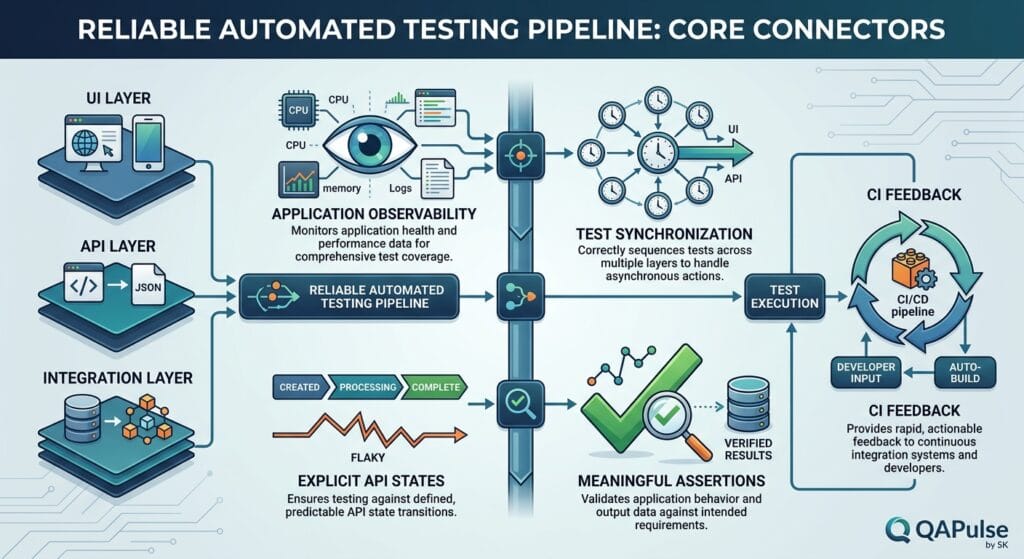
This creates an important relationship:
Application Observability
          ↓
Test Synchronization
          ↓
Reliable Assertions
          ↓
Stable Results
When applications expose meaningful states, automation becomes easier to synchronize.
This is why stable automated tests are not purely a QA concern. Testability is an engineering architecture concern.
Replace Time-Based Synchronization With State-Based Synchronization
A fragile approach:
await page.waitForTimeout(5000);
A better approach:
await expect(
  page.getByTestId('processing-status')
).toHaveText('Completed');
An even stronger API-driven approach may be:
await expect.poll(async () => {
  const response = await request.get(`/api/jobs/${jobId}`);
  const body = await response.json();

  return body.status;
}).toBe('completed');
The difference is subtle but important.
The first approach assumes:
“Five seconds should be enough.”
The second approach says:
“Continue when the application proves that it is ready.”
The second model adapts to different execution environments while remaining tied to actual application behavior.
That is exactly the kind of synchronization stable automated tests need.
Control Randomness Without Destroying Realism
Random test data can improve coverage, but uncontrolled randomness can make failures difficult to reproduce.
This is problematic:
const amount = Math.random() * 1000;
A failure could occur once and disappear forever.
A deterministic approach is:
const testData = {
  amount: 749.50,
  currency: 'USD',
  customerType: 'business'
};
If you genuinely need randomized testing, use a controlled seed:
const seed = process.env.TEST_SEED || 'checkout-001';

const data = generateData(seed);
Now the test can reproduce the same generated values.
The principle is not “never use randomness.”
It is:
Never introduce randomness that you cannot reproduce.
Reproducibility is one of the strongest characteristics of stable automated tests.
Parallel Testing Changes the Rules
A test that passes sequentially may fail when executed in parallel.
Imagine:
Worker 1 → creates user@example.com
Worker 2 → creates user@example.com
Worker 3 → deletes user@example.com
The problem is not the browser.
The problem is shared state.
Parallel execution therefore requires:
- unique test data
- isolated accounts
- independent temporary files
- separate database state where appropriate
- concurrency-safe fixtures
- independent service resources
For example:
const email = `user-${testInfo.workerIndex}-${testInfo.testId}@example.com`;
The exact implementation will depend on your framework, but the architectural principle remains the same.
Before increasing CI parallelism, ask:
“Can every test safely run at the same time?”
If the answer is no, adding more workers may increase failures instead of reducing execution time.
UI, API, and Integration Tests Need Different Stability Strategies
It is tempting to create one universal framework strategy.
That usually creates unnecessary complexity.
Each layer has different risks.
UI stability
Focus on:
- semantic selectors
- state-based waits
- controlled browser state
- minimal navigation
- isolated accounts
- deterministic test data
API stability
Focus on:
- explicit contracts
- deterministic payloads
- meaningful status and body assertions
- independent test data
- authentication control
- schema validation
Integration stability
Focus on:
- controlled dependencies
- reproducible environments
- database isolation
- queue cleanup
- predictable service versions
- dependency health checks
The strategy should therefore look like:
UI
│
├── Stable selectors
├── State synchronization
└── Critical journeys

API
│
├── Contract validation
├── Business assertions
└── Deterministic data

Integration
│
├── Controlled dependencies
├── Environment isolation
└── Reproducible infrastructure
Trying to apply the same technique to all three layers is usually less effective than designing stability around the characteristics of each layer.
Contract Testing Can Reduce Integration Uncertainty
Suppose Service A expects:
{
  "customerId": "123",
  "status": "active"
}
but Service B changes the response to:
{
  "id": "123",
  "state": "active"
}
A broad end-to-end test may discover the problem much later.
Contract testing can identify the incompatibility closer to the source.
For example:
expect(response.body).toMatchObject({
  customerId: expect.any(String),
  status: 'active'
});
The exact contract-testing technology will depend on your architecture, but the principle is universal:
Validate important assumptions at the boundary where they matter.
This reduces the amount of unexpected behavior that reaches expensive UI or end-to-end tests.
Build Failure Diagnostics Into the Framework
A test failure should leave evidence.
For UI automation, useful evidence may include:
Screenshot
Video
Trace
Console logs
Network logs
DOM snapshot
Test data
Environment information
For API automation:
Request URL
HTTP method
Headers
Request body
Response status
Response body
Timing
Correlation ID
For integration tests:
Service logs
Container logs
Database state
Queue messages
Environment versions
Dependency health
A failure without evidence forces engineers to reproduce the problem manually.
A failure with evidence turns investigation into analysis.
This is especially important for stable automated tests because stability is not only about whether tests pass. It is also about whether failures can be understood quickly.
Flakiness Should Be Measured, Not Guessed
Instead of saying:
“The checkout test is flaky.”
Measure it.
A simple stability metric can be:
Flake Rate =
Unexpected Test Failures
------------------------
Total Test Executions
For example:
Unexpected failures = 12
Total executions     = 2,000

Flake rate = 12 / 2,000
           = 0.6%
Track the metric over time.
A useful dashboard can include:
| Metric | Why it matters |
|---|---|
| Pass rate | Overall execution result |
| Flake rate | Stability |
| Retry rate | Hidden instability |
| Mean execution time | Feedback speed |
| Failure recurrence | Root-cause prioritization |
| Failure diagnosis time | Engineering efficiency |
| Test quarantine count | Technical debt |
A suite that has a 99.5% pass rate but a growing retry rate may actually be deteriorating.
Do Not Quarantine Tests Forever
Quarantine can be useful when a test is actively harming the pipeline.
But quarantine should create an engineering task, not become permanent storage.
A useful workflow is:
Failure detected
      ↓
Classify
      ↓
Infrastructure?
Application defect?
Automation defect?
Data problem?
      ↓
Quarantine if necessary
      ↓
Create owner + deadline
      ↓
Fix
      ↓
Restore
      ↓
Monitor
Without ownership and deadlines, quarantined tests gradually become invisible technical debt.
The goal should always be to return the test to the trusted execution path.
Compare Traditional Automation With Stability-First Automation
| Area | Traditional approach | Stability-first approach |
|---|---|---|
| UI synchronization | Fixed waits | Application state |
| Test data | Shared records | Isolated factories |
| API validation | Status codes | Contract + business assertions |
| Integration | Live dependencies everywhere | Controlled dependencies |
| Parallelism | Add workers first | Prove isolation first |
| Failures | Retry | Diagnose |
| Randomness | Uncontrolled | Seeded/reproducible |
| Setup | Repeated inside tests | Purpose-built fixtures |
| Coverage | Mostly UI | Layered by risk |
| Reporting | Pass/fail | Evidence-rich diagnostics |
The stability-first model may require more architectural thinking initially.
But it pays back through:
- fewer false failures
- faster pipelines
- easier debugging
- safer parallelization
- greater developer trust
- lower maintenance cost
A Practical Stability Review Before CI
Before adding an automation suite to a critical CI pipeline, run a controlled experiment.
Execute the same suite repeatedly.
For example:
50 executions
5 parallel workers
Fresh test data
Same application version
Same environment
Then measure:
Passes
Failures
Retries
Unique failure causes
Execution duration
If the suite produces different failures under identical conditions, investigate before scaling it.
You can also intentionally introduce stress:
- increase parallel workers
- restart a dependency
- slow network conditions
- refresh test data
- run tests in a clean environment
- execute repeatedly overnight
This turns stability validation into an engineering experiment rather than an assumption.
The Stability Checklist for SDETs
Use this checklist during framework reviews:
- Tests own or explicitly control their data
- Tests are safe for parallel execution
- UI tests avoid arbitrary sleeps
- API tests validate meaningful business behavior
- Integration dependencies are controlled
- Random data can be reproduced
- Test setup is separated from test intent
- Failures automatically capture useful evidence
- Retry policies do not hide defects
- Flake rate is measured
- Quarantined tests have ownership
- Critical behavior is tested at the appropriate layer
- CI execution is reproducible
- Environment configuration is version controlled
- The suite can explain why a failure occurred
If several answers are “no,” adding more test cases may not be the right investment.
Improving the architecture may deliver considerably more value.
Internal Blog Links
- 50 Playwright Commands Every QA Engineer Should Know
- How to Build a More Reliable Test Automation Architecture
- Test Automation Framework vs Test Suite: The Critical Difference Every Engineer Should Understand
- Test Automation Framework Health: 9 Signs Your Tests Are Lying to You
- RAG Powered Performance Testing: Make k6 Tests Smarter With Real API Behavior
Internal Series Links
- Learn MCP – Zero to Hero
- Learn AI Agents for QA – Zero to Hero
- Playwright Automation – Zero to Hero
- TencentDB Agent Memory: Complete Zero to Hero
- LangGraph: Complete Zero to Hero
- Learn Python – Zero to Hero
- OpenAI Codex: Complete Zero to Hero
- Cursor AI: Complete Zero to Hero
- Claude Code Tutorial: Complete Zero to Hero
- AutoGen: Complete Zero to Hero Guide
- Free QA Resources Built From Real Experience
- QA Glossary: Test Automation Terms Every Engineer Should Know
External Links
- Postman documentation: Postman Learning Center
- Playwright: Playwright documentation
- Cypress: Cypress documentation
- Selenium: Selenium documentation
- pytest: pytest documentation
- Postman: Postman documentation
- Grafana k6: Grafana k6 documentation
- OpenAPI: OpenAPI Specification
- Pact: Pact documentation
- Martin Fowler — Test Pyramid: Martin Fowler: Test Pyramid
People Asked Questions
What are stable automated tests?
Stable automated tests are tests that produce consistent results under the same controlled conditions and fail primarily when the application or environment has a meaningful problem.
How do you make automated tests more stable?
Improve test-data isolation, replace fixed waits with state-based synchronization, control external dependencies, make tests parallel-safe, use deterministic data, and capture sufficient failure evidence.
Why do automated tests become flaky?
Common causes include timing problems, shared test data, unstable environments, external dependencies, race conditions, poor selectors, asynchronous operations, and tests that depend on execution order.
How do you reduce flaky UI tests?
Use reliable selectors, explicit application-state synchronization, isolated test data, controlled authentication state, and strong failure diagnostics instead of arbitrary sleep commands.
Are API tests more stable than UI tests?
API tests are often easier to stabilize because they avoid browser rendering and UI synchronization, but they can still become flaky because of shared data, unstable services, authentication, network dependencies, or asynchronous backend processing.
How should UI, API, and integration tests be divided?
Use each layer according to its purpose. UI tests should validate critical user journeys, API tests should validate service behavior and contracts, and integration tests should verify important interactions between components.
Should flaky tests be retried?
Retries can reduce the immediate impact of environmental failures, but excessive retries can hide genuine instability. A retry should be treated as diagnostic evidence rather than a permanent solution.
How do you measure test stability?
Track metrics such as flake rate, retry rate, pass rate, execution time, recurring failure causes, and time required to diagnose failures.
AEO Optimization
Stable automated tests are automated tests that produce consistent results under controlled conditions and provide trustworthy feedback when application behavior changes.
AI Overview
What makes an automated test stable?
An automated test is stable when repeated executions under equivalent conditions produce consistent results, failures are reproducible, and the test does not depend on arbitrary timing, shared state, or uncontrolled external dependencies.
What is the fastest way to reduce test flakiness?
Start by identifying the dominant source of instability. Measure failures, classify them into synchronization, test data, infrastructure, dependency, and automation problems, then fix the highest-frequency cause instead of blindly adding retries.
What is the difference between a stable test and a passing test?
A passing test only describes one execution. A stable test consistently produces trustworthy results across repeated executions and different valid execution conditions.
Conclusion
Stable automated tests are the result of deliberate engineering, not a lucky combination of reliable scripts.
The strongest automation systems control the variables that can change unexpectedly: test data, timing, dependencies, environments, parallel execution, and external services.
They also make an important distinction between layers.
UI tests should prove user-facing behavior.
API tests should validate service behavior and contracts.
Integration tests should verify that important components work together under controlled conditions.
When those responsibilities are correctly distributed, the automation suite becomes faster, easier to maintain, and more trustworthy.
The real measure of success is not how many tests you have.
It is how much confidence those tests provide.
A green pipeline should mean:
The system behaved as expected, and we have good evidence to trust that result.
A red pipeline should mean:
Something requires investigation, and we have enough evidence to find out what happened.
That is the standard worth pursuing when building stable automated tests.
Final Key Takeaways
- Stable automated tests are an architectural outcome, not simply a scripting technique.
- Use the lowest practical test layer for each behavior instead of pushing everything into UI automation.
- Replace fixed waits with state-based synchronization.
- Keep test data isolated, deterministic, and reproducible.
- Design API tests around business behavior and contracts, not only HTTP status codes.
- Treat integration dependencies as controlled architectural components.
- Design parallel execution around isolation before speed.
- Use retries as a controlled safety mechanism, never as a substitute for fixing flaky automation.
- Capture screenshots, traces, requests, responses, logs, and environment information so failures become diagnosable.
- Measure flake rate, retry rate, execution time, and diagnosis time instead of relying on assumptions.
- Quarantine unstable tests temporarily and assign ownership for restoring them.
- The ultimate goal is not a green dashboard. It is trustworthy engineering feedback.
If an automation suite can repeatedly execute under controlled conditions, detect genuine defects, ignore irrelevant environmental noise, and clearly explain its failures, it has moved beyond being a collection of scripts.
It has become a reliable engineering system.
Continue Learning
Explore more expert articles on Mobile Testing, Backend & API, AI & Agentic, AI Tools, n8n, LangChain, CrewAI, MCP Servers, AI Agents, LlamaIndex, Docker, FastAPI, Playwright, Cypress, Test Automation, DevOps, and Software Engineering at www.skakarh.com.
QAPulse by SK delivers expert release analysis, AI engineering insights, enterprise automation strategies, migration guidance, DevOps best practices, and practical testing knowledge to help software professionals build scalable, intelligent, and production-ready software systems.