QA
QA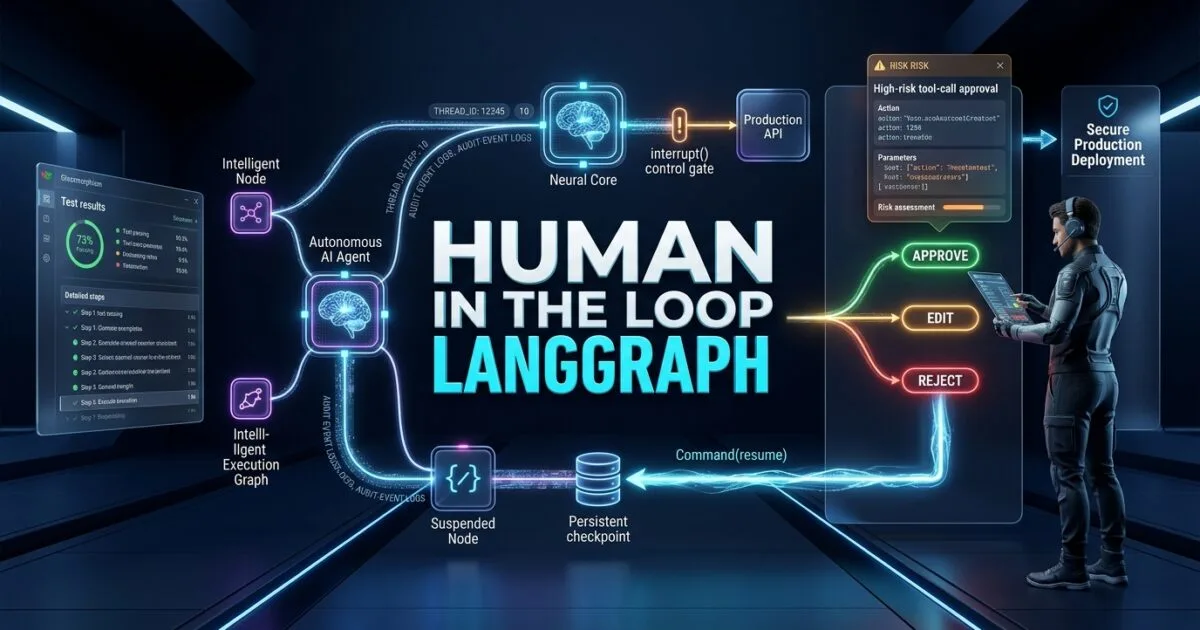
Human in the loop LangGraph is one of the most practical patterns for turning an autonomous AI agent into a controlled production system where humans can review, approve, reject, edit, or redirect agent actions before risky decisions are executed.
For an SDET, this is more than an AI design pattern. It is a quality, governance, and reliability architecture.
An agent that can autonomously call APIs, modify files, execute database queries, trigger deployments, create test cases, or interact with external systems should not necessarily be allowed to execute every action without supervision. LangGraph addresses this by making interruption, persistence, and resumable execution first-class parts of graph-based agent workflows. (Docs by LangChain)
The important distinction is that human-in-the-loop should not mean putting a developer in front of every agent step.
That would simply replace automation with manual work.
A production-grade architecture instead determines where human judgment has the highest value, pauses the graph only at those decision boundaries, preserves the execution state, presents enough evidence for a reviewer to make a decision, and then resumes the workflow with an explicit decision.
Key Architectural Takeaways for SDETs
- Interrupt at decision boundaries: Human review should happen before high-risk or irreversible actions, not randomly throughout the workflow.
- Persist before waiting: A human may respond seconds, hours, or days later, so the graph needs durable state and a stable
thread_id. - Treat approval as testable behavior: Approve, reject, edit, timeout, duplicate submission, stale approval, and reviewer failure all require explicit test coverage.
- Separate agent reasoning from authorization: An LLM proposing an action does not mean the action is authorized to execute.
- Make human decisions observable: Every intervention should produce evidence that can be audited, correlated, and validated.
⚡ Executive Summary: Human-in-the-Loop Is a Control Layer, Not a Chatbox
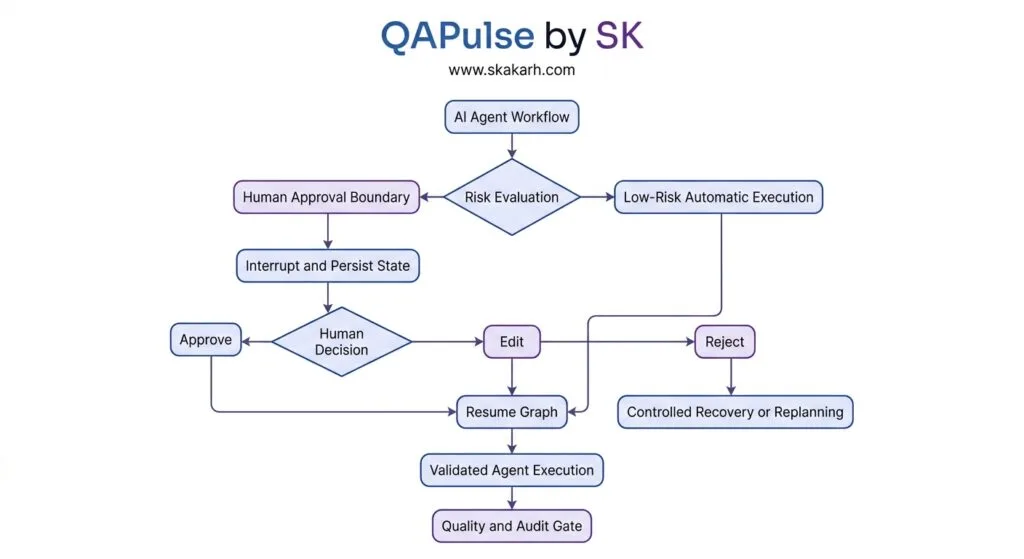
The simplest mental model for human in the loop LangGraph is:
Agent decides what it wants to do
        ↓
Risk policy evaluates the action
        ↓
Low risk ───────────────→ Execute
        ↓
High risk
        ↓
Interrupt
        ↓
Persist graph state
        ↓
Human reviews evidence
        ↓
Approve / Edit / Reject
        ↓
Resume graph
        ↓
Execute the authorized path
LangGraph’s interrupt() function provides a dynamic pause point inside graph execution. The value passed to interrupt() is surfaced to the caller, and execution can later be resumed with Command(resume=...). LangGraph’s persistence layer stores the graph state needed to pause and resume, with thread_id identifying the execution thread. (Docs by LangChain)
This architecture is fundamentally different from using Python’s input() function.
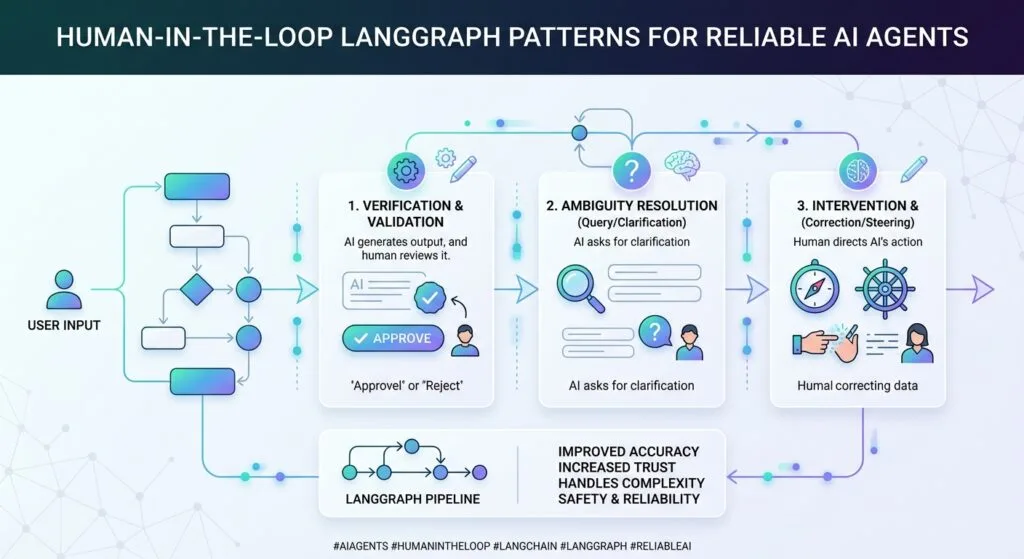
A terminal input() blocks a process waiting for synchronous input. LangGraph’s interrupt model is designed around resumable graph execution, meaning the application can suspend a workflow and allow a human to respond through an external UI or service later. LangChain’s own explanation specifically describes persistence as a foundation for human-in-the-loop workflows because the graph state can be saved while waiting for human intervention. (LangChain Blog)
For SDETs, this creates a new testing surface:
The pause itself must be tested. The state must be tested. The decision must be tested. The resume path must be tested.
The Core Problem: Why Fully Autonomous Agents Need a Human Control Boundary
Autonomous agents are excellent at generating plans and executing multi-step workflows.
That is also exactly what creates risk.
Consider a QA engineering agent that receives:
Investigate the failed payment tests and fix the issue.
The agent might:
- inspect the repository;
- read test failures;
- inspect application logs;
- query a database;
- modify a test;
- modify application code;
- run the regression suite;
- create a pull request;
- trigger CI;
- potentially deploy a fix.
Some of those actions are low risk.
Others are not.
Reading a log file is fundamentally different from deleting production data.
Running a read-only SQL query is different from executing:
DELETE FROM payments WHERE status = 'failed';Creating a draft pull request is different from merging it.
Generating a test case is different from changing a production configuration.
This is why human-in-the-loop architecture should be risk-based.
The Antipattern: Human Approval Everywhere
A naive implementation might pause after every agent action:
Agent
 ↓
Human
 ↓
Agent
 ↓
Human
 ↓
Agent
 ↓
Human
That creates terrible throughput.
The human becomes the bottleneck.
A better design is:
Read Logs ───────────────→ Automatic
Read Repository ─────────→ Automatic
Run Unit Tests ──────────→ Automatic
Generate Test ───────────→ Automatic
Modify Production File ──→ Human Review
Execute Destructive SQL ─→ Human Review
Deploy ──────────────────→ Human Review
The goal is not maximum human involvement.
The goal is maximum useful human judgment at minimum interruption cost.
7 Core Pillars of Human in the Loop LangGraph
1. Human in the Loop LangGraph Starts With a Risk Boundary
The first architectural decision is not how to display an approval button.
It is:
Which actions require human judgment?
A useful policy might look like this:
| Agent Action | Risk | Human Review |
|---|---|---|
| Read source code | Low | No |
| Search logs | Low | No |
| Run unit tests | Low | No |
| Generate test cases | Low | Usually no |
| Run read-only SQL | Medium | Depends |
| Modify test files | Medium | Depends |
| Modify application code | Medium/High | Often |
| Write database records | High | Yes |
| Delete records | Critical | Yes |
| Send external email | High | Yes |
| Deploy production | Critical | Yes |
| Rotate credentials | Critical | Yes |
This is where SDET thinking becomes valuable.
QA engineers already work with risk-based testing.
The same principle should be applied to Agent authorization.
Instead of:
“The Agent needs approval.”
define:
“The Agent needs approval when action X meets risk condition Y.”
That distinction allows automation to remain fast while keeping humans around consequential decisions.
2. interrupt() Creates the Human Decision Boundary
LangGraph provides the interrupt() primitive for dynamically pausing graph execution. It can surface a JSON-serializable value to the caller and later receive the human response when the graph is resumed. (Docs by LangChain)
A minimal Python example looks like this:
from typing import TypedDict

from langgraph.graph import StateGraph, START, END
from langgraph.checkpoint.memory import InMemorySaver
from langgraph.types import interrupt, Command


class State(TypedDict):
    action: str
    approved: bool | None


def request_approval(state: State):
    decision = interrupt({
        "type": "approval",
        "action": state["action"],
        "message": "Approve this action?"
    })

    return {
        "approved": decision
    }


builder = StateGraph(State)

builder.add_node("request_approval", request_approval)

builder.add_edge(START, "request_approval")
builder.add_edge("request_approval", END)

checkpointer = InMemorySaver()

graph = builder.compile(checkpointer=checkpointer)
The important part is not the UI.
It is this boundary:
decision = interrupt(...)The graph stops there.
The human response later becomes the value returned by interrupt() when the graph resumes.
LangGraph documents that an interrupt requires persistence because the graph must retain its state while execution is paused. (Docs by LangChain)
3. Persistence Turns a Pause Into a Production Workflow
A common beginner mistake is to think:
“I can call
interrupt(), so I have human-in-the-loop.”
Not quite.
A production workflow also needs to know where the interrupted execution belongs.
That is where the checkpointer and thread_id become critical.
A typical configuration is:
config = {
    "configurable": {
        "thread_id": "qa-incident-8472"
    }
}
Then:
result = graph.invoke(
    {
        "action": "Deploy payment-service fix"
    },
    config=config
)
When the graph reaches the interrupt, the execution can pause.
Later, the same thread can be resumed:
graph.invoke(
    Command(resume=True),
    config=config
)
The same thread_id is essential because it identifies the persisted graph state that should be resumed. LangGraph’s persistence documentation describes the thread as the identifier for a sequence of checkpoints, and the checkpointer uses that ID to retrieve state. (Docs by LangChain)
For QA, this immediately creates test cases.
Test: Resume the Correct Workflow
Thread A
  ↓
Interrupt
  ↓
Human Decision
  ↓
Resume Thread A
  ↓
Correct State
Then deliberately attempt:
Thread A
  ↓
Interrupt
  ↓
Resume Thread B
The application should not accidentally continue the wrong workflow.
This is a critical multi-user correctness test.
4. Human Decisions Should Be Structured, Not Just Boolean
The simplest approval model is:
Command(resume=True)But production systems frequently need more than yes/no.
For example:
{
    "decision": "edit",
    "reason": "Do not modify production configuration",
    "changes": {
        "environment": "staging"
    }
}
Human review can therefore become a structured authorization event.
A useful decision model is:
APPROVE
   ↓
Execute Proposed Action

EDIT
   ↓
Modify Proposed Action
   ↓
Validate
   ↓
Execute

REJECT
   ↓
Do Not Execute
   ↓
Recover / Replan
Current LangChain human-in-the-loop tooling supports decision types such as approve, edit, and reject, with configurable policies around which decisions are permitted for particular tools. (Docs by LangChain)
For SDETs, this is extremely useful because each branch becomes an explicit test path.
5. Approval Must Include Evidence
A terrible approval UI would say:
Approve database operation?
That gives the reviewer almost no context.
A better interrupt payload might include:
{
    "type": "database_change",
    "operation": "UPDATE",
    "target": "orders",
    "environment": "staging",
    "estimated_rows": 17,
    "query": "...",
    "reason": "Repair test fixture state",
    "risk": "high"
}
Now the reviewer has evidence.
This leads to an important engineering rule:
Never ask humans to approve an opaque Agent action.
The human should know:
- what the Agent wants to do;
- why it wants to do it;
- what resource is affected;
- which environment is affected;
- what the expected impact is;
- what happens after approval.
Human-in-the-loop therefore becomes an evidence presentation problem as much as an orchestration problem.
6. Resume Is Not the Same as Re-Run
This is one of the most important technical details for LangGraph testing.
When a graph resumes from an interrupt, the node containing the interrupt is restarted from the beginning of that node. LangGraph’s documentation explicitly warns that code before the interrupt() call can execute again when the graph resumes. (LangChain Reference Docs)
Consider:
def deploy_node(state):
    create_deployment_record()

    approval = interrupt({
        "action": "deploy"
    })

    deploy_application()

    return state
The dangerous assumption is:
create_deployment_record()runs once.
Depending on the execution/resume design, logic before the interrupt can be re-executed.
That means side effects require careful design.
A safer pattern is to separate preparation from side effects:
def prepare_deployment(state):
    deployment_plan = build_deployment_plan(state)

    approval = interrupt({
        "type": "deployment_approval",
        "plan": deployment_plan
    })

    if approval != "approve":
        return {
            "status": "rejected"
        }

    return {
        "status": "approved",
        "deployment_plan": deployment_plan
    }
Then execute the actual side effect in a controlled subsequent step.
This is classic distributed-systems thinking:
Do not put non-idempotent side effects casually around resumable control flow.
7. Human Intervention Must Be Observable and Testable
The final pillar is observability.
A production Agent system should be able to answer:
- Who approved the action?
- What did they approve?
- When did they approve it?
- What evidence did they see?
- What changed after approval?
- Which Agent thread generated the request?
- Which tool was executed?
- Did execution succeed?
- Was the action rejected?
- Was the approval stale?
- Did the Agent resume successfully?
This is particularly important for QA and regulated environments.
A useful event structure could be:
{
  "event": "human_approval",
  "thread_id": "qa-incident-8472",
  "reviewer_id": "engineer-42",
  "decision": "approve",
  "action": "deploy",
  "environment": "staging",
  "timestamp": "2026-08-22T10:00:00Z"
}
That event becomes test evidence.
It also becomes part of your audit trail.
Building a Production Human-in-the-Loop LangGraph Workflow
Let’s build a simplified QA Agent that analyzes a failed test and proposes a remediation action.
The workflow is:
Test Failure
    ↓
Analyze Failure
    ↓
Generate Remediation
    ↓
Risk Evaluation
    ↓
Human Review
    ↓
Approve / Edit / Reject
    ↓
Execute Remediation
    ↓
Run Regression Test
    ↓
Report Result
Define the State
from typing import TypedDict, Any


class QAState(TypedDict):
    test_name: str
    failure: str
    diagnosis: str
    proposed_action: dict[str, Any]
    human_decision: dict[str, Any] | None
    execution_result: str | None
The state should represent business-relevant workflow information, not simply dump every model response into one giant string.
Analyze the Failure
def analyze_failure(state: QAState):
    failure = state["failure"]

    # In production, this could call an LLM,
    # retrieve logs, inspect traces, or query test artifacts.

    diagnosis = (
        f"Failure analysis for {state['test_name']}: "
        f"{failure}"
    )

    return {
        "diagnosis": diagnosis
    }
Generate a Proposed Action
def propose_action(state: QAState):
    action = {
        "type": "rerun_test_with_updated_fixture",
        "test": state["test_name"],
        "reason": state["diagnosis"],
        "environment": "staging"
    }

    return {
        "proposed_action": action
    }
Ask for Human Review
from langgraph.types import interrupt


def human_review(state: QAState):
    decision = interrupt({
        "type": "qa_remediation_review",
        "test": state["test_name"],
        "diagnosis": state["diagnosis"],
        "proposed_action": state["proposed_action"],
        "message": "Review the proposed remediation."
    })

    return {
        "human_decision": decision
    }
Execute Only After Authorization
def execute_remediation(state: QAState):
    decision = state["human_decision"]

    if not decision:
        return {
            "execution_result": "blocked"
        }

    if decision.get("decision") == "reject":
        return {
            "execution_result": "rejected"
        }

    # Execute the approved or edited action here.
    return {
        "execution_result": "executed"
    }
Compile With Persistence
from langgraph.graph import StateGraph, START, END
from langgraph.checkpoint.memory import InMemorySaver


builder = StateGraph(QAState)

builder.add_node("analyze_failure", analyze_failure)
builder.add_node("propose_action", propose_action)
builder.add_node("human_review", human_review)
builder.add_node("execute_remediation", execute_remediation)

builder.add_edge(START, "analyze_failure")
builder.add_edge("analyze_failure", "propose_action")
builder.add_edge("propose_action", "human_review")
builder.add_edge("human_review", "execute_remediation")
builder.add_edge("execute_remediation", END)

checkpointer = InMemorySaver()

graph = builder.compile(
    checkpointer=checkpointer
)
For development this is sufficient to demonstrate the mechanism.
For production, use a persistent checkpointer appropriate for your deployment architecture rather than treating in-memory persistence as durable infrastructure. LangGraph’s documentation explicitly identifies persistence/checkpointing as the mechanism enabling human review, interruption, recovery, and resumption. (Docs by LangChain)
Resume the Interrupted Agent
Use a stable thread configuration:
config = {
    "configurable": {
        "thread_id": "qa-test-10027"
    }
}
Start the workflow:
result = graph.invoke(
    {
        "test_name": "checkout_payment_success",
        "failure": "Expected HTTP 200 but received HTTP 503",
        "diagnosis": "",
        "proposed_action": {},
        "human_decision": None,
        "execution_result": None
    },
    config=config
)
The workflow reaches:
interrupt(...)and pauses.
The application can now show the reviewer:
Test:
checkout_payment_success

Failure:
HTTP 503

Proposed remediation:
Rerun with updated staging fixture

Risk:
Medium

[Approve] [Edit] [Reject]
If the reviewer approves:
from langgraph.types import Command

graph.invoke(
    Command(
        resume={
            "decision": "approve"
        }
    ),
    config=config
)
The graph resumes from the persisted workflow.
This is the central mechanism behind human in the loop LangGraph.
Testing the Seven Human-in-the-Loop Failure Modes
An SDET should not stop after testing the happy path.
Test 1: Approval
Agent
 ↓
Interrupt
 ↓
Approve
 ↓
Resume
 ↓
Action executes
Expected:
- one approval event;
- one execution;
- correct thread;
- final status successful.
Test 2: Rejection
Agent
 ↓
Interrupt
 ↓
Reject
 ↓
Resume
 ↓
Action NOT executed
The most important assertion is negative:
The dangerous action must not execute.
Test 3: Edit
Agent proposes A
 ↓
Human edits to B
 ↓
Resume
 ↓
B executes
Never assume the system executes exactly what the Agent originally proposed.
Test 4: Duplicate Approval
The reviewer double-clicks Approve.
Your system must not execute the action twice.
This is especially important for:
- payments;
- deployments;
- database writes;
- external API calls;
- ticket creation;
- emails.
Test 5: Stale Approval
Suppose the Agent generated:
Deployment version: 2.4.1The reviewer waits two hours.
Meanwhile:
2.4.1 → 2.4.2The old approval may no longer be valid.
Your system should determine whether the authorization is:
- still valid;
- expired;
- invalidated by state changes;
- required again.
Test 6: Reviewer Timeout
What happens if nobody approves?
Do not leave the workflow in an undefined state.
Define:
Pending
 ↓
Timeout
 ↓
Escalate / Cancel / Reassign
Test 7: Resume After Failure
What happens if the process crashes after approval but before execution?
This is where persistence and idempotency become critical.
The system must be able to determine:
Approved?
Executed?
Partially executed?
Retry safe?
That is not an LLM problem.
It is a distributed workflow problem.
Benchmark Data: Human-in-the-Loop Architecture Trade-Offs
These are architectural trade-offs, not vendor benchmark measurements.
| Architecture | Automation | Human Control | Failure Recovery | Implementation Complexity | Best Use |
|---|---|---|---|---|---|
| Fully autonomous | Very high | Low | Medium | Medium | Low-risk tasks |
| Human approves every step | Low | Very high | Medium | Low | Sensitive prototypes |
| Risk-based HITL | High | High where needed | High | High | Production agents |
| Manual workflow | Low | Very high | High | Low | Highly regulated tasks |
| Static breakpoint workflow | Medium | Medium | Medium | Medium | Development/debugging |
| Interrupt + persistence | High | High | High | High | Production Agent systems |
For most production AI systems, risk-based human-in-the-loop provides the strongest balance.
The objective is not to eliminate autonomy.
It is to make autonomy bounded and observable.
Real-World Edge Cases & Pitfalls
Pitfall 1: Putting Side Effects Before interrupt()
This is one of the easiest mistakes to make.
Avoid:
def dangerous_node(state):
    charge_customer()

    approval = interrupt("Approve?")
The irreversible operation has already happened.
Instead:
def dangerous_node(state):
    approval = interrupt({
        "action": "charge_customer"
    })

    if approval:
        charge_customer()
The authorization boundary must come before the side effect.
Pitfall 2: Assuming thread_id Is Just Metadata
It is not.
The thread identifies the persisted execution state used for resumption. (Docs by LangChain)
Treat it as a workflow identity.
Bad:
thread_id = str(uuid.uuid4())on every resume request.
Good:
thread_id = existing_workflow_idretrieved from the application’s durable workflow record.
Pitfall 3: Ignoring Re-Execution Semantics
Because the node containing an interrupt resumes from the beginning of that node, pre-interrupt logic can run again. (LangChain Reference Docs)
That means idempotency matters.
If you must perform preparation before an interrupt, make it safe to repeat.
Pitfall 4: Using In-Memory Persistence in Production
This:
InMemorySaver()is excellent for learning and tests.
It is not automatically an appropriate production durability strategy.
A human may approve an action long after the original process has disappeared.
Your production architecture needs persistence that survives the lifecycle of the worker handling the request. LangGraph’s persistence documentation specifically connects checkpointers with human-in-the-loop workflows and fault tolerance. (Docs by LangChain)
Pitfall 5: Treating Human Approval as Authorization Without Identity
A button click is not enough.
The system should know:
Who approved?
What did they approve?
Which version?
Which environment?
When?
Under which policy?
Otherwise you have a UI interaction, not a reliable authorization record.
Comparison Matrix: Human-in-the-Loop Strategies
| Strategy | Human Control | Agent Autonomy | Best For | Main Risk |
|---|---|---|---|---|
| Approve every action | Maximum | Low | Highly sensitive workflows | Human bottleneck |
| Approve only dangerous tools | High | High | Production agents | Requires risk policy |
| Approve only production actions | High | High | DevOps/QA agents | Environment classification |
| Edit before execution | Very high | Medium | Code/data modification | Complex review UX |
| Reject and replan | High | High | Investigative agents | Requires recovery logic |
| Time-based approval | Medium | High | Routine operations | Stale approvals |
| Fully autonomous | Low | Maximum | Low-risk tasks | Unbounded Agent actions |
The most robust architecture is usually a combination:
Low-risk action
→ Automatic

Medium-risk action
→ Conditional review

High-risk action
→ Mandatory approval

Critical action
→ Approval + policy + authorization + audit
Production Best-Practice Checklist
- Define risk boundaries before adding interrupts.
- Use
interrupt()for dynamic human decision points. - Persist graph state with a production-grade checkpointer.
- Use stable
thread_idvalues for resumable workflows. - Keep irreversible side effects after authorization.
- Design pre-interrupt logic to tolerate re-execution.
- Support structured approve/edit/reject decisions where required.
- Present evidence rather than opaque approval requests.
- Prevent duplicate execution after repeated approval events.
- Expire or invalidate stale approvals.
- Test reviewer timeout and reassignment.
- Record reviewer identity and decision context.
- Test recovery when the Agent crashes after approval.
- Separate Agent recommendation from authorization.
- Treat human intervention as a first-class testable workflow state.
Conclusion: Human-in-the-Loop Makes Agent Autonomy Testable
Human in the loop LangGraph is not simply about stopping an Agent and asking a person a question.
It is about designing an explicit control boundary between what an Agent can recommend and what an Agent is authorized to execute.
LangGraph’s combination of interrupt(), Command(resume=...), persistence, and thread-based state makes this pattern suitable for workflows where execution may pause and later continue after human review. (Docs by LangChain)
For SDETs, that creates a much richer quality model.
You are no longer testing only:
Input → Agent → OutputYou are testing:
Input
 ↓
Agent Reasoning
 ↓
Risk Classification
 ↓
Human Decision
 ↓
Persisted State
 ↓
Resume
 ↓
Authorized Action
 ↓
Validation
 ↓
Audit Evidence
That is a fundamentally different testing problem.
The most important lesson is simple:
Do not add humans everywhere. Add humans where judgment matters.
A production Agent should remain autonomous for low-risk work while creating a reliable, observable, and resumable human control point for consequential decisions.
That is where human in the loop LangGraph moves beyond a demo pattern and becomes a genuine production architecture.
Internal Blog Links
- LangGraph: Understanding Stateful AI Agent Workflows and Graph-Based Orchestration
- LangGraph State Management: Understanding the Foundation of Stateful AI Applications
- LangGraph Nodes: Understanding the Building Blocks of AI Workflows
- LangGraph Checkpointing: Building Fault-Tolerant and Persistent AI Workflows
- LangGraph Human in the Loop: Building AI Workflows That Collaborate with People
- LangGraph Multi-Agent Systems: Building AI Teams That Solve Complex Problems
- LangGraph Conditional Edges: Building Dynamic AI Agent Workflows
- LangGraph Subgraphs: Building Modular and Reusable AI Workflows
Internal Series Links
- Learn MCP – Zero to Hero
- Learn AI Agents for QA – Zero to Hero
- Playwright Automation – Zero to Hero
- TencentDB Agent Memory: Complete Zero to Hero
- LangGraph: Complete Zero to Hero
- Learn Python – Zero to Hero
- OpenAI Codex: Complete Zero to Hero
- Cursor AI: Complete Zero to Hero
- Claude Code Tutorial: Complete Zero to Hero
- AutoGen: Complete Zero to Hero Guide
- Free QA Resources Built From Real Experience
- QA Glossary: Test Automation Terms Every Engineer Should Know
External Links
- LangGraph Interrupts — Official Documentation — Core documentation for
interrupt(), persistence, payloads, and resuming graph execution. - LangGraph Persistence — Official Documentation — Checkpoints, threads, fault tolerance, and persistence architecture.
- LangGraph Human-in-the-Loop — Official LangChain Documentation — Approval, editing, rejection, and configurable human review patterns.
- LangGraph Human-in-the-Loop Frontend Guide — Approval-card and frontend integration patterns for interrupt-based workflows.
- LangGraph `interrupt` Reference — API-level behavior and resume semantics.
- LangGraph `Command` Resume Reference — Official reference for providing resume values after interruptions.
- LangChain: Building Human-in-the-Loop Agents with LangGraph — Background on why persistence and interrupts are central to production HITL workflows.
AI Overview & Answer Engine Optimisation
Human in the loop LangGraph uses
interrupt()to pause an Agent at a decision point, persist its graph state, surface the proposed action to a human, and resume execution withCommand(resume=...)after approval, rejection, or editing. This enables controlled Agent autonomy without requiring humans to supervise every low-risk action.
Key Architectural Rules:
- Use risk-based intervention rather than approving every Agent action.
- Persist interrupted graph state with a production-grade checkpointer.
- Resume using the same stable
thread_id. - Place human authorization before irreversible side effects.
- Design interrupt-containing nodes for safe re-execution.
- Test approve, reject, edit, timeout, duplicate, stale, and recovery paths.
- Treat human decisions as auditable workflow events.
People Asked Questions
Q1: What is human in the loop LangGraph?
Human in the loop LangGraph is an architecture where a LangGraph-based Agent can pause at a defined decision point, persist its current state, request human input, and resume execution based on the human’s decision. LangGraph’s interrupt() and Command(resume=...) primitives provide the core mechanism. (Docs by LangChain)
Q2: How does LangGraph pause an Agent for human approval?
A graph node calls interrupt() with a value containing the information the human needs to review. Execution pauses and the interrupt payload is surfaced to the caller. After the human responds, the application resumes the same graph execution using Command(resume=...). (Docs by LangChain)
Q3: Does human-in-the-loop require LangGraph persistence?
For resumable interrupt-based workflows, persistence is essential because the graph needs to retain its state while waiting for human intervention. A checkpointer stores the graph state, while thread_id identifies the workflow state that should be resumed. (Docs by LangChain)
Q4: What can a human do after a LangGraph interrupt?
Depending on the application’s decision model, the human can approve an action, reject it, or modify the proposed action before execution. LangChain’s current human-in-the-loop tooling explicitly supports configurable approve, edit, and reject decisions. (Docs by LangChain)
Q5: Why should SDETs test LangGraph interrupts?
An interrupt creates multiple new workflow states: pending review, approved, rejected, edited, timed out, resumed, and potentially failed during recovery. Each state can introduce defects involving duplicate execution, stale approvals, incorrect thread state, authorization failures, or lost workflow context.
Q6: Can LangGraph human approval wait for hours or days?
Yes. LangGraph’s interrupt model is designed around persisted state, allowing execution to pause while waiting for external human input rather than requiring the same synchronous process interaction to remain active. (GitHub)
Q7: What is the biggest mistake when implementing human-in-the-loop LangGraph?
The biggest mistake is placing irreversible side effects before the approval boundary or failing to account for node re-execution when an interrupt resumes. Production workflows should keep authorization before the side effect and make relevant operations idempotent. (LangChain Reference Docs)
Continue Learning
Explore more expert articles on Mobile Testing, Backend & API, AI & Agentic, AI Tools, n8n, LangChain, CrewAI, MCP Servers, AI Agents, LlamaIndex, Docker, FastAPI, Playwright, Cypress, Test Automation, DevOps, and Software Engineering at www.skakarh.com.
QAPulse by SK delivers expert release analysis, AI engineering insights, enterprise automation strategies, migration guidance, DevOps best practices, and practical testing knowledge to help software professionals build scalable, intelligent, and production-ready software systems.