QA
QA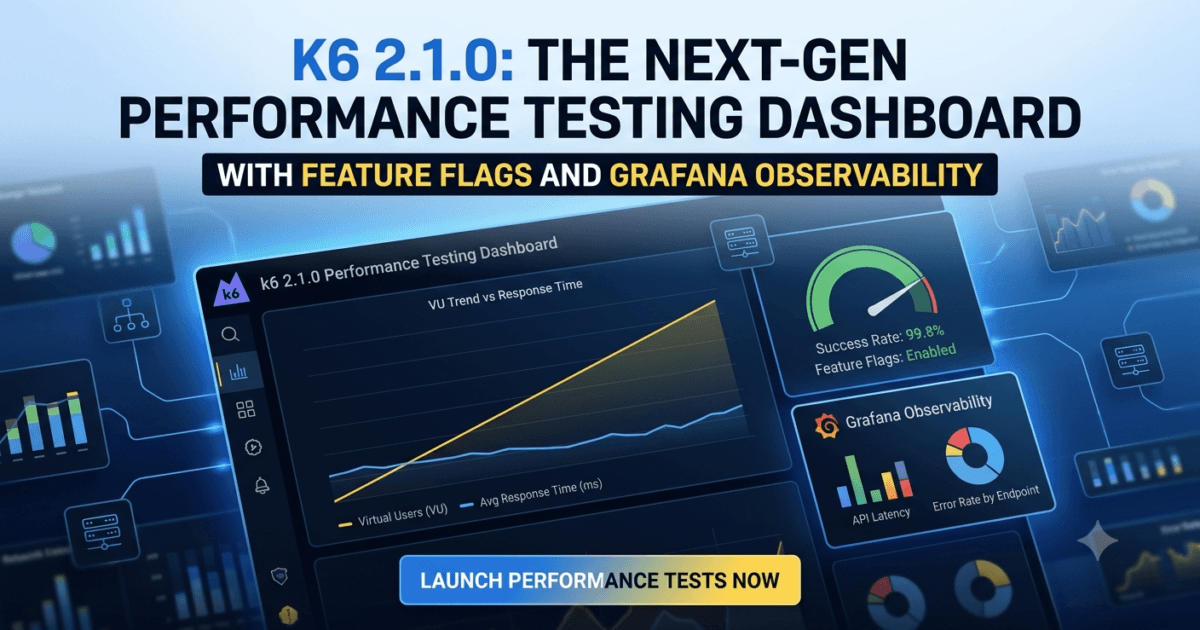
k6 2.1.0 Released: A Significant Step Forward for Modern Performance Testing
Performance testing has evolved far beyond generating virtual users and measuring response times. Today’s QA engineers are expected to validate cloud-native applications, microservices, AI-powered systems, distributed APIs, and highly scalable platforms where observability and accurate performance metrics are just as important as load generation itself.
That evolution is exactly what k6 2.1.0 represents.
Rather than focusing solely on new load testing capabilities, this release introduces architectural improvements that make the framework more extensible, observable, and enterprise-ready. The introduction of a feature flag system, experimental native histograms, browser proxy enhancements, and improved Grafana Cloud integration demonstrates that the k6 team is investing in the long-term future of performance engineering.
For QA engineers, SDETs, DevOps professionals, and Site Reliability Engineers (SREs), these improvements provide greater flexibility for experimentation while keeping production environments stable.
Perhaps the most encouraging aspect of this release is that there are no breaking changes, allowing teams to adopt the new capabilities with minimal migration effort.
What’s New in k6 2.1.0?
The official release introduces several important enhancements designed for modern performance engineering workflows.
Key additions include:
- A new feature flag system for safely introducing experimental capabilities.
- Experimental native histograms for more accurate trend metric collection.
- Browser context-level proxy configuration.
- Improved extension discovery for custom k6 binaries.
- A new k6 cloud test list command for Grafana Cloud users.
- Various developer experience improvements.
Unlike many releases that simply introduce additional commands, version 2.1.0 lays the foundation for future innovation by enabling experimental features without affecting stable production environments.
Release Highlights
| Area | Enhancement | Why It Matters |
|---|---|---|
| Feature Flags | New --features framework | Safe experimentation with upcoming capabilities |
| Native Histograms | Experimental performance metrics | More accurate latency analysis |
| Browser Testing | Context-level proxy support | Improved browser-based performance testing |
| Grafana Cloud | New cloud test management command | Easier cloud workflow automation |
| Extension Ecosystem | Better extension discovery | Improved maintainability for custom binaries |
| Compatibility | No breaking changes | Low-risk upgrade for production teams |
Feature Flags Introduce a Safer Innovation Model
One of the most significant additions in k6 2.1.0 is the introduction of a dedicated feature flag system.
Rather than immediately exposing experimental functionality to every user, new capabilities can now be enabled selectively using:
--featuresK6_FEATURESenvironment variablek6 featuresdiscovery command
This approach allows engineering teams to evaluate upcoming functionality without affecting existing test suites.
From a QA perspective, this is a major improvement.
Performance testing environments often support multiple applications, shared CI/CD pipelines, and critical release validation processes. Experimental functionality should never introduce instability into these environments.
Feature flags solve this challenge by allowing teams to evaluate new capabilities in isolated environments before wider adoption.
This also creates cleaner upgrade paths because organizations can gradually adopt experimental features instead of waiting for large framework changes.
Experimental Native Histograms Improve Performance Observability
The first capability delivered through the new feature flag system is experimental native histograms for trend metrics.
Although the term may sound highly technical, the practical benefit is straightforward.
Performance engineers rely heavily on trend metrics such as:
- Response times
- Request duration
- API latency
- Percentile calculations
- Throughput analysis
Traditional metric aggregation sometimes sacrifices detail when handling massive datasets.
Native histograms improve how these metrics are represented, enabling richer statistical analysis while reducing storage overhead in compatible observability platforms.
For teams already using Grafana, this enhancement opens the door to more accurate latency visualization and better long-term performance analysis.
While the feature remains experimental, it represents the future direction of observability within the k6 ecosystem.
Browser Proxy Support Expands Testing Flexibility
Browser-based performance testing continues to gain importance as modern applications rely heavily on JavaScript execution, client-side rendering, and API-driven user interfaces.
Version 2.1.0 introduces context-level proxy configuration for browser contexts.
This enhancement enables testers to configure different proxy settings for individual browser contexts rather than relying solely on global configurations.
For enterprise testing environments, this creates several practical advantages:
- Simulating regional network conditions.
- Testing applications behind corporate proxies.
- Validating security gateways.
- Executing geographically distributed browser tests.
- Isolating browser traffic during debugging.
This flexibility is especially valuable for organizations performing end-to-end testing across multiple environments or validating applications deployed behind enterprise networking infrastructure.
Better Grafana Cloud Integration for Enterprise Teams
Organizations using Grafana Cloud k6 receive another practical enhancement through the introduction of the new:
k6 cloud test list
command.
Managing cloud-based load tests becomes significantly easier because engineers can now retrieve available performance tests directly from the command line.
The command supports:
- Human-readable output
- JSON output for automation
- Project selection via CLI
- Environment variable configuration
- Default project resolution
For DevOps and QA teams building automated CI/CD pipelines, this improvement simplifies cloud automation and makes scripting much easier.
Instead of manually navigating dashboards, engineers can integrate cloud test discovery directly into deployment workflows, reporting systems, and release validation pipelines.
What k6 2.1.0 Means for QA Engineers
The features introduced in k6 2.1.0 reflect an important shift in how performance testing tools are evolving. Instead of focusing only on generating virtual users, modern performance engineering platforms are becoming deeply integrated with observability, cloud infrastructure, browser automation, and enterprise DevOps workflows.
For QA engineers, this means performance testing is no longer an isolated activity performed just before production deployment. It has become a continuous engineering discipline that spans development, CI/CD pipelines, production monitoring, and capacity planning.
The addition of feature flags gives teams a safer way to evaluate upcoming capabilities without introducing unnecessary risk into production test suites. At the same time, native histograms improve the quality of performance metrics available for analysis, enabling more accurate investigation of latency trends and bottlenecks.
Organizations already using Grafana Cloud will also benefit from improved CLI capabilities that simplify cloud-based load test management and automation.
Overall, k6 2.1.0 continues to strengthen the framework as a production-ready performance testing platform rather than simply a load generation tool.
Regression Testing Checklist Before Upgrading
Although there are no breaking changes in this release, every upgrade should still follow a structured validation process.
Before deploying k6 2.1.0 into production environments, QA teams should verify:
- Existing load test scripts execute successfully.
- Threshold validations produce expected results.
- Browser-based performance tests continue working.
- Grafana dashboards receive metrics correctly.
- Cloud execution pipelines complete successfully.
- Custom extensions remain compatible.
- Existing CI/CD integrations continue functioning.
- Performance reports remain consistent across versions.
- Experimental features remain disabled unless intentionally enabled.
- Team documentation reflects any new workflow changes.
For enterprise organizations, testing should include both local execution and cloud-based performance pipelines to ensure complete compatibility.
Enterprise Impact of k6 2.1.0
One of the biggest strengths of this release is that it prepares organizations for future innovation without forcing immediate adoption.
The new feature flag system allows engineering teams to experiment with upcoming capabilities while maintaining stable production environments. This reduces upgrade risk and enables gradual adoption of new functionality as it matures.
Similarly, the native histogram implementation demonstrates the growing importance of observability in performance engineering. Modern QA teams increasingly analyze latency distributions, percentile behaviour, and long-running performance trends instead of relying solely on average response times.
For organizations building microservices, cloud-native platforms, AI applications, or distributed APIs, these improvements contribute to more accurate performance analysis and better operational visibility.
Should You Upgrade to k6 2.1.0?
Yes.
This release is recommended for most organizations because it introduces valuable new capabilities while maintaining full backward compatibility.
The absence of breaking changes makes upgrading relatively low risk, and the new feature flag architecture provides flexibility for teams that want to evaluate experimental functionality without affecting existing test suites.
Teams using Grafana Cloud, browser-based performance testing, or custom k6 extensions will benefit the most from this update.
A recommended upgrade strategy is:
- Upgrade development environments.
- Execute existing performance regression suites.
- Validate Grafana integrations.
- Verify browser-based load tests.
- Evaluate experimental features only in non-production environments.
- Roll out gradually to production pipelines.
How to Upgrade
Install or Upgrade k6
# macOS
brew upgrade k6

# Windows
choco upgrade k6

# Linux
sudo apt update
sudo apt install k6
Verify Installed Version
k6 version
If you use Docker, pull the latest official image before rerunning your performance test suites.
Internal Links
- Day 4: How Playwright Works Behind the Scenes: Complete Architecture Guide for Beginners
- Day 6: Build Your First MCP Server in Python: A Production-Ready Guide for Beginners
- Day 3: Your First Playwright Test: Understanding Every Line Before You Write Code
Official Resources
- Official Release Notes: https://github.com/grafana/k6/releases/tag/v2.1.0
- Official Documentation: https://grafana.com/docs/k6/latest
Final Verdict
k6 2.1.0 is one of the most meaningful performance testing releases in recent months because it strengthens the platform’s long-term architecture rather than focusing solely on incremental features.
The introduction of feature flags establishes a safer innovation model, native histograms move k6 closer to modern observability practices, browser proxy enhancements increase testing flexibility, and Grafana Cloud improvements streamline enterprise automation workflows.
For QA engineers and SDETs, these enhancements improve the reliability, scalability, and maintainability of performance testing environments without introducing breaking changes.
If your organization relies on k6 for API performance testing, browser load testing, cloud-native applications, or CI/CD performance validation, upgrading to k6 2.1.0 is strongly recommended after completing your standard regression testing process.
Frequently Asked Questions
Does k6 2.1.0 introduce breaking changes?
No. The official release notes state that there are no breaking changes, making this a low-risk upgrade for existing projects.
What is the biggest feature in k6 2.1.0?
The introduction of the new feature flag system is the most significant architectural enhancement, allowing teams to safely experiment with future capabilities such as native histograms.
Should production teams enable experimental features?
Not immediately. Experimental features should first be validated in development or staging environments before being considered for production workloads.
Is k6 2.1.0 worth upgrading?
Yes. The release improves extensibility, observability, browser testing, and Grafana Cloud integration while maintaining backward compatibility.
k6 2.1.0 Released: Key Takeaways
Although k6 2.1.0 does not introduce disruptive changes, it delivers several improvements that position the framework for future growth. The new feature flag system gives engineering teams greater control over adopting experimental capabilities, while native histograms lay the groundwork for more precise performance analysis. Browser proxy support expands testing flexibility for enterprise environments, and enhanced Grafana Cloud commands simplify cloud-based workflow automation.
For QA engineers, the release offers immediate operational benefits without requiring significant migration effort. Since there are no breaking changes, most organizations can upgrade confidently after validating their existing performance suites. Teams that prioritize scalable performance testing, observability, and continuous delivery should consider k6 2.1.0 a recommended maintenance upgrade that strengthens both current workflows and future testing capabilities.
Continue Learning
Explore more expert articles on k6, Playwright, Selenium, FastAPI, PyTest, MCP, Agentic AI, LangChain, AI Testing, Performance Testing, and Software Engineering at www.skakarh.com.
QAPulse by SK delivers practical release analysis, migration guidance, performance engineering insights, and enterprise testing strategies to help QA professionals stay ahead of the rapidly evolving software engineering landscape.