QA
QA
TencentDB Agent Memory Search solves a different problem from automatic memory recall: instead of waiting for the system to decide what context to inject, an Agent can deliberately search its stored memories for a specific fact, preference, event, instruction, or project context.
If a user asks, “Which testing framework did we choose for the checkout project?”, returning five unrelated memories is not a memory problem—it is a retrieval-quality problem. The engineering objective is to turn an ambiguous natural-language request into a small, relevant, bounded set of memories that the Agent can actually use.
TencentDB Agent Memory currently exposes active memory-search capabilities for structured L1 memories and conversation history. Its Gateway maps /search/memories to structured L1 memory search and /search/conversations to L0 conversation search, while the Agent-facing tdai_memory_search tool supports query, limit, memory type, and scene filters. (GitHub)
The Problem: Why Naive Memory Search Fails in Production
A naive Agent implementation often treats memory as a single search box:
User question
    ↓
Search everything
    ↓
Return top results
    ↓
Send everything to LLM
That looks simple, but it creates three predictable problems.
First, retrieval precision drops as memory grows. A developer may have hundreds or thousands of memories containing similar words such as “Playwright,” “API,” “CI,” or “testing.” Keyword overlap alone cannot reliably identify the memory that answers the current question.
Second, excessive results increase context consumption. A memory system can technically retrieve relevant records while still producing a poor Agent response because too much surrounding material competes for the model’s attention.
Third, different types of memory answer different questions. A user preference, a past event, and an explicit instruction should not necessarily be searched or interpreted in exactly the same way.
TencentDB Agent Memory addresses this by exposing structured memory search alongside conversation search. The current Agent tool distinguishes persona, episodic, and instruction memory types and also supports an optional scene filter. (GitHub)
The Cost of Searching Everything
Consider a QA automation Agent with this memory collection:
M01: User prefers Playwright for web automation.
M02: Checkout project uses Playwright with TypeScript.
M03: User previously evaluated Cypress.
M04: Playwright CI pipeline runs on GitHub Actions.
M05: User prefers API tests to run before UI tests.
M06: Checkout API uses REST.
M07: Previous checkout defect involved a payment timeout.
M08: User prefers concise test reports.
Now ask:
"What automation framework did we choose for checkout?"A broad search might return:
M01
M03
M04
M08
M02
The correct answer is M02.
The problem is not that M01, M03, or M04 are false. They are simply less specific to the question.
A useful retrieval pipeline therefore looks like:
Natural-language query
        ↓
Query interpretation
        ↓
Memory-type selection
        ↓
Search
        ↓
Relevance ranking
        ↓
Result limit
        ↓
Context construction
        ↓
LLM
This distinction becomes critical when the Agent moves from demonstration workloads to production.
Bad Search Code
A common anti-pattern is to retrieve a large number of records and let the LLM figure everything out:
// Anti-pattern: retrieve too much information and delegate
// the entire filtering problem to the language model.

const memories = await searchMemory({
  query: userMessage,
  limit: 50,
});

const prompt = `
User request:
${userMessage}

All potentially relevant memories:
${JSON.stringify(memories)}

Answer the user.
`;
There are several problems here:
- The retrieval boundary is too broad.
- The Agent receives potentially irrelevant records.
- Prompt size grows with the memory store.
- Search quality becomes difficult to measure.
- The model becomes responsible for filtering noise that the retrieval layer should have removed.
A better design makes retrieval itself responsible for producing a high-quality candidate set.
Before-and-After Engineering Impact
Assume a test Agent performs 1,000 memory searches during an evaluation run.
A deliberately conservative example might look like this:
| Metric | Broad retrieval | Targeted retrieval |
|---|---|---|
| Results requested | 20 | 5 |
| Average useful results | 3 | 3 |
| Irrelevant results | 17 | 2 |
| Approx. context passed | 12,000 chars | 4,000 chars |
| Manual debugging effort | High | Lower |
| Retrieval behavior | Hard to reason about | Easier to evaluate |
The important metric is not simply the number of retrieved records.
The better question is:
How many retrieved records are actually useful for answering the current request?
That is retrieval precision.
A production memory system should therefore measure at least:
Search latency
Result count
Relevant-result count
Irrelevant-result count
Empty-result rate
Search strategy
Memory type
Scene
The repository’s current search implementation logs information such as result count, strategy, and elapsed time for the Agent-facing memory search tool, which provides useful observability for this kind of evaluation. (GitHub)
The Solution: How TencentDB Agent Memory Search Works
The core idea is simple:
Search structured memories when you need reusable facts, and search conversation history when you need the original dialogue.
The distinction matters.
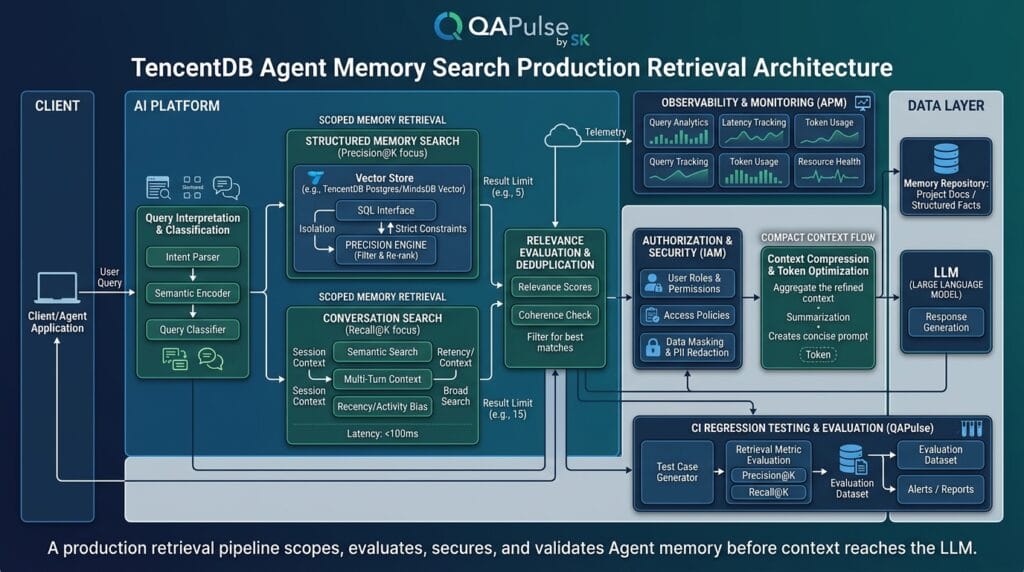
TencentDB Agent Memory separates memory into layers. Its documented architecture describes L0 conversation data, L1 atomic memories, L2 scenarios, and L3 persona/profile information. L1 is especially important for targeted memory search because it represents structured, reusable facts extracted from previous interactions. (GitHub)
The search path can therefore be conceptualized as:
                     User question
                           │
                 ┌─────────┴─────────┐
                 │                   │
           Structured fact       Original dialogue
                 │                   │
              L1 search            L0 search
                 │                   │
                 └─────────┬─────────┘
                           │
                    Relevant context
                           │
                           ▼
                         Agent
This gives developers an important decision point.
If the user asks:
"What testing framework do I prefer?"structured memory is usually the better starting point.
If the user asks:
"What exactly did I say about the checkout timeout last Tuesday?"conversation search may be more appropriate because the original wording and surrounding dialogue matter.
The current Gateway exposes these as separate endpoints:
POST /search/memories
POST /search/conversations
and the Agent-facing tools similarly distinguish structured memory search from conversation search. (GitHub)
Search Structured Memory Intentionally
The Agent-facing memory search accepts:
query
limit
type
scene
with memory types including:
persona
episodic
instruction
and a default maximum result count of five, with a documented maximum of twenty for the tool. (GitHub)
A focused TypeScript search wrapper can therefore look like this:
import process from "node:process";

type MemoryType = "persona" | "episodic" | "instruction";

interface MemorySearchRequest {
  query: string;
  limit?: number;
  type?: MemoryType;
  scene?: string;
}

interface MemorySearchResponse {
  total: number;
  strategy: string;
  text: string;
  items?: Array<{
    content: string;
    type?: MemoryType;
    scene?: string;
    score?: number;
  }>;
}

async function searchStructuredMemory(
  request: MemorySearchRequest,
): Promise<MemorySearchResponse> {
  const endpoint =
    process.env.TDAI_MEMORY_GATEWAY_URL ?? "http://127.0.0.1:8420";

  const apiKey = process.env.TDAI_GATEWAY_API_KEY;

  const limit = Math.min(Math.max(request.limit ?? 5, 1), 20);

  const response = await fetch(`${endpoint}/search/memories`, {
    method: "POST",
    headers: {
      "Content-Type": "application/json",
      ...(apiKey
        ? { Authorization: `Bearer ${apiKey}` }
        : {}),
    },
    body: JSON.stringify({
      query: request.query.trim(),
      limit,
      ...(request.type ? { type: request.type } : {}),
      ...(request.scene ? { scene: request.scene } : {}),
    }),
    signal: AbortSignal.timeout(5_000),
  });

  if (!response.ok) {
    const body = await response.text();

    throw new Error(
      `Memory search failed: HTTP ${response.status} ${body}`,
    );
  }

  return (await response.json()) as MemorySearchResponse;
}

const result = await searchStructuredMemory({
  query: "checkout automation framework",
  limit: 5,
  type: "episodic",
  scene: "checkout-project",
});

console.log(result.items ?? []);
The important engineering characteristics are not just syntax.
The wrapper:
- bounds the result count;
- trims the query;
- reads the Gateway URL from configuration;
- does not hard-code a secret;
- supports Bearer authentication;
- applies a timeout;
- validates the HTTP status;
- allows memory-type filtering;
- allows scene-level narrowing.
The current Gateway documentation identifies /search/memories as the L1 structured-memory search endpoint and documents query, limit, type, and scene as its search inputs. (GitHub)
For a production Agent, those boundaries are much more valuable than a one-line fetch() call.
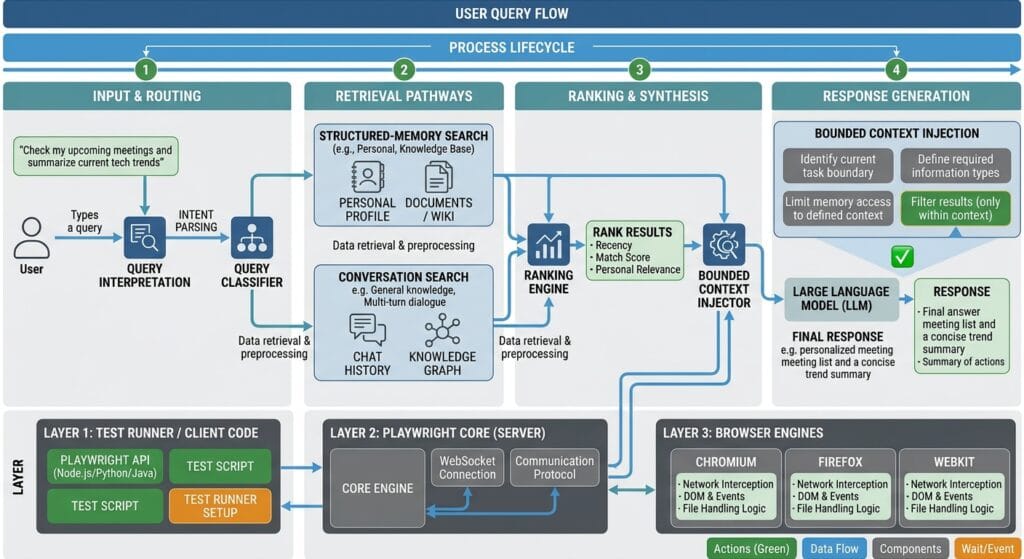
Choose the Search Target Before Searching
One of the strongest improvements you can make is to stop treating every query as a generic memory query.
Use a decision model:
Does the user want a reusable fact?
        │
       Yes
        ↓
   Search L1 memory

Does the user want an old conversation?
        │
       Yes
        ↓
   Search L0 conversation

Does the request concern
user identity/preferences?
        │
       Yes
        ↓
   Consider persona memory

Does it concern an explicit rule?
        │
       Yes
        ↓
   Consider instruction memory
For example:
Question:
"What coding style does the user prefer?"
→ persona

Question:
"What happened during the failed deployment?"
→ episodic

Question:
"Never generate Cypress examples unless requested."
→ instruction

Question:
"What exactly did the user say about the failed build?"
→ conversation search
This is more strategic than simply increasing limit.
Search quality starts before the database query.
Advanced Search Patterns for Real-World Agents
A production Agent rarely operates in a clean single-user, single-project environment. QA automation teams commonly have multiple projects, multiple roles, multiple environments, and parallel CI executions.
That creates several edge cases that directly affect memory search quality.
Edge Case: Search Scope and Memory Isolation
Memory contamination is one of the most dangerous failure modes.
Imagine:
Agent A → Mobile automation
Agent B → Backend API testing
Agent C → Frontend E2E testing
Now imagine all three agents searching the same memory domain.
A query such as:
"timeout configuration"could match:
Mobile network timeout
API request timeout
Playwright navigation timeout
Database connection timeout
A semantically plausible result can still be operationally wrong.
This is why isolation metadata matters.
The newer MemoryCore architecture documents stronger multi-tenant and session-aware data-plane APIs, including team, agent, user, and session identity boundaries. Its v3 design requires explicit team_id, agent_id, and user_id, with session_id used for stricter L0/L1 isolation. (GitHub)
That is a crucial architectural distinction from simply adding more search terms.
Edge Case: Parallel QA and Fullstack Workflows
Suppose a CI pipeline runs:
PR #481
 ├── API tests
 ├── Playwright tests
 ├── accessibility tests
 └── performance tests
All jobs may use the same Agent infrastructure.
If memory is not properly scoped, a Playwright failure could retrieve a performance-testing memory because both contain the term “timeout.”
A safer design carries execution identity into the memory layer:
interface SearchContext {
  teamId: string;
  agentId: string;
  userId: string;
  sessionId: string;
  scene?: string;
}

function buildSearchQuery(
  question: string,
  context: SearchContext,
): {
  query: string;
  scene?: string;
} {
  return {
    query: question.trim(),
    scene: context.scene,
  };
}

const context: SearchContext = {
  teamId: "qa-platform",
  agentId: "playwright-reviewer",
  userId: "qa-engineer",
  sessionId: "pr-481-playwright",
  scene: "checkout-e2e",
};

const search = buildSearchQuery(
  "Which timeout setting caused the checkout test failure?",
  context,
);

console.log(search);
The identifiers above illustrate the structure rather than claiming they are actual credentials or production identities.
The principle is what matters:
Query
+
Identity
+
Session
+
Scene
=
Controlled retrieval scope
This becomes particularly important for enterprise Agents where multiple users and multiple Agents share infrastructure.
Edge Case: Search Quality in CI/CD
CI introduces another problem: deterministic evaluation.
A human can inspect a result and say:
“That memory looks relevant.”
A CI pipeline needs something measurable.
Create a retrieval evaluation dataset:
[
  {
    "query": "checkout automation framework",
    "expectedMemory": "checkout uses Playwright with TypeScript"
  },
  {
    "query": "API test execution order",
    "expectedMemory": "API tests run before UI tests"
  },
  {
    "query": "payment timeout incident",
    "expectedMemory": "payment service timed out during checkout"
  }
]
Then execute the search repeatedly.
interface EvaluationCase {
  query: string;
  expectedMemory: string;
}

function normalize(value: string): string {
  return value
    .toLowerCase()
    .replace(/\s+/g, " ")
    .trim();
}

function containsExpectedMemory(
  resultText: string,
  expectedMemory: string,
): boolean {
  return normalize(resultText).includes(normalize(expectedMemory));
}

async function evaluateSearch(
  cases: EvaluationCase[],
): Promise<void> {
  let passed = 0;

  for (const testCase of cases) {
    const result = await searchStructuredMemory({
      query: testCase.query,
      limit: 5,
    });

    const text = result.items
      ?.map((item) => item.content)
      .join("\n") ?? "";

    const success = containsExpectedMemory(
      text,
      testCase.expectedMemory,
    );

    console.log(
      `${success ? "PASS" : "FAIL"}: ${testCase.query}`,
    );

    if (success) {
      passed += 1;
    }
  }

  console.log(
    `Retrieval accuracy: ${passed}/${cases.length}`,
  );
}
This is not a complete semantic retrieval benchmark, but it demonstrates the right engineering direction.
Instead of asking:
“Does memory search seem good?”
you can ask:
“Did the expected memory appear in the top five results for 95% of our evaluation queries?”
That is an SDET-friendly approach to Agent memory.
Architectural Comparison & Best Practice Matrix
There are several ways an Agent can obtain historical context.
| Approach | Performance | Complexity | Recommended For | Risk Level |
|---|---|---|---|---|
| Entire conversation in prompt | Low at scale | Low initially | Small experiments | High |
| Keyword-only search | High | Low | Exact terms and identifiers | Medium |
| Embedding search | Medium–High | Medium | Semantic queries | Medium |
| Hybrid retrieval | High when tuned | Medium | Mixed technical/conversational data | Low–Medium |
| Structured L1 search | High for reusable facts | Medium | Agent memory | Low–Medium |
| Raw conversation search | Medium | Medium | Historical dialogue | Medium |
| Unbounded multi-source retrieval | Poor at scale | High | Rare investigative workflows | High |
The golden rule is:
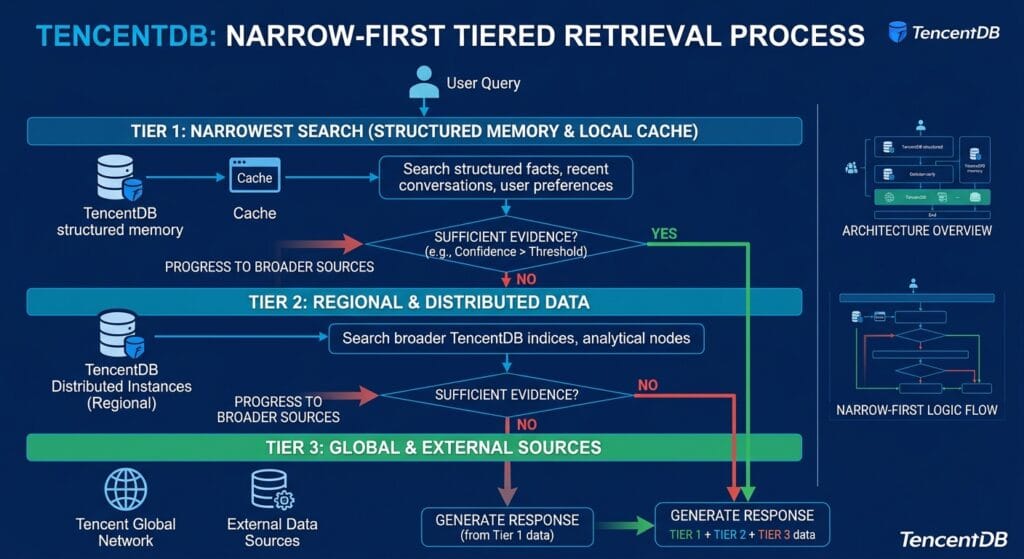
Search the smallest memory scope that can answer the question, then expand only when the evidence is insufficient.
That rule prevents a surprisingly large number of Agent-memory problems.
For example:
First attempt
→ Search structured L1 memory

No useful result
→ Search conversation history

Still insufficient
→ Search broader project knowledge
This is better than:
Search everything
→ dump everything into context
→ ask LLM to decide
The former treats retrieval as an engineering subsystem.
The latter treats retrieval as prompt decoration.
Production Checklist & Engineering Validation
Before deploying a memory-search feature, validate these areas:
- Query quality: normalize and classify user questions before searching.
- Scope: separate user, Agent, team, project, and session context where supported by the deployed API version.
- Result limits: start with a small bounded result set rather than retrieving everything.
- Search type: distinguish structured memory from historical conversation search.
- Failure handling: enforce timeouts and handle empty results explicitly.
- Evaluation: maintain representative queries and expected results in CI.
- Observability: record latency, result count, strategy, and failure rate without logging sensitive memory contents unnecessarily.
For the broader learning path, connect this article contextually with the earlier TencentDB Agent Memory architecture, memory storage, retrieval design, L0–L3 memory layers, SDK, setup, and configuration articles. Those links should explain why the search layer behaves the way it does rather than simply creating a chain of unrelated URLs.
The current TencentDB Agent Memory project also provides official TypeScript and Python SDKs for the broader Memory service, while the Gateway exposes search operations for agents that need direct retrieval capabilities. The project’s newer releases have evolved from the original OpenClaw-focused plugin toward a standalone Memory service with official SDKs and stricter isolation capabilities. (GitHub)
For QA Automation Engineers, the key takeaway is to treat retrieval as something that can be tested, measured, isolated, and regression-checked.
For Fullstack Developers, the key takeaway is to keep memory retrieval behind a clear application boundary rather than scattering search calls throughout Agent business logic.
A good abstraction looks like:
Agent
  │
  ▼
MemoryService
  │
  ├── classify query
  ├── select search scope
  ├── execute bounded search
  ├── validate result
  └── return compact context
           │
           ▼
        LLM
That boundary gives the application somewhere to add ranking policies, access controls, observability, caching, retries, and evaluation without rewriting the Agent itself.
Image prompt for this section: Create a professional 16:9 engineering workflow diagram showing an AI Agent calling a dedicated memory-search service, with query classification, scope selection, bounded retrieval, evaluation, observability, and context injection before the LLM. Include QA automation and CI/CD elements, QAPulse by SK branding, no day labels, no series labels, no fake UI.
Image ALT: TencentDB Agent Memory Search production workflow with scoped retrieval and CI evaluation
Production Validation: Turn Memory Search Into a Testable System
A production memory layer should not be judged only by whether it returns something. The useful question is whether the returned context is correct, sufficiently relevant, isolated to the right user or Agent, and delivered quickly enough for the application to use it.
That changes how an engineering team validates TencentDB Agent Memory Search. Instead of manually asking an Agent a few questions and deciding that the feature “works,” treat retrieval like any other production dependency: define acceptance criteria, create representative test data, measure outcomes, and protect the behavior with automated regression tests.
For QA Automation Engineers, this is particularly important because memory retrieval introduces a new class of failures:
Correct query
    ↓
Wrong memory
    ↓
Correct-looking Agent answer
    ↓
Silent functional defect
The most dangerous failures are not always obvious errors. A memory can be syntactically valid, semantically plausible, and still be the wrong memory.
Build a Retrieval Evaluation Dataset
Start with real questions your Agent is expected to answer.
For example, a software-engineering Agent might have these memories:
User prefers Playwright for browser automation.

The checkout project uses Playwright with TypeScript.

API tests execute before browser tests in the checkout pipeline.

The payment service experienced a timeout during a previous release.

The user prefers concise CI failure reports.
Create evaluation cases around those memories:
interface RetrievalCase {
  name: string;
  query: string;
  expectedContent: string;
}

const retrievalCases: RetrievalCase[] = [
  {
    name: "framework preference",
    query: "Which browser automation framework does the user prefer?",
    expectedContent: "Playwright",
  },
  {
    name: "project framework",
    query: "Which framework does the checkout project use?",
    expectedContent: "Playwright with TypeScript",
  },
  {
    name: "pipeline ordering",
    query: "Which tests run before browser tests?",
    expectedContent: "API tests",
  },
  {
    name: "historical incident",
    query: "What caused the previous checkout incident?",
    expectedContent: "payment service timeout",
  },
];
This dataset should contain both easy and difficult queries.
Easy:
"Which framework does checkout use?"Ambiguous:
"What framework are we using?"Semantic:
"How do we automate browser coverage?"Contextual:
"What did we decide for the checkout UI tests?"The objective is not to make every query identical to the stored memory. Real users do not speak in database-record language.
A strong evaluation dataset therefore deliberately includes:
- synonyms;
- incomplete questions;
- conversational wording;
- project-specific terminology;
- ambiguous terms;
- short queries;
- long queries;
- questions with irrelevant surrounding information.
That gives the retrieval layer a realistic workload.
Measure Precision Instead of Counting Results
Suppose five memories are returned:
Result 1 → relevant
Result 2 → relevant
Result 3 → irrelevant
Result 4 → irrelevant
Result 5 → irrelevant
The search technically succeeded.
But its precision is:
Relevant results / Total retrieved results

2 / 5 = 40%
That is much more informative than saying:
"Search returned five memories successfully."For a simple evaluation framework:
interface SearchResult {
  content: string;
}

function calculatePrecision(
  results: SearchResult[],
  expectedTerms: string[],
): number {
  if (results.length === 0) {
    return 0;
  }

  const relevant = results.filter((result) => {
    const content = result.content.toLowerCase();

    return expectedTerms.some((term) =>
      content.includes(term.toLowerCase()),
    );
  });

  return relevant.length / results.length;
}
For production evaluation, replace simple substring matching with a stronger relevance judge or manually curated labels. The important principle is that the team should establish a measurable definition of “good retrieval.”
You can track:
| Metric | What it tells you |
|---|---|
| Precision@K | How much of the retrieved context is useful |
| Recall@K | Whether the required memory appears |
| MRR | How high the first useful result appears |
| Empty-result rate | How often retrieval finds nothing |
| Latency | How quickly retrieval completes |
| Context size | How much information reaches the LLM |
| Wrong-scope rate | How often another user’s/project’s memory appears |
For an Agent memory system, Recall@K and Precision@K should be evaluated together.
High recall with terrible precision means the correct memory is present but buried beneath noise.
High precision with poor recall means the search is clean but frequently misses the answer.
The production target should depend on the application’s risk profile.
A customer-support Agent may tolerate broader retrieval.
A code-generation Agent modifying production infrastructure should use much stricter context controls.
Retrieval Strategy: Search Less Before You Search More
One of the strongest patterns for memory systems is progressive retrieval.
Do not immediately search every available source.
Instead:
User question
     ↓
Determine information type
     ↓
Search narrow memory scope
     ↓
Evaluate results
     ↓
Enough evidence?
   /       \
 Yes       No
 ↓          ↓
Answer    Broaden search
This avoids the common mistake of solving low-quality retrieval by simply increasing limit.
Consider:
async function retrieveAgentContext(
  question: string,
) {
  const focused = await searchStructuredMemory({
    query: question,
    limit: 5,
  });

  if (focused.items?.length) {
    return focused.items;
  }

  // A real implementation could then search
  // conversation history or another approved source.
  return [];
}
The important architectural idea is that retrieval policy belongs in an application service, not inside every Agent tool invocation.
That gives you a single place to implement:
query normalization
scope selection
memory-type selection
result limits
timeouts
retry policy
logging
evaluation
fallback behavior
For larger systems, this abstraction becomes extremely valuable.
A typical structure could be:
src/
├── agents/
│   └── qaAgent.ts
├── memory/
│   ├── memoryClient.ts
│   ├── memoryPolicy.ts
│   ├── memorySearch.ts
│   └── memoryEvaluator.ts
├── config/
│   └── environment.ts
└── tests/
    └── memory/
        ├── retrieval.spec.ts
        └── isolation.spec.ts
The Agent should not need to understand HTTP endpoints.
It should ask:
const context = await memoryService.findRelevantContext({
  query: userQuestion,
  scene: "checkout-e2e",
});
The memory service owns the implementation.
That separation makes the Agent easier to test and allows the storage or retrieval implementation to evolve independently.
Memory Search vs Conversation Search
A common architectural mistake is assuming that structured memories and conversations are interchangeable.
They are not.
Structured memory is optimized around reusable information.
Conversation history is optimized around historical interaction context.
Consider this question:
“What browser framework does the checkout project use?”
A structured memory might contain:
Checkout project uses Playwright with TypeScript.That is ideal.
Now consider:
“Why did we reject Cypress during the discussion?”
That may require conversation history because the answer could depend on the reasoning surrounding a decision.
The distinction can be represented as:
| Requirement | Structured memory | Conversation search |
|---|---|---|
| User preference | Excellent | Possible |
| Explicit instruction | Excellent | Possible |
| Stable project fact | Excellent | Possible |
| Historical wording | Limited | Excellent |
| Decision reasoning | Limited | Excellent |
| Long discussion context | Poor fit | Excellent |
| Compact Agent context | Excellent | More expensive |
| Exact conversational evidence | Limited | Excellent |
A useful rule is:
Use memory for what the Agent should remember; use conversation search for what the Agent needs to reconstruct.
That distinction prevents unnecessary context expansion.
When Hybrid Retrieval Makes Sense
Some questions genuinely need both.
For example:
“What did we decide about Playwright, and why?”
The first part may be answered from structured memory:
Checkout uses Playwright with TypeScript.The second part may require conversation evidence:
The team selected Playwright because it provided
the required browser and API testing capabilities
with a unified TypeScript workflow.
A hybrid retrieval policy could therefore be:
interface ContextCandidate {
  source: "memory" | "conversation";
  content: string;
}

async function getDecisionContext(
  query: string,
): Promise<ContextCandidate[]> {
  const memories = await searchStructuredMemory({
    query,
    limit: 5,
  });

  if (memories.items?.length) {
    return memories.items.map((item) => ({
      source: "memory",
      content: item.content,
    }));
  }

  return [];
}
The example deliberately keeps the first search narrow.
In a full implementation, the fallback could invoke a conversation-search client when structured memory does not provide enough evidence.
This design also gives you a measurable fallback rate.
If 90% of questions require conversation fallback, your structured memory extraction or indexing strategy may need improvement.
If only 5% require fallback, the structured-memory layer is probably doing its intended job effectively for that workload.
Search Quality Compared With Other Retrieval Approaches
TencentDB Agent Memory Search should not be treated as a universal replacement for every retrieval technology.
Different data types require different retrieval strategies.
| Retrieval approach | Best strength | Weakness | Typical use |
|---|---|---|---|
| Exact keyword | Deterministic matching | Weak semantics | IDs, error codes |
| SQL filtering | Precise structured queries | Requires schema knowledge | Business data |
| Vector search | Semantic similarity | Can return plausible noise | Documents |
| Full-text search | Text relevance | Limited semantic understanding | Documentation |
| Structured Agent memory | Reusable Agent context | Depends on memory extraction | Preferences/facts |
| Conversation retrieval | Historical context | Larger context footprint | Previous discussions |
| Hybrid retrieval | Broad coverage | More complexity | Enterprise Agents |
This is why an Agent architecture should not blindly route every question through one retrieval mechanism.
Imagine a developer asks:
"What was HTTP error 429 in build 842?"A deterministic database query may be superior.
But:
"What approach do I usually prefer for API automation?"is a memory problem.
And:
"Why did we choose the current API architecture?"may require conversation or documentation retrieval.
The retrieval system should therefore classify the information need, not merely the text.
Protect Against Retrieval Security Failures
Memory retrieval also introduces security concerns.
A search result can be technically relevant but unauthorized.
Imagine:
User A
   ↓
"What payment configuration did the team use?"
   ↓
Search
   ↓
Memory belonging to User B
That is not a ranking defect.
It is an authorization defect.
Therefore, access control must happen before or as part of retrieval, depending on the deployed TencentDB Agent Memory architecture and API version.
Never implement authorization by asking the LLM:
"Only use memories belonging to the current user."That is not a security boundary.
Instead, identity and scope should be represented by application-controlled parameters and enforced by the memory service.
The newer MemoryCore architecture specifically emphasizes explicit multi-tenant identity fields such as team, Agent, and user identifiers, with session identity available for tighter isolation. (github.com)
That architectural approach is significantly safer than relying exclusively on prompt instructions.
A production retrieval test should include negative cases:
Given:
User A owns memory X.
User B owns memory Y.

When:
User A searches for information matching Y.

Then:
Y must not appear in the result set.
This belongs in CI, not just in a manual security review.
Observability: Know Why Retrieval Failed
A memory system becomes difficult to operate when the only available metric is:
search succeeded = trueYou need enough telemetry to understand the retrieval path.
Useful fields include:
{
  "operation": "memory_search",
  "latency_ms": 83,
  "result_count": 4,
  "limit": 5,
  "memory_type": "episodic",
  "scene": "checkout-e2e",
  "strategy": "hybrid"
}
Avoid logging raw sensitive memory content by default.
Instead, log metadata that helps diagnose the system.
For example:
function recordSearchMetrics(
  startedAt: number,
  resultCount: number,
  limit: number,
): void {
  const latencyMs = Date.now() - startedAt;

  console.info("memory_search", {
    latencyMs,
    resultCount,
    limit,
  });
}
The official project implementation similarly exposes search-related observability around result count, strategy, and elapsed time. (github.com)
This gives engineers the ability to identify patterns such as:
Latency increased after deployment
Result count frequently equals zero
One scene returns too many memories
A particular query type has poor recall
Without telemetry, these issues become anecdotal.
With telemetry, they become engineering problems that can be investigated.
Build an SDET-Grade Retrieval Test Suite
A memory feature deserves the same discipline as an API client or UI automation framework.
Create tests for:
Functional retrieval
Empty results
Ambiguous queries
Result limits
Memory-type filtering
Scene filtering
Timeouts
Authentication failures
Isolation
Concurrent searches
Regression cases
A Playwright-style API test could look like:
import { test, expect } from "@playwright/test";

test.describe("Agent memory retrieval", () => {
  test("returns relevant checkout memory", async ({ request }) => {
    const response = await request.post(
      "/search/memories",
      {
        data: {
          query: "checkout automation framework",
          limit: 5,
          type: "episodic",
          scene: "checkout-e2e",
        },
      },
    );

    expect(response.ok()).toBeTruthy();

    const body = await response.json();

    expect(body.total).toBeGreaterThan(0);

    const content = JSON.stringify(body.items);

    expect(content.toLowerCase()).toContain("playwright");
  });

  test("honors the configured result limit", async ({ request }) => {
    const response = await request.post(
      "/search/memories",
      {
        data: {
          query: "automation",
          limit: 3,
        },
      },
    );

    expect(response.ok()).toBeTruthy();

    const body = await response.json();

    expect(body.items.length).toBeLessThanOrEqual(3);
  });
});
The exact endpoint and authentication setup should match the version and deployment model of your TencentDB Agent Memory installation.
The testing principle is portable:
Search request
    ↓
Contract validation
    ↓
Result validation
    ↓
Relevance validation
    ↓
Security validation
That makes memory retrieval part of your quality engineering system rather than an opaque AI capability.
People Asked Questions
What does TencentDB Agent Memory Search do?
TencentDB Agent Memory Search retrieves relevant stored Agent memories from the memory system so an Agent can use previously captured context instead of relying exclusively on the current conversation. The current Agent-facing implementation supports query, result limit, memory type, and scene parameters for structured-memory retrieval. (github.com)
What is the difference between memory search and conversation search?
Memory search targets structured, reusable memories, while conversation search targets historical dialogue. Use structured memory for facts, preferences, and instructions; use conversation retrieval when the exact discussion or surrounding context matters.
How many memories should an Agent retrieve?
There is no universal number. Start with a small bounded result set and evaluate Precision@K and Recall@K against representative queries. The current Agent-facing tool documents a default limit of five and a maximum of twenty. (github.com)
How can I test memory retrieval as an SDET?
Build a retrieval dataset containing realistic queries and expected memories, then automate tests for relevance, empty results, limits, latency, isolation, and regressions. Treat retrieval quality as a measurable system property rather than evaluating it only through manual conversations.
AEO Optimization
What is TencentDB Agent Memory Search?
It is the retrieval capability used by TencentDB Agent Memory to find relevant stored Agent memories based on a query, with supported controls for result limits, memory type, and scene filtering.
How does TencentDB Agent Memory Search work?
A query is passed to the memory retrieval layer, which searches structured memories and returns relevant records. Agents can separately search conversation history when the required context is tied to previous dialogue.
What is the difference between memory search and conversation search?
Memory search targets structured long-term memories, while conversation search retrieves historical dialogue and individual messages.
How many results should Agent memory search return?
Start with a small bounded result set and tune it using retrieval evaluation metrics. The current Agent-facing implementation documents a default limit of five and a maximum of twenty.
How do you test Agent memory retrieval?
Use representative queries with expected memories and automate relevance, recall, result limits, latency, security isolation, and regression testing in CI.
Internal Blog Links
- What Is TencentDB Agent Memory? A Practical Guide to AI Agent Memory
- TencentDB Agent Memory Architecture: How Persistent AI Memory Actually Works
- TencentDB Agent Memory Storage: How Short Term and Long Term Memories Are Stored
- TencentDB Memory Retrieval Design: How AI Agents Find the Right Context
- Building TencentDB Agent Memory Layers: L0 to L3 Explained
- TencentDB Agent Memory SDK: Build Persistent Memory Into Your AI Agent
- TencentDB Agent Memory Setup: Configure Your First Working Environment
- TencentDB Agent Memory Configuration: Essential Settings Explained
Internal Series Links
- Learn MCP – Zero to Hero
- Learn AI Agents for QA – Zero to Hero
- Playwright Automation – Zero to Hero
- TencentDB Agent Memory: Complete Zero to Hero
- LangGraph: Complete Zero to Hero
- Learn Python – Zero to Hero
- OpenAI Codex: Complete Zero to Hero
- Cursor AI: Complete Zero to Hero
- Claude Code Tutorial: Complete Zero to Hero
- AutoGen: Complete Zero to Hero Guide
- Free QA Resources Built From Real Experience
- QA Glossary: Test Automation Terms Every Engineer Should Know
External Links
- Official TencentDB Agent Memory repository: TencentDB Agent Memory GitHub repository
- Official Installation Guide: TencentDB Agent Memory installation guide
- Official Deployment Documentation: TencentDB Agent Memory deployment documentation
- Official Development Requirements: TencentDB Agent Memory contributing guide
- TencentDB Agent Memory GitHub: TencentDB Agent Memory GitHub repository
- Tencent Cloud Vector Database: Tencent Cloud Vector Database documentation
- Tencent Cloud Documentation: Tencent Cloud documentation
Conclusion
The difficult part of Agent memory is not storing another piece of information. The difficult part is retrieving the right information at the right time without polluting the Agent’s context.
TencentDB Agent Memory Search provides the retrieval layer needed to make structured memory useful to an Agent, but production quality depends on how that capability is integrated. Small result limits, explicit scope, memory-type selection, progressive retrieval, observability, and automated evaluation turn a basic search endpoint into a reliable engineering component.
The strongest architecture is not:
User → Search Everything → LLMIt is:
User
 ↓
Understand information need
 ↓
Select appropriate memory scope
 ↓
Perform bounded retrieval
 ↓
Evaluate relevance
 ↓
Apply authorization
 ↓
Construct compact context
 ↓
LLM
For QA Automation Engineers, this creates a clear testing surface: retrieval can be validated for correctness, relevance, performance, isolation, and regression.
For Fullstack Developers, it creates a clean service boundary between Agent orchestration and memory infrastructure.
The strategic lesson is simple: do not measure a memory system by how much it remembers. Measure it by how reliably it retrieves the evidence the Agent actually needs.
Final Key Takeaways
- Treat TencentDB Agent Memory Search as a retrieval subsystem, not merely a database lookup.
- Prefer targeted structured-memory retrieval when the Agent needs reusable facts, preferences, or instructions.
- Use conversation search when historical dialogue or decision reasoning is required.
- Keep result limits deliberately small and expand retrieval only when evidence is insufficient.
- Scope retrieval by the appropriate user, Agent, team, project, scene, and session boundaries supported by your deployment.
- Never use an LLM prompt as a substitute for authorization.
- Measure Precision@K, Recall@K, latency, empty-result rate, and isolation failures.
- Build retrieval datasets and run them in CI like any other regression suite.
- Log search metadata without unnecessarily exposing sensitive memory contents.
- Keep memory retrieval behind a dedicated service abstraction so Agents remain maintainable.
- Use hybrid retrieval only when the information requirement genuinely crosses structured memory and historical conversation.
- The ultimate goal is not maximum retrieval volume; it is minimum sufficient context with maximum relevance.
Continue Learning
Explore more expert articles on Mobile Testing, Backend & API, AI & Agentic, AI Tools, n8n, LangChain, CrewAI, MCP Servers, AI Agents, LlamaIndex, Docker, FastAPI, Playwright, Cypress, Test Automation, DevOps, and Software Engineering at www.skakarh.com.
QAPulse by SK delivers expert release analysis, AI engineering insights, enterprise automation strategies, migration guidance, DevOps best practices, and practical testing knowledge to help software professionals build scalable, intelligent, and production-ready software systems.