QA
QA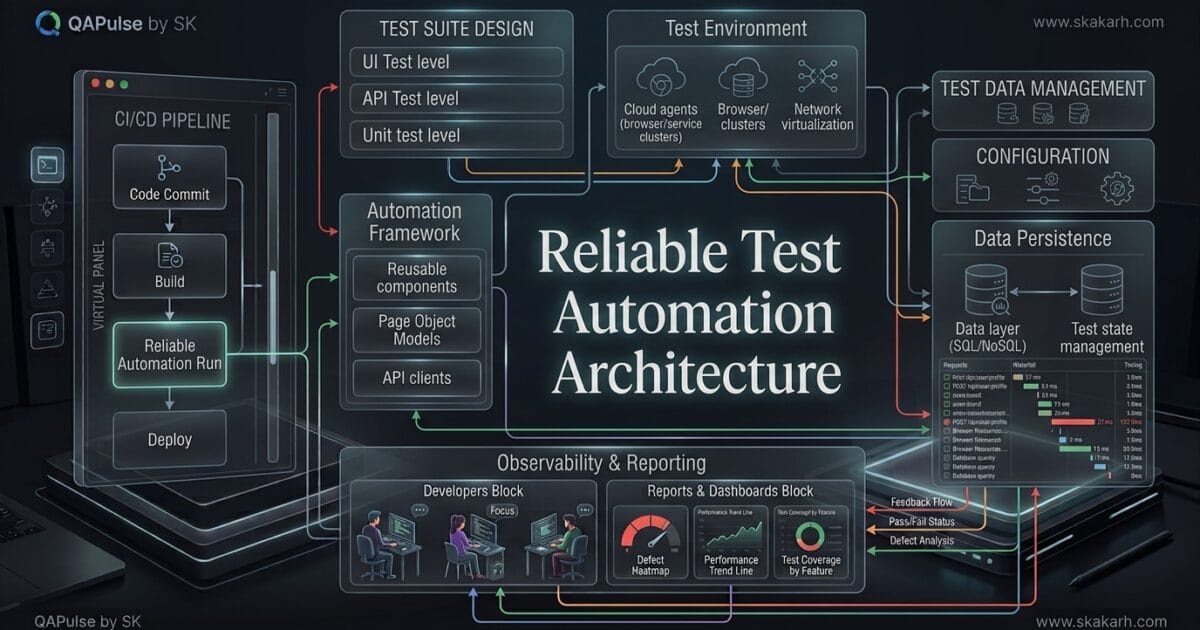
Test automation architecture is not simply the folder structure around your Playwright, Cypress, Selenium, Appium, or API tests. It is the engineering design that determines how tests are created, executed, isolated, diagnosed, maintained, and integrated into delivery pipelines.
A team can have thousands of automated tests and still have a weak test automation architecture.
That is the uncomfortable reality many engineering teams discover only after their suite becomes slow, flaky, expensive, and difficult to change.
A healthy automation system should make this equation work:
Reliable tests
     +
Reusable components
     +
Controlled test data
     +
Stable environments
     +
Fast diagnostics
     +
Predictable execution
     =
Maintainable automation
If one layer is poorly designed, adding more tests can actually make the system worse.
What Makes an Automation Architecture Reliable?
Reliability means more than getting a green pipeline.
A reliable automation system should answer five questions clearly:
- Can tests run repeatedly with the same expected outcome?
- Can multiple tests run without interfering with each other?
- Can failures be diagnosed quickly?
- Can new tests reuse existing capabilities?
- Can the system scale without increasing maintenance at the same rate?
This is where architecture becomes more important than the individual automation tool.
For example, Playwright can provide excellent browser automation capabilities, but Playwright itself cannot automatically prevent your team from creating shared test state, hard-coded environments, duplicated login logic, or poorly isolated data.
The same principle applies to Cypress and Selenium.
| Concern | Weak implementation | Reliable architecture |
|---|---|---|
| Configuration | Hard-coded URLs | Environment-driven configuration |
| Test data | Shared static records | Isolated or controlled data |
| Authentication | Repeated login steps | Reusable authentication strategy |
| Selectors | Scattered throughout tests | Centralized and maintainable strategy |
| API calls | Duplicated request logic | Reusable API clients |
| Reporting | Pass/fail only | Actionable diagnostics |
| Parallel execution | Shared state | Isolated execution |
| CI/CD | One giant job | Purpose-based execution |
| Failures | Retry and ignore | Retry, classify, investigate |
| Maintenance | Duplicate code | Reusable abstractions |
The goal is not to create the most sophisticated architecture.
The goal is to create an architecture where reliability improves as the automation system grows.
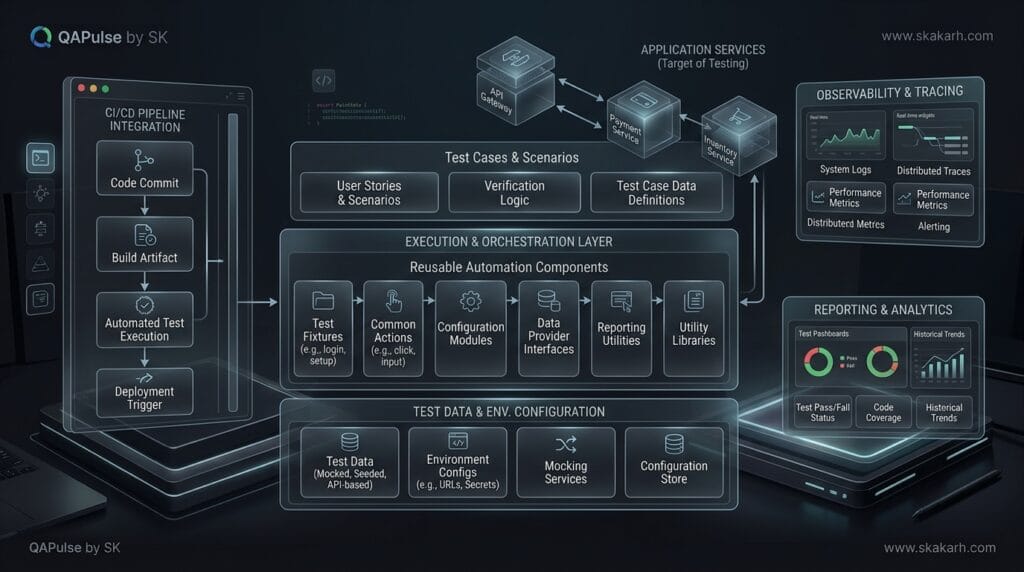
Suggested ALT text: test automation architecture showing reusable components test data CI and reporting
Start With Architecture, Not With Test Scripts
A common mistake is to start automation by writing the first test.
The process often looks like this:
Requirement
   ↓
Write test
   ↓
Add locator
   ↓
Add assertion
   ↓
Copy code
   ↓
Write another test
   ↓
Copy more code
It feels productive.
After 100 tests, however, the consequences begin appearing:
100 tests
↓
40 duplicated utilities
↓
20 different login implementations
↓
15 environment assumptions
↓
multiple test-data dependencies
↓
inconsistent reporting
↓
flaky CI
A better approach is to design the execution model before aggressively increasing test count.
Start by asking:
What will every test need?

What must tests never share?

What needs to change between environments?

What should be reusable?

What information is required when a test fails?

What can safely execute in parallel?
These questions expose architectural requirements before they become technical debt.
A Practical Layered Model
A scalable automation system can be separated into several logical layers.
┌───────────────────────────────────────┐
│           Test Scenarios              │
│ Smoke | Regression | API | UI | E2E   │
├───────────────────────────────────────┤
│        Domain / Workflow Layer        │
│ Login | Checkout | Search | Payments  │
├───────────────────────────────────────┤
│       Reusable Automation Layer       │
│ Pages | API Clients | Fixtures        │
├───────────────────────────────────────┤
│        Infrastructure Layer           │
│ Config | Auth | Data | Logging        │
├───────────────────────────────────────┤
│          Execution Layer              │
│ Local | CI | Parallel | Containers    │
└───────────────────────────────────────┘
The exact names do not matter.
The separation of responsibilities does.
A test should describe what behavior is being verified, rather than explaining every technical detail required to make the application interactable.
For example, this is difficult to maintain:
test('customer can purchase a product', async ({ page }) => {
  await page.goto('https://staging.example.com');

  await page.locator('#email').fill('customer@example.com');
  await page.locator('#password').fill('Password123');

  await page.locator('#login').click();
  await page.locator('.product-card:nth-child(2)').click();
  await page.locator('#add-to-cart').click();
  await page.locator('#checkout').click();

  await expect(page.locator('.success')).toHaveText('Order placed');
});
The scenario is mixed with:
- environment configuration
- authentication
- selectors
- navigation
- business workflow
- assertions
A better design separates those concerns.
test('customer can purchase a product', async ({
  loginPage,
  productPage,
  checkoutPage
}) => {
  await loginPage.loginAsCustomer();
  await productPage.addProductToCart('Laptop');
  await checkoutPage.completePurchase();

  await expect(checkoutPage.successMessage)
    .toHaveText('Order placed');
});
The second test is not automatically better simply because it is shorter.
It is better because the scenario communicates business intent while reusable implementation details can evolve independently.
Framework Abstraction vs Business Abstraction
This distinction is frequently misunderstood.
A technical abstraction might look like:
await clickElement('#submit');
A business abstraction might look like:
await checkoutPage.completePurchase();
The first hides a technical action.
The second represents a meaningful business capability.
That difference matters when applications evolve.
Suppose the checkout button changes from:
#submit
to:
[data-testid="complete-order"]
With excessive low-level abstraction, hundreds of tests can still depend on implementation details.
With appropriate separation, the selector can change inside the checkout component while the business scenario remains unchanged.
The architecture therefore acts as a buffer between application implementation and test intent.
Avoid the Giant Utility Folder
One of the earliest warning signs of architectural decay is a folder called:
utils/
containing everything.
For example:
utils/
├── login.js
├── database.js
├── api.js
├── browser.js
├── dates.js
├── users.js
├── checkout.js
├── payments.js
├── screenshots.js
└── random.js
The problem is not the folder itself.
The problem is that unrelated responsibilities are being treated as reusable utilities simply because they are used by multiple tests.
A better structure communicates ownership:
automation/
├── config/
├── fixtures/
├── clients/
│   ├── userClient.js
│   └── orderClient.js
├── pages/
│   ├── loginPage.js
│   └── checkoutPage.js
├── workflows/
│   ├── loginWorkflow.js
│   └── checkoutWorkflow.js
├── data/
├── reporters/
└── tests/
    ├── smoke/
    ├── regression/
    └── api/
Now developers can ask a much better question:
Where does this responsibility belong?
That question is one of the simplest architectural quality checks you can introduce.
Configuration Should Not Leak Into Tests
Hard-coded environments are another common reliability problem.
Avoid:
await page.goto(
  'https://qa.example.com/login'
);
Prefer environment-aware configuration:
const config = {
  baseURL: process.env.BASE_URL,
  apiURL: process.env.API_URL
};

await page.goto(`${config.baseURL}/login`);
For local execution:
BASE_URL=https://qa.example.com npm test
For CI:
env:
  BASE_URL: ${{ secrets.TEST_BASE_URL }}
The test should not care whether it is running against:
local
QA
staging
pre-production
That responsibility belongs to configuration and execution infrastructure.
This separation becomes particularly important when the same automated tests must run across multiple deployment environments.
Test Data Is an Architectural Concern
Many teams blame flaky tests on synchronization.
Sometimes the real problem is data.
Consider:
test('user can update profile', async () => {
  const user = await getUser('john@example.com');

  await updateProfile(user, {
    firstName: 'John'
  });
});
If multiple workers execute this test simultaneously against the same account, the test may interfere with itself.
The failure might appear random:
Run 1 → PASS
Run 2 → PASS
Run 3 → FAIL
Run 4 → PASS
Run 5 → FAIL
The temptation is to add:
await page.waitForTimeout(2000);
That does not solve the architectural problem.
The real question is:
Who owns this test data?
Possible strategies include:
| Strategy | Isolation | Complexity | Best use |
|---|---|---|---|
| Shared static data | Low | Low | Simple smoke tests |
| Generated data | High | Medium | Parallel execution |
| API-created data | High | Medium | E2E workflows |
| Database fixtures | High | High | Controlled environments |
| Per-test accounts | Very high | Medium | Critical workflows |
The correct strategy depends on the application and environment.
The important principle is that test data should be deliberately designed rather than accidentally shared.
Authentication Should Be Designed for Execution
Authentication is another place where poor architecture creates unnecessary cost.
Imagine 500 tests and every test performs:
Open browser
→ Navigate to login
→ Enter credentials
→ Submit
→ Wait for dashboard
→ Continue test
If every test spends several seconds authenticating, the suite becomes unnecessarily slow.
Modern automation systems can separate authentication setup from business validation.
For example, Playwright supports reusable authentication state:
import { test as setup } from '@playwright/test';

setup('authenticate', async ({ page }) => {
  await page.goto('/login');

  await page.getByLabel('Email')
    .fill(process.env.TEST_USER);

  await page.getByLabel('Password')
    .fill(process.env.TEST_PASSWORD);

  await page.getByRole('button', {
    name: 'Sign in'
  }).click();

  await page.context()
    .storageState({
      path: 'playwright/.auth/user.json'
    });
});
Then tests can consume the prepared state instead of repeatedly reproducing the same authentication workflow.
But there is an important warning:
Shared authentication state is useful only when the application state permits it.
If tests modify the authenticated user’s data, sharing that state can create cross-test interference.
Reliability therefore requires balancing:
Execution speed
        vs
State isolation
There is no universal “best” setting.
Reliability Is a System Property
One of the most important mindset changes is this:
A test does not become reliable simply because its assertions are correct.
Reliability emerges from the interaction between:
Test design
+
Application state
+
Test data
+
Environment
+
Synchronization
+
Execution strategy
+
Infrastructure
+
Observability
This is why simply adding more assertions rarely fixes an unreliable automation system.
Consider two teams.
Team A
2,000 tests
35% flaky failures
45-minute pipeline
frequent retries
poor failure diagnostics
shared test accounts
Team B
1,200 tests
low flaky rate
15-minute pipeline
isolated data
parallel execution
rich traces and logs
Team A has more automation.
Team B has a healthier engineering system.
Automation volume is therefore a poor standalone measure of automation maturity.
Compare Architecture by Failure Cost
A useful way to evaluate your current design is to ask what happens after a failure.
Suppose a CI job reports:
FAILED: checkout.spec.js
That is not enough.
A strong automation system should help answer:
Which environment?

Which browser?

Which commit?

Which test data?

Which API calls occurred?

What was the page state?

What network request failed?

What assertion failed?

How long did execution take?

Was the failure reproduced?

Is this a product defect or test defect?
This is where observability becomes part of architecture rather than an optional reporting feature.
A failure should produce evidence.
For example:
test.afterEach(async ({ page }, testInfo) => {
  if (testInfo.status !== testInfo.expectedStatus) {
    await page.screenshot({
      path: `artifacts/${testInfo.title}.png`,
      fullPage: true
    });
  }
});
You can extend this concept with:
- traces
- videos
- screenshots
- browser console logs
- network logs
- API responses
- environment metadata
- test-data identifiers
- execution duration
The objective is simple:
Reduce the time between failure and understanding.
The Most Important Architectural Comparison
It is useful to compare a traditional script-centric approach with a reliability-oriented design.
| Area | Script-centric approach | Reliability-oriented approach |
|---|---|---|
| Test design | Action-heavy | Intent-focused |
| Reuse | Copy/paste | Controlled abstractions |
| Configuration | Hard-coded | Environment-driven |
| Data | Shared | Isolated or deliberately managed |
| Authentication | Repeated | Reusable where safe |
| Execution | Sequential by default | Parallel where safe |
| Failures | Pass/fail | Evidence-rich |
| CI | One large suite | Purpose-based execution |
| Maintenance | Reactive | Architecture-driven |
| Scaling | More tests = more complexity | Reuse absorbs growth |
The difference is not about writing more code.
It is about putting the right code in the right layer.
A Simple Architecture Test
Before adding another 100 automated tests, inspect the existing system.
Ask:
Can I change the base URL without modifying tests?

Can I change authentication without rewriting every test?

Can I create isolated test data?

Can I execute two tests simultaneously?

Can I identify exactly why a CI test failed?

Can I run smoke tests independently?

Can API setup happen without unnecessary UI interaction?

Can reusable workflows evolve without changing every scenario?

Can a new engineer understand where each responsibility belongs?
If the answer is “no” to several of these questions, increasing test volume may increase technical debt faster than coverage.
The better strategy is to strengthen the architecture first, then scale coverage.
A Practical Reliability Scorecard
You can score an automation system from 0 to 2 for each area:
0 = missing
1 = partially implemented
2 = consistently implemented
Configuration management      [0-2]
Test data isolation           [0-2]
Authentication strategy       [0-2]
Reusable components           [0-2]
Test isolation                [0-2]
Parallel execution            [0-2]
Failure diagnostics           [0-2]
CI/CD integration             [0-2]
Environment management        [0-2]
Flaky-test tracking           [0-2]
Maximum:
20 points
A useful interpretation:
| Score | Architecture condition |
|---|---|
| 0–7 | High architectural risk |
| 8–12 | Developing |
| 13–16 | Healthy foundation |
| 17–20 | Strong engineering maturity |
This is not a universal industry benchmark.
It is a practical conversation starter for your team.
The goal is not to achieve a perfect score.
The goal is to identify the weakest architectural layer before it becomes the next bottleneck.
The Strategic Rule
Do not ask:
“How many automated tests do we have?”
Ask:
“How much reliable testing capability can our architecture support?”
That shift changes how engineering teams invest in automation.
A mature system does not measure success only by the number of scripts created. It measures whether the system can continuously provide trustworthy feedback while the product, team, environments, and execution volume change.
That is the real purpose of test automation architecture: not merely to organize code, but to create a dependable engineering system around automated feedback.
Designing for Reliability Instead of Just More Tests
A reliable automation strategy is not created by adding more test cases. It is created by designing a test automation architecture that can absorb application changes without turning every release into a maintenance exercise.
This distinction matters because many teams measure automation success by the number of automated tests. A healthier measurement is whether those tests provide trustworthy feedback at the speed the engineering team needs.
Consider two projects:
| Characteristic | Project A | Project B |
|---|---|---|
| Automated tests | 2,000 | 800 |
| Average execution time | 2 hours | 25 minutes |
| Flaky tests | 18% | 2% |
| Duplicate coverage | High | Low |
| Test ownership | Unclear | Defined |
| Failure diagnosis | Difficult | Fast |
| Maintenance effort | High | Controlled |
| Release confidence | Low | High |
Project B has fewer tests but potentially delivers much more engineering value.
That is why the goal should not be maximum automation. The goal should be maximum trustworthy feedback.
The Four Layers of a Reliable Automation System
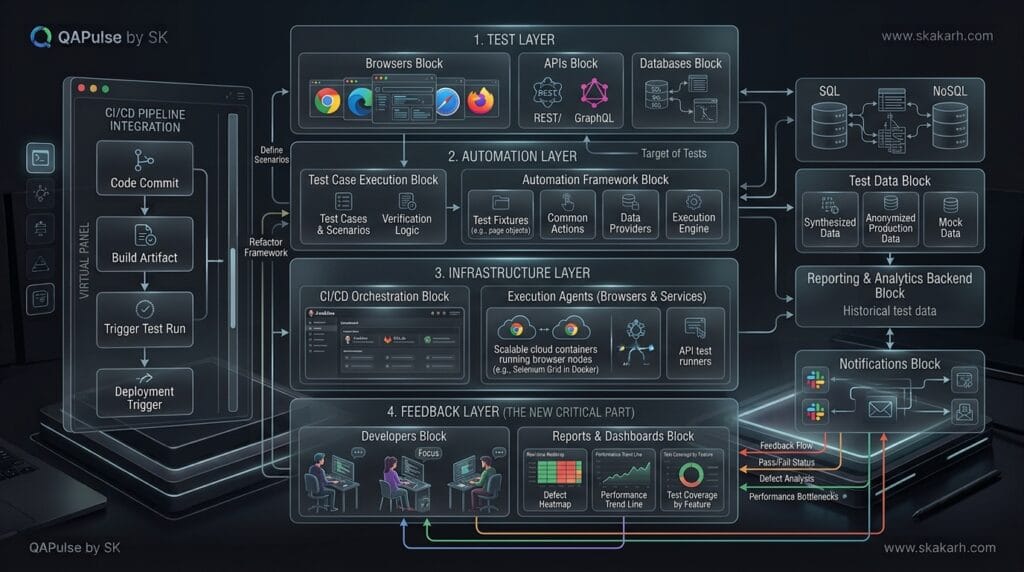
A scalable test automation architecture can be viewed as four connected layers:
- Test layer — what behavior is being validated.
- Automation layer — how tests interact with the application.
- Infrastructure layer — how environments, browsers, services, and data are managed.
- Feedback layer — how failures are reported, analyzed, and acted upon.
A weakness in one layer can damage the entire system.
For example, a beautifully written Playwright test can still be unreliable if the test environment randomly loses database connections. Similarly, a stable API test becomes less valuable when its failure report only says Expected 200, received 500.
The architecture must therefore optimize not only execution but also diagnosis and recovery.
Separate Test Intent From Implementation Details
One of the strongest architectural decisions is separating what you want to validate from how the application is implemented.
Imagine a checkout test:
def test_customer_can_complete_checkout():
    login_page.login("customer@example.com", "password")
    product_page.add_product("Laptop")
    checkout_page.complete_payment()
    assert confirmation_page.order_created()
The test describes business behavior.
But internally, the implementation can change:
class CheckoutPage:
    def complete_payment(self):
        self.card_number.fill("4111111111111111")
        self.expiry.fill("12/30")
        self.cvv.fill("123")
        self.pay_button.click()
If the payment form changes from separate fields to a hosted payment widget, the test should not need to understand every implementation detail.
That is the architectural advantage of abstraction.
Compare this with tightly coupled automation:
page.locator("#card-number").fill(card)
page.locator("#expiry-date").fill(expiry)
page.locator("#cvv").fill(cvv)
page.locator(".checkout-btn").click()
When selectors, UI structure, or component libraries change, hundreds of tests can become maintenance candidates.
A better automation design establishes stable boundaries between:
Business scenario
       ↓
Test intent
       ↓
Page / service abstraction
       ↓
Application interface
       ↓
Environment
This does not mean creating enormous page-object classes. Abstraction should remove unnecessary knowledge from tests, not hide every possible detail.
Page Objects Are Useful, But They Are Not the Architecture
A common mistake is treating Page Object Model as the entire solution.
POM is a design pattern.
A test automation architecture is much broader.
| Concern | Page Object Model | Complete Architecture |
|---|---|---|
| UI abstraction | Yes | Yes |
| API testing | Limited | Yes |
| Test data | Not inherently | Yes |
| Environment management | No | Yes |
| Parallel execution | No | Yes |
| CI/CD integration | No | Yes |
| Reporting | No | Yes |
| Observability | No | Yes |
| Retry strategy | No | Yes |
| Dependency management | No | Yes |
| Failure analysis | No | Yes |
This distinction becomes increasingly important as automation grows.
You can have excellent page objects inside a badly designed automation system.
When Abstraction Becomes a Problem
More abstraction is not automatically better.
Consider:
checkout.execute_standard_customer_purchase()
It looks clean, but what does it actually do?
Does it:
- create a user?
- log in?
- add a product?
- apply a coupon?
- select shipping?
- submit payment?
- validate the order?
- clean up test data?
If the answer is hidden across several layers, debugging becomes difficult.
A better design keeps important business intent visible:
customer.login()
cart.add(product)
checkout.select_shipping("express")
checkout.pay(payment)
order.assert_created()
The test reads almost like the requirement.
That is a useful architectural principle:
Hide implementation complexity, not business intent.
Build Around Test Boundaries
A reliable system also needs clear boundaries between UI, API, service, database, and component-level validation.
Not every scenario needs a browser.
Suppose the application supports customer registration.
You could test it through the UI:
def test_customer_registration(page):
    page.goto("/signup")
    page.fill("#email", "test@example.com")
    page.fill("#password", "SecurePassword123")
    page.click("button[type='submit']")
    assert page.locator(".success").is_visible()
But if the purpose is validating registration business logic rather than the visual interface, an API test may be faster:
response = client.post(
    "/api/customers",
    json={
        "email": "test@example.com",
        "password": "SecurePassword123"
    }
)

assert response.status_code == 201
The UI test should validate UI integration.
The API test should validate service behavior.
This produces a healthier distribution of tests.
| Test level | Typical speed | Best for |
|---|---|---|
| Unit | Very fast | Business logic |
| Component | Fast | Component behavior |
| API | Fast | Service contracts |
| Integration | Medium | System interactions |
| UI | Slower | Critical user journeys |
| End-to-end | Slowest | Cross-system workflows |
A reliable architecture uses each level intentionally rather than pushing everything through the browser.
Use the Test Pyramid as a Design Constraint
The classic test pyramid remains useful because it forces an important question:
Why am I validating this behavior at this layer?
If a team has thousands of browser tests for functionality that could be tested through APIs or components, the suite will eventually become expensive.
For example:
             UI
           /     \
        API       E2E
       /           \
   Component     Integration
      /               \
            Unit
The exact distribution depends on the application, but the principle remains valuable.
A better approach is to reserve expensive end-to-end tests for workflows where multiple systems genuinely need to work together.
For example:
UI test
  → Login
  → Add product
  → Checkout
  → Payment
  → Confirmation
Then validate individual rules separately:
API
  → discount calculation

API
  → inventory reservation

Component
  → payment validation

Unit
  → tax calculation
Now a failure tells you considerably more.
If the tax calculation changes, you do not need to wait for a full browser workflow to discover it.
Reliability Requires Deterministic Test Data
Even an excellent test automation architecture can become unreliable when test data is unpredictable.
A dangerous pattern is:
user = find_existing_user()
Why?
Because the user may:
- have been modified by another test,
- have expired permissions,
- already have an order,
- be locked,
- have different feature flags,
- belong to another environment state.
Prefer controlled data creation:
user = user_factory.create(
    role="customer",
    status="active"
)
Then the test owns the state it needs.
A factory can centralize creation:
class UserFactory:

    def create(self, role="customer", status="active"):
        return api.post(
            "/users",
            json={
                "role": role,
                "status": status
            }
        ).json()
This creates another important architectural property: repeatability.
The same scenario should behave consistently whether it runs:
- locally,
- in CI,
- alone,
- in parallel,
- after another test,
- or 500 times overnight.
Parallel Execution Changes the Architecture
Parallelization is often introduced with a configuration flag:
pytest -n 8
But reliable parallel execution requires more than increasing worker count.
Tests need isolation.
Consider two tests:
Worker 1 → customer@example.com
Worker 2 → customer@example.com
Both modify the same customer.
One test may deactivate the account while another expects it to remain active.
The resulting failure can look random.
A stronger design generates unique identities:
import uuid

email = f"customer-{uuid.uuid4()}@example.com"
Or preferably uses a centralized test-data factory:
user = user_factory.create_unique()
Parallel execution therefore exposes architectural weaknesses that sequential execution can hide.
That makes concurrency a useful engineering test of the automation system itself.
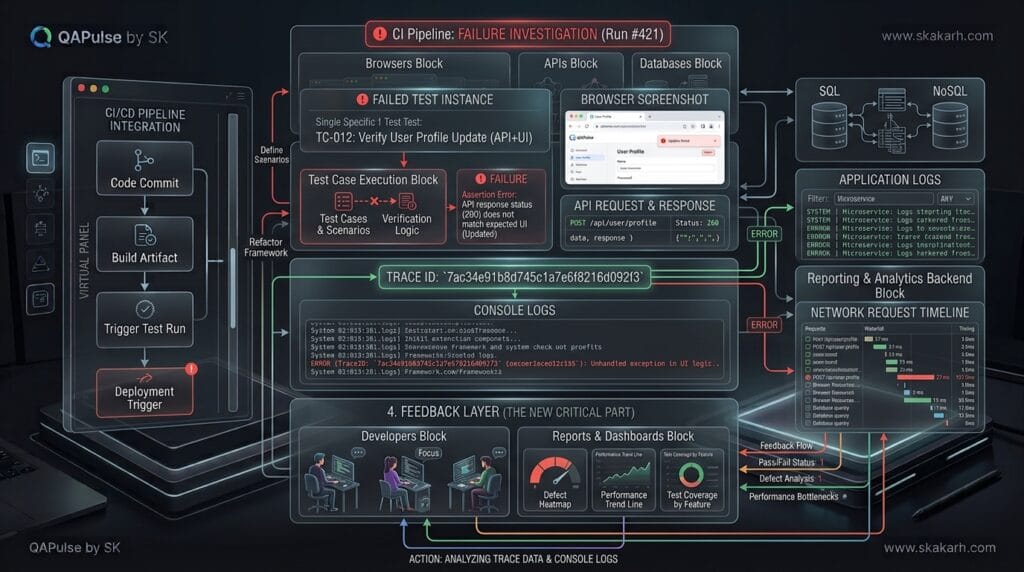
Design Failure Handling as Part of the Architecture
A failed test should answer three questions quickly:
- What failed?
- Why did it fail?
- What should the engineer do next?
A weak report:
AssertionError: expected 200
A stronger report:
POST /api/orders

Expected: 201
Actual:   500

Request ID: 7b31...
Customer: test-customer-482
Environment: staging

Response:
{
  "error": "inventory_service_timeout"
}
Now the failure contains diagnostic context.
This is where screenshots, traces, videos, network logs, request IDs, and structured logging become architectural components rather than optional extras.
Compare a Traditional Framework With a Reliable Architecture
The difference becomes clearer when the systems are placed side by side.
| Area | Traditional automation setup | Reliability-focused architecture |
|---|---|---|
| Tests | Large collection of scripts | Intent-driven scenarios |
| UI interaction | Direct selectors everywhere | Encapsulated interfaces |
| API | Separate scripts | Integrated service layer |
| Test data | Shared/static | Isolated/factory-driven |
| Configuration | Hardcoded | Environment-aware |
| Parallelism | Added later | Designed from the beginning |
| Retries | Used to hide failures | Limited and evidence-driven |
| Reports | Pass/fail | Diagnostic feedback |
| CI/CD | Execution mechanism | Feedback system |
| Maintenance | Reactive | Preventive |
| Ownership | QA-only | Shared engineering responsibility |
The second model requires more architectural thinking at the beginning, but that investment becomes increasingly valuable as the application and team grow.
Do Not Use Retries to Hide Flakiness
One of the most dangerous practices is:
@pytest.mark.flaky(reruns=3)
def test_checkout():
    ...
Retries can be useful for infrastructure-related transient failures.
But unlimited retries can turn a broken test into a green test.
Imagine:
Attempt 1 → FAIL
Attempt 2 → FAIL
Attempt 3 → PASS
CI → GREEN
The dashboard says success.
The system actually experienced instability.
A better strategy records the retry:
Result: PASS
Initial attempt: FAIL
Retry count: 1
Failure category: network timeout
Then monitor retry frequency.
A useful engineering metric is:
Retry Rate =
Tests requiring retry / Total executed tests × 100
If that number continually increases, the architecture is telling you something.
Do not silence that signal.
Make the CI Pipeline Part of the Feedback Architecture
A mature automation system should fit naturally into CI/CD.
For example:
name: automated-tests

on:
  pull_request:

jobs:
  api-tests:
    runs-on: ubuntu-latest
    steps:
      - uses: actions/checkout@v4

      - name: Install dependencies
        run: pip install -r requirements.txt

      - name: Run API tests
        run: pytest tests/api -q

  ui-tests:
    needs: api-tests
    runs-on: ubuntu-latest
    steps:
      - uses: actions/checkout@v4

      - name: Run UI tests
        run: pytest tests/ui -q
The important question is not simply whether the tests execute.
Ask:
Does the pipeline give developers useful feedback before the cost of a defect increases?
That changes how test execution should be organized.
Fast tests can run on every pull request.
Broader suites can run after deployment.
Long-running performance or compatibility suites can run on scheduled pipelines.
This creates feedback tiers:
Pull Request
   ↓
Fast validation
   ↓
Merge
   ↓
Integration validation
   ↓
Deployment
   ↓
Broader regression
   ↓
Scheduled deep validation
The architecture should support this progression without requiring separate, disconnected automation projects.
A Practical Reliability Checklist
Before calling an automation architecture mature, ask:
- Can tests run independently?
- Can test data be created safely?
- Can tests execute in parallel?
- Can a failed test explain what happened?
- Can UI and API validation share useful infrastructure?
- Can the suite run against multiple environments?
- Can developers run the same important tests locally?
- Can CI selectively execute the right test layers?
- Are retries measurable?
- Are flaky tests tracked separately?
- Are test owners defined?
- Can application changes be absorbed without rewriting large portions of the suite?
If several answers are “no,” adding more test cases probably will not solve the underlying problem.
The better move is to strengthen the architecture first.
Make Reliability Measurable
A final shift is to stop treating automation quality as subjective.
Track measurable signals.
| Metric | What it tells you |
|---|---|
| Pass rate | Overall execution outcome |
| Flake rate | Stability of tests |
| Mean execution time | Feedback speed |
| Retry rate | Hidden instability |
| Failure diagnosis time | Debuggability |
| Maintenance hours | Engineering cost |
| Defect detection rate | Testing effectiveness |
| Escaped defects | Coverage effectiveness |
| Parallel efficiency | Scalability |
| Test ownership coverage | Operational maturity |
For example:
Automation Reliability Score

Flake rate        → 2%
Retry rate        → 1.5%
Median duration   → 18 min
Diagnostic time   → 7 min
Owner coverage    → 100%
These measurements provide a much stronger engineering conversation than:
“We have 4,500 automated tests.”
The number of tests is an inventory metric.
Reliability is an engineering metric.
The Strategic Mindset Shift
The most important change is to stop thinking about automation as a collection of scripts.
Think of it as an internal engineering platform.
A strong platform provides:
Test creation
     ↓
Reusable interfaces
     ↓
Controlled data
     ↓
Environment management
     ↓
Parallel execution
     ↓
Observability
     ↓
CI/CD feedback
     ↓
Actionable engineering decisions
When these capabilities work together, automation becomes easier to scale.
When they are disconnected, every new test adds another maintenance obligation.
That is the real difference between having automated tests and having a reliable test automation architecture.
People Asked Questions
What is test automation architecture?
Test automation architecture is the overall design of an automated testing system, including test layers, framework components, test data, configuration, environments, execution, CI/CD, reporting, and observability.
Why is test automation architecture important?
It determines how well automated testing can scale, remain maintainable, execute reliably, and provide useful feedback as the application and test suite become more complex.
What makes a test automation architecture reliable?
Isolation, stable automation components, controlled test data, deterministic execution, appropriate test layers, reliable synchronization, CI/CD integration, and useful diagnostics are key characteristics.
How do you prevent flaky automated tests?
Use independent tests, stable selectors, proper synchronization, controlled test data, isolated environments, deterministic setup and cleanup, and detailed failure diagnostics.
Should UI and API tests be separated?
Their test logic should generally remain separated because they validate different application layers. Shared infrastructure such as configuration, authentication, data utilities, reporting, and CI/CD can still be reused.
Is Page Object Model enough for a reliable automation architecture?
No. Page Object Model can improve UI abstraction, but architecture also requires test isolation, data management, environment handling, execution strategy, reporting, CI/CD, and maintainability controls.
Which automation tool is best for a scalable architecture?
There is no universal best tool. Playwright, Selenium, and Cypress have different capabilities and execution models. The architecture should be determined by application requirements before selecting or standardizing the tool.
How should automation be integrated into CI/CD?
Fast, high-confidence tests should provide early pipeline feedback, while broader and more expensive tests should execute at appropriate stages. Parallel execution, test selection, reporting, diagnostics, and environment management should be designed into the automation architecture.
How do you measure automation reliability?
Track metrics such as pass-rate stability, flaky-test rate, mean time to diagnose failures, execution duration, retry frequency, defect detection, test maintenance effort, and pipeline failure accuracy.
AI Overview
A test automation framework is only one component of a test automation architecture. The architecture also includes test layers, data, environments, execution, CI/CD, reporting, observability, and reliability controls.
AI Overview-Friendly Comparison
| Architecture approach | Main advantage | Main weakness | Best fit |
|---|---|---|---|
| UI-heavy | Strong user-flow validation | Slower and more fragile | Critical end-to-end journeys |
| API-heavy | Fast and stable | Limited UI validation | Business logic and services |
| Unit-heavy | Extremely fast feedback | Limited system coverage | Component/business logic |
| Mixed-layer | Balanced coverage | Requires stronger design | Growing engineering teams |
AEO Optimization
Question
What is a reliable test automation architecture?
Answer target:
A reliable test automation architecture is a structured system that separates test logic from framework infrastructure, isolates tests, manages data and environments consistently, uses appropriate test layers, supports stable execution, integrates with CI/CD, and provides actionable failure reporting.
Question
How do you build a reliable test automation architecture?
Answer target:
Build it around independent tests, reusable infrastructure, controlled test data, stable synchronization, appropriate UI/API/test layers, environment management, parallel execution, CI/CD integration, reporting, and measurable reliability.
Question
What makes test automation reliable?
Answer target:
Reliable automation is deterministic, isolated, maintainable, appropriately scoped, resistant to application changes, and capable of producing useful diagnostics when failures occur.
Question
How do you reduce flaky automated tests?
Answer target:
Reduce flaky tests by eliminating shared state, avoiding arbitrary waits, using stable selectors, controlling test data, isolating tests, managing environments consistently, and collecting detailed failure diagnostics.
Internal Blog Links
- AI Agents vs Agentic AI — Stop Confusing These Concepts (90% of Developers Get It Wrong)
- RAG Powered Performance Testing: Make k6 Tests Smarter With Real API Behavior
- Claude Code vs Cursor: Which AI Coding Tool is Better for Professional Development?
- Claude AI Jira Integration: 11 Powerful Workflows for Developers and QA
- AutoGen Function Tools: Connect AI Agents to Python Functions
Internal Series Links
- Learn MCP – Zero to Hero
- Learn AI Agents for QA – Zero to Hero
- Playwright Automation – Zero to Hero
- TencentDB Agent Memory: Complete Zero to Hero
- LangGraph: Complete Zero to Hero
- Learn Python – Zero to Hero
- OpenAI Codex: Complete Zero to Hero
- Cursor AI: Complete Zero to Hero
- Claude Code Tutorial: Complete Zero to Hero
- AutoGen: Complete Zero to Hero Guide
- Free QA Resources Built From Real Experience
- QA Glossary: Test Automation Terms Every Engineer Should Know
External Links
- Selenium Test Practices
- Selenium Encouraged Practices
- Playwright Test Documentation
- Playwright Running Tests
- Cypress Best Practices
- Martin Fowler — Test Pyramid
- Martin Fowler — Practical Test Pyramid
Conclusion
A reliable test automation architecture is not defined by how many tests a team has written. It is defined by how consistently that automation produces trustworthy, actionable feedback.
The strongest systems separate business intent from implementation details, use the right testing layer for each risk, isolate test data, support safe parallel execution, expose meaningful failure evidence, and integrate naturally with CI/CD.
The strategic goal is simple:
Build an automation system that becomes more valuable as the product becomes more complex—not one that becomes more fragile.
If a team must constantly repair selectors, restart failed pipelines, investigate unexplained errors, clean shared test data, and manually determine whether a failure is real, the problem is probably architectural rather than simply a lack of test cases.
A mature automation strategy turns those recurring problems into engineering capabilities.
Final Key Takeaways
- Test automation architecture is broader than Page Object Model or any individual framework.
- More automated tests do not automatically mean better quality.
- Business intent should remain visible while implementation details stay encapsulated.
- UI, API, integration, component, and unit tests should each validate the risks they are best suited to cover.
- Test data isolation is essential for repeatability and parallel execution.
- Parallel execution should be designed into the system rather than added as an afterthought.
- Retries should expose instability, not hide it.
- Screenshots, traces, logs, request IDs, and structured reports make failures actionable.
- CI/CD should function as a feedback system, not merely a place where tests execute.
- Flake rate, retry rate, execution time, diagnosis time, and maintenance cost are better indicators of automation health than test count.
- The ultimate objective is trustworthy engineering feedback at sustainable speed.
Continue Learning
Explore more expert articles on Mobile Testing, Backend & API, AI & Agentic, AI Tools, n8n, LangChain, CrewAI, MCP Servers, AI Agents, LlamaIndex, Docker, FastAPI, Playwright, Cypress, Test Automation, DevOps, and Software Engineering at www.skakarh.com.
QAPulse by SK delivers expert release analysis, AI engineering insights, enterprise automation strategies, migration guidance, DevOps best practices, and practical testing knowledge to help software professionals build scalable, intelligent, and production-ready software systems.