 QA
QA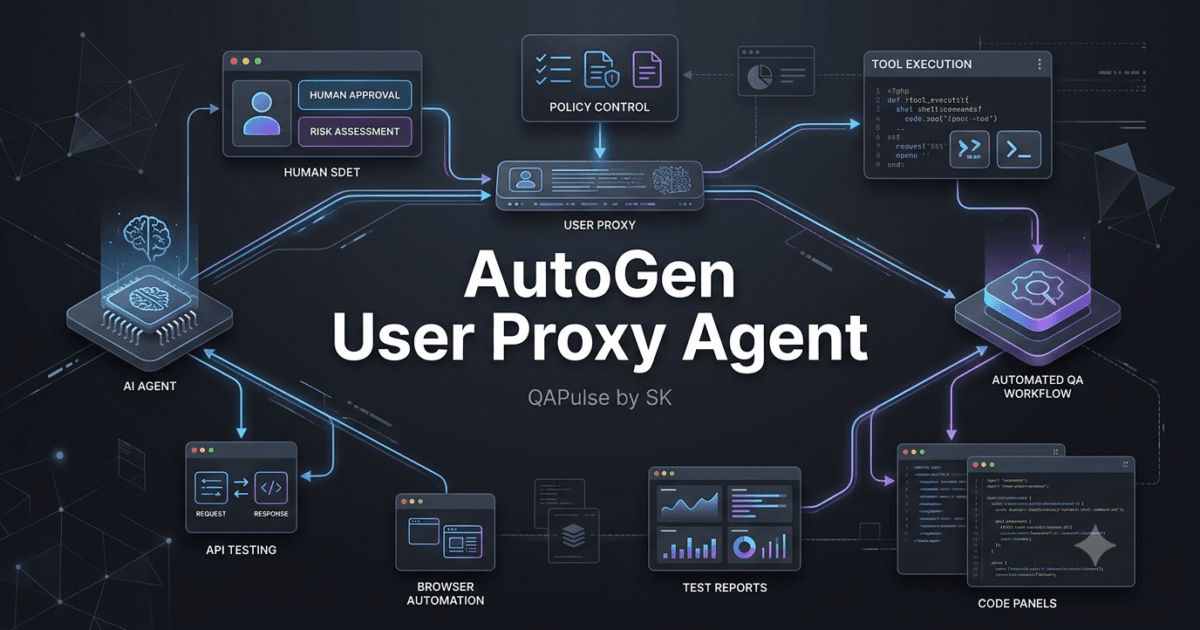
AutoGen user proxy agents introduce an important capability into agentic systems: allowing a human to participate directly in an AI workflow.
Instead of building a system where AI agents operate completely independently, a user proxy can represent the human side of the interaction.
The basic idea is:
Human
  ↓
User Proxy Agent
  ↓
AI Agent
  ↓
Task Execution
  ↓
Result
This creates a bridge between human instructions and autonomous AI behavior.
For software engineers, SDETs, QA engineers, and AI developers, this pattern is especially useful because many real-world workflows cannot be safely completed without human input.
Examples include:
Requirement clarification
Test approval
Code review
Production deployment approval
Security decisions
Tool authorization
Ambiguous business rules
A user proxy does not simply mean “another chatbot.”
It represents a controlled human interaction point inside an agent workflow.
What Is a User Proxy Agent?
A user proxy agent can be understood as the component responsible for bringing human input into an agent-based workflow.
Consider a simple example.
A user asks:
Create an API testing strategy
for our authentication service.
An AI agent may immediately start generating tests.
But a real QA workflow might require additional information:
Which authentication method?

JWT or session-based?

What are the supported roles?

Should security testing be included?

What environments are available?
Instead of allowing the AI to guess, the workflow can request human clarification.
User
 ↓
User Proxy
 ↓
QA Agent
 ↓
Clarification Required
 ↓
User Proxy
 ↓
Human Response
 ↓
QA Agent
The proxy therefore becomes a controlled communication boundary between the human and the AI workflow.
Why User Proxy Agents Matter
Fully autonomous agents sound attractive, but real engineering tasks frequently contain ambiguity.
A requirement might say:
"Users should be able to reset their password."
That leaves many unanswered questions:
How long is the reset token valid?

Can the token be reused?

What happens after multiple failed attempts?

Should the system reveal whether an email exists?

What password rules apply?

Should MFA be required?
An AI agent can make assumptions.
A human can provide the missing business context.
This creates a useful division:
| Responsibility | Human | AI Agent |
|---|---|---|
| Business decisions | Strong | Limited |
| Requirement clarification | Strong | Assist |
| Repetitive analysis | Limited | Strong |
| Test generation | Review | Strong |
| Final approval | Strong | Assist |
| Pattern identification | Assist | Strong |
| High-risk decisions | Strong | Assist |
| Natural-language transformation | Assist | Strong |
The goal is not to replace the human.
The goal is to make the human-AI workflow more effective.
User Proxy vs Assistant Agent
A common source of confusion is the difference between a user proxy and an assistant agent.
An assistant agent generally represents an AI role.
For example:
Requirements Analyst
Test Designer
Security Reviewer
Coding Assistant
A user proxy represents human participation.
Conceptually:
Assistant Agent
→ AI participant

User Proxy
→ Human participant
| Characteristic | User Proxy | Assistant Agent |
|---|---|---|
| Represents | Human interaction | AI role |
| Main purpose | Provide human input | Perform AI task |
| Generates reasoning | Usually no | Yes |
| Requests clarification | Can facilitate | Can request |
| Human approval | Supports it | Can wait for it |
| Autonomous reasoning | Not its primary role | Core capability |
| Best use | Human-in-the-loop | AI processing |
This distinction becomes important when designing larger AutoGen systems.
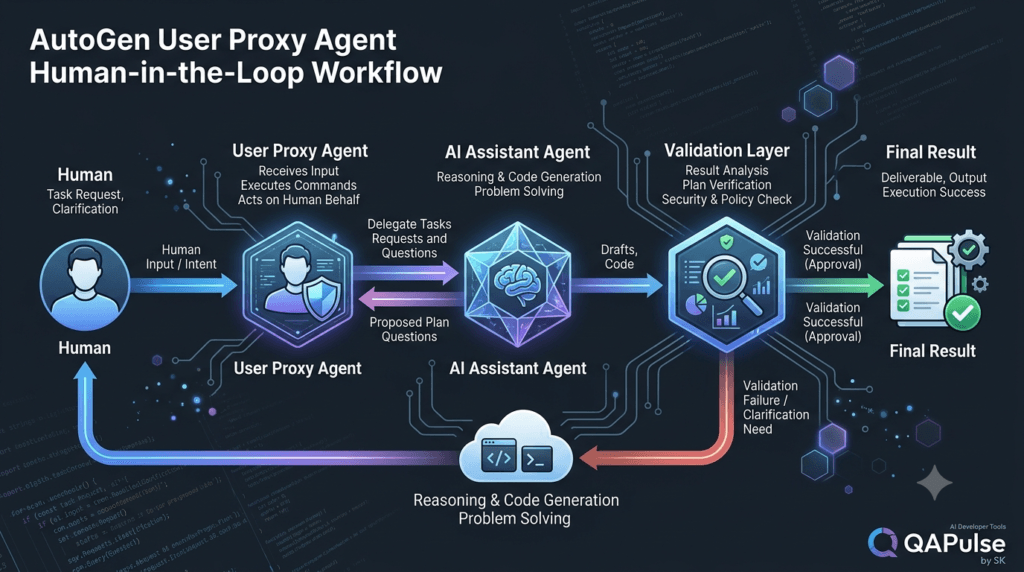
The Simplest Human-in-the-Loop Workflow
Consider a QA automation example.
User
 ↓
User Proxy
 ↓
Test Designer
 ↓
Generated Test Strategy
 ↓
User Review
 ↓
Approved?
 ↙       ↘
No        Yes
↓          ↓
Feedback   Execute
↓
Test Designer
The human remains part of the workflow.
The AI performs the repetitive work.
The human provides judgment where judgment matters.
This is the foundation of human-in-the-loop AI.
A Simple Conceptual Example
A workflow might start with a human request:
task = """
Create a test strategy for our login API.

The API supports:
- email/password authentication
- MFA
- account lockout
"""
The user proxy can participate in the workflow while an assistant agent performs the analysis.
Conceptually:
from autogen_agentchat.agents import AssistantAgent

qa_agent = AssistantAgent(
    name="qa_agent",
    model_client=model_client,
    system_message="""
    You are a senior QA engineer.

    Analyze the provided requirement and
    create a comprehensive API test strategy.

    Identify missing information before
    making assumptions.
    """
)
The important concept is not the exact syntax.
The important architecture is:
Human Request
      ↓
Human Interaction Layer
      ↓
QA Agent
      ↓
AI-generated Analysis
Why Human Input Should Not Be an Afterthought
A weak architecture often looks like:
AI Agent
   ↓
AI Agent
   ↓
AI Agent
   ↓
AI Agent
   ↓
Human
The human only becomes involved when something goes wrong.
A stronger architecture deliberately defines human interaction points:
Requirement
    ↓
Human Clarification
    ↓
AI Analysis
    ↓
Human Approval
    ↓
AI Execution
    ↓
Human Verification
Human participation becomes part of the design rather than an emergency mechanism.
User Proxy Agents in QA Engineering
The user proxy pattern is particularly valuable for QA and SDET workflows.
Imagine an AI system receives:
Create Playwright tests for the checkout flow.
The AI may need clarification:
Which browsers?

Which payment methods?

Should guest checkout be covered?

What test environment should be used?

Should visual testing be included?

Should failed tests create defects automatically?
Instead of guessing, the workflow can ask the human.
QA Engineer
     ↓
User Proxy
     ↓
Test Agent
     ↓
Clarification
     ↓
QA Engineer
     ↓
Test Agent
     ↓
Test Plan
This significantly reduces the risk of silently making incorrect assumptions.
User Proxy Agents for Code Generation
Consider an AI coding workflow.
The user says:
Add authentication to the application.
An AI coding agent may need to know:
Which authentication provider?

OAuth or JWT?

Which endpoints require authentication?

How should refresh tokens work?

What security policy applies?
A user proxy can pause the workflow and obtain clarification.
Developer
   ↓
User Proxy
   ↓
Coding Agent
   ↓
Clarification Needed
   ↓
Developer
The system becomes interactive rather than blindly autonomous.
User Proxy Agents for Production Operations
Human approval becomes even more important when AI agents can perform actions.
Imagine:
AI Agent:
Deployment ready.

Proposed action:
Deploy version 4.2.1 to production.
Instead of automatically executing:
AI
 ↓
Production
use:
AI Agent
   ↓
Approval Request
   ↓
User Proxy
   ↓
Human
   ↓
Approve / Reject
   ↓
Application
   ↓
Deployment
This creates an explicit control boundary.
Approval Is Different From Conversation
A human-in-the-loop system should distinguish between:
Conversation
and:
Authorization
A user saying:
"Looks good."
is not necessarily equivalent to:
"Approve production deployment."
For high-risk operations, explicit approval should be represented as a structured action.
For example:
approval = {
    "action": "production_deployment",
    "approved": True,
    "approved_by": "human"
}
The application can then enforce the approval.
This is safer than interpreting arbitrary natural-language messages as authorization.
A Human Approval State Machine
A production-oriented workflow can use explicit states:
DRAFT
  ↓
READY_FOR_REVIEW
  ↓
AWAITING_HUMAN_APPROVAL
  ↓
   ┌───────────────┐
   ↓               ↓
APPROVED         REJECTED
   ↓               ↓
EXECUTE          REVISE
This is much easier to test than:
Agent talks to human
↓
Maybe human approves
↓
Maybe agent executes
The state should be explicit.
Interactive Exercise: Where Should the Human Enter?
Consider this AI-powered testing workflow:
Requirement
 ↓
Requirements Agent
 ↓
Test Design Agent
 ↓
Test Code Agent
 ↓
Test Execution Agent
 ↓
Defect Agent
Now identify possible human checkpoints.
A strong design might place human interaction here:
Requirement
 ↓
Requirements Agent
 ↓
Human Clarification
 ↓
Test Design Agent
 ↓
Human Approval
 ↓
Test Code Agent
 ↓
Test Execution Agent
 ↓
Defect Agent
 ↓
Human Decision
Ask yourself:
Which decisions require business knowledge?

Which decisions require QA expertise?

Which actions could cause damage?

Which tasks are safe to automate completely?
This is the real purpose of human-in-the-loop architecture.
User Proxy vs Human-in-the-Loop
These concepts are closely related but not identical.
User proxy describes the mechanism or participant that represents human interaction inside an agent workflow.
Human-in-the-loop describes the broader architecture where humans participate in decision-making or control.
Therefore:
User Proxy
=
Interaction Component

Human-in-the-Loop
=
Overall Workflow Pattern
A human-in-the-loop architecture can potentially use different interaction mechanisms.
The user proxy is one way to model that interaction in an agent system.
Understanding the Control Boundary
A useful architecture is:
┌─────────────────────────┐
│          Human          │
└────────────┬────────────┘
             ↓
┌─────────────────────────┐
│      User Proxy         │
└────────────┬────────────┘
             ↓
┌─────────────────────────┐
│    Agent Orchestrator   │
└────────────┬────────────┘
             ↓
┌─────────────────────────┐
│     Assistant Agent     │
└────────────┬────────────┘
             ↓
┌─────────────────────────┐
│     Tools / Systems     │
└─────────────────────────┘
Notice that the human is not directly connected to production infrastructure.
The application remains between the human, agents, and tools.
That creates opportunities for:
Authentication
Authorization
Validation
Auditing
Approval
Rate limiting
Policy enforcement
These controls should remain outside the LLM.
Why This Matters
Suppose an agent asks:
Run database migration.
The user proxy should not simply translate that into:
execute("migration")
The application should first verify:
Is this operation allowed?

Is approval required?

Is the target environment safe?

Does the user have permission?

Is the command valid?

Has the operation been audited?
This is the difference between an AI demo and an engineered system.
Strategy: Use Humans for High-Value Decisions
Human involvement has a cost.
Humans should not be asked to approve every trivial action.
For example:
Generate test case
→ Human approval
for every test case would create unnecessary friction.
Instead:
Generate 100 test cases
        ↓
Automated validation
        ↓
Human reviews final strategy
This allows the AI to handle volume while the human handles judgment.
A useful principle is:
Automate the repetitive work and reserve human attention for decisions where context, accountability, or risk matters.
Risk-Based Human Intervention
Not every workflow requires the same level of human involvement.
| Task | Risk | Human Involvement |
|---|---|---|
| Generate test ideas | Low | Optional |
| Generate documentation | Low | Review |
| Create test code | Medium | Review |
| Modify production code | High | Approval |
| Deploy to production | Very high | Explicit approval |
| Delete production data | Critical | Strong approval |
| Security policy decision | High | Human review |
This is a better strategy than using the same human-interaction model for every workflow.
Interactive Exercise: Classify These Actions
Classify each action as:
A = Fully automated
B = Human review
C = Explicit human approval
Action 1
Generate 20 API test scenarios.
Action 2
Commit generated test code to a feature branch.
Action 3
Merge code into the production branch.
Action 4
Deploy to production.
Action 5
Delete production test data.
A reasonable classification might be:
1 → A
2 → B
3 → C
4 → C
5 → C
The exact classification depends on organizational policies.
The important lesson is to deliberately classify risk.
Human Proxy as a Feedback Mechanism
Human participation does not have to mean approval only.
It can also provide feedback.
For example:
AI:
Generated test strategy.

Human:
Add mobile browser coverage.

AI:
Updated test strategy.

Human:
Remove unsupported payment scenarios.

AI:
Updated result.
The workflow becomes iterative:
AI Output
   ↓
Human Feedback
   ↓
AI Revision
   ↓
Human Feedback
   ↓
Final Output
This can be extremely useful for creative, analytical, and engineering tasks.
Feedback Should Be Structured When Possible
Instead of:
"Make it better."
a structured feedback model can be:
feedback = {
    "action": "revise",
    "changes": [
        "Add mobile browser coverage",
        "Remove unsupported payment scenarios"
    ]
}
Now the workflow can process the feedback more reliably.
The human remains responsible for the decision.
The AI performs the transformation.
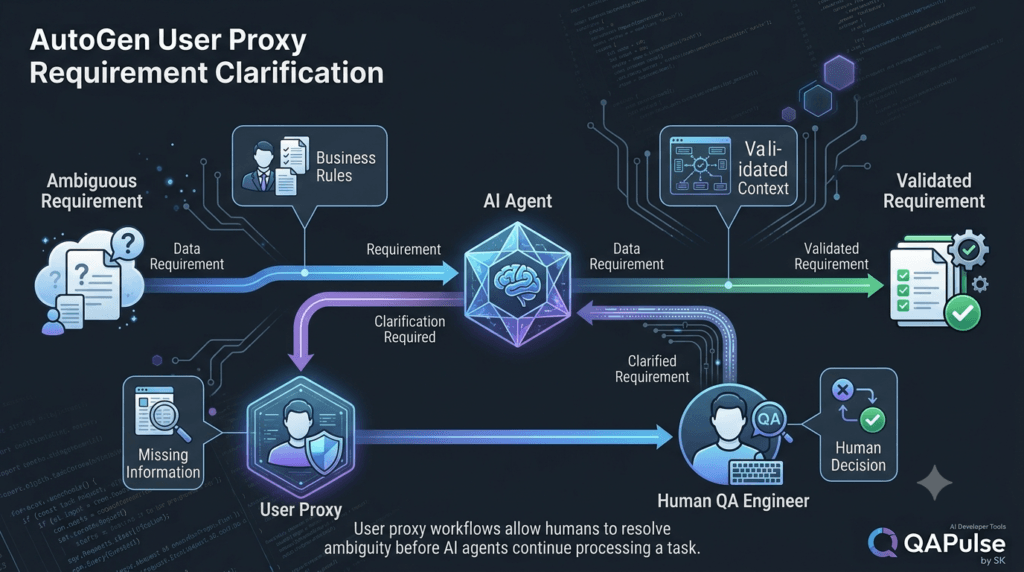
User Proxy and Requirement Clarification
One of the strongest use cases is resolving ambiguity.
Consider:
Requirement:
"The system should lock accounts after
multiple failed login attempts."
The agent asks:
How many attempts?

How long should the lockout last?

Should administrators be exempt?

Should the user be notified?

Should IP-based protection also apply?
The human answers:
5 attempts.

Lock for 15 minutes.

Administrators are subject to the same policy.

Send an email notification.
The workflow can now continue with explicit requirements.
Ambiguous Requirement
        ↓
User Proxy
        ↓
Human Clarification
        ↓
Structured Requirement
        ↓
AI Processing
This is much safer than allowing the agent to invent policy.
Don’t Let Agents Invent Business Policy
This is one of the most important rules for human-in-the-loop systems.
Suppose the requirement says:
Users receive a notification
after a security event.
The AI should not automatically decide:
Send an SMS after 3 failed attempts.
unless that behavior is supported by requirements or policy.
Instead:
Known Requirement
        ↓
AI identifies ambiguity
        ↓
Human clarification
        ↓
Validated Business Rule
        ↓
AI implementation
This creates a clean separation between:
Business Decision
and:
AI Interpretation
User Proxy Agents and Tool Execution
The concept becomes even more powerful when agents can use tools.
Imagine:
User
 ↓
User Proxy
 ↓
AI Agent
 ↓
Tool
 ↓
External System
The agent may request:
Run Playwright tests.
The application can check:
Which environment?

Which test suite?

Does the user have permission?

Is this safe to execute?

Should approval be required?
The user proxy can facilitate the human interaction, but the application should enforce the actual permissions.
Tool Approval Workflow
A safer architecture is:
AI Agent
    ↓
Tool Request
    ↓
Policy Check
    ↓
Approval Required?
   ↙          ↘
No             Yes
↓               ↓
Execute       User Proxy
                ↓
             Human
                ↓
          Approve / Reject
                ↓
             Execute
This pattern becomes extremely important when AI agents have access to:
Shell commands
Databases
Cloud infrastructure
Source repositories
Deployment systems
Customer data
Production services
Human-in-the-Loop Does Not Mean Human-in-Every-Step
This distinction is critical.
A poorly designed system might require:
Human
 ↓
Every agent
 ↓
Every tool call
 ↓
Every output
That eliminates much of the value of automation.
A better system identifies decision points.
100 Automated Actions
        ↓
Automated Validation
        ↓
1 Meaningful Approval
        ↓
Continue
The human becomes a strategic control point rather than a bottleneck.
Strategy: Design Approval Gates
An approval gate is a deliberate point where the workflow stops until an authorized human makes a decision.
Examples:
Requirements Approved
Test Strategy Approved
Code Approved
Production Deployment Approved
Security Exception Approved
The workflow can represent this explicitly:
state = {
    "status": "awaiting_human_approval"
}
The system should not continue until the state changes.
Approval Should Be Auditable
For important decisions, record:
Who approved?
What was approved?
When was it approved?
What version was reviewed?
What environment was targeted?
What action followed?
For example:
approval_record = {
    "workflow_id": "wf-001",
    "action": "production_deployment",
    "status": "approved",
    "timestamp": "2026-08-09T21:00:00"
}
In a real application, the approval identity and timestamp should come from trusted application infrastructure rather than model-generated text.
User Proxy Agents and SDET Workflows
This pattern creates interesting opportunities for SDETs.
Imagine an AI QA system:
Requirement
     ↓
Requirements Agent
     ↓
Test Design Agent
     ↓
User Proxy
     ↓
QA Approval
     ↓
Code Generation Agent
     ↓
Execution Agent
     ↓
Results
     ↓
User Proxy
     ↓
QA Decision
The AI can handle:
Test generation
Code generation
Test execution
Result summarization
Failure clustering
Documentation
The SDET can focus on:
Risk
Coverage
Architecture
Business behavior
Quality decisions
Production readiness
This creates a powerful human-AI collaboration model.
Interactive Exercise: Design Your QA Agent Team
Imagine you are building an AI QA platform.
Choose where the human participates.
Requirements Agent
        ↓
Test Strategy Agent
        ↓
API Test Agent
        ↓
UI Test Agent
        ↓
Execution Agent
        ↓
Defect Analysis Agent
Now add:
User Proxy
Where should it appear?
A strong design might be:
Requirements Agent
        ↓
User Proxy
        ↓
Test Strategy Agent
        ↓
User Proxy
        ↓
API/UI Test Agents
        ↓
Execution Agent
        ↓
Defect Analysis Agent
        ↓
User Proxy
But you should not automatically use all three checkpoints.
Ask:
Which decision requires human judgment?

Which decision is low risk?

Which decision can be validated automatically?
The answers determine the actual architecture.
The Most Important Design Principle
A user proxy should not exist merely because the framework supports it.
It should exist because human participation improves the workflow.
Use it when:
Requirements are ambiguous
      OR
Business decisions are required
      OR
Risk is high
      OR
Approval is required
      OR
Human feedback improves quality
Avoid unnecessary interaction when:
The task is deterministic
      OR
The risk is low
      OR
The decision can be validated automatically
      OR
Human approval adds no meaningful value
A Practical Decision Framework
Before adding a human checkpoint, ask five questions:
1. Is the decision high risk?

2. Does it require business context?

3. Can automated validation reliably handle it?

4. Would an incorrect decision cause significant impact?

5. Does human involvement materially improve quality?
If the answers indicate meaningful risk or uncertainty, a human checkpoint may be justified.
Human-in-the-Loop vs Human-on-the-Loop
These are useful concepts to distinguish.
Human-in-the-loop
The workflow pauses and requires human interaction.
AI
 ↓
Human
 ↓
AI continues
Human-on-the-loop
The system operates autonomously while the human supervises and can intervene.
AI
 ↓
AI
 ↓
AI
 ↓
Human monitors
 ↓
Intervenes when required
The choice depends on risk.
High-risk actions generally need stronger human control.
Lower-risk workflows may benefit from supervision rather than constant approval.
A Simple Comparison
| Model | Human Role | Automation | Best For |
|---|---|---|---|
| Human-in-the-loop | Direct decision | Medium | High-risk decisions |
| Human-on-the-loop | Supervisor | High | Lower-risk autonomous workflows |
| Fully autonomous | Minimal | Very high | Controlled low-risk tasks |
| Manual workflow | Primary operator | Low | Highly sensitive tasks |
The goal is to select the appropriate model rather than assuming maximum autonomy is always better.
Building a Reliable User Proxy Workflow
A practical architecture can be summarized as:
Human
  ↓
User Proxy
  ↓
Orchestrator
  ↓
Specialized Agent
  ↓
Validation
  ↓
Decision
  ↓
Human Approval When Required
  ↓
Tool / System Action
  ↓
Result
Every transition should have a reason.
The human should not be asked unnecessary questions.
The AI should not make decisions that belong to the human.
The application should control permissions and execution.
Strategy: Treat Human Attention as a Limited Resource
Human attention is expensive.
Therefore:
AI handles volume.
Human handles judgment.
Application handles control.
This is one of the strongest mental models for designing human-AI systems.
For example:
AI:
Analyze 500 test failures.

Human:
Review the 8 failure clusters
that require product decisions.
This is much more scalable than asking the human to manually inspect all 500 failures.
Notes:
User proxy agents introduce a critical dimension to AutoGen workflows: controlled human participation.
The strongest systems do not attempt to eliminate humans from every decision.
They identify where human judgment, business knowledge, approval, or accountability adds real value.
A practical architecture separates responsibilities clearly:
Human
   ↓
User Proxy
   ↓
Agent Orchestration
   ↓
Specialized AI Agent
   ↓
Validation
   ↓
Tool / System
The human provides context and judgment.
The AI handles reasoning and repetitive work.
The application controls permissions, state transitions, validation, and execution.
That separation creates a much safer architecture than allowing an autonomous agent to make every decision.
For QA and software engineering, this model is particularly powerful.
An AI system can generate hundreds of test scenarios, analyze failures, produce automation code, and summarize results.
The SDET or QA engineer can remain responsible for the decisions that require engineering judgment.
The objective is therefore not:
Remove the human.
It is:
Make human involvement more valuable.
Key Takeaways
1. A user proxy represents human participation inside an agent workflow.

2. Human-in-the-loop is the broader architecture; a user proxy can provide the interaction mechanism.

3. User proxy workflows are valuable when requirements are ambiguous or decisions are high risk.

4. AI agents should not invent business policies when clarification is required.

5. Human approval should be explicit for high-risk actions.

6. Natural-language feedback should not automatically be treated as authorization.

7. Deterministic permissions and execution controls should remain in application code.

8. Human checkpoints should be designed deliberately rather than added as emergency mechanisms.

9. Do not require humans to approve every low-risk AI action.

10. Use automated validation before requesting human intervention whenever possible.

11. Treat human attention as a limited and valuable resource.

12. User proxy workflows can be especially useful for QA, SDET, coding, security, and production operations.

13. Approval gates should be explicit, testable, and auditable.

14. Sensitive tool actions should pass through application-level policy checks.

15. Human-in-the-loop and human-on-the-loop architectures serve different risk levels.

16. The AI should handle repetitive reasoning and analysis.

17. The human should provide judgment, business context, accountability, and approval where necessary.

18. The application should control state, permissions, retries, validation, and execution.

19. More human checkpoints do not automatically mean better safety; unnecessary interaction can create bottlenecks.

20. The best human-AI workflow is one where every human interaction has a clear purpose and measurable value.
The core architecture to remember is:
Human Judgment
      +
User Proxy
      +
AI Reasoning
      +
Application Control
      +
Validation
      =
Responsible Human-AI Collaboration
How AutoGen User Proxy Agents Actually Work
At a practical level, an AutoGen user proxy agent is an interface between an application and a human.
In current AutoGen AgentChat, UserProxyAgent represents a human user through an input function. The input function can be customized for environments such as a console, web application, or other user interface.
A simplified architecture looks like this:
┌──────────────────────┐
│        Human         │
└──────────┬───────────┘
           │
           ▼
┌──────────────────────┐
│   UserProxyAgent     │
│   Human Interface    │
└──────────┬───────────┘
           │
           ▼
┌──────────────────────┐
│    Agent Team        │
│                      │
│ Planner → Developer  │
│          → Reviewer  │
└──────────┬───────────┘
           │
           ▼
┌──────────────────────┐
│   Tools / Systems    │
└──────────────────────┘
The important detail is that the user proxy is not an LLM-powered replacement for the human.
Its purpose is to expose a controlled interaction point.
Creating a Basic User Proxy Agent
A minimal current AgentChat example can look like this:
from autogen_agentchat.agents import UserProxyAgent

user_proxy = UserProxyAgent(
    "user_proxy",
    input_func=input
)
The input_func determines how the application obtains human input.
For a terminal application:
input_func=input
is enough for a basic experiment.
For a web application, however, you would normally connect the input function to your application’s communication mechanism.
This distinction is important.
The agent framework should not need to know whether the human is using:
Terminal
Web browser
Mobile application
Internal dashboard
Approval dialog
Chat interface
The application provides the interaction mechanism.
Connecting a User Proxy With an Assistant Agent
A simple team can contain an assistant and a user proxy:
from autogen_agentchat.agents import AssistantAgent, UserProxyAgent
from autogen_agentchat.teams import RoundRobinGroupChat

assistant = AssistantAgent(
    "assistant",
    model_client=model_client,
    system_message="""
    You are a senior QA engineer.
    Generate a test strategy and request
    human feedback when appropriate.
    """
)

user_proxy = UserProxyAgent(
    "user_proxy",
    input_func=input
)

team = RoundRobinGroupChat(
[assistant, user_proxy]
)
The conceptual flow is:
Human
  ↓
Task
  ↓
Assistant Agent
  ↓
Generated Result
  ↓
User Proxy
  ↓
Human Feedback
  ↓
Assistant Agent
AutoGen’s current human-in-the-loop documentation demonstrates this pattern with RoundRobinGroupChat and explains that the team can transfer control to the UserProxyAgent and wait for user feedback.
Understanding the Control Transfer
The most important concept is control transfer.
Imagine an agent team processing a task:
User
 ↓
Planner
 ↓
Developer
 ↓
Reviewer
At some point the team determines that human feedback is needed.
The control flow becomes:
Planner
   ↓
Developer
   ↓
Reviewer
   ↓
UserProxyAgent
   ↓
Human
The team pauses while the user provides input.
After the response:
Human
   ↓
UserProxyAgent
   ↓
Planner / Developer / Reviewer
Control returns to the agent workflow.
This is different from simply adding another message to a chat.
The workflow itself is transferring responsibility for the next decision to the human.
A Human Approval Example
Consider an AI coding workflow.
The coding agent generates:
Authentication module completed.

Files changed:
- auth_service.py
- login_controller.py
- test_auth.py

Security review:
Passed

Unit tests:
42 passed

Ready for merge.
Instead of allowing the system to merge automatically, the workflow can ask:
Approve merge?

[Approve] [Reject]
The user proxy represents that interaction.
Conceptually:
approval = input(
    "Approve merge? Type APPROVE or REJECT: "
)

if approval.upper() == "APPROVE":
    print("Approved")
else:
    print("Rejected")
The important engineering principle is that the application should interpret the approval and enforce the action.
The LLM should not be the final authority over whether a sensitive operation executes.
Using Explicit Approval Signals
A simple workflow can define a clear approval vocabulary:
APPROVE
REJECT
REVISE
For example:
feedback = input(
    "Review result [APPROVE/REJECT/REVISE]: "
).strip().upper()

if feedback == "APPROVE":
    action = "continue"

elif feedback == "REJECT":
    action = "stop"

elif feedback == "REVISE":
    action = "revise"

else:
    action = "invalid"
This is preferable to interpreting arbitrary natural-language input as authorization.
For a production system, you would generally use structured application state rather than relying solely on strings.
User Proxy as a State Transition
A better mental model is to think of human interaction as a workflow state.
GENERATING
     ↓
REVIEW_REQUIRED
     ↓
AWAITING_HUMAN
     ↓
┌────┼────┐
↓    ↓    ↓
APPROVE REJECT REVISE
↓       ↓      ↓
EXECUTE STOP   GENERATE
This architecture is much easier to reason about.
It also makes testing easier.
A QA engineer can test:
REVIEW_REQUIRED → APPROVE
REVIEW_REQUIRED → REJECT
REVIEW_REQUIRED → REVISE
REVIEW_REQUIRED → TIMEOUT
REVIEW_REQUIRED → INVALID_INPUT
Instead of testing an unpredictable conversation.
Why State Matters More Than Conversation
An AI conversation can be flexible.
A production workflow should be deterministic where it matters.
For example:
AI:
"I think deployment looks safe."
should not automatically mean:
deployment_status = APPROVED
Instead:
deployment_status = AWAITING_APPROVAL
The human explicitly selects:
APPROVE
and the application changes the state:
deployment_status = APPROVED
This separation provides a much stronger control boundary.
Current AutoGen Human-in-the-Loop Behavior
There is an important implementation detail developers need to understand.
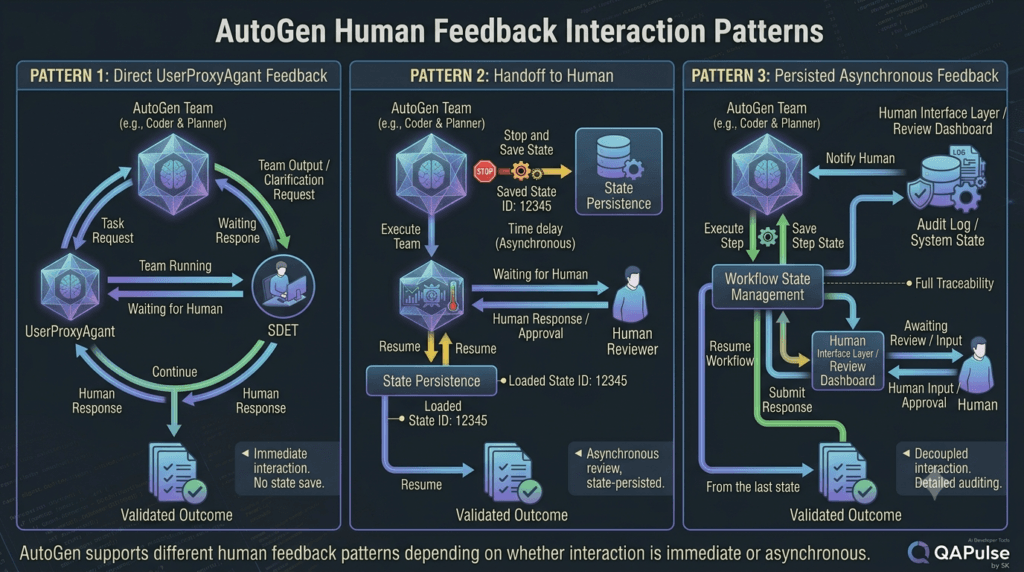
The current AutoGen documentation explains that when UserProxyAgent is called during a team run, the running team waits for user input. Because this can block the team, the documentation recommends using the direct UserProxyAgent interaction mainly for short, immediate feedback interactions.
Examples include:
Approve?
Reject?
Continue?
Provide a short clarification.
This is different from a workflow where a human might respond several minutes or several hours later.
That distinction changes the architecture.
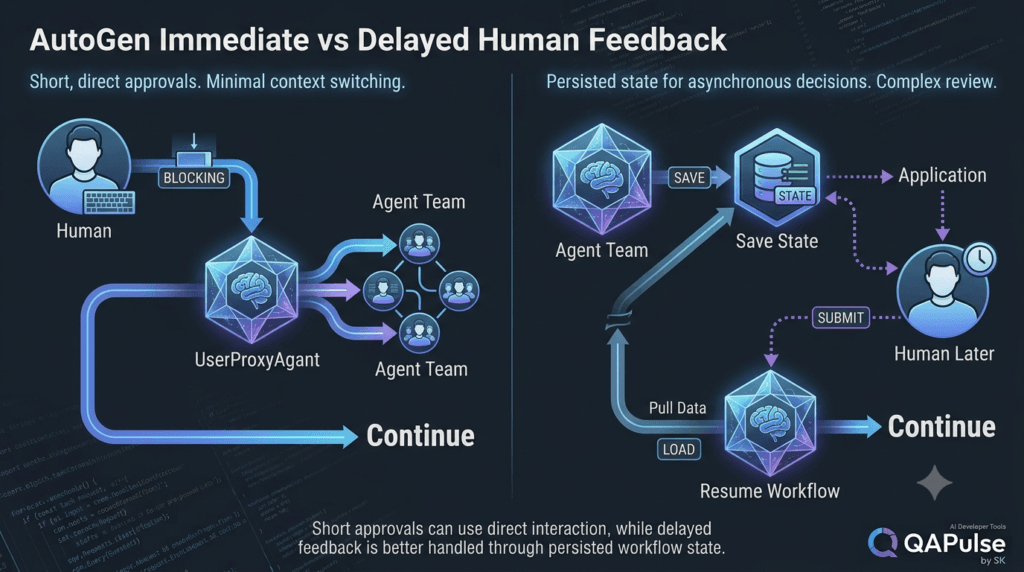
Immediate Feedback vs Delayed Feedback
Consider two workflows.
Immediate feedback
AI
 ↓
"Approve?"
 ↓
Human responds immediately
 ↓
AI continues
This is a good candidate for direct user-proxy interaction.
Delayed feedback
AI
 ↓
Generate report
 ↓
WAIT
 ↓
Human reviews report later
 ↓
Human responds
 ↓
Workflow resumes
For delayed interaction, a better architecture is often to stop the team and persist its state, then start another run when the application receives the human response. AutoGen’s documentation specifically describes this pattern for asynchronous user feedback.
Persisted Human Feedback Architecture
A production application can use:
Agent Team
    ↓
Needs Human Input
    ↓
Save Workflow State
    ↓
Return Control to Application
    ↓
Store Pending Approval
    ↓
Human Responds Later
    ↓
Load Workflow State
    ↓
Resume Workflow
This is significantly more robust than keeping a long-running process blocked while waiting for a person.
Why Blocking Is a Real Engineering Problem
Suppose an AI workflow waits for a human.
The human goes to lunch.
The workflow remains waiting.
Then the browser closes.
Or the network connection disappears.
Or the server restarts.
Or the user never responds.
A naïve architecture might leave the workflow in an uncertain state.
A production architecture should instead define:
Waiting
Timeout
Cancelled
Approved
Rejected
Expired
Resumed
This turns human interaction into a manageable workflow state.
Designing a Custom Input Function
The real power of UserProxyAgent appears when the input function is connected to an actual application.
For example, a simplified asynchronous input function could look like:
async def user_input(prompt, cancellation_token):
    message = await websocket.receive_text()
    return message
The user proxy can then use this function:
user_proxy = UserProxyAgent(
    "user_proxy",
    input_func=user_input
)
This allows the interaction to happen through a web application instead of the terminal.
AutoGen’s documentation shows this general approach for web integrations and notes that custom input functions can connect the user proxy to application-level communication mechanisms.
Web Application Architecture
A realistic architecture might look like:
Browser
   │
   ▼
Frontend
   │
   ▼
Backend API
   │
   ├── Authentication
   ├── Authorization
   ├── Workflow State
   └── AutoGen Team
            │
            ├── Planner
            ├── QA Agent
            └── UserProxyAgent
This is much closer to how an enterprise system should be designed.
The browser should not directly control the agent.
The backend should mediate the interaction.
Why the Application Should Remain in Control
Consider a production deployment approval.
The AI says:
Deployment recommended.
The browser displays:
Approve Deployment
The user clicks the button.
The backend should verify:
Authenticated user?
Authorized for deployment?
Correct workflow?
Correct environment?
Approval still valid?
Workflow not expired?
Only then should the backend change the workflow state.
Browser
   ↓
Backend
   ↓
Authorization
   ↓
Workflow State
   ↓
AutoGen
   ↓
Execution
This separation prevents the AI conversation from becoming the security boundary.
User Proxy and Authentication
A user proxy represents human interaction, but it does not automatically provide enterprise identity management.
Your application still needs to know:
Who is the user?
What can they access?
What can they approve?
Which organization do they belong to?
Which environment can they modify?
Therefore:
UserProxyAgent
≠
Authentication System
and:
UserProxyAgent
≠
Authorization System
The proxy handles interaction.
Your application handles identity and permissions.
User Proxy and Authorization
Imagine two users:
QA Engineer
Release Manager
The QA engineer may be allowed to:
Approve test strategy
Approve test data
Start staging tests
The release manager may additionally be allowed to:
Approve production deployment
The AI should not decide this.
The backend should enforce it.
permissions = {
    "qa_engineer": [
        "approve_test_strategy",
        "run_staging_tests"
    ],
    "release_manager": [
        "approve_test_strategy",
        "run_staging_tests",
        "approve_production_deployment"
    ]
}
The workflow then checks the user’s actual permissions.
Comparison: Human Proxy vs Application Approval Layer
| Capability | User Proxy | Application Approval Layer |
|---|---|---|
| Collect human input | Yes | Yes |
| Represent human interaction | Yes | Indirectly |
| Authenticate user | No | Yes |
| Authorize action | No | Yes |
| Maintain workflow state | Not primarily | Yes |
| Enforce business policy | No | Yes |
| Display approval UI | Through application | Yes |
| Audit decision | Not by itself | Yes |
| Execute sensitive action | No | Yes, if authorized |
This separation is essential for production architecture.
User Proxy in a QA Review Workflow
Consider an AI-generated API testing strategy:
Requirements
     ↓
QA Agent
     ↓
Generated Strategy
     ↓
User Proxy
     ↓
QA Engineer
The QA engineer reviews:
Functional coverage
Negative scenarios
Security cases
Boundary conditions
Performance requirements
Environment assumptions
The human might respond:
APPROVE
or:
REVISE

Add:
- rate limiting tests
- expired-token scenarios
- concurrent login tests
The AI then receives targeted feedback.
Human Feedback
      ↓
User Proxy
      ↓
QA Agent
      ↓
Updated Strategy
This is much more useful than simply asking an AI to “make the test strategy better.”
Structured Human Feedback
For larger systems, structured feedback is preferable.
For example:
feedback = {
    "decision": "revise",
    "priority": "high",
    "changes": [
        "Add rate limiting tests",
        "Add expired-token scenarios",
        "Add concurrent login tests"
    ]
}
The workflow can then process each requested change.
if feedback["decision"] == "revise":
    for change in feedback["changes"]:
        print(f"Applying: {change}")
The AI can interpret the details, while the application controls the overall state.
Interactive Exercise: Design the Feedback Contract
Imagine your QA agent generates:
Authentication API Test Strategy

Coverage:
- Login
- Logout
- Password reset
- MFA

Environment:
Staging

Risk:
Medium
Now imagine the human wants to request changes.
What should the feedback contract contain?
A useful structure might be:
Decision
Reason
Requested changes
Priority
Reviewer identity
Timestamp
For example:
{
  "decision": "revise",
  "reason": "Security coverage is incomplete",
  "changes": [
    "Add brute-force protection tests",
    "Add token replay tests"
  ],
  "priority": "high"
}
This is far easier to audit and process than:
"Please improve this."
User Proxy With Multiple Agents
The pattern becomes more interesting when multiple AI agents are involved.
Consider:
Human
  ↓
User Proxy
  ↓
Planner
  ↓
Requirements Agent
  ↓
Test Designer
  ↓
Security Reviewer
  ↓
User Proxy
  ↓
Human
The user proxy can appear at meaningful checkpoints.
For example:
Checkpoint 1
Requirement clarification

Checkpoint 2
Test strategy approval

Checkpoint 3
Production execution approval
However, adding the user proxy everywhere is usually a poor design.
The workflow should ask:
Does this checkpoint require human judgment?
rather than:
Can we ask the human here?
Strategic Placement of Human Checkpoints
A useful pattern is:
AI Analysis
   ↓
Automated Validation
   ↓
Human Decision
   ↓
AI Execution
instead of:
AI Analysis
   ↓
Human
   ↓
AI Validation
   ↓
Human
   ↓
AI Execution
   ↓
Human
The second design creates unnecessary friction.
The first design lets automation eliminate obvious errors before consuming human attention.
Validation Before Human Review
Suppose an AI generates 500 test cases.
There is little value in asking a human to manually inspect all 500.
Instead:
500 Generated Tests
        ↓
Automated Validation
        ↓
Remove Duplicates
        ↓
Check Syntax
        ↓
Check Required Fields
        ↓
Check Coverage
        ↓
20 Important Cases
        ↓
Human Review
The human sees the useful information rather than the raw model output.
This is a powerful design strategy for AI-assisted QA.
Human Proxy and Guardrails
A human checkpoint can be part of a broader guardrail architecture:
AI Agent
   ↓
Policy Validation
   ↓
Risk Assessment
   ↓
Human Approval?
   ↓
User Proxy
   ↓
Application Authorization
   ↓
Tool Execution
Notice that human approval is not the only safeguard.
You can combine:
AI reasoning
+
Automated validation
+
Policy checks
+
Human approval
+
Application authorization
This creates defense in depth.
High-Risk Actions Need Stronger Controls
Different actions should have different approval requirements.
For example:
Generate documentation
→ No approval

Create feature branch
→ Optional review

Merge code
→ Review

Deploy staging
→ Approval depending on policy

Deploy production
→ Explicit authorization

Delete production data
→ Strong multi-step control
The user proxy is one component of this architecture.
It should not be treated as the complete safety mechanism.
Handling Rejection
A good workflow must define what happens when the human rejects the result.
For example:
AI Result
   ↓
Human Review
   ↓
REJECT
   ↓
Capture Reason
   ↓
Agent Revision
   ↓
Validation
   ↓
Human Review
The rejection should not simply disappear.
Capture the reason:
rejection = {
    "decision": "reject",
    "reason": "Missing MFA abuse scenarios"
}
The agent can then use that feedback to revise the output.
Handling Revision
A revision loop can look like:
GENERATE
   ↓
VALIDATE
   ↓
REVIEW
   ↓
REVISE
   ↓
GENERATE
The workflow should have a limit.
For example:
MAX_REVISIONS = 3
Without limits, a poorly designed agent workflow can continue indefinitely.
Human Feedback and Termination Conditions
AutoGen supports termination conditions that can be used to control when a team stops. The current documentation describes conditions such as TextMentionTermination and HandoffTermination, allowing workflows to stop when a particular message or handoff occurs.
For example:
from autogen_agentchat.conditions import TextMentionTermination

termination = TextMentionTermination("APPROVE")
The workflow can then treat an explicit approval signal as a termination condition.
Conceptually:
Agent
  ↓
Generate Result
  ↓
User Proxy
  ↓
Human
  ↓
APPROVE
  ↓
Termination Condition
This is useful for controlled approval workflows.
Handoff-Based Human Interaction
Another useful pattern is explicit handoff.
Conceptually:
Agent
  ↓
Cannot continue safely
  ↓
Handoff to Human
  ↓
Workflow stops
  ↓
Human provides information
  ↓
Workflow continues
Current AutoGen documentation provides HandoffTermination for this style of interaction and notes that the application can then continue the workflow with additional user input.
This is especially useful when the human response may take longer.
Handoff vs Direct User Proxy Interaction
| Pattern | Best Use | Workflow Behavior |
|---|---|---|
| Direct UserProxyAgent interaction | Short immediate feedback | Team waits for input |
| Handoff termination | Human needs more time | Team can stop |
| Persisted state | Delayed workflows | Resume later |
| Application approval API | Sensitive operations | Backend controls authorization |
| Structured feedback | Complex review | Machine-readable decision |
This distinction becomes increasingly important as an AutoGen application moves from experimentation to production.
Testing User Proxy Workflows
A QA engineer should test the human interaction layer just like any other application component.
Important test scenarios include:
Approval
Rejection
Revision
Invalid input
Empty input
Timeout
Cancellation
Duplicate response
Expired approval
Unauthorized user
Network failure
Agent failure
State restoration
For example:
Given a workflow is awaiting approval

When an authorized user approves

Then the workflow should continue.
And:
Given a workflow is awaiting approval

When an unauthorized user approves

Then the workflow should remain blocked.
This turns the human-in-the-loop architecture into something that can be systematically tested.
Testing Approval Security
Never assume that displaying an approval button is sufficient.
Test:
Can another user approve?

Can an expired approval be reused?

Can the same approval be replayed?

Can the approval target be changed?

Can an unauthorized API request bypass the UI?

Can a user approve an action they cannot normally execute?
These are application-security questions, not LLM questions.
Testing Workflow Resumption
For asynchronous workflows, test:
Workflow stopped
        ↓
State persisted
        ↓
Server restarted
        ↓
Human responds
        ↓
State restored
        ↓
Workflow resumes correctly
A production-ready system should not lose the context simply because the server process restarted.
Testing Human Feedback Quality
You can also test whether the AI correctly interprets structured feedback.
Input:
{
  "decision": "revise",
  "changes": [
    "Add MFA tests"
  ]
}
Expected:
MFA scenarios added
Input:
{
  "decision": "reject",
  "reason": "Security coverage incomplete"
}
Expected:
Workflow does not execute.
This provides deterministic assertions around an otherwise conversational workflow.
User Proxy and Observability
Human interactions should be observable.
Useful events include:
workflow_started
review_requested
user_input_received
approval_granted
approval_rejected
workflow_resumed
workflow_cancelled
workflow_expired
tool_execution_started
tool_execution_completed
A production dashboard could show:
Workflow: QA-4821

Status: Awaiting Approval

Requested by: QA Agent

Risk: High

Action:
Execute security regression suite

Reviewer:
Release Manager

Created:
21:14

Expires:
21:30
This is much easier to operate than looking through raw agent messages.
Measuring Human Interaction
Useful metrics include:
Average approval time
Approval rate
Rejection rate
Revision rate
Timeout rate
Human interventions per workflow
Automation percentage
Workflow completion rate
For example:
100 workflows

72 approved automatically
18 required human review
7 rejected
3 expired
This data can reveal whether human checkpoints are correctly placed.
If 90% of approvals are always granted, perhaps the workflow can be redesigned.
If 60% are rejected, the AI may be producing poor results.
Human interaction therefore becomes a measurable engineering signal.
The Human Is Also an Evaluation Signal
Human feedback can improve the system.
Suppose the AI repeatedly generates incomplete API security tests.
Humans repeatedly add:
Rate limiting
Token replay
Credential stuffing
Session invalidation
That feedback can reveal a systematic weakness.
The team can then improve:
System prompts
Agent roles
Validation rules
Test templates
Evaluation datasets
Workflow policies
Human feedback should therefore not only control execution.
It can also improve the agent system itself.
From Human Approval to Continuous Improvement
The loop becomes:
AI Output
   ↓
Human Review
   ↓
Feedback
   ↓
Store Evaluation Signal
   ↓
Analyze Patterns
   ↓
Improve Agent
   ↓
AI Output
This turns the user proxy from a simple interaction mechanism into part of an evaluation strategy.
Practical Architecture for a QA Agent Platform
A mature AI QA platform could look like:
                         ┌─────────────────┐
                         │      Human      │
                         │    QA / SDET    │
                         └────────┬────────┘
                                  │
                                  ▼
                         ┌─────────────────┐
                         │  User Proxy /   │
                         │ Approval Layer  │
                         └────────┬────────┘
                                  │
                                  ▼
                    ┌─────────────────────────┐
                    │     Orchestrator        │
                    └───────────┬─────────────┘
                                │
              ┌─────────────────┼─────────────────┐
              ▼                 ▼                 ▼
       Requirements        Test Design       Security
          Agent               Agent            Agent
              │                 │                 │
              └─────────────────┼─────────────────┘
                                ▼
                       ┌─────────────────┐
                       │   Validation    │
                       └────────┬────────┘
                                │
                                ▼
                       ┌─────────────────┐
                       │ Execution Agent │
                       └────────┬────────┘
                                │
                                ▼
                       ┌─────────────────┐
                       │ Test Results    │
                       └────────┬────────┘
                                │
                                ▼
                       ┌─────────────────┐
                       │ Human Review    │
                       └─────────────────┘
This architecture demonstrates why human participation should be designed as part of the overall system rather than treated as an isolated chatbot feature.
Strategy: Keep the AI Layer and Control Layer Separate
A useful architectural rule is:
AI Layer
→ Reason
→ Generate
→ Analyze
→ Recommend

Control Layer
→ Authenticate
→ Authorize
→ Validate
→ Approve
→ Execute
→ Audit
The AI can recommend:
"Deploy version 4.2.1."
The control layer decides:
Is this user authorized?

Is deployment approved?

Is the environment correct?

Is the deployment policy satisfied?
This separation is one of the strongest foundations for safe agentic systems.
Interactive Challenge: Find the Security Boundary
Consider:
if agent_response == "deploy":
    deploy_to_production()
What is wrong with this design?
The problem is that the model’s output directly controls a sensitive operation.
A safer architecture is:
if (
    workflow.status == "APPROVED"
    and user.is_authorized("deploy_production")
    and deployment_policy.is_valid()
):
    deploy_to_production()
Now the AI can participate in the decision-making process without becoming the security authority.
Ask yourself:
What happens if the model hallucinates "APPROVED"?

What happens if the user is not authorized?

What happens if the approval expired?

What happens if the target environment changed?
These questions should influence the architecture before implementation.
User Proxy Is Not a Magic Safety Switch
It is tempting to think:
Human involved
=
Safe
That is incorrect.
A human can approve the wrong thing.
A compromised account can approve a malicious action.
A misleading AI explanation can influence a human.
A badly designed interface can hide critical information.
Therefore, human oversight should be combined with:
Clear evidence
+
Risk classification
+
Policy checks
+
Authentication
+
Authorization
+
Audit logging
+
Automated validation
Human involvement is one layer of defense, not the entire defense.
Designing Better Approval Interfaces
The quality of human oversight depends heavily on what information the human receives.
Bad approval interface:
Deploy?

[YES] [NO]
Better:
Production Deployment

Version:
4.2.1

Changes:
17 files

Tests:
428 passed
3 failed

Security:
Passed

Risk:
Medium

Rollback:
Available

Target:
production-us-east

[Approve Deployment]
[Reject]
[Request Changes]
The second design gives the human meaningful context.
This reduces the risk of blind approval.
Approval Fatigue
If users receive:
Approve?
Approve?
Approve?
Approve?
Approve?
Approve?
all day, they may begin approving automatically.
This is known as approval fatigue.
A better workflow groups low-risk actions and reserves approval gates for meaningful decisions.
For example:
100 low-risk test actions
        ↓
Automated execution

1 high-risk production action
        ↓
Human approval
This makes human intervention more meaningful.
Human Proxy and Agent Autonomy
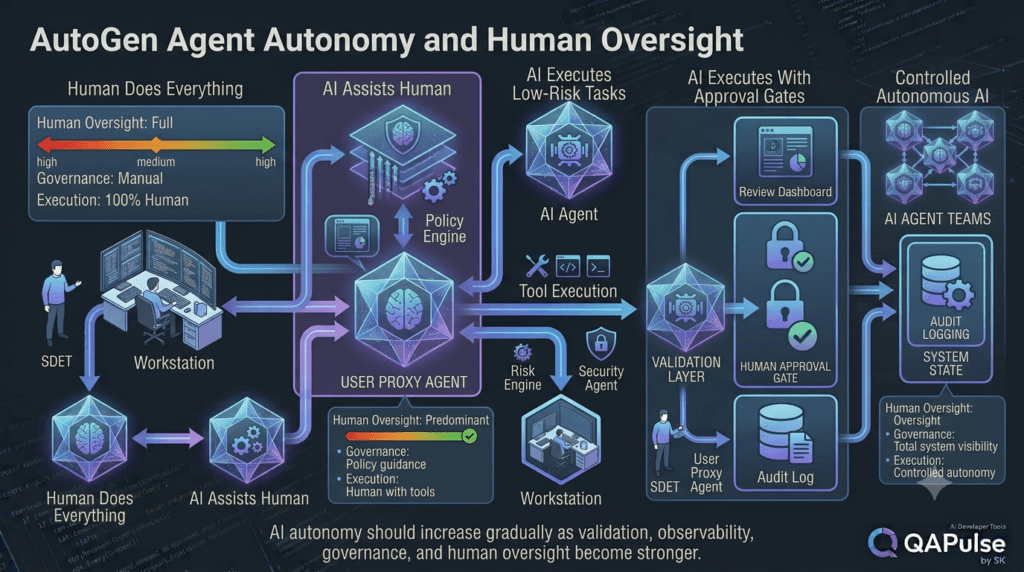
A useful maturity model is:
Level 1
Human does everything

Level 2
AI assists human

Level 3
AI executes low-risk tasks

Level 4
AI executes workflows with approval gates

Level 5
AI operates autonomously within strict policies
User proxy agents are especially useful around Levels 2–4.
The goal should not be to jump immediately to Level 5.
The system should earn autonomy through:
Testing
Evaluation
Observability
Policy enforcement
Reliable tool execution
Human feedback
A Practical Autonomy Strategy
Start with:
AI recommends
Human decides
Then move to:
AI executes low-risk actions
Human approves high-risk actions
Then:
AI executes validated workflows
Human supervises exceptions
This progressive approach is usually more practical than attempting complete autonomy from the beginning.
A Useful Rule for SDETs
For software testing workflows, use this principle:
Automate execution.
Automate validation.
Humanize judgment.
The AI can:
Generate tests
Run tests
Analyze failures
Cluster defects
Suggest root causes
Create reports
The human can:
Define quality risk
Resolve ambiguous requirements
Approve critical decisions
Evaluate business impact
Accept or reject release readiness
This creates a natural division of responsibilities.
User Proxy as a Quality Gate
A user proxy can therefore act as a quality gate:
AI Generates
     ↓
Automated Validation
     ↓
Human Review
     ↓
Quality Gate
     ↓
Continue / Revise / Reject
The key is that the quality gate should have a clearly defined purpose.
If the human cannot explain what they are expected to evaluate, the checkpoint probably needs redesign.
Designing the Human Review Contract
Every approval checkpoint should answer:
What am I reviewing?

What evidence do I receive?

What decision can I make?

What happens after approval?

What happens after rejection?

How long is the approval valid?

Who is authorized to approve?
This transforms a vague human interaction into an engineered workflow contract.
Building Practical Human-in-the-Loop Workflows With AutoGen
A useful AutoGen user proxy workflow should do more than pause an agent and ask a human to type something.
The real objective is to create a controlled collaboration model where the AI handles repetitive reasoning and execution while the human handles decisions that require context, authority, judgment, or accountability.
A practical workflow can be expressed as:
User Request
     ↓
AI Analysis
     ↓
Automated Validation
     ↓
Risk Assessment
     ↓
Human Checkpoint
     ↓
Approval / Rejection / Revision
     ↓
Controlled Execution
     ↓
Result
This model works particularly well for software engineering and QA workflows.
For example, an AI system might automatically generate a regression strategy but require a senior SDET to approve production execution.
The human does not need to inspect every internal reasoning step.
Instead, the system presents the evidence needed to make the decision.
Designing a Reviewable Agent Result
A weak human-in-the-loop implementation might send this:
Should I continue?

yes/no
The human has almost no useful context.
A stronger implementation produces a structured review package:
review = {
    "task": "Production regression execution",
    "environment": "production",
    "risk": "high",
    "tests": 428,
    "passed": 421,
    "failed": 7,
    "critical_failures": 1,
    "recommendation": "BLOCK",
    "reason": "Critical authentication test failed"
}
The user interface can transform that information into a meaningful approval screen.
The AI provides analysis.
The application provides evidence.
The human makes the decision.
AutoGen User Proxy With Structured Decisions
Instead of accepting arbitrary text, define a small decision vocabulary.
VALID_DECISIONS = {
    "APPROVE",
    "REJECT",
    "REVISE"
}

decision = input(
    "Decision [APPROVE/REJECT/REVISE]: "
).strip().upper()

if decision not in VALID_DECISIONS:
    raise ValueError("Invalid decision")
This makes downstream processing predictable.
You can then map the decision to workflow states:
state_map = {
    "APPROVE": "approved",
    "REJECT": "rejected",
    "REVISE": "revision_required"
}

workflow_state = state_map[decision]
The important point is that natural-language conversation can remain flexible while the control layer remains deterministic.
Adding Review Reasons
For production workflows, a decision should often include a reason.
review = {
    "decision": "REJECT",
    "reason": "Critical authentication regression failed"
}
For revision:
review = {
    "decision": "REVISE",
    "reason": "Security coverage is incomplete",
    "requested_changes": [
        "Add brute-force scenarios",
        "Add token replay tests",
        "Add session invalidation tests"
    ]
}
This creates useful information for both the agent and the audit system.
AutoGen User Proxy and Workflow State
A robust workflow should maintain explicit state.
For example:
workflow = {
    "id": "QA-2048",
    "status": "awaiting_human_review",
    "risk": "high",
    "reviewer": None,
    "decision": None
}
When the human approves:
workflow["status"] = "approved"
workflow["decision"] = "APPROVE"
When the human rejects:
workflow["status"] = "rejected"
workflow["decision"] = "REJECT"
When revision is requested:
workflow["status"] = "revision_required"
workflow["decision"] = "REVISE"
This is more reliable than trying to infer workflow state from conversation history.
Why Explicit State Is Important
Consider this conversation:
Agent:
The test strategy is ready.

Human:
Looks good.

Agent:
Should I execute it?

Human:
Yes.
A human understands what “yes” means.
A production system should not assume that every “yes” represents authorization for every possible action.
Instead, the application should maintain:
workflow_id
approval_request_id
requested_action
requested_environment
authorized_user
approval_status
approval_timestamp
expiration
The human response should be tied to a specific approval request.
Approval Tokens and Idempotency
Sensitive operations should also be protected against duplicate submissions.
Suppose a user clicks Approve twice.
The system should not execute the deployment twice.
A simplified approach:
if approval.status != "pending":
    return "Approval already processed"

approval.status = "approved"

execute_workflow()
In a production application, this would normally be implemented with transactional state and idempotency controls rather than an in-memory dictionary.
The principle is what matters:
One approval
→ One controlled state transition
Handling Expired Approvals
An approval should not necessarily remain valid forever.
For example:
from datetime import datetime, timedelta

approval_expires = datetime.utcnow() + timedelta(minutes=15)
Before execution:
if datetime.utcnow() > approval_expires:
    raise RuntimeError("Approval expired")
This prevents an old approval from being reused against a changed environment or workflow.
A production implementation should use timezone-aware timestamps and persistent storage.
Human Approval Is Context-Sensitive
Imagine this sequence:
10:00
AI recommends deployment.

10:02
Human approves.

10:05
A new critical defect appears.

10:10
Deployment begins.
Should the 10:02 approval still be valid?
Not necessarily.
This demonstrates why approval should be associated with the exact state of the workflow.
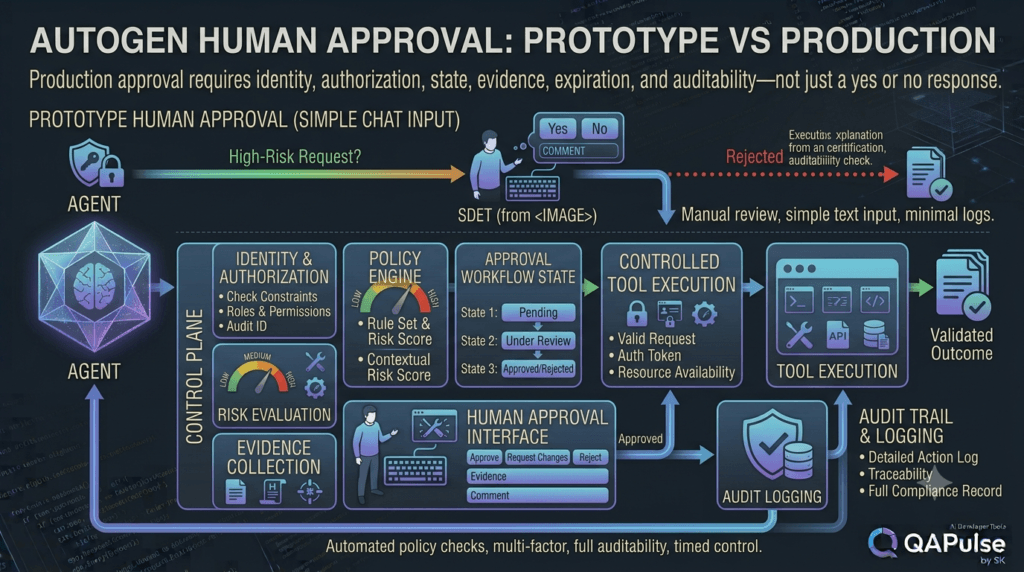
A useful model is:
Approval
+
Workflow Version
+
Target Environment
+
Requested Action
+
Expiration
If those conditions change, the approval may need to be requested again.
Comparing Simple Chat Approval and Production Approval
| Feature | Simple Chat Approval | Production Approval |
|---|---|---|
| Free-form text | Common | Limited |
| Explicit workflow state | Optional | Required |
| User identity | Basic | Required |
| Authorization | Usually absent | Required |
| Expiration | Rare | Recommended |
| Audit trail | Limited | Required |
| Idempotency | Often ignored | Required |
| Risk evaluation | Minimal | Recommended |
| Evidence | Limited | Required |
| Approval binding | Conversation | Specific workflow/action |
This is the difference between a prototype and an enterprise workflow.
Connecting Human Review With Agent Teams
A user proxy becomes especially useful when several agents collaborate.
Consider a QA platform:
                    ┌──────────────┐
                    │ User Proxy   │
                    └──────┬───────┘
                           │
                           ▼
                 ┌─────────────────┐
                 │   Orchestrator  │
                 └───────┬─────────┘
                         │
        ┌────────────────┼────────────────┐
        ▼                ▼                ▼
   Requirements      Test Design      Security
      Agent             Agent           Agent
        │                │                │
        └────────────────┼────────────────┘
                         ▼
                  Validation Agent
                         │
                         ▼
                  Human Review
The important design decision is where the human checkpoint belongs.
It should normally appear after automated analysis has reduced the amount of information the human must review.
Avoiding Human-in-the-Loop Bottlenecks
Suppose 10 agents produce 50 intermediate decisions.
If every decision requires human approval:
50 decisions
×
1 human
=
50 interruptions
The human becomes the bottleneck.
A better architecture groups decisions:
50 AI decisions
       ↓
Automated validation
       ↓
5 high-risk decisions
       ↓
Human review
The human reviews meaningful exceptions rather than routine work.
This is one of the most important strategies for scaling agentic systems.
Risk-Based Human Intervention
A practical policy can classify actions:
def requires_human_approval(risk):
    return risk in {"high", "critical"}
Then:
if requires_human_approval(action.risk):
    workflow.status = "awaiting_human_review"
else:
    workflow.status = "approved_for_automation"
The actual policy should be more sophisticated in production, but the principle is simple.
Not every AI action deserves the same level of human attention.
Risk Classification Example
| Action | Risk | Human Approval |
|---|---|---|
| Generate test cases | Low | No |
| Run local tests | Low | No |
| Create test report | Low | No |
| Modify staging data | Medium | Optional |
| Merge production-bound code | High | Yes |
| Deploy production | High | Yes |
| Delete production data | Critical | Strong approval |
This gives the workflow a clear autonomy policy.
User Proxy and QA Test Execution
Imagine an AI testing agent has generated a regression suite.
The workflow can perform:
Generate Tests
      ↓
Static Validation
      ↓
Dry Run
      ↓
Analyze Failures
      ↓
Human Review
      ↓
Execute Full Suite
The human checkpoint is not needed before every test.
It is needed at the decision boundary.
For example:
"These 428 tests are ready for production execution."
The human can review:
Coverage
Risk
Known failures
Environment
Data requirements
Expected duration
Potential impact
Then approve execution.
AutoGen User Proxy for Defect Triage
Another practical use case is AI-assisted defect triage.
The AI can analyze:
Stack trace
Logs
Screenshots
Recent commits
Existing defects
Test results
Then generate:
triage = {
    "severity": "high",
    "component": "authentication",
    "likely_cause": "token refresh regression",
    "confidence": 0.87,
    "recommended_owner": "identity-team"
}
A human reviewer can approve or modify the classification.
The workflow becomes:
Defect
 ↓
AI Analysis
 ↓
Evidence Collection
 ↓
Suggested Classification
 ↓
Human Review
 ↓
Confirmed Classification
 ↓
Ticket Update
This is a strong example of human judgment being combined with AI automation.
Human Review for AI-Generated Test Cases
AI-generated test cases can contain:
Duplicate scenarios
Incorrect assumptions
Invalid data
Missing edge cases
Weak assertions
Environment-specific errors
Instead of manually reviewing every generated test, the system can calculate quality signals.
quality = {
    "duplicate_rate": 0.03,
    "coverage_score": 0.91,
    "invalid_test_rate": 0.01,
    "security_coverage": 0.74
}
If security coverage falls below a threshold:
if quality["security_coverage"] < 0.80:
    workflow.status = "awaiting_human_review"
This makes human intervention conditional on measurable risk.
Interactive Exercise: Design an Approval Policy
Imagine an AutoGen QA agent can perform these operations:
1. Generate tests
2. Execute tests
3. Modify test data
4. Create a defect
5. Close a defect
6. Deploy test environment
7. Deploy production
Design a policy using three levels:
AUTO
REVIEW
BLOCK
A reasonable starting point might be:
Generate tests       → AUTO
Execute tests        → AUTO
Modify test data     → REVIEW
Create defect        → AUTO
Close defect         → REVIEW
Deploy test env      → REVIEW
Deploy production    → REVIEW
Delete production    → BLOCK
The exact policy depends on the organization.
The important exercise is learning to explicitly define autonomy instead of allowing the agent to decide its own permissions.
AutoGen User Proxy and Tool Execution
A particularly important boundary appears when agents have tools.
Suppose an agent has access to:
tools = [
    run_tests,
    create_defect,
    deploy_application,
    delete_test_data
]
The user proxy should not automatically mean that every tool call is approved.
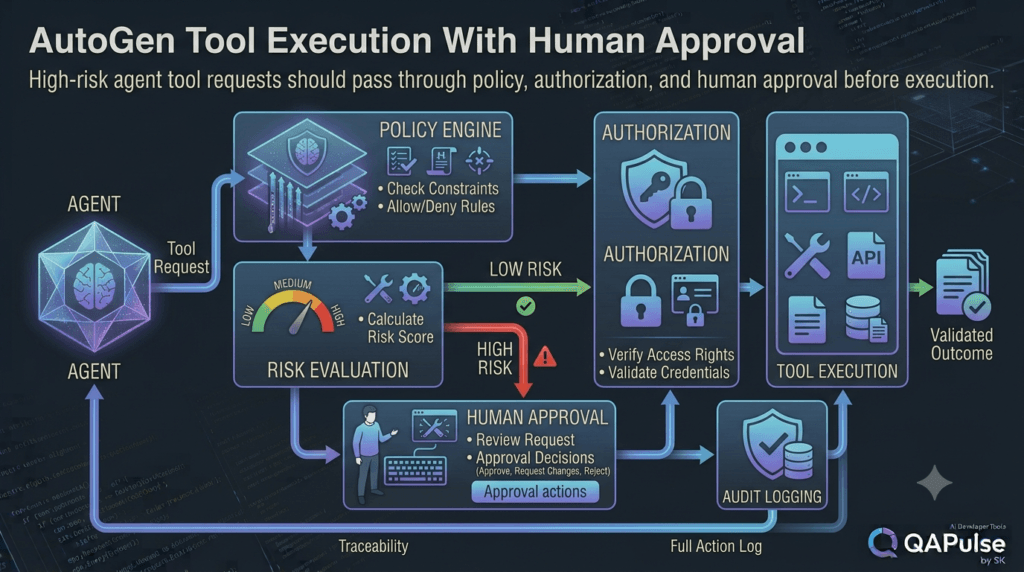
A better architecture is:
Agent
 ↓
Tool Request
 ↓
Policy Engine
 ↓
Risk Evaluation
 ↓
Human Approval if Required
 ↓
Authorization
 ↓
Tool Execution
This provides several control points.
Tool Requests Should Be Explicit
Instead of allowing an agent to directly execute:
deploy_application("production")
the agent can produce a structured request:
tool_request = {
    "tool": "deploy_application",
    "environment": "production",
    "version": "4.2.1",
    "risk": "high"
}
The application then decides what happens.
if tool_request["risk"] == "high":
request_human_approval(tool_request)
This makes the system easier to test and audit.
Comparing Agent Permission Models
| Model | Description | Risk |
|---|---|---|
| Full autonomy | Agent executes any available tool | High |
| Prompt-based restriction | Agent is told what not to do | High |
| Tool allowlist | Agent only sees permitted tools | Medium |
| Policy-controlled tools | Requests are evaluated before execution | Lower |
| Policy + human approval | High-risk actions require human approval | Stronger |
The safest architecture depends on the environment, but production systems should not rely solely on prompts to enforce security boundaries.
Building a Human Review Queue
When workflows become asynchronous, a review queue becomes useful.
Conceptually:
┌─────────────────────────────────────────┐
│ Human Review Queue │
├─────────────────────────────────────────┤
│ High Risk │ Production Deployment │
│ High Risk │ Security Test Execution │
│ Medium │ Test Data Modification │
│ Medium │ Defect Closure │
└─────────────────────────────────────────┘
The backend can store:
review_request = {
"id": "REV-8291",
"workflow_id": "QA-2048",
"action": "execute_security_suite",
"risk": "high",
"status": "pending"
}
The UI can then retrieve pending requests.
This architecture is better suited to teams where multiple reviewers participate.
Reviewer Assignment
A production workflow may need reviewer routing.
For example:
Security action
→ Security Engineer
Production deployment
→ Release Manager
Test strategy
→ QA Lead
The routing policy should be implemented by the application.
reviewer_map = {
"security": "security_team",
"deployment": "release_management",
"test_strategy": "qa_lead"
}
The AI can recommend the category.
The application determines the authorized reviewer.
Multiple Human Reviewers
Some high-risk workflows may require two approvals.
For example:
AI Recommendation
↓
Security Approval
↓
Release Approval
↓
Production Execution
This creates separation of duties.
The workflow might maintain:
approvals = {
"security": False,
"release": False
}
Execution becomes possible only when both conditions are satisfied:
if approvals["security"] and approvals["release"]:
deploy_production()
Again, this should be backed by persistent transactional state in a production application.
Approval Quorum
For certain workflows, you may require a quorum.
For example:
Required approvals: 2
Received approvals: 2
Then:
if len(valid_approvals) >= required_approvals:
workflow.status = "approved"
This pattern is useful for critical systems where a single person’s approval is insufficient.
Handling Conflicting Human Decisions
Imagine:
Security Engineer → APPROVE
Release Manager → REJECT
The workflow should not ask the AI to decide who is correct.
Instead, define a policy:
Any critical rejection
→ Block execution
or:
All required approvals
→ Must be APPROVE
The control layer should resolve this deterministically.
Human Feedback as Agent Context
When the user requests revision, the feedback should become part of the agent’s task context.
For example:
feedback = """
The generated test strategy is missing:
- MFA bypass tests
- token replay scenarios
- session invalidation tests
"""
The agent can then receive:
Original Task
+
Generated Strategy
+
Human Feedback
This produces a focused revision loop.
The system does not need to regenerate everything from scratch.
Revision Loop Example
Initial Strategy
↓
Automated Validation
↓
Human Review
↓
REVISE
↓
Feedback
↓
Agent Updates Strategy
↓
Automated Validation
↓
Human Review
A maximum iteration count prevents runaway loops:
MAX_REVISIONS = 3
if revision_count >= MAX_REVISIONS:
workflow.status = "manual_intervention_required"
This is especially important in automated agent workflows.
Designing a Better Human Feedback Interface
A useful interface might provide:
┌─────────────────────────────────────────┐
│ AI QA Strategy Review │
├─────────────────────────────────────────┤
│ Coverage Score: 91% │
│ Security Coverage: 74% │
│ Duplicate Tests: 3% │
│ Risk: HIGH │
│ │
│ Missing Coverage: │
│ • Token replay │
│ • MFA bypass │
│ • Session invalidation │
│ │
│ [Approve] [Request Changes] [Reject] │
└─────────────────────────────────────────┘
This is dramatically better than:
Approve?
The more important the decision, the more evidence should be presented.
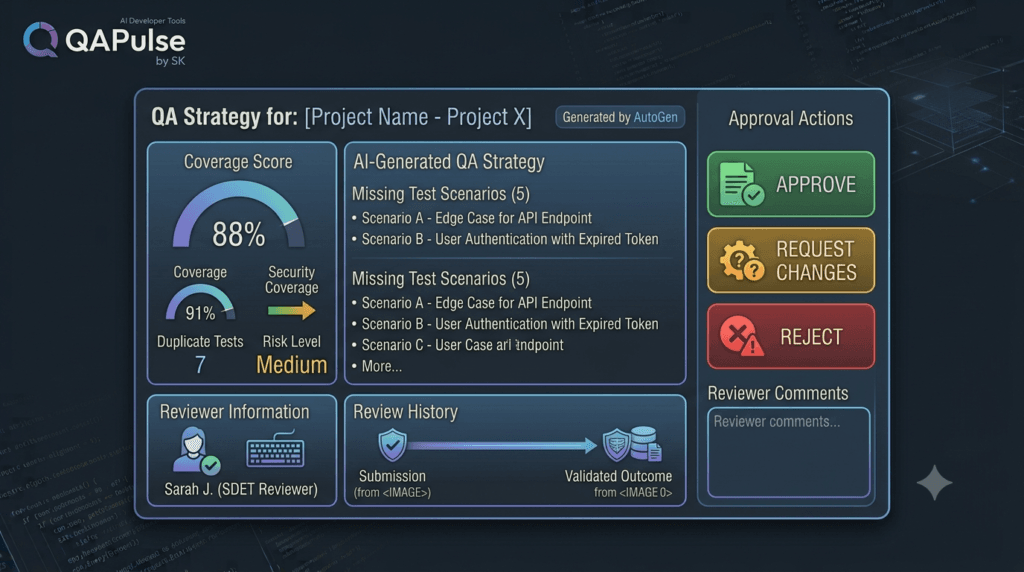
Measuring the Value of Human-in-the-Loop
Human oversight should also be evaluated.
Useful metrics include:
Human approval rate
Human rejection rate
Average review time
Revision rate
Approval reversal rate
False approval rate
Human interventions per workflow
Automation coverage
Suppose:
100 workflows
80 completed automatically
15 required review
5 required manual intervention
Automation coverage is:
80%
But that does not automatically mean the system is successful.
You also need to examine quality.
For example:
Review rejection rate = 20%
Critical defect escape rate = 0%
Average review time = 45 seconds
These metrics tell a more useful story.
Human Review as a Cost
Human interaction has a cost.
If every workflow requires five minutes of senior SDET time:
1,000 workflows
×
5 minutes
=
5,000 minutes
That is more than 83 hours of human review.
Therefore, the goal should not be:
Maximum human involvement
The goal should be:
Maximum useful human judgment
This distinction is fundamental when scaling AI agents.
Strategy: Automate Evidence Before Automating Decisions
A strong implementation strategy is:
First:
Automate data collection.
Then:
Automate validation.
Then:
Automate risk classification.
Then:
Ask the human to decide only where judgment is required.
Finally:
Increase autonomy as confidence grows.
For example:
Logs
↓
Automated analysis
↓
Test results
↓
Risk score
↓
Human decision
This is much more efficient than presenting raw logs to the human.
A Practical AutoGen QA Workflow
Putting the concepts together:
Requirement
↓
Requirements Agent
↓
Test Design Agent
↓
Security Agent
↓
Validation Agent
↓
Risk Assessment
↓
┌───────────────┐
│ Low Risk? │
└───────┬───────┘
│
Yes │ No
↓ │ ↓
Execute│ User Proxy
│
↓
Human Review
│
┌────┼────┐
↓ ↓ ↓
APPROVE REVISE REJECT
│ │ │
↓ ↓ ↓
Execute Loop Stop
This pattern can be adapted to:
API testing
UI testing
Security testing
Performance testing
Regression testing
Defect triage
Release validation
Deployment approval
Production Checklist for User Proxy Workflows
Before deploying an AutoGen user proxy workflow, verify:
[ ] Human checkpoints are clearly defined
[ ] Workflow states are explicit
[ ] User identity is verified
[ ] Authorization is enforced
[ ] Approval is tied to a specific action
[ ] Approval expiration is supported
[ ] Duplicate approvals are handled
[ ] Rejections have defined behavior
[ ] Revision loops have limits
[ ] High-risk tools require additional controls
[ ] Audit events are stored
[ ] Workflow state can be recovered
[ ] Timeouts are handled
[ ] Unauthorized approvals are rejected
[ ] Human review metrics are collected
This checklist is particularly useful when moving from an AutoGen prototype to a production-grade agent platform.
The Core Engineering Pattern
The most reusable architecture can be summarized as:
AI
↓
Analyze
↓
Validate
↓
Recommend
↓
Human
↓
Approve / Reject / Revise
↓
Policy
↓
Authorization
↓
Execute
↓
Audit
The user proxy provides the human interaction mechanism.
The application provides the governance.
The agents provide reasoning and automation.
The tools provide execution.
The combination creates a much stronger system than any individual component.
Interactive Design Challenge
Imagine you are building an AI-powered release assistant.
It can:
Analyze test results
Read defect reports
Check deployment readiness
Generate release notes
Trigger deployment
Rollback deployment
Now define three categories:
AUTOMATIC
HUMAN REVIEW
PROHIBITED
For each action, ask:
What could go wrong?
What is the blast radius?
Can the action be reversed?
Does it affect production?
Does it require business judgment?
Does it require privileged access?
This exercise forces you to design the agent’s autonomy intentionally.
A strong AI system is not one that can do everything.
A strong AI system is one that knows which actions it should perform automatically, which require approval, and which should never be delegated.
AutoGen User Proxy in SDET Architecture
For SDETs, this opens an interesting architecture:
Human SDET
│
▼
User Proxy Agent
│
▼
QA Orchestrator
│
┌─────────────┼─────────────┐
▼ ▼ ▼
Requirements Test AI Security AI
Agent Agent Agent
│ │ │
└─────────────┼─────────────┘
▼
Validation Layer
│
▼
Execution Layer
│
┌────────────┼────────────┐
▼ ▼ ▼
Playwright API Performance
│
▼
Test Results
│
▼
User Proxy
│
▼
Human SDET
This is where AutoGen becomes especially relevant to modern QA engineering.
The SDET is no longer required to manually perform every operation.
Instead, the SDET becomes the supervisor of an intelligent testing workflow.
The Strategic Shift
Traditional automation often looks like:
Human
↓
Write Test
↓
Run Test
↓
Read Result
↓
Fix Test
↓
Repeat
An agentic testing architecture can look like:
Human
↓
Define Objective
↓
AI Agents
↓
Generate
↓
Validate
↓
Execute
↓
Analyze
↓
Human Review
↓
Improve
The human moves upward in the abstraction layer.
Instead of controlling every test action, the human controls objectives, policies, risk, and exceptions.
That is the real value of human-in-the-loop agent architecture.
Practical Rule
When designing an AutoGen user proxy workflow, ask five questions:
1. What decision requires a human?
2. What evidence does the human need?
3. What actions can happen automatically?
4. What actions require authorization?
5. What happens if the human does not respond?
If those five questions have clear answers, the workflow is already moving toward a production-oriented design.
Key Implementation Principle
The most important distinction is:
UserProxyAgent
≠
Complete Human Governance System
The user proxy is an interaction component.
A production workflow still needs:
Identity
Authorization
State
Policy
Validation
Audit
Timeouts
Recovery
When these pieces work together, human-in-the-loop workflows become predictable, testable, and scalable.
What This Means for AutoGen Applications
AutoGen user proxy agents are most valuable when human judgment is strategically inserted into an otherwise automated workflow.
The strongest designs do not constantly interrupt the human.
They automate low-risk work, validate intermediate results, identify meaningful risk, and bring the human into the workflow only when their judgment adds real value.
That approach creates a better balance between:
Automation
+
Human Judgment
+
Governance
+
Safety
For software engineering teams, this can transform AI agents from conversational assistants into controlled engineering systems.
Designing Production-Ready Human-in-the-Loop AutoGen Workflows
A production-grade AutoGen workflow should not treat human interaction as a simple input() statement.
The real challenge is deciding when a human should intervene, what information the human should receive, what authority the human has, and how the system should continue after the decision.
This becomes especially important when an AutoGen system can execute tools, modify data, generate code, run tests, or interact with external systems.
A useful production architecture looks like this:
User Request
↓
AutoGen Agent
↓
Analysis
↓
Validation
↓
Risk Assessment
↓
Policy Decision
↓
┌───────────────────────────┐
│ Does this require review? │
└─────────────┬─────────────┘
│
┌─────┴─────┐
│ │
No Yes
│ │
▼ ▼
Automatic Human Review
Execution │
│ ┌────┼────┐
│ ▼ ▼ ▼
│ Approve Revise Reject
│ │ │ │
│ │ │ └── Stop
│ │ └──────── Reprocess
│ └──────────── Execute
│
└──────────────┐
▼
Result
↓
Audit
The important idea is that the human is not simply another conversational participant.
The human becomes a controlled decision point inside an engineered workflow.
Human-in-the-Loop Is a Spectrum
Not every AutoGen application needs the same level of human involvement.
There are several common models.
| Model | Human Involvement | Example | Automation |
|---|---|---|---|
| Human-in-the-loop | Human approves important actions | Production deployment | Medium |
| Human-on-the-loop | Human supervises the system | AI test execution | High |
| Human-in-command | Human defines objectives and policies | Enterprise QA platform | High |
| Human-out-of-the-loop | No human intervention | Low-risk data processing | Very High |
For QA and software engineering, human-on-the-loop and human-in-command architectures can be particularly powerful.
The objective should not be maximum human interaction.
The objective should be maximum useful automation without losing appropriate control.
Understanding Approval as a State Transition
An approval should change the workflow state.
For example:
workflow = {
"status": "awaiting_approval",
"action": "production_deployment",
"version": "5.4.0"
}
After approval:
workflow["status"] = "approved"
After rejection:
workflow["status"] = "rejected"
After revision:
workflow["status"] = "revision_required"
This is more reliable than interpreting conversation messages such as:
"Okay"
"Looks good"
"Go ahead"
as authorization.
A production system should have explicit states.
Use State Machines for Critical Workflows
A simple state machine can make the workflow easier to reason about:
VALID_TRANSITIONS = {
"draft": ["awaiting_approval"],
"awaiting_approval": ["approved", "rejected", "revision_required"],
"revision_required": ["awaiting_approval"],
"approved": ["executing"],
"executing": ["completed", "failed"],
}
Then:
def transition(current_state, new_state):
allowed = VALID_TRANSITIONS.get(current_state, [])
if new_state not in allowed:
raise ValueError(
f"Invalid transition: {current_state} → {new_state}"
)
return new_state
This prevents invalid workflow transitions.
For example:
rejected
↓
completed
should normally not be allowed without another valid workflow cycle.
Why State Machines Matter for AI Agents
AI systems are probabilistic.
Workflow control should be deterministic.
That gives us an important architectural separation:
AI
→ Reasoning
→ Recommendations
→ Classification
Application
→ State
→ Authorization
→ Policy
→ Execution
Do not allow an LLM’s interpretation of a conversation to become your only authorization mechanism.
The AI can recommend an action.
The application should determine whether the action is permitted.
Approval Context Should Be Immutable
Imagine an agent requests approval for:
Deploy version 5.4.0 to production
The user approves it.
Before execution, the agent changes the request to:
Deploy version 5.4.1 to production
That approval should not automatically transfer.
The approval should be bound to the exact request.
A simplified structure:
approval = {
"request_id": "REQ-10045",
"workflow_id": "REL-2048",
"action": "deploy",
"environment": "production",
"version": "5.4.0",
"status": "approved"
}
Before execution:
if requested_version != approval["version"]:
raise RuntimeError(
"Approval does not match requested version"
)
This small principle can prevent serious authorization mistakes.
Approval Expiration
Approvals should also have a lifetime.
from datetime import datetime, timedelta, timezone
expires_at = (
datetime.now(timezone.utc)
+ timedelta(minutes=15)
)
Before executing:
if datetime.now(timezone.utc) > expires_at:
raise RuntimeError("Approval has expired")
Why?
Because the environment may change.
Consider:
10:00 → Tests pass
10:02 → Human approves
10:05 → New critical defect appears
10:20 → Deployment begins
The original approval may no longer represent the current risk.
Therefore:
Approval
+
Context
+
Time
+
Workflow Version
should be treated as one unit.
Human Review Should Be Risk-Based
A common mistake is requiring approval for every action.
That creates a bottleneck.
Instead, define risk categories.
def risk_level(action):
high_risk = {
"production_deploy",
"delete_production_data",
"modify_security_policy"
}
medium_risk = {
"modify_staging_data",
"close_critical_defect"
}
if action in high_risk:
return "HIGH"
if action in medium_risk:
return "MEDIUM"
return "LOW"
Then:
risk = risk_level(action)
if risk == "HIGH":
require_human_approval()
The actual production policy should be much more comprehensive, but the architecture remains the same.
Compare Risk-Based and Universal Approval
| Approach | Human Workload | Automation | Production Suitability |
|---|---|---|---|
| Approve everything | Very High | Low | Poor |
| Approve nothing | Very Low | Very High | Risky |
| Risk-based approval | Controlled | High | Strong |
| Risk + policy + authorization | Controlled | High | Strongest |
The best approach is usually not simply “add a human.”
It is:
Add a human where human judgment materially reduces risk.
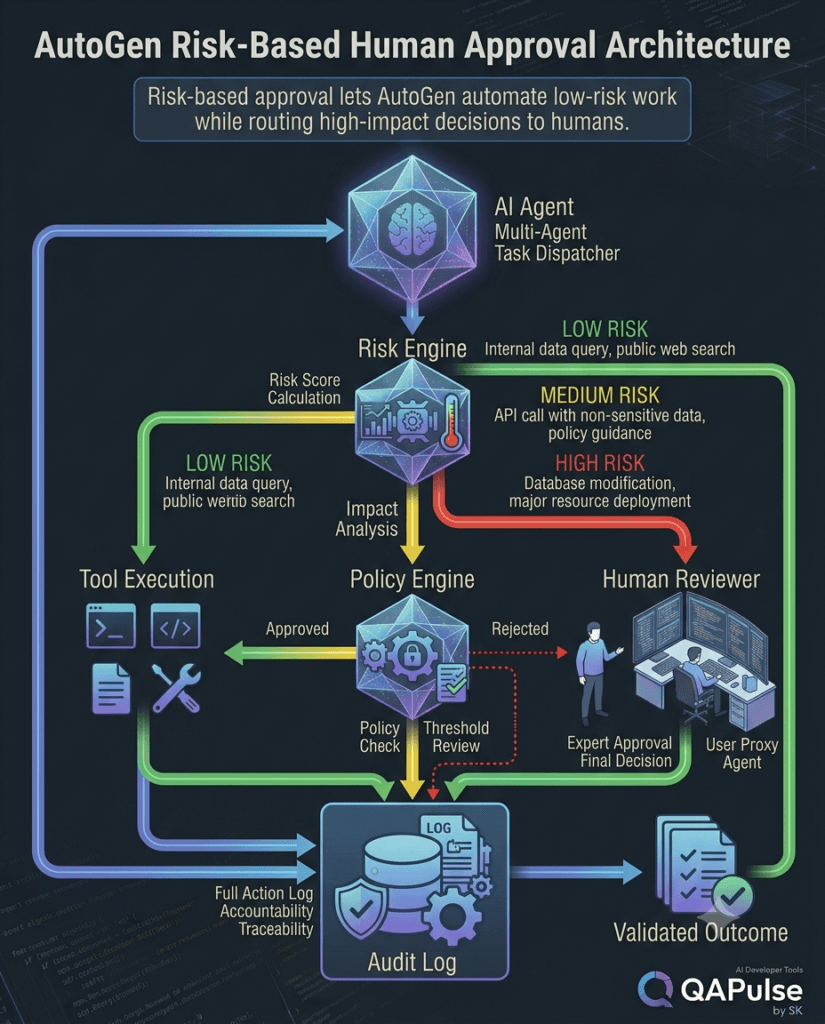
Human Review Should Receive Evidence
A human should not have to reconstruct the AI’s reasoning from hundreds of messages.
Instead, create an evidence package.
review_package = {
"task": "Production regression",
"environment": "production",
"tests": 428,
"passed": 421,
"failed": 7,
"critical_failures": 1,
"coverage": 92,
"risk": "HIGH",
"recommendation": "BLOCK"
}
The reviewer can then make an informed decision.
This is a major difference between:
AI says:
"Should I continue?"
and:
AI says:
"428 tests executed.
421 passed.
7 failed.
1 critical authentication failure detected.
Risk: HIGH.
Recommendation: BLOCK."
The second interaction is much more useful.
Human Approval Interfaces Should Be Decision-Oriented
A good approval interface should answer:
What is happening?
Why is it happening?
What evidence supports the recommendation?
What could go wrong?
What will happen if I approve?
What happens if I reject?
For example:
┌──────────────────────────────────────┐
│ Production Deployment Review │
├──────────────────────────────────────┤
│ Version: 5.4.0 │
│ Risk: HIGH │
│ │
│ Tests: 428 │
│ Passed: 421 │
│ Failed: 7 │
│ Critical: 1 │
│ │
│ AI Recommendation: BLOCK │
│ │
│ Reason: Authentication regression │
│ │
│ [Approve] [Reject] [Request Changes] │
└──────────────────────────────────────┘
The interface should make the consequence of the decision obvious.
Human-in-the-Loop for QA Automation
This architecture becomes especially interesting for SDETs.
Imagine an AutoGen-based QA system that can:
Read requirements
Generate test cases
Generate Playwright tests
Execute API tests
Run regression suites
Analyze failures
Create defects
Generate reports
You do not want the SDET manually approving every generated test.
Instead:
Requirement
↓
Test Generation
↓
Automated Validation
↓
Coverage Analysis
↓
Risk Analysis
↓
Human Review
↓
Execution
The SDET becomes the supervisor.
This changes the role from:
Test Executor
to:
AI Test Workflow Engineer
Example: AI-Generated Regression Suite
Suppose AutoGen creates 500 regression tests.
The system calculates:
metrics = {
"total": 500,
"duplicates": 14,
"invalid": 6,
"coverage": 94,
"security_coverage": 71
}
The security coverage is below the organization’s threshold.
if metrics["security_coverage"] < 80:
status = "human_review"
The human does not need to inspect all 500 tests.
The system highlights the risk.
That is intelligent human-in-the-loop design.
Interactive Exercise: Create Your Own Approval Policy
Imagine an AutoGen QA agent has these capabilities:
Generate test cases
Run tests
Modify test data
Create defects
Close defects
Deploy staging
Deploy production
Delete data
Classify each operation:
AUTO
REVIEW
BLOCK
Then ask:
Does the action affect production?
Is the action reversible?
Does it change data?
Does it require privileged access?
Could the action create financial or security impact?
Can the result be automatically validated?
A possible policy:
| Action | Policy | Reason |
|---|---|---|
| Generate test cases | AUTO | Low risk |
| Run tests | AUTO | Controlled execution |
| Create defect | AUTO | Reversible |
| Modify test data | REVIEW | Data impact |
| Close critical defect | REVIEW | Human judgment |
| Deploy staging | REVIEW | Environment impact |
| Deploy production | REVIEW | High impact |
| Delete production data | BLOCK | Extreme risk |
The exact policy will differ by organization.
The important lesson is to define autonomy intentionally.
Tool Calling Changes the Risk Model
When AutoGen agents gain access to tools, human-in-the-loop design becomes more important.
An agent might have access to:
tools = [
run_tests,
create_defect,
update_ticket,
deploy_application,
rollback_application
]
The dangerous assumption is:
Agent has tool
=
Agent can always execute tool
A better architecture is:
Agent
↓
Tool Request
↓
Policy Engine
↓
Risk Evaluation
↓
Authorization
↓
Human Approval if required
↓
Tool Execution
This creates a security boundary between reasoning and execution.
Never Use the Prompt as Your Only Security Boundary
A system prompt might say:
Never deploy to production without approval.
That is useful guidance.
It should not be your only control.
The application should enforce:
if environment == "production":
require_approval()
The difference is critical.
Prompts influence model behavior.
Application controls enforce system behavior.
Comparing Control Mechanisms
| Mechanism | Purpose | Reliability |
|---|---|---|
| System prompt | Behavioral guidance | Limited |
| Tool description | Tool usage guidance | Limited |
| Allowlist | Restrict available tools | Stronger |
| Policy engine | Enforce business rules | Strong |
| Authorization | Verify permission | Strong |
| Human approval | Add human judgment | Strong |
| Audit log | Record decisions | Essential |
A production AutoGen application should use multiple layers rather than depending on one mechanism.
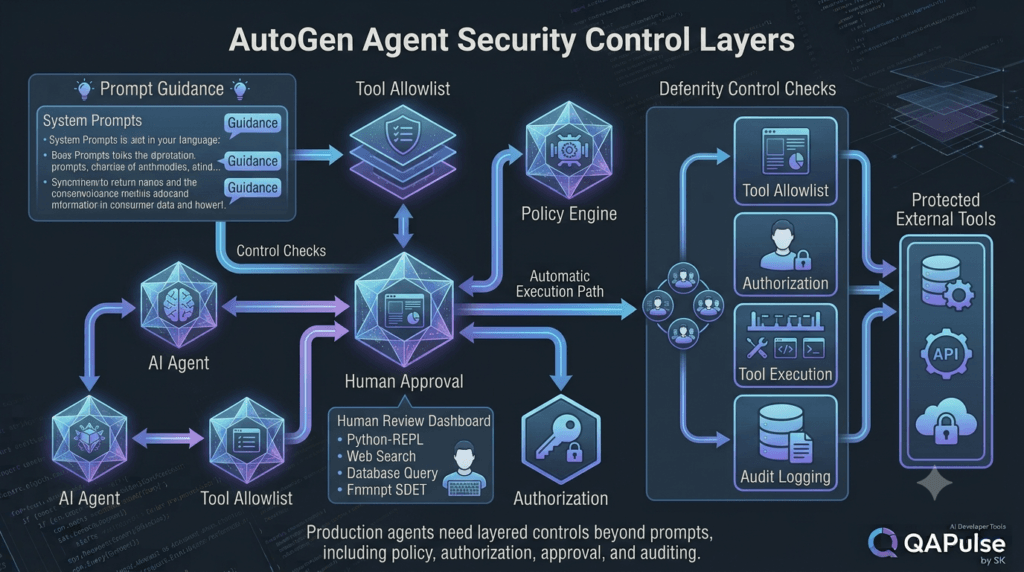
Handling Human Rejection
A rejection should be treated as a meaningful workflow event.
decision = "REJECT"
if decision == "REJECT":
workflow["status"] = "rejected"
workflow["reason"] = "Critical regression detected"
The system should not simply ask the same question again.
Instead, define what rejection means.
Possible actions include:
Stop execution
Create incident
Return to agent
Request additional evidence
Escalate to another reviewer
The correct behavior depends on the workflow.
Handling Revision Requests
Revision is different from rejection.
REJECT
→ Stop
REVISE
→ Improve
APPROVE
→ Execute
For example:
feedback = {
"decision": "REVISE",
"requirements": [
"Add authentication edge cases",
"Add token expiration tests",
"Add negative API scenarios"
]
}
The agent can use that feedback to produce a new version.
Prevent Infinite Revision Loops
Agentic systems can accidentally enter loops:
Generate
↓
Review
↓
Revise
↓
Review
↓
Revise
↓
Revise
↓
Revise
...
Set explicit limits.
MAX_REVISIONS = 3
if revision_count >= MAX_REVISIONS:
workflow["status"] = "manual_intervention_required"
This creates a safe stopping condition.
Async Human Review
Real users are not always available.
A human may need:
30 seconds
10 minutes
2 hours
to respond.
Therefore, production workflows should support asynchronous states.
awaiting_review
means:
The workflow is paused.
Nothing is lost.
The system can resume later.
The workflow should persist enough state to continue safely.
Timeout Strategy
What happens if nobody approves?
Define a timeout policy.
if review_expired:
workflow["status"] = "expired"
Possible strategies:
Low risk → Continue automatically
Medium risk → Retry notification
High risk → Stop
Critical risk → Escalate
Never leave the behavior undefined.
Building an Audit Trail
Every important decision should produce an audit event.
audit_event = {
"workflow_id": "QA-2048",
"action": "production_deployment",
"decision": "APPROVE",
"reviewer": "user-123",
"timestamp": "2026-08-09T14:30:00Z"
}
An audit trail helps answer:
Who approved it?
What was approved?
When was it approved?
What evidence existed?
Which version was approved?
What happened afterward?
This is extremely important for enterprise AI systems.
Measuring Human-in-the-Loop Performance
A mature workflow should measure its own performance.
Useful metrics include:
Approval rate
Rejection rate
Revision rate
Average review time
Approval expiration rate
Human intervention rate
Automation coverage
Escalation rate
False approval rate
Critical incident rate
For example:
1,000 workflows
820 automatic
120 human-approved
40 rejected
20 escalated
Automation coverage:
820 / 1000 × 100 = 82%
But automation percentage alone is not enough.
You also need to know whether the automation is safe and effective.
Strategy: Optimize for Human Judgment, Not Human Clicks
A poor AI workflow says:
Human must approve 100 actions.
A better workflow says:
AI performs 95 safe actions.
Human reviews 5 meaningful decisions.
An even better workflow improves over time:
95 automatic
5 reviewed
↓
Analyze review outcomes
↓
Improve policy
↓
97 automatic
3 reviewed
This creates a feedback loop.
Human decisions become data for improving workflow policies.
The Long-Term Strategy
A mature AutoGen application can gradually move through:
Stage 1
Manual execution
↓
Stage 2
AI recommendations
↓
Stage 3
Human-approved automation
↓
Stage 4
Risk-based automation
↓
Stage 5
Policy-controlled autonomy
↓
Stage 6
Exception-driven human oversight
The goal is not to eliminate humans.
The goal is to eliminate unnecessary human work while preserving human control where it matters.
A Complete AutoGen QA Architecture
The concepts can now be combined into a broader QA platform:
Human SDET
│
▼
Review Dashboard
│
▼
User Proxy Layer
│
▼
Workflow Orchestrator
│
┌──────────────────┼──────────────────┐
▼ ▼ ▼
Requirements Agent Test Agent Security Agent
│ │ │
└──────────────────┼──────────────────┘
▼
Validation Layer
│
▼
Risk Engine
│
▼
Policy Engine
│
┌────────┴────────┐
▼ ▼
AUTO REVIEW
│ │
│ ▼
│ Human SDET
│ │
└────────┬────────┘
▼
Tool Execution
│
┌──────────────┼──────────────┐
▼ ▼ ▼
Playwright API Performance
│ │ │
└──────────────┼──────────────┘
▼
Result Analysis
│
▼
Audit Log
This architecture illustrates where AutoGen can fit into a real engineering platform.
The agents perform specialized reasoning.
The orchestrator manages workflow.
The user proxy connects human decisions.
The policy engine controls autonomy.
The tools perform actual work.
The audit system records what happened.
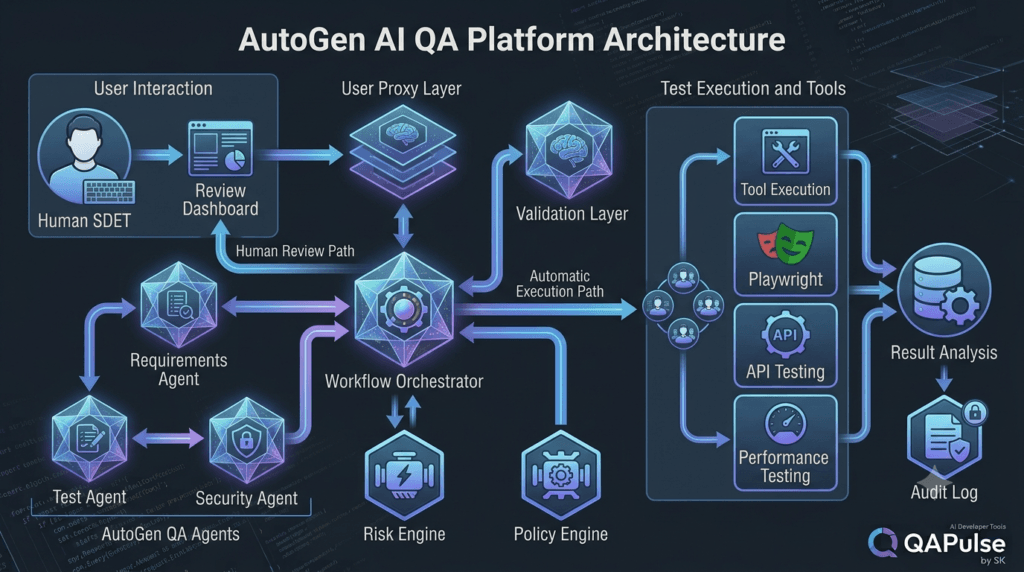
Practical Production Checklist
Before calling a human-in-the-loop AutoGen workflow production-ready, verify:
[ ] Human checkpoints are explicitly defined
[ ] Workflow states are persistent
[ ] Approval is tied to a specific action
[ ] Approval contains sufficient context
[ ] Approval can expire
[ ] User identity is verified
[ ] Authorization is enforced
[ ] High-risk tools are protected
[ ] Tool permissions are restricted
[ ] Rejection behavior is defined
[ ] Revision loops have limits
[ ] Human timeout behavior is defined
[ ] Audit events are recorded
[ ] Workflow recovery is possible
[ ] Duplicate execution is prevented
[ ] Human review metrics are measured
If several of these are missing, the system may still be a useful prototype, but it should not automatically be treated as production-grade agent infrastructure.
What SDETs Should Learn From User Proxy Agents
The deeper lesson is not simply how to use a particular AutoGen agent class.
The bigger lesson is architectural.
Traditional test automation asks:
What should the test execute?
Agentic test automation asks:
What should the system decide?
What can the AI automate?
What requires validation?
What requires human judgment?
What actions are allowed?
What actions are dangerous?
That is a much broader engineering problem.
The modern SDET increasingly needs to understand:
AI agents
+
Workflow orchestration
+
Tool calling
+
Policy enforcement
+
Human oversight
+
Observability
+
SecurityInternal Links:
- Learn MCP – Zero to Hero
- Learn AI Agents for QA – Zero to Hero
- Playwright Automation – Zero to Hero
- LangGraph: Complete Zero to Hero
- Learn Python – Zero to Hero
- OpenAI Codex: Complete Zero to Hero
- Cursor AI: Complete Zero to Hero
- Claude Code Tutorial: Complete Zero to Hero
- AutoGen: Complete Zero to Hero Guide
- Free QA Resources Built From Real Experience
- QA Glossary: Test Automation Terms Every Engineer Should Know
External Links:
- Official AutoGen Repository: Microsoft AutoGen GitHub Repository
- Official AutoGen Documentation: AutoGen Official Documentation
- AutoGen Agents Documentation: AutoGen Agents Documentation
- AutoGen Agent and Multi-Agent Concepts: AutoGen Agent and Multi-Agent Applications
- AutoGen Messages: AutoGen Message Documentation
People Asked Questions
What is an AutoGen User Proxy Agent?
An AutoGen User Proxy Agent represents the human side of an agent workflow and can participate in conversations, provide human input, and support controlled interaction between users and AI agents.
What is human-in-the-loop in AutoGen?
Human-in-the-loop in AutoGen means that AI agents can perform automated reasoning and execution while humans intervene at predefined decision points such as approvals, high-risk actions, or workflow revisions.
Why use a User Proxy Agent in AutoGen?
A User Proxy Agent can help combine AI automation with human judgment, particularly for workflows involving tool execution, testing, deployment, sensitive operations, and business decisions.
Can AutoGen User Proxy Agents execute tools?
They can participate in workflows involving tool execution, but production systems should place appropriate authorization, policy, validation, and security controls around high-impact tools.
How can AutoGen be used for QA automation?
AutoGen can coordinate specialized AI agents for requirements analysis, test generation, test execution, failure analysis, defect triage, and reporting while allowing SDETs to review high-risk decisions.
Is human approval required for every AutoGen action?
No. A better production strategy is usually risk-based. Low-risk operations can be automated while high-risk or irreversible operations can require human approval.
How do you secure AutoGen agents?
Use layered controls including restricted tools, authorization, policy enforcement, validation, human approval for sensitive operations, audit logging, and explicit workflow states.
What is the difference between an AI agent and a human-in-the-loop agent?
An autonomous agent can perform tasks with minimal human intervention, while a human-in-the-loop system deliberately introduces human decisions at specific points where judgment, authorization, or risk management is required.
AI Overview Optimization
An AutoGen User Proxy Agent enables human-in-the-loop interaction between people and AI agents, allowing automated workflows to pause for human input, approval, revision, or decision-making. In production systems, it should be combined with workflow state management, risk assessment, authorization, policy controls, and audit logging.
AI Answer-Engine Summary
AutoGen User Proxy Agent
↓
Human-in-the-loop
↓
Human approval
↓
Risk-based automation
↓
Tool execution
↓
Policy enforcement
↓
AuditabilityAutoGen User Proxy Agent is a human-interaction component in an AutoGen agent workflow that helps connect AI-driven automation with human input, review, and decision-making.
Final Conclusion
AutoGen user proxy agents provide an important bridge between autonomous AI behavior and human decision-making.
The most effective implementation is not a chatbot that repeatedly asks for permission.
It is a controlled workflow where AI agents analyze problems, generate recommendations, execute low-risk operations, identify uncertainty, and escalate meaningful decisions to humans.
For production systems, human-in-the-loop architecture should be supported by explicit workflow states, risk classification, policy enforcement, authorization, approval expiration, audit logging, and safe recovery.
For QA and SDET teams, this creates a powerful model:
Human defines objectives
↓
AI agents perform reasoning
↓
Automation validates results
↓
Risk engine identifies exceptions
↓
Human reviews important decisions
↓
Tools execute approved actions
↓
System records the outcome
That is the difference between simply adding an AI assistant to testing and building an AI-powered engineering workflow with controlled autonomy.
Final Key Takeaways
- AutoGen user proxy agents are more than input handlers. They can become controlled human decision points inside agent workflows.
- Do not treat natural-language approval as authorization. Production workflows should use explicit states, policies, and permissions.
- Use risk-based human intervention. Low-risk operations can be automated while high-impact operations can require review.
- Give humans evidence, not raw agent conversations. Reviewers make better decisions when the system summarizes risk, results, and recommendations.
- Separate reasoning from execution. The AI can recommend an action, while the application determines whether that action is permitted.
- Protect tool execution. High-impact tools should pass through policy, authorization, and, where appropriate, human approval.
- Approval should be contextual. Bind approval to the specific workflow, action, environment, version, and time period.
- Design for rejection and revision. A mature workflow must know what happens when humans reject or request changes.
- Prevent infinite agent loops. Revision counts, timeouts, and escalation policies provide safe stopping conditions.
- Audit important decisions. Production AI systems should be able to answer who approved what, when, why, and what happened afterward.
- Human oversight should become more strategic over time. The goal is not more human clicks; it is better human judgment at the right points.
- For SDETs, this represents a major shift. The future of AI-driven testing is increasingly about supervising intelligent workflows rather than manually controlling every testing operation.
The strongest AutoGen systems will not be those that remove humans completely.
They will be the systems that understand where automation is safe, where human judgment is valuable, and how to connect both through reliable engineering controls.
Continue Learning
Explore more expert articles on n8n, Autogen, Postman AI, LangChain, CrewAI, MCP Servers, AI Agents, LlamaIndex, Docker, FastAPI, Playwright, Cypress, Test Automation, DevOps, and Software Engineering at www.skakarh.com.
QAPulse by SK delivers expert release analysis, AI engineering insights, enterprise automation strategies, migration guidance, DevOps best practices, and practical testing knowledge to help software professionals build scalable, intelligent, and production-ready software systems.


