 QA
QA
AutoGen agent-to-agent conversations are the foundation of multi-agent AI systems.
A single AI agent can analyze a task, generate an answer, write code, or design test cases.
But many real-world engineering problems are not single-role problems.
A software development workflow might require:
Requirement
    ↓
Analyst
    ↓
Developer
    ↓
Tester
    ↓
Reviewer
Each role needs different expertise.
Instead of asking one agent to perform every responsibility, AutoGen allows us to design workflows where agents communicate with one another.
The important idea is simple:
One Agent
    ↓
One Perspective

Multiple Agents
    ↓
Multiple Perspectives
    ↓
Conversation
    ↓
Collaboration
    ↓
Result
This is where agentic AI starts becoming substantially more interesting.
What Is Agent-to-Agent Communication?
Agent-to-agent communication means one AI agent sends information to another agent, receives a response, and potentially uses that response to continue the workflow.
Conceptually:
Agent A
   │
   │ message
   ▼
Agent B
   │
   │ response
   ▼
Agent A
The conversation can also involve more than two agents:
Agent A
   │
   ▼
Agent B
   │
   ▼
Agent C
   │
   ▼
Agent A
The agents are not necessarily identical.
They can have different:
- Roles
- Instructions
- Responsibilities
- Tools
- Context
- Goals
- Evaluation criteria
That specialization is what makes multi-agent architecture powerful.
Why Not Use One Agent for Everything?
Suppose you ask one agent:
Analyze this requirement, design the test cases,
write Playwright automation, review the code,
identify security issues, and produce the final report.
A capable model may produce something useful.
But you have created a very broad responsibility.
The agent must simultaneously behave as:
Requirements Analyst
+
Test Designer
+
Automation Engineer
+
Code Reviewer
+
Security Reviewer
+
Technical Writer
This creates a responsibility problem.
A specialized architecture could instead look like:
Requirement
     ↓
Requirements Analyst
     ↓
Test Designer
     ↓
Automation Engineer
     ↓
Code Reviewer
     ↓
Final Result
Each agent can focus on one responsibility.
Single Agent vs Agent-to-Agent Architecture
| Area | Single Agent | Agent-to-Agent |
|---|---|---|
| Architecture | Simple | More complex |
| Responsibilities | Broad | Specialized |
| Communication | Internal reasoning/context | Explicit messages |
| Debugging | Easier initially | Requires conversation tracing |
| Latency | Usually lower | Can increase |
| Token usage | Usually lower | Can increase |
| Specialization | Limited | Strong |
| Best use | Focused tasks | Collaborative workflows |
Agent-to-agent communication is therefore not automatically better.
It is useful when the problem naturally benefits from multiple specialized perspectives.
A Simple Two-Agent Mental Model
Start with the smallest useful example.
Imagine two agents:
Requirements Analyst
        ↓
Test Engineer
The analyst receives:
Create a password reset feature.
The analyst identifies requirements and assumptions.
Then the analyst communicates the relevant information to the test engineer.
The test engineer creates test scenarios.
The workflow becomes:
User Requirement
       ↓
Analyst Agent
       ↓
Analysis
       ↓
Test Agent
       ↓
Test Scenarios
This is fundamentally different from asking a single generic assistant to do everything.
Creating Specialized Agents
A conceptual AutoGen implementation can define two agents with different responsibilities:
from autogen_agentchat.agents import AssistantAgent

analyst = AssistantAgent(
    name="requirements_analyst",
    model_client=model_client,
    system_message="""
    You are a senior software requirements analyst.

    Analyze requirements carefully.
    Identify ambiguity, missing information,
    assumptions, and acceptance criteria.

    Do not design automation code.
    """
)

tester = AssistantAgent(
    name="test_engineer",
    model_client=model_client,
    system_message="""
    You are a senior QA test engineer.

    Convert software requirements into
    practical test scenarios.

    Focus on positive cases, negative cases,
    boundary conditions, and validation.

    Do not invent undocumented behavior.
    """
)
Notice something important.
The agents are not given the same system message.
The analyst has one responsibility.
The tester has another.
That is deliberate architecture.
The Message Is the Contract Between Agents
Once agents communicate, the message becomes extremely important.
Consider:
Analyst → Tester

Feature:
Password reset

Requirements:
- User submits registered email.
- System sends reset email.
- Reset link expires.
- Invalid email should not expose account existence.

Unknown:
- Exact expiration duration.
The tester can now use this information to construct test scenarios.
The message effectively becomes a handoff contract.
Agent A
   ↓
Structured Information
   ↓
Agent B
Poor communication creates poor downstream results.
If Agent A produces:
"Password reset seems normal."
Agent B has very little useful information.
If Agent A produces:
Feature: Password reset

Known:
- Registered email is required.
- Reset link expires.
- Invalid email must not reveal
  whether an account exists.

Unknown:
- Expiration duration.
- Rate-limit behavior.
Agent B has substantially better information.
This leads to a major principle:
Agent-to-agent quality depends heavily on the quality of information transferred between agents.
Conversation Is More Than Passing Text
It is tempting to think of agent-to-agent communication as simply:
agent_a_output → agent_b_input
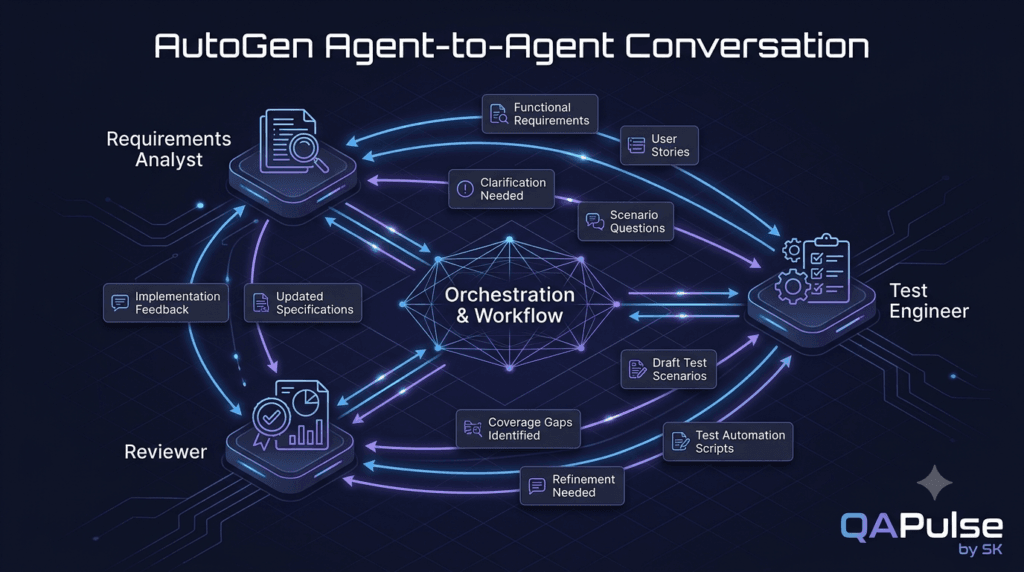
But real workflows often involve multiple exchanges:
Agent A
   ↓
Agent B
   ↓
Agent A
   ↓
Agent C
   ↓
Agent B
For example:
Analyst:
"Here are the requirements."

Tester:
"I identified 14 scenarios, but the rate-limit
behavior is undefined."

Analyst:
"The requirement confirms five attempts per hour."

Tester:
"I will add rate-limit scenarios."
Now the conversation is collaborative.
The agents are not simply executing isolated prompts.
They are exchanging information to improve the result.
Sequential Conversations
The simplest multi-agent workflow is sequential.
For example:
User
 ↓
Analyst
 ↓
Tester
 ↓
Reviewer
Each agent completes its responsibility before the next agent receives the result.
This is easy to understand.
It also provides a predictable execution path.
A conceptual implementation might look like:
analysis = await analyst.run(
    task=requirement
)

test_design = await tester.run(
    task=analysis.messages[-1].content
)

review = await reviewer.run(
    task=test_design.messages[-1].content
)
The pattern is:
Input
 ↓
Agent 1
 ↓
Output 1
 ↓
Agent 2
 ↓
Output 2
 ↓
Agent 3
 ↓
Output 3
This is a useful starting architecture because every transition is visible.
The Important Difference Between Agents and Functions
At first glance, this may look like ordinary function chaining.
For example:
analysis = analyze(requirement)
tests = generate_tests(analysis)
review = review_tests(tests)
So why use agents?
Because an agent can perform reasoning using a language model and potentially interact with tools, context, and other agents.
A conventional function follows deterministic application logic.
An AI agent can interpret less-structured information.
Compare:
Function
Input
 ↓
Deterministic Logic
 ↓
Output
with:
AI Agent
Input
 ↓
Instructions + Context
 ↓
Model Reasoning
 ↓
Output
That difference is important.
You should not replace every normal function with an agent.
Use traditional code where deterministic logic is better.
Use agents where flexible reasoning and language understanding provide value.
Agent Communication Should Have a Purpose
A common mistake is creating conversations simply because multi-agent systems are fashionable.
For example:
Agent 1:
"Hello."

Agent 2:
"Hello."

Agent 1:
"What do you think?"

Agent 2:
"I agree."
This is technically agent-to-agent communication.
But it has no engineering value.
Useful communication should transfer something meaningful:
Requirements
Decisions
Evidence
Questions
Test scenarios
Code
Review feedback
Research findings
Corrections
A good question to ask before creating an agent conversation is:
What information is this agent providing that another agent genuinely needs?
If the answer is unclear, the additional agent may not be necessary.
Interactive Exercise: Design Your First Agent Conversation
Take this requirement:
A shopping application allows users
to apply a discount code during checkout.

Valid codes reduce the order total.

Expired codes should be rejected.

Invalid codes should not change
the order total.
Now create three responsibilities:
Agent 1:
Requirements Analyst

Agent 2:
Test Designer

Agent 3:
QA Reviewer
Before running anything, predict what each agent should produce.
Analyst
Should identify:
Known behavior
Unknown behavior
Business rules
Potential ambiguities
Acceptance criteria
Test Designer
Should identify:
Valid code
Invalid code
Expired code
Boundary conditions
Order total validation
Reviewer
Should identify:
Missing scenarios
Duplicate scenarios
Unclear requirements
Coverage gaps
Now compare your expectations with the actual agent responses.
The goal is not simply to get an answer.
The goal is to understand how responsibility changes the output.
Conversation Direction Matters
A workflow can be:
A → B
or:
A → B → C
or:
A ↔ B
or even:
       B
      ↗ ↘
A →       → D
      ↘ ↗
       C
Different communication patterns solve different problems.
One-Way Handoff
Analyst
   ↓
Tester
Best when the output of one stage becomes the input for the next.
Back-and-Forth
Analyst
   ↕
Tester
Useful when the tester needs clarification.
Review Loop
Developer
    ↓
Reviewer
    ↓
Developer
    ↓
Reviewer
Useful when iterative improvement is required.
Parallel Specialists
             Security Agent
                  ↑
Requirement → Test Agent
                  ↓
             UX Agent
Useful when independent perspectives can be collected before a final decision.
The communication topology is therefore an architectural decision.
Conversation History Matters
An agent may need more than the latest message.
Consider:
Analyst:
"The reset link expires."

Tester:
"How long?"

Analyst:
"15 minutes."

Tester:
"Should expired links be reusable?"

Analyst:
"No. They must be invalidated."
The tester’s final decision depends on the conversation history.
If only:
"No. They must be invalidated."
is provided without context, the meaning may be unclear.
This is why conversation state and context management become important in multi-agent systems.
A useful mental model is:
Current Message
+
Relevant Conversation History
+
Agent Instructions
+
Task Context
produces the next response.
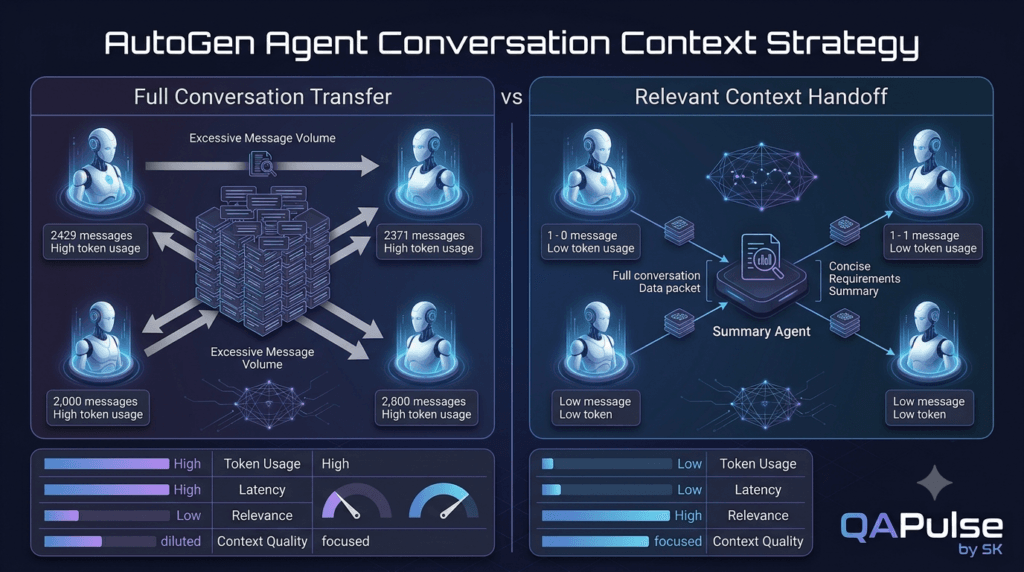
Don’t Pass Everything Everywhere
More conversation history does not automatically mean better results.
Imagine a workflow with hundreds of messages.
Passing the complete conversation to every agent can create:
Higher token usage
More latency
More irrelevant context
Greater chance of confusion
A better strategy is to provide each agent with the context it actually needs.
For example:
Analyst
 ↓
Requirements Summary
 ↓
Tester
rather than:
Entire conversation
+
All logs
+
All previous responses
+
Unrelated messages
 ↓
Tester
This becomes especially important as workflows grow.
Agent-to-Agent Communication vs Human Team Communication
A useful way to understand the architecture is to compare it with a software engineering team.
Imagine:
Product Manager
      ↓
QA Engineer
      ↓
Developer
      ↓
Code Reviewer
Each person receives information from another role.
The same principle can be modeled with agents:
Product Agent
      ↓
QA Agent
      ↓
Developer Agent
      ↓
Review Agent
The similarity is useful.
But there is an important difference.
Human teams have persistent knowledge, judgment, accountability, and organizational context.
AI agents operate within the context and capabilities provided by the application.
Therefore, the application still needs to control:
Permissions
Context
Tools
Data
Validation
Execution
The agents should not be treated as unrestricted software employees.
Agent Communication Is an Architecture Problem
Once agents begin communicating, you need to think about:
Who talks to whom?
When do they talk?
What information is transferred?
What happens if an agent fails?
Who decides the final result?
How is the conversation terminated?
These questions define the architecture.
For example:
User
 ↓
Coordinator
 ↓
Analyst
 ↓
Tester
 ↓
Reviewer
 ↓
Coordinator
 ↓
Final Response
Here the coordinator controls the workflow.
Another architecture could be:
User
 ↓
Analyst
 ↓
Tester
 ↓
Final Response
The second is simpler.
The first provides more control.
Again, the correct choice depends on the problem.
Strategy: Define the Communication Contract First
Before implementing multiple agents, define the information each agent should receive and produce.
For example:
Requirements Analyst

INPUT:
Raw requirement

OUTPUT:
- Functional requirements
- Ambiguities
- Assumptions
- Acceptance criteria
Then:
Test Designer

INPUT:
Analyzed requirement

OUTPUT:
- Positive scenarios
- Negative scenarios
- Boundary scenarios
- Validation points
Then:
Reviewer

INPUT:
Test scenarios

OUTPUT:
- Missing coverage
- Duplicates
- Incorrect assumptions
- Recommendations
Now the architecture becomes much clearer:
Raw Requirement
      ↓
[ Analyst ]
      ↓
Analyzed Requirement
      ↓
[ Test Designer ]
      ↓
Test Scenarios
      ↓
[ Reviewer ]
      ↓
Reviewed Scenarios
This is far easier to build and debug than simply telling three agents to “work together.”
What Happens When an Agent Gives a Bad Result?
This is where multi-agent systems become interesting.
Suppose:
Analyst
  ↓
Incorrect requirement interpretation
  ↓
Tester
  ↓
Incorrect test scenarios
The tester may produce a technically excellent answer based on incorrect input.
This creates a chain reaction.
Therefore:
An agent can only be as reliable as the information it receives and the validation surrounding that information.
You may eventually introduce validation between stages:
Analyst
   ↓
Validation
   ↓
Tester
   ↓
Validation
   ↓
Reviewer
This is a major difference between a simple multi-agent demo and a reliable multi-agent system.
A Practical Validation Pattern
You can start with simple application-level checks.
For example:
analysis = await analyst.run(
    task=requirement
)

analysis_text = analysis.messages[-1].content

if not analysis_text.strip():
    raise ValueError(
        "Analyst returned an empty result"
    )

test_result = await tester.run(
    task=analysis_text
)
The check is basic.
But the architectural idea is important:
Agent
 ↓
Application Validation
 ↓
Next Agent
Do not blindly trust every output simply because it came from another AI component.
The Human Can Still Be Part of the Conversation
Agent-to-agent communication does not mean humans disappear.
A workflow can include:
Analyst
   ↓
Tester
   ↓
Human Reviewer
   ↓
Developer
The human can validate important decisions before the workflow continues.
This is particularly useful when agents eventually interact with:
Production systems
Financial data
Security systems
Customer information
Source repositories
Deployment pipelines
The goal is not maximum autonomy.
The goal is useful and controlled autonomy.
Interactive Design Challenge
Design an agent workflow for this problem:
A company wants an AI system
that reviews pull requests.
You could start with:
Code Analyzer
      ↓
Test Reviewer
      ↓
Security Reviewer
      ↓
Final Reviewer
Now ask yourself:
Which agent should receive the source code?

Which agent should receive test results?

Should the security reviewer see everything?

Who produces the final decision?

What happens when reviewers disagree?

Should a human approve the final result?
These questions are more important than the Python syntax.
They force you to design the communication architecture before implementing it.
A Strong Design Principle
Do not start with:
“How many agents should I create?”
Start with:
“What responsibilities exist in this workflow?”
Then map responsibilities to agents.
Problem
 ↓
Responsibilities
 ↓
Communication Requirements
 ↓
Agent Boundaries
 ↓
Conversation Architecture
This prevents unnecessary agent proliferation.
What You Should Understand Before Going Further
Agent-to-agent communication is not simply two chatbots talking.
It is a mechanism for distributing responsibility across specialized AI components.
A useful architecture has:
Clear Roles
+
Meaningful Messages
+
Relevant Context
+
Defined Communication Paths
+
Validation
+
Observable Execution
When these pieces are designed properly, agents can collaborate on tasks that are difficult to handle cleanly with a single general-purpose agent.
When they are designed poorly, the result can be a complicated chain of model calls that costs more, takes longer, and becomes harder to debug.
The engineering goal is therefore not:
More Agents
It is:
Better Responsibility DistributionDesigning Agent-to-Agent Conversations That Actually Work
Building two agents is easy.
Designing the communication between them is the real engineering challenge.
An AutoGen agent-to-agent conversation should not be treated as two independent LLM calls connected with a string.
A better mental model is:
Agent A
   ↓
Message
   ↓
Agent B
   ↓
Response
   ↓
Agent A / Another Agent
Every transition should have a purpose.
The message should carry information that helps the receiving agent perform its responsibility.
The receiving agent should know what the information means, what it is expected to do with it, and what output it should produce.
This gives us a much stronger architecture:
Role
  ↓
Responsibility
  ↓
Input Contract
  ↓
Conversation
  ↓
Output Contract
Agent Roles Should Be Narrow Enough to Be Useful
Suppose you are building an AI-powered API testing workflow.
A weak design might create:
Agent 1:
"Senior AI Assistant"
and ask it to:
Analyze requirements
Create test cases
Write automation
Review the code
Find security issues
Generate documentation
This looks convenient, but the role is too broad.
A stronger design separates responsibilities:
Requirements Analyst
        ↓
Test Designer
        ↓
Automation Engineer
        ↓
Test Reviewer
Each agent now has a reason to exist.
The analyst understands requirements.
The test designer focuses on coverage.
The automation engineer focuses on implementation.
The reviewer challenges the implementation.
This is specialization.
Responsibility Boundaries Reduce Confusion
Consider these two designs.
Broad Agent
QA Agent

Responsibilities:
- Analyze requirements
- Design tests
- Write automation
- Review automation
- Find security issues
- Explain results
Specialized Agents
Requirements Agent
        ↓
Test Design Agent
        ↓
Automation Agent
        ↓
Review Agent
The second architecture creates clearer boundaries.
| Design | Advantages | Disadvantages |
|---|---|---|
| Broad agent | Simple, low coordination | Responsibility overload |
| Specialized agents | Clear responsibilities | More communication |
| Many specialized agents | High specialization | Higher complexity |
| Hybrid | Balance of both | Requires careful design |
There is no universal winner.
The architecture should follow the problem.
Define the Message Before Writing the Conversation
One of the strongest design techniques is to define the information exchanged between agents before implementing the workflow.
For example:
Requirements Analyst → Test Designer

Feature:
Password Reset

Functional Requirements:
1. User submits email.
2. Registered users receive a reset link.
3. Link expires after a defined period.
4. Password can be changed through the link.

Ambiguities:
1. Exact expiration duration is unspecified.
2. Rate limiting is unspecified.

Assumptions:
Do not expose whether an email address exists.
This is far more useful than:
"Here is the requirement. Create tests."
The first message provides a contract.
The second provides a request without sufficient structure.
Natural Language vs Structured Messages
Agents can communicate through natural language, but structured information often becomes easier to validate.
For example:
analysis = {
    "feature": "Password Reset",
    "requirements": [
        "User submits email",
        "Registered users receive reset link",
        "Reset link expires"
    ],
    "ambiguities": [
        "Expiration duration unspecified",
        "Rate limiting unspecified"
    ],
    "assumptions": [
        "Account existence must not be exposed"
    ]
}
The receiving agent can then work from a predictable structure.
Conceptually:
Agent A
   ↓
Structured Result
   ↓
Validation
   ↓
Agent B
This gives the application more control over the workflow.
Why Structured Communication Matters
Imagine an agent produces:
"The password reset feature should probably
work normally. Users enter their email and
receive a link."
A downstream agent has to interpret what “normally” means.
Now compare:
{
  "feature": "Password Reset",
  "requirements": [
    "Email is required",
    "Registered users receive a reset link",
    "Reset links expire"
  ],
  "unknowns": [
    "Expiration duration",
    "Rate limiting"
  ]
}
The second representation is much easier to reason about programmatically.
It can also be validated.
For example:
required_fields = [
    "feature",
    "requirements",
    "unknowns"
]

for field in required_fields:
    if field not in analysis:
        raise ValueError(
            f"Missing field: {field}"
        )
Now the application is not blindly trusting model output.
Natural Language Still Has an Important Role
Structured data does not mean every agent message needs to become JSON.
Natural language is useful when agents need to:
Explain reasoning
Provide recommendations
Discuss ambiguity
Review implementation
Summarize findings
Ask questions
A practical architecture often combines both:
Structured Data
+
Natural Language Explanation
For example:
{
  "decision": "needs_clarification",
  "missing_information": [
    "Reset link expiration duration"
  ]
}
followed by:
The expiration duration should be clarified
before final test coverage is considered complete.
This gives machines structure and humans readability.
Agent Conversations Should Have a Defined Objective
Before starting a conversation, define the outcome.
For example:
Objective:
Produce a complete API test strategy
from an approved requirement.
Then define:
Input:
Requirement

Agent A:
Analyze requirement

Agent B:
Create test scenarios

Agent C:
Review coverage

Final output:
Approved test strategy
Now every agent has a purpose.
Without a defined objective, conversations can drift.
The model may continue generating ideas that do not contribute to the actual task.
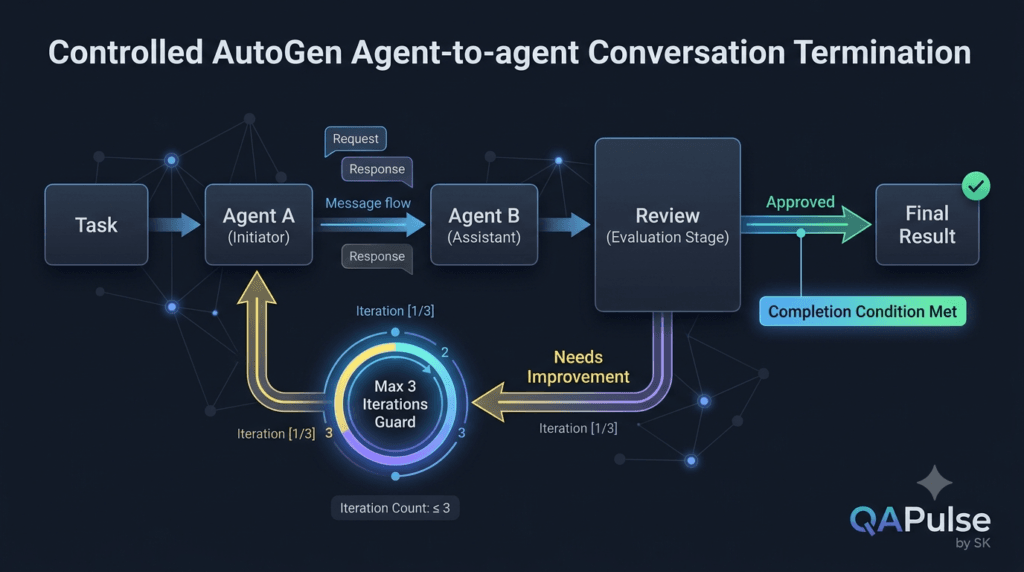
Conversation Termination Is an Engineering Concern
A conversation needs to stop.
This sounds obvious, but agentic systems can potentially continue exchanging messages if the workflow does not have a clear termination condition.
A simple architecture can define:
Start
 ↓
Agent A
 ↓
Agent B
 ↓
Review
 ↓
Complete
An iterative workflow might instead use:
Draft
 ↓
Review
 ↓
Problems?
 ├── Yes → Revise
 │          ↓
 │        Review
 │
 └── No → Complete
The second architecture needs a termination condition.
For example:
max_iterations = 3

for iteration in range(max_iterations):
    # execute review cycle
    ...
A maximum iteration count is a simple safety mechanism.
The exact implementation depends on the orchestration design, but the principle is universal:
Every autonomous loop should have a defined exit condition.
Avoid Infinite AI Discussions
A poorly designed workflow might produce:
Agent A:
"I think the tests are complete."

Agent B:
"I disagree."

Agent A:
"Why?"

Agent B:
"Because another edge case exists."

Agent A:
"Which one?"

Agent B:
"This one."

Agent A:
"I disagree."

...
The conversation may theoretically continue indefinitely.
A controlled design might define:
Maximum review cycles: 3
or:
Stop when:
Coverage >= required threshold
or:
Stop when:
Reviewer status == approved
This turns an open-ended conversation into an engineering workflow.
Agent Disagreement Is Useful
Multiple agents become particularly valuable when they can disagree.
Suppose:
Test Designer:
"Coverage is complete."

Reviewer:
"Missing rate-limit scenarios."
The disagreement identifies a potential weakness.
This can be intentionally designed.
Generator
    ↓
Reviewer
    ↓
Challenge
    ↓
Improvement
This is similar to code review.
One component creates a solution.
Another component challenges it.
The result can improve through iteration.
But More Agents Do Not Automatically Mean Better Results
There is a common misconception:
1 Agent < 2 Agents < 5 Agents < 10 Agents
That is not how agent architecture works.
More agents can create more opportunities for useful specialization.
But they can also introduce more failure points.
For example:
2 Agents
↓
1 Communication Boundary

5 Agents
↓
Multiple Communication Boundaries
↓
More Coordination
A larger system can therefore become harder to reason about.
A better principle is:
Use the minimum number of agents required to create meaningful specialization.
Communication Topology Matters
Agent-to-agent systems can be designed using different communication patterns.
Pipeline
A → B → C → D
Each agent hands its output to the next.
Good for:
Requirements
→ Design
→ Implementation
→ Review
Round Trip
A ↔ B
Useful when two agents need iterative clarification.
Hub and Spoke
        Agent B
           ↑
Agent A → Coordinator → Agent C
           ↓
        Agent D
The coordinator controls communication.
Useful when a central component needs to manage several specialists.
Review Loop
Generator
   ↓
Reviewer
   ↓
Generator
   ↓
Reviewer
Useful for iterative improvement.
Parallel Specialists
             Security Agent
                  ↑
Requirement → Coordinator
                  ↓
             QA Agent
                  ↓
             UX Agent
Multiple agents independently analyze the same task.
Their outputs can later be combined.
Choosing the Right Communication Pattern
| Pattern | Best For | Main Risk |
|---|---|---|
| Pipeline | Sequential workflows | Later stages depend on earlier output |
| Round trip | Clarification | Conversation can grow |
| Hub-and-spoke | Central coordination | Coordinator becomes bottleneck |
| Review loop | Iterative quality improvement | Infinite loops |
| Parallel | Independent perspectives | Result aggregation |
The architecture should be selected according to workflow requirements.
Do not choose a pattern simply because it is available.
Build a Coordinator When Coordination Becomes Complex
A simple two-agent workflow can be explicit:
analysis = await analyst.run(
    task=requirement
)

tests = await tester.run(
    task=analysis.messages[-1].content
)
As the number of agents increases, this can become difficult to maintain.
For example:
Coordinator
   ├── Analyst
   ├── Tester
   ├── Security Reviewer
   ├── Automation Engineer
   └── Documentation Agent
The coordinator can determine:
Who should receive the task?
What should happen next?
Which agent's output is required?
When is the workflow complete?
This creates an orchestration layer.
That orchestration layer becomes increasingly important as systems grow.
A Coordinator Is Not Automatically an AI Agent
This distinction matters.
A coordinator can be ordinary application code.
For example:
if requirement_is_ambiguous:
    send_to_analyst()
elif security_review_required:
    send_to_security_agent()
else:
    send_to_test_agent()
There is no reason to use an LLM for deterministic routing.
This is a valuable architecture principle:
Deterministic Decision
→ Use Code

Flexible Reasoning
→ Consider an Agent
Do not introduce AI where traditional programming is more reliable.
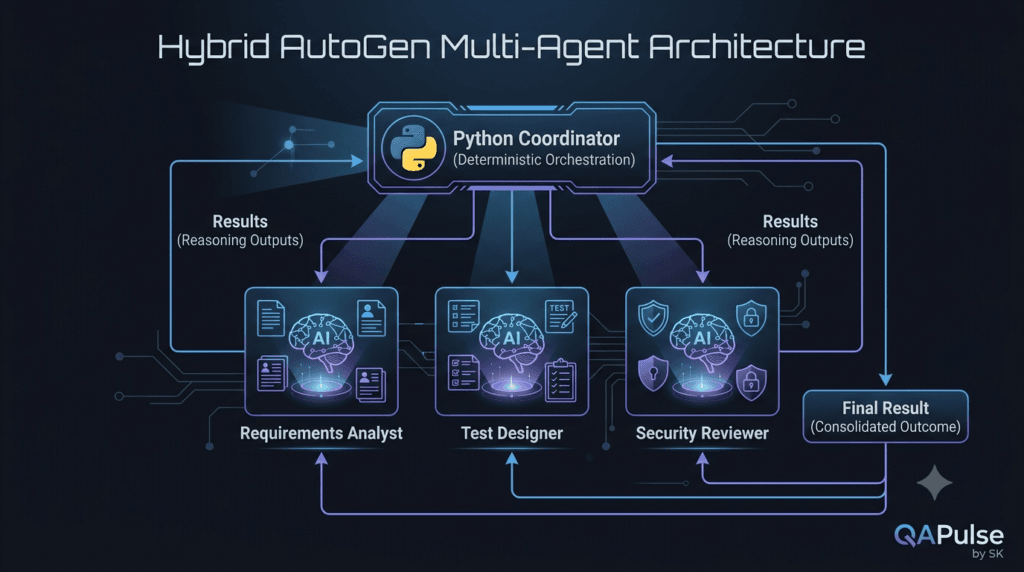
Hybrid Orchestration Is Often Stronger
A mature architecture can combine deterministic application logic with AI agents.
For example:
                ┌───────────────┐
                │  Coordinator  │
                │   Python Code │
                └───────┬───────┘
                        │
          ┌─────────────┼─────────────┐
          ↓             ↓             ↓
       Analyst        Tester       Reviewer
          │             │             │
          └─────────────┼─────────────┘
                        ↓
                   Final Result
The coordinator handles predictable routing.
The agents handle language-based reasoning.
This separation can make systems easier to test and operate.
Error Handling Between Agents
Suppose the analyst fails.
What should happen?
A production-oriented workflow should not simply continue.
Conceptually:
analysis = await analyst.run(
    task=requirement
)

if not analysis.messages:
    raise RuntimeError(
        "Analyst produced no messages"
    )
You can then decide whether to:
Retry
Fallback
Ask for human review
Skip the optional stage
Terminate safely
Different failures require different strategies.
For example:
Transient model/API failure
→ Retry

Invalid agent output
→ Validate / regenerate

Missing requirement
→ Request clarification

Security-sensitive ambiguity
→ Human review
This is where traditional software engineering practices become extremely important.
Retry Does Not Mean Retry Forever
A retry mechanism should be bounded.
Bad:
while True:
    retry()
Better:
max_retries = 3

for attempt in range(max_retries):
    try:
        result = await agent.run(
            task=task
        )
        break
    except Exception:
        if attempt == max_retries - 1:
            raise
The exact implementation will vary depending on the error and framework configuration.
The principle remains:
Retry
+
Limit
+
Fallback
Validate Before Passing Information Forward
A powerful pattern for multi-agent workflows is:
Agent A
   ↓
Validate
   ↓
Transform
   ↓
Agent B
Instead of:
Agent A
   ↓
Trust Everything
   ↓
Agent B
For example:
analysis = await analyst.run(
    task=requirement
)

analysis_text = analysis.messages[-1].content

if len(analysis_text.strip()) < 20:
    raise ValueError(
        "Analysis is too short"
    )

test_result = await tester.run(
    task=analysis_text
)
This is only a basic validation example.
In a serious system, validation should be based on actual business requirements rather than arbitrary character counts.
Observability Becomes More Important With More Agents
With one agent, you may inspect:
Input
 ↓
Agent
 ↓
Output
With multiple agents:
Input
 ↓
Analyst
 ↓
Message
 ↓
Tester
 ↓
Message
 ↓
Reviewer
 ↓
Message
 ↓
Final Result
There are many more places where things can go wrong.
You should therefore capture useful metadata such as:
Agent name
Timestamp
Task identifier
Conversation identifier
Input summary
Output summary
Model used
Latency
Errors
Retry count
A simplified application log might look like:
print({
    "agent": "requirements_analyst",
    "status": "completed",
    "task_id": task_id
})
For production systems, structured logging and proper tracing are preferable to scattered print() statements.
Interactive Exercise: Find the Failure Point
Consider:
Requirement
   ↓
Analyst
   ↓
Tester
   ↓
Reviewer
   ↓
Final Result
Now imagine the final result is wrong.
Where could the problem have originated?
Potentially:
Requirement
   ↓
Incorrect interpretation
   ↓
Incorrect analysis
   ↓
Incorrect test design
   ↓
Incorrect review
   ↓
Incorrect final result
The final output alone does not tell you where the failure began.
This is why conversation tracing matters.
A useful debugging strategy is:
Trace backward
from final output
to each agent handoff.
Ask at each step:
Was the input correct?

Was the agent's output correct?

Was the message complete?

Was the receiving agent given relevant context?

Was the transformation correct?
This is essentially distributed debugging for AI workflows.
Agent-to-Agent Conversations and QA
This architecture is particularly interesting for software testing.
Imagine:
Requirement Analyst
       ↓
Test Designer
       ↓
Automation Engineer
       ↓
Test Reviewer
The workflow itself becomes testable.
You can test:
Agent-Level Behavior
Does the analyst identify ambiguity?
Message-Level Behavior
Does the analyst provide the required information?
Workflow-Level Behavior
Does the tester receive the correct analysis?
System-Level Behavior
Does the complete workflow produce useful test coverage?
This gives you multiple testing layers.
| Layer | What You Test |
|---|---|
| Agent | Individual behavior |
| Message | Information transfer |
| Handoff | Context correctness |
| Workflow | Collaboration |
| System | Final outcome |
This is a powerful way to approach AI testing.
Strategy: Treat Every Handoff as a Test Boundary
Traditional software testing often focuses on component boundaries.
The same idea applies here.
Agent A
   ↓
[ Handoff Boundary ]
   ↓
Agent B
Test the boundary.
Ask:
Is required information present?

Is irrelevant information removed?

Is the format valid?

Are assumptions identified?

Can the receiving agent interpret it?
This approach can expose problems before they propagate through the entire workflow.
A Practical Agent Handoff Contract
For a test-design workflow, define:
INPUT:
Analyzed requirement

REQUIRED:
- Functional requirements
- Business rules
- Known constraints

OPTIONAL:
- Assumptions
- Open questions

OUTPUT:
- Positive scenarios
- Negative scenarios
- Boundary scenarios
- Validation points
Now the tester has a clear contract.
The contract can later become part of automated validation.
This is how agentic workflows become engineering systems rather than prompt chains.
Think in Terms of Data Flow
A strong way to reason about multi-agent systems is to ignore the AI terminology temporarily.
Ask:
What data enters the system?

Who transforms it?

Where does it go?

What information is created?

What information is lost?

Where is it validated?

Who consumes the result?
For example:
Raw Requirement
      ↓
Requirement Analysis
      ↓
Structured Test Intent
      ↓
Test Scenarios
      ↓
Automation Specification
      ↓
Reviewed Automation
The agents are performing transformations across that data flow.
This makes the architecture easier to reason about.
The Most Important Design Rule
Never create an agent just because the framework makes it easy.
Create an agent because a distinct responsibility exists.
Good reason:
Security analysis requires a dedicated
security perspective.
Weak reason:
I want more agents because
multi-agent AI is interesting.
Good reason:
The reviewer needs to challenge
the generated test strategy independently.
Weak reason:
Three agents sounds more intelligent
than one agent.
The architecture should solve a problem.
A Practical Decision Framework
Before adding another agent, ask these five questions:
1. What responsibility does this agent own?

2. Why can't an existing agent handle it?

3. What information will it receive?

4. What unique output will it produce?

5. How will its output improve the final result?
If you cannot answer these questions clearly, you probably do not need the additional agent.
Agent-to-Agent Architecture as a Team of Specialists
The strongest mental model is not:
Multiple Chatbots
It is:
Specialized AI Components
working through
defined communication contracts.
For example:
                ┌────────────────────┐
                │ Requirements Agent │
                └─────────┬──────────┘
                          │
                          ▼
                ┌────────────────────┐
                │   Test Designer    │
                └─────────┬──────────┘
                          │
                          ▼
                ┌────────────────────┐
                │ Automation Agent   │
                └─────────┬──────────┘
                          │
                          ▼
                ┌────────────────────┐
                │   Review Agent     │
                └─────────┬──────────┘
                          │
                          ▼
                    Final Result
Each component has:
A role
A responsibility
An input
An output
A communication boundary
That is the foundation of maintainable multi-agent architecture.
Practical Checklist for Agent-to-Agent Conversations
Before implementing a workflow, verify:
[ ] Each agent has one clear primary responsibility.

[ ] The overall workflow has a defined objective.

[ ] Every agent knows what input it receives.

[ ] Every agent has a defined expected output.

[ ] Communication between agents has a purpose.

[ ] Relevant context is passed between agents.

[ ] Unnecessary conversation history is avoided.

[ ] Agent outputs are validated before critical handoffs.

[ ] Conversation loops have termination conditions.

[ ] Retries are bounded.

[ ] Failures have defined handling strategies.

[ ] Important execution data is observable.

[ ] The final result can be evaluated.

[ ] Humans can intervene where risk requires it.
A workflow that passes this checklist is already much closer to a real engineering architecture than a simple collection of prompts.
The Core Strategy
Build agent-to-agent systems incrementally.
Start here:
Agent A
   ↓
Agent B
Then introduce a meaningful review:
Agent A
   ↓
Agent B
   ↓
Reviewer
Then add iteration only if needed:
Agent A
   ↓
Agent B
   ↓
Reviewer
   ↓
Needs Improvement?
   ├── Yes → Agent B
   └── No → Complete
Only after this architecture is understandable should you consider more sophisticated orchestration.
The objective is not to maximize the number of agents.
The objective is to maximize useful collaboration while keeping the system understandable, testable, observable, and controllable.
A Useful Engineering Formula
A practical way to think about multi-agent quality is:
Multi-Agent Quality
=
Agent Quality
×
Communication Quality
×
Context Quality
×
Workflow Quality
×
Validation
A strong individual agent cannot compensate for a broken communication architecture.
Likewise, excellent orchestration cannot compensate for agents that consistently produce poor outputs.
The system needs all of these layers to work together.
What Good Agent Collaboration Looks Like
A healthy conversation might look like:
Analyst:
"The requirement does not specify
password reset link expiration."

Tester:
"I cannot finalize boundary scenarios
without that value."

Analyst:
"Product specification confirms
a 15-minute expiration."

Tester:
"I will add expiration boundary,
expired-link, and reusable-link scenarios."

Reviewer:
"Coverage is complete except
for rate-limit behavior."

Analyst:
"Rate limiting is outside
the current requirement."

Reviewer:
"Accepted. The scope is documented."
Notice what is happening.
The agents are:
Exchanging information
Asking questions
Resolving ambiguity
Challenging assumptions
Making decisions
Documenting scope
That is meaningful collaboration.
It is much more valuable than agents simply generating long responses to one another.
Building a Real Agent-to-Agent Workflow with AutoGen
Understanding agent communication is only useful when we can turn the idea into an actual workflow.
A practical AutoGen system should connect agents around a real engineering objective rather than simply making multiple agents talk.
For this example, imagine a QA workflow where the system receives a software requirement and produces a reviewed test strategy.
The architecture is:
Software Requirement
        ↓
Requirements Analyst
        ↓
Test Designer
        ↓
Test Reviewer
        ↓
Approved Test Strategy
Each agent has a specific responsibility.
Requirements Analyst
→ Understand the requirement

Test Designer
→ Create test coverage

Test Reviewer
→ Challenge the coverage

Final System
→ Produce the approved result
This is a much more useful starting point than creating several generic assistants.
Start With the Workflow, Not the Agents
Before writing AutoGen code, define the workflow.
For example:
INPUT
  ↓
Raw Requirement
  ↓
ANALYZE
  ↓
Requirements Analysis
  ↓
DESIGN
  ↓
Test Scenarios
  ↓
REVIEW
  ↓
Coverage Review
  ↓
OUTPUT
  ↓
Final Test Strategy
Now define the responsibilities.
| Component | Responsibility | Output |
|---|---|---|
| Analyst | Understand requirement | Requirements analysis |
| Test Designer | Create scenarios | Test strategy |
| Reviewer | Identify gaps | Review findings |
| Application | Control workflow | Final result |
This separation makes the system easier to reason about.
A Basic AutoGen Agent Structure
A modern AutoGen application commonly separates the model client from the agent.
Conceptually:
from autogen_agentchat.agents import AssistantAgent

analyst = AssistantAgent(
    name="requirements_analyst",
    model_client=model_client,
    system_message="""
    You are a senior software requirements analyst.

    Analyze the supplied requirement.

    Identify:
    - functional requirements
    - business rules
    - constraints
    - ambiguities
    - assumptions
    - missing information

    Do not create test cases.
    """
)
The important part is not the number of lines.
It is the boundary created by the system message.
The analyst knows:
What it does
What it does not do
What information it should produce
Now create the test designer:
tester = AssistantAgent(
    name="test_designer",
    model_client=model_client,
    system_message="""
    You are a senior QA test engineer.

    Convert the supplied requirements analysis
    into a comprehensive test strategy.

    Include:
    - positive scenarios
    - negative scenarios
    - boundary cases
    - validation scenarios
    - important edge cases

    Do not invent unsupported requirements.
    """
)
The second agent has a completely different responsibility.
Add the Reviewer
Now introduce an independent reviewer.
reviewer = AssistantAgent(
    name="test_reviewer",
    model_client=model_client,
    system_message="""
    You are an independent QA reviewer.

    Review the supplied test strategy.

    Identify:
    - missing coverage
    - duplicate scenarios
    - unsupported assumptions
    - weak validation
    - important edge cases

    Be critical and concise.
    """
)
The reviewer is intentionally separated from the test designer.
This creates a useful quality-control boundary:
Generator
    ↓
Independent Reviewer
The reviewer should not simply repeat what the generator already said.
It should challenge it.
Connecting the Agents
At the application level, the workflow can pass one agent’s result into another.
A simplified pattern is:
analysis = await analyst.run(
    task=requirement
)

analysis_text = analysis.messages[-1].content

test_result = await tester.run(
    task=analysis_text
)

test_text = test_result.messages[-1].content

review_result = await reviewer.run(
    task=test_text
)
The data flow is:
Requirement
    ↓
Analyst
    ↓
Analysis
    ↓
Test Designer
    ↓
Test Strategy
    ↓
Reviewer
    ↓
Review
This is a basic sequential agent pipeline.
It is simple enough to understand and powerful enough to demonstrate the core concept.
Why Sequential Execution Is a Good Starting Point
A sequential workflow gives you clear boundaries.
You know:
Step 1 → Analyst
Step 2 → Test Designer
Step 3 → Reviewer
If the final result is incorrect, you can inspect each stage.
Compare that with an uncontrolled multi-agent conversation:
Agent A
 ↕
Agent B
 ↕
Agent C
 ↕
Agent A
 ↕
Agent D
The second architecture may eventually be useful, but it is harder to debug.
| Architecture | Simplicity | Debugging | Flexibility |
|---|---|---|---|
| Sequential | High | High | Medium |
| Round-trip | Medium | Medium | High |
| Group conversation | Lower | Lower | High |
| Dynamic orchestration | Low | Harder | Very high |
A good engineering strategy is to start with the simplest architecture that solves the problem.
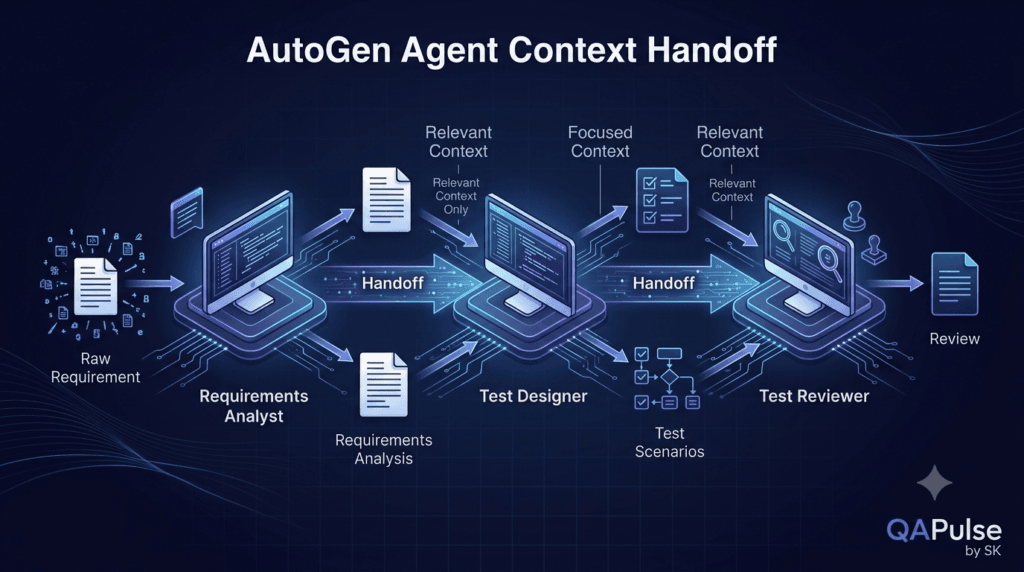
Passing the Right Context
The test designer does not need every detail from the entire application.
It needs the relevant requirements analysis.
That means:
Raw Requirement
      ↓
Analyst
      ↓
Relevant Analysis
      ↓
Test Designer
Not:
Raw Requirement
+
All Logs
+
All Previous Conversations
+
Unrelated Data
+
Every Agent Output
      ↓
Test Designer
This distinction becomes increasingly important as the workflow grows.
Add Validation Between Agents
Blindly forwarding an AI response is risky.
Consider:
analysis = await analyst.run(
    task=requirement
)

if not analysis.messages:
    raise RuntimeError(
        "No analysis was produced."
    )

analysis_text = analysis.messages[-1].content

if not analysis_text.strip():
    raise ValueError(
        "Analysis is empty."
    )
Only after validation should the next stage execute.
Analyst
   ↓
Validation
   ↓
Test Designer
This small architectural decision has a large impact.
The application becomes responsible for controlling the workflow instead of blindly trusting model output.
Validate Meaning, Not Just Presence
Checking that a message exists is only the beginning.
Suppose the analyst returns:
"Everything looks good."
Technically, the message exists.
But it is not a useful requirements analysis.
A stronger validation strategy can check for required information:
required_sections = [
    "requirements",
    "ambiguities",
    "assumptions"
]
If the application expects structured output, validate the structure before continuing.
Conceptually:
Agent Output
    ↓
Schema Validation
    ↓
Business Validation
    ↓
Next Agent
This is one of the most important differences between a demonstration and an engineered AI workflow.
Use Structured Output Where Possible
Suppose the analyst returns:
{
  "requirements": [
    "User can request password reset",
    "Reset link expires"
  ],
  "ambiguities": [
    "Expiration duration is unspecified"
  ],
  "assumptions": [
    "Account existence should not be exposed"
  ]
}
The application can inspect these fields.
For example:
analysis = {
    "requirements": [
        "User can request password reset",
        "Reset link expires"
    ],
    "ambiguities": [
        "Expiration duration is unspecified"
    ],
    "assumptions": [
        "Account existence should not be exposed"
    ]
}

if not analysis["requirements"]:
    raise ValueError(
        "Requirements are missing."
    )
This creates a stronger contract between agents.
Communication Contracts
A communication contract defines what one agent should provide to another.
For example:
Requirements Analyst

INPUT:
Raw software requirement

OUTPUT:
- requirements
- business rules
- ambiguities
- assumptions
- open questions
The test designer then receives:
Test Designer

INPUT:
Validated requirements analysis

OUTPUT:
- positive scenarios
- negative scenarios
- boundary scenarios
- edge cases
- validation points
The reviewer receives:
Test Reviewer

INPUT:
Validated test strategy

OUTPUT:
- missing coverage
- unsupported assumptions
- duplicates
- recommendations
Now the entire system has explicit contracts.
Analyst Contract
       ↓
Tester Contract
       ↓
Reviewer Contract
This makes future changes much easier.
What Happens When Agents Disagree?
Disagreement can be valuable.
Imagine the test designer produces:
Scenario:
User enters an invalid email.
System displays "Account not found."
The reviewer responds:
Potential security issue:
The response may expose whether
an account exists.
Now the reviewer has identified a problem that the generator missed.
The workflow becomes:
Test Designer
      ↓
Test Strategy
      ↓
Reviewer
      ↓
Security Concern
The disagreement becomes useful information.
Introduce a Revision Loop
A more advanced workflow can allow the original agent to revise its output.
Test Designer
      ↓
Reviewer
      ↓
Approved?
   ↙       ↘
 No         Yes
 ↓           ↓
Revise     Complete
 ↓
Reviewer
Conceptually:
for iteration in range(3):

    review = await reviewer.run(
        task=test_strategy
    )

    if is_approved(review):
        break

    test_strategy = await tester.run(
        task=f"""
        Improve this test strategy
        using the following review:

        {review}
        """
    )
The example is intentionally simplified.
In a production implementation, is_approved() should use explicit validation rather than relying on fragile string matching.
Why the Maximum Iteration Matters
Without a limit:
Generate
 ↓
Review
 ↓
Revise
 ↓
Review
 ↓
Revise
 ↓
Review
 ↓
...
The workflow can become expensive and unpredictable.
A bounded loop provides:
Maximum Attempts
+
Explicit Completion
+
Failure Handling
For example:
MAX_REVIEW_CYCLES = 3
After three unsuccessful cycles, the application could:
Stop
+
Return the latest result
+
Flag for human review
This is a safer design.
Human Approval as a Control Point
Not every decision should be fully autonomous.
A workflow can pause after review:
Analyst
   ↓
Tester
   ↓
Reviewer
   ↓
Human Approval
   ↓
Final Result
This is especially useful when the workflow affects:
Production code
Security decisions
Customer data
Financial operations
Infrastructure
Deployment
A human approval point provides an explicit control boundary.
Interactive Exercise: Build the Workflow on Paper
Take this requirement:
An API allows customers to update
their email address.

The new email must be valid.

The customer must confirm the change.

The old email should no longer
receive account notifications.
Design the agents.
Agent 1
Requirements Analyst
Expected output:
Functional requirements
Business rules
Security considerations
Ambiguities
Agent 2
API Test Designer
Expected output:
Positive tests
Negative tests
Boundary tests
API validation tests
Authentication tests
Agent 3
Security Reviewer
Expected output:
Authorization issues
Account takeover risks
Email verification weaknesses
Information leakage
Now define the communication:
Requirement
     ↓
Analyst
     ↓
Validated Analysis
     ↓
Test Designer
     ↓
Test Strategy
     ↓
Security Reviewer
     ↓
Final Assessment
Before implementing it, ask:
What information does each agent need?

What information should each agent not receive?

Which outputs need validation?

Where can a human intervene?

What happens if one agent fails?
This exercise is more important than memorizing API calls.
Agent-to-Agent Conversations for Software Testing
This architecture can become particularly powerful for QA engineering.
Imagine a complete workflow:
Requirement Agent
       ↓
Test Design Agent
       ↓
API Test Agent
       ↓
UI Test Agent
       ↓
Security Test Agent
       ↓
Test Reviewer
Each agent can focus on a different testing dimension.
The system can produce:
Functional Coverage
+
API Coverage
+
UI Coverage
+
Security Coverage
+
Review Findings
The architecture starts looking like an AI-powered QA team.
But the same principle applies:
Do not add agents simply to make the diagram impressive.
Each agent must contribute something unique.
Agent-to-Agent Conversations for Coding
The same architecture can be applied to software development.
Requirement
    ↓
Architect Agent
    ↓
Developer Agent
    ↓
Test Agent
    ↓
Code Reviewer
The architect can produce:
Design
API boundaries
Components
Technical decisions
The developer can produce:
Implementation
The test agent can produce:
Unit tests
Integration tests
Edge cases
The reviewer can challenge:
Correctness
Maintainability
Security
Test coverage
This is a natural multi-agent workflow.
Agent-to-Agent Conversations for Research
Research systems can use a similar architecture:
Research Planner
       ↓
Researcher A
       ↓
Researcher B
       ↓
Fact Checker
       ↓
Synthesizer
Different agents can investigate different aspects.
But again, research quality depends heavily on:
Source quality
Evidence validation
Context management
Conflict resolution
Multiple agents do not automatically make information true.
A system can produce multiple confident but incorrect answers.
That is why validation remains essential.
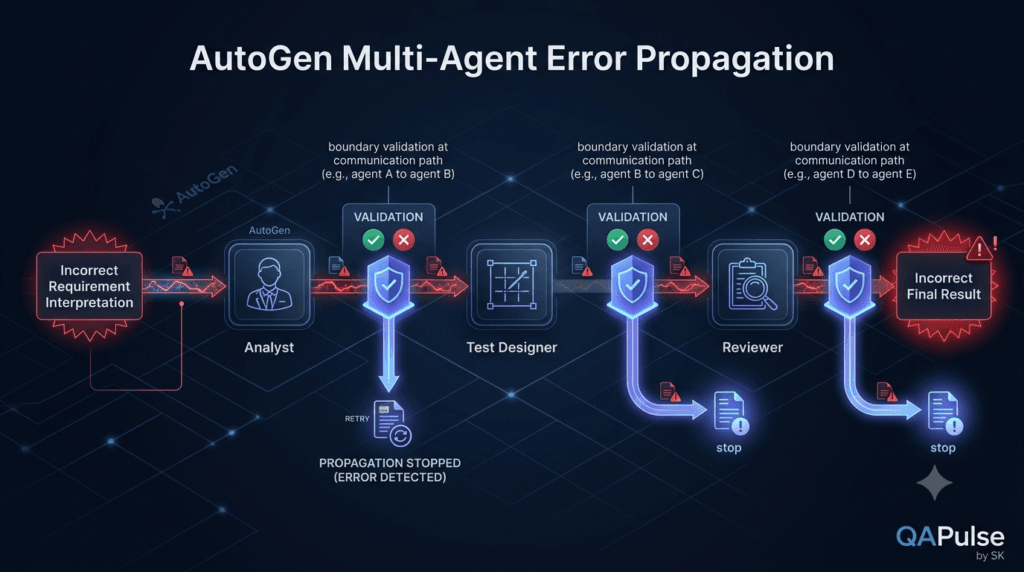
Multi-Agent Systems Can Amplify Errors
This is one of the most important concepts to understand.
Suppose:
Agent A
makes an incorrect assumption.
Then:
Agent B
uses that assumption.
Then:
Agent C
uses B's output.
The error propagates:
Incorrect Input
      ↓
Incorrect Analysis
      ↓
Incorrect Test Strategy
      ↓
Incorrect Review
      ↓
Incorrect Final Result
This is why validation at handoff boundaries is so important.
A multi-agent system does not eliminate model errors.
It can actually propagate them faster.
The Error-Budget Mental Model
Think of each agent as a potential source of uncertainty.
Input
 ↓
Agent A
 ↓
Potential Error
 ↓
Agent B
 ↓
Potential Error
 ↓
Agent C
 ↓
Potential Error
Adding more agents can therefore increase the number of places where something can go wrong.
This does not mean multi-agent systems are bad.
It means every additional component should have a clear justification.
Designing for Observability
As the number of agents increases, you need to know what happened.
At minimum, track:
Conversation ID
Task ID
Agent Name
Start Time
End Time
Status
Model
Input Summary
Output Summary
Error
Retry Count
A conceptual event might look like:
event = {
    "task_id": "task-001",
    "agent": "test_designer",
    "status": "completed",
    "duration_ms": 4200
}
This becomes useful when debugging.
Instead of asking:
Why is the final answer wrong?
you can ask:
Did the analyst fail?

Was the analyst output incomplete?

Did the tester receive the wrong context?

Did the reviewer identify the problem?

Did the application ignore the review?
Observability turns a mysterious AI workflow into something that can actually be investigated.
Measure the Conversation, Not Just the Final Answer
Traditional application monitoring often focuses on final outcomes.
Agentic systems need deeper visibility.
Useful measurements include:
Agent latency
Conversation length
Number of turns
Retry count
Token consumption
Failure rate
Validation failures
Human interventions
Final task success
For example:
Task Success Rate
=
Successful Tasks
÷
Total Tasks
You can also measure:
Average Agent Latency
Average Conversation Turns
Average Retry Count
These metrics become valuable when optimizing the system.
A Simple Quality Model
A useful conceptual model is:
Workflow Quality
=
Agent Quality
×
Communication Quality
×
Context Quality
×
Validation Quality
×
Orchestration Quality
If one component is extremely weak, the overall workflow suffers.
For example:
Excellent Agents
+
Poor Communication
=
Poor System
or:
Excellent Communication
+
Poor Validation
=
Risky System
The complete system matters more than any individual agent.
A Practical Architecture for Production-Oriented Workflows
A more mature design could look like:
                    User Request
                         │
                         ▼
                 ┌───────────────┐
                 │  Coordinator  │
                 └───────┬───────┘
                         │
          ┌──────────────┼──────────────┐
          ▼              ▼              ▼
      Analyst          Tester        Security
          │              │              │
          └──────────────┼──────────────┘
                         ▼
                   Validation
                         │
                         ▼
                      Reviewer
                         │
                  ┌──────┴──────┐
                  ▼             ▼
               Approved      Revision
                  │             │
                  ▼             │
              Final Result ◄────┘
Notice the architecture contains more than agents.
It contains:
Agents
+
Coordinator
+
Validation
+
Review
+
Termination
That is the difference between a collection of AI prompts and an engineered agent workflow.
Interactive Challenge: Simplify the Architecture
Consider this system:
Agent 1
 ↓
Agent 2
 ↓
Agent 3
 ↓
Agent 4
 ↓
Agent 5
 ↓
Agent 6
Ask:
Does every agent have a unique responsibility?
Could Agent 2 and Agent 3 be combined?
Does Agent 5 add measurable value?
Can Agent 6 be deterministic application code?
Which communication boundaries require validation?
Now try reducing it.
A simpler system might become:
Analyst
↓
Test Designer
↓
Reviewer
If both systems achieve the same result, prefer the simpler one.
Complexity should be earned.
Strategy: Optimize for Useful Collaboration
A strong agent-to-agent strategy follows these principles:
1. Define the business objective.
2. Identify distinct responsibilities.
3. Assign only meaningful responsibilities to agents.
4. Define communication contracts.
5. Pass only relevant context.
6. Validate important outputs.
7. Bound loops and retries.
8. Observe every important handoff.
9. Add human approval for high-risk decisions.
10. Measure whether each agent improves the final result.
The tenth point is especially important.
If removing an agent does not reduce quality, the agent may not be necessary.
The “Remove One Agent” Test
Take your architecture:
Analyst
↓
Tester
↓
Security Reviewer
↓
Final Reviewer
Now remove the Security Reviewer.
Ask:
What capability disappears?
If the answer is:
Security-specific analysis
then the agent has a clear purpose.
Now remove the Final Reviewer.
If nothing meaningful changes, the final reviewer may be redundant.
This simple thought experiment can prevent unnecessary architecture complexity.
Agent Communication Is a Product Decision Too
Technical architecture is only part of the problem.
You also need to decide:
What should the user see?
Should intermediate messages be visible?
Should the system expose agent names?
Should users approve certain decisions?
Should the final answer include the reasoning process?
Which information should remain internal?
A production system should not automatically expose every internal agent message to the user.
The user may only need:
Final Result
+
Important Findings
+
Required Actions
while the application retains detailed internal traces for observability.
A Better User Experience
Instead of showing:
Analyst:
...
Tester:
...
Reviewer:
...
Analyst:
...
Tester:
...
the application can present:
Analysis Complete
✓ Requirements analyzed
✓ Test scenarios generated
✓ Coverage reviewed
Result:
42 test scenarios
3 coverage gaps identified
1 requirement needs clarification
The agents collaborate internally.
The application presents a useful result externally.
That separation is important in real products.
The Engineering Boundary
A robust architecture separates:
User Experience
↓
Application / Orchestrator
↓
Agent Workflow
↓
Models and Tools
The user does not need to understand every internal interaction.
The application owns the workflow.
The agents perform specialized reasoning.
The model provides language intelligence.
This separation makes the entire system easier to evolve.
Final Practical Checklist
Before calling an agent-to-agent workflow ready for experimentation, verify:
[ ] Clear overall objective
[ ] Clear agent responsibilities
[ ] Defined input for every agent
[ ] Defined output for every agent
[ ] Explicit communication path
[ ] Relevant context only
[ ] Output validation
[ ] Error handling
[ ] Bounded retries
[ ] Bounded conversation loops
[ ] Review or evaluation mechanism
[ ] Observability
[ ] Human intervention where appropriate
[ ] Measurable final outcome
If several of these are missing, the workflow is still closer to an experiment than an engineered system.
The Core Idea
The most important lesson is not how to create three AssistantAgent objects.
It is how to design the relationship between them.
A strong AutoGen agent-to-agent workflow looks like:
Clear Responsibility
+
Meaningful Communication
+
Relevant Context
+
Validation
+
Controlled Orchestration
+
Observable Execution
=
Reliable Multi-Agent Workflow
The agents are only one layer.
The communication architecture determines how useful those agents become.
And the application remains responsible for controlling the system, validating important outputs, limiting autonomous behavior, and deciding when the workflow is complete.
Putting Agent-to-Agent Conversations Into Practice
The real value of AutoGen agent-to-agent conversations appears when specialized agents collaborate around a clearly defined objective.
A practical engineering workflow might look like this:
User Requirement
↓
Requirements Analyst
↓
Validated Analysis
↓
Test Designer
↓
Test Strategy
↓
Independent Reviewer
↓
Validation
↓
Final Result
This architecture is simple enough to understand, but it already introduces several important engineering concepts:
Specialization
Communication
Context Management
Validation
Review
Error Handling
Observability
Termination
The goal is not to create the largest possible multi-agent system.
The goal is to create the smallest system that produces a better result than a simpler architecture.
A Complete Conceptual Workflow
Consider a password-reset feature.
The requirement is:
Users can request a password reset
using their registered email address.
The system sends a reset link.
The reset link expires.
Users can create a new password
through the reset link.
A specialized workflow could process this requirement as follows:
Requirement
↓
Requirements Analyst
↓
Requirements Analysis
↓
Test Designer
↓
Test Scenarios
↓
Test Reviewer
↓
Review Findings
↓
Approved Test Strategy
The important part is not the number of agents.
The important part is that each stage adds a meaningful transformation.
Step 1: Analyze the Requirement
The analyst should identify what is known and what is missing.
A useful output might look like:
Requirements:
- User submits registered email.
- System sends reset link.
- Reset link expires.
- User can create a new password.
Ambiguities:
- Expiration duration is unspecified.
- Password complexity rules are unspecified.
- Rate limiting is unspecified.
Security considerations:
- Account existence should not be exposed.
- Reset tokens should not be reusable.
This output is significantly more useful than:
"The password reset feature looks good."
The first output gives the next agent information it can act upon.
Step 2: Design the Test Strategy
The test designer receives the validated analysis.
It can produce:
Positive:
- Registered email receives reset link.
- Valid reset token allows password change.
Negative:
- Invalid email.
- Expired token.
- Invalid token.
- Reused token.
Boundary:
- Token expiration boundary.
- Password minimum length.
Security:
- Token cannot be reused.
- Account existence is not disclosed.
Now the information has moved through two specialized transformations:
Raw Requirement
↓
Requirement Understanding
↓
Test Strategy
Step 3: Independent Review
The reviewer should not simply summarize the test strategy.
Its job is to challenge it.
For example:
Review Findings:
1. Token reuse is covered.
2. Expired token behavior is covered.
3. Account enumeration risk is addressed.
4. Rate limiting is missing because
the requirement does not define it.
5. Password complexity remains unspecified.
This introduces independent scrutiny.
Generation
↓
Independent Review
↓
Improvement
That pattern is one of the strongest reasons to use multiple agents.
Step 4: Validate the Workflow
The application should decide whether the result is acceptable.
For example:
required_sections = [
"requirements",
"ambiguities",
"assumptions"
]
for section in required_sections:
if section not in analysis:
raise ValueError(
f"Missing section: {section}"
)
The exact validation rules depend on the application.
The important principle is:
AI Output
↓
Application Validation
↓
Trusted Workflow State
Do not allow every model response to automatically become trusted system state.
What Should Happen When Validation Fails?
Suppose the analyst produces no ambiguity section.
The workflow could:
Validation Failure
↓
Retry Agent
OR
Request Clarification
OR
Human Review
OR
Terminate Safely
The correct choice depends on the failure.
For example:
| Failure | Appropriate Response |
|---|---|
| Temporary model/API failure | Retry |
| Empty response | Retry |
| Invalid structure | Regenerate |
| Missing business requirement | Clarification |
| Security-sensitive uncertainty | Human review |
| Repeated failure | Stop safely |
This is where ordinary software engineering becomes critical to AI systems.
Don’t Let the Agent Decide Everything
A common mistake is allowing the AI workflow to control every aspect of its own execution.
For example:
Agent decides:
- Which agent runs
- How many times it runs
- When to retry
- When to stop
- What tools to call
- What data to access
That can create an unnecessarily unpredictable system.
A safer architecture is:
Application
↓
Controls Workflow
↓
Agents
↓
Produce Reasoning and Results
The application remains in control.
The agents provide intelligence within defined boundaries.
Deterministic Logic Should Stay Deterministic
Suppose the application needs to decide:
If review_status == "approved"
→ Finish
Otherwise
→ Revise
There is no reason to ask an LLM to make that decision.
Use application code:
if review_status == "approved":
complete_workflow()
else:
revise_strategy()
This gives a useful architectural rule:
Deterministic Requirement
→ Code
Reasoning Requirement
→ Agent
This distinction can dramatically improve reliability.
Interactive Architecture Challenge
Consider this workflow:
Requirement
↓
Analyst
↓
Tester
↓
Reviewer
↓
Developer
↓
Final Result
Now ask:
Does the Developer actually need to be an AI agent?
Maybe.
But perhaps the developer’s job is simply to execute deterministic code generated by the test workflow.
Or perhaps the developer needs to interpret ambiguous technical requirements.
The correct answer depends on the responsibility.
Now ask:
Does the Reviewer need access to the entire original conversation?
Probably not.
It may only need:
Requirements
+
Test Strategy
+
Relevant Constraints
This exercise demonstrates an important principle:
Every agent should receive the minimum context required to perform its responsibility correctly.
Agent-to-Agent Conversation vs Traditional Pipeline
There is an important distinction between an AI conversation and ordinary application orchestration.
A traditional pipeline might be:
requirements = analyze(requirement)
tests = generate_tests(requirements)
report = review(tests)
The functions generally follow deterministic logic.
An agent workflow may involve:
Requirement
↓
AI interpretation
↓
Agent response
↓
AI interpretation
↓
Agent response
The model introduces flexibility and uncertainty.
That flexibility is useful when the task requires language understanding or reasoning.
But it also means the application needs stronger controls.
| Traditional Pipeline | Agent Workflow |
|---|---|
| Deterministic logic | Probabilistic reasoning |
| Predictable output format | Variable output |
| Easier testing | Requires behavioral evaluation |
| Lower variability | Higher variability |
| Explicit control flow | May include dynamic behavior |
| Usually easier to debug | Requires conversation tracing |
The right architecture can also combine both.
The Hybrid Model
A strong production-oriented design often looks like:
Application
│
▼
Coordinator
│
┌────────────┼────────────┐
▼ ▼ ▼
Analyst Tester Reviewer
│ │ │
└────────────┼────────────┘
▼
Validator
│
▼
Final Result
The application controls:
Routing
Retries
Limits
Permissions
Validation
Persistence
Termination
The agents handle:
Interpretation
Reasoning
Generation
Review
Natural-language analysis
This separation is often easier to maintain than allowing an LLM to control the entire workflow.
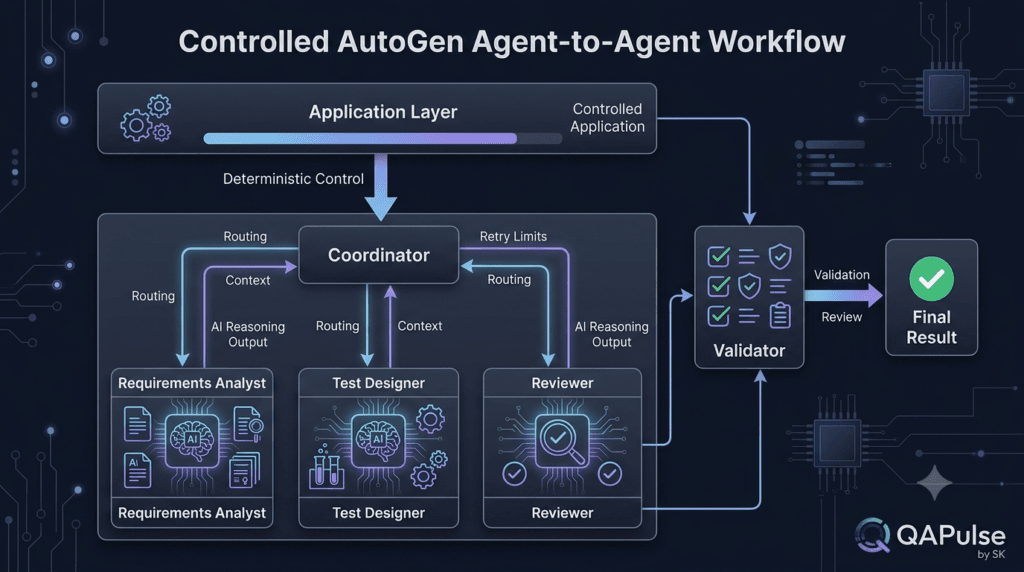
Conversation State Is a Design Decision
As conversations become longer, state management becomes increasingly important.
Consider:
Message 1:
Requirement received.
Message 2:
Analyst identifies ambiguity.
Message 3:
Product clarification received.
Message 4:
Tester creates scenarios.
Message 5:
Reviewer identifies a gap.
The system needs to know which information remains relevant.
A useful state model might contain:
state = {
"requirement": requirement,
"analysis": analysis,
"test_strategy": test_strategy,
"review": review,
"status": "reviewing"
}
Now the application has an explicit representation of workflow state.
Instead of relying entirely on conversation history, important state can be represented directly.
Conversation History vs Application State
These concepts are related but not identical.
Conversation history:
Messages
↓
Agent interactions
Application state:
Task status
Requirements
Validated outputs
Approvals
Errors
Retries
Workflow decisions
A mature system may need both.
| Conversation History | Application State |
|---|---|
| Captures communication | Captures workflow status |
| Useful for context | Useful for control |
| Can become large | Can remain compact |
| Model-oriented | Application-oriented |
| Useful for reasoning | Useful for orchestration |
This distinction becomes particularly important when workflows become long-running.
Don’t Confuse Conversation With Memory
A conversation contains messages.
Memory is broader.
An agent might need information from:
Previous tasks
User preferences
Project documentation
Historical decisions
External knowledge
Stored artifacts
Not all of that belongs in the immediate conversation.
A scalable architecture therefore separates:
Current Conversation
+
Persistent State
+
External Knowledge
This becomes especially important when building production AI systems.
Handling Conflicting Agent Outputs
Suppose two specialist agents disagree.
Security Agent:
"Risk is high."
QA Agent:
"Risk is low."
Who wins?
The answer should not simply be:
The last agent to speak.
You need a conflict-resolution strategy.
Possible approaches include:
Specialist priority
Human review
Evidence comparison
Dedicated adjudicator
Rule-based decision
Additional verification
For example:
Security concern
↓
Security policy check
↓
Human approval
The architecture should define what happens when agents disagree before the system reaches production.
Use Evidence to Resolve Disagreement
Instead of asking another agent:
"Who is correct?"
provide evidence.
For example:
Requirement
+
API specification
+
Security policy
+
Agent A finding
+
Agent B finding
Then ask a reviewer to evaluate the claims against authoritative information.
This produces a stronger workflow:
Claim
↓
Evidence
↓
Evaluation
↓
Decision
The same principle applies to research, coding, QA, and business workflows.
Interactive Exercise: Resolve a Conflict
Imagine:
Test Agent:
"Password reset should return
404 for unknown email."
Security Agent:
"Returning 404 exposes whether
the account exists."
Do not immediately ask another AI agent to choose.
Ask:
What does the actual API specification say?
What does the security policy require?
What behavior does the product requirement define?
What information should the user be allowed to infer?
Now the conflict can be resolved using evidence rather than model confidence.
This is an important principle:
Confidence is not evidence.
Agent-to-Agent Conversations Need Testing
A multi-agent workflow should itself be tested.
You can create tests for:
Agent Responsibilities
Does the analyst identify ambiguity?
Communication
Does the tester receive the required analysis?
Validation
Does malformed output get rejected?
Workflow
Does the reviewer execute after test generation?
Failure Handling
What happens when the analyst fails?
Termination
Does the review loop stop after the configured limit?
This means agentic systems need multiple layers of testing.
The AI Agent Testing Pyramid
A useful conceptual model is:
System
▲
│
Workflow
▲
│
Handoff
▲
│
Agent
▲
│
Model
Each layer has different concerns.
| Layer | Example Test |
|---|---|
| Model | Response quality |
| Agent | Role adherence |
| Handoff | Context correctness |
| Workflow | Correct orchestration |
| System | Business outcome |
This approach is particularly useful for SDETs building AI-powered automation.
Measure Whether Collaboration Actually Helps
Suppose you have:
Single Agent → 85% useful test coverage
and:
Multi-Agent Workflow → 88% useful test coverage
The multi-agent system improved coverage by only 3 percentage points.
But perhaps it also:
Doubled latency
Tripled token usage
Increased operational complexity
Added more failure points
Is the architecture worth it?
Not necessarily.
This is why architecture decisions should be measured.
A useful comparison is:
| Metric | Single Agent | Multi-Agent |
|---|---|---|
| Quality | Measure | Measure |
| Latency | Measure | Measure |
| Cost | Measure | Measure |
| Failure rate | Measure | Measure |
| Coverage | Measure | Measure |
| Human intervention | Measure | Measure |
| Complexity | Lower | Usually higher |
The goal is not to prove multi-agent systems are better.
The goal is to determine when they are better.
Strategy: Establish a Baseline
Before introducing multiple agents, create a baseline.
For example:
Baseline:
Single Agent
Measure:
- Accuracy
- Coverage
- Latency
- Cost
- Failure rate
Then build the multi-agent version.
Experiment:
Multi-Agent
Measure:
- Accuracy
- Coverage
- Latency
- Cost
- Failure rate
Now compare them.
This is much stronger engineering than assuming:
Multi-Agent = Better
A Practical Rule for Adding an Agent
Before adding an agent, identify the measurable improvement.
For example:
Add Security Reviewer
↓
Expected improvement:
Better security coverage
Then test whether it actually happens.
If security coverage does not improve meaningfully, reconsider the architecture.
This makes agent design evidence-driven.
Cost Is Part of Architecture
Every additional agent can introduce:
More model calls
More tokens
More latency
More retries
More context
More infrastructure
A workflow like:
Agent A
↓
Agent B
↓
Agent C
↓
Agent D
↓
Agent E
may require significantly more model interaction than:
Single Agent
That does not make the multi-agent workflow wrong.
It means the additional value must justify the additional cost.
Latency Also Matters
Suppose each agent takes:
Agent A = 2 seconds
Agent B = 3 seconds
Agent C = 2 seconds
Agent D = 4 seconds
A sequential workflow can approach:
2 + 3 + 2 + 4 = 11 seconds
This is a simplified example.
Parallel execution can sometimes reduce wall-clock time:
┌→ Security Agent ─┐
Task ───┼→ QA Agent ───────┼→ Aggregator
└→ UX Agent ───────┘
But parallel workflows introduce their own complexity.
The architectural choice should consider both quality and execution requirements.
When Parallel Agents Make Sense
Parallel agents are useful when tasks are relatively independent.
For example:
Requirement
├── Security Analysis
├── Functional Analysis
└── Performance Analysis
Each agent can independently analyze the requirement.
Their results can then be combined.
Security Analysis
↓
Functional Analysis
↓
Performance Analysis
↓
Aggregator
The aggregator can produce the final assessment.
This is different from a sequential workflow where each stage depends directly on the previous stage.
When Parallelism Is a Bad Idea
If Agent B depends heavily on Agent A:
A
↓
B
parallel execution does not make sense.
You cannot generate the final test strategy before the requirements analysis exists.
This creates a fundamental distinction:
Independent Work
→ Parallel
Dependent Work
→ Sequential
This simple rule helps prevent unnecessary orchestration complexity.
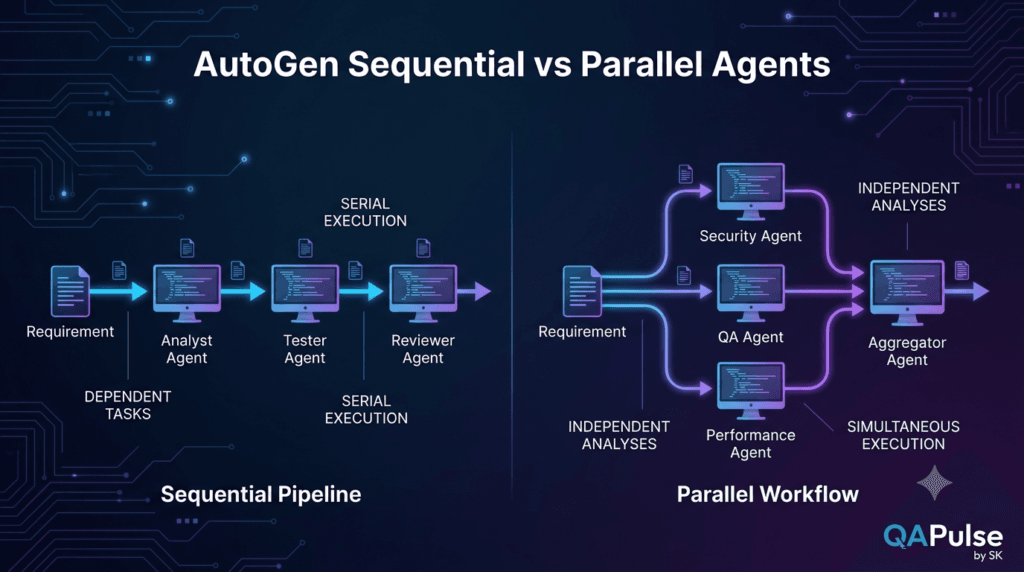
The Aggregator Pattern
When multiple agents work independently, their results need to be combined.
Conceptually:
Analyst A
↓
Requirement → Analyst B → Aggregator → Final Result
↑
Analyst C
The aggregator can be:
Deterministic code
or:
Another AI agent
The choice depends on the task.
If the outputs follow a strict schema, deterministic code may be preferable.
If synthesis requires complex language reasoning, an AI-based aggregator may be useful.
Don’t Use an AI Aggregator Automatically
Suppose three agents return structured results:
{
"risk": "low"
}
{
"risk": "medium"
}
{
"risk": "high"
}
A deterministic rule could handle this:
risk_levels = {
"low": 1,
"medium": 2,
"high": 3
}
final_risk = max(
result["risk"]
for result in results
)
No LLM is required.
The architecture should always ask:
Can ordinary code solve this part more reliably?
If yes, use ordinary code.
A Production-Oriented Mental Model
A reliable multi-agent system can be viewed as several layers:
┌───────────────────────────────┐
│ User Layer │
└──────────────┬────────────────┘
↓
┌───────────────────────────────┐
│ Application / Control │
└──────────────┬────────────────┘
↓
┌───────────────────────────────┐
│ Agent Orchestration │
└──────────────┬────────────────┘
↓
┌──────────────┼────────────────┐
│ │ │
▼ ▼ ▼
Analyst Tester Reviewer
│ │ │
└──────────────┼────────────────┘
↓
┌───────────────────────────────┐
│ Validation Layer │
└──────────────┬────────────────┘
↓
┌───────────────────────────────┐
│ Final Application │
└───────────────────────────────┘
This model keeps the responsibilities clear.
What Should Remain Outside the Agents?
A mature architecture should generally keep critical controls outside the model.
Examples include:
Authentication
Authorization
Rate limits
Maximum iterations
Timeouts
Retry limits
Data access
Secrets
Deployment permissions
Final approval
The agent can request an action.
The application should determine whether that action is allowed.
For example:
Agent:
"Run production deployment."
Application:
"Deployment requires human approval."
This distinction becomes essential as agents gain access to tools.
Agent Communication and Security
Agent-to-agent messages can contain sensitive information.
Consider:
Agent A
↓
Customer Data
↓
Agent B
Should Agent B actually receive the customer data?
Maybe not.
The application should consider:
Data minimization
Permission boundaries
Sensitive information
Tool access
Audit logging
A useful security rule is:
An agent should receive only the information and capabilities required for its responsibility.
This principle becomes even more important when workflows include external tools.
The Handoff Is a Security Boundary
Think of:
Agent A
↓
Agent B
as a trust boundary.
Before sending information, the application can ask:
Does B need this data?
Is the data sensitive?
Has it been validated?
Is it safe to expose?
Does B have permission to use it?
This creates a security-aware agent architecture.
Interactive Security Exercise
Imagine:
Customer Support Agent
↓
Engineering Agent
The support agent receives:
Customer:
John Smith
Email:
john@example.com
Order:
123456
Issue:
Cannot access account.
Does the engineering agent need all of this?
Maybe it only needs:
Issue:
Account access failure
Relevant technical context:
Authentication endpoint returns 401.
The unnecessary personal information should not automatically travel through the workflow.
This is data minimization applied to agent architecture.
Strategy: Design the Handoff Before the Prompt
Instead of writing:
"You are a helpful test agent.
Here is everything."
define:
INPUT CONTRACT
Feature:
string
Requirements:
list[string]
Constraints:
list[string]
Known Ambiguities:
list[string]
Then build the agent prompt around that contract.
This produces a more predictable system.
Agent-to-Agent Communication as an API
One of the most useful ways to think about this architecture is:
Agent A
↓
Message Contract
↓
Agent B
This resembles an API boundary.
An API defines:
Input
Output
Schema
Errors
Permissions
Agent communication can follow the same principles.
A strong agent boundary defines:
Input
Expected Output
Allowed Context
Failure Conditions
Validation Rules
This makes multi-agent systems easier to design, test, and maintain.
Build Agent Contracts Like API Contracts
For example:
POST /analyze-requirement
Input:
{
"requirement": "..."
}
Output:
{
"requirements": [],
"ambiguities": [],
"assumptions": []
}
The actual implementation may not be an HTTP API.
The analogy is still useful.
You are defining a predictable contract between components.
Testing Agent Contracts
You can test the analyst contract with cases such as:
Valid requirement
Empty requirement
Ambiguous requirement
Very large requirement
Conflicting requirement
Unsupported request
Then verify:
Required fields exist
Output format is valid
No unsupported assumptions appear
Sensitive information is handled correctly
This is exactly the kind of work SDETs can bring into agentic AI systems.
Interactive Exercise: Break the Contract
Suppose the analyst is expected to return:
{
"requirements": [],
"ambiguities": [],
"assumptions": []
}
Now imagine it returns:
{
"requirements": [],
"randomThought": "Maybe users need MFA"
}
Should the workflow continue?
Not necessarily.
The contract has been violated.
A validator can reject the response:
Invalid Output
↓
Reject
↓
Retry / Repair / Human Review
This is much safer than passing the result blindly to another agent.
Strategy: Make Failure a First-Class State
Do not design only:
Success
Design:
Success
Failure
Retrying
Needs Clarification
Awaiting Approval
Rejected
Completed
For example:
state = {
"status": "needs_clarification"
}
This gives the orchestrator explicit information about what should happen.
A Useful State Machine
A simple workflow can be represented as:
START
↓
ANALYZE
↓
VALIDATE
↓
DESIGN
↓
REVIEW
↓
APPROVED?
↙ ↘
NO YES
↓ ↓
REVISE COMPLETE
↓
REVIEW
Now the workflow is explicit.
The application can enforce the transitions.
This is often easier to maintain than allowing agents to freely decide what happens next.
Why State Machines Matter
State machines provide:
Predictable transitions
Explicit failure states
Controlled loops
Easier testing
Easier debugging
Clear termination
They are especially valuable when workflows become long-running or involve human approval.
Interactive Exercise: Draw the State Machine
Take the password-reset test workflow.
Create states for:
Received
Analyzing
Analysis Validated
Testing
Reviewing
Needs Clarification
Approved
Failed
Now define which transitions are allowed.
For example:
Received
↓
Analyzing
↓
Analysis Validated
↓
Testing
↓
Reviewing
If ambiguity is discovered:
Reviewing
↓
Needs Clarification
↓
Human Input
↓
Testing
This turns agentic behavior into something you can reason about and test.
The Bigger Lesson
Agent-to-agent communication is not fundamentally about making AI agents chat.
It is about designing controlled information flow between specialized reasoning components.
The architecture can be summarized as:
Problem
↓
Responsibilities
↓
Agents
↓
Communication Contracts
↓
Context
↓
Validation
↓
Orchestration
↓
Evaluation
↓
Result
Once you understand this model, multi-agent systems become much easier to reason about.
Internal Links:
- Learn MCP – Zero to Hero
- Learn AI Agents for QA – Zero to Hero
- Playwright Automation – Zero to Hero
- LangGraph: Complete Zero to Hero
- Learn Python – Zero to Hero
- OpenAI Codex: Complete Zero to Hero
- Cursor AI: Complete Zero to Hero
- Claude Code Tutorial: Complete Zero to Hero
- AutoGen: Complete Zero to Hero Guide
- Free QA Resources Built From Real Experience
- QA Glossary: Test Automation Terms Every Engineer Should Know
External Links:
- Official AutoGen Repository: Microsoft AutoGen GitHub Repository
- Official AutoGen Documentation: AutoGen Official Documentation
- AutoGen Agents Documentation: AutoGen Agents Documentation
- AutoGen Agent and Multi-Agent Concepts: AutoGen Agent and Multi-Agent Applications
- AutoGen Messages: AutoGen Message Documentation
People Asked Questions
What are AutoGen agent-to-agent conversations?
AutoGen agent-to-agent conversations allow specialized AI agents to communicate and collaborate to complete a larger task or workflow.
How do agents communicate in AutoGen?
Agents communicate through messages and workflow orchestration, allowing information produced by one agent to become context for another agent.
What is an AutoGen multi-agent system?
An AutoGen multi-agent system combines multiple specialized AI agents that collaborate through an orchestrated workflow.
Should AutoGen agents use sequential or parallel execution?
Use sequential execution when one agent depends on another’s output. Use parallel execution when multiple tasks can be performed independently.
How do you validate AutoGen agent output?
Validate important outputs using schemas, required fields, business rules, application-level checks, and explicit workflow states before passing results downstream.
Can AutoGen agents review each other’s work?
Yes. A dedicated reviewer agent can evaluate another agent’s output and identify missing coverage, incorrect assumptions, or other problems.
Are more AutoGen agents always better?
No. Additional agents increase complexity, latency, token consumption, and possible failure points. Each agent should provide measurable value.
Can AutoGen be used for QA and software testing?
Yes. AutoGen can be used to create workflows involving requirements analysis, test generation, security review, test analysis, and other QA activities.
AI Overview Optimization
AutoGen agent-to-agent conversations are workflows where specialized AI agents exchange information and collaborate to complete a larger task. Each agent can have a defined responsibility, such as requirements analysis, test generation, security review, or result validation. The application orchestrates communication, controls context, validates outputs, and determines when the workflow should stop.
Conclusion
AutoGen agent-to-agent conversations become powerful when communication is treated as an engineering boundary rather than casual model-to-model messaging.
A reliable workflow gives every agent a clear responsibility.
It defines what information enters each agent, what information leaves it, and how that information is validated before moving through the system.
The strongest architectures combine AI reasoning with deterministic application control.
They use agents for tasks that require interpretation, generation, analysis, and judgment.
They use ordinary code for tasks such as routing, validation, permission checks, retry limits, state transitions, and termination.
The result is a system that can collaborate without becoming uncontrolled.
Specialized Agents
+
Clear Contracts
+
Relevant Context
+
Validation
+
Controlled State
+
Observability
+
Human Oversight
=
Reliable Agent Collaboration
The most important question is therefore not:
How many agents can AutoGen run?
The better question is:
Which responsibilities genuinely benefit from separate agents, and how can those agents communicate safely and predictably?
That question leads to better architecture.
Final Key Takeaways
1. Agent-to-agent communication should solve a real workflow problem.
2. Create specialized agents around distinct responsibilities.
3. Define communication contracts before building complex conversations.
4. Pass relevant context instead of forwarding everything.
5. Validate important agent outputs before downstream execution.
6. Use structured outputs when predictable machine-readable data is required.
7. Keep deterministic orchestration in application code where possible.
8. Bound retries, iterations, and autonomous loops.
9. Treat agent handoffs as testing and security boundaries.
10. Use independent reviewers when additional scrutiny improves quality.
11. Use sequential execution for dependent tasks.
12. Use parallel agents when tasks are genuinely independent.
13. Track conversation state separately from application state when necessary.
14. Test agents, handoffs, workflows, and final outcomes independently.
15. Measure whether additional agents actually improve quality enough to justify their cost and complexity.
16. Keep permissions, sensitive data access, and critical actions under application control.
17. Remember that more agents do not automatically produce better AI.
18. The objective is not maximum autonomy.
19. The objective is useful, measurable, controlled collaboration.
20. A production-ready multi-agent system is an engineered workflow, not simply a conversation between chatbots.
A useful final mental model is:
AI Agent
↓
Specialized Responsibility
↓
Communication Contract
↓
Validated Handoff
↓
Controlled Orchestration
↓
Observable Workflow
↓
Measured Outcome
That is the foundation for building serious multi-agent systems with AutoGen.
Continue Learning
Explore more expert articles on n8n, Autogen, Postman AI, LangChain, CrewAI, MCP Servers, AI Agents, LlamaIndex, Docker, FastAPI, Playwright, Cypress, Test Automation, DevOps, and Software Engineering at www.skakarh.com.
QAPulse by SK delivers expert release analysis, AI engineering insights, enterprise automation strategies, migration guidance, DevOps best practices, and practical testing knowledge to help software professionals build scalable, intelligent, and production-ready software systems.


