QA
QA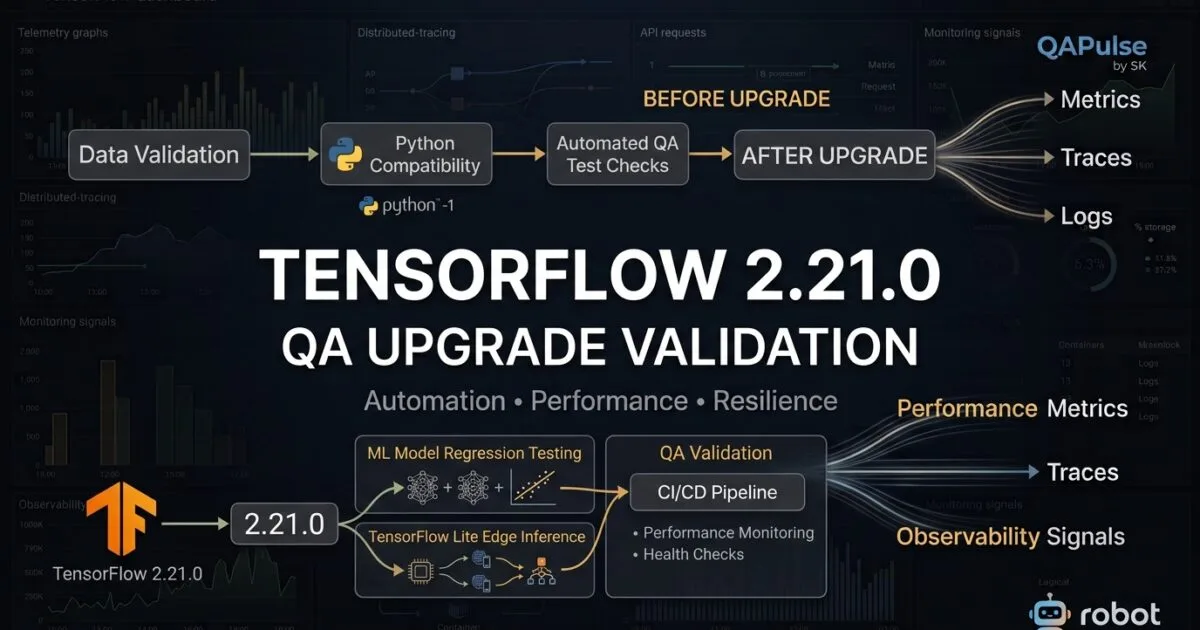
TensorFlow 2.21.0 is more than a routine framework update for teams building, testing, or validating machine-learning systems. Released on March 6, 2026, this release introduces changes that directly affect the Python runtime, TensorBoard dependency model, TensorFlow Lite capabilities, image processing, and data APIs.
For QA engineers and SDETs, the most important point is not simply identifying the new features. The real question is:
What can change in an existing ML testing environment when TensorFlow 2.21.0 removes Python 3.9 support and changes dependency behavior?
That question should drive your upgrade strategy.
A conventional application upgrade might look like this:
Install new version
       ↓
Run tests
       ↓
Check pass/fail
For machine-learning systems, that approach is too shallow.
A better strategy is:
Existing ML Environment
        ↓
Dependency Baseline
        ↓
TensorFlow 2.21.0 Upgrade
        ↓
Compatibility Validation
        ↓
Model Validation
        ↓
Data Pipeline Testing
        ↓
Inference Testing
        ↓
Performance Comparison
This difference matters because an ML system can produce technically valid outputs while still introducing accuracy, compatibility, latency, or reproducibility problems.
Why TensorFlow 2.21.0 Matters to QA Engineers
The first thing QA teams should notice is that this release contains breaking changes, not only feature additions.
The most important compatibility change is:
- Python 3.9 support has been removed.
- The TensorBoard dependency has been removed from TensorFlow itself.
That means teams should not approach the upgrade as:
pip install --upgrade tensorflow
and immediately run the complete regression suite.
Instead, first determine what your current environment expects.
For example:
python --version
pip show tensorflow
pip show tensorboard
pip freeze > requirements-before.txt
Then capture the current environment:
pip freeze > tensorflow-baseline.txt
After upgrading:
pip install --upgrade tensorflow
pip freeze > tensorflow-2.21.0.txt
Now compare:
diff tensorflow-baseline.txt tensorflow-2.21.0.txt
This simple exercise can reveal dependency changes that a functional test suite may not immediately expose.
The First Upgrade Question: Is Your Python Version Supported?
The Python 3.9 removal is the first compatibility gate.
Check your runtime:
python --version
If your project is still running:
Python 3.9.x
you should not treat TensorFlow 2.21.0 as a drop-in upgrade.
A better approach is to test the supported Python runtime in an isolated environment.
For example:
python3.10 -m venv tf2210-qa
source tf2210-qa/bin/activate

python -m pip install --upgrade pip
pip install tensorflow==2.21.0
Then verify:
python -c "import tensorflow as tf; print(tf.__version__)"
Expected:
2.21.0
This creates a clean compatibility boundary between the existing environment and the new release.
QA Strategy: Test the Runtime Before Testing the Model
This is an important distinction.
Do not start with:
Model accuracy
Start with:
Python runtime
      ↓
TensorFlow import
      ↓
Dependencies
      ↓
GPU/CPU environment
      ↓
Model loading
      ↓
Inference
If TensorFlow cannot reliably initialize, model-level testing has little value.
TensorBoard Dependency Removal Changes the Test Environment
Another important change in TensorFlow 2.21.0 is that the TensorBoard dependency has been removed from TensorFlow.
This does not necessarily mean TensorBoard disappears from ML workflows.
It means teams should no longer assume that installing TensorFlow automatically provides everything required for TensorBoard-based workflows.
Check your environment explicitly:
pip show tensorflow
pip show tensorboard
If your test framework depends on TensorBoard, make that dependency explicit.
For example:
tensorflow==2.21.0
tensorboard
pytest
This is preferable to relying on an indirect dependency.
From a QA perspective, explicit dependencies make the environment easier to reproduce.
Why Dependency Isolation Matters for SDETs
Imagine your test environment contains:
TensorFlow
TensorBoard
pytest
NumPy
Pandas
CUDA libraries
Custom ML packages
Model-serving libraries
If one package changes unexpectedly, your tests may fail for reasons unrelated to your application.
A better environment strategy is:
requirements.txt
        ↓
Virtual Environment
        ↓
Known Versions
        ↓
Automated Installation
        ↓
Automated Tests
You can validate installation from scratch:
python -m venv clean-test
source clean-test/bin/activate

pip install -r requirements.txt
pytest
This is especially valuable for CI/CD environments.


TensorFlow 2.21.0 and Existing Model Regression
Once the environment is stable, the next concern is model compatibility.
A model that loaded successfully under an older TensorFlow version should be loaded and validated again.
For example:
import tensorflow as tf

print("TensorFlow:", tf.__version__)

model = tf.keras.models.load_model("models/customer_model")

print("Model loaded successfully")
model.summary()
But successful loading is only the first test.
You should also compare predictions.
import numpy as np

prediction = model.predict(test_data)

print(prediction.shape)
print(np.mean(prediction))
The QA question becomes:
Are the outputs still within the expected tolerance?
For deterministic workloads, you may compare exact results.
For ML workloads, tolerance-based validation is often more appropriate:
np.testing.assert_allclose(
    actual_prediction,
    baseline_prediction,
    rtol=1e-4,
    atol=1e-5
)
The correct tolerance depends on your model and numerical characteristics.
Don’t Test Only Whether the Model Loads
A common ML testing mistake is:
Model loads → PASS
That is not sufficient.
A stronger validation matrix is:
| Validation | Question |
|---|---|
| Model loading | Does the model initialize? |
| Schema | Is input structure unchanged? |
| Prediction | Are outputs valid? |
| Accuracy | Is model quality preserved? |
| Numerical tolerance | Are differences acceptable? |
| Latency | Is inference still fast enough? |
| Memory | Has resource consumption changed? |
| Serialization | Can the model still be saved and loaded? |
| Batch inference | Does larger input behave correctly? |
| Edge cases | Are unusual inputs handled correctly? |
This is where traditional software QA and ML testing start to overlap.
Testing TensorFlow 2.21.0 With a Baseline Model
Suppose your current production environment generates:
Baseline accuracy: 94.82%
After the upgrade:
New accuracy: 94.79%
That difference may be acceptable.
But if you see:
Baseline accuracy: 94.82%
New accuracy:      89.41%
you have a serious regression.
Automate the comparison:
baseline_accuracy = 0.9482
new_accuracy = 0.9479

difference = abs(baseline_accuracy - new_accuracy)

assert difference < 0.005
The threshold should be defined by the ML team rather than arbitrarily chosen by the test automation engineer.
TensorFlow Lite Changes Need Device-Level Validation
TensorFlow 2.21.0 also contains important TensorFlow Lite improvements.
The release adds support involving:
SQRTwith int8 and int16x8EQUALandNOT_EQUALwith int16x8int2int4uint4- additional casting and operator support
These changes are particularly relevant if your product performs inference on edge devices.
The QA strategy should therefore extend beyond server-side model tests.
Think about:
Training
   ↓
Conversion
   ↓
TensorFlow Lite
   ↓
Device
   ↓
Inference
   ↓
Prediction Validation
A model can work correctly in the full TensorFlow environment but behave differently after conversion to a constrained runtime.
Test Quantized Models Differently
Quantized models deserve dedicated regression coverage.
For example:
interpreter = tf.lite.Interpreter(
    model_path="model.tflite"
)

interpreter.allocate_tensors()

input_details = interpreter.get_input_details()
output_details = interpreter.get_output_details()

print(input_details)
print(output_details)
Then execute inference using representative input.
interpreter.set_tensor(
    input_details[0]["index"],
    test_input
)

interpreter.invoke()

output = interpreter.get_tensor(
    output_details[0]["index"]
)
Your validation should include:
Output shape
Output type
Output range
Numerical tolerance
Latency
Memory usage
Accuracy
This becomes particularly important when testing int8, int16x8, int2, or int4-related workflows.
TensorFlow 2.21.0 and Image Testing
Another useful change is JPEG XL support in tf.image.decode_image.
If your application processes images, this should become a targeted test area.
A basic test could look like:
import tensorflow as tf

image_bytes = tf.io.read_file("sample.jxl")

image = tf.image.decode_image(
    image_bytes,
    expand_animations=False
)

print(image.shape)
print(image.dtype)
But don’t stop at:
Decode succeeded
Test the complete image pipeline:
JPEG XL
   ↓
Decode
   ↓
Resize
   ↓
Normalize
   ↓
Model Input
   ↓
Prediction
For computer-vision systems, image decoding is part of the model’s input contract.
Compare TensorFlow With PyTorch From a QA Perspective
TensorFlow and PyTorch are both widely used ML frameworks, but the testing strategy can differ depending on the ecosystem.
| Area | TensorFlow | PyTorch |
|---|---|---|
| Model testing | TensorFlow/Keras tooling | PyTorch tooling |
| Edge deployment | TensorFlow Lite ecosystem | Torch-based deployment options |
| Data pipeline | tf.data | Dataset/DataLoader |
| Tensor operations | TensorFlow APIs | PyTorch APIs |
| Visualization | TensorBoard ecosystem | Multiple tooling options |
| Mobile/edge testing | Strong TensorFlow Lite focus | Different deployment paths |
| Dependency testing | Important | Important |
| Numerical regression | Essential | Essential |
The lesson is not that one framework is “better” for QA.
The lesson is that framework-specific features create framework-specific test risks.
The tf.data Change Deserves API-Level Tests
TensorFlow 2.21.0 adds NoneTensorSpec to the public API.
This matters if your data pipelines use optional or None values.
A basic validation could look like:
import tensorflow as tf

spec = tf.NoneTensorSpec()

assert isinstance(
    spec,
    tf.NoneTensorSpec
)
For production systems, however, test the behavior of the complete data pipeline rather than testing the class in isolation.
For example:
Raw Dataset
    ↓
Transformation
    ↓
Optional Values
    ↓
Batching
    ↓
Model Input
Your tests should verify that existing datasets continue to produce the expected structures.
Test Data Pipelines Like Production Code
A model is only as reliable as the data entering it.
Consider:
dataset = tf.data.Dataset.from_tensor_slices(
    test_data
)

dataset = dataset.batch(32)

for batch in dataset.take(1):
    print(batch.shape)
Now add assertions:
for batch in dataset.take(1):
    assert batch.shape[0] <= 32
    assert batch.dtype == expected_dtype
For more complex systems, validate:
Schema
Shape
Datatype
Missing values
Ordering
Batch size
Transformation
Normalization
Optional values
This prevents a framework upgrade from silently changing the assumptions of downstream model code.
Create an Upgrade Matrix
Before adopting TensorFlow 2.21.0 across your organization, create a compatibility matrix.
| Component | Current | Target | Validation |
|---|---|---|---|
| Python | Existing version | Supported version | Import tests |
| TensorFlow | Previous release | 2.21.0 | API/model tests |
| TensorBoard | Existing dependency | Explicit dependency | Dashboard tests |
| NumPy | Existing | Compatible | Data pipeline |
| CUDA/GPU | Existing | Validated | GPU inference |
| TensorFlow Lite | Existing | 2.21.0 | Device tests |
| Model | Existing | Same model | Prediction regression |
| CI | Existing | New environment | Full pipeline |
This gives QA, developers, DevOps, and ML engineers a common artifact for the upgrade discussion.
A Better CI Validation Pipeline
Instead of allowing the new dependency to enter the complete test suite immediately, create progressive gates.
Build Environment
      ↓
Python Compatibility
      ↓
TensorFlow Import
      ↓
Dependency Validation
      ↓
Model Load
      ↓
Data Pipeline
      ↓
Inference
      ↓
Accuracy Regression
      ↓
Performance Regression
      ↓
Full Test Suite
A simplified GitHub Actions-style step could be:
- name: Install TensorFlow
  run: |
    python -m pip install --upgrade pip
    pip install tensorflow==2.21.0

- name: Verify TensorFlow
  run: |
    python -c "import tensorflow as tf; print(tf.__version__)"

- name: Run ML smoke tests
  run: |
    pytest tests/ml/smoke

- name: Run regression tests
  run: |
    pytest tests/ml/regression
The principle is simple:
Fail early on environment problems before spending resources on expensive model regression tests.
When Should QA Recommend the Upgrade?
There is no universal answer of “upgrade immediately.”
A better decision model is:
Upgrade sooner when:
- Your current Python version is already compatible.
- Your CI environment is reproducible.
- Your models have strong regression coverage.
- TensorFlow Lite functionality is important to your product.
- You have automated dependency validation.
- You can compare accuracy and performance against a baseline.
Delay broad adoption when:
- Your environment still depends on Python 3.9.
- TensorBoard is assumed to be installed indirectly.
- Your ML models have weak regression coverage.
- GPU dependencies are poorly controlled.
- Production inference has no baseline metrics.
- Your CI environment cannot reliably reproduce dependencies.
This turns an upgrade decision into an engineering decision rather than a version-number decision.
TensorFlow 2.21.0 Upgrade Validation: From Compatibility to Production Confidence
TensorFlow 2.21.0 deserves a structured validation strategy because its most important QA implications are not limited to new capabilities. The removal of Python 3.9 support, the change around TensorBoard dependencies, TensorFlow Lite improvements, and updates to data and image APIs can affect different layers of an ML testing stack.
For an SDET, the goal should be to answer four questions:
- Does the environment remain compatible?
- Do existing models produce trustworthy results?
- Do performance and deployment characteristics remain acceptable?
- Can the team reproduce and diagnose failures?
That leads to a practical validation model:
Environment
    ↓
Dependencies
    ↓
Data Pipeline
    ↓
Model
    ↓
Inference
    ↓
Performance
    ↓
Deployment
    ↓
Production Confidence
Build a TensorFlow 2.21.0 Compatibility Gate
Don’t make the full regression suite your first test.
Create a lightweight compatibility gate that runs before expensive ML tests.
import tensorflow as tf

def test_tensorflow_version():
    assert tf.__version__ == "2.21.0"
Then validate the Python environment:
import sys

print("Python:", sys.version)
print("TensorFlow:", tf.__version__)
You can also expose this information as a CI artifact:
python --version
pip show tensorflow
pip show tensorboard
pip freeze
This gives you an auditable environment snapshot.
A useful CI failure message should tell engineers what changed, not merely that something failed.
Environment compatibility check failed

Python: 3.9.x
Required for this TensorFlow release: supported Python version

Action:
Upgrade the runtime before continuing ML regression tests.
That is considerably more useful than:
FAILED test_model.py
Validate TensorBoard Explicitly
Because TensorBoard is no longer a TensorFlow dependency in the same way as before, test it as an explicit component when your workflow requires it.
For example:
pip install tensorflow==2.21.0
pip install tensorboard
Verify:
tensorboard --version
Then test the workflow that your team actually uses.
For training pipelines, that could mean checking whether event files are generated:
import tensorflow as tf

writer = tf.summary.create_file_writer("logs/qa")

with writer.as_default():
    tf.summary.scalar("validation_accuracy", 0.95, step=1)

writer.close()
Then verify that the expected artifact exists.
The important QA principle is:
Test the dependency relationship your product actually depends on, rather than assuming package installation guarantees workflow compatibility.
Create Model-Level Regression Tests
Environment compatibility is only the first gate.
The next question is whether an existing model behaves consistently.
A basic model smoke test might look like:
import tensorflow as tf

model = tf.keras.models.load_model(
    "models/customer_model"
)

assert model is not None
assert len(model.inputs) > 0
assert len(model.outputs) > 0
Then execute a known test dataset:
predictions = model.predict(
    test_data,
    verbose=0
)

assert predictions.shape[0] == len(test_data)
This checks structural compatibility.
But ML QA should go further.
Validate Predictions Against a Golden Dataset
Create a small, version-controlled dataset containing representative inputs and expected outputs.
For example:
tests/
├── data/
│   ├── golden_inputs.npy
│   └── golden_predictions.npy
└── models/
    └── customer_model/
Then:
import numpy as np

expected = np.load(
    "tests/data/golden_predictions.npy"
)

actual = model.predict(
    golden_inputs,
    verbose=0
)

np.testing.assert_allclose(
    actual,
    expected,
    rtol=1e-4,
    atol=1e-5
)
This gives your upgrade testing a measurable baseline.
It is much stronger than saying:
“The model seems to work.”
Accuracy Regression Needs Business Thresholds
Numerical comparison alone is not enough for every ML system.
Consider a classification model:
Before upgrade: 95.21%
After upgrade:  95.16%
That might be acceptable.
But consider:
Before upgrade: 95.21%
After upgrade:  91.84%
That should immediately trigger investigation.
Build the acceptance threshold into your test:
baseline_accuracy = 0.9521
current_accuracy = 0.9516

maximum_allowed_drop = 0.005

assert (
    baseline_accuracy - current_accuracy
) <= maximum_allowed_drop
The threshold should come from the model’s business requirements and historical variability.
Test More Than Accuracy
A mature ML regression suite should consider:
| Metric | Why It Matters |
|---|---|
| Accuracy | Overall correctness |
| Precision | False-positive impact |
| Recall | False-negative impact |
| F1 | Balance between precision and recall |
| AUC | Classification ranking quality |
| Latency | Production responsiveness |
| Memory | Infrastructure cost |
| Throughput | Capacity |
| Prediction distribution | Detects unexpected behavior |
This is where ML testing becomes substantially different from conventional API testing.
Test Model Serialization
Model loading should be tested from a clean environment.
Don’t only test:
model = load_existing_model()
Also test the complete lifecycle:
Train
  ↓
Save
  ↓
Transfer
  ↓
Load
  ↓
Predict
  ↓
Compare
For example:
model.save("artifacts/test-model.keras")
Then load it in a fresh process:
import tensorflow as tf

model = tf.keras.models.load_model(
    "artifacts/test-model.keras"
)

prediction = model.predict(
    test_data,
    verbose=0
)
This catches environment-specific problems that may remain hidden when everything runs inside the same long-lived process.
TensorFlow 2.21.0 and Data Pipeline Regression
The model is not the only component that needs testing.
A typical ML pipeline looks like:
Raw Data
   ↓
Validation
   ↓
Transformation
   ↓
Batching
   ↓
TensorFlow Dataset
   ↓
Model
A framework upgrade can expose assumptions in any of these layers.
For example:
dataset = (
    tf.data.Dataset
    .from_tensor_slices(test_data)
    .batch(32)
)
Validate the resulting structure:
for batch in dataset.take(1):
    assert batch.shape[0] <= 32
Also check:
assert batch.dtype == expected_dtype
For complex pipelines, add explicit tests for:
- shape
- datatype
- batch size
- missing values
- ordering
- normalization
- optional values
- transformations
This is particularly relevant with changes to the public tf.data API.
Test Edge Cases, Not Just Happy Paths
A strong TensorFlow 2.21.0 regression suite should intentionally test unusual inputs.
Examples include:
Empty dataset
Single record
Large batch
Missing values
NaN values
Infinity
Unexpected datatype
Maximum expected input
Minimum expected input
Malformed input
For example:
import numpy as np

edge_case = np.array(
    [[np.nan, 1.0, 2.0]],
    dtype=np.float32
)

prediction = model.predict(
    edge_case,
    verbose=0
)

assert np.all(np.isfinite(prediction))
Whether this assertion is appropriate depends on the model contract, but the important point is to make edge behavior explicit.
Test TensorFlow Lite Separately
TensorFlow Lite changes deserve a dedicated validation layer when your application uses edge or mobile inference.
Your architecture may look like:
TensorFlow Model
       ↓
Conversion
       ↓
TensorFlow Lite Model
       ↓
Mobile / Edge Device
       ↓
Inference
Don’t assume:
TensorFlow model passes
        =
TensorFlow Lite model passes
They are separate execution paths.
A basic TensorFlow Lite smoke test:
interpreter = tf.lite.Interpreter(
    model_path="model.tflite"
)

interpreter.allocate_tensors()

inputs = interpreter.get_input_details()
outputs = interpreter.get_output_details()

assert len(inputs) > 0
assert len(outputs) > 0
Then execute representative input:
interpreter.set_tensor(
    inputs[0]["index"],
    test_input
)

interpreter.invoke()

result = interpreter.get_tensor(
    outputs[0]["index"]
)
Compare the result against your accepted baseline.
Quantization Requires Its Own Regression Strategy
The TensorFlow 2.21.0 TensorFlow Lite improvements around integer types make quantized-model testing particularly relevant.
For example:
FP32
 ↓
INT8
 ↓
INT16x8
 ↓
INT4 / INT2
Lower precision can provide deployment advantages, but QA needs to verify whether prediction quality remains within acceptable limits.
Compare:
| Attribute | FP32 | Quantized Model |
|---|---|---|
| Model size | Higher | Lower |
| Precision | Higher | Reduced |
| Inference efficiency | Baseline | Potentially improved |
| Memory usage | Higher | Potentially lower |
| Accuracy | Baseline | Must be validated |
| Device suitability | Depends | Often stronger |
The important word is validated.
Never assume a smaller model automatically means an equivalent model.


Suggested image placement: Place this image immediately after the TensorFlow Lite and quantization discussion.
Suggested ALT text: TensorFlow 2.21.0 TensorFlow Lite quantization testing for edge AI
Test JPEG XL Image Processing
The JPEG XL support in tf.image.decode_image is another opportunity for targeted regression testing.
A test should verify not only successful decoding but the resulting tensor.
image = tf.image.decode_image(
    image_bytes,
    expand_animations=False
)

assert image.ndim == 3
assert image.shape[-1] in (1, 3, 4)
Then test downstream processing:
JPEG XL
  ↓
Decode
  ↓
Resize
  ↓
Normalize
  ↓
Tensor
  ↓
Model
  ↓
Prediction
A decoder test alone does not prove that the complete computer-vision pipeline works.
TensorFlow 2.21.0 vs PyTorch Upgrade Testing
Both TensorFlow and PyTorch require strong regression testing, but their ecosystems can expose different upgrade risks.
| Testing Concern | TensorFlow | PyTorch |
|---|---|---|
| Runtime compatibility | Python/package matrix | Python/package matrix |
| Data pipeline | tf.data | Dataset/DataLoader |
| Model validation | Keras/TF APIs | PyTorch modules |
| Edge inference | TensorFlow Lite | PyTorch deployment ecosystem |
| Visualization | TensorBoard ecosystem | Multiple alternatives |
| Numerical regression | Essential | Essential |
| GPU validation | Important | Important |
| Serialization | Must validate | Must validate |
The strategic lesson is simple:
Don’t copy a generic regression strategy from another ML framework. Build tests around the capabilities your TensorFlow application actually uses.
Compare TensorFlow With Traditional Application Testing
Traditional application testing often emphasizes:
Input
 ↓
API
 ↓
Expected response
ML testing is more multidimensional:
Input
 ↓
Data pipeline
 ↓
Model
 ↓
Prediction
 ↓
Statistical validation
 ↓
Performance
 ↓
Drift / distribution
For example, an API test might say:
assert response.status_code == 200
An ML test might need:
assert response.status_code == 200
assert prediction.shape == expected_shape
assert np.isfinite(prediction).all()
assert accuracy >= minimum_accuracy
assert latency_ms < maximum_latency
That difference should influence your automation architecture.
Add Performance Regression to the Upgrade Pipeline
A model can remain accurate while becoming slower.
Measure inference latency before upgrading:
import time

start = time.perf_counter()

model.predict(
    test_data,
    verbose=0
)

elapsed = time.perf_counter() - start

print(f"Inference time: {elapsed:.3f}s")
Run the same benchmark against TensorFlow 2.21.0.
Record:
Baseline:  1.82 seconds
New:       1.89 seconds
Change:    +3.8%
Define a threshold:
assert regression_percent < 10
Again, the correct threshold belongs to the application’s performance requirements.
Track More Than Execution Time
Measure:
Inference latency
CPU utilization
GPU utilization
Memory consumption
Throughput
Cold-start time
Warm-start time
Batch performance
A release that improves accuracy but doubles inference cost may not be acceptable for production.
Test CPU and GPU Paths Separately
If your environment supports both CPU and GPU execution, don’t assume one validates the other.
For example:
print(tf.config.list_physical_devices("CPU"))
print(tf.config.list_physical_devices("GPU"))
Then create separate CI jobs:
CPU Regression
     ↓
GPU Regression
     ↓
Compare Results
GPU tests should validate:
- model loading
- inference
- numerical tolerance
- memory usage
- batch execution
- performance
This becomes particularly important when deployment environments differ from developer machines.
Create a TensorFlow 2.21.0 Upgrade Matrix
A practical QA matrix might look like this:
| Layer | Test | Expected Result |
|---|---|---|
| Python | Runtime compatibility | Supported |
| TensorFlow | Import | Successful |
| TensorBoard | Explicit installation | Successful |
| Dependencies | Version resolution | Reproducible |
| Model | Load | Successful |
| Model | Prediction | Within tolerance |
| Data | Pipeline | Expected schema |
| TFLite | Conversion | Successful |
| TFLite | Inference | Valid output |
| Image | JPEG XL | Correct decoding |
| GPU | Inference | Successful |
| Performance | Latency | Within threshold |
| CI/CD | Full pipeline | Successful |
This matrix becomes your upgrade acceptance contract.
Automate the Upgrade Decision
You can combine these checks into a quality gate.
checks = {
    "environment": environment_passed,
    "model": model_passed,
    "data_pipeline": data_passed,
    "accuracy": accuracy_passed,
    "performance": performance_passed,
    "tflite": tflite_passed,
}

failed = [
    name for name, passed in checks.items()
    if not passed
]

if failed:
    raise AssertionError(
        f"TensorFlow upgrade validation failed: {failed}"
    )
Now the pipeline can report:
TensorFlow Upgrade Validation

Environment     PASS
Model           PASS
Data Pipeline   PASS
Accuracy        PASS
Performance     FAIL
TensorFlow Lite PASS

Decision: BLOCK
Reason: Performance threshold exceeded
This is far more actionable than a generic red CI build.
When Should You Adopt TensorFlow 2.21.0?
A sensible QA recommendation is controlled adoption rather than blind immediate rollout.
Move forward when:
Python compatibility       PASS
Dependency validation      PASS
Model regression           PASS
Data regression            PASS
TFLite regression          PASS
Performance baseline       PASS
CI/CD validation           PASS
Hold the rollout when:
Python 3.9 dependency remains
        OR
Model accuracy regresses
        OR
Inference latency exceeds threshold
        OR
GPU environment is unstable
        OR
TensorBoard workflow breaks
        OR
Critical dependencies cannot be reproduced
The key is that the decision should be evidence-based.
A Practical CI Pipeline for TensorFlow 2.21.0
A mature pipeline can use progressive validation:
Pull Request
     ↓
Create Clean Environment
     ↓
Python Compatibility
     ↓
Install TensorFlow 2.21.0
     ↓
Import Smoke Test
     ↓
Dependency Validation
     ↓
Model Smoke Test
     ↓
Data Pipeline Tests
     ↓
Prediction Regression
     ↓
TensorFlow Lite Tests
     ↓
Performance Tests
     ↓
Full Regression
     ↓
Quality Gate
A simplified implementation:
steps:
  - name: Install dependencies
    run: |
      python -m pip install --upgrade pip
      pip install -r requirements.txt

  - name: Verify TensorFlow
    run: |
      python -c "import tensorflow as tf; print(tf.__version__)"

  - name: ML smoke tests
    run: |
      pytest tests/ml/smoke

  - name: Model regression
    run: |
      pytest tests/ml/regression

  - name: Performance validation
    run: |
      pytest tests/ml/performance
The expensive tests come later because the earlier gates have already established environment health.
What QA Engineers Should Actually Learn From This Release
The most useful lesson from TensorFlow 2.21.0 is not any individual API addition.
It is the importance of dependency-aware ML regression testing.
A framework upgrade can affect:
Runtime
Dependencies
Data
Models
Inference
Devices
Performance
Observability
CI/CD
If your automation covers only model accuracy, you are testing only one slice of the system.
A stronger SDET architecture treats the ML platform itself as a testable system.
Final QA Upgrade Checklist
Before approving TensorFlow 2.21.0 for a production workload, verify:
- Python runtime compatibility
- TensorFlow installation
- Explicit TensorBoard dependency where required
- Dependency reproducibility
- Existing model loading
- Prediction regression
- Accuracy thresholds
- Precision/recall or other business metrics
- Data pipeline compatibility
tf.databehavior- TensorFlow Lite conversion
- Quantized model behavior
- JPEG XL image processing where applicable
- CPU inference
- GPU inference
- Model serialization
- Inference latency
- Memory consumption
- CI/CD installation
- Clean-environment reproducibility
- Failure diagnostics
Internal Links
- Learn MCP – Zero to Hero
- Learn AI Agents for QA – Zero to Hero
- Playwright Automation – Zero to Hero
- TencentDB Agent Memory: Complete Zero to Hero
- LangGraph: Complete Zero to Hero
- Learn Python – Zero to Hero
- OpenAI Codex: Complete Zero to Hero
- Cursor AI: Complete Zero to Hero
- Claude Code Tutorial: Complete Zero to Hero
- AutoGen: Complete Zero to Hero Guide
- Free QA Resources Built From Real Experience
- QA Glossary: Test Automation Terms Every Engineer Should Know
External Links
- TensorFlow GitHub Repository
- TensorFlow Version Compatibility
- Python Documentation
- TensorBoard Documentation
- TensorBoard Getting Started Guide
- TensorFlow Lite Interpreter API
- TensorFlow Version Compatibility and TensorFlow Lite
- TensorFlow Lite Text and Edge Deployment Guide
People Asked Questions
What is new in TensorFlow 2.21.0?
TensorFlow 2.21.0 introduces several changes, including the removal of Python 3.9 support, TensorBoard dependency changes, TensorFlow Lite enhancements, JPEG XL image decoding support, and updates to TensorFlow data APIs.
Does TensorFlow 2.21.0 support Python 3.9?
No. TensorFlow 2.21.0 removes support for Python 3.9. Teams using Python 3.9 should upgrade their Python environment before adopting this TensorFlow release.
Is TensorFlow 2.21.0 a breaking release?
Yes. The removal of Python 3.9 support is an important breaking compatibility change. Teams should also review dependency and application-specific compatibility before upgrading.
What should QA engineers test after upgrading TensorFlow?
QA engineers should validate the Python environment, dependencies, model loading, prediction outputs, accuracy, data pipelines, TensorFlow Lite models, image processing, CPU/GPU execution, latency, memory usage, and CI/CD environments.
What changed in TensorFlow Lite in TensorFlow 2.21.0?
TensorFlow 2.21.0 includes several TensorFlow Lite improvements involving integer types and operator support, including int8, int16x8, int2, int4, and uint4-related functionality.
Does TensorFlow 2.21.0 still work with TensorBoard?
TensorBoard is no longer provided as the same TensorFlow dependency. Projects that use TensorBoard should explicitly manage and test their TensorBoard dependency.
Should I upgrade to TensorFlow 2.21.0 immediately?
Not necessarily. Production teams should first validate Python compatibility, dependencies, model outputs, accuracy, performance, deployment paths, and CI/CD reproducibility before adopting the release broadly.
How do I test TensorFlow model compatibility after an upgrade?
Use a combination of model-loading tests, golden datasets, prediction comparisons, numerical tolerances, accuracy thresholds, performance benchmarks, and deployment-specific regression tests.
AI Overview Optimization
TensorFlow 2.21.0 is a significant upgrade for QA teams because it removes Python 3.9 support and changes dependency behavior around TensorBoard while adding TensorFlow Lite and image-processing improvements. Before upgrading production ML systems, QA engineers should validate the Python runtime, dependencies, model predictions, data pipelines, TensorFlow Lite inference, performance, and CI/CD reproducibility.
Conclusion
The safest way to approach TensorFlow 2.21.0 is not to ask whether the new package installs successfully.
Ask whether your entire ML testing contract remains valid.
The Python 3.9 removal creates an immediate compatibility checkpoint. The TensorBoard dependency change encourages more explicit environment management. TensorFlow Lite enhancements create new opportunities for edge-device regression testing. Data and image-processing changes create additional API-level validation targets.
For SDETs, the winning strategy is therefore:
Don't test only the framework.
Test the ecosystem around the framework.
That ecosystem includes the runtime, dependencies, datasets, models, inference paths, devices, performance characteristics, and CI/CD pipeline.
Final Key Takeaways
- TensorFlow 2.21.0 should be validated as an ecosystem upgrade, not merely a package upgrade.
- Python 3.9 removal should be your first compatibility checkpoint.
- TensorBoard should be treated as an explicit dependency where required.
- Golden datasets provide a powerful mechanism for prediction regression.
- Model loading alone does not prove compatibility.
- TensorFlow Lite workflows need independent regression coverage.
- Quantized models should be validated for both accuracy and performance.
- JPEG XL support should be tested through the complete image-processing pipeline.
tf.datachanges should be validated at the data-pipeline level.- CPU and GPU execution should be tested separately when both are supported.
- Accuracy, latency, memory, and throughput should have measurable acceptance thresholds.
- A progressive CI pipeline can identify environment failures before expensive regression tests begin.
- The best upgrade decision is based on measurable evidence, not simply the fact that TensorFlow 2.21.0 installed successfully.
Continue Learning
Explore more expert articles on Mobile Testing, Backend & API, AI & Agentic, AI Tools, n8n, LangChain, CrewAI, MCP Servers, AI Agents, LlamaIndex, Docker, FastAPI, Playwright, Cypress, Test Automation, DevOps, and Software Engineering at www.skakarh.com.
QAPulse by SK delivers expert release analysis, AI engineering insights, enterprise automation strategies, migration guidance, DevOps best practices, and practical testing knowledge to help software professionals build scalable, intelligent, and production-ready software systems.