 QA
Selenium release notes are easy to skim and easy to misread. Most entries say “Support CDP versions” and little else, while the changes that break a suite are buried in one-line bullets in four separate changelogs. I read the Java, Python, JavaScript and .NET changelogs for every Selenium release from 4.45.0 to 4.54.0 and pulled out what matters to a test team. The Python example near the end passed on Selenium 4.54.0 in Chrome 153.
Selenium Release Notes in Brief
The latest Selenium version is 4.54.0, released November 23, 2026, with support for Chrome DevTools Protocol (CDP) versions 156, 157 and 158. Selenium ships a minor release roughly every three to four weeks. Each release supports the three newest CDP versions, so if your tests use DevTools you need to keep up. The biggest additions between 4.45 and 4.54 are an accessibility snapshot API in every binding (4.53), relative locators that start from an element or shadow root (4.50 for Java and .NET, 4.53 for Python), Electron app support in Java (4.45), and Redis-backed Grid components. Releases since 4.49 also remove long-deprecated APIs, including the old Firefox profile extension methods and the legacy Grid file endpoint.
Five Selenium Changes Worth Your Time
If you only have five minutes for these Selenium release notes, these are the five changes I would check first.
- Accessibility snapshots (4.53).
driver.accessibility_snapshot()returns the page’s accessibility tree, computed from the DOM, in Classic and BiDi sessions. You can assert on roles and accessible names without a separate accessibility library. - Relative locators from an element (4.50 and 4.53). You can now start a relative search such as
below()from inside a form or shadow root instead of the whole page. That removes a whole class of “found the wrong button” bugs. - Removed Firefox profile methods (4.50). The deprecated methods for adding extensions and certificates to a Firefox profile are gone from the Java, Python and .NET bindings. If your setup code still calls them, it breaks on upgrade.
- Selenium Manager on Linux arm64 (4.49). Every binding now ships a prebuilt Selenium Manager binary for Linux arm64, so drivers resolve automatically on Graviton and Apple Silicon Linux runners.
- Redis-backed Grid (4.44 to 4.45). Grid now ships Redis-backed Distributor, SessionMap and SessionQueue implementations, which makes a highly available Grid much easier to run.
The Selenium Release Calendar for 2026
The table lists every release this hub covers, newest first, with the CDP versions each one supports. Dates come from the npm releases of selenium-webdriver. The other bindings publish on the same days or within a day.
| Version | Released | CDP versions | Headline for testers |
|---|---|---|---|
| 4.54.0 | Nov 23, 2026 | 156, 157, 158 | Firefox picks its own BiDi port, Safari quits faster |
| 4.53.0 | Nov 17, 2026 | 155, 156, 157 | Accessibility snapshot API, Python relative locators from elements |
| 4.52.0 | Oct 29, 2026 | 154, 155, 156 | Python installs web extensions from the driver |
| 4.51.0 | Oct 9, 2026 | 153, 154, 155 | Java client drops Guava, JavaScript gets web extension methods |
| 4.50.0 | Sep 30, 2026 | 152, 153, 154 | Relative locators from elements (Java, .NET), Firefox profile methods removed |
| 4.49.0 | Sep 9, 2026 | 151, 152, 153 | Selenium Manager for Linux arm64, legacy Grid file endpoint removed |
| 4.48.0 | Aug 27, 2026 | 150, 151, 152 | Grid file transfer for Kubernetes, Docker and relay sessions |
| 4.47.0 | Aug 10, 2026 | 149, 150, 151 | Per-session Grid video folders, Python blocks CDP on Firefox |
| 4.46.0 | Jul 11, 2026 | 148, 149, 150 | Java BiDi classes marked beta, stricter JSON parsing |
| 4.45.0 | Jun 16, 2026 | 147, 148, 149 | Electron support in Java, Redis-backed SessionMap by default |
How to Read Selenium Release Notes Without Missing Anything
Selenium publishes one changelog per binding, and the Selenium release notes on the blog only cover highlights. Three habits save me from surprises.
Read your binding’s changelog, not just Java’s. A change often lands in one binding a release or two before the others. Relative locators from an element arrived in Java and .NET in 4.50.0, but in Python only in 4.53.0.
Watch the CDP window. Every release supports exactly three CDP versions. If your tests call DevTools directly (network throttling, console capture, performance metrics) and Chrome updates faster than your Selenium version, those calls stop working. Tests that use only WebDriver and BiDi are not affected.
Search for “remove” and “deprecate”. In these Selenium release notes, almost every breaking change is a one-line bullet that starts with one of those two words. A plain text search through the changelog finds them faster than reading every line.
Selenium Release Notes by Language Binding
Java
Java got the most structural work this year. Version 4.45.0 added ElectronOptions and ElectronDriver for driving Electron desktop apps, moved visibility checks such as isDisplayed() onto newer TypeScript atoms, and removed deprecated logging classes.
Version 4.46.0 marked every BiDi class as beta and tightened the JSON parser to follow RFC 8259, so malformed JSON that used to slip through now fails. Version 4.47.0 removed FTP proxy support and fixed By.className() and By.id() escaping for names that start with a non-ASCII digit. Version 4.50.0 added relative locators from elements and shadow roots and removed deprecated HttpClient methods. Version 4.51.0 removed Guava from the client bindings, which shrinks your dependency tree and can surface hidden Guava imports in your own code.
Version 4.53.0 removed Response.status and sped up JSON serialization and parsing. Version 4.54.0 removed Debug.getDebugLogLevel() and stopped waiting an extra 10 seconds when it quits the Safari driver.
Python
The Python Selenium release notes read like a steady cleanup with a few real features. Version 4.45.0 made the BiDi websocket close on quit(), let you configure MAX_WS_MESSAGE_SIZE, and made the driver service stop when start() fails to connect. Version 4.47.0 prevents CDP access with Firefox and fixes no_proxy matching so empty entries no longer bypass the proxy. Version 4.50.0 applies the ClientConfig user agent and extra headers to each connection.
Version 4.52.0 added installing web extensions from the driver, bounded Service.start() by time so Windows runs fail fast instead of hanging, and aligned cookie matching with RFC 6265. Version 4.53.0 brought relative locators from a WebElement or ShadowRoot, the accessibility snapshot, and a Select.select_by_value() that now finds options with XPath. It also deprecated driver.webextension.
JavaScript
The selenium-webdriver package changed less on the surface. Version 4.51.0 added web extension methods on the driver, with a BiDi path and a fallback. Version 4.52.0 requires Node.js releases that block the compromised eMudhra certificate keys, so check your CI Node version before you upgrade. Version 4.53.0 added the accessibility snapshot, including in Classic sessions, and 4.54.0 lets Firefox choose its own BiDi websocket port, which avoids port clashes when you run many Firefox sessions in parallel.
.NET
The .NET binding added the most BiDi features. Version 4.49.0 added browsing-context screencast support, and 4.50.0 added screenshot image sizes, a destination folder for screencasts, text layout overrides, and relative locators from elements and shadow roots. Version 4.54.0 added the missing userContexts option to the BiDi subscribe command and escapes frame IDs that are not valid CSS identifiers.
WebDriver BiDi Progress in the Selenium Release Notes
BiDi is the new two-way browser protocol that will replace most CDP use in Selenium, and it shows up in nearly every entry of the 2026 Selenium release notes. Here is where it stands.
The bindings now generate BiDi code from the spec. Java added a BiDi code generator in 4.51.0, and Python moved its internal BiDi layer to code generated from a shared, binding-neutral schema in 4.48.0. In practice, new BiDi commands should reach every binding faster and with fewer hand-written mistakes.
Errors are typed. Since 4.49.0, Python raises typed WebDriver errors for BiDi wire error codes, so you can catch a specific exception instead of parsing a message string.
More browsers speak BiDi. Java’s SafariOptions gained a switch to enable BiDi in 4.46.0, and 4.54.0 lets Firefox choose its own BiDi websocket port in Python, JavaScript and .NET.
It is still beta in Java. Version 4.46.0 marked every Java BiDi class as beta. If your suite relies on BiDi network interception or log events, pin your Selenium version and read the Selenium release notes before each upgrade.
Selenium Grid Changes in the 4.45 to 4.54 Release Notes
If you run your own Grid, these Selenium release notes matter more than the binding changes.
- Redis everywhere (4.44 and 4.45). The Distributor, SessionMap and SessionQueue all have built-in Redis-backed versions, and 4.45.0 bundles the Redis SessionMap by default. You can run several Grid components behind a load balancer without writing custom glue.
- WebSocket stability (4.45). The WebSocket tunnel now applies TCP backpressure and fixes a race before the handshake, which makes BiDi and CDP over Grid more reliable on busy nodes.
- Video recording (4.47). Dynamic Grid can store each session’s video in its own subfolder through
SE_VIDEO_SESSION_SUBFOLDER, and on Kubernetes it always does. - File transfer (4.48 and 4.49). File upload and download now work for Kubernetes, Docker and relay sessions. Downloading a file whose name contains spaces no longer returns a 500 error. The deprecated
GET /session/{sessionId}/se/files/{fileName}endpoint is gone. - Load spreading (4.53). New sessions are spread across Nodes again instead of piling onto one.
Removals and Deprecations to Check Before You Upgrade
This checklist collects every removal and deprecation from these Selenium release notes that is likely to touch test code.
| Change | Version | Binding | What to do |
|---|---|---|---|
| Deprecated logging classes removed | 4.45.0 | Java | Switch to the current logging setup |
| BiDi classes marked beta | 4.46.0 | Java | Expect API changes; pin versions in BiDi-heavy suites |
| FTP proxy support removed | 4.47.0 | Java | Remove setFtpProxy() calls |
| Invalid Firefox profile code deprecated | 4.47.0 | Java | Move profile setup to FirefoxOptions |
| Legacy Grid file endpoint removed | 4.49.0 | Grid | Use the current downloads API |
| Firefox profile extension and certificate methods removed | 4.50.0 | Java, Python, .NET | Install extensions through the driver instead |
Deprecated HttpClient methods removed | 4.50.0 | Java | Move to the current HttpClient API |
| Guava removed from client bindings | 4.51.0 | Java | Add Guava yourself if your own code uses it |
websocket_interval deprecated | 4.52.0 | Python | Delete the setting |
driver.webextension deprecated | 4.53.0 | Python | Use the driver’s web extension methods |
Response.status removed | 4.53.0 | Java | Remove direct uses in custom executors |
Debug.getDebugLogLevel() removed | 4.54.0 | Java | Configure logging directly |
Tested Example: Selenium 4.54 in Python
These three tests exercise the newest features from the Selenium release notes: a relative locator that starts from an element, Select.select_by_value(), and the accessibility snapshot. All 3 tests passed on Selenium 4.54.0 with headless Chrome 153. In my test environment I pointed Selenium at a local ChromeDriver, because the Selenium Manager download was blocked. On a normal machine, the plain webdriver.Chrome(options=opts) call below finds the right driver for you.
import pytest
from selenium import webdriver
from selenium.webdriver.common.by import By
from selenium.webdriver.support.relative_locator import locate_with
from selenium.webdriver.support.select import Select

PAGE = """data:text/html,
<title>Checkout</title><style>input,select,button,label{display:block;margin:8px}</style>
<form id='billing'>
  <label for='email'>Email</label><input id='email' type='email'>
  <label for='plan'>Plan</label>
  <select id='plan'><option value='free'>Free</option><option value='pro'>Pro</option></select>
  <button type='submit'>Pay now</button>
</form>
<section id='promo'><button>Pay now with promo</button></section>
"""


@pytest.fixture
def driver():
    opts = webdriver.ChromeOptions()
    opts.add_argument("--headless=new")
    drv = webdriver.Chrome(options=opts)
    drv.get(PAGE)
    yield drv
    drv.quit()


def test_relative_locator_from_element(driver):
    # 4.53: relative locators can start from a WebElement
    form = driver.find_element(By.ID, "billing")
    email = form.find_element(By.ID, "email")
    button = form.find_element(locate_with(By.TAG_NAME, "button").below(email))
    assert button.text == "Pay now"


def test_select_by_value(driver):
    plan = Select(driver.find_element(By.ID, "plan"))
    plan.select_by_value("pro")
    assert plan.first_selected_option.text == "Pro"


def test_accessibility_snapshot(driver):
    # 4.53: accessibility snapshot works in Classic sessions too
    tree = driver.accessibility_snapshot()
    assert tree.role == "document"
    text = tree.to_text()
    assert "Pay now" in text
    assert "Email" in text
Look at the first test. The page has two “Pay now” buttons, and both sit below the email field. Because the search starts from the form, Selenium returns the form’s own button and ignores the promo button. Before 4.53.0, Python could only start a relative search from the driver, which covers the whole page.
A Five-Step Upgrade Playbook
This is the routine I use whenever the Selenium release notes show a new minor version.
- Check the CDP window. Compare the CDP versions in the release with the Chrome version in your CI image. If they don’t overlap and you use DevTools, upgrade Selenium first.
- Search the changelog for “remove”. Use your binding’s changelog and the checklist above.
- Upgrade on a branch and run one browser. Run the suite in Chrome first, then Firefox. Firefox BiDi changes, such as the new websocket port handling in 4.54.0, show up there.
- Upgrade the Grid separately. Upgrade the Grid in its own change, so you can tell which side caused a failure.
- Pin the version. Don’t use open version ranges for Selenium in CI. A release every few weeks is too often to take unreviewed.
For a wider comparison, see Playwright vs Selenium vs Cypress. To run Selenium in containers, see Docker for QA: containerizing browsers. The Cypress release notes hub covers another browser tool the same way.
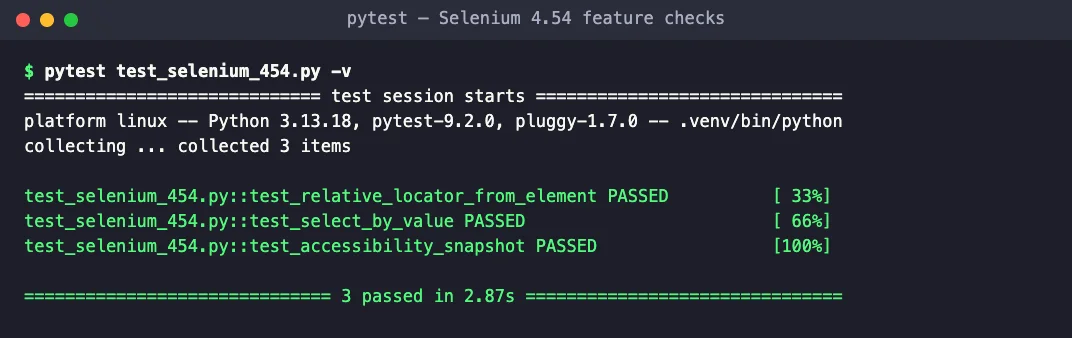
The Selenium 4.54 checks, run for real
These Selenium release notes are backed by three pytest cases running headless Chrome through Selenium 4.54: a relative locator anchored on an element, select-by-value, and the new accessibility snapshot. All three pass.
Internal Sources
- Selenium Java changelog, GitHub
- Selenium Python changelog, GitHub
- selenium-webdriver JavaScript changelog, GitHub
- Selenium .NET changelog, GitHub
- selenium-webdriver version history, npm
- Selenium relative locators, Selenium documentation
Internal Blog Links
- 7 Powerful LangGraph State Management Secrets for QA Agents
- Prompt Injection Testing: 7 Powerful GenAI Security Secrets
- Testing RAG Systems: 5 Best Vector Performance Secrets
- Claude Code for SDETs: 10 Best High-Velocity Workflows
- Cursor Rules for Automation: 7 Best Framework Secrets
Internal Series Links
- Learn Python – Zero to Hero
- Playwright Forge — Modern Web Automation
- Agentic QA & LLMs — AI Driven Quality Engineering
- API & Performance Testing
- Enterprise SDET Architect — Frameworks, CI/CD & Leadership
- LangGraph: Complete Zero to Hero
- Claude Code Tutorial: Complete Zero to Hero
- Learn MCP – Zero to Hero
- Cursor AI: Complete Zero to Hero
- OpenAI Codex: Complete Zero to Hero
- AutoGen: Complete Zero to Hero Guide
- AI Agents for QA: Zero to Hero
- Python for Data Science: Complete Zero to Hero
- Learn Playwright – Zero to Hero
- Learn Cypress Testing – Zero to Hero
- Learn Selenium WebDriver – Zero to Hero
- Postman AI: Complete Zero to Hero
- XCUITest iOS Testing: Complete Zero to Hero
- Appium: Complete Zero to Hero
- Detox React Native Testing: Complete Zero to Hero
- EarlGrey: Complete Zero to Hero
- Espresso Android Testing: Complete Zero to Hero
- Flutter Integration Testing: Complete Zero to Hero
- Maestro Mobile Testing: Complete Zero to Hero
- Robot Framework Appium: Complete Zero to Hero
- UI Automator: Complete Zero to Hero
- WebdriverIO Mobile: Complete Zero to Hero
- SQL Mastery: From Basics to Advanced
- TencentDB Agent Memory: Complete Zero to Hero
- DataRobot: Complete Zero to Hero
- Deepnote AI: Complete Zero to Hero
- Jupyter AI: Complete Zero to Hero
- AWS Q Developer: Complete Zero to Hero
- Azure AI DevOps: Complete Zero to Hero
- Docker AI: Complete Zero to Hero
- GitHub Actions AI: Complete Zero to Hero
- Google Cloud AI: Complete Zero to Hero
- Kubernetes AI: Complete Zero to Hero
- Terraform AI: Complete Zero to Hero
- Free QA Resources Built From Real Experience
- QA Glossary: Test Automation Terms Every Engineer Should Know
People Also Ask About Selenium Release Notes
What is the latest version of Selenium?
The latest Selenium version is 4.54.0, released November 23, 2026. It supports CDP versions 156, 157 and 158 and is available for Java, Python, JavaScript and .NET, among other bindings.
Where can I find the official Selenium release notes?
Each binding has its own changelog in the SeleniumHQ/selenium GitHub repository: java/CHANGELOG, py/CHANGES, javascript/selenium-webdriver/CHANGES.md and dotnet/CHANGELOG. The Selenium blog and GitHub releases page publish highlights for each version.
How often does Selenium release a new version?
In 2026, Selenium released a new minor version roughly every three to four weeks. Ten minor versions shipped between June 16 (4.45.0) and November 23 (4.54.0).
Does Selenium 4.54 work with the latest Chrome?
Yes, for WebDriver and BiDi commands. For direct CDP calls, Selenium 4.54.0 supports CDP versions 156 to 158. I ran the tests in this hub on Chrome 153, which uses WebDriver Classic, and they passed.
What is the Selenium accessibility snapshot?
Added in 4.53.0, it is a method that returns the page’s accessibility tree, with each node’s role, accessible name, value and states. Selenium computes it from the DOM using WAI-ARIA rules, so it works in Classic and BiDi sessions and in any browser.
Can Selenium relative locators search inside an element?
Yes. Since 4.50.0 in Java and .NET, and 4.53.0 in Python, you can call a relative locator from a WebElement or a shadow root, so the search stays inside that container.
Is Selenium still worth learning in 2026?
Yes. The Selenium release notes show active development, with BiDi support, accessibility tooling and Grid scaling all improving this year. Selenium remains the W3C WebDriver reference implementation and supports more languages than Playwright or Cypress.
About the author: Muhammad Shahnawaz Khan is an independent software engineer and applied ML researcher with 11+ years in SDET and SQA. He founded QAPulse by SK and writes about test automation, CI/CD and AI in testing. More about Shahnawaz
Every version, date and change on this page comes from FastAPI’s official release notes and reviewed by the author. See our editorial policy.