QA
QA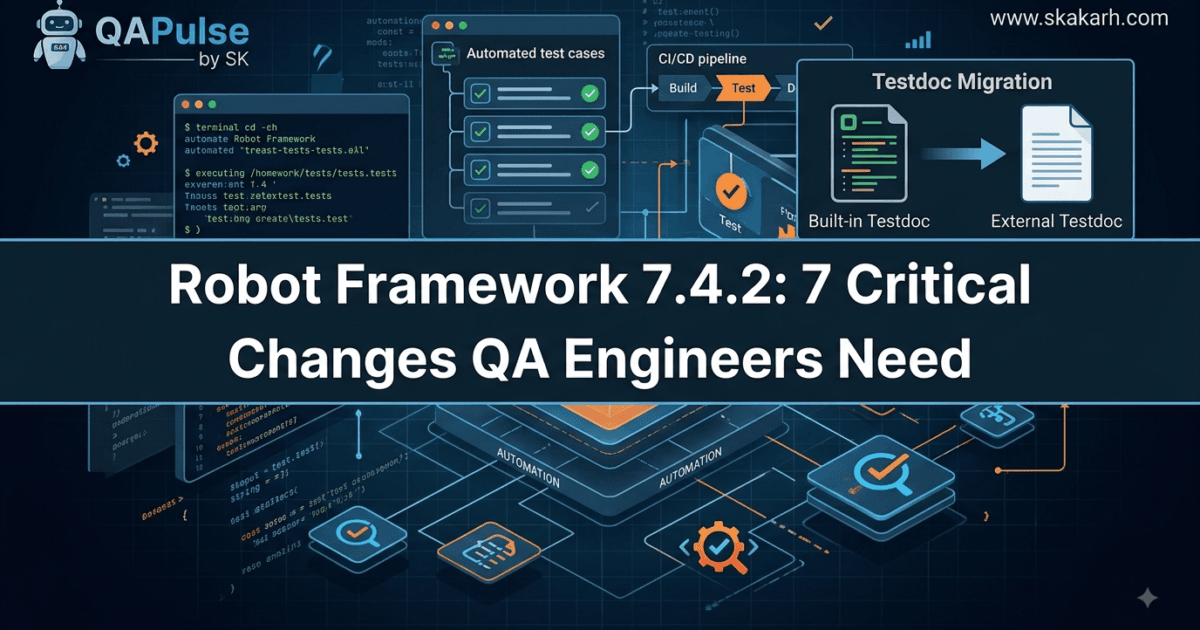
Robot Framework 7.4.2 is a focused maintenance release rather than a major feature release, but that does not make it irrelevant for QA engineers. Released on March 3, 2026, this version is the last planned bug-fix release in the Robot Framework 7.4.x series. The release contains bug fixes and documentation improvements, with one particularly important change for teams that generate test documentation: the built-in Testdoc tool is now deprecated in favor of the newer external Testdoc project. (PyPI)
That distinction matters.
When a framework reaches a maintenance release, the wrong question is usually, “What shiny new feature did I get?” The better question for a QA team is, “What changed in the behavior, tooling, maintenance path, and technical debt I need to manage?”
That is exactly how Robot Framework 7.4.2 should be evaluated.
For teams already using Robot Framework 7.4 or 7.4.1, the upgrade is primarily about staying aligned with the supported 7.4.x maintenance line and addressing the changes around Testdoc. For teams running older versions, the decision deserves more investigation because the broader 7.4 release introduced significant capabilities such as secret variables, typed standard-library keywords, and improvements around bytes handling. (Safety)
Robot Framework 7.4.2 at a Glance
The release was published to PyPI on March 3, 2026, and the package supports Python 3.8 and newer. PyPI lists the 7.4.2 source distribution and universal Python wheel, making the upgrade straightforward for standard Python-based Robot Framework environments. (PyPI)
| Area | Robot Framework 7.4.2 impact | QA/SDET takeaway |
|---|---|---|
| Release type | Bug-fix and documentation release | Lower-risk upgrade than a feature release |
| Release date | March 3, 2026 | Already available for production evaluation |
| 7.4.x status | Last planned bug-fix release | Important signal for maintenance planning |
| Testdoc | Built-in tool deprecated | Review documentation-generation workflows |
| Existing tests | No major test syntax migration indicated | Regression testing should still be performed |
| Python | Python 3.8+ | Verify your CI interpreter matrix |
| Upgrade method | pip | Treat it like a dependency upgrade |
The most important thing to notice is that Robot Framework 7.4.2 is not a “rewrite your test suite” release.
It is a maintenance and tooling-transition release.
That makes the upgrade conversation much more practical for an SDET.
What Changed in Robot Framework 7.4.2?
The official release announcement describes the release as relatively small, containing bug fixes and documentation enhancements. The project specifically highlights the deprecation of the built-in Testdoc tool and recommends the external Testdoc tool instead. (Robot Framework)
That gives QA engineers three areas to investigate:
- Framework stability
- Documentation tooling
- Long-term maintenance strategy
The first area is what you would normally expect from a patch release. The second is where the release becomes strategically interesting.
1. Bug Fixes Matter More Than Feature Count
A common mistake in release analysis is to measure a test automation framework release by the number of new features.
For a production QA platform, stability is often more valuable.
Imagine a team with:
- 4,000 automated tests
- 30 CI pipelines
- 12 test libraries
- multiple Python versions
- nightly regression execution
- release-gate automation
A seemingly small framework change can affect thousands of executions.
Therefore, the correct upgrade workflow is not:
New version available
        ↓
pip install --upgrade
        ↓
Done
A better SDET workflow is:
New version
    ↓
Read release notes
    ↓
Identify behavioral/tooling changes
    ↓
Upgrade isolated environment
    ↓
Run smoke tests
    ↓
Run representative regression
    ↓
Compare reports/logs
    ↓
Promote through CI
    ↓
Production adoption
This is especially important with Robot Framework 7.4.2, because the release is focused on maintenance rather than delivering a large set of user-facing features.
SDET checkpoint: If your organization treats every patch release as an automatic production upgrade, use this release as an opportunity to introduce a lightweight dependency-validation gate.
A good rule is:
Patch release ≠ zero testing.
It usually means less testing than a major release, not no testing.
The Biggest Change: Built-In Testdoc Is Deprecated
The most important change in Robot Framework 7.4.2 is the deprecation of the built-in Testdoc tool. The Robot Framework 7.4.2 documentation explicitly states that the built-in tool is deprecated and is planned for removal in Robot Framework 8.0. It directs users toward the external robotframework-testdoc project. (robot-framework.readthedocs.io)
This is more important than the word “deprecated” may initially suggest.
Deprecation is a future-maintenance signal.
Your existing command may continue working today, but if your organization depends on it, you should not interpret continued availability as a reason to ignore the change.
For example, teams may currently have scripts like:
python -m robot.testdoc tests/ testdoc.html
or:
python path/to/robot/testdoc.py tests/ testdoc.html
Those workflows are associated with the built-in Testdoc implementation.
The 7.4.2 documentation now identifies that implementation as deprecated and points users toward the external project. (robot-framework.readthedocs.io)
The strategic question is therefore:
Where does test documentation belong in your automation architecture?
If Testdoc is used only occasionally by individual engineers, the migration is relatively small.
If Testdoc is part of:
- CI pipelines
- release documentation
- audit evidence
- test reporting
- compliance workflows
- generated QA portals
- documentation publishing
- stakeholder reporting
then the migration should be treated as an engineering task.
The External Testdoc Direction
The external robotframework-testdoc package provides a dedicated CLI for generating documentation from Robot Framework test scripts. Its current PyPI documentation shows installation through:
pip install robotframework-testdoc
and basic usage such as:
testdoc tests/ TestDocumentation.html
The external tool can generate HTML and JSON output and also provides configuration and integration capabilities. (PyPI)
That separation is architecturally interesting.
Instead of treating documentation generation as inseparable from the core automation framework, the capability becomes an independently maintained tool.
For QA teams, that can be a good thing.
Think about the architecture this way:
OLD MODEL

Robot Framework
├── Test execution
├── Reporting
├── Test documentation
└── Other built-in tools


NEW DIRECTION

Robot Framework
└── Test execution + core framework

External Testdoc
└── Test documentation
This gives the ecosystem more freedom to evolve documentation functionality independently from the core framework.
Why QA Engineers Should Care About This Deprecation
A deprecation becomes important when it intersects with automation infrastructure.
Suppose your CI pipeline currently contains:
- name: Generate test documentation
  run: python -m robot.testdoc tests/ testdoc.html
You should not wait until a future major version removes that functionality.
Instead, identify the dependency now.
A migration-oriented pipeline could eventually move toward:
- name: Install Robot Framework
  run: pip install robotframework

- name: Install Testdoc
  run: pip install robotframework-testdoc

- name: Generate test documentation
  run: testdoc tests/ TestDocumentation.html
The exact CI implementation will depend on your environment, but the architectural principle is straightforward:
Separate framework execution from optional documentation tooling.
That separation makes future upgrades easier to reason about.
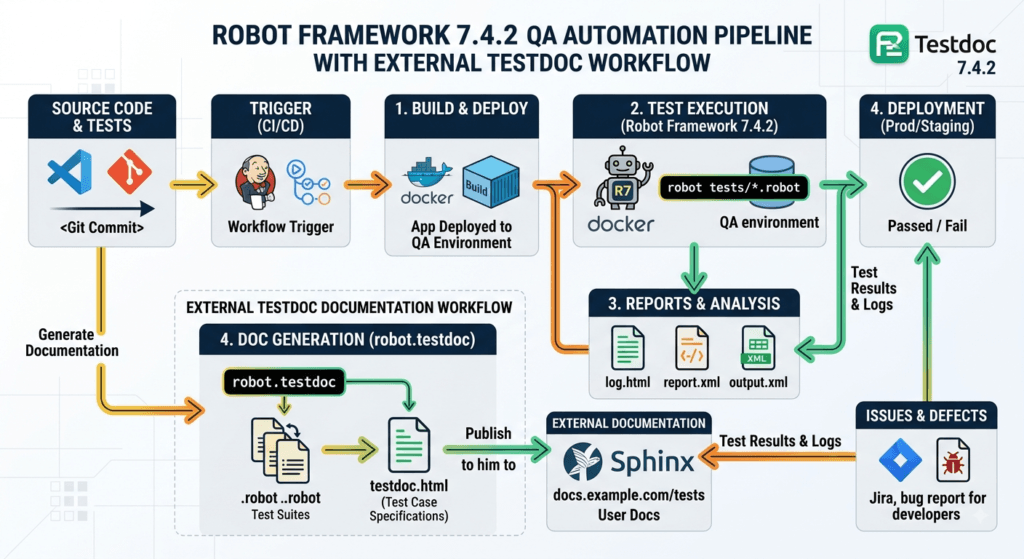
A Critical Correction: You Do Not Upgrade Robot Framework With npm
One important correction is necessary in the original upgrade instructions.
Robot Framework is a Python-based framework, so this command is appropriate:
python -m pip install --upgrade robotframework
or:
pip install --upgrade robotframework
The following command is not the normal installation method:
npm install robotframework@latest
Robot Framework’s official project documentation identifies Python and pip as the standard installation path, and PyPI provides the Robot Framework packages. (GitHub)
For reproducible CI environments, I would go one step further and avoid an unbounded upgrade.
Instead of:
pip install --upgrade robotframework
use a controlled version:
python -m pip install robotframework==7.4.2
This gives your pipeline deterministic behavior.
Then verify:
robot --version
You want your CI log to clearly show:
Robot Framework 7.4.2
That small practice becomes extremely useful when diagnosing failures across different pipeline runs.
Should You Upgrade Immediately?
For most teams already running the 7.4.x series, Robot Framework 7.4.2 is a reasonable upgrade candidate, but I would not blindly deploy it directly to every pipeline.
My recommendation is:
| Your situation | Recommendation |
|---|---|
| Running 7.4.1 | Upgrade after smoke/regression validation |
| Running 7.4 | Upgrade and validate |
| Running much older versions | Plan a broader upgrade assessment |
| Using built-in Testdoc | Start migration planning now |
| Not using Testdoc | Upgrade risk is comparatively lower |
| Large enterprise CI estate | Roll out progressively |
| Small automation project | Upgrade in a controlled environment first |
The key is to separate framework risk from migration risk.
The framework update itself is relatively focused.
The bigger long-term concern is whether your automation estate still depends on deprecated tooling.
That is a very different engineering problem.
Compare Robot Framework 7.4.2 With Other Automation Framework Updates
Not every version update should be judged using the same criteria.
A Playwright feature release, a Cypress major release, and a Robot Framework maintenance release can have completely different upgrade profiles.
| Factor | Robot Framework 7.4.2 | Typical feature release | Major release |
|---|---|---|---|
| Primary goal | Bug fixes + documentation | New capabilities | Architectural/API evolution |
| Upgrade pressure | Moderate | Moderate–High | High |
| Test rewrite expectation | Low | Usually low–moderate | Potentially high |
| Deprecated APIs | Important to review | Important | Critical |
| CI validation | Recommended | Strongly recommended | Mandatory |
| Migration planning | Focus on Testdoc | Feature-dependent | Required |
| Rollout strategy | Controlled | Staged | Highly staged |
This is why release notes should be interpreted rather than merely summarized.
A QA engineer who reads:
“Bug fixes and documentation enhancements”
might conclude:
“Nothing important.”
An experienced SDET asks:
“Which workflows changed, which tools are deprecated, and what future version will make today’s ignored warning a production failure?”
That second question is much more valuable.
Turn the Release Into an Upgrade Experiment
Here is a practical exercise for your team.
Create a temporary environment:
python -m venv .venv-rf742
Activate it:
source .venv-rf742/bin/activate
On Windows:
.venv-rf742\Scripts\Activate.ps1
Install the exact release:
python -m pip install robotframework==7.4.2
Verify it:
robot --version
Then run a small representative suite:
robot \
  --outputdir results/rf742 \
  tests/smoke/
Do not compare only the final pass/fail number.
Compare:
- execution duration
- failed tests
- warnings
- console output
- generated reports
- library compatibility
- custom listeners
- CI plugins
- documentation generation
- Python-version behavior
This is how a patch-level upgrade becomes an evidence-based engineering decision rather than a guess.
What About Existing Test Suites?
For teams upgrading from 7.4.x, there is no indication that Robot Framework 7.4.2 requires a wholesale rewrite of normal .robot test suites. The release is positioned as a bug-fix and documentation update, rather than another feature-level syntax transition. (Robot Framework)
However, “no rewrite required” should never become “no validation required.”
A mature automation suite contains more than test cases.
Consider the complete dependency chain:
.robot files
   ↓
Resource files
   ↓
Custom Python libraries
   ↓
Third-party Robot libraries
   ↓
Python runtime
   ↓
CI runner
   ↓
Browser / API / device infrastructure
   ↓
Reports and documentation
An upgrade can expose problems anywhere in that chain.
That is why the best Robot Framework upgrade strategy is dependency-aware, not simply version-aware.
A Better SDET Upgrade Checklist
Before promoting Robot Framework 7.4.2 across your organization, ask:
- Are all CI jobs using the expected Robot Framework version?
- Are we pinning the framework version?
- Are our custom Python libraries compatible?
- Are third-party Robot libraries compatible?
- Do we generate Testdoc anywhere?
- Do any scripts call
robot.testdocdirectly? - Do we publish generated Testdoc HTML?
- Are Testdoc artifacts consumed by another system?
- Do we have smoke tests covering critical workflows?
- Have we tested the upgrade on every supported Python version?
- Can we roll back quickly?
The Testdoc questions deserve particular attention.
A simple repository search can uncover hidden dependencies:
grep -R "robot.testdoc" .
You can also search for:
testdoc
inside:
.github/
.gitlab-ci.yml
Jenkinsfile
Makefile
pyproject.toml
requirements.txt
scripts/
docker/
The goal is not merely to find failing tests.
The goal is to discover automation assumptions.
The Bigger Lesson Behind 7.4.2
The most interesting aspect of this release is not the number 7.4.2.
It is the architectural direction it represents.
Modern test automation frameworks are increasingly becoming ecosystems rather than monolithic tools.
Core execution should remain stable while specialized capabilities can evolve independently.
That means QA engineers need to stop thinking only in terms of:
framework → tests
and start thinking in terms of:
framework → libraries → tooling → CI → reporting → documentation → developer workflow
The Testdoc transition is a small but useful example of this broader shift.
For an SDET, that means every dependency should have an owner, every deprecated capability should have a migration path, and every upgrade should have evidence behind it.
Robot Framework 7.4.2 is therefore not a release that demands panic. It is a release that rewards disciplined maintenance.
And that is exactly what production-grade test automation needs.
Robot Framework 7.4.2: The Testdoc Change QA Teams Should Not Ignore
Robot Framework 7.4.2 looks like a small maintenance release, but its Testdoc deprecation creates a useful decision point for QA teams. The official Robot Framework announcement describes it as the last planned bug-fix release in the 7.4.x series and highlights the deprecation of the built-in Testdoc tool in favor of the external Testdoc tool.
That means the practical upgrade question is no longer simply:
“Will my Robot Framework tests still run?”
It should be:
“Will my complete QA automation ecosystem still work, and have I removed dependencies on tooling that is moving outside the core framework?”
That distinction is important for SDETs because a test automation framework is rarely used alone. It normally sits inside a larger system containing Python packages, browser libraries, API clients, CI pipelines, reporting tools, Docker images, custom listeners and documentation generators.
What QA Engineers Should Validate After Robot Framework 7.4.2
A good upgrade validation strategy should operate at three levels.
| Validation level | What to check | Why it matters |
|---|---|---|
| Framework | Test execution and syntax | Detect core regressions |
| Ecosystem | Libraries, listeners and plugins | Detect dependency incompatibility |
| Pipeline | CI, reports and documentation | Detect operational failures |
For example, a smoke suite might pass perfectly while the documentation stage fails.
That means this pipeline:
Checkout
   ↓
Install dependencies
   ↓
Robot tests
   ↓
Generate report
   ↓
Generate Testdoc
   ↓
Publish artifacts
can produce a misleading result:
Tests       → PASS
Reports     → PASS
Testdoc     → FAIL
Pipeline    → FAIL
This is why Robot Framework 7.4.2 should be evaluated as a tooling upgrade, not merely a test-runner upgrade.
The test suite is only one component.
Build a Representative Upgrade Suite
Do not start your validation with your entire regression suite.
Instead, select a representative suite that exercises the parts of your framework that are most likely to expose compatibility problems.
A useful structure is:
tests/
├── smoke/
│   ├── login.robot
│   ├── checkout.robot
│   └── search.robot
├── api/
│   └── users.robot
├── ui/
│   └── dashboard.robot
└── integration/
    └── workflows.robot
Then execute the smallest useful validation set first:
robot --outputdir results/rf742 tests/smoke/
If that succeeds, expand:
robot --outputdir results/rf742 tests/api/
and then:
robot --outputdir results/rf742 tests/ui/
Finally:
robot --outputdir results/rf742 tests/integration/
This staged approach gives your team faster feedback than immediately launching several thousand tests.
For large automation estates, that difference matters.
Use Version Pinning Instead of Floating Dependencies
One of the most practical improvements you can make while adopting Robot Framework 7.4.2 is to make the environment reproducible.
Avoid relying on:
pip install robotframework
inside a production CI pipeline if you need deterministic builds.
Instead:
robotframework==7.4.2
can be pinned in your dependency-management strategy.
For example:
robotframework==7.4.2
robotframework-seleniumlibrary==6.8.0
requests==2.32.4
The exact versions of your other packages should be selected based on your own compatibility matrix rather than copied blindly.
The principle is what matters.
When a pipeline fails three weeks later, you should be able to answer:
Which Robot Framework version executed this build?
Which Python version?
Which automation libraries?
Which browser?
Which container image?
Without that information, debugging becomes archaeology.
The Testdoc Migration Deserves Its Own Validation
The Testdoc change is the area where Robot Framework 7.4.2 deserves the most attention.
The external robotframework-testdoc project is now available as a separate package and provides a testdoc command for generating documentation from Robot Framework test suites. Its current PyPI documentation supports HTML and JSON output, configuration through TOML, and customization through templates and integrations.
The basic installation is:
python -m pip install robotframework-testdoc
Then:
testdoc tests/ TestDocumentation.html
This is conceptually simple, but enterprise QA teams should look beyond the command itself.
Ask:
Where does the generated documentation go?
For example:
Robot tests
    ↓
Testdoc
    ↓
HTML
    ↓
CI artifact
    ↓
QA portal
    ↓
Stakeholder review
If your organization has built downstream processes around that artifact, the migration is no longer a small developer change.
It becomes a pipeline change.
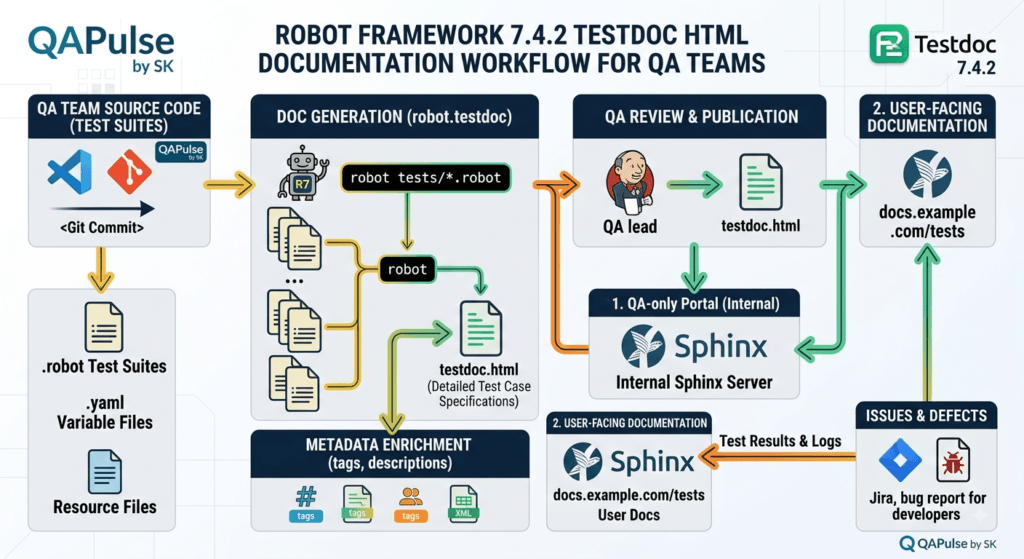
A Safer Testdoc Migration Pattern
Instead of replacing the old command everywhere at once, introduce the external tool alongside the existing process.
For example:
python -m pip install robotframework==7.4.2
python -m pip install robotframework-testdoc
Generate the new documentation:
testdoc tests/ TestDocumentation-new.html
Now compare the result with your current artifact.
Look at:
- suite names
- test names
- documentation
- tags
- keyword visibility
- source references
- metadata
- HTML rendering
- downstream publishing
If your team consumes documentation automatically, JSON output may also be useful. The external Testdoc documentation currently describes JSON as a machine-readable suite-tree format.
For example:
testdoc -f json tests/ TestDocumentation.json
That opens another architectural possibility:
Robot Framework
      ↓
Testdoc
      ↓
JSON
      ↓
QA analytics
      ↓
Dashboard
Instead of treating generated documentation as a static HTML file, engineering teams can potentially use structured output as an input to other automation.
That is a much more strategic way to think about the migration.
Do Not Confuse Test Reports With Test Documentation
This distinction is easy to miss.
Robot Framework test reports answer questions such as:
Did the test execute successfully?
Test documentation answers a different question:
What tests and suites exist, and what do they represent?
These are different artifacts.
A mature QA architecture might therefore look like:
                 Robot Framework
                       │
          ┌────────────┼────────────┐
          ↓            ↓            ↓
       Results       Reports       Testdoc
          │            │            │
          ↓            ↓            ↓
       Analysis     CI artifact   Documentation
The Testdoc deprecation does not mean your test execution or normal reporting system is being replaced.
It specifically means the built-in Testdoc capability is moving toward an external implementation.
That makes it important to avoid overreacting to the change.
You do not need to redesign your entire Robot Framework architecture simply because Testdoc is being separated.
You need to identify whether your organization actually uses Testdoc.
A Simple Repository Audit
Before upgrading every pipeline, search your repository.
On Linux or macOS:
grep -Rni "testdoc" .
For the specific built-in module:
grep -Rni "robot.testdoc" .
If you use GitHub Actions:
grep -Rni "testdoc" .github/
For Jenkins:
grep -Rni "testdoc" Jenkinsfile
For Docker-based environments:
grep -Rni "testdoc" Dockerfile docker/
You are looking for more than direct commands.
Search for:
testdoc
robot.testdoc
TestDocumentation.html
TestDocumentation.json
You may discover that Testdoc is not mentioned in your Robot Framework test files at all.
It may be hidden inside a shell script, Makefile, CI job or Docker entrypoint.
That is exactly why dependency discovery matters.
Robot Framework 7.4.2 Versus Staying on an Older Version
The decision is not simply “upgrade or don’t upgrade.”
There are at least three reasonable strategies.
| Strategy | Best for | Risk | Recommendation |
|---|---|---|---|
| Upgrade immediately everywhere | Small controlled projects | Medium | Usually unnecessary |
| Pilot then roll out | Professional QA teams | Low–Medium | Best default |
| Delay indefinitely | Legacy environments | Increasing | Avoid |
For most professional teams, the middle option is strongest.
Create a pilot branch:
git checkout -b upgrade/robot-framework-7-4-2
Update the dependency:
robotframework==7.4.2
Run your smoke suite.
Then run your integration tests.
Then validate reporting.
Then validate Testdoc if your project uses it.
Finally, run the full regression suite.
This gives you an evidence-based upgrade decision.
A Practical Compatibility Matrix
If you are managing Robot Framework across multiple projects, create a matrix instead of relying on memory.
For example:
| Project | Current RF | Target | Python | Testdoc | Status |
|---|---|---|---|---|---|
| Web Portal | 7.4.1 | 7.4.2 | 3.12 | Yes | Pilot |
| Mobile API | 7.4 | 7.4.2 | 3.11 | No | Ready |
| Payments | 7.3.x | 7.4.2 | 3.12 | Yes | Migration |
| Legacy | 6.x | TBD | 3.9 | Unknown | Investigate |
This simple table immediately tells engineering leadership where the actual risk exists.
Notice something important:
The version number alone does not tell you the migration risk.
A project running 7.4.1 with no Testdoc dependency may be easier to upgrade than a project running 7.4.1 with a heavily customized documentation pipeline.
The dependency graph matters more than the version number.
Compare the Upgrade Mindset With Other Automation Tools
The same principle applies across modern test automation frameworks, but the risk profile differs.
| Tool | Typical upgrade concern | What QA should validate |
|---|---|---|
| Robot Framework | Framework + libraries + tooling | Suites, libraries, Testdoc, CI |
| Playwright | Browser/runtime changes | Browsers, locators, traces, CI |
| Cypress | Runner/browser behavior | Specs, plugins, browser matrix |
| Selenium | Driver/browser compatibility | WebDriver, browser versions |
| Appium | Driver/device ecosystem | Devices, drivers, capabilities |
This comparison reveals why a universal statement such as “patch releases are safe” is too simplistic.
Every automation ecosystem has different external dependencies.
For Robot Framework 7.4.2, the Testdoc transition is the clearest example.
For another framework, browser or driver compatibility might be the bigger concern.
The SDET’s job is therefore not merely to read a changelog.
The job is to translate release information into system-level risk.
Turn Upgrade Testing Into a CI Gate
Once your team has validated Robot Framework 7.4.2, make the validation repeatable.
A GitHub Actions-style workflow could look like:
name: Robot Framework Tests

on:
  push:
  pull_request:

jobs:
  robot-tests:
    runs-on: ubuntu-latest

    steps:
      - uses: actions/checkout@v4

      - name: Set up Python
        uses: actions/setup-python@v5
        with:
          python-version: "3.12"

      - name: Install dependencies
        run: |
          python -m pip install --upgrade pip
          pip install -r requirements.txt

      - name: Verify Robot Framework
        run: robot --version

      - name: Run smoke tests
        run: |
          robot \
            --outputdir results \
            tests/smoke/

      - name: Generate Testdoc
        run: |
          testdoc tests/ results/TestDocumentation.html
The exact action versions and dependency versions should be reviewed against your organization’s CI standards.
The important concept is that the pipeline verifies both:
Test execution
+
Test documentation
rather than validating only one of them.
What If Your Tests Pass but Testdoc Fails?
This is where release engineering discipline matters.
Do not immediately conclude:
“Robot Framework 7.4.2 is broken.”
Instead, isolate the failure.
Try:
robot --version
Then:
testdoc --help
Then:
testdoc tests/smoke/ smoke-doc.html
If the external tool works on a small suite but fails on the full project, investigate project-specific assumptions.
Possible causes could include:
- unsupported project configuration
- custom templates
- unexpected suite structures
- CI path differences
- missing files
- Python environment differences
- dependency conflicts
The goal is to reduce the problem from:
"Robot Framework upgrade failed"
to:
"Test documentation generation fails for suite X
under environment Y because configuration Z is incompatible."
That is actionable engineering information.
An Interactive Exercise for QA Teams
If you are teaching Robot Framework 7.4.2 to a QA or SDET team, turn the upgrade into a small workshop.
Give the team this scenario:
Your organization has 2,500 Robot Framework tests. The tests pass after upgrading to 7.4.2, but the CI pipeline fails during documentation generation.
Ask the engineers:
- Is the framework upgrade actually failing?
- Which component failed?
- Is Testdoc used by the business?
- Where is Testdoc invoked?
- Can the documentation stage be migrated independently?
- Should the entire upgrade be rolled back?
- What evidence is required before production rollout?
A strong answer should distinguish between:
Framework execution
        ≠
Documentation tooling
        ≠
CI orchestration
That mindset is far more valuable than memorizing release notes.
The Upgrade Strategy I Recommend
For a production QA organization, I would use this sequence for Robot Framework 7.4.2:
1. Inventory current version
          ↓
2. Search for Testdoc dependencies
          ↓
3. Create isolated upgrade environment
          ↓
4. Pin Robot Framework 7.4.2
          ↓
5. Run smoke tests
          ↓
6. Validate custom/third-party libraries
          ↓
7. Install external Testdoc if required
          ↓
8. Compare generated documentation
          ↓
9. Run full regression
          ↓
10. Deploy progressively
This approach minimizes unnecessary risk while still keeping the automation platform current.
It also creates a useful artifact for future upgrades: a repeatable upgrade playbook.
When Should You Delay the Upgrade?
There are situations where delaying adoption of Robot Framework 7.4.2 can be reasonable.
For example:
- your release is in a critical production window
- your CI environment cannot currently be reproduced
- a critical third-party library has not been validated
- your Testdoc process is heavily customized
- you cannot roll back easily
- your organization lacks regression coverage
In such cases, the correct response is not to ignore the release.
Create an upgrade ticket.
Document the blocker.
Assign an owner.
Define the validation criteria.
Then revisit the upgrade when the blocker is removed.
Technical debt becomes dangerous when nobody owns it.
When Should You Upgrade?
For teams already on the 7.4.x line, Robot Framework 7.4.2 is a sensible candidate for controlled adoption because it is positioned as a maintenance release rather than a large feature release. The official announcement specifically describes it as the final planned bug-fix release in the 7.4.x series.
My practical recommendation is:
Upgrade in a controlled environment, validate the complete automation pipeline, and address Testdoc dependencies rather than postponing them.
If you are not using the built-in Testdoc functionality, the migration concern is smaller.
If you are using it heavily, start the Testdoc transition as part of your upgrade work.
The external Testdoc project is independently installable and currently supports HTML and JSON output, configuration, and template-based customization.
Internal Links:
- Learn MCP – Zero to Hero
- Learn AI Agents for QA – Zero to Hero
- Playwright Automation – Zero to Hero
- TencentDB Agent Memory: Complete Zero to Hero
- LangGraph: Complete Zero to Hero
- Learn Python – Zero to Hero
- OpenAI Codex: Complete Zero to Hero
- Cursor AI: Complete Zero to Hero
- Claude Code Tutorial: Complete Zero to Hero
- AutoGen: Complete Zero to Hero Guide
- Free QA Resources Built From Real Experience
- QA Glossary: Test Automation Terms Every Engineer Should Know
Official Resources
- Robot Framework 7.4.2 Release Announcement
- Robot Framework GitHub Releases
- Robot Framework 7.4.2 on PyPI
- Robot Framework Testdoc on PyPI
People Asked Questions
What is Robot Framework 7.4.2?
Robot Framework 7.4.2 is a maintenance release in the Robot Framework 7.4.x series, released on March 3, 2026, containing bug fixes and documentation improvements.
What is new in Robot Framework 7.4.2?
The release primarily contains bug fixes and documentation improvements. One of the most important changes is the deprecation of the built-in Testdoc tool.
Is Robot Framework Testdoc deprecated?
Yes. The built-in Testdoc tool is deprecated, with users directed toward the external robotframework-testdoc project.
Should QA engineers upgrade to Robot Framework 7.4.2?
Teams should generally evaluate the upgrade in a controlled environment, particularly checking custom libraries, CI pipelines, reporting and Testdoc dependencies.
How do I install Robot Framework 7.4.2?
Use Python’s package manager:
python -m pip install robotframework==7.4.2How do I install the external Robot Framework Testdoc?
python -m pip install robotframework-testdocThen the testdoc command can be used to generate documentation.
AI Overview / Answer-Engine Optimization
Robot Framework 7.4.2 is a maintenance release released on March 3, 2026. It includes bug fixes and documentation improvements, while the built-in Testdoc tool is deprecated in favor of the external Testdoc project.
Conclusion
Robot Framework 7.4.2 is a good example of why QA engineers should read framework releases from an engineering perspective rather than simply looking for new features.
The release itself is relatively focused: bug fixes, documentation improvements and an important deprecation of the built-in Testdoc tool.
The most significant lesson is therefore not a new keyword or syntax feature.
It is maintenance discipline.
If your organization uses Robot Framework professionally, you should know:
- exactly which version runs in CI
- which Python version supports it
- which external libraries it depends on
- whether Testdoc is part of your pipeline
- where documentation artifacts are consumed
- how the framework is pinned
- how upgrades are validated
- how quickly you can roll back
That is what separates a collection of automated tests from a maintainable automation platform.
Final Key Takeaways
- Robot Framework 7.4.2 is a maintenance-focused release, not a major feature release.
- The most important change for many teams is the deprecation of the built-in Testdoc tool.
- The external
robotframework-testdocpackage provides a dedicatedtestdocCLI and supports HTML and JSON documentation output. - Do not use npm to install Robot Framework; use the Python package manager and preferably pin the version in controlled environments.
- Do not validate an upgrade only by running tests. Validate libraries, reports, documentation and CI pipelines.
- Search your repository for hidden Testdoc dependencies before upgrading.
- A staged rollout is safer than upgrading every automation project simultaneously.
- Treat deprecations as future migration signals, not immediate failures.
- The best SDET upgrade strategy is evidence-driven: inventory → isolate → upgrade → validate → compare → roll out.
- The real value of Robot Framework 7.4.2 is not a flashy feature list; it is the opportunity to make your automation architecture more maintainable before future framework changes force the issue.
Continue Learning
Explore more expert articles on Mobile Testing, Backend & API, AI & Agentic, AI Tools, n8n, LangChain, CrewAI, MCP Servers, AI Agents, LlamaIndex, Docker, FastAPI, Playwright, Cypress, Test Automation, DevOps, and Software Engineering at www.skakarh.com.
QAPulse by SK delivers expert release analysis, AI engineering insights, enterprise automation strategies, migration guidance, DevOps best practices, and practical testing knowledge to help software professionals build scalable, intelligent, and production-ready software systems.