QA
QA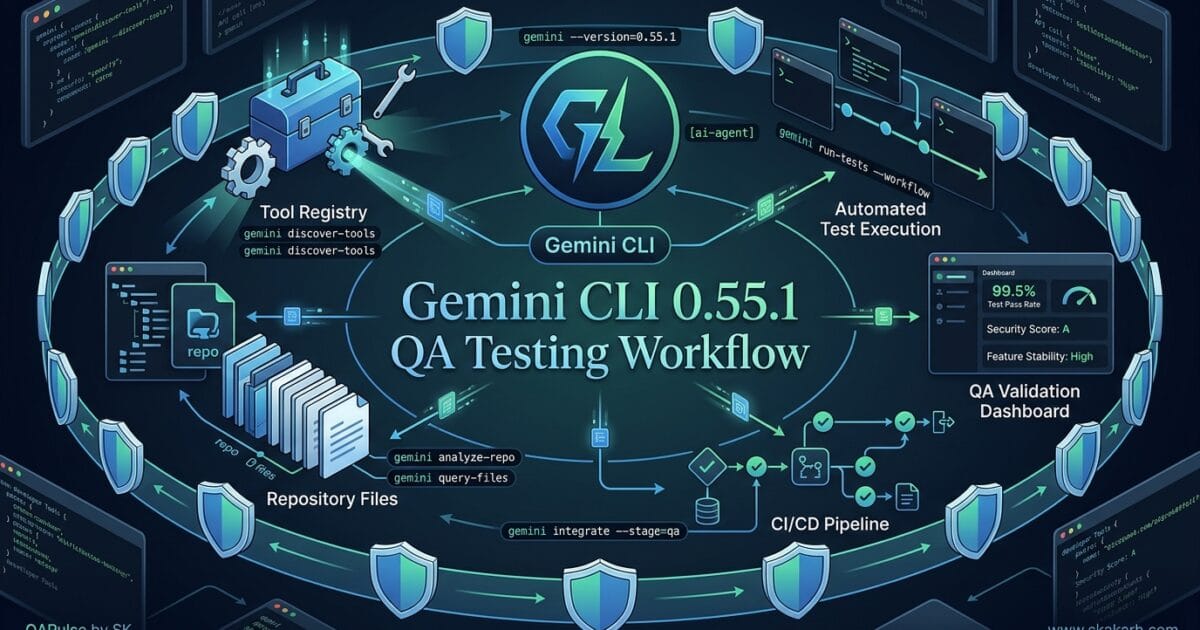
Gemini CLI 0.55.1 is more than a routine version bump for QA engineers. The release includes changes around tool registry discovery, release verification, security-sensitive path handling, symbolic-link protection, Vertex connectivity, CI reliability, and Cloud Run webhook infrastructure.
For an SDET, the interesting question is not simply:
“Does Gemini CLI 0.55.1 install and start?”
The better question is:
“Can Gemini CLI 0.55.1 discover tools correctly, execute them safely, respect filesystem boundaries, and remain reliable across CI and developer environments?”
That shift turns a release check into a meaningful engineering test strategy.
Why Gemini CLI 0.55.1 Matters to QA Engineers
AI coding CLIs increasingly operate across the same boundaries that traditional automation systems depend on:
Gemini CLI
    │
    ├── Tools
    ├── Filesystem
    ├── Git repository
    ├── Environment variables
    ├── Network services
    ├── CI/CD
    ├── IDE integration
    └── Cloud services
Every connection creates a potential compatibility or security boundary.
The release contains several changes that deserve targeted regression testing:
| Release Area | QA Risk | Recommended Testing |
|---|---|---|
| Tool registry discovery | Wrong or missing tools | Integration testing |
| NPM release verification | Broken packages | Release validation |
| Workspace binary handling | Incorrect executable selection | CI testing |
| Sensitive path blocklist | Unauthorized access | Security testing |
| Symbolic-link resolution | Directory escape | Security regression |
| Vertex base URL | Cloud connectivity failure | API/integration testing |
no_proxy behavior | Network routing issues | Environment testing |
| Cloud Run webhook | Event-processing failures | E2E testing |
| macOS path handling | Platform-specific regressions | Cross-platform testing |
This is why a simple:
gemini --version
is useful—but nowhere near sufficient.
Start With a Version and Environment Smoke Test
The first test should establish that the expected binary is installed.
gemini --version
Then capture the environment in CI:
node --version
npm --version
gemini --version
A lightweight smoke test can be automated:
#!/usr/bin/env bash

set -e

echo "Node:"
node --version

echo "NPM:"
npm --version

echo "Gemini CLI:"
gemini --version
The purpose is not to prove that the release is production-ready.
It establishes the baseline.
Think of the testing layers as:
Installation
     ↓
Startup
     ↓
Tool Discovery
     ↓
Security
     ↓
Integration
     ↓
Workflow
     ↓
Production Readiness
Stopping at installation is equivalent to testing whether a web browser opens and declaring the website production-ready.
Test Tool Registry Discovery as a Contract
One of the most interesting changes in Gemini CLI 0.55.1 is tool registry discovery.
That deserves dedicated testing because an AI CLI becomes substantially more capable when it can discover available tools dynamically.
The expected architecture looks something like:
Gemini CLI
     │
     ↓
Tool Registry
     │
 ┌───┼────┬──────┐
 ↓   ↓    ↓      ↓
Tool A Tool B Tool C Tool D
The first test should verify that expected tools can be discovered.
A conceptual test might look like:
def test_tool_registry_discovery():
    tools = discover_tools()

    assert tools
    assert "expected_tool" in tools
But that is only the happy path.
A stronger test suite should also check:
- empty registry
- duplicate tools
- unavailable tools
- malformed metadata
- unauthorized tools
- tools with conflicting names
- slow tool discovery
- registry connection failure
- partial discovery
For example:
def test_missing_tool_is_handled():
    tools = discover_tools()

    assert "missing_tool" not in tools
    assert discovery_completed_without_crashing()
The strategic question is:
What happens when tool discovery is incomplete?
An AI agent should not silently behave as though every expected capability exists.
Compare Static Tool Configuration With Registry Discovery
Traditional automation often relies on explicitly configured capabilities.
Static Configuration

Tool A
Tool B
Tool C
Dynamic discovery changes that model:
Registry
   ↓
Discover
   ↓
Select
   ↓
Execute
| Characteristic | Static Configuration | Registry Discovery |
|---|---|---|
| Setup | Manual | Dynamic |
| Flexibility | Lower | Higher |
| Discovery failures | Limited | Important |
| Runtime dependencies | Predictable | Potentially variable |
| Testing complexity | Lower | Higher |
| Security surface | Smaller | Larger |
This is an important lesson for SDETs.
Dynamic capability discovery increases both flexibility and test responsibility.

Test Tool Discovery Boundaries
A useful QA matrix should deliberately test different registry sizes.
0 tools
1 tool
10 tools
100 tools
500 tools
1000+ tools
Why?
Because registry implementations can behave differently at boundaries.
For example:
@pytest.mark.parametrize(
    "tool_count",
    [0, 1, 10, 100, 500]
)
def test_tool_registry(tool_count):
    create_registry(tool_count)

    tools = discover_tools()

    assert len(tools) == tool_count
You should also test duplicate identifiers:
registry:
    test_api
    test_api
The expected behavior should be explicit.
Possible acceptable outcomes include:
Reject duplicate
OR
Resolve deterministically
OR
Report conflict
The dangerous outcome is:
Random tool selected
Test Release Verification, Not Just Application Behavior
The release includes fixes related to npm ci, release verification, workspace binary shadowing, bad NPM releases, and job crashes.
These changes are particularly relevant to teams that consume Gemini CLI through automated build pipelines.
Your CI test should simulate a clean environment:
rm -rf node_modules
npm ci
npm test
Then verify the resulting binary:
which gemini
gemini --version
The objective is to detect cases where:
Expected binary
      ↓
Actual binary
      X
Different workspace binary
This is a classic CI problem.
An engineer may believe they are testing version 0.55.1 while the environment is actually executing another binary.
Test Workspace Binary Shadowing
Create a deliberately conflicting executable in a controlled test environment:
workspace/
├── node_modules/
├── package.json
└── fake-bin/
    └── gemini
Then validate that the intended executable is selected.
Conceptually:
command -v gemini
gemini --version
The test should verify both path and version.
def test_correct_gemini_binary():
    path = resolve_gemini_binary()
    version = get_gemini_version()

    assert expected_binary(path)
    assert version == EXPECTED_VERSION
This is a good example of why environment validation belongs in modern QA pipelines.
Test Sensitive Path Protection as a Security Boundary
The security change enforcing a case-insensitive sensitive path blocklist deserves more than a normal functional test.
Filesystem security tests should deliberately vary path casing.
For example:
SensitivePath
sensitivepath
SENSITIVEPATH
SensitivePATH
A security test could conceptually validate:
@pytest.mark.parametrize(
    "path",
    [
        "SensitivePath/file.txt",
        "sensitivepath/file.txt",
        "SENSITIVEPATH/file.txt",
    ]
)
def test_sensitive_path_is_blocked(path):
    result = access_path(path)

    assert result.blocked
The reason this matters is simple:
A security control that works only for one spelling is not a reliable security control.
Test Symbolic-Link Directory Escape
The symbolic-link directory escape fix is another high-value security area.
Create a controlled test environment:
sandbox/
├── allowed/
│   └── test.txt
└── link → /outside/
Then ask the CLI to access:
sandbox/link/test.txt
The test should verify that the security boundary is preserved.
def test_symlink_cannot_escape_workspace():
    result = access_file("sandbox/link/test.txt")

    assert result.blocked
Test both:
relative symlink
absolute symlink
nested symlink
symlinked directory
symlinked file
Also test legitimate paths:
def test_normal_workspace_file_is_accessible():
    result = access_file("sandbox/allowed/test.txt")

    assert result.allowed
This creates an important security regression pair:
Legitimate access → ALLOW
Boundary escape → BLOCK
That is much stronger than simply checking that the security feature exists.
Test macOS Path Resolution Separately
The release includes defensive path resolution work and macOS tests.
Do not assume Linux coverage is enough.
A practical CI matrix could be:
strategy:
  matrix:
    os:
      - ubuntu-latest
      - macos-latest
      - windows-latest
Then execute the same filesystem suite:
pytest tests/filesystem/
Compare:
| Platform | Path Testing | Symlink Testing | CLI Execution |
|---|---|---|---|
| Linux | ✓ | ✓ | ✓ |
| macOS | ✓ | ✓ | ✓ |
| Windows | ✓ | Platform-specific | ✓ |
Platform differences can expose bugs that never appear on the developer’s machine.
Test Vertex Base URL Changes
The Vertex base URL update should be validated as an integration boundary.
Don’t immediately use production credentials.
Start with a controlled endpoint or test environment.
Conceptually:
def test_vertex_endpoint():
    response = send_vertex_request(
        base_url=TEST_VERTEX_URL
    )

    assert response.status_code == 200
Then test configuration behavior:
Default URL
Custom URL
Invalid URL
Unavailable URL
Timeout
Authentication failure
The important assertion is not simply:
HTTP 200
It should also verify that Gemini CLI reports meaningful failures.
For example:
def test_invalid_vertex_endpoint():
    result = connect_to_vertex(INVALID_URL)

    assert result.failed
    assert result.error_is_actionable
Test no_proxy Behavior
Proxy configuration is one of those features that often works perfectly in development and fails inside enterprise environments.
Build a matrix:
| Scenario | Proxy | no_proxy | Expected |
|---|---|---|---|
| Direct | No | No | Direct |
| Proxy | Yes | No | Proxy |
| Bypass | Yes | Target | Direct |
| Invalid proxy | Yes | No | Clear failure |
| Multiple bypass hosts | Yes | Multiple | Correct bypass |
A conceptual test:
def test_no_proxy_bypasses_proxy():
    configure_proxy(PROXY)
    configure_no_proxy(TEST_HOST)

    response = request(TEST_HOST)

    assert response.used_direct_connection
This is particularly valuable for enterprise QA environments.
Test Cloud Run Webhook Ingestion
The Cloud Run webhook ingestion service introduces an event-driven testing surface.
The basic workflow becomes:
Event
  ↓
Webhook
  ↓
Cloud Run
  ↓
Validation
  ↓
Processing
  ↓
Result
Your tests should cover:
Valid webhook
Invalid payload
Missing fields
Duplicate event
Delayed event
Unexpected event
Authentication failure
Service unavailable
For example:
def test_valid_webhook():
    response = post_webhook(valid_payload())

    assert response.status_code in [200, 202]
Then test malformed input:
def test_invalid_webhook():
    response = post_webhook({"invalid": True})

    assert response.status_code >= 400
The exact expected status should follow the application’s API contract.
Test Duplicate Webhook Delivery
Event-driven systems must account for retries.
Send the same event twice:
def test_webhook_idempotency():
    event = create_event(id="QA-1001")

    first = post_webhook(event)
    second = post_webhook(event)

    assert processing_count("QA-1001") == 1
This is one of the most valuable tests for webhook-based systems.
A webhook that works once is functional.
A webhook that handles retries safely is production-ready.
Build a Gemini CLI 0.55.1 Regression Matrix
Rather than running random tests, organize the release into risk categories.
| Area | Smoke | Integration | Security | E2E |
|---|---|---|---|---|
| Version | ✓ | |||
| Tool registry | ✓ | ✓ | ✓ | ✓ |
| NPM installation | ✓ | ✓ | ||
| Binary resolution | ✓ | ✓ | ✓ | |
| Sensitive paths | ✓ | ✓ | ✓ | |
| Symlinks | ✓ | ✓ | ✓ | |
| Vertex | ✓ | ✓ | ✓ | |
| Proxy | ✓ | ✓ | ||
| Cloud Run webhook | ✓ | ✓ | ✓ | |
| macOS paths | ✓ | ✓ | ✓ | ✓ |
This gives your CI pipeline a clear testing strategy instead of a collection of unrelated tests.
What Should QA Engineers Test First?
If your team has limited time, prioritize by risk.
Priority 1 — Security
Test:
- sensitive path blocking
- case-insensitive path matching
- symbolic-link escape prevention
- authentication boundaries
Priority 2 — Tool Discovery
Test:
- registry availability
- tool discovery
- duplicate tools
- missing tools
- malformed tool metadata
Priority 3 — CI Reliability
Test:
- clean NPM installation
- binary resolution
- workspace shadowing
- release verification
Priority 4 — Cloud Integration
Test:
- Vertex connectivity
- proxy behavior
- Cloud Run webhooks
Priority 5 — Platform Compatibility
Test:
- macOS
- Linux
- Windows
- filesystem behavior
This risk-based order is more practical than giving every release-note item equal priority.
Compare Gemini CLI With Traditional Test Automation
Gemini CLI testing also highlights an important difference between AI tooling and traditional automation.
| Traditional CLI | AI Coding CLI |
|---|---|
| Fixed commands | Agent-selected actions |
| Predictable workflow | Dynamic workflow |
| Static integrations | Dynamic tools |
| Explicit inputs | Natural-language intent |
| Deterministic output | Potentially variable output |
| Smaller permission surface | Broader permission surface |
| Conventional regression testing | Behavioral + security regression |
This means QA teams should add new testing dimensions:
Functional
+
Integration
+
Security
+
Behavioral
+
Permission
+
Agent workflow
The SDET role becomes especially valuable here because AI systems combine software engineering with probabilistic decision-making.
Build a Real AI-Assisted QA Scenario
A useful end-to-end scenario could be:
“Inspect this API project, identify changed endpoints, generate regression tests, execute them, and summarize failures.”
The workflow might become:
User Request
     ↓
Gemini CLI
     ↓
Tool Discovery
     ↓
Project Access
     ↓
Filesystem Security
     ↓
Tool Execution
     ↓
Test Generation
     ↓
Test Execution
     ↓
Failure Analysis
     ↓
QA Report
Now test the entire chain.
def test_ai_qa_workflow():
    result = run_gemini_qa_workflow(
        "Analyze the API changes and generate regression tests."
    )

    assert result.tool_discovery_successful
    assert result.tests_generated
    assert result.tests_executed
    assert result.report_created
This is ultimately the test that matters most.
A CLI can pass 100 unit tests and still fail the workflow your engineering team actually depends on.
Production Readiness for Gemini CLI 0.55.1
Before approving the release, create explicit gates.
Install
  ↓ PASS
Version
  ↓ PASS
Tool Discovery
  ↓ PASS
Filesystem Security
  ↓ PASS
Symlink Security
  ↓ PASS
CI Verification
  ↓ PASS
Cloud Integration
  ↓ PASS
Cross-Platform
  ↓ PASS
E2E QA Workflow
  ↓ PASS
Production
A security failure should block release even if every functional test passes.
That distinction is critical:
Test coverage measures what you tested. Production readiness measures whether the remaining risk is acceptable.
The Strategic SDET Lesson
The most important lesson from Gemini CLI 0.55.1 is not any individual bug fix.
It is the changing nature of AI developer tools.
Traditional testing asks:
“Did the application return the expected result?”
AI-agent testing increasingly asks:
“Did the agent discover the correct capability, operate within the correct security boundary, use the correct tools, and complete the intended workflow safely?”
That requires a broader QA strategy.
Your regression suite should therefore test the agent ecosystem, not just the CLI binary.
The best approach is:
Release Notes
     ↓
Risk Analysis
     ↓
Capability Mapping
     ↓
Security Tests
     ↓
Integration Tests
     ↓
Cross-Platform Tests
     ↓
E2E AI Workflow
     ↓
Production Gate
And that is how QA engineers can turn a small version update into meaningful engineering confidence.
What Gemini CLI 0.55.1 Changes for AI-Assisted QA Workflows
Gemini CLI 0.55.1 is more than a routine version bump for teams using AI-assisted development and testing workflows. The release includes changes around tool registry discovery, release verification, security controls, Vertex AI configuration, path handling, and CI reliability.
For QA engineers and SDETs, the important question is not simply “What changed in Gemini CLI 0.55.1?” The better question is:
Which changes can affect how an AI coding agent discovers tools, accesses files, runs commands, and participates in an automated testing workflow?
That distinction matters because an AI CLI is increasingly becoming part of the engineering toolchain. If the CLI changes its tool discovery, security boundaries, authentication behavior, or command execution, your testing strategy needs to account for those changes.
The release was published on August 11, 2026, and the changes listed in the release information include tool registry discovery, release verification fixes, security hardening, Vertex base URL updates, Cloud Run webhook functionality, and defensive filesystem handling.
Why Gemini CLI 0.55.1 Matters to QA Engineers
Traditional test automation tools execute predefined instructions.
An AI CLI can interpret a request, inspect a repository, discover available capabilities, modify files, execute commands, and interact with external services.
That creates a larger testing surface.
Think about a simple request:
Run the API tests, investigate failures, and fix the implementation.
A traditional automation framework may execute a known test suite.
An AI CLI may need to:
1. Inspect the repository
2. Discover available tools
3. Read configuration
4. Identify the test command
5. Execute the tests
6. Interpret failures
7. Modify code
8. Execute tests again
9. Report the result
Every step becomes a potential verification point.
This is why QA engineers should treat Gemini CLI 0.55.1 as part of the engineering system rather than simply another developer utility.
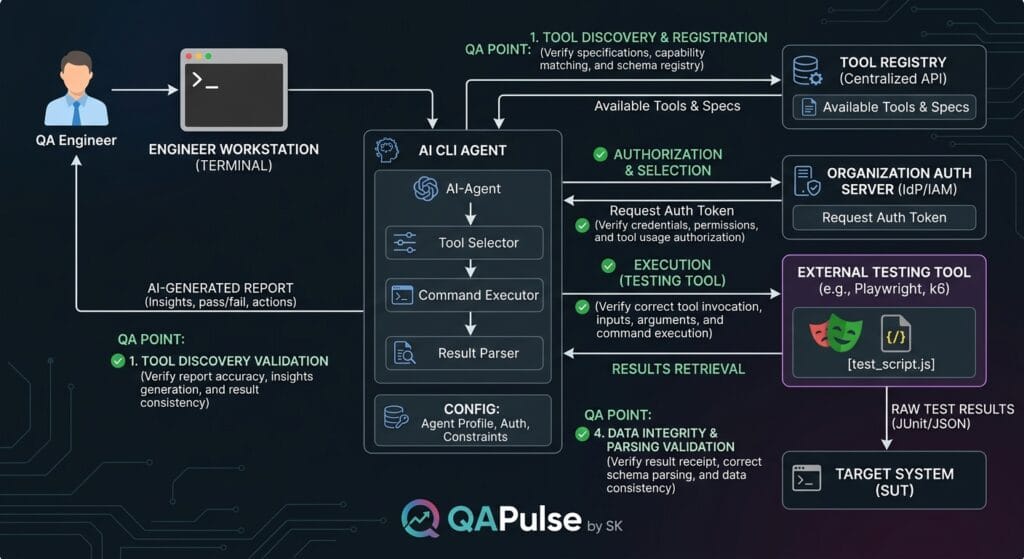
The Most Interesting Change: Tool Registry Discovery
One of the notable changes listed for Gemini CLI 0.55.1 is tool registry discovery.
For AI-assisted engineering, tool discovery is strategically important.
An agent cannot effectively use a capability that it cannot discover or understand.
Imagine an environment containing:
tools/
├── run_tests
├── check_api
├── generate_report
├── inspect_logs
└── deploy_preview
A tool registry gives the agent a structured mechanism for discovering capabilities.
From a QA perspective, this introduces a new validation question:
Does the agent discover the correct tool, understand its purpose, and use it safely?
You can think of this as AI capability discovery testing.
A practical validation matrix could look like this:
| Test Area | What to Verify | QA Risk |
|---|---|---|
| Tool discovery | Expected tools are visible | Agent cannot complete task |
| Tool metadata | Description is accurate | Wrong tool selection |
| Tool parameters | Required inputs are recognized | Invalid execution |
| Tool availability | Disabled tools remain unavailable | Security risk |
| Tool execution | Correct tool is invoked | Functional regression |
| Tool errors | Failures are handled correctly | Misleading agent output |
This is different from traditional API testing.
With an API, you normally know the endpoint before execution:
response = client.get("/users")
With an AI agent, the system may first determine which capability should be used.
That means QA increasingly needs to test both:
execution correctness and decision-path correctness.
Release Verification Is Also a QA Concern
The release notes include fixes related to release verification, including preventing bad NPM releases and improving CI behavior.
At first glance, these might appear to be internal engineering changes.
They are actually relevant to QA.
A CLI release pipeline should answer three questions:
Was the package built correctly?
Was the published artifact correct?
Can users install and execute that artifact successfully?
These are different checks.
A useful release validation pipeline could look like:
npm ci --ignore-scripts

npm test

npm run build

npm pack

npm publish --dry-run
Then validate the resulting package from a clean environment.
For example:
mkdir release-smoke-test
cd release-smoke-test

npm init -y
npm install <package>

npx <cli-command> --version
The goal is to avoid a dangerous situation where:
CI = PASS
Package publication = PASS
User installation = FAIL
For QA engineers, this is an important distinction.
CI validation tests the pipeline. Release smoke testing tests the artifact.
Security Changes Should Trigger Negative Testing
The release also contains security-related changes, including enforcement around sensitive paths and human-in-the-loop behavior.
This is particularly important for AI CLI tools because the agent can potentially inspect files and execute commands.
Suppose a repository contains:
.env
.env.production
credentials.json
secrets/
private/
A security-focused test should not only verify that legitimate files can be accessed.
It should verify that protected resources remain protected.
For example:
Test 1: Read README.md
Expected: ALLOWED

Test 2: Read src/config.py
Expected: ALLOWED

Test 3: Read .env
Expected: BLOCKED

Test 4: Read credentials.json
Expected: BLOCKED

Test 5: Traverse outside project directory
Expected: BLOCKED
This is classic negative testing applied to an AI-powered development environment.
Path Traversal Testing Is Especially Important
Filesystem handling deserves particular attention when an AI agent works directly with a local repository.
A basic test strategy should include paths such as:
./src/app.py
../config.json
../../secrets.txt
/absolute/path/file
./safe/../private/file
symbolic-link-to-sensitive-directory
The expected result should be explicit.
For example:
def test_sensitive_path_is_blocked(agent):
    result = agent.read_file("../secrets.txt")

    assert result.blocked is True
The exact implementation will depend on the CLI architecture, but the testing principle remains the same:
Never assume an AI agent will respect repository boundaries simply because the normal workflow does. Test the boundary deliberately.
Gemini CLI vs Traditional Test Automation
Gemini CLI does not replace tools such as Playwright, Selenium, Cypress, or pytest.
It operates at a different layer.
| Capability | Gemini CLI | Playwright | pytest |
|---|---|---|---|
| AI-assisted reasoning | Strong | Limited | Limited |
| Browser automation | Indirect | Strong | Via plugins/libraries |
| Unit testing | Can assist | No | Strong |
| Repository understanding | Strong | Limited | Limited |
| Tool discovery | Agent-oriented | Framework-oriented | Plugin-oriented |
| Test execution | Can orchestrate | Executes browser tests | Executes Python tests |
| Code modification | Can assist | No | No |
| Deterministic execution | Lower | High | High |
| Best role | AI engineering assistant | Browser automation | Test framework |
This comparison highlights an important QA principle.
Do not replace deterministic automation with an AI agent merely because the agent can perform the same action.
Instead, use AI to orchestrate, investigate, generate, and reason, while deterministic tools continue to provide reliable verification.
A mature architecture might therefore look like:
                 AI CLI
                   |
        -----------------------
        |          |          |
     pytest    Playwright   API tests
        |          |          |
        -----------------------
                   |
              Test Results
                   |
              QA Validation
The AI layer becomes the coordinator rather than the source of truth.
Test the Agent’s Result, Not Just Its Reasoning
This is one of the biggest mindset changes for QA engineers working with AI tools.
An agent can produce an impressive explanation and still be wrong.
For example:
Agent:
"All API tests are passing."
That statement should not automatically be trusted.
Your validation layer should independently verify:
pytest -q
or:
npx playwright test
Then compare the actual exit status and test results.
A useful principle is:
AI-generated claims should be treated as test observations, not test evidence, until independently verified.
This becomes especially important when an AI CLI is allowed to modify source code.
A Practical Gemini CLI Upgrade Test Strategy
Before adopting Gemini CLI 0.55.1 across a QA environment, create a small regression suite.
Start with installation:
npm install -g @google/gemini-cli
Then verify the installed version according to the package’s current CLI installation and invocation instructions:
gemini --version
Next, test basic repository interaction:
Inspect this repository and identify the test framework.
Do not modify any files.
The expected result should be a correct repository analysis without modifications.
Then test controlled execution:
Run the existing test suite.
Do not modify source files.
Report the exact command and exit status.
Then test failure investigation:
Run the tests and identify the first failing test.
Do not change the implementation.
Explain the likely root cause.
Finally, test controlled modification separately:
Fix only the failing test identified earlier.
Show the proposed change before applying it.
This creates progressively higher-risk test stages.
| Stage | Agent Capability | Risk |
|---|---|---|
| Repository inspection | Read | Low |
| Test discovery | Analyze | Low |
| Test execution | Execute | Medium |
| Failure investigation | Reason | Medium |
| Code modification | Write | High |
| External service interaction | Execute externally | High |
This is much more useful than simply installing the new version and asking whether it starts.
Where QA Engineers Should Be Careful
The biggest mistake would be treating Gemini CLI 0.55.1 as an ordinary patch update.
A better approach is to identify which capabilities your organization actually uses.
If your team only uses the CLI for:
code explanation
your regression surface is relatively small.
If you use it for:
repository analysis
+
tool discovery
+
test execution
+
code modification
+
MCP integration
+
cloud services
your regression surface is considerably larger.
Create an internal capability inventory:
gemini_cli:
  repository_access: true
  test_execution: true
  code_modification: true
  tool_discovery: true
  external_services: true
  mcp: true
  production_access: false
Then build regression tests around the capabilities that are actually enabled.
This is a much more strategic upgrade model than blindly testing the version number.
An Interactive QA Exercise
Imagine your team upgrades to Gemini CLI 0.55.1.
The agent can:
read files
execute tests
modify code
discover tools
Now answer these questions before allowing it into a shared development environment:
- Can it access files outside the intended workspace?
- Can it discover tools it should not have access to?
- Can it execute destructive commands?
- Can it modify production configuration?
- Can it expose secrets in command output?
- Can it correctly report failed test execution?
- Can you independently verify its claims?
If you cannot answer these questions with automated checks, your upgrade testing is incomplete.
The Strategic QA Takeaway
The most important lesson from Gemini CLI 0.55.1 is not a single feature.
It is the expanding testing surface created by AI-powered developer tools.
Traditional QA largely asks:
Did the application behave correctly?
AI-assisted engineering adds another layer:
Did the agent choose the correct action?
Did it access the correct resources?
Did it respect security boundaries?
Did it invoke the correct tool?
Did it accurately report what happened?
That creates an additional quality dimension:
agent behavior quality.
For SDETs, this is an opportunity rather than a threat.
Your existing automation skills remain valuable, but the system under test is becoming more intelligent, more autonomous, and more capable of taking actions.
The QA strategy therefore needs to evolve from testing only application behavior to testing the complete interaction between AI reasoning, tools, permissions, code, and deterministic automation.
AI Overview Optimization
What is Gemini CLI 0.55.1?
Gemini CLI 0.55.1 is an updated release of Google’s Gemini CLI that includes changes involving tool registry discovery, release verification, security controls, CI reliability, Vertex configuration, and filesystem handling. For QA engineers, the important consideration is validating how these changes affect AI-assisted development and testing workflows.
What should QA engineers test after upgrading Gemini CLI 0.55.1?
QA engineers should validate:
- Tool discovery and availability
- Tool permissions
- Repository and filesystem boundaries
- Test execution
- Command execution
- Security restrictions
- Release/package installation
- AI-generated test-result accuracy
- Existing automation integrations
- CI/CD workflows
Does Gemini CLI replace Playwright or pytest?
No. Gemini CLI and deterministic test frameworks serve different purposes. Gemini CLI can help discover, orchestrate, investigate, and modify code, while Playwright, pytest, API frameworks, and CI pipelines provide deterministic verification.
What is the biggest QA concern with AI coding agents?
The biggest concern is not simply whether the AI agent works. QA teams must verify that it performs the correct action, accesses only authorized resources, respects security boundaries, invokes appropriate tools, and accurately reports the resulting state.
People Asked Questions
What is new in Gemini CLI 0.55.1?
Gemini CLI 0.55.1 includes tool registry discovery along with fixes and improvements involving release verification, CI reliability, security controls, Vertex configuration, and filesystem handling.
Should QA engineers upgrade to Gemini CLI 0.55.1?
Teams should validate the release against their existing AI-assisted workflows before broad adoption. A controlled upgrade test should cover tool discovery, repository access, command execution, security boundaries, and existing automation.
How should I test Gemini CLI after an upgrade?
Start with installation and version verification, then test repository inspection, tool discovery, test execution, failure investigation, controlled file modification, security restrictions, and CI integration.
Can Gemini CLI run automated tests?
Yes, an AI CLI can be used to orchestrate test execution, but the resulting test status should be independently verified using the underlying deterministic test framework.
Is Gemini CLI a replacement for Playwright?
No. Playwright is designed specifically for browser automation, whereas Gemini CLI is an AI-assisted development and orchestration tool. They can work together.
Is Gemini CLI a replacement for pytest?
No. pytest remains a deterministic Python testing framework. Gemini CLI can assist with discovering, executing, analyzing, and troubleshooting pytest tests.
Why is tool registry discovery important for QA?
Tool discovery introduces another validation layer because an AI agent needs to identify available capabilities before using them. QA teams should verify tool visibility, metadata, authorization, parameter handling, and execution.
Should AI-generated test results be trusted?
AI-generated reports should be treated as observations rather than independent evidence. Important results should be verified through deterministic test execution, exit codes, logs, and CI artifacts.
Internal Links
- Learn MCP – Zero to Hero
- Learn AI Agents for QA – Zero to Hero
- Playwright Automation – Zero to Hero
- TencentDB Agent Memory: Complete Zero to Hero
- LangGraph: Complete Zero to Hero
- Learn Python – Zero to Hero
- OpenAI Codex: Complete Zero to Hero
- Cursor AI: Complete Zero to Hero
- Claude Code Tutorial: Complete Zero to Hero
- AutoGen: Complete Zero to Hero Guide
- Free QA Resources Built From Real Experience
- QA Glossary: Test Automation Terms Every Engineer Should Know
External Links
- Gemini CLI GitHub Repository
- Gemini CLI Releases
- Gemini CLI Documentation
- Google Gemini API Documentation
- Playwright Documentation
- pytest Documentation
Conclusion
Gemini CLI 0.55.1 is a useful reminder that AI-powered developer tools need to be tested differently from conventional automation frameworks. Tool registry discovery, release verification, security hardening, filesystem protection, and CI reliability all influence how safely an AI CLI can participate in a QA or SDET workflow.
For QA engineers, the upgrade question should therefore go beyond “Does Gemini CLI 0.55.1 install and start?”
The stronger question is:
Can Gemini CLI 0.55.1 perform its intended tasks while preserving security, determinism, tool boundaries, and trustworthy test results?
That means validating the complete workflow: repository access, tool discovery, command execution, test orchestration, file modification, sensitive-path protection, and result verification.
The most effective approach is not to make the AI agent the source of truth. Let the agent investigate, reason, orchestrate, and assist, while deterministic automation such as Playwright, pytest, API tests, CI pipelines, and security checks independently verify the outcome.
For SDETs, this represents an important shift in testing strategy. AI coding agents are becoming part of the software delivery system, so their behavior, permissions, integrations, and outputs increasingly belong inside the QA strategy.
Final Key Takeaways
- Gemini CLI 0.55.1 introduces changes that matter beyond simple CLI functionality.
- Tool registry discovery creates a new area for validating tool visibility, selection, permissions, and execution.
- Release verification fixes reinforce the importance of testing the published artifact, not only the CI pipeline.
- Security changes should be validated with deliberate negative tests for sensitive paths and unauthorized operations.
- Filesystem boundary testing should include traversal attempts, absolute paths, symbolic links, and protected resources.
- AI-generated test reports should not be treated as independent evidence. Verify important claims with deterministic automation.
- Gemini CLI should complement—not replace—tools such as Playwright, pytest, API automation, and CI/CD validation.
- AI-assisted QA requires testing both outcomes and agent behavior.
- Before adopting the upgrade broadly, validate the capabilities your organization actually enables: repository access, test execution, code modification, tool discovery, MCP, and external services.
- The strongest QA strategy is to give the AI agent useful autonomy while maintaining explicit permissions, deterministic verification, and production safety gates.
The real upgrade test isn’t whether Gemini CLI 0.55.1 works. It’s whether your engineering workflow remains trustworthy when an AI agent is allowed to participate in it.
Continue Learning
Explore more expert articles on Mobile Testing, Backend & API, AI & Agentic, AI Tools, n8n, LangChain, CrewAI, MCP Servers, AI Agents, LlamaIndex, Docker, FastAPI, Playwright, Cypress, Test Automation, DevOps, and Software Engineering at www.skakarh.com.
QAPulse by SK delivers expert release analysis, AI engineering insights, enterprise automation strategies, migration guidance, DevOps best practices, and practical testing knowledge to help software professionals build scalable, intelligent, and production-ready software systems.