QA
QA
AI in 2026 is no longer about chatbots generating text.
The real transformation is happening elsewhere.
👉 AI agents integrated directly with business systems
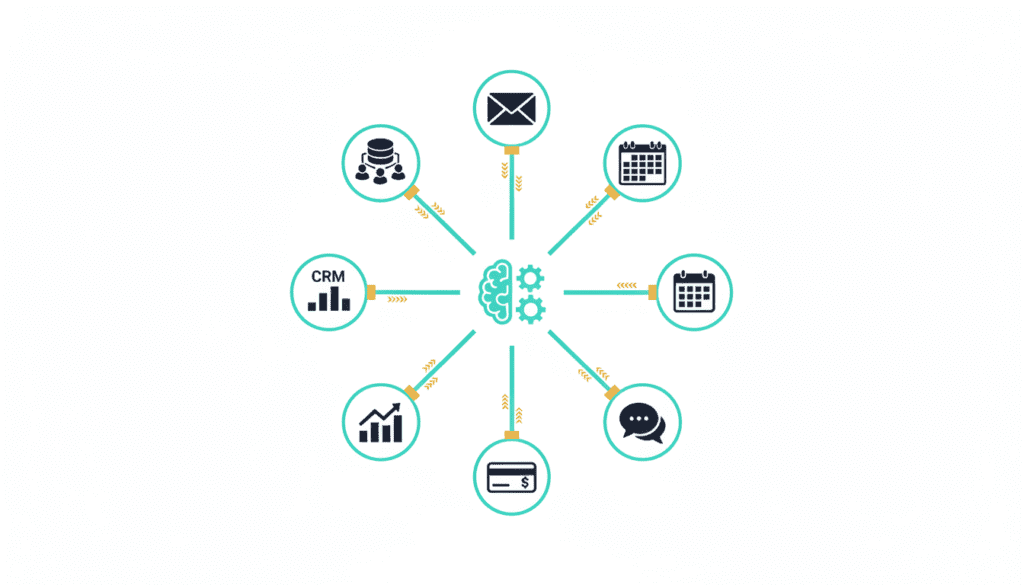
These agents don’t just respond — they:
- Query databases
- Update CRMs
- Trigger workflows
- Execute real operations
This shift — from “AI as assistant” to “AI as autonomous executor” — is redefining how modern software systems operate.
🚀 Why AI Agent Integration Matters
A standalone LLM can answer questions.
An integrated AI agent can:
- Fetch live business data
- Update records automatically
- Trigger actions across systems
- Orchestrate workflows end-to-end
That difference is massive.
Example
Instead of:
“What is the status of this deal?”
You get:
“Deal is in proposal stage. I’ve updated the follow-up task and notified the sales owner.”
That’s not AI assistance.
That’s AI execution.
🧠 What Is an AI Agent?
An AI agent is a system where a language model acts as a decision-making engine.
It operates in four stages:
1. Observe
- Reads APIs, databases, documents
2. Reason
- Understands context
- Plans next actions
3. Act
- Calls tools
- Executes workflows
4. Reflect
- Evaluates results
- Improves decisions
🔧 Core Foundation: Tool Calling
Modern LLMs like OpenAI GPT models, Claude, and Google Gemini support tool calling (function calling).
Instead of generating raw API text, the model produces structured calls.
Example
{
  "tool": "create_ticket",
  "parameters": {
    "title": "Login issue",
    "priority": "high"
  }
}
Your system executes the function — not the LLM.
This is critical for:
- Reliability
- Security
- Control
🏗️ Architecture Patterns for AI Agent Integration
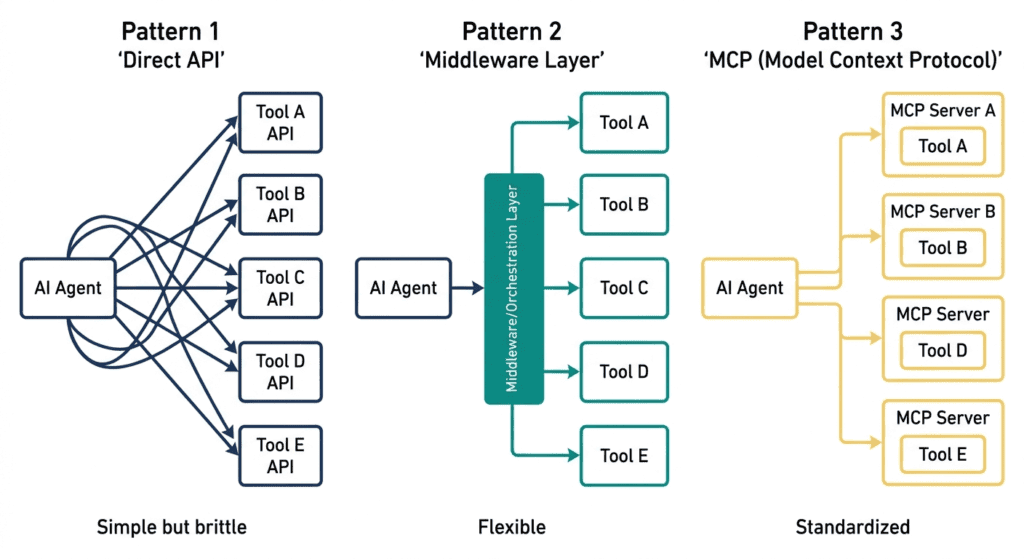
1. Direct Tool Calling (Simple & Fast)
User → LLM → Tool Call → API → Result → Response
Best for:
- Small systems
- 5–20 tools
- Simple workflows
Limitation:
- Breaks down when tool count grows
2. Agent + RAG (Knowledge-Aware Systems)
RAG = Retrieval-Augmented Generation
Agent retrieves context from:
- Documents
- Knowledge bases
- Logs
- Internal data
When to Use
- Customer support systems
- Internal assistants
- Knowledge-heavy workflows
Key Insight
Your system is only as good as your retrieval pipeline:
- Chunking strategy
- Embeddings quality
- Ranking accuracy
Poor retrieval = poor AI decisions.
3. Multi-Agent Orchestration (Enterprise Level)
User → Orchestrator
        ↓
   [CRM Agent]
   [Analytics Agent]
   [Support Agent]
        ↓
   Aggregated Response
Best for:
- Large organizations
- Complex workflows
- Domain-specific tasks
Tradeoff:
- High complexity
- Requires coordination logic
🔌 Connecting AI Agents to Business Systems
CRM Integration
Common use cases:
- Fetch customer data
- Update deal stages
- Log activities
- Analyze sales pipeline
Security Requirement
- OAuth 2.0 authentication
- Role-based access control
- Least-privilege access
🗄️ Database Integration (High Risk, High Power)
AI + database = powerful… but dangerous.
Risks
- Expensive queries
- Data leaks
- Unauthorized access
Safeguards
- Read-only replicas
- Query validation
- Timeouts (5–10 seconds)
- PII masking
Example Validation Rule
if not has_where_clause(query):
    reject("Unsafe query detected")
🔗 Internal APIs & Microservices
Agents interact with internal systems via APIs.
Best Practices
- Clear tool descriptions
- Strict parameter validation
- Idempotent operations
Example Tool Definition
{
  "name": "create_support_ticket",
  "description": "Create a new support ticket with priority and description",
  "parameters": {
    "type": "object",
    "required": ["title", "priority"]
  }
}
🔐 Security & Compliance (Critical)
AI agents are autonomous.
That changes everything.
1. Least Privilege
Agents should only access:
- Required endpoints
- Required fields
Never full access.
2. Human-in-the-Loop
For critical actions:
- Payments
- Deletions
- Access changes
Require manual approval.
3. Audit Logging
Log everything:
- Tool calls
- Parameters
- Results
- Decisions
This is essential for:
- Debugging
- Compliance
- Trust
4. Prompt Injection Defense
Biggest risk in AI systems.
Protection Strategies
- Input sanitization
- Output validation
- Tool access restrictions
- Sandboxed execution
⚙️ Production Reliability Patterns
Retry & Fallback
LLM calls can fail.
Use:
- Exponential backoff
- Circuit breakers
- Graceful fallbacks
Observability Metrics
Track:
- Tool success rate
- LLM latency (P50, P95, P99)
- Tool selection accuracy
- Cost per interaction
- User satisfaction
📈 Practical Implementation Roadmap
Week 1–2
- Identify one low-risk use case
- Example: internal knowledge assistant
Week 3–4
- Build prototype with 3–5 tools
- Focus on read-only operations
Week 5–6
- Add:
- Authentication
- Authorization
- Logging
- Validation
Week 7–8
- Pilot with small user group
- Monitor accuracy
Week 9–12
- Expand features
- Add write operations (with approval)
- Scale usage
💡 Model Selection Strategy
- For complex reasoning → Claude or GPT-4 class models
- For cost optimization → smaller models
Start with accuracy → optimize later.
🧠 Key Insights Most Teams Miss
- Tool calling > prompt engineering
- RAG quality determines agent intelligence
- Security must exist at execution layer (not prompt layer)
- Observability is non-negotiable
- Start small, scale gradually
🎯 Final Thoughts
AI agents are not just a feature.
They are becoming the operating layer of modern systems.
The real advantage is not in:
- Using LLMs
But in:
- Connecting them to real systems
- Controlling their behavior
- Making them reliable
The Shift Is Clear
❌ AI that talks
✅ AI that acts
More Relevant Articles
- 7 Powerful AI Agent Workflows Every Modern SDET Should Learn
- Day 4: MCP Architecture Deep Dive
- Day 3: MCP vs REST APIs vs Plugins