QA
QA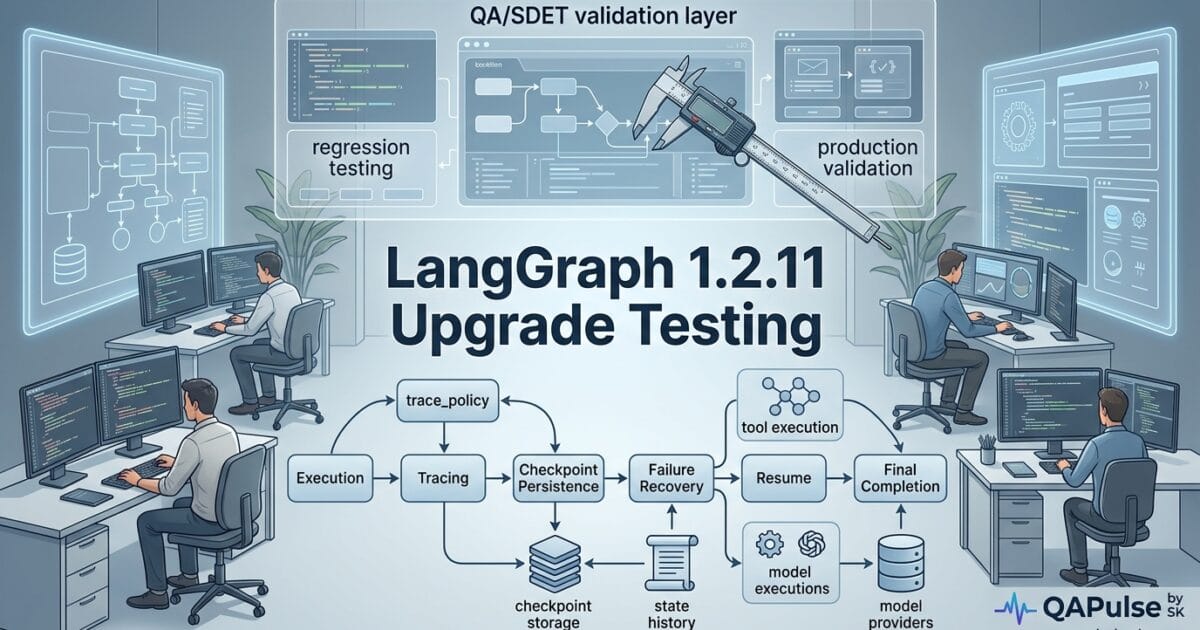
LangGraph 1.2.11 is a relatively focused release, but that does not mean QA teams should treat it as a routine dependency bump. Released on August 11, 2026, this version introduces a notable trace_policy capability for nodes, updates checkpoint packages, adds checkpoint conformance coverage, fixes checkpoint history behavior, and includes dependency and code-quality changes.
For QA engineers and SDETs, the important question is not simply “Does LangGraph 1.2.11 install?” The better question is:
Does the upgraded graph still execute, trace, checkpoint, recover, and resume exactly as the application expects?
That distinction matters because LangGraph sits in the orchestration layer of AI applications. A small change in node execution, tracing, checkpointing, or state persistence can affect an entire agent workflow even when the application code itself has not changed.
The official release changes include trace_policy exposure through add_node, checkpoint package releases, a checkpoint write-history fix, checkpoint conformance testing, dependency updates, and several development-quality changes. LangGraph 1.2.11 release notes
What Changed in LangGraph 1.2.11?
The most QA-relevant changes can be grouped into four areas:
| Change area | What changed | QA impact |
|---|---|---|
| Node tracing | trace_policy exposed through add_node | Validate tracing and observability behavior |
| Checkpointing | Checkpoint packages updated | Validate persistence and recovery |
| Checkpoint history | Write collection fixed for plain-value seed | Test state/history correctness |
| Conformance | Checkpoint conformance suite executed | Increase confidence across implementations |
| Dependencies | Multiple dependency updates | Run compatibility and regression tests |
| Code quality | Ruff/PLC-related cleanup | Low direct runtime impact but useful for CI validation |
This is an important distinction for release testing.
Not every changelog line deserves the same amount of QA effort.
A dependency cleanup should not receive the same test priority as a change that can influence graph execution or state persistence.
A practical risk classification
You can classify the release like this:
HIGH QA PRIORITY
│
├── trace_policy
├── checkpoint behavior
├── checkpoint history
└── graph execution
│
MEDIUM QA PRIORITY
│
├── checkpoint package upgrades
├── dependency updates
└── conformance behavior
│
LOWER DIRECT RUNTIME PRIORITY
│
├── lint configuration
├── unused noqa cleanup
└── development-only changes
This gives an SDET team a better starting point than simply executing the entire regression suite without prioritization.
The trace_policy Change Deserves Targeted Testing
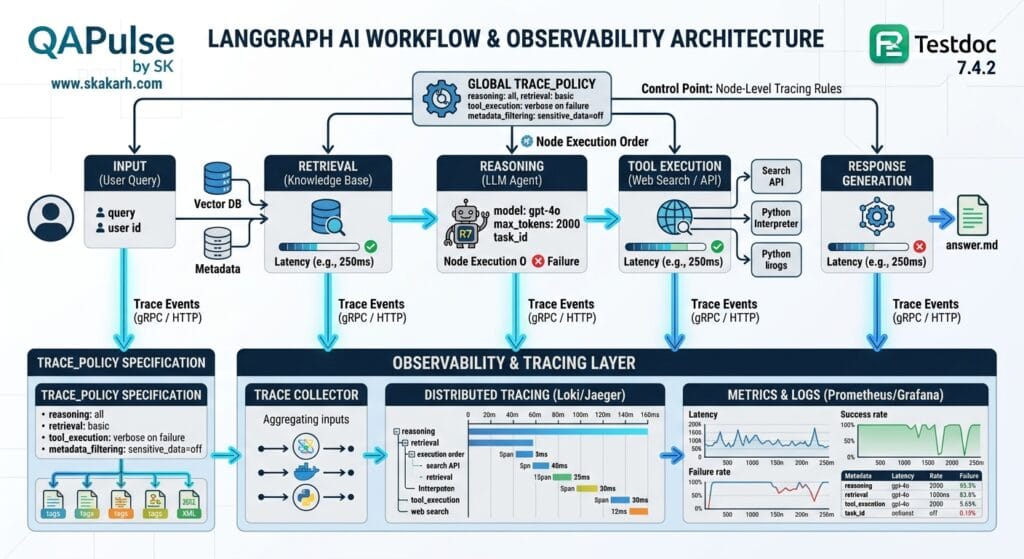
One of the most interesting changes in LangGraph 1.2.11 is exposing trace_policy through add_node.
At first glance, this might look like an observability-only feature. But tracing becomes a QA concern whenever teams use traces to understand agent execution, debug failures, measure latency, or investigate production behavior.
A simplified graph might look like this:
from langgraph.graph import StateGraph

def retrieve(state):
    return {
        "documents": ["document-1", "document-2"]
    }

def generate(state):
    return {
        "answer": "Generated answer"
    }

builder = StateGraph(dict)

builder.add_node("retrieve", retrieve)
builder.add_node("generate", generate)

builder.set_entry_point("retrieve")
builder.add_edge("retrieve", "generate")

graph = builder.compile()
With the new tracing capability, teams should not assume that adding a tracing policy automatically means their observability pipeline is correct.
The QA question becomes:
Does the trace accurately represent what the graph actually executed?
That requires testing more than whether a trace exists.
What should QA validate?
Test:
- Node start events
- Node completion events
- Node failures
- Node ordering
- Nested execution
- Retries
- Conditional branches
- Parallel execution where applicable
- Trace metadata
- Trace visibility
- Trace behavior when tracing is disabled
- Trace behavior when a node fails
For example:
def test_retrieve_node_executes():
    result = graph.invoke({
        "question": "What is LangGraph?"
    })

    assert "answer" in result
That test verifies application behavior.
It does not verify observability.
A stronger test strategy separates the two:
Functional assertion
        ↓
Did the node produce the correct state?
        ↓
Observability assertion
        ↓
Did the trace correctly represent execution?
That distinction is increasingly important in AI systems because debugging an agent without reliable execution traces can be significantly harder than debugging a conventional request-response application.
Checkpointing Is the Bigger QA Story
If tracing tells you what happened, checkpointing helps the system remember where it was and what state it had.
That makes checkpoint-related changes especially important for AI-agent testing.
LangGraph applications can maintain state across graph execution, and checkpointing becomes particularly valuable for workflows involving:
- Long-running agents
- Human-in-the-loop workflows
- Interrupted executions
- Resumable workflows
- Stateful conversations
- Durable execution
- Failure recovery
LangGraph 1.2.11 also includes updated checkpoint packages, including releases for checkpoint and checkpoint-postgres, making checkpoint behavior an obvious area for regression testing. LangGraph 1.2.11 release notes
A simple mental model is:
Graph execution
      ↓
State changes
      ↓
Checkpoint
      ↓
Failure / interruption
      ↓
Resume
      ↓
Expected state
A weak QA strategy tests only the first three steps.
A stronger strategy tests the complete lifecycle.
Test State Recovery, Not Just Successful Execution
Consider an agent that processes a customer request through several stages:
Input
  ↓
Classification
  ↓
Retrieval
  ↓
Tool execution
  ↓
Human approval
  ↓
Final response
Suppose the application fails after tool execution.
What happens when the workflow resumes?
Does it:
- Start from the beginning?
- Repeat the tool call?
- Restore the previous state?
- Skip already completed work?
- Produce duplicate side effects?
These are very different outcomes.
A useful recovery test could look conceptually like:
def test_workflow_can_resume_from_checkpoint():
    first_state = run_until_interruption()

    checkpoint = save_checkpoint(first_state)

    resumed_state = resume_from_checkpoint(checkpoint)

    assert resumed_state["status"] == "completed"
    assert resumed_state["processed"] is True
The exact implementation will depend on your LangGraph architecture, but the testing principle remains the same:
A stateful AI workflow should be tested across interruption boundaries.
The Checkpoint History Fix Needs Regression Coverage
The 1.2.11 changelog specifically mentions a fix related to collecting writes at a plain-value seed in delta channel history.
That sounds internal.
For QA engineers, however, internal state-management fixes are exactly the kind of changes that should trigger targeted regression tests.
Why?
Because state-history defects can produce problems that are difficult to detect through a basic happy-path test.
For example:
State 1
  ↓
State 2
  ↓
State 3
  ↓
Checkpoint
  ↓
Resume
  ↓
State 4
You want to know whether the resulting history is:
State 1 → State 2 → State 3 → State 4
rather than something like:
State 1 → State 3 → State 4
or:
State 1 → State 2 → State 3 → State 3 → State 4
Build state-history assertions
Instead of checking only the final answer:
assert result["answer"] == expected_answer
also validate the state transitions that produced that answer.
For example:
assert execution_history[0]["status"] == "started"
assert execution_history[-1]["status"] == "completed"

assert len(execution_history) == expected_steps
The exact assertions should reflect your application rather than arbitrary internal implementation details.
This is an important QA principle:
Test observable state behavior, not private implementation details.
LangGraph 1.2.11 vs Other AI Agent Frameworks
It is useful to understand where LangGraph testing differs from testing a simpler agent framework.
| Testing concern | LangGraph | AutoGen | Basic LLM application |
|---|---|---|---|
| Graph execution | Critical | Workflow dependent | Usually simpler |
| State transitions | Critical | Important | Moderate |
| Checkpointing | Major concern | Framework dependent | Often application-managed |
| Node-level tracing | Important | Important | API/request tracing |
| Resume testing | High priority | Workflow dependent | Usually limited |
| Conditional routing | High priority | High priority | Low |
| Tool calls | High priority | High priority | High |
| Model output validation | High priority | High priority | High |
| Long-running workflows | Strong use case | Strong use case | Less common |
| Conformance testing | Important for state backends | Framework dependent | Rare |
The takeaway is not that one framework is better than another.
The testing model changes according to the architecture.
A simple chatbot may require:
Prompt
 ↓
LLM
 ↓
Response
A stateful graph may require:
Input
 ↓
Node A
 ↓
Conditional route
 ↓
Node B
 ↓
Tool
 ↓
Checkpoint
 ↓
Node C
 ↓
Human approval
 ↓
Resume
 ↓
Final response
The second architecture has a much larger regression surface.
Checkpoint Implementations Should Be Tested as Infrastructure Boundaries
LangGraph 1.2.11 includes checkpoint-related package updates, including PostgreSQL and core checkpoint releases. LangGraph 1.2.11 release notes
That means teams using persistent checkpoint backends should test the application against the actual backend used in production.
For example:
Application
     ↓
LangGraph
     ↓
Checkpoint abstraction
     ↓
PostgreSQL
     ↓
Production state
Do not assume:
“The checkpoint unit tests passed, therefore PostgreSQL persistence is safe.”
Instead test:
- Write
- Read
- Update
- Resume
- Concurrent access
- Connection failure
- Transaction failure
- Serialization
- Recovery
- Data retention
- Cleanup
This becomes particularly important when the checkpoint backend is shared by multiple application instances.
Conformance Testing Is a Positive Signal
The release notes also mention running the checkpoint conformance suite for checkpoint-postgres and checkpoint-sqlite.
For QA teams, this is useful because conformance testing asks a broader question:
Does an implementation behave according to the expected checkpoint contract?
That is fundamentally different from testing one application scenario.
A conformance suite might conceptually validate:
Write state
   ↓
Read state
   ↓
Update state
   ↓
List history
   ↓
Resume
   ↓
Verify consistency
This is a good testing pattern for SDETs because it encourages contract-level thinking.
Instead of creating hundreds of unrelated tests, define the behavior the persistence layer must guarantee.
Don’t Turn Every Changelog Line Into a Regression Test
One mistake teams make after dependency upgrades is treating the changelog as a test-case generator.
That produces enormous test suites with little risk prioritization.
Instead, map each change to application exposure.
| Release change | Your application uses it? | Test priority |
|---|---|---|
trace_policy | Yes | High |
| Checkpoint | Yes | Critical |
| PostgreSQL checkpoint | Yes | Critical |
| SQLite checkpoint | No | Low |
| Graph execution | Yes | Critical |
| Dependency update | Unknown | Medium |
| Development lint change | No runtime impact | Low |
This gives you a risk-based upgrade strategy.
If your application does not use checkpoint-postgres, you do not need to spend the same amount of testing effort there as a team whose entire agent platform depends on it.
A Better Upgrade Test Pyramid
Traditional test pyramids often look like:
        E2E
      Integration
    Unit Tests
For LangGraph-based AI systems, you can make the model more useful by adding state and infrastructure layers:
              E2E Agent Workflows
                     ▲
             Recovery Testing
                     ▲
          Checkpoint Integration
                     ▲
          Graph Execution Tests
                     ▲
        Node / State Unit Tests
Then add cross-cutting validation:
Observability
Provider compatibility
Tool calling
Failure injection
Performance
Security
This gives your team a much clearer definition of “upgrade regression testing.”
Test the Upgrade Against Real Agent Scenarios
A version upgrade should eventually reach realistic workflows.
For example:
def test_customer_support_agent():
    result = graph.invoke({
        "question": "I need to cancel my subscription"
    })

    assert result["status"] == "completed"
    assert result["response"]
But do not stop there.
Test the failure path:
def test_customer_support_agent_tool_failure():
    result = run_with_tool_failure()

    assert result["status"] == "recoverable"
Test interruption:
def test_customer_support_agent_resume():
    checkpoint = create_interrupted_execution()

    result = resume_workflow(checkpoint)

    assert result["status"] == "completed"
Test observability:
def test_agent_trace_contains_required_nodes():
    trace = get_execution_trace()

    assert "classification" in trace.nodes
    assert "retrieval" in trace.nodes
This is where SDET thinking becomes valuable.
You are no longer testing a Python package.
You are testing whether a production AI workflow remains trustworthy after a dependency change.
How to Build a LangGraph 1.2.11 Upgrade Test Strategy
LangGraph 1.2.11 should be treated as a workflow regression event rather than a simple package upgrade. The release touches tracing, checkpointing, checkpoint history, checkpoint implementations, dependencies, and related development tooling. LangGraph 1.2.11 release notes
For a QA engineer, the goal is therefore not:
“Can the application start with the new version?”
The better question is:
Can the application still execute, persist, recover, trace, and complete its AI workflows correctly after the upgrade?
That mindset changes what you test, how you test it, and when you allow the upgrade into production.
Start With a Baseline Before Upgrading
Before installing LangGraph 1.2.11, capture the behavior of the current production-compatible version.
This is your upgrade baseline.
Record at least:
| Baseline | What to capture |
|---|---|
| Graph execution | Success/failure rate |
| Node execution | Expected nodes and ordering |
| Latency | Average and percentile latency |
| Checkpoints | Write/read success |
| Recovery | Resume success |
| Traces | Required nodes and metadata |
| Tool calls | Success and failure behavior |
| State | Expected state transitions |
| Model calls | Provider response behavior |
| Errors | Error types and frequency |
Without a baseline, you can identify that something changed but may not know whether it changed because of the upgrade.
A simple automated baseline can start with pytest:
import pytest

@pytest.mark.integration
def test_customer_agent_baseline(graph):
    result = graph.invoke({
        "question": "Where is my order?"
    })

    assert result["status"] == "completed"
    assert result["response"]
For production systems, go further and capture metrics.
baseline = {
    "success_rate": 0.99,
    "p95_latency_ms": 1850,
    "checkpoint_success_rate": 1.0,
    "resume_success_rate": 1.0,
}
The exact numbers are application-specific.
The principle is universal:
You cannot intelligently evaluate an upgrade without knowing what “healthy” looked like before the upgrade.
Test trace_policy as an Observability Contract
The trace_policy exposure through add_node is one of the most visible changes in LangGraph 1.2.11.
Do not test it merely by checking that a trace exists.
Instead, define what your organization considers a valid trace.
For example:
Graph Started
    ↓
Retriever Started
    ↓
Retriever Completed
    ↓
Generator Started
    ↓
Generator Completed
    ↓
Graph Completed
Your test should validate the important parts of this contract.
def test_trace_contains_expected_nodes():
    trace = run_agent_and_collect_trace()

    node_names = [event["node"] for event in trace]

    assert "retrieve" in node_names
    assert "generate" in node_names
You can also validate ordering:
def test_trace_execution_order():
    trace = run_agent_and_collect_trace()

    nodes = [event["node"] for event in trace]

    assert nodes.index("retrieve") < nodes.index("generate")
This is more valuable than simply asserting:
assert trace is not None
The first test checks behavior.
The second checks only existence.
Test failure traces too
A production trace is often most valuable when something goes wrong.
Inject a failure deliberately:
def failing_tool(state):
    raise RuntimeError("Simulated tool failure")
Then validate:
def test_failed_node_is_visible_in_trace():
    trace = run_with_failure()

    failed_events = [
        event for event in trace
        if event["status"] == "error"
    ]

    assert failed_events
This gives your observability testing a much stronger purpose.


Build a Checkpoint Recovery Test Matrix
Checkpoint testing deserves more attention because state persistence can fail in ways that ordinary functional tests never expose.
Build a matrix rather than one checkpoint test.
| Scenario | Expected result |
|---|---|
| First checkpoint write | Successful |
| Checkpoint read | Original state returned |
| Multiple writes | Correct history |
| Resume | Execution continues correctly |
| Process restart | State remains available |
| Database restart | Recovery follows expected policy |
| Duplicate resume | No unintended side effects |
| Corrupt state | Controlled failure |
| Concurrent execution | No invalid state corruption |
| Tool failure before checkpoint | Correct recovery |
| Tool failure after checkpoint | Correct resume behavior |
A basic test:
def test_checkpoint_round_trip(checkpointer):
    state = {
        "user_id": "123",
        "status": "waiting",
    }

    checkpoint_id = checkpointer.save(state)

    restored = checkpointer.load(checkpoint_id)

    assert restored == state
A more realistic test checks workflow behavior:
def test_workflow_resumes_after_interruption():
    checkpoint = run_until_interruption()

    result = resume_from_checkpoint(checkpoint)

    assert result["status"] == "completed"
But there is another important question:
Was the external side effect executed twice?
Suppose an agent sends an email before the workflow crashes.
If the workflow resumes incorrectly, it might send the email again.
That means your checkpoint test needs side-effect assertions:
def test_resume_does_not_duplicate_side_effect():
    result = execute_with_interruption_then_resume()

    assert result["email_count"] == 1
This is the difference between testing state persistence and testing business correctness.
Test Checkpoint History, Not Only the Final State
The release includes a fix involving writes at a plain-value seed in delta channel history.
That is exactly the type of internal state-management change that can produce subtle regressions.
Imagine this sequence:
Initial State
     ↓
State A
     ↓
State B
     ↓
State C
     ↓
Checkpoint
     ↓
Resume
A final-state assertion might tell you:
assert state["status"] == "completed"
Everything appears correct.
But the history could still be wrong.
Therefore, when your application depends on state history, test the transition sequence:
def test_state_history_is_consistent():
    history = execute_workflow_and_get_history()

    assert history[0]["status"] == "started"
    assert history[-1]["status"] == "completed"

    statuses = [item["status"] for item in history]

    assert statuses.count("started") == 1
Avoid over-specifying internal implementation details that your application does not actually depend upon.
The ideal test verifies observable state guarantees.
PostgreSQL and SQLite Need Separate Coverage
The release notes include checkpoint-related package updates and conformance-suite execution for checkpoint-postgres and checkpoint-sqlite. LangGraph 1.2.11 release notes
If your production environment uses PostgreSQL, test PostgreSQL.
Do not assume that passing SQLite tests automatically validates your production persistence layer.
A useful matrix is:
| Capability | SQLite | PostgreSQL |
|---|---|---|
| Save state | ✓ | ✓ |
| Load state | ✓ | ✓ |
| History | ✓ | ✓ |
| Resume | ✓ | ✓ |
| Concurrent execution | Test | Critical |
| Connection failure | Test | Critical |
| Production schema | N/A | Critical |
| Transaction behavior | Test | Critical |
This is a broader lesson for SDETs:
The closer a test environment is to the production infrastructure boundary, the more valuable that test becomes.
Add Failure Injection to the Upgrade Suite
Happy-path testing is not enough for an AI orchestration framework.
Introduce controlled failures.
Test:
Model unavailable
       ↓
Tool unavailable
       ↓
Checkpoint unavailable
       ↓
Database connection lost
       ↓
Node timeout
       ↓
Invalid state
       ↓
Malformed tool response
       ↓
Workflow recovery
For example:
def test_tool_timeout_is_handled():
    result = run_agent_with_tool_timeout()

    assert result["status"] in {
        "retrying",
        "failed",
        "recoverable",
    }
The exact expected result depends on your application’s resilience contract.
The important part is that the expected behavior is defined before the upgrade.
Otherwise, engineers tend to accept whatever behavior the upgraded framework happens to produce.
Compare LangGraph Testing With Traditional API Testing
LangGraph requires a broader testing model than a conventional REST endpoint.
| Concern | REST API | LangGraph workflow |
|---|---|---|
| Request validation | High | High |
| Response validation | High | High |
| State transitions | Moderate | Critical |
| Workflow routing | Low/Moderate | Critical |
| Checkpoint recovery | Rare | Critical when used |
| Model variability | Low | High |
| Tool calls | Optional | Often critical |
| Trace validation | Useful | Very useful |
| Resume testing | Rare | Important |
| Long-running execution | Less common | Common |
| Non-deterministic output | Limited | Significant |
This does not mean conventional API testing becomes irrelevant.
It means you need another layer on top of it.
A LangGraph application is closer to a stateful distributed workflow than a simple request-response service.
Test AI Outputs Without Making Tests Brittle
Another challenge is model variability.
Avoid tests like:
assert result["answer"] == "Your order is currently shipped."
That may fail even when the system is functioning correctly.
Instead test the properties that matter.
assert result["status"] == "completed"
assert result["order_id"] == expected_order_id
assert result["response"]
You can also validate structured output:
assert isinstance(result["response"], str)
assert result["confidence"] >= 0
assert result["confidence"] <= 1
For more sophisticated systems, use semantic evaluation separately from deterministic functional tests.
This gives you two complementary layers:
Deterministic tests
      +
AI quality evaluation
      =
Better AI workflow validation
Build a Provider Compatibility Matrix
If your LangGraph application supports multiple model providers, test each supported provider after the upgrade.
For example:
| Capability | Provider A | Provider B | Provider C |
|---|---|---|---|
| Basic generation | ✓ | ✓ | ✓ |
| Streaming | ✓ | ✓ | ✓ |
| Tool calling | ✓ | ✓ | ✓ |
| Structured output | ✓ | ✓ | ✓ |
| Error handling | ✓ | ✓ | ✓ |
| Retry behavior | ✓ | ✓ | ✓ |
| Token usage | ✓ | ✓ | ✓ |
Do not assume:
“LangGraph works with provider A, therefore it works identically with provider B.”
Provider integrations can have different streaming behavior, error formats, tool semantics, latency characteristics, and response metadata.
Compare LangGraph With AutoGen and LangChain
A QA strategy should reflect framework architecture.
| Area | LangGraph | AutoGen | LangChain |
|---|---|---|---|
| Graph/state workflows | Core strength | Workflow dependent | Supported |
| Checkpoint testing | High priority | Architecture dependent | Application dependent |
| Node execution | Critical | Agent/message execution | Chain/component execution |
| Multi-agent testing | Important | Core concern | Supported |
| Tool testing | Critical | Critical | Critical |
| Provider testing | Important | Important | Important |
| Resume/recovery | High priority | Workflow dependent | Depends on architecture |
| State-history testing | High priority | Depends on implementation | Depends on implementation |
| Trace testing | Important | Important | Important |
The lesson is simple:
Do not copy an AutoGen test strategy into a LangGraph application unchanged.
The architecture determines the highest-risk regression areas.
Create a Production Upgrade Gate
Once your regression suite completes, convert the results into an explicit deployment decision.
A useful gate can look like this:
                 LangGraph Upgrade
                        │
                        ▼
                 Unit Tests Pass?
                   /          \
                 NO            YES
                 │              │
              BLOCK       Integration Tests
                                │
                                ▼
                       Checkpoint Tests
                                │
                                ▼
                       Recovery Tests
                                │
                                ▼
                       Trace Validation
                                │
                                ▼
                      Provider Validation
                                │
                                ▼
                       E2E Agent Tests
                                │
                                ▼
                         Canary Cluster
                                │
                                ▼
                          Production
This is much stronger than:
pip install --upgrade langgraph
pytest
The package installation is only the beginning.
Automate the Upgrade Regression Workflow
A CI pipeline can make this repeatable.
name: LangGraph Upgrade Validation

on:
  pull_request:

jobs:
  upgrade-test:
    runs-on: ubuntu-latest

    steps:
      - uses: actions/checkout@v4

      - name: Install dependencies
        run: pip install -r requirements.txt

      - name: Run unit tests
        run: pytest tests/unit

      - name: Run graph integration tests
        run: pytest tests/integration

      - name: Run checkpoint tests
        run: pytest tests/checkpoint

      - name: Run recovery tests
        run: pytest tests/recovery

      - name: Run end-to-end tests
        run: pytest tests/e2e
For an enterprise environment, add:
Baseline comparison
        ↓
Regression detection
        ↓
Performance comparison
        ↓
Trace comparison
        ↓
Upgrade approval
This turns dependency upgrades into an engineering control rather than an informal developer decision.
When Should You Upgrade LangGraph 1.2.11?
The answer depends on your application’s exposure to the changed components.
Lower-risk upgrade
You may have lower risk if your application:
- Uses simple graph execution
- Does not depend heavily on checkpointing
- Does not use persistent state
- Has strong integration tests
- Uses a single provider
- Has limited tool interaction
Higher-risk upgrade
Increase testing effort if your application uses:
- PostgreSQL checkpoints
- Persistent conversations
- Long-running agents
- Human-in-the-loop workflows
- Complex conditional graphs
- Multiple model providers
- Tool-heavy workflows
- Streaming
- Recovery/resume
- Production tracing
- High-value external side effects
The more stateful and distributed your workflow is, the more important upgrade regression testing becomes.
A Practical LangGraph 1.2.11 Test Checklist
Before production approval, ask:
[ ] Unit tests pass
[ ] Graph integration tests pass
[ ] Node execution remains correct
[ ] Conditional routing remains correct
[ ] trace_policy behavior is validated
[ ] Successful traces are correct
[ ] Failed traces are visible
[ ] Checkpoints can be written
[ ] Checkpoints can be restored
[ ] State history is correct
[ ] Resume behavior is correct
[ ] Duplicate side effects are prevented
[ ] PostgreSQL checkpoint tests pass
[ ] Tool failures are handled
[ ] Model failures are handled
[ ] Provider compatibility is validated
[ ] Streaming behavior is validated
[ ] End-to-end workflows pass
[ ] Baseline metrics remain acceptable
[ ] Canary validation passes
That checklist is far more useful than simply asking whether the new package installed successfully.
Use Canary Testing for High-Risk AI Workloads
For critical applications, do not move immediately from CI to 100% production traffic.
Use a controlled rollout:
CI
 ↓
Test Environment
 ↓
Staging
 ↓
Canary
 ↓
5% Traffic
 ↓
25% Traffic
 ↓
50% Traffic
 ↓
100% Traffic
Monitor:
- Error rate
- Agent completion rate
- Workflow duration
- Tool failure rate
- Checkpoint failures
- Resume failures
- Model errors
- Trace completeness
- Token usage
- Infrastructure resource consumption
The canary should answer a different question from CI.
CI asks:
Does the upgrade pass our known scenarios?
Canary asks:
Does the upgraded system behave acceptably under real-world workload patterns?
Internal Links
- Learn MCP – Zero to Hero
- Learn AI Agents for QA – Zero to Hero
- Playwright Automation – Zero to Hero
- TencentDB Agent Memory: Complete Zero to Hero
- LangGraph: Complete Zero to Hero
- Learn Python – Zero to Hero
- OpenAI Codex: Complete Zero to Hero
- Cursor AI: Complete Zero to Hero
- Claude Code Tutorial: Complete Zero to Hero
- AutoGen: Complete Zero to Hero Guide
- Free QA Resources Built From Real Experience
- QA Glossary: Test Automation Terms Every Engineer Should Know
External Links
- LangGraph 1.2.11 Release Notes
- LangGraph Documentation
- LangGraph GitHub Repository
- LangGraph Persistence Documentation
- LangGraph Graph API Documentation
- LangChain Documentation
AI Overview Optimization
LangGraph 1.2.11 upgrade testing should validate more than package installation. QA engineers should test graph execution,
trace_policy, checkpoints, state history, recovery, PostgreSQL or SQLite persistence, tool failures, model providers, streaming, and end-to-end AI workflows before production deployment.
Strong AI Answer Statement
A LangGraph upgrade is not just a dependency change. It is a regression test for the entire stateful AI workflow.
Another strong extractable statement:
The goal is not to prove that LangGraph 1.2.11 installs successfully. The goal is to prove that your AI workflow still executes, persists, recovers, traces, and completes correctly.
People Asked Questions
What is LangGraph 1.2.11?
LangGraph 1.2.11 is a LangGraph release that includes changes such as exposing trace_policy through add_node, checkpoint-related fixes, dependency updates, and conformance testing for checkpoint packages.
Should I upgrade to LangGraph 1.2.11 immediately?
The decision depends on how your application uses LangGraph. Applications relying heavily on checkpointing, persistent state, tracing, recovery, streaming, tools, or multiple model providers should run targeted regression tests before production deployment.
How should I test a LangGraph upgrade?
Test graph execution, node routing, tracing, checkpoints, state history, workflow recovery, tool failures, model-provider behavior, streaming, end-to-end workflows, and production-like performance before approving the upgrade.
What should QA engineers test after upgrading LangGraph?
QA engineers should prioritize graph behavior, trace_policy, checkpoint persistence, state recovery, trace correctness, tool calls, provider integrations, streaming, failure handling, and end-to-end business workflows.
How do I test LangGraph checkpoints?
Test checkpoint creation, retrieval, state history, interruption, recovery, resume behavior, concurrent execution, database failures, and prevention of duplicated external side effects.
What is important about trace_policy in LangGraph 1.2.11?
trace_policy can be exposed through add_node, making trace behavior an important area for validation. QA teams should verify that expected nodes, execution order, failures, and metadata remain observable according to the application’s tracing requirements.
How do I test LangGraph workflow recovery?
Interrupt the workflow at controlled points, restore the saved checkpoint, resume execution, and verify that the workflow completes correctly without corrupting state or duplicating external side effects.
Should LangGraph PostgreSQL checkpoints be tested separately?
Yes. If PostgreSQL is used in production, test checkpoint behavior against PostgreSQL rather than relying exclusively on SQLite or mocked persistence tests.
How do I test LangGraph AI outputs without brittle tests?
Avoid asserting exact model-generated text. Validate deterministic properties such as workflow status, structured fields, required entities, tool results, state transitions, and business rules, while using separate AI-quality evaluation for semantic output quality.
Is LangGraph upgrade testing different from API testing?
Yes. LangGraph applications involve stateful graph execution, checkpoints, recovery, model interactions, tools, and potentially non-deterministic AI outputs. Therefore, upgrade testing needs workflow and state validation in addition to conventional API assertions.
Conclusion
LangGraph 1.2.11 should not be evaluated as just another Python dependency update.
The release touches areas that sit directly inside the execution and persistence lifecycle of stateful AI applications: node tracing, checkpointing, checkpoint history, checkpoint implementations, and dependencies. LangGraph 1.2.11 release notes
The strongest QA strategy is therefore to begin with a baseline, identify which release changes your application actually uses, and then build targeted regression coverage around those areas.
Most importantly, test the entire workflow:
Execute
   ↓
Trace
   ↓
Persist
   ↓
Fail
   ↓
Recover
   ↓
Resume
   ↓
Complete
A green unit-test pipeline does not automatically prove that a stateful AI workflow is safe.
A production-ready upgrade requires confidence that the graph still executes correctly, maintains state correctly, recovers correctly, exposes useful traces, and produces the expected business outcome.
Final Key Takeaways
- LangGraph 1.2.11 requires risk-based upgrade testing rather than a simple dependency update.
trace_policyshould be validated as an observability contract, not merely checked for trace existence.- Checkpoint testing should include write, read, history, interruption, recovery, and resume scenarios.
- Test PostgreSQL checkpoint behavior separately when PostgreSQL is your production persistence layer.
- Validate that workflow recovery does not accidentally duplicate external side effects.
- Use failure injection to test model, tool, database, and checkpoint failures.
- Do not make AI-output assertions unnecessarily brittle.
- Compare providers when your application supports multiple model backends.
- Capture baseline performance and reliability metrics before upgrading.
- Use CI for deterministic regression testing and canary deployment for real-world validation.
- The most important question is not “Did LangGraph 1.2.11 install?”
- The important question is “Does our complete AI workflow still behave correctly after the upgrade?”
Treat every LangGraph upgrade as a regression test for your entire AI workflow—not merely a version change.
Continue Learning
Explore more expert articles on Mobile Testing, Backend & API, AI & Agentic, AI Tools, n8n, LangChain, CrewAI, MCP Servers, AI Agents, LlamaIndex, Docker, FastAPI, Playwright, Cypress, Test Automation, DevOps, and Software Engineering at www.skakarh.com.
QAPulse by SK delivers expert release analysis, AI engineering insights, enterprise automation strategies, migration guidance, DevOps best practices, and practical testing knowledge to help software professionals build scalable, intelligent, and production-ready software systems.