QA
QA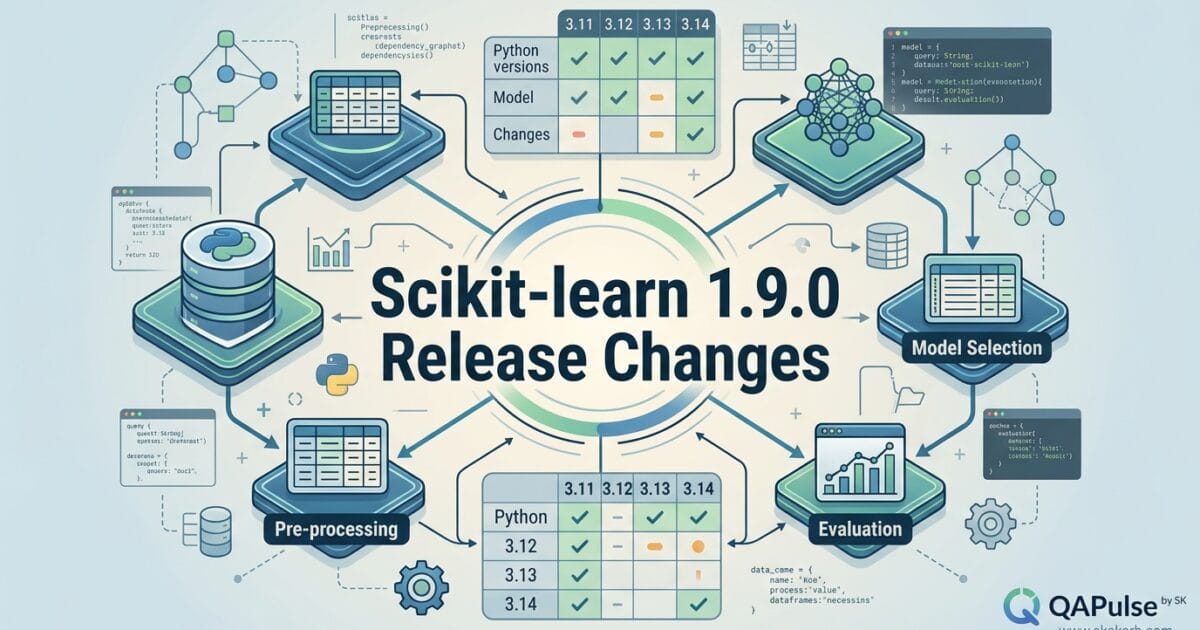
Scikit-learn 1.9.0 is more than a routine machine-learning library update. Released on June 2, 2026, this release introduces an important dependency change with Narwhals, expands dataframe interoperability, and supports Python 3.11 through 3.14. For teams maintaining machine-learning pipelines, data-processing workflows, notebooks, APIs, and automated validation suites, those changes deserve a deliberate compatibility check rather than a blind package upgrade.
The important question is not simply, “Can I install Scikit-learn 1.9.0?” The better engineering question is: What changes in my environment when I move to Scikit-learn 1.9.0?
That distinction matters because machine-learning projects rarely depend on scikit-learn alone. A typical production environment may combine NumPy, pandas, SciPy, joblib, visualization libraries, model-serving frameworks, notebooks, Python runtimes, and internal utilities. A seemingly small dependency change can therefore affect installation, imports, data conversion, test fixtures, and model pipelines.
For engineers evaluating this release, the most notable change is the introduction of Narwhals as a dependency to improve dataframe interoperability. Scikit-learn 1.9.0 also supports Python 3.11–3.14, giving teams using newer Python versions a clearer compatibility path.
What is Scikit-learn 1.9.0?
Scikit-learn is one of Python’s most widely used machine-learning libraries for supervised learning, unsupervised learning, preprocessing, model selection, evaluation, and pipeline construction.
The 1.9.0 release continues that ecosystem with a focus on compatibility and dataframe interoperability rather than positioning itself as a completely new machine-learning platform.
The release highlights three things that should immediately catch an engineer’s attention:
- Narwhals becomes a new dependency
- Dataframe interoperability receives additional attention
- Python 3.11 through 3.14 are supported
For a simple project, upgrading may be straightforward.
For a production ML platform, however, you should treat the upgrade as a dependency and compatibility exercise.
A useful mental model is:
Python runtime
      ↓
NumPy / SciPy
      ↓
Narwhals / dataframe layer
      ↓
Scikit-learn
      ↓
Your ML pipeline
      ↓
Tests / CI / deployment
The higher the number of dependencies around your model, the more valuable it becomes to validate the complete environment rather than testing only whether import sklearn succeeds.
Why the Narwhals Dependency Matters
The most interesting change in Scikit-learn 1.9.0 is the addition of Narwhals as a dependency.
Narwhals is designed to provide a compatibility layer across dataframe libraries and dataframe-like APIs. That matters because modern Python data workflows are no longer limited to one dataframe implementation.
Historically, many machine-learning workflows have been written around pandas:
import pandas as pd
from sklearn.preprocessing import StandardScaler

df = pd.DataFrame({
    "age": [25, 32, 41],
    "income": [40000, 55000, 80000]
})

scaler = StandardScaler()
scaled = scaler.fit_transform(df)

print(scaled)
That workflow is familiar and stable.
But data engineering ecosystems are becoming more diverse. Teams may use pandas, Polars, Arrow-based systems, distributed data processing, or other dataframe-compatible technologies.
This is where dataframe interoperability becomes strategically important.
Instead of thinking:
Machine Learning → pandas only
the ecosystem is moving toward:
Machine Learning
       ↓
Dataframe abstraction
       ↓
Multiple dataframe implementations
That can make it easier for libraries to support different dataframe ecosystems without creating completely separate implementations for every library.


Scikit-learn 1.9.0 and Dataframe Interoperability
For developers, interoperability can sound abstract.
For a real ML system, it can affect how data moves between preprocessing, feature engineering, model training, and prediction.
Consider a pipeline:
from sklearn.pipeline import Pipeline
from sklearn.preprocessing import StandardScaler
from sklearn.linear_model import LogisticRegression

pipeline = Pipeline([
    ("scaler", StandardScaler()),
    ("model", LogisticRegression())
])

pipeline.fit(X_train, y_train)
predictions = pipeline.predict(X_test)
The model itself may be simple.
The difficult part in production is often everything around it:
Raw data
   ↓
Dataframe
   ↓
Feature engineering
   ↓
Preprocessing
   ↓
Model
   ↓
Prediction
   ↓
Validation
   ↓
Serving
An interoperability layer can become valuable when different parts of the data ecosystem use different dataframe technologies.
For QA and automation engineers, this creates a new testing question:
Does the pipeline produce equivalent results when the input dataframe implementation changes?
That is a much better test than simply checking whether the package installed successfully.
A Practical Compatibility Test
After installing the new release, begin with a basic environment check:
python --version
pip show scikit-learn
pip show narwhals
Then verify the actual Python imports:
import sklearn
import narwhals

print("scikit-learn:", sklearn.__version__)
print("narwhals:", narwhals.__version__)
You can turn this into an automated smoke test:
def test_ml_environment():
    import sklearn
    import narwhals

    assert sklearn.__version__.startswith("1.9.")
    assert narwhals.__version__ is not None
This is useful in CI because dependency problems can be detected before they reach model-training or deployment stages.
However, don’t stop at package imports.
A healthy ML upgrade should also validate behavior.
Installation Success Is Not Compatibility Success
One of the most common mistakes when upgrading Python libraries is treating successful installation as proof that the upgrade is safe.
For example:
pip install -U scikit-learn
may complete successfully.
That only proves that pip found an installable dependency graph for the current environment.
It does not prove that:
- existing pipelines still behave correctly
- serialized models remain compatible with your workflow
- preprocessing produces expected results
- CI passes
- dataframe operations behave as expected
- Python-version-specific environments remain stable
- downstream applications continue working
Think about upgrade validation as four layers:
| Validation layer | What you should verify |
|---|---|
| Installation | Dependencies resolve correctly |
| API | Imports and expected APIs still work |
| Behavior | Models and transformations produce expected results |
| Production | CI, deployment and inference workflows remain healthy |
This distinction is particularly important for Scikit-learn 1.9.0 because the dependency ecosystem is part of the release story.
Python 3.11–3.14 Support Changes the Upgrade Conversation
Scikit-learn 1.9.0 supports Python 3.11, 3.12, 3.13, and 3.14.
That gives teams several runtime choices.
A useful compatibility matrix for your CI pipeline might look like this:
strategy:
  matrix:
    python-version:
      - "3.11"
      - "3.12"
      - "3.13"
      - "3.14"
The important point is not that every project must immediately move to Python 3.14.
Instead, use the release as an opportunity to determine whether your dependency stack is ready for the Python version you actually intend to support.
For example:
Production
Python 3.12
    ↓
Scikit-learn 1.9.0

Compatibility testing
Python 3.13
    ↓
Scikit-learn 1.9.0

Forward compatibility
Python 3.14
    ↓
Scikit-learn 1.9.0
This approach separates upgrading scikit-learn from upgrading Python.
You don’t necessarily need to change both at the same time.
Scikit-learn 1.9.0 vs Staying on the Previous Version
A release decision should be based on project requirements rather than version numbers alone.
| Consideration | Stay on existing version | Move to Scikit-learn 1.9.0 |
|---|---|---|
| Current pipeline is stable | Lower immediate risk | Requires validation |
| Need newer Python support | May be limiting | Better fit for 3.11–3.14 |
| Dataframe interoperability | Existing behavior | New ecosystem opportunity |
| Dependency changes | No immediate change | Narwhals introduced |
| CI effort | Minimal | Requires regression testing |
| Long-term maintenance | May become harder | Keeps stack current |
This does not mean every team should upgrade immediately.
Instead, ask three questions:
- Do we need the new compatibility capabilities?
- Can our dependency stack support the new environment?
- Can we validate the upgrade automatically?
If the answer to all three is yes, the upgrade becomes considerably easier to justify.
Compare the Upgrade Strategy With Other Python Libraries
Different Python libraries require different upgrade strategies.
| Library type | Typical upgrade concern | Recommended validation |
|---|---|---|
| Dataframe library | API/data behavior | Transformation tests |
| Numerical library | Numerical compatibility | Calculation regression tests |
| ML library | Model and pipeline behavior | Golden prediction tests |
| Web framework | API/runtime behavior | Integration tests |
| Test framework | Test execution behavior | Full CI suite |
Scikit-learn belongs in the category where behavioral regression testing matters heavily.
A model can still train successfully while producing subtly different outputs because of preprocessing, dependency, configuration, or environment changes.
That is why a serious upgrade strategy should include expected-result validation.
For example:
def test_prediction_regression(model, test_data):
    predictions = model.predict(test_data)

    expected = [0, 1, 1, 0]

    assert predictions.tolist() == expected
For larger models, exact equality may not be appropriate. You may instead validate metrics or acceptable numerical tolerances:
accuracy = model.score(X_test, y_test)

assert accuracy >= 0.90
The correct threshold depends on the application.
The strategic principle remains the same:
Test the outcome that matters to the business, not merely the fact that the library upgraded successfully.
A Safer Upgrade Workflow
For teams using Scikit-learn 1.9.0 in production, a controlled upgrade can follow this sequence:
Create isolated environment
        ↓
Install Scikit-learn 1.9.0
        ↓
Resolve dependency changes
        ↓
Run import smoke tests
        ↓
Run preprocessing tests
        ↓
Run model regression tests
        ↓
Run integration tests
        ↓
Run CI across supported Python versions
        ↓
Deploy to staging
        ↓
Validate inference
        ↓
Promote to production
An isolated environment makes rollback easier:
python -m venv .venv-scikit-learn-190

source .venv-scikit-learn-190/bin/activate

python -m pip install --upgrade pip
python -m pip install scikit-learn==1.9.0
On Windows:
python -m venv .venv-scikit-learn-190

.venv-scikit-learn-190\Scripts\activate

python -m pip install --upgrade pip
python -m pip install scikit-learn==1.9.0
Pinning the exact version during validation is preferable to immediately using an unconstrained upgrade:
python -m pip install scikit-learn==1.9.0
Once the environment passes your validation suite, update the project’s dependency management strategy deliberately.
Turn the Release Into an Engineering Experiment
Instead of asking:
“Should we upgrade?”
ask:
“What evidence would convince us that the upgrade is safe?”
Create a small upgrade scorecard:
[ ] Installation succeeds
[ ] Narwhals dependency resolves
[ ] Existing imports pass
[ ] Data transformations pass
[ ] Model predictions pass
[ ] Regression metrics pass
[ ] Python 3.11 environment passes
[ ] Python 3.12 environment passes
[ ] Python 3.13 environment passes
[ ] Python 3.14 environment passes
[ ] CI passes
[ ] Staging inference passes
This transforms a package upgrade into a measurable engineering exercise.
For teams maintaining multiple ML services, this approach can also expose which applications are ready for modernization and which ones still depend on older runtime assumptions.
The biggest lesson from Scikit-learn 1.9.0 is therefore not simply the version number. It is the direction of the Python ML ecosystem: interoperability, broader runtime support, and stronger integration between data tools and machine-learning workflows.
Scikit-learn 1.9.0 Upgrade Strategy: Test the Environment, Not Just the Package
Scikit-learn 1.9.0 deserves a more deliberate upgrade strategy because the release is not only about adding another version number to requirements.txt. The release introduces Narwhals as a dependency for dataframe interoperability and supports Python 3.11 through 3.14. Those changes can affect the environment surrounding your machine-learning workloads even when your own model code appears unchanged.
The safest approach is to treat Scikit-learn 1.9.0 as an environment change and then prove that your application still behaves correctly.
Build an Upgrade Test Matrix Before Changing Production
A useful upgrade starts with a matrix rather than a package command.
For example:
| Area | What to test | Success criteria |
|---|---|---|
| Python runtime | 3.11–3.14 | Environment builds successfully |
| Scikit-learn | 1.9.0 | Correct version installed |
| Dependencies | Narwhals and existing packages | No incompatible resolution |
| Preprocessing | Transformers and encoders | Expected outputs |
| Models | Training and inference | Regression tests pass |
| Pipelines | End-to-end execution | No behavioral regression |
| CI | Complete test suite | All required jobs pass |
| Deployment | Staging environment | Application remains healthy |
This approach is particularly useful when several teams consume the same internal ML platform.
Instead of asking every developer to manually validate the release, create one reusable compatibility suite.
import sklearn
import narwhals

def test_runtime_versions():
    assert sklearn.__version__.startswith("1.9.")
    assert narwhals.__version__
The version check is only the first layer.
A successful import tells you almost nothing about whether your actual machine-learning workload still behaves correctly.
Test the Data Boundary
The dataframe interoperability direction is one of the most interesting aspects of Scikit-learn 1.9.0.
Your tests should therefore pay attention to the boundary between data preparation and model processing.
Consider a conventional workflow:
import pandas as pd

from sklearn.preprocessing import StandardScaler
from sklearn.pipeline import Pipeline
from sklearn.linear_model import LogisticRegression

data = pd.DataFrame({
    "age": [21, 30, 42, 55],
    "income": [30000, 50000, 75000, 95000]
})

X = data[["age", "income"]]
y = [0, 0, 1, 1]

pipeline = Pipeline([
    ("scale", StandardScaler()),
    ("model", LogisticRegression())
])

pipeline.fit(X, y)

predictions = pipeline.predict(X)

print(predictions)
A good regression test should capture the expected behavior rather than merely checking that fit() completes.
def test_pipeline_predictions():
    pipeline.fit(X, y)

    predictions = pipeline.predict(X)

    assert len(predictions) == len(y)
For a deterministic model and controlled test data, you can go further:
def test_prediction_values():
    pipeline.fit(X, y)

    predictions = pipeline.predict(X)

    assert predictions.tolist() == [0, 0, 1, 1]
The exact assertion should depend on the model and business requirements.
The principle is simple: validate the contract at the data-to-model boundary.


Compare Scikit-learn 1.9.0 With a Conservative Upgrade
Not every project needs the same upgrade policy.
A startup experimenting with a new ML model can accept more change than a regulated production system with hundreds of deployed models.
| Strategy | Advantage | Risk | Best suited for |
|---|---|---|---|
| Immediate upgrade | Fast access to new ecosystem support | Less validation time | Experimental projects |
| Controlled upgrade | Balance between progress and stability | Requires engineering effort | Most production teams |
| Delayed upgrade | Lowest short-term change | Technical debt grows | Legacy systems |
For most production environments, the controlled upgrade is the strongest option.
Create a branch:
git checkout -b upgrade/scikit-learn-1.9.0
Install the exact release:
python -m pip install scikit-learn==1.9.0
Freeze the resulting environment:
python -m pip freeze > requirements-scikit-learn-1.9.0.txt
Then execute the existing test suite.
pytest -q
This gives you a reproducible baseline.
Don’t Test Only the Happy Path
Machine-learning upgrade testing becomes much more valuable when it includes edge cases.
For example:
def test_empty_dataset():
    # Validate expected application behavior
    pass

def test_missing_values():
    # Validate preprocessing behavior
    pass

def test_unseen_category():
    # Validate categorical handling
    pass

def test_large_batch():
    # Validate inference behavior
    pass
Your actual tests should reflect the behavior supported by your pipeline.
For example, if your preprocessing pipeline is expected to reject missing values, test that explicitly:
import pytest

def test_missing_values_are_rejected():
    bad_data = [[25, None]]

    with pytest.raises(Exception):
        pipeline.predict(bad_data)
A stronger implementation would assert the specific exception type expected by your application rather than using a broad Exception.
The goal is to discover whether the upgrade changes behavior at the edges, where production failures frequently occur.
Test Numerical Stability Instead of Assuming It
Machine-learning systems often require a different kind of regression testing from ordinary CRUD applications.
Suppose your model previously achieved:
Accuracy: 0.941
F1:       0.927
Recall:   0.913
After upgrading Scikit-learn 1.9.0, don’t automatically require bit-for-bit equality unless your application genuinely needs it.
Instead, define acceptable tolerances.
accuracy = model.score(X_test, y_test)

assert accuracy >= 0.93
For numerical calculations:
import numpy as np

np.testing.assert_allclose(
    actual_predictions,
    expected_predictions,
    rtol=1e-5,
    atol=1e-7
)
This is more meaningful than checking whether every floating-point value is identical.
The correct tolerance should come from your application’s requirements and historical variance.
Python 3.11, 3.12, 3.13 and 3.14 Need Separate Validation
Scikit-learn 1.9.0 supports Python 3.11 through 3.14.
That does not mean your entire dependency graph automatically supports all four versions.
Your CI matrix can expose those differences:
name: ML Compatibility

on:
  push:
  pull_request:

jobs:
  test:
    runs-on: ubuntu-latest

    strategy:
      matrix:
        python-version: ["3.11", "3.12", "3.13", "3.14"]

    steps:
      - uses: actions/checkout@v4

      - uses: actions/setup-python@v5
        with:
          python-version: ${{ matrix.python-version }}

      - run: python -m pip install --upgrade pip
      - run: pip install scikit-learn==1.9.0
      - run: pip install -r requirements.txt
      - run: pytest
The important engineering insight is that Scikit-learn 1.9.0 compatibility does not automatically equal application compatibility.
Your application may depend on packages that have their own Python-version restrictions.
That is why the complete matrix matters.
Use Dependency Inspection as an Early Warning System
Before running expensive integration tests, inspect the environment.
python -m pip check
You can also inspect the installed package:
python -m pip show scikit-learn
And inspect the dependency tree if your environment provides an appropriate dependency-inspection tool.
A useful CI sequence is:
Install
  ↓
Dependency validation
  ↓
Import smoke tests
  ↓
Unit tests
  ↓
ML regression tests
  ↓
Integration tests
  ↓
Staging validation
This prevents a simple dependency problem from consuming the time required for a complete integration run.
Create Golden Predictions for Critical Models
One of the strongest techniques for a machine-learning library upgrade is a golden dataset.
Create a small, deterministic dataset containing representative inputs and expected outputs.
golden_inputs = [
    [25, 42000],
    [35, 62000],
    [48, 88000],
]

expected_predictions = [0, 1, 1]
Then validate the model after upgrading:
def test_golden_predictions(model):
    predictions = model.predict(golden_inputs)

    assert predictions.tolist() == expected_predictions
For probability-based models:
expected = [0.12, 0.76, 0.91]

actual = model.predict_proba(golden_inputs)[:, 1]

np.testing.assert_allclose(
    actual,
    expected,
    rtol=0.05,
    atol=0.01
)
This turns your existing production behavior into an automated compatibility contract.
It also gives you something valuable beyond Scikit-learn 1.9.0: a reusable regression mechanism for future dependency upgrades.
Upgrade the Library Without Upgrading Everything
Avoid turning a library upgrade into an uncontrolled ecosystem migration.
For example, this:
pip install -U scikit-learn numpy pandas scipy
changes several important variables simultaneously.
If something breaks, you may not know which package caused it.
A more controlled approach is:
python -m pip install scikit-learn==1.9.0
Then validate.
If the project also needs upgrades to other dependencies, handle those as separate changes where practical.
This creates clearer causality:
Change Scikit-learn
       ↓
Run tests
       ↓
Observe result
       ↓
Change next dependency
       ↓
Run tests again
That is slower initially but much easier to troubleshoot.
Scikit-learn 1.9.0 vs a Full Environment Refresh
These two strategies should not be confused.
| Approach | What changes | Debugging difficulty |
|---|---|---|
| Scikit-learn-only upgrade | One primary dependency | Lower |
| ML stack upgrade | Several ML dependencies | Medium |
| Full Python upgrade | Runtime + packages | High |
| Container rebuild | Runtime + OS/dependencies | Potentially high |
If your goal is specifically to evaluate Scikit-learn 1.9.0, start with the smallest meaningful change.
Once that passes, you can decide whether broader modernization is justified.
Containerize the Validation Environment
For teams running production ML services, containerized validation can make the upgrade reproducible.
A minimal example:
FROM python:3.13-slim

WORKDIR /app

COPY requirements.txt .

RUN pip install --no-cache-dir \
    scikit-learn==1.9.0 \
    -r requirements.txt

COPY . .

CMD ["pytest", "-q"]
Build it:
docker build -t ml-scikit-learn-190-test .
Run the suite:
docker run --rm ml-scikit-learn-190-test
This separates the upgrade experiment from your workstation.
It also makes it easier for another engineer to reproduce the same environment.
What Should You Test Before Production?
A practical Scikit-learn 1.9.0 checklist looks like this:
Environment
✓ Python version
✓ Package installation
✓ Dependency resolution

Data
✓ Dataframe input
✓ Missing values
✓ Data types
✓ Edge cases

ML pipeline
✓ Preprocessing
✓ Training
✓ Prediction
✓ Probability output
✓ Model metrics

Application
✓ API inference
✓ Batch processing
✓ Serialization workflow
✓ Logging
✓ Error handling

Delivery
✓ CI
✓ Container build
✓ Staging deployment
✓ Production smoke test
For critical models, add a rollback test.
You should know not only how to deploy Scikit-learn 1.9.0, but also how to return to the previous known-good environment.
When Should You Upgrade?
The answer depends on your environment.
Upgrade sooner when
- You need the supported Python 3.11–3.14 range.
- Dataframe interoperability is strategically important.
- Your dependency stack is already compatible.
- Your automated regression suite is strong.
- You maintain isolated and reproducible environments.
Validate more carefully when
- You operate critical ML models.
- Your project has extensive serialized-model workflows.
- Your dependency graph is large.
- You support multiple Python versions.
- Your tests do not currently cover model outputs.
Delay the upgrade when
- Your current environment is unstable.
- You have no meaningful regression suite.
- Your production model behavior is poorly documented.
- Multiple unrelated dependency upgrades are already underway.
The release itself isn’t the problem.
The problem is upgrading without knowing what your system considers “correct.”
A Better Upgrade Gate for ML Teams
Instead of using:
"Package installed successfully"
as your deployment gate, use:
Installation
    +
Dependency compatibility
    +
Behavioral regression
    +
Model accuracy
    +
Integration testing
    +
Production smoke testing
You can even automate the decision.
def upgrade_is_safe(
    dependency_ok,
    pipeline_ok,
    regression_ok,
    metrics_ok,
):
    return all([
        dependency_ok,
        pipeline_ok,
        regression_ok,
        metrics_ok,
    ])
Then your CI system can treat the upgrade as a quality gate rather than a manual judgment.
This is especially valuable for teams managing multiple models because the same validation framework can be reused across repositories.
The Bigger Lesson From Scikit-learn 1.9.0
Scikit-learn 1.9.0 illustrates an important shift in modern Python machine-learning engineering.
Libraries increasingly depend on interoperability layers and broader ecosystem compatibility instead of operating as isolated packages.
That means upgrade engineering needs to evolve as well.
A package manager can answer:
“Can these packages coexist?”
Your test suite needs to answer:
“Does our application still behave correctly?”
Those are two completely different questions.
If you can answer both confidently, upgrading becomes a controlled engineering operation instead of a gamble.
Internal Links
- Learn MCP – Zero to Hero
- Learn AI Agents for QA – Zero to Hero
- Playwright Automation – Zero to Hero
- TencentDB Agent Memory: Complete Zero to Hero
- LangGraph: Complete Zero to Hero
- Learn Python – Zero to Hero
- OpenAI Codex: Complete Zero to Hero
- Cursor AI: Complete Zero to Hero
- Claude Code Tutorial: Complete Zero to Hero
- AutoGen: Complete Zero to Hero Guide
- Free QA Resources Built From Real Experience
- QA Glossary: Test Automation Terms Every Engineer Should Know
External Links
- Scikit-learn 1.9.0 Release Highlights
- Scikit-learn 1.9 What’s New
- Scikit-learn GitHub Releases
- Scikit-learn Documentation
- Python Documentation
- Narwhals Documentation
People Asked Questions
What is Scikit-learn 1.9.0?
Scikit-learn 1.9.0 is a release of the Python machine-learning library that adds Narwhals as a dependency for dataframe interoperability and supports Python 3.11 through 3.14.
When was Scikit-learn 1.9.0 released?
Scikit-learn 1.9.0 was released on June 2, 2026.
What is new in Scikit-learn 1.9.0?
A notable change is the addition of Narwhals as a dependency to improve dataframe interoperability. The release also supports Python 3.11–3.14.
Does Scikit-learn 1.9.0 support Python 3.14?
Yes. Scikit-learn 1.9.0 supports Python versions 3.11, 3.12, 3.13, and 3.14.
What is Narwhals in Scikit-learn 1.9.0?
Narwhals provides an interoperability layer for dataframe APIs. Its inclusion helps Scikit-learn work more effectively with the broader dataframe ecosystem.
How do I install Scikit-learn 1.9.0?
Use:
python -m pip install scikit-learn==1.9.0For a general upgrade to the current release:
python -m pip install --upgrade scikit-learnShould I upgrade directly to Scikit-learn 1.9.0?
For production applications, test the upgrade in an isolated environment first. Validate dependencies, preprocessing, model predictions, regression metrics, CI, and staging behavior before production deployment.
Can Scikit-learn 1.9.0 break an existing ML project?
An upgrade can expose compatibility problems in the surrounding dependency ecosystem even when your application code has not changed. This is why dependency checks and regression testing are important.
How should I test a Scikit-learn upgrade?
Use layered testing:
Dependency validation
       ↓
Import tests
       ↓
Dataframe tests
       ↓
Preprocessing tests
       ↓
Model regression tests
       ↓
Integration tests
       ↓
CI
       ↓
Staging
Is Scikit-learn 1.9.0 suitable for production?
It can be, provided your application’s dependency stack and ML workflows have been validated against the release. Production readiness should be based on test evidence rather than the version number alone.
Answer Engine Optimization
Scikit-learn 1.9.0 is a release of the Python machine-learning library Scikit-learn that introduces Narwhals as a dependency for dataframe interoperability and supports Python 3.11–3.14.
Quick Facts
| Question | Answer |
|---|---|
| Version | 1.9.0 |
| Release date | June 2, 2026 |
| Python support | 3.11–3.14 |
| Notable dependency | Narwhals |
| Main ecosystem theme | Dataframe interoperability |
| Installation | pip install -U scikit-learn |
AI Overview Optimization
What changed in Scikit-learn 1.9.0?
Scikit-learn 1.9.0 is a major release that adds Narwhals as a dependency for improved dataframe interoperability and supports Python 3.11 through 3.14. Teams upgrading should validate dependency resolution, dataframe workflows, preprocessing pipelines, model predictions, and CI environments before production deployment.
What Python versions does Scikit-learn 1.9.0 support?
Scikit-learn 1.9.0 supports Python 3.11 through Python 3.14.
What is new in Scikit-learn 1.9.0?
One of the notable changes is the introduction of Narwhals as a dependency to improve dataframe interoperability. The release also supports Python 3.11–3.14.
Should I upgrade to Scikit-learn 1.9.0?
Teams should evaluate the upgrade based on dependency compatibility, Python-version requirements, dataframe workflows, model regression tests, and CI results rather than upgrading solely because a new version is available.
Does Scikit-learn 1.9.0 support Python 3.14?
Yes. Scikit-learn 1.9.0 supports Python 3.11 through 3.14.
Conclusion
Scikit-learn 1.9.0 is a release worth evaluating through the lens of ecosystem compatibility rather than version numbers alone. Its Narwhals dependency and Python 3.11–3.14 support are particularly relevant for teams modernizing their data and machine-learning environments.
The safest strategy is straightforward: isolate the upgrade, inspect dependencies, test dataframe boundaries, validate model predictions, run regression tests across supported Python versions, and verify the complete application before production rollout.
Don’t measure upgrade success by whether pip install finishes without an error. Measure it by whether your data, models, pipelines, APIs, and production behavior remain correct.
Final Key Takeaways
- Scikit-learn 1.9.0 introduces Narwhals as a dependency connected to dataframe interoperability.
- Python 3.11 through 3.14 are supported, but your complete dependency graph still needs validation.
- A successful installation is not proof of application compatibility.
- Test the complete path from dataframe → preprocessing → model → prediction.
- Use golden datasets to detect unexpected model-output changes.
- Use numerical tolerances where exact floating-point equality is inappropriate.
- Validate the release independently before combining it with unrelated dependency upgrades.
- Run CI across the Python versions your project actually supports.
- Containerized validation can make the upgrade environment reproducible.
- Most importantly, treat the upgrade as an engineering experiment with measurable quality gates, not as a simple package update.
Continue Learning
Explore more expert articles on Mobile Testing, Backend & API, AI & Agentic, AI Tools, n8n, LangChain, CrewAI, MCP Servers, AI Agents, LlamaIndex, Docker, FastAPI, Playwright, Cypress, Test Automation, DevOps, and Software Engineering at www.skakarh.com.
QAPulse by SK delivers expert release analysis, AI engineering insights, enterprise automation strategies, migration guidance, DevOps best practices, and practical testing knowledge to help software professionals build scalable, intelligent, and production-ready software systems.