QA
QA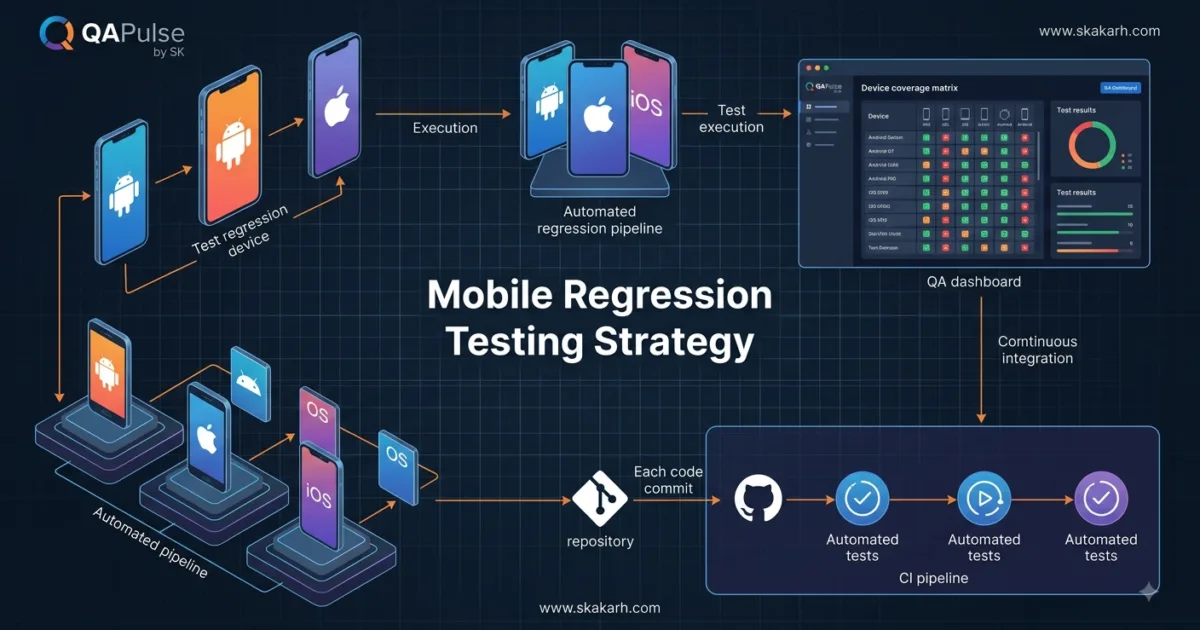
Mobile Regression Testing is one of the easiest areas of QA to misunderstand.
A team fixes one login defect, changes a payment screen, upgrades an Android dependency, or releases a new iOS version—and suddenly someone says:
“Run the full regression suite.”
That sounds reasonable.
But should you really test everything?
On how many devices?
Which operating systems?
Which network conditions?
Which user journeys?
And most importantly:
How do you know that the regression suite you just ran actually provides enough confidence to release the application?
That is the real problem.


Mobile applications are not tested against a single environment. A production user may have a completely different combination of:
Device
+ OS version
+ Screen size
+ CPU / memory
+ Network
+ Permissions
+ App version
+ Backend version
+ Locale
+ Battery state
+ Installed dependencies
A test that passes on one device does not automatically prove that the same application will behave correctly across the mobile ecosystem.
This is why mature QA teams don’t treat regression as simply “rerunning old tests.”
They treat it as a risk-selection problem.
What is Mobile Regression Testing?
Mobile regression testing is the process of verifying that existing mobile application functionality still works after changes are introduced to the application, its dependencies, backend services, operating system, configuration, or surrounding environment.
The important word is changes.
For example:
New feature
     ↓
Existing functionality
     ↓
Potential side effects
Imagine a shopping application where developers change the checkout screen.
The obvious test is:
Open checkout
→ Enter payment details
→ Complete purchase
But the real regression surface may include:
Cart
 ↓
Checkout
 ↓
Address
 ↓
Payment
 ↓
Order creation
 ↓
Push notification
 ↓
Order history
 ↓
Refund
A checkout modification can therefore affect functionality that nobody directly changed.
That is why regression testing is fundamentally about finding unintended consequences.
Regression Testing Is Not the Same as Retesting
These concepts are often mixed together.
Retesting
Retesting asks:
“Did the defect we fixed actually get fixed?”
Example:
Bug:
Login button did nothing on iOS.

Developer fixes bug.

Retest:
Does login button now work?
Regression
Regression asks:
“Did the fix break something else?”
For example:
Login button fixed
        ↓
Login works
        ↓
Check:
Password reset
Biometric login
Remember me
Session persistence
Logout
Deep links
A simple way to remember it:
| Testing Type | Main Question |
|---|---|
| Retesting | Is the original defect fixed? |
| Regression | Did the change break existing behavior? |
| Smoke testing | Is the build stable enough for deeper testing? |
| Sanity testing | Does the changed area behave reasonably? |
| Exploratory testing | What unexpected behavior can we discover? |
This distinction becomes extremely important when building an automated mobile quality strategy.
Why Mobile Regression Is Harder Than Web Regression
A web application might be tested primarily across:
Chrome
Firefox
Safari
Edge
Mobile applications introduce many more variables.
Consider this simplified matrix:
| Variable | Example |
|---|---|
| Platform | Android / iOS |
| OS | Android 14 / Android 15 / iOS 18 |
| Device | Pixel / Samsung / iPhone |
| Screen | Small / Medium / Large |
| Architecture | ARM variants |
| Network | Wi-Fi / 4G / 5G |
| Permissions | Allowed / Denied |
| Battery | Normal / Low |
| Orientation | Portrait / Landscape |
| Locale | English / Arabic / Urdu |
| Backend | Multiple API versions |
Now imagine testing every combination.
The number grows quickly.
If you have:
2 platforms
× 4 OS versions
× 5 devices
× 3 network conditions
× 2 orientations
you already have:
2 × 4 × 5 × 3 × 2 = 240 combinations
And that’s an intentionally simplified example.
You probably don’t have enough time to execute the entire suite manually against 240 environments.
So the question becomes:
How should we select the right regression tests and environments?
That is where strategy matters.
Start With Risk, Not With Test Count
A common mistake is measuring regression quality by the number of tests executed.
For example:
Regression suite:
1,200 tests

Executed:
1,100

Pass rate:
98%
That looks impressive.
But suppose the 100 skipped tests contain:
Payment
Authentication
Data synchronization
Order creation
The 98% number suddenly means very little.
A better model is:
Business risk
+
Change impact
+
User frequency
+
Technical complexity
+
Historical defects
=
Regression priority
For example:
| Feature | User Frequency | Business Risk | Change Impact | Priority |
|---|---|---|---|---|
| Login | High | High | Medium | Critical |
| Payment | High | Critical | High | Critical |
| Profile | Medium | Medium | Low | Medium |
| Settings | Low | Low | Low | Low |
| Help | Low | Low | None | Very Low |
Your regression suite should reflect this reality.
Build a Mobile Regression Pyramid
Don’t think about regression as one giant suite.
Think in layers.
              E2E
           /--------\
          / Critical \
         / User Flows \
        /--------------\
       Integration Tests
      /------------------\
     API / Service Tests
    /----------------------\
   Unit Tests
  /__________________________\
The bottom should be fast.
The top should be smaller and more selective.
For example:
Layer 1 — Unit Tests
Validate:
Business logic
Validation
Formatting
Calculations
State management
These should execute very quickly.
Layer 2 — API / Integration
Validate:
Authentication APIs
Payment APIs
Order APIs
Data synchronization
This catches many failures without requiring a real device.
Layer 3 — Mobile UI
Validate critical journeys:
Login
Search
Add to cart
Checkout
Payment
Logout
Layer 4 — Cross-Device Validation
Run a carefully selected subset across representative devices.
This prevents the expensive device matrix from becoming the default execution environment for every commit.

ALT text: Mobile regression testing pyramid from unit tests to cross-device UI validation
The Critical User Journey Approach
One of the most effective ways to reduce regression execution time is to identify critical user journeys.
Instead of asking:
“Which tests should we run?”
Ask:
“Which user journeys must never fail?”
For an e-commerce application:
Install
 ↓
Launch
 ↓
Login
 ↓
Search product
 ↓
Open product
 ↓
Add to cart
 ↓
Checkout
 ↓
Payment
 ↓
Order confirmation
That becomes your critical path.
Automate it.
Run it frequently.
Then maintain a broader regression suite for scheduled execution.
A practical pipeline might look like:
Pull Request
   ↓
Unit Tests
   ↓
API Tests
   ↓
Critical Mobile Flows
   ↓
Merge
   ↓
Broader Regression
   ↓
Device Matrix
   ↓
Release Candidate
This gives developers rapid feedback without sacrificing broader release confidence.
Example: Appium Regression Flow
For teams using Appium, a simple test might look like:
from appium import webdriver
from appium.options.android import UiAutomator2Options


options = UiAutomator2Options()
options.platform_name = "Android"
options.device_name = "Android Emulator"
options.app = "/apps/shop.apk"


driver = webdriver.Remote(
    "http://127.0.0.1:4723",
    options=options
)

driver.find_element(
    "accessibility id",
    "Login"
).click()

driver.find_element(
    "accessibility id",
    "Username"
).send_keys("qa@example.com")

driver.find_element(
    "accessibility id",
    "Password"
).send_keys("password")

driver.find_element(
    "accessibility id",
    "Submit"
).click()

assert driver.find_element(
    "accessibility id",
    "Home"
).is_displayed()

driver.quit()
The code itself isn’t the difficult part.
The difficult engineering problem is deciding:
When should this test run?
On which devices?
Against which build?
With which backend?
What happens if it fails?
That is where a mature regression strategy differs from simply having automation scripts.
Regression Selection Can Be Automated
Suppose a developer changes:
checkout/payment.py
Do you need to execute tests for:
Profile
Settings
Help
About
Probably not immediately.
You want some form of impact analysis.
A simple conceptual model could be:
changed_files = [
    "checkout/payment.py"
]

test_map = {
    "checkout/payment.py": [
        "test_checkout",
        "test_payment",
        "test_order_confirmation",
        "test_refund"
    ]
}
Then:
selected_tests = set()

for file in changed_files:
    selected_tests.update(
        test_map.get(file, [])
    )

print(selected_tests)
This is a very basic example, but it demonstrates the principle:
Regression selection should respond to change impact.
Modern engineering teams can take this much further using code ownership, dependency graphs, historical failure data, test tagging, service boundaries, and AI-assisted test selection.
Use Tags to Control Regression Scope
A practical automation suite might classify tests:
@pytest.mark.smoke
def test_login():
    ...


@pytest.mark.critical
def test_payment():
    ...


@pytest.mark.regression
def test_profile_update():
    ...


@pytest.mark.device_matrix
def test_orientation():
    ...
Then CI can choose the right level.
For example:
pytest -m smoke
For critical flows:
pytest -m "smoke or critical"
For full regression:
pytest -m regression
The exact implementation depends on your automation stack, but the concept is universal.
Don’t create one enormous suite and hope CI can magically decide what matters.
Give your tests meaningful classifications.
Compare Mobile Regression Strategies
There are several common approaches.
| Strategy | Speed | Coverage | Maintenance | Best Use |
|---|---|---|---|---|
| Full manual regression | Low | High | High | Small releases |
| Full automated regression | Medium | High | High | Mature suites |
| Risk-based regression | High | Targeted | Medium | Frequent releases |
| Change-impact regression | Very High | Targeted | Medium/High | CI pipelines |
| AI-assisted selection | Very High | Dynamic | Emerging | Large suites |
The strongest strategy is usually not one approach.
It is a combination:
Smoke
+
Critical paths
+
Change impact
+
Risk-based selection
+
Scheduled full regression
That gives you speed without abandoning coverage.
Don’t Ignore OS-Level Regression
A mobile application can break even when your application code hasn’t changed significantly.
Consider:
New iOS release
or:
New Android version
Suddenly you may see:
Permission changes
Notification behavior changes
Background execution changes
Keyboard differences
WebView changes
Biometric behavior changes
UI rendering differences
This means your regression strategy should include platform-driven changes, not just application-driven changes.
Your test triggers should include:
Application release
Backend release
OS release
Major dependency upgrade
Device firmware update
Security configuration change
Third-party SDK update
That is particularly important for applications that depend heavily on:
- Maps
- Payments
- Authentication SDKs
- Analytics
- Push notifications
- Camera
- Bluetooth
- Location services
A Dependency Update Can Create a Regression
Imagine the team upgrades:
Payment SDK
v4 → v5
No checkout code changed.
But the payment SDK now changes:
Callback behavior
Error codes
UI
Authentication
Token handling
Your regression scope should immediately increase around payment.
This is why release impact analysis should consider dependencies.
A simple change classification could be:
Code change
     ↓
Dependency change?
     ↓
Yes
     ↓
Identify affected capability
     ↓
Expand regression scope
That is much smarter than applying the same test suite to every pull request.
Test Network Conditions
Mobile users don’t always have perfect connectivity.
Your regression strategy should include:
Online
Slow network
Offline
Network transition
Intermittent connection
Wi-Fi → mobile data
Mobile data → Wi-Fi
For example:
Upload image
     ↓
Network disappears
     ↓
Network returns
What should happen?
A robust application might:
Preserve upload state
Show retry option
Avoid duplicate upload
Notify user
Resume safely
A poor implementation might:
Lose data
Crash
Upload twice
Display misleading success
Those are regression defects.
Test State Transitions
Mobile applications are stateful.
Consider:
Login
 ↓
Background app
 ↓
Kill app
 ↓
Restart
Does the user remain authenticated?
Now:
Checkout
 ↓
Background app
 ↓
Payment completed
 ↓
Return to app
Does the application correctly display the order?
These are not simple screen-level tests.
They are state transition tests.
Your regression suite should therefore include lifecycle events:
Launch
Background
Foreground
Terminate
Restart
Rotate
Lock screen
Unlock
Permission change
Network change
Mobile Regression vs Mobile Smoke Testing
Smoke testing answers:
“Is this build stable enough to test?”
For example:
Install
Launch
Login
Navigate
Logout
Regression asks:
“Did this release break existing functionality?”
Therefore:
Smoke:
Fast + shallow

Regression:
Broader + deeper
A good pipeline might execute smoke tests immediately after installation:
APK / IPA
 ↓
Install
 ↓
Smoke
 ↓
Pass?
 ├── No → Reject build
 └── Yes
       ↓
Regression
There is no reason to waste 45 minutes running a large regression suite against a build that cannot even complete login.
Build a Regression Decision Matrix
Here’s a practical model you can adapt.
| Change | Smoke | Critical Regression | Full Regression | Device Matrix |
|---|---|---|---|---|
| UI text change | Yes | Selected | No | No |
| Login change | Yes | Yes | Yes | Yes |
| Payment change | Yes | Yes | Yes | Yes |
| Backend API change | Yes | Yes | Selected | Selected |
| Analytics SDK update | Yes | Selected | Selected | Selected |
| Android OS update | Yes | Yes | Yes | Yes |
| Minor CSS/UI change | Yes | Selected | No | No |
| Database migration | Yes | Yes | Yes | Yes |
This is much more useful than saying:
“We always run regression.”
Because now the team knows why a particular scope was selected.
Use Historical Defects to Improve Regression
Your regression suite contains valuable historical information.
Suppose over six months:
Payment:
23 defects

Login:
18 defects

Profile:
3 defects

Settings:
1 defect
That tells you something.
Your regression strategy should not treat these areas equally.
Historical defect density can influence priority:
risk_score = (
    business_impact
    + change_frequency
    + defect_history
)
You could then rank test areas.
For example:
Payment      → 95
Authentication → 90
Checkout     → 88
Profile      → 52
Settings     → 25
Now regression becomes data-driven.
The QA Engineer’s Real Role
The modern QA engineer should not simply ask:
“How many regression tests do we have?”
Ask:
“What production risks does our regression suite cover?”
Then ask:
“What production risks does it NOT cover?”
That second question is often more valuable.
You may discover:
1,500 automated tests

But:

Payment failure recovery → Not covered
Offline checkout → Not covered
OS upgrade → Not covered
Duplicate transaction → Not covered
Background resume → Not covered
Your suite is large.
But your confidence is weak.
That’s the difference between test volume and risk coverage.
A Practical Mobile Regression Checklist
Before releasing a significant mobile build, review:
Application
□ Installation
□ Launch
□ Login
□ Critical navigation
□ Core business workflows
□ Logout
Device
□ Representative Android devices
□ Representative iOS devices
□ Small screen
□ Large screen
□ Different OS versions
Network
□ Wi-Fi
□ Mobile data
□ Offline
□ Slow network
□ Network transition
Lifecycle
□ Background
□ Foreground
□ Force close
□ Restart
□ Screen rotation
□ Lock/unlock
Permissions
□ Camera
□ Location
□ Notifications
□ Storage/photos
□ Bluetooth
Integrations
□ Payment
□ Authentication
□ Push notifications
□ Analytics
□ Third-party SDKs
Automation
□ Smoke suite
□ Critical regression
□ Change-impact tests
□ Device matrix
□ Scheduled full regression
The goal isn’t to check every box for every release.
The goal is to make the decision deliberate.
The Strategic Shift
The future of mobile QA is not:
More tests
It is:
Better test selection
Not:
More devices
But:
Smarter device coverage
Not:
Run everything
But:
Run what the change makes risky
That is the difference between an automation framework and an engineering strategy.
For a small application with infrequent releases, a broad regression suite may be perfectly reasonable.
For a large application deploying multiple times per day, it becomes impossible to run everything after every change.
The answer is not abandoning regression.
The answer is making regression risk-aware, change-aware, and automation-driven.
And that is where mobile QA becomes much more interesting.
A Final Question for Your Team
The next time someone says:
“Run the full regression.”
Don’t immediately open the test suite.
Ask five questions first:
1. What changed?

2. Which user journeys can this change affect?

3. Which devices and OS versions are most exposed?

4. Which historical defects make these areas risky?

5. What is the minimum test set that gives us meaningful release confidence?
If your team can answer those questions consistently, you are no longer treating regression as a checklist.
You are engineering release confidence.
Mobile Regression Testing: Build a Risk-Based Strategy for Reliable App Releases
Mobile regression testing becomes difficult when teams confuse test execution volume with release confidence. A large suite may contain thousands of automated checks, yet still miss the exact failure that affects customers after a release.
The stronger approach is to connect three things:
CHANGE
   ↓
IMPACT
   ↓
REGRESSION COVERAGE
When a payment SDK changes, the payment journey deserves more attention.
When authentication changes, login, logout, session persistence, biometrics, password recovery, and deep links become higher-priority regression areas.
When an Android version changes, device and operating-system compatibility becomes part of the risk model.
This approach turns regression from a repetitive activity into an engineering decision.
Build a Change-to-Test Mapping Strategy
One of the biggest weaknesses in traditional QA processes is that test cases are often disconnected from the code and architecture they validate.
You might have:
TC-001 → Login
TC-002 → Checkout
TC-003 → Search
TC-004 → Payment
TC-005 → Profile
But when a developer modifies:
src/auth/session_manager
the QA team may have no immediate way of knowing which tests should be prioritized.
A better system creates relationships between:
Code
 ↓
Component
 ↓
Business capability
 ↓
User journey
 ↓
Test cases
 ↓
Devices
For example:
| Changed Component | Business Capability | High-Priority Tests |
|---|---|---|
| Authentication service | Login | Login, logout, session |
| Payment SDK | Checkout | Payment, retry, refund |
| Push SDK | Notifications | Push, deep links |
| Location service | Delivery | GPS, permissions |
| Image library | Profile | Upload, crop, permissions |
This gives QA engineers something extremely valuable:
test-selection context.
Instead of opening the entire regression suite and guessing, the team starts from the change.
Example: Creating a Simple Test Impact Map
You can begin with a lightweight configuration.
test_impact_map = {
    "authentication": [
        "login",
        "logout",
        "session_persistence",
        "password_reset"
    ],

    "payment": [
        "checkout",
        "payment_success",
        "payment_failure",
        "refund"
    ],

    "notifications": [
        "push_notification",
        "notification_deep_link"
    ]
}
Then identify the changed component:
changed_component = "payment"
And retrieve the affected tests:
affected_tests = test_impact_map.get(
    changed_component,
    []
)

print(affected_tests)
Output:
[
    'checkout',
    'payment_success',
    'payment_failure',
    'refund'
]
This isn’t sophisticated AI.
It doesn’t need to be.
The important architectural principle is:
Your automation system should understand why a test exists, not only how to execute it.
That distinction becomes increasingly important as the test suite grows.
Add Business Risk to Test Selection
Change impact alone isn’t enough.
Suppose two components were modified:
Profile photo
Payment processing
Both technically changed.
But the business consequences are dramatically different.
A failed profile upload might frustrate a customer.
A failed payment transaction can cause:
- Revenue loss
- Duplicate charges
- Customer complaints
- Support tickets
- Refund operations
- Regulatory problems
Therefore, regression prioritization should combine technical and business risk.
A simple model could be:
Regression Priority =
Business Impact
+
Change Impact
+
Defect History
+
User Frequency
+
Technical Complexity
You don’t need a mathematically perfect formula.
You need a consistent decision framework.
For example:
| Area | Business Impact | Change Impact | Historical Defects | Priority |
|---|---|---|---|---|
| Payment | 5 | 5 | 5 | Critical |
| Login | 5 | 4 | 4 | Critical |
| Search | 3 | 4 | 3 | High |
| Profile | 2 | 2 | 2 | Medium |
| Settings | 1 | 1 | 1 | Low |
Now imagine a release contains a payment change.
The regression scope automatically expands toward the highest-risk area.
That’s far more defensible than:
“We ran 87% of our tests.”
Regression Selection Should Be Dynamic
Static regression suites are easy to understand.
They’re also easy to abuse.
A team creates:
regression.xml
or:
regression.yaml
and six months later it contains every test anyone has ever written.
Then someone says:
“Run regression.”
CI executes everything.
The pipeline takes three hours.
Developers wait.
Failures appear.
Nobody knows which failures are actually release blockers.
A dynamic model is different.
Think about three test categories:
FAST
 ↓
CRITICAL
 ↓
BROAD
Fast Validation
Run on every change:
Unit
API
Smoke
Critical UI
Targeted Regression
Run when specific components change:
Payment
Authentication
Push
Location
Database
Broad Regression
Run:
Nightly
Before major release
Before app-store submission
After major OS updates
After major dependency upgrades
This gives you a much healthier execution model.

Compare Static and Risk-Based Regression
| Approach | Static Regression | Risk-Based Regression |
|---|---|---|
| Test selection | Mostly fixed | Change-driven |
| Execution time | Often high | Usually lower |
| Business risk | Often implicit | Explicit |
| Maintenance | Can grow continuously | Requires governance |
| CI suitability | Moderate | Strong |
| Large teams | Difficult to scale | More scalable |
| Release confidence | Test-count focused | Risk focused |
Neither approach is inherently useless.
Static regression can be valuable for release candidates.
The problem appears when teams use full regression for every engineering event.
That is expensive without necessarily increasing confidence proportionally.
Device Selection Is a Separate Risk Problem
One of the biggest mistakes in mobile automation is assuming:
“If the test passed on one Android phone, Android is covered.”
It isn’t.
Mobile compatibility has multiple dimensions.
Consider:
Device
OS
Screen
CPU
Memory
GPU
Network
Permissions
Manufacturer customizations
Two Android devices running the same operating system can behave differently.
For example:
Pixel
Samsung Galaxy
Xiaomi
OnePlus
may have different:
- System UI
- Permission behavior
- Battery management
- Background process handling
- Notification behavior
- WebView versions
- Manufacturer-specific optimizations
The goal therefore isn’t:
“Test every device.”
That becomes economically unrealistic.
The goal is:
Build a representative device portfolio based on production risk.
Create a Device Coverage Matrix
Start with production analytics.
Suppose your application has this device distribution:
| Device Group | User Share | Revenue Share | Defect History | Priority |
|---|---|---|---|---|
| iPhone flagship | 18% | 25% | Medium | Critical |
| iPhone older generation | 15% | 14% | High | High |
| Samsung flagship | 12% | 15% | Medium | Critical |
| Samsung mid-range | 20% | 18% | High | Critical |
| Pixel | 10% | 12% | Low | High |
| Other Android | 25% | 16% | High | Medium |
This immediately tells you something important.
The device with the largest user share isn’t necessarily the device with the largest business risk.
So device selection should consider:
User population
+
Business value
+
Failure history
+
OS distribution
+
Technical diversity
Don’t Forget Older Devices
QA teams sometimes prioritize the newest devices because they’re easy to access.
Production users don’t necessarily behave that way.
A customer may still use:
Older iPhone
Older Samsung
Budget Android device
Low-memory device
A modern flagship might provide excellent performance while hiding problems related to:
- Memory pressure
- Slow rendering
- Storage limitations
- Background process termination
- CPU constraints
This is why representative device testing should include both:
High adoption
and:
High technical risk
Network Conditions Belong in Regression Planning
A mobile application is effectively distributed software.
The client communicates with:
Mobile device
 ↓
Network
 ↓
CDN
 ↓
API Gateway
 ↓
Services
 ↓
Database
A failure anywhere along this chain can become a mobile defect.
Consider a checkout operation:
response = payment_api.charge(amount)

if response.status_code == 200:
    show_success()
else:
    show_failure()
Looks simple.
But what happens if the request times out after the server processes the payment?
The client doesn’t know whether the transaction succeeded.
A naïve implementation might retry:
payment_api.charge(amount)
payment_api.charge(amount)
Now you have a potential duplicate payment.
This is not just an automation problem.
It is a distributed-systems regression risk.
Test Idempotency
For critical operations, your regression strategy should validate idempotent behavior.
A conceptual example:
request_id = "ORDER-12345"

first = create_payment(
    amount=100,
    request_id=request_id
)

second = create_payment(
    amount=100,
    request_id=request_id
)

assert first.transaction_id == second.transaction_id
The exact implementation depends on the backend architecture.
The principle is what matters:
Repeating a request should not accidentally create multiple business transactions.
This is particularly important for:
- Payments
- Orders
- Bookings
- Transfers
- Subscription creation
- Account operations
Mobile automation becomes much more valuable when it validates these end-to-end contracts rather than merely checking whether a button is visible.
App Lifecycle Testing
Another area frequently underestimated in mobile regression is lifecycle behavior.
A web page can be refreshed.
A mobile application can be:
Launched
Backgrounded
Suspended
Terminated
Restarted
Restored
Imagine this scenario:
User starts checkout
        ↓
App moves to background
        ↓
Operating system reclaims memory
        ↓
App restarts
        ↓
User returns
What should happen?
A well-designed application might restore:
Cart
User identity
Checkout state
Selected address
A weak implementation might:
Lose checkout
Reset navigation
Duplicate API calls
Show stale data
These behaviors belong in your regression strategy.
Test Orientation Changes
Orientation is another example where a simple UI test may not be enough.
Consider:
Portrait
 ↓
Landscape
 ↓
Portrait
You should verify:
State preserved?
Input preserved?
Network request duplicated?
UI rendered correctly?
Navigation preserved?
Keyboard handled correctly?
For example:
driver.orientation = "LANDSCAPE"

assert checkout_page.is_displayed()

driver.orientation = "PORTRAIT"

assert payment_data_is_preserved()
The exact API differs by framework, but the testing principle remains.
App Permissions Need Explicit Coverage
Permissions are particularly important because mobile operating systems can change permission behavior independently of your application.
Consider:
Camera
Location
Microphone
Photos
Notifications
Bluetooth
Don’t only test:
Allow
Test:
Allow
Deny
Ask later
Previously denied
Permission revoked
Permission changed in settings
A practical scenario:
Camera permission denied
        ↓
User opens document scanner
        ↓
Application should explain why permission is needed
        ↓
User opens settings
        ↓
Enables camera
        ↓
Returns to app
        ↓
Scanner works
That is a real mobile workflow.
It should not be left to chance.
Compare Appium, Native Frameworks and Cloud Device Platforms
Different tools solve different parts of the problem.
| Capability | Appium | XCUITest / Espresso | Cloud Device Platform |
|---|---|---|---|
| Cross-platform | Strong | Platform-specific | Strong |
| Native integration | Good | Excellent | Depends |
| Device diversity | Depends on infrastructure | Depends on infrastructure | Excellent |
| CI integration | Strong | Strong | Strong |
| Real-device scaling | Infrastructure dependent | Infrastructure dependent | Strong |
| Best for | Cross-platform automation | Deep native testing | Large device coverage |
The strategic answer is often not choosing one tool exclusively.
A mature mobile quality platform might use:
API tests
+
Appium
+
XCUITest
+
Espresso
+
Cloud device testing
depending on the risk being validated.
Tool selection should follow the testing problem.
Not the other way around.
Create Test Data That Supports Regression
A regression suite becomes unreliable when test data is unreliable.
Suppose your checkout test requires:
Valid customer
Valid address
Valid card
Available product
Active promotion
If the environment doesn’t consistently provide these conditions, failures become ambiguous.
Was the application broken?
Or was the data broken?
A better strategy creates controlled test states.
For example:
customer = create_customer(
    status="active"
)

product = create_product(
    stock=10
)

cart = create_cart(
    customer=customer,
    product=product
)
Then the UI test operates against known conditions.
This separates:
Test setup failure
from:
Application failure
That distinction dramatically improves debugging.
Treat Regression Failures as Signals
Suppose CI reports:
127 tests
124 passed
3 failed
Don’t immediately classify all three as defects.
Build failure categories:
Application defect
Automation defect
Environment failure
Test-data failure
Infrastructure failure
Flaky test
For example:
| Failure | Classification |
|---|---|
| Button missing | Application |
| Emulator crashed | Infrastructure |
| API unavailable | Environment |
| Locator changed | Automation |
| Random timeout | Flaky |
| Invalid test account | Test data |
This is essential.
Otherwise your regression dashboard becomes noisy.
And noisy dashboards eventually get ignored.
Track Regression Health
A useful regression dashboard should report more than pass rate.
Consider tracking:
Execution duration
Pass rate
Failure rate
Flake rate
Blocked tests
Skipped tests
Device coverage
OS coverage
Critical-path coverage
Defect detection rate
One particularly useful metric is:
Flake Rate
For example:
Flake Rate =
Flaky Executions
----------------
Total Executions
× 100
If your suite has a 12% flake rate, a green pipeline doesn’t necessarily provide strong confidence.
You may simply have a system that occasionally gets lucky.
Measure Time Saved by Intelligent Selection
Suppose your full suite takes:
180 minutes
But a targeted change-impact suite takes:
35 minutes
You save:
145 minutes
per execution.
Across 20 CI executions:
145 × 20 = 2,900 minutes
That’s:
48.3 hours
of execution time avoided.
But the objective isn’t simply saving hours.
The real objective is:
Reduce unnecessary execution while maintaining meaningful risk coverage.
That distinction should remain central to your strategy.
A Practical CI Model
A strong mobile pipeline can look like this:
Developer Commit
       ↓
Static Analysis
       ↓
Unit Tests
       ↓
API Tests
       ↓
Smoke Tests
       ↓
Change Impact Analysis
       ↓
Targeted Mobile Regression
       ↓
Representative Device Matrix
       ↓
Release Candidate
       ↓
Broader Regression
Notice something important.
The expensive tests appear later.
Fast feedback appears earlier.
That is intentional.
Developers shouldn’t wait an hour to discover a basic authentication failure that a two-minute test could have caught.
Make Test Ownership Explicit
Another common problem is that nobody owns regression tests.
A test fails.
QA says:
“Probably infrastructure.”
Developers say:
“Probably automation.”
DevOps says:
“Probably the device.”
The result?
Nobody fixes it.
Assign ownership.
For example:
Authentication tests → Auth team
Payment tests → Payments team
Push tests → Mobile platform team
Device infrastructure → QA platform
CI pipeline → DevOps
Now failures have a path to resolution.
Regression quality isn’t only about automation.
It is also about organizational design.
Use AI Carefully for Test Selection
AI can eventually make regression selection more intelligent.
Imagine feeding an AI system:
Changed files
+
Commit message
+
Dependency graph
+
Historical defects
+
Test history
+
Production usage
+
Device distribution
The system could recommend:
Critical tests:
Payment
Checkout
Order confirmation

Devices:
iPhone 15
Samsung Galaxy S-series
Samsung mid-range

Additional scenarios:
Network interruption
Background/foreground
Payment retry
But there is an important warning.
Don’t let AI become the final authority for release decisions.
AI-generated test selection should initially be treated as:
Recommendation
      ↓
QA validation
      ↓
Approved scope
      ↓
Execution
The system should explain why it selected each test.
For example:
Selected:
test_payment_retry

Reason:
Payment service modified
+
High historical defect rate
+
Critical business capability
+
Frequently used workflow
That makes AI-assisted QA auditable.
Interactive Exercise: Design Your Own Regression Policy
Take your application and answer these questions.
Question 1
What are your five highest-risk user journeys?
1. __________
2. __________
3. __________
4. __________
5. __________
Question 2
Which components influence each journey?
Journey → Components → Tests
Question 3
Which devices represent most of your production traffic?
Android:
__________

iOS:
__________
Question 4
What happens when the network disappears during your most important transaction?
Expected:
__________

Actual:
__________
Question 5
What happens if the application is killed during that same transaction?
Expected:
__________

Actual:
__________
These questions expose gaps that a conventional “run regression” instruction often hides.
The Goal Is Confidence, Not Completion
Imagine two teams.
Team A
2,000 tests
1,850 executed
98% passed
Team B
650 tests
100% critical-path coverage
Top production devices covered
High-risk changes targeted
Known flaky tests isolated
Critical failures investigated
Which team has more release confidence?
You can’t answer that from test counts.
Team B may actually have a much stronger quality signal.
This is the mindset shift QA engineers need to make.
Regression should not answer:
“How many tests did we execute?”
It should answer:
“What meaningful production risks did we validate?”
That is the metric that matters.
Mobile Regression Testing: Build a Risk-Based Strategy for Reliable App Releases
Mobile regression testing becomes significantly more powerful when it moves beyond UI checks and starts validating the entire application ecosystem: APIs, databases, authentication, payments, notifications, device state, network conditions, operating-system behavior, and third-party integrations.
A mobile application is not an isolated piece of software.
It is a distributed system running on hardware that the engineering team does not fully control.
That changes how regression should be designed.
Think Beyond the App Screen
A typical mobile test might look like this:
def test_login():
    launch_app()
    enter_username("qa@example.com")
    enter_password("secret")
    tap_login()

    assert home_screen.is_displayed()
This test answers one question:
Can this user log in under these conditions?
But production introduces many more conditions.
What happens when:
Login request
      ↓
Network timeout
      ↓
User taps Login again
Or:
Login request
      ↓
Server succeeds
      ↓
App moves to background
      ↓
OS suspends application
      ↓
User returns
Or:
Login
 ↓
Token issued
 ↓
Token expires
 ↓
API returns 401
 ↓
Refresh token
 ↓
Retry request
A high-quality regression strategy must validate these state transitions rather than merely checking that a screen appears.
This is where mobile QA starts becoming systems engineering.


Test the Contract Between Mobile and Backend
One of the most important areas of regression is the contract between the mobile application and backend services.
Consider an API response:
{
  "id": 1024,
  "status": "confirmed",
  "total": 249.99
}
The mobile application may expect:
order["status"]
order["total"]
Now imagine a backend release changes:
{
  "id": 1024,
  "state": "confirmed",
  "amount": 249.99
}
The backend may technically be working.
The mobile application may technically be working.
But the contract has broken.
The application may display:
Order status unavailable
or crash entirely.
This is why API contract testing should complement UI regression.
Contract Testing Example
A lightweight Python validation might look like:
def validate_order_response(order):
    required_fields = [
        "id",
        "status",
        "total"
    ]

    for field in required_fields:
        assert field in order

    assert order["status"] in {
        "pending",
        "confirmed",
        "cancelled"
    }

    assert isinstance(order["total"], (int, float))
This test executes much faster than opening the application on a real device.
That leads to an important principle:
Don’t wait for UI regression to discover API contract failures.
Catch them at the lowest practical layer.
Compare UI Regression and Contract Testing
| Area | UI Regression | Contract Testing |
|---|---|---|
| Execution speed | Slower | Faster |
| Real device required | Usually | No |
| User journey validation | Excellent | Limited |
| API compatibility | Indirect | Direct |
| Debugging | Can be complex | Usually simpler |
| CI frequency | Moderate | Very high |
The strongest strategy uses both.
Contract testing answers:
“Does the service still provide what the client expects?”
UI regression answers:
“Can a real user successfully complete the journey?”
Those are different questions.
Validate Authentication State, Not Just Login
Authentication is another area where simplistic regression suites create false confidence.
Many teams have:
Login test → Pass
and conclude:
Authentication is working.
But authentication is a lifecycle.
Consider:
Login
 ↓
Access token
 ↓
API requests
 ↓
Token expiration
 ↓
Refresh
 ↓
New access token
 ↓
Continue session
Now introduce a failure:
Refresh token invalid
        ↓
API returns 401
        ↓
Application should:
- clear sensitive state
- redirect to login
- preserve safe navigation
- avoid infinite retry
That behavior should be explicitly tested.
A test might conceptually look like:
def test_expired_session():
    login()

    expire_access_token()

    response = get_profile()

    assert response.status_code == 401

    refresh_session()

    response = get_profile()

    assert response.status_code == 200
The implementation will vary depending on the application’s architecture, but the testing principle remains.
Test Biometric Authentication Separately
Biometric authentication introduces another state layer.
For example:
Password Login
      ↓
Enable Biometrics
      ↓
Close App
      ↓
Restart
      ↓
Biometric Prompt
Now test:
Successful biometric
Failed biometric
Cancelled biometric
Too many attempts
Device biometric disabled
Biometric removed
New biometric enrolled
A simple happy-path test:
def test_biometric_login():
    launch_app()

    trigger_biometric_prompt()

    authenticate_with_biometric()

    assert home_screen.is_displayed()
is useful.
But it isn’t enough.
The interesting defects usually exist around the boundaries.
Regression Lives at the Boundaries
A useful mental model is:
Normal state
     ↓
Boundary
     ↓
Unexpected state
Examples:
Online → Offline
Logged in → Session expired
Foreground → Background
Portrait → Landscape
Permission granted → Permission revoked
Available inventory → Out of stock
Payment pending → Payment timeout
These boundaries are where production defects frequently appear.
Therefore, your regression suite should deliberately contain boundary scenarios.
Network Interruption Testing
Consider a food-delivery application.
The user taps:
Place Order
The mobile application sends:
POST /orders
The server processes the request.
But the network response is lost.
The mobile application sees:
Timeout
What should it do?
If it simply retries:
place_order()
place_order()
you could create duplicate orders.
A stronger design uses an idempotency key:
idempotency_key = "ORDER-938472"

response = place_order(
    cart_id="C123",
    idempotency_key=idempotency_key
)
A retry uses the same key:
retry = place_order(
    cart_id="C123",
    idempotency_key=idempotency_key
)
The backend can recognize:
This is the same logical operation.
This is an excellent example of where QA must understand backend architecture.
A Mobile Test Is Sometimes a Distributed-Systems Test
That distinction is important.
When you’re validating:
Payment
Booking
Transfer
Order
Subscription
you’re not simply testing the screen.
You’re testing:
Mobile
 ↓
Network
 ↓
API
 ↓
Service
 ↓
Database
 ↓
External provider
 ↓
Response
 ↓
Mobile state
A defect in any layer can appear as a mobile failure.
Therefore, QA engineers should understand:
- API behavior
- retries
- timeouts
- idempotency
- caching
- eventual consistency
- authentication
- asynchronous processing
This knowledge makes regression automation dramatically more effective.
Test Eventual Consistency
Suppose a user creates an order.
The mobile application immediately requests:
GET /orders/123
The order service may respond:
{
  "status": "processing"
}
Two seconds later:
{
  "status": "confirmed"
}
A brittle test might do:
assert get_order(123)["status"] == "confirmed"
immediately.
That can create flaky tests.
A better approach understands the system’s expected state transition:
def wait_for_order_status(order_id, expected):
    for _ in range(10):
        order = get_order(order_id)

        if order["status"] == expected:
            return True

        sleep(1)

    return False
Then:
assert wait_for_order_status(
    order_id,
    "confirmed"
)
This isn’t simply a testing trick.
It reflects the application’s architecture.
Don’t Hide Real Performance Problems With Huge Waits
There is an important warning here.
This is bad:
sleep(30)
assert order_is_confirmed()
Why?
Because the test doesn’t understand the system.
It simply waits.
If the order completes in one second, you wasted 29 seconds.
If it never completes, you still wait 30 seconds.
Use polling with a meaningful timeout instead:
deadline = time.time() + 15

while time.time() < deadline:
    if order_is_confirmed():
        break

    time.sleep(1)
else:
    raise AssertionError(
        "Order was not confirmed within 15 seconds"
    )
Now the test has explicit behavior.
Push Notifications Need End-to-End Coverage
Push notifications are another common source of mobile regressions.
Consider:
Backend Event
      ↓
Notification Service
      ↓
APNs / FCM
      ↓
Device
      ↓
Notification
      ↓
Deep Link
      ↓
Application Screen
A test that verifies only the backend event isn’t enough.
A real end-to-end scenario might be:
Order confirmed
 ↓
Push notification sent
 ↓
Notification received
 ↓
User taps notification
 ↓
App launches
 ↓
Order details displayed
Then add negative scenarios:
Notification permission denied
App in foreground
App in background
App terminated
Device offline
Notification delayed
Duplicate notification
Expired notification
This gives you much stronger confidence.


Deep Links Are Easy to Break
Suppose an order notification contains:
myshop://orders/123
The user taps it.
The application should:
Open application
      ↓
Authenticate user
      ↓
Validate order access
      ↓
Navigate to order 123
Now test what happens when:
User logged in
User logged out
App installed
App not installed
App running
App terminated
Invalid order ID
Expired session
A deep-link regression suite catches failures that normal navigation tests won’t detect.
Test Data Synchronization
Mobile applications frequently cache data locally.
Consider:
Server:
Product price = $50

Device:
Cached price = $45
The application must decide when and how to refresh.
Now imagine:
Device offline
 ↓
User views product
 ↓
Server price changes
 ↓
Device reconnects
 ↓
Application synchronizes
Your regression strategy should validate the expected behavior.
For example:
def test_price_refresh_after_reconnect():
    enable_offline_mode()

    cached_price = get_product_price()

    restore_network()

    refresh_product()

    server_price = get_product_price()

    assert server_price != cached_price
The exact expected result depends on the business rules.
The important point is that synchronization behavior should be tested deliberately.
Database Migration Can Trigger Mobile Regression
Backend database changes can also indirectly affect mobile clients.
Suppose the backend migrates:
customer.status
from:
"active"
to:
{
    "code": "ACTIVE",
    "label": "Active"
}
The API layer might handle the change.
Or it might not.
Your regression strategy should include database migration validation when migrations can affect API contracts or business behavior.
A release should not be considered safe simply because:
Mobile code unchanged
Changes outside the mobile repository can still create mobile regressions.
Third-Party SDKs Are Hidden Regression Dependencies
Modern applications often contain:
Payment SDK
Analytics SDK
Crash reporting
Maps
Authentication
Push
Advertising
Feature flags
Remote configuration
Each one introduces external behavior.
Suppose a payment SDK changes its callback:
onSuccess()
to:
onPaymentCompleted()
Your application may compile successfully if the abstraction layer hides the change.
But behavior could still be affected.
Therefore, major dependency upgrades should automatically increase regression priority.
A simple dependency policy could be:
Minor dependency
    ↓
Targeted regression

Major dependency
    ↓
Critical regression

Security-sensitive dependency
    ↓
Critical + platform matrix

Payment/auth SDK
    ↓
Full affected journey
This makes regression scope predictable.
Remote Configuration Can Change Production Behavior
Feature flags and remote configuration create another challenge.
Your application binary might not change.
But behavior can.
For example:
Feature Flag:
new_checkout = true
changes:
Checkout A
into:
Checkout B
Therefore, regression should test important configuration states.
At minimum:
Flag enabled
Flag disabled
Missing configuration
Invalid configuration
Configuration timeout
Configuration rollback
A robust test could validate:
def test_checkout_flag():
    enable_feature("new_checkout")

    assert new_checkout_is_visible()

    disable_feature("new_checkout")

    assert legacy_checkout_is_visible()
This is particularly important for teams using progressive delivery.
Test Rollback Scenarios
Most teams test:
Release → Success
Mature teams also test:
Release → Failure → Rollback
Imagine version 6.4.0 contains a severe payment defect.
The team rolls back backend configuration.
Does the mobile application continue working?
What if the mobile app is already installed?
What if users are running different versions?
You may have:
Mobile 6.3
Mobile 6.4
Backend 2026.08
all operating simultaneously.
Regression strategy should account for compatibility across supported versions.
Backward Compatibility Matters
Mobile applications often remain installed for weeks or months.
Users don’t update simultaneously.
That means backend systems frequently need to support multiple mobile versions.
For example:
Mobile 5.9 → API v3
Mobile 6.0 → API v3
Mobile 6.1 → API v4
Mobile 6.2 → API v4
A backend release can therefore break an older client.
Your compatibility tests might include:
def test_old_client_contract():
    response = api_request(
        client_version="6.0"
    )

    assert response.status_code == 200
This is especially important for applications with:
- Low update rates
- Enterprise customers
- Older devices
- Regional connectivity problems
- Mandatory upgrade delays
Compare Different Regression Scopes
A practical release model could use four levels.
| Scope | Trigger | Typical Coverage |
|---|---|---|
| Smoke | Every build | Launch, login, core navigation |
| Targeted | Component change | Affected functionality |
| Critical | High-risk change | Business-critical journeys |
| Full | Major release | Broad application coverage |
This provides a useful vocabulary for engineering teams.
Instead of:
“QA needs regression.”
you can say:
“The payment service changed, so we’re running critical regression plus the supported device matrix.”
That statement is measurable and defensible.
Build a Regression Tagging System
Tags make this strategy practical in automation.
For example:
@pytest.mark.smoke
def test_app_launch():
    ...


@pytest.mark.critical
def test_payment():
    ...


@pytest.mark.payment
def test_payment_retry():
    ...


@pytest.mark.network
def test_checkout_offline():
    ...


@pytest.mark.lifecycle
def test_checkout_after_restart():
    ...


@pytest.mark.device_matrix
def test_payment_on_supported_devices():
    ...
Now CI can compose suites.
For example:
pytest -m smoke
or:
pytest -m "critical or payment"
or:
pytest -m "critical or network or lifecycle"
This is much better than maintaining dozens of manually selected lists.
Use Failure Classification Automatically
Imagine a pipeline returns:
Total: 500
Passed: 482
Failed: 12
Skipped: 6
Don’t stop there.
Classify the failures.
failure_types = {
    "application": 0,
    "automation": 0,
    "environment": 0,
    "data": 0,
    "infrastructure": 0
}
Then your dashboard might show:
| Category | Failures |
|---|---|
| Application | 4 |
| Automation | 2 |
| Environment | 3 |
| Test Data | 1 |
| Infrastructure | 2 |
Now the engineering team can act.
Without classification:
12 failures
With classification:
4 probable product defects
2 automation issues
3 environment failures
1 data issue
2 infrastructure issues
That’s a dramatically better signal.
Flaky Tests Should Not Become Permanent Exceptions
A common anti-pattern is:
Test fails frequently
       ↓
Mark flaky
       ↓
Ignore
Now the test exists.
The pipeline runs it.
Everyone knows it isn’t trustworthy.
Yet the test remains in the suite.
A better lifecycle is:
Failure
 ↓
Detect repeated instability
 ↓
Classify
 ↓
Quarantine temporarily
 ↓
Create owner
 ↓
Fix
 ↓
Validate stability
 ↓
Return to regression
Quarantine should be a temporary engineering state, not a permanent garbage bin.
Measure Stability Over Time
Suppose a test executes 1,000 times.
It fails 40 times for reasons unrelated to product defects.
Its flake rate is:
40 / 1000 × 100 = 4%
That may sound small.
But across 5,000 tests, instability can generate enormous noise.
A useful regression dashboard can therefore track:
Test
Executions
Failures
Retries
Flakes
Average duration
Last stable run
Owner
Now QA can prioritize test maintenance based on evidence.
Retry Carefully
Retries can be useful for transient infrastructure problems.
But retries can also hide real defects.
Bad pattern:
for attempt in range(5):
    try:
        run_test()
        break
    except Exception:
        continue
The test may appear green even though the application failed.
A better strategy distinguishes:
Infrastructure retry
from:
Application retry
For example:
Device connection failure
→ Retry

Application assertion failure
→ Don't silently retry
This keeps your regression signal meaningful.
A Better Mobile CI Architecture
You can bring these ideas together into a practical architecture:
                  Git Commit
                      │
                      ▼
              Change Detection
                      │
          ┌───────────┴───────────┐
          ▼                       ▼
     Unit / API              Dependency Scan
          │                       │
          └───────────┬───────────┘
                      ▼
                Risk Analysis
                      │
        ┌─────────────┼─────────────┐
        ▼             ▼             ▼
      Smoke       Targeted       Critical
        │             │             │
        └─────────────┼─────────────┘
                      ▼
              Device Selection
                      │
                      ▼
              Mobile Automation
                      │
                      ▼
              Failure Analysis
                      │
                      ▼
              Release Decision
This architecture has a critical characteristic:
The regression scope is generated from engineering context rather than being blindly executed.
That is the direction modern QA platforms should move toward.
What Should You Automate First?
If your current mobile regression suite is mostly manual, don’t attempt to automate everything.
Start with:
Tier 1
Login
Launch
Core navigation
Logout
Tier 2
Critical business transactions
Tier 3
Network recovery
Lifecycle
Permissions
Deep links
Tier 4
Device matrix
OS compatibility
Third-party integrations
The priority should be based on:
Business value
+
Failure probability
+
Execution frequency
not simply which test is easiest to automate.
A Practical Regression Scorecard
You can introduce a simple release scorecard:
| Category | Score |
|---|---|
| Critical journeys | 100% |
| Supported OS coverage | 95% |
| High-risk devices | 100% |
| API contracts | 100% |
| Network scenarios | 90% |
| Lifecycle scenarios | 90% |
| Critical third-party integrations | 100% |
| Flaky test rate | <2% |
| Critical defects | 0 |
These numbers are examples, not universal industry requirements.
Your organization should define thresholds based on its risk tolerance.
The important thing is to make release confidence measurable.
The Strategic Question QA Teams Should Ask
Instead of:
“Did regression pass?”
ask:
“What evidence supports this release?”
That question changes the entire conversation.
Evidence could include:
Critical journeys passed
        +
API contracts validated
        +
High-risk devices covered
        +
OS compatibility verified
        +
Network recovery validated
        +
No unresolved critical defects
        +
Regression stability acceptable
Now the release decision becomes evidence-driven.
Think Like a Release Engineer
A strong QA engineer should understand the difference between:
Test execution
and:
Release validation
Test execution tells you what happened during a set of checks.
Release validation asks whether the available evidence is sufficient to accept risk.
That’s a much higher-level responsibility.
Consider this situation:
95% tests passed
but:
Payment regression failed
The release should probably stop.
Now:
95% tests passed
and the remaining failures are:
Low-priority cosmetic tests
The release may still proceed.
The percentage alone doesn’t tell you that.
Risk does.
Interactive Exercise: Challenge Your Current Regression Suite
Open your current regression suite and choose ten tests.
For each test, answer:
1. What production risk does this test cover?

2. What business capability does it protect?

3. Which device does it represent?

4. Which OS does it validate?

5. What happens if it fails?

6. Is the test still valuable?

7. Can a faster API test catch the same defect?

8. Does this test belong in every CI run?
You may discover that several tests don’t deserve their current execution frequency.
That’s not a failure.
That’s useful information.
A regression suite should evolve as the product evolves.
The Best Regression Suite Is Not the Largest
A mature mobile testing organization eventually realizes something uncomfortable:
Adding tests is easy.
Maintaining useful tests is hard.
Every automated test has a cost:
Development
+
Maintenance
+
Infrastructure
+
Execution time
+
Failure investigation
Therefore:
More tests ≠ automatically better quality
A better equation is:
Useful Coverage
----------------
Execution Cost
The objective is to maximize meaningful risk coverage while controlling maintenance and execution cost.
That is the strategic foundation of modern mobile regression testing.
Build for Change, Not Just Today’s Application
Your application will change.
The device ecosystem will change.
Operating systems will change.
Third-party SDKs will change.
Backend services will change.
User behavior will change.
Therefore, your regression strategy must be designed to adapt.
A static suite says:
"This is what we tested."
A strategic suite says:
"This is what we need to test
because this is what changed."
That difference may appear subtle.
In a high-frequency delivery environment, it becomes enormous.
A Simple Operating Model
For every release, capture these five inputs:
CHANGE
What changed?

IMPACT
What can the change affect?

RISK
Which failures matter most?

COVERAGE
Which tests and environments validate that risk?

EVIDENCE
Is the evidence strong enough to release?
You can even represent it as:
                CHANGE
                  │
                  ▼
                IMPACT
                  │
                  ▼
                 RISK
                  │
                  ▼
               COVERAGE
                  │
                  ▼
                EVIDENCE
                  │
                  ▼
              RELEASE
This is much more scalable than:
Build received
 ↓
Run everything
 ↓
Wait
 ↓
Look at report
The latter is test execution.
The former is engineering.
One More Challenge for QA Engineers
Look at your application’s five most important workflows.
For each one, identify:
Happy path
Failure path
Offline path
Timeout path
Restart path
Permission path
Authentication path
Then ask:
Which of these scenarios are automated today?
The gaps will tell you more about the quality of your regression strategy than the total number of test cases.
A suite containing 3,000 happy-path tests can still be weaker than a suite containing 500 carefully designed scenarios covering the application’s real failure boundaries.
The objective is not to make regression larger.
The objective is to make it more intelligent, more representative, and more trustworthy.
Mobile Regression Testing: Build a Risk-Based Strategy for Reliable App Releases
Mobile regression testing should ultimately answer one question:
Do we have enough evidence to release this mobile application with an acceptable level of risk?
That is a much stronger question than:
“Did the regression suite pass?”
A regression suite is a collection of checks.
A release decision is an engineering judgment supported by evidence.
The difference becomes especially important when mobile applications are released frequently, support multiple operating systems, depend on cloud APIs, integrate third-party services, and operate across hundreds of device configurations.
From Regression Execution to Release Confidence
Consider two release reports.
Team A
2,400 tests
2,352 passed
48 failed
Pass rate: 98%
The report looks impressive.
But the failures include:
Payment authorization
Session recovery
Push notification
Those three failures could represent significant production risk.
Now consider Team B:
820 tests
806 passed
14 failed
Pass rate: 98.3%
The failures are:
Minor visual alignment
Low-priority settings screen
Legacy device scenario
Team B may have considerably stronger release confidence.
The lesson is simple:
A pass percentage is not a risk assessment.
Your regression strategy should therefore combine:
Test Results
+
Risk
+
Business Impact
+
Environment Coverage
+
Historical Evidence
That is how QA evolves from test execution toward release engineering.
Create a Release Confidence Model
You can create a simple internal scoring model.
For example:
release_score = (
    critical_flow_score * 0.35
    + device_coverage_score * 0.20
    + api_validation_score * 0.15
    + regression_stability_score * 0.15
    + defect_score * 0.15
)
This isn’t an industry-standard formula.
It is a framework for forcing the team to think about multiple dimensions.
For example:
Critical flows       100
Device coverage       95
API validation       100
Suite stability       92
Defect score          90
The team can then establish its own release thresholds.
The important point is not the exact mathematics.
The important point is making the reasoning explicit.
Use Release Gates Instead of a Single Pass/Fail
A mature pipeline can contain multiple release gates.
Build
 ↓
Installability Gate
 ↓
Smoke Gate
 ↓
API Contract Gate
 ↓
Critical Journey Gate
 ↓
Device Coverage Gate
 ↓
Regression Stability Gate
 ↓
Defect Risk Gate
 ↓
Release Decision
For example:
Gate 1 — Installability
The application must:
Install
Launch
Initialize
Reach login
If this fails, stop immediately.
Gate 2 — Critical Journey
Validate:
Login
Search
Purchase
Payment
Order confirmation
Logout
Gate 3 — Device Coverage
Verify supported high-risk combinations.
Gate 4 — Defect Risk
No unresolved blocker or critical defects.
This approach gives teams a clear release policy.
Risk-Based Regression Does Not Mean “Test Less”
This is an important distinction.
Some teams hear “risk-based regression” and think:
“We’re going to skip tests.”
That’s not the objective.
The objective is:
Spend testing effort where failure matters most.
Imagine a banking application.
You have:
Money transfer
Profile picture
Help page
About page
If a release changes the transfer engine, it would be irresponsible to give all four areas equal regression priority.
Instead:
Money transfer
     ↓
Highest priority
while:
About page
     ↓
Lower priority
The testing effort follows business risk.
That’s smarter testing, not less testing.
Introduce Failure Budgets
Borrowing an idea from reliability engineering, teams can define acceptable levels of instability.
For example:
Critical test flake rate: < 1%
Overall test flake rate: < 2%
Critical defects: 0
Blocker defects: 0
Critical journey coverage: 100%
Again, these values are examples.
Your organization should establish its own thresholds.
The benefit is that the discussion becomes measurable.
Instead of:
“The suite seems stable.”
You can say:
“Critical test flakiness increased from 0.7% to 3.1% over the last four releases.”
That’s actionable.
Historical Data Makes Regression Smarter
Your test suite generates historical data every day.
Capture:
Test name
Build
Device
OS
Duration
Result
Failure category
Retry count
Defect ID
Owner
Then analyze it.
Suppose your historical data shows:
| Component | Releases | Defects | Regression Failures |
|---|---|---|---|
| Authentication | 25 | 18 | 34 |
| Payment | 25 | 27 | 51 |
| Search | 25 | 8 | 11 |
| Profile | 25 | 3 | 5 |
Payment is clearly producing more risk signals.
Your regression strategy should respond accordingly.
You might increase:
Payment device coverage
Payment negative scenarios
Payment network scenarios
Payment retry scenarios
Payment API contract tests
The suite becomes data-driven.
Build a Defect-to-Test Feedback Loop
Don’t let defect reports disappear after closure.
Connect defects back to tests.
For example:
Production defect
      ↓
Root cause
      ↓
Missing scenario
      ↓
New automated test
      ↓
Regression suite
Imagine a production defect:
Payment was duplicated when the network disconnected after authorization.
The response shouldn’t simply be:
Fix payment code
It should become:
Fix payment code
+
Add network interruption test
+
Add idempotency validation
+
Add retry scenario
+
Add monitoring
Now the defect has improved the testing system.
This is one of the most powerful habits an engineering organization can develop.
Test What Production Actually Uses
Your test strategy should be connected to production analytics whenever possible.
Suppose your application has:
Android 65%
iOS 35%
But your regression suite runs:
Android 50%
iOS 50%
That may be perfectly reasonable if you’re intentionally balancing coverage.
But you should know the difference between:
Production representation
and:
Test environment representation
Use production data to answer:
- Which devices are most common?
- Which OS versions dominate?
- Which workflows are used most?
- Which regions generate the most traffic?
- Which features generate the most failures?
Then adapt regression priorities.
ALT text: Mobile regression testing dashboard showing device OS and release coverage
Production Traffic Can Influence Device Selection
Imagine your analytics show:
Samsung mid-range → 22%
iPhone 15 → 16%
iPhone 13 → 12%
Pixel → 9%
Other → 41%
Your device strategy could therefore prioritize:
Samsung mid-range
iPhone 15
iPhone 13
Pixel
Then add technical diversity:
Older Android
Low-memory device
Older iOS
Large-screen device
This is much more defensible than selecting devices because:
“Those are the phones available in the QA lab.”
Device Farms Change the Economics
Physical devices are valuable.
But maintaining a large physical device lab can become expensive.
Cloud device platforms can provide access to:
Real devices
Multiple OS versions
Different manufacturers
Parallel execution
Geographic infrastructure
However, cloud execution doesn’t eliminate all challenges.
You still need to manage:
Test duration
Device availability
Network behavior
Session startup
Platform-specific quirks
Security
Test data
Cost
Therefore, a practical strategy may be:
Local emulators
+
Physical critical devices
+
Cloud device matrix
Each layer serves a different purpose.
Compare Emulator, Simulator and Real Device Testing
| Environment | Speed | Hardware Fidelity | Scale | Best Use |
|---|---|---|---|---|
| Emulator | High | Medium | High | Android functional testing |
| Simulator | High | Medium | High | iOS functional testing |
| Real device | Lower | Highest | Limited | Critical validation |
| Cloud real device | Medium | High | Very High | Device matrix |
Do not treat these as interchangeable.
A simulator cannot reproduce every hardware behavior.
A real device cannot provide unlimited parallelism.
A cloud device platform can scale but introduces infrastructure and cost considerations.
A mature strategy uses the right environment for the risk.
Add Visual Regression Carefully
Mobile UI changes can create unexpected visual defects.
For example:
Button moved
Text clipped
Keyboard overlaps field
Dark mode broken
Font scaling broken
Landscape layout broken
Visual testing can help.
For example:
screenshot = capture_screen()

compare_with_baseline(
    screenshot,
    "checkout.png"
)
But visual regression can also create noise.
Dynamic elements such as:
Dates
Prices
User names
Advertisements
Animations
Timestamps
can make screenshots unstable.
Therefore, visual testing should use:
Stable regions
Controlled data
Meaningful thresholds
Platform-specific baselines
Don’t compare every pixel blindly.
Accessibility Is Part of Regression Quality
Accessibility regressions can occur without obvious functional failures.
For example:
Button visible
Button clickable
Button has no accessible label
The functional test passes.
The experience still regresses.
Include checks for:
Accessible labels
Contrast
Text scaling
Touch target size
Screen-reader navigation
Focus order
Dynamic type
A simple conceptual accessibility assertion:
element = find_element("checkout_button")

assert element.accessibility_label
assert element.is_enabled
For production-quality testing, combine automated accessibility checks with manual assistive-technology validation.
Localization Can Create Mobile Regressions
Applications serving multiple markets need localization testing.
A screen that looks correct in English may break in German or Arabic.
For example:
English:
"Continue"
German:
"Weiter zur Zahlung"
The longer text may overflow.
Right-to-left languages introduce additional complexity:
English → LTR
Arabic → RTL
Regression should consider:
Text expansion
RTL layout
Date formats
Currency
Number formats
Locale-specific validation
Translated strings
A strong mobile suite doesn’t assume:
“If English works, localization works.”
Test Dark Mode and System Settings
Modern operating systems expose application behavior to system-level configuration.
Consider:
Light mode
Dark mode
Large text
Reduced motion
High contrast
A UI that passes in default settings may fail under accessibility or appearance changes.
Therefore, include high-risk combinations in your regression matrix.
You don’t necessarily need every test under every setting.
Prioritize critical workflows.
Test Battery and Resource Behavior Strategically
Some applications rely heavily on:
- GPS
- Bluetooth
- Camera
- Video
- Background synchronization
- Continuous location tracking
These applications need additional resource-oriented regression.
For example:
Start location tracking
↓
Background app
↓
Wait
↓
Return
↓
Validate tracking
Check:
Battery impact
Memory behavior
Background execution
CPU usage
Session recovery
These scenarios may not belong in every pull-request pipeline.
They can be part of scheduled or release-candidate validation.
That is where risk-based execution becomes useful again.
Regression for Mobile Applications With AI Features
Mobile applications increasingly include AI functionality.
Now regression may need to validate:
Prompt
↓
Model
↓
Response
↓
UI rendering
But AI introduces variability.
A deterministic assertion such as:
assert response == "Your order is confirmed."
may be inappropriate for generative output.
Instead, validate properties:
assert response
assert len(response) < 1000
assert contains_order_information(response)
assert contains_no_sensitive_data(response)
For AI-powered mobile features, QA may also need:
- Safety validation
- Prompt injection testing
- Sensitive-data checks
- Latency thresholds
- Fallback behavior
- Model failure handling
This demonstrates how mobile regression is expanding alongside modern application architecture.
Regression and Observability Should Work Together
Testing ends when the test ends.
Production does not.
A test may validate:
Payment succeeded
But production observability can reveal:
Payment latency increased
Error rate increased
Retry rate increased
Specific device failures increased
Therefore:
Testing
+
Observability
=
Stronger quality feedback
A mature QA organization connects production failures back into testing.
For example:
Production spike
↓
Device identified
↓
Root cause identified
↓
Regression scenario created
↓
Automated test
↓
Future release protection
This creates a continuous learning loop.
Mobile Regression Testing Should Be Self-Improving
Your strategy should evolve through a loop:
Release
↓
Production
↓
Telemetry
↓
Failures
↓
Root Cause
↓
New Test
↓
Regression Suite
↓
Next Release
This is much stronger than writing a large test suite once and maintaining it forever.
Every production defect should teach your regression system something.
Create a Regression Governance Model
At scale, someone needs to own the strategy.
Define:
Who decides critical tests?
Who owns flaky tests?
Who manages devices?
Who maintains test data?
Who approves release gates?
Who reviews skipped tests?
Who removes obsolete tests?
Without governance, regression suites naturally become bloated.
A useful review process might occur monthly.
Review:
Unused tests
Flaky tests
Slow tests
Duplicate tests
New production defects
New devices
New OS versions
Changed business priorities
Then adjust the suite.
Remove Tests Too
This is one of the most overlooked QA practices.
Teams constantly add tests.
Very few remove them.
Suppose a feature was removed six months ago.
Yet its tests still execute:
Test count ↑
Execution time ↑
Maintenance ↑
Value = 0
Delete them.
A healthy regression suite should shrink when functionality disappears.
That is not loss of coverage.
It is removal of obsolete coverage.
A Simple Test Value Model
You can think about each test using:
Test Value =
Risk Covered
-----------
Maintenance Cost
High-value test:
Critical payment scenario
+
Stable
+
Fast
Low-value test:
Obsolete feature
+
Flaky
+
Slow
The second test shouldn’t survive simply because someone once wrote it.
Make Regression Reports Decision-Friendly
A report shouldn’t force a release manager to interpret thousands of rows.
The first screen should answer:
Build: 6.8.0
Critical flows: PASS
API contracts: PASS
High-risk devices: PASS
Critical defects: 0
Regression:
Pass: 96.8%
Flaky: 1.1%
Infrastructure: 1.4%
Product failures: 0.7%
Release recommendation:
GO
Then provide detailed information underneath.
This is a much more effective reporting model.
The report should support decisions, not simply document execution.
Example Release Dashboard Data
You could structure results as:
{
"build": "6.8.0",
"critical_flows": "PASS",
"api_contracts": "PASS",
"critical_defects": 0,
"flake_rate": 0.011,
"device_coverage": 0.96,
"release_recommendation": "GO"
}
That information can feed:
- CI dashboards
- Slack notifications
- Release management systems
- Quality gates
- Executive reports
The test suite becomes part of the engineering delivery system.
When Should You Stop the Release?
A release should generally receive increased scrutiny when:
Critical journey fails
Payment fails
Authentication breaks
Data corruption detected
Security issue detected
High-risk device failure
Major OS compatibility issue
Critical API contract broken
But not every failure deserves the same response.
For example:
Low-priority visual defect
may be acceptable depending on business policy.
The important thing is to define this before the release, rather than negotiating it under pressure after failures occur.
Create Explicit Release Policies
For example:
BLOCK RELEASE
- Any blocker defect
- Critical authentication failure
- Payment transaction failure
- Data corruption
- Security vulnerability
- Critical supported-device failure
And:
REVIEW REQUIRED
- High-severity defect
- Elevated flake rate
- Partial device coverage
- Performance degradation
- Major third-party SDK warning
And:
RELEASE MAY PROCEED
- Low-severity cosmetic defect
- Non-critical test failure
- Known acceptable limitation
Your organization should define its own policy.
The key is consistency.
A Practical End-to-End Example
Imagine a shopping application changes its payment SDK.
The pipeline detects:
Changed:
payment-sdk 4.2 → 5.0
Risk analysis identifies:
Payment
Checkout
Order creation
Refund
Authentication
The system selects:
API payment contracts
Payment success
Payment failure
Payment retry
Network interruption
Duplicate request
Checkout
Order confirmation
Refund
Then device selection chooses:
iPhone current
iPhone older supported
Samsung flagship
Samsung mid-range
Pixel
The execution pipeline becomes:
Unit
↓
API
↓
Payment contract
↓
Critical mobile flows
↓
Network scenarios
↓
Device matrix
↓
Release decision
That is a strong regression workflow.
Notice what it did not do.
It did not blindly run every test in the repository.
It selected tests based on:
Change
+
Risk
+
Business impact
+
Device exposure
The Future of Mobile QA
Mobile quality engineering is moving toward intelligent systems.
The future suite may understand:
Code changes
Dependencies
Architecture
Production usage
Historical defects
Device distribution
Test history
and recommend:
Tests
Devices
Networks
Environments
automatically.
AI can help with this.
But the fundamental QA principle remains:
Automation can recommend evidence; engineers remain responsible for interpreting risk.
That distinction matters.
AI should not simply say:
"Run these 37 tests."
It should ideally explain:
"These tests were selected because
the payment service changed,
payment has high business impact,
and these scenarios historically
detect failures in this component."
Explainability makes intelligent automation useful.
Your Mobile Regression Strategy Checklist
Before calling a release ready, ask:
Change Analysis
□ What changed?
□ Which dependencies changed?
□ Which APIs changed?
□ Which configuration changed?
Risk
□ Which business capabilities are affected?
□ Which workflows are critical?
□ Which historical defects exist?
Device Coverage
□ Are high-traffic devices covered?
□ Are high-risk devices covered?
□ Are supported OS versions represented?
Environment
□ Network interruption tested?
□ Offline behavior tested?
□ Background/foreground tested?
□ Permissions tested?
□ Lifecycle tested?
Integration
□ Authentication validated?
□ Payment validated?
□ Notifications validated?
□ Deep links validated?
□ Third-party SDKs validated?
Automation Health
□ Flake rate acceptable?
□ Test duration acceptable?
□ Failures classified?
□ Quarantined tests reviewed?
Release
□ Critical defects resolved?
□ Critical journeys passed?
□ Release evidence reviewed?
□ Risk accepted explicitly?
The Most Important Metric Is Confidence
It is tempting to optimize:
Test count
Then:
Pass rate
Then:
Execution speed
These metrics matter.
But the ultimate goal is:
CONFIDENCE
Confidence that:
Important user journeys work
+
Important environments work
+
Important integrations work
+
Known risks are covered
+
Unknown risk is understood
No testing strategy can eliminate uncertainty completely.
The objective is to make uncertainty visible and manageable.
Internal Links:
- Appium: Complete Zero to Hero
- Detox React Native Testing: Complete Zero to Hero
- EarlGrey: Complete Zero to Hero
- Espresso Android Testing: Complete Zero to Hero
- Flutter Integration Testing: Complete Zero to Hero
- Maestro Mobile Testing: Complete Zero to Hero
- Robot Framework Appium: Complete Zero to Hero
- UI Automator: Complete Zero to Hero
- WebdriverIO Mobile: Complete Zero to Hero
- XCUITest iOS Testing: Complete Zero to Hero
- Free QA Resources Built From Real Experience
- QA Glossary: Test Automation Terms Every Engineer Should Know
External Resources:
- Python Official Documentation
- OpenAI Platform Documentation
- Anthropic Documentation
- Google AI Documentation
- Appium Documentation
- Android Developers
- Apple Developer
- WebdriverIO Documentation
- Playwright Documentation
AI Overview Optimization
What is mobile regression testing?
Mobile regression testing is the process of verifying that changes to a mobile application have not introduced defects into existing functionality across supported devices, operating systems, integrations, and real-world conditions.
Why is mobile regression testing important?
Mobile regression testing is important because mobile applications operate across different devices, operating systems, screen sizes, network conditions, permissions, and hardware capabilities. A change that works on one device can therefore introduce failures elsewhere.
People Asked Questions
What is mobile regression testing?
Mobile regression testing is the process of verifying that changes to a mobile application have not broken existing functionality across supported devices, operating systems, integrations, and environments.
Why is regression testing important for mobile apps?
Mobile applications operate across many combinations of devices, operating systems, screen sizes, hardware capabilities, permissions, and network conditions. Regression testing helps identify defects introduced by application changes before they reach users.
How do you perform mobile regression testing?
Start by analyzing the changes in the release, identify affected workflows, prioritize risks, select relevant devices and operating systems, execute critical tests, validate integrations, analyze failures, and evaluate the results against predefined release criteria.
What should be included in a mobile regression test suite?
A strong suite should include critical user journeys, authentication, payments where applicable, APIs, notifications, deep links, application lifecycle behavior, network interruptions, permissions, accessibility, localization, and important device configurations.
Is mobile regression testing the same as mobile functional testing?
No. Functional testing verifies whether a feature works according to its requirements. Regression testing focuses on whether existing functionality continues to work after changes are introduced. The two can overlap, but they serve different purposes.
Should mobile regression testing be automated?
Yes, repetitive and stable regression scenarios are strong candidates for automation. However, automation should be combined with exploratory, visual, accessibility, real-device, and risk-based testing where appropriate.
Should regression testing use real devices?
Real devices are important for validating hardware-dependent and platform-specific behavior. Emulators and simulators are useful for speed and scale, while real devices provide higher hardware fidelity. A balanced strategy can use all three environments.
How do you choose devices for mobile regression testing?
Prioritize devices and operating systems based on production usage, supported configurations, business importance, historical defects, and technical risk. The most popular device is not always the highest-risk device.
How can flaky tests affect mobile regression testing?
Flaky tests reduce trust in automation results because the same application state can produce different outcomes. Teams should track flake rates, identify root causes, quarantine unstable tests when necessary, and prevent flaky tests from silently becoming permanent.
How often should mobile regression testing be performed?
The frequency depends on release velocity and risk. Critical automated regression can run in CI, while broader device-matrix and resource-intensive testing can run nightly or during release-candidate validation.
What is risk-based mobile regression testing?
Risk-based regression testing prioritizes tests according to factors such as business impact, probability of failure, historical defects, architectural changes, production usage, and technical complexity instead of treating every test as equally important.
Conclusion
Mobile regression testing should not be treated as a giant checklist that engineers execute at the end of every release.
It should be a dynamic risk-management system.
The strongest strategy connects:
Code Changes
↓
Architecture
↓
Business Risk
↓
Production Usage
↓
Test Selection
↓
Device Selection
↓
Execution
↓
Failure Analysis
↓
Release Evidence
That model changes how QA teams work.
Instead of asking:
“How many tests did we run?”
they ask:
“Which risks did we validate?”
Instead of asking:
“Did the suite pass?”
they ask:
“What evidence supports the release?”
Instead of adding more tests every time something breaks, they ask:
“What permanent protection should this failure create?”
That is the difference between maintaining an automation suite and engineering a quality system.
Final Key Takeaways
- Mobile regression testing should be risk-driven, not test-count driven.
- Map application changes to affected business capabilities and tests.
- Combine UI automation with API and contract validation.
- Treat authentication, payments, notifications, deep links, and lifecycle behavior as high-risk areas.
- Use production analytics to make device and OS selection realistic.
- Test network failures, retries, timeouts, and synchronization—not only happy paths.
- Track flaky tests separately from genuine application failures.
- Connect production defects back into automated regression coverage.
- Remove obsolete tests instead of allowing the suite to grow indefinitely.
- Use release gates and explicit risk policies to make release decisions consistent.
- Use AI to recommend test scope where appropriate, but keep engineering judgment in the release process.
- Measure meaningful risk coverage and release confidence, not simply the number of automated tests.
The best mobile QA teams don’t try to test everything.
They build systems that know what matters, why it matters, and what evidence is needed before shipping it.
Continue Learning
Explore more expert articles on Mobile Testing, Backend & API, AI & Agentic, AI Tools, n8n, LangChain, CrewAI, MCP Servers, AI Agents, LlamaIndex, Docker, FastAPI, Playwright, Cypress, Test Automation, DevOps, and Software Engineering at www.skakarh.com.
QAPulse by SK delivers expert release analysis, AI engineering insights, enterprise automation strategies, migration guidance, DevOps best practices, and practical testing knowledge to help software professionals build scalable, intelligent, and production-ready software systems.