QA
QA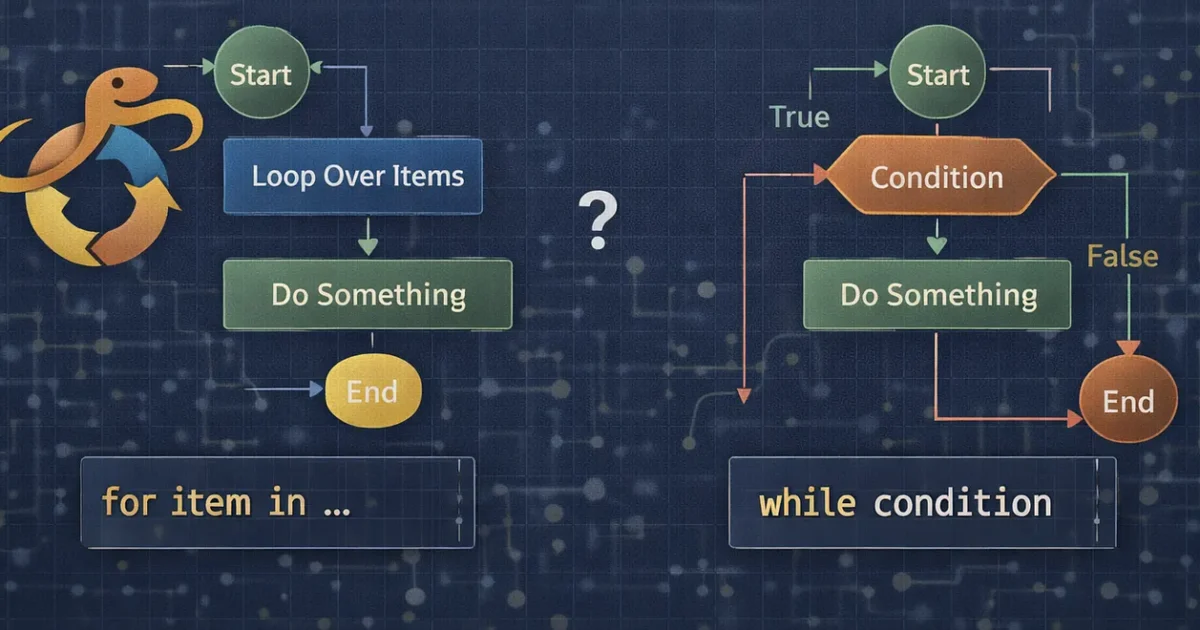
If you’ve written the same line of code more than once, congratulations — you’re ready for loops in Python 🎉
Loops are how computers say:
“Do this again… and again… and again… until I say stop.”
Today, we’ll remove the confusion around Python loops and make one thing crystal clear:
👉 When should you use for and when should you use while?
No theory overload. Real examples only.
First: What Is a Loop (Like You’re 5)
Imagine your mom says:
“Eat 5 biscuits.”
You don’t ask which biscuit every time.
You just repeat the same action 5 times.
That’s a loop.
The for Loop — When You Know How Many Times
Use a for loop when:
- You know how many times you want to repeat
- OR you are looping through a collection (list, string, range)
Example 1️⃣: Print numbers 1 to 5
for number in range(1, 6):
    print(number)
Output:
1
2
3
4
5
👉 range(1, 6) means:
- Start from 1
- Stop before 6
Example 2️⃣: Loop through a string
for letter in "Python":
    print(letter)
Output:
P
y
t
h
o
n
💡 Rule of Thumb
If you are looping over something (list, string, numbers) → use
for
The while Loop — When You Don’t Know When to Stop
Use a while loop when:
- You don’t know how many times the loop will run
- The loop depends on a condition
Example 3️⃣: Count until a condition becomes false
count = 1

while count <= 5:
    print(count)
    count += 1
Output:
1
2
3
4
5
⚠️ Important:
If you forget count += 1, the loop will run forever 😬
That’s called an infinite loop.
Common Beginner Mistake (Very Important)
❌ This will run forever:
while True:
    print("Hello")
Why?
Truenever becomesFalse
💡 Use while only when you control the exit condition.
⚖️ for vs while — Simple Comparison
SituationUseLooping through a listforRepeating fixed number of timesforLoop until user input is correctwhileUnknown stopping pointwhileSafer for beginnersfor
👉 90% of the time, beginners should start with for loops.
Real-World Examples
✅ Check passwords until correct (while loop)
password = ""

while password != "admin123":
    password = input("Enter password: ")
print("Access granted!")
✅ Process items in a list (for loop)
fruits = ["apple", "banana", "mango"]

for fruit in fruits:
    print(fruit)
Pro Tip (Senior-Level Thinking)
If you can say:
“Do this for each item…”
Use for.
If you say:
“Keep doing this until something happens…”
Use while.
🧠 Summary (Save This)
forloop → predictable, clean, safewhileloop → powerful but dangerous if misused- Beginners should master
forfirst - Always control your exit condition in
while