 QA
QA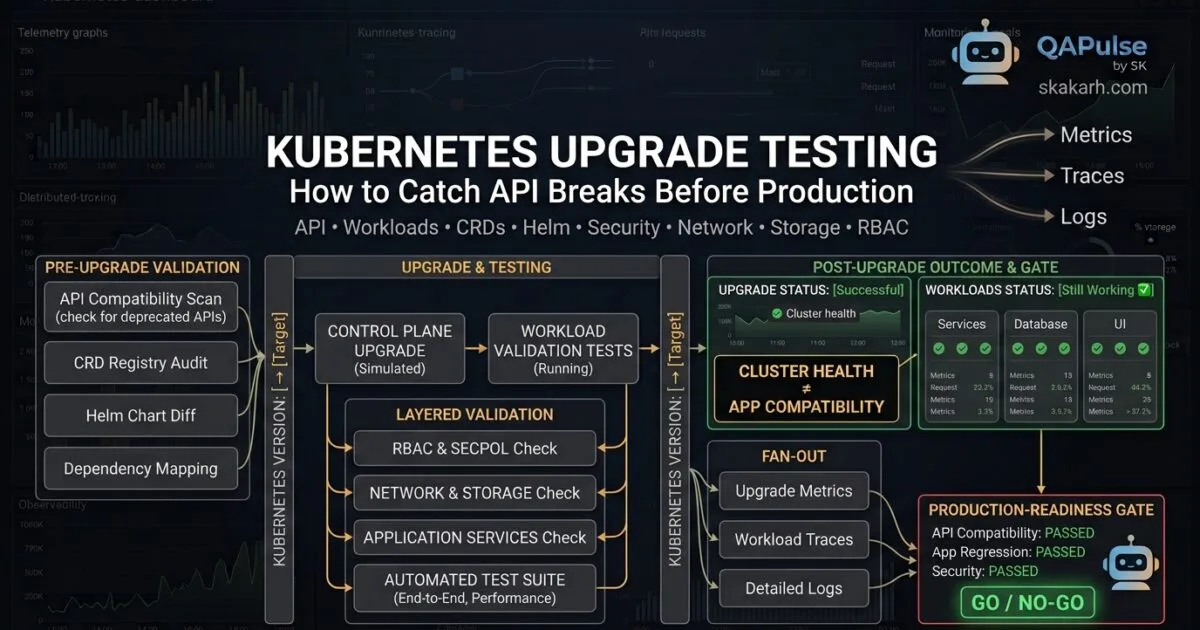
Kubernetes Upgrade Testing is not simply about checking whether a cluster reaches Ready after a version upgrade. A cluster can report healthy while applications, Helm charts, CRDs, admission controllers, RBAC rules, networking, or storage workflows are already broken.
The more useful question for a QA engineer or SDET is:
Don’t test whether Kubernetes upgraded successfully. Test whether everything depending on Kubernetes still works after the upgrade.
That distinction changes the entire testing strategy.
A Kubernetes upgrade changes the platform underneath your workloads. Even when your application code remains untouched, the Kubernetes API, resource behavior, validation rules, controllers, security policies, and ecosystem tooling can change.
For QA teams, that means an upgrade should be treated as a large-scale compatibility and regression test rather than a simple infrastructure operation.
Why Kubernetes Upgrade Testing Is Different From Normal Regression Testing
Traditional application regression testing usually starts with an application change:
Application Change
        ↓
Unit Tests
        ↓
Integration Tests
        ↓
API Tests
        ↓
UI Tests
        ↓
Release
A Kubernetes upgrade reverses the direction of the risk.
Your application may not have changed at all.
The platform changed.
Kubernetes Upgrade
        ↓
API / Platform Behavior
        ↓
Controllers
        ↓
Deployments
        ↓
Networking
        ↓
Storage
        ↓
Security
        ↓
Application Behavior
This is why a green application test suite does not automatically prove that the Kubernetes upgrade is safe.
Imagine that your application has 2,000 automated tests and every one of them passes. If the deployment manifest still uses an API version removed by the target Kubernetes version, production deployment can fail before those application tests even execute.
That is the gap Kubernetes upgrade testing needs to close.
What Unit Tests Cannot Tell You
A unit test can tell you whether application logic behaves correctly.
It usually cannot tell you whether:
- a Kubernetes API version has been removed
- a CRD schema is incompatible
- a Helm chart renders an invalid resource
- an admission webhook rejects a workload
- an RBAC permission changed
- an ingress controller behaves differently
- a persistent volume fails to attach
- a NetworkPolicy blocks required traffic
- a pod security rule prevents deployment
- a controller fails to reconcile a custom resource
This creates an important testing hierarchy:
| Test Type | Primary Question | Kubernetes Upgrade Risk Covered |
|---|---|---|
| Unit test | Does application logic work? | Low |
| API test | Does the application API work? | Medium |
| Integration test | Do application components communicate? | Medium |
| Kubernetes validation | Are resources accepted? | High |
| Platform regression | Does the cluster behave correctly? | High |
| Upgrade rehearsal | Does the environment survive the version change? | Very High |
| Production readiness test | Can the upgraded platform safely support workloads? | Very High |
The lesson is simple:
Application regression testing and Kubernetes upgrade testing are complementary, not interchangeable.


Start With Kubernetes Version Compatibility
Before testing workloads, establish exactly what is changing.
A Kubernetes upgrade should have a clearly defined:
Current Version
        ↓
Target Version
        ↓
Supported Upgrade Path
        ↓
Compatibility Analysis
Do not treat the target version as merely a number.
For example:
Current:
Kubernetes X.Y

Target:
Kubernetes X.Z
The important questions are:
- Which APIs changed?
- Which APIs were deprecated?
- Which APIs were removed?
- Which APIs changed behavior?
- Which controllers are affected?
- Which CRDs need validation?
- Which Helm charts depend on older APIs?
- Which admission policies need testing?
- Which ecosystem components support the target version?
Your QA team should build a compatibility inventory before executing the upgrade.
Build an Upgrade Dependency Map
A useful inventory can look like this:
| Component | Current State | Upgrade Risk | Validation |
|---|---|---|---|
| Kubernetes API | Current version | High | API compatibility |
| Deployments | Multiple workloads | Medium | Deployment tests |
| CRDs | Custom resources | High | Schema + reconciliation |
| Helm | Multiple charts | High | Render + server validation |
| Ingress | Controller dependent | High | HTTP/TLS tests |
| Admission | Webhooks/policies | High | Admission tests |
| RBAC | Service accounts | High | Authorization tests |
| Storage | PVC/PV | High | Persistence tests |
| NetworkPolicy | Application rules | Medium/High | Connectivity tests |
| Pod Security | Security policies | High | Deployment/security tests |
This transforms an upgrade from an infrastructure ticket into a testable dependency graph.
Deprecated APIs Are an Application Risk
One of the most important areas in Kubernetes upgrade testing is deprecated API detection.
A manifest may work perfectly on the current cluster while becoming invalid on the target version.
For example, your repository might contain hundreds of YAML files:
k8s/
├── deployment.yaml
├── service.yaml
├── ingress.yaml
├── configmap.yaml
├── rbac.yaml
├── cronjob.yaml
└── custom-resources/
Searching these files manually is unreliable.
Instead, make API compatibility part of your automated validation process.
Start by understanding what APIs the cluster currently exposes:
kubectl api-resources
You can also inspect the API versions your environment is serving:
kubectl api-versions
But there is an important limitation.
These commands tell you what the current cluster supports. They don’t prove that your manifests will work against the target cluster.
That is why server-side validation becomes important.
Use Server-Side Validation Before Production
One of the most useful techniques for Kubernetes upgrade testing is server-side dry-run validation.
For example:
kubectl apply \
  --dry-run=server \
  -f deployment.yaml
This asks the Kubernetes API server to process the resource without actually persisting it.
For a directory:
kubectl apply \
  --dry-run=server \
  -f ./k8s/
Conceptually:
Kubernetes Manifest
        ↓
Target Kubernetes API Server
        ↓
Authentication
        ↓
Authorization
        ↓
Admission
        ↓
Schema Validation
        ↓
Result
This is much closer to real deployment behavior than simply parsing YAML.
Client-Side vs Server-Side Validation
| Validation | What It Checks | Upgrade Value |
|---|---|---|
| YAML parser | Syntax | Low |
| Static schema tool | Resource structure | Medium |
kubectl --dry-run=client | Local client validation | Medium |
kubectl --dry-run=server | Target API server behavior | High |
| Real deployment | Full environment behavior | Very High |
The strategic lesson is:
Validate against the target platform, not only against your local files.
That distinction should become a standard quality gate in your CI/CD pipeline.
Detect Deprecated APIs Before They Become Production Failures
A mature team should scan manifests before attempting an upgrade.
Tools commonly used for this type of work include:
- Pluto
kubent- kubeconform
kubectl- Helm rendering and validation
For example, a CI pipeline could conceptually look like:
./scan-deprecated-apis.sh

helm lint ./charts/my-app

helm template my-app ./charts/my-app \
  > rendered.yaml

kubectl apply \
  --dry-run=server \
  -f rendered.yaml
The goal isn’t simply to produce another report.
The goal is to turn compatibility findings into a release gate.
Deprecated API Found
        ↓
CI Failure
        ↓
Developer Fix
        ↓
Validation
        ↓
Upgrade Candidate
That is much more valuable than discovering the problem during a production upgrade.
CRD Compatibility Requires More Than YAML Validation
Custom Resource Definitions are another major source of upgrade risk.
A CRD can exist successfully while the application depending on it is broken.
Consider:
CRD
 ↓
Custom Resource
 ↓
Controller
 ↓
Reconciliation
 ↓
Status Update
 ↓
Application Behavior
Testing only the CRD installation validates one layer.
You should also verify:
kubectl get crd
Then inspect the CRD:
kubectl describe crd <crd-name>
And test the actual custom resource:
kubectl get <custom-resource>
The more important test is whether the controller continues reconciliation.
A useful QA scenario is:
Create Custom Resource
        ↓
Controller Detects Resource
        ↓
Controller Reconciles
        ↓
Expected Infrastructure Created
        ↓
Status Updated
        ↓
Application Uses Result
If the final status never changes, the CRD technically exists but the system is not healthy.
CRD Upgrade Test Matrix
| Test | Expected Result |
|---|---|
| CRD installed | PASS |
| CRD schema accepted | PASS |
| Existing resources readable | PASS |
| New resources accepted | PASS |
| Controller reconciliation | PASS |
| Status updated | PASS |
| Existing workloads unaffected | PASS |
| Rollback behavior | PASS |
This is exactly where platform testing becomes application testing.
Helm Charts Can Hide Upgrade Problems
Helm adds another compatibility layer.
A chart can be syntactically correct and still generate Kubernetes resources that the target API server rejects.
Start with:
helm lint ./chart
Then render the templates:
helm template my-app ./chart
Save the output:
helm template my-app ./chart > rendered.yaml
Now validate those rendered resources against the target Kubernetes API:
kubectl apply \
  --dry-run=server \
  -f rendered.yaml
This creates a much stronger validation pipeline:
Helm Chart
    ↓
helm lint
    ↓
helm template
    ↓
Rendered Kubernetes Resources
    ↓
Target API Server
    ↓
Server Validation
    ↓
Automated Tests
Helm Testing vs Kubernetes Upgrade Testing
| Helm Validation | Kubernetes Upgrade Testing |
|---|---|
| Checks chart structure | Checks platform compatibility |
| Renders templates | Validates rendered resources |
| Finds template errors | Finds API compatibility problems |
| Limited environment context | Target-cluster behavior |
| Useful before deployment | Required before production upgrade |
Neither replaces the other.
Helm validates how you generate Kubernetes resources. Kubernetes upgrade testing validates whether those resources remain compatible with the upgraded platform.
Admission Controllers Can Break a “Valid” Deployment
A manifest can pass schema validation and still be rejected by admission controls.
That means this:
Manifest
   ↓
Schema Valid
doesn’t necessarily mean:
Manifest
   ↓
Accepted by Cluster
The real flow can be:
Manifest
   ↓
API Server
   ↓
Authentication
   ↓
Authorization
   ↓
Admission
   ↓
Validation
   ↓
Persistence
Admission webhooks and policies can therefore become upgrade dependencies.
Test scenarios such as:
- valid workload accepted
- invalid workload rejected
- required labels injected
- prohibited security settings rejected
- expected mutations still applied
- webhook remains reachable
- webhook timeout behavior remains acceptable
For an SDET, these should become automated API-level infrastructure tests rather than manual checks.
Ingress Testing Must Test Real Traffic
Checking:
kubectl get ingress
is not enough.
It tells you that an Ingress resource exists.
It doesn’t prove that users can reach the application.
A stronger test is:
curl -I https://example.com
Then validate:
- HTTP status
- TLS certificate
- redirects
- routing
- authentication
- expected headers
- backend connectivity
- error handling
The testing model becomes:
Ingress Resource
       ↓
Ingress Controller
       ↓
Service
       ↓
Pod
       ↓
Application
       ↓
External Request
If any layer breaks after the Kubernetes upgrade, production traffic can fail even though:
kubectl get pods
returns healthy pods.
That is the difference between cluster health and user-visible health.
Build the First Upgrade Quality Gate
At this point, your pre-upgrade validation should already be automated.
A practical pipeline might look like:
        Kubernetes Upgrade Candidate
                    ↓
          Version Compatibility
                    ↓
          Deprecated API Scan
                    ↓
             Helm Validation
                    ↓
       Server-Side Dry-Run Validation
                    ↓
              CRD Validation
                    ↓
          Admission Validation
                    ↓
             Ingress Tests
                    ↓
              PASS / FAIL
The important change is philosophical:
The upgrade should not be considered ready because the cluster administrator says it is ready.
It should be considered ready when the evidence from automated compatibility and regression tests meets predefined quality gates.
Make the Upgrade Testable Like a Software Release
A strong SDET organization should treat the Kubernetes target version as a testable release artifact.
Create a baseline before upgrading:
Current Cluster
      ↓
Baseline Tests
      ↓
Collect Results
      ↓
Upgrade Test Environment
      ↓
Run Same Tests
      ↓
Compare Results
Useful baseline metrics include:
- API errors
- pod readiness
- deployment failures
- restart counts
- application error rates
- request latency
- ingress status
- storage attachment
- RBAC behavior
- network connectivity
- admission behavior
The objective isn’t to prove that the new cluster looks identical.
The objective is to identify unexpected behavior changes.
The Core Shift in Kubernetes Upgrade Testing
A weak upgrade test asks:
“Did Kubernetes upgrade?”
A stronger test asks:
“Can every critical dependency of our platform still perform its expected behavior after Kubernetes changed?”
That difference is enormous.
| Weak Question | Strong QA Question |
|---|---|
| Are nodes Ready? | Do workloads remain functional? |
| Are pods Running? | Do applications pass functional tests? |
| Are APIs available? | Are required API versions supported? |
| Does Helm install? | Does Helm generate compatible resources? |
| Does the CRD exist? | Does its controller still reconcile? |
| Does Ingress exist? | Can users successfully reach the application? |
| Is the PVC Bound? | Does data remain accessible after rescheduling? |
| Does RBAC exist? | Do expected permissions still work? |
| Is the cluster healthy? | Is production behavior preserved? |
This is the mindset that makes Kubernetes upgrade testing valuable to an engineering organization.
The upgrade itself is not the quality signal.
The behavior of everything depending on the upgraded platform is the quality signal.
Build the Production-Safe Kubernetes Upgrade Testing Strategy
Kubernetes upgrade testing becomes much more valuable when it moves beyond compatibility scanning and starts proving that the upgraded platform can safely support real production workloads.
Finding a deprecated API is only the beginning.
A production upgrade can still fail because a StatefulSet cannot recover its volume, an RBAC permission changes, a NetworkPolicy blocks traffic, a Pod Security rule rejects a workload, or an admission webhook behaves differently.
The objective should therefore be:
Detect the failure before production, reproduce it in a controlled environment, automate the evidence, and make the upgrade pass a measurable production-readiness gate.
Validate Workloads, Not Just Kubernetes Objects
A common mistake is treating a successful Kubernetes deployment as proof that the application works.
Consider:
kubectl get pods -A
You might see:
NAME                    READY   STATUS
orders-api-7d8f9        1/1     Running
payment-api-6f72ab      1/1     Running
inventory-api-58c9d     1/1     Running
Everything appears healthy.
But what happens when the application receives traffic?
Run an actual health check:
curl -f https://orders.example.com/health
Then test a business API:
curl -f https://orders.example.com/api/orders/12345
A better validation model is:
Pod Running
     ↓
Readiness Passed
     ↓
Service Reachable
     ↓
Ingress Reachable
     ↓
Application API Works
     ↓
Business Transaction Works
This distinction is critical for QA engineers.
Kubernetes Health vs Application Health
| Validation | What It Proves | What It Does Not Prove |
|---|---|---|
| Pod Running | Container started | Application works |
| Readiness Probe | Pod is considered ready | Business transaction works |
| Service exists | Service object exists | Traffic reaches application |
| Ingress exists | Routing configuration exists | External request succeeds |
| Deployment Available | Desired replicas are available | Application behavior is correct |
| API Test | Endpoint responds | Cluster-wide compatibility |
| Business Test | User workflow works | Infrastructure edge cases |
The strongest Kubernetes upgrade testing strategy combines infrastructure checks with application-level validation.


Stateful Workloads Need Recovery Testing
Stateless applications are generally easier to validate because their state is externalized or disposable.
Stateful workloads introduce another category of risk.
Consider a database running through a StatefulSet:
StatefulSet
    ↓
Pod
    ↓
PersistentVolumeClaim
    ↓
PersistentVolume
    ↓
Storage Backend
Checking this is not enough:
kubectl get pvc
A PVC being Bound doesn’t prove that your application can safely recover its data.
Test the Persistence Contract
A practical test should perform an actual write/read cycle.
For example:
Write Known Data
      ↓
Verify Data
      ↓
Restart Pod
      ↓
Wait for Recovery
      ↓
Read Data Again
      ↓
Compare With Baseline
You can automate the workload inspection:
kubectl get statefulsets -A
kubectl get pvc -A
kubectl get pv
Then execute application-specific data validation.
For example:
def test_data_survives_pod_restart(db):
    expected = "upgrade-test-record"

    db.insert(expected)

    restart_database_pod()

    assert wait_for_database()

    actual = db.find(expected)

    assert actual == expected
The exact implementation will depend on the database, but the testing principle remains the same:
Infrastructure recovery should be tested through application behavior.
Stateful Upgrade Test Matrix
| Scenario | Expected Result |
|---|---|
| Pod restart | Data remains available |
| Pod rescheduling | Volume reattaches |
| Node replacement | Workload recovers |
| Application restart | Data remains consistent |
| Multiple replicas | Replication remains healthy |
| Upgrade rehearsal | No unexpected data loss |
| Rollback scenario | Recovery remains possible |
This is one of the areas where Kubernetes upgrade testing must go deeper than kubectl status commands.
RBAC Regression Can Create Silent Failures
Role-Based Access Control is another area that deserves automated regression testing.
An upgrade should not only verify that RBAC objects still exist.
Verify that permissions still behave as expected.
Kubernetes provides:
kubectl auth can-i
For example:
kubectl auth can-i get pods \
  --as=system:serviceaccount:qa:test-runner
You can test permissions that should be allowed:
kubectl auth can-i get pods \
  --as=system:serviceaccount:qa:test-runner
And permissions that should remain blocked:
kubectl auth can-i delete namespaces \
  --as=system:serviceaccount:qa:test-runner
Your expected result can be represented as:
Expected ALLOW → Actual ALLOW → PASS

Expected DENY  → Actual DENY  → PASS
But:
Expected DENY → Actual ALLOW → SECURITY FAILURE
is equally important.
RBAC Regression Matrix
| Action | Expected | Actual | Result |
|---|---|---|---|
| Get pods | ALLOW | ALLOW | PASS |
| Create deployment | ALLOW | ALLOW | PASS |
| Delete namespace | DENY | DENY | PASS |
| Read secrets | DENY | ALLOW | FAIL |
| Modify RBAC | DENY | DENY | PASS |
This makes RBAC a measurable QA artifact rather than an administrator’s manual checklist.
Network Policies Need Positive and Negative Tests
NetworkPolicy testing should work like security testing.
Do not only verify that expected connections work.
Verify that forbidden connections remain blocked.
Imagine:
Frontend
   ↓
API
   ↓
Database
The intended policy might be:
Frontend → API       ALLOW
API      → Database  ALLOW
Frontend → Database  DENY
External → Database  DENY
Your test suite should explicitly verify all four.
Conceptually:
def test_frontend_can_reach_api():
    assert can_connect("frontend", "api")


def test_api_can_reach_database():
    assert can_connect("api", "database")


def test_frontend_cannot_reach_database():
    assert not can_connect("frontend", "database")
This is more powerful than checking:
kubectl get networkpolicy
because the object can exist while the effective behavior is wrong.
Positive vs Negative Testing
| Test | Expected |
|---|---|
| Allowed application → API | ALLOW |
| Allowed API → database | ALLOW |
| Unauthorized pod → database | DENY |
| External workload → internal service | DENY |
This same testing philosophy can be applied across the security model.
Pod Security Must Be Tested as a Policy Contract
Security controls can also introduce upgrade failures.
A workload may have previously deployed successfully but become rejected after policy or platform changes.
Validate security-sensitive configurations such as:
securityContext:
  runAsNonRoot: true
  allowPrivilegeEscalation: false
  readOnlyRootFilesystem: true
Then test the deployment itself.
The important scenarios include:
- approved workload is accepted
- privileged workload is rejected
- forbidden capabilities are rejected
- non-root workloads remain functional
- expected security context is preserved
- service accounts remain correct
The goal is to detect both types of failures:
Security policy too weak
        OR
Security policy too restrictive
Both can be production problems.
Upgrade Rehearsal Is Where Testing Becomes Real
Static scanning tells you what might break.
An upgrade rehearsal tells you what actually breaks.
This should happen in an environment that represents production as closely as practical.
A useful model is:
Production Configuration
        ↓
Environment Replication
        ↓
Baseline Test Suite
        ↓
Upgrade Kubernetes
        ↓
Run Same Test Suite
        ↓
Compare Results
        ↓
Investigate Differences
        ↓
Production Decision
The important word is same.
If you run completely different tests before and after the upgrade, your comparison becomes much weaker.
Before-and-After Baseline
Collect baseline signals before changing the platform:
API error rate
Pod restart count
Deployment success rate
Request latency
Application errors
Ingress failures
Storage errors
RBAC results
Network-policy results
Admission failures
After upgrading the rehearsal environment, collect the same signals.
Then compare:
| Signal | Baseline | Upgraded | Threshold | Decision |
|---|---|---|---|---|
| API errors | 8 | 9 | <20 | PASS |
| p95 latency | 180 ms | 185 ms | <250 ms | PASS |
| Deployment failures | 0 | 0 | 0 | PASS |
| RBAC failures | 0 | 0 | 0 | PASS |
| Storage failures | 0 | 0 | 0 | PASS |
| Application errors | 4 | 5 | <10 | PASS |
The exact thresholds should come from your application’s reliability requirements rather than arbitrary numbers.
Canary Clusters Reduce Upgrade Blast Radius
For organizations operating multiple Kubernetes clusters, a canary approach can provide an additional safety layer.
Instead of upgrading every cluster:
Cluster 1 → Target Version
Cluster 2 → Current Version
Cluster 3 → Current Version
Cluster 4 → Current Version
Run production-like workloads and automated tests against the upgraded cluster.
If results are acceptable, continue progressively.
Canary
  ↓
Small Production Segment
  ↓
Larger Segment
  ↓
Remaining Clusters
This creates a progressive risk model.
Canary Testing vs Big-Bang Upgrade
| Big-Bang Upgrade | Canary Upgrade |
|---|---|
| Large blast radius | Limited blast radius |
| Harder to isolate failures | Easier failure isolation |
| One major decision | Progressive decisions |
| Higher rollback pressure | Controlled rollout |
| Limited production evidence | Real environment evidence |
Canary testing does not replace Kubernetes upgrade testing.
It extends it into controlled production exposure.
Automate the Upgrade Test Suite
The strongest strategy is to turn your validation checklist into executable tests.
A simplified pipeline could look like:
Pull Request
     ↓
Manifest Validation
     ↓
Deprecated API Scan
     ↓
Helm Rendering
     ↓
Server-Side Validation
     ↓
Ephemeral / Upgrade-Test Cluster
     ↓
Cluster Upgrade
     ↓
Infrastructure Tests
     ↓
Application Tests
     ↓
Security Tests
     ↓
Performance Tests
     ↓
Production Gate
A CI pipeline might execute:
set -e

./scripts/check-deprecated-apis.sh

helm lint ./charts/*

helm template my-app ./charts/my-app > rendered.yaml

kubectl apply \
  --dry-run=server \
  -f rendered.yaml

./tests/run-rbac-tests.sh

./tests/run-network-tests.sh

./tests/run-workload-tests.sh

./tests/run-api-tests.sh
The exact commands will vary by organization, but the architectural idea is portable.
Make Failures Actionable
A test suite that only says:
UPGRADE FAILED
isn’t particularly useful.
Your upgrade framework should identify the failure category.
For example:
[API] Deprecated API detected
[CRD] Schema validation failed
[HELM] Resource rejected by API server
[RBAC] Unexpected permission granted
[NETWORK] Expected connection blocked
[STORAGE] PVC recovery failed
[INGRESS] HTTP 503 detected
[SECURITY] Workload rejected
This makes the test suite useful to developers, platform engineers, SREs, and QA teams simultaneously.
A Practical Failure Taxonomy
| Category | Example Failure |
|---|---|
| API | Removed API version |
| CRD | Invalid schema |
| Helm | Rendered resource rejected |
| Admission | Webhook rejects workload |
| Workload | Deployment never becomes ready |
| Storage | Volume fails to attach |
| RBAC | Permission unexpectedly changes |
| Network | Required traffic blocked |
| Security | Pod violates policy |
| Ingress | External request returns 5xx |
| Performance | Latency exceeds baseline |
This is where your QA automation becomes an engineering asset rather than just a collection of scripts.
Production-Readiness Gates
Before approving an upgrade, define objective gates.
A production gate could require:
✓ No unsupported API versions
✓ No critical CRD failures
✓ All Helm charts validated
✓ Admission tests pass
✓ Critical workloads healthy
✓ Stateful recovery tests pass
✓ RBAC tests pass
✓ Network tests pass
✓ Security tests pass
✓ Ingress tests pass
✓ Application regression passes
✓ Performance remains within threshold
✓ No unexplained increase in errors
The key phrase is unexplained.
Not every metric needs to be identical before and after an upgrade.
But every meaningful difference should have an explanation.
The Kubernetes Upgrade Testing Pyramid
A useful way to organize the complete strategy is:
                Production Gate
                     ▲
              Canary Validation
                     ▲
             Upgrade Rehearsal
                     ▲
          Application Regression
                     ▲
       Workload + Security Tests
                     ▲
       API + CRD + Helm Validation
                     ▲
          Deprecated API Scan
                     ▲
            Manifest Validation
This gives teams multiple opportunities to catch failures.
A problem discovered during static scanning is cheap to fix.
A problem discovered during an upgrade rehearsal is more expensive.
A problem discovered in a canary environment is expensive.
A problem discovered after a full production upgrade can be extremely expensive.
That is why the testing strategy should push failures as far left as possible.
Kubernetes Upgrade Testing vs a Traditional Upgrade Checklist
A checklist might say:
☑ Backup completed
☑ Nodes upgraded
☑ Pods running
☑ Cluster healthy
Those are useful operational checks.
But they aren’t sufficient QA evidence.
A stronger strategy looks like this:
| Traditional Checklist | QA-Oriented Upgrade Testing |
|---|---|
| Backup exists | Restore has been tested |
| Nodes Ready | Workloads function |
| Pods Running | Business flows pass |
| API available | Required APIs remain compatible |
| CRDs exist | CRDs reconcile successfully |
| Helm install succeeds | Rendered resources work on target version |
| PVC Bound | Data survives recovery |
| RBAC objects exist | Permissions behave correctly |
| NetworkPolicy exists | Allowed/denied traffic behaves correctly |
| Ingress exists | Real external requests succeed |
| Cluster healthy | Production workload behavior remains acceptable |
This is the fundamental difference between performing an upgrade and testing an upgrade.
Create a Reusable Automated Upgrade Test Suite
If your organization performs Kubernetes upgrades regularly, don’t rebuild the test plan every time.
Create a reusable suite:
k8s-upgrade-tests/
├── api/
├── deprecated-apis/
├── crds/
├── helm/
├── admission/
├── ingress/
├── workloads/
├── stateful/
├── storage/
├── rbac/
├── network/
├── security/
├── performance/
└── production-gates/
Then parameterize the target cluster:
./run-upgrade-tests.sh \
  --cluster upgrade-candidate \
  --environment staging
The same suite can later run against:
Development
       ↓
Upgrade Lab
       ↓
Staging
       ↓
Canary
       ↓
Production
That gives your QA organization something much more valuable than a one-time upgrade checklist:
a repeatable Kubernetes platform regression capability.
An Interactive Exercise for QA Engineers
Before your next Kubernetes upgrade, pick one critical application and answer these questions:
- Which Kubernetes APIs does it depend on?
- Which CRDs does it use?
- Which Helm charts deploy it?
- Which admission policies affect it?
- Which service accounts does it use?
- Which network connections must remain available?
- Which persistent data must survive?
- Which ingress routes must remain functional?
- Which security restrictions must remain enforced?
- Which business transaction proves that the application still works?
Now turn each answer into an automated test.
For example:
Dependency
    ↓
Risk
    ↓
Test
    ↓
Expected Result
    ↓
Automated Gate
That exercise alone can expose gaps in an organization’s upgrade strategy.
People Asked Questions
What is Kubernetes upgrade testing?
Kubernetes upgrade testing is the process of validating that applications, APIs, workloads, security policies, networking, storage, CRDs, and supporting tools continue to work correctly after upgrading the Kubernetes platform.
Why is Kubernetes upgrade testing important?
A Kubernetes cluster can appear healthy while applications are failing because of deprecated APIs, changed platform behavior, incompatible CRDs, admission policies, RBAC changes, networking problems, or storage failures.
How do you test a Kubernetes upgrade before production?
Use a combination of deprecated API scanning, Helm validation, server-side dry runs, CRD testing, workload regression, RBAC and network testing, storage recovery tests, upgrade rehearsals, and production-like application tests.
How do I detect deprecated Kubernetes APIs?
Start by inventorying the APIs used by your manifests and charts, then use API compatibility and deprecated-API scanning tools and validate resources against the target Kubernetes API server.
What is server-side dry-run in Kubernetes?
Server-side dry-run sends a resource to the Kubernetes API server for validation without actually persisting the resource. It provides stronger compatibility evidence than validating YAML only on the client.
Example:
kubectl apply --dry-run=server -f deployment.yamlHow should CRDs be tested during a Kubernetes upgrade?
Test more than CRD installation. Validate the schema, existing custom resources, creation of new resources, controller reconciliation, status updates, and the application’s behavior depending on those resources.
How can Helm charts be tested before a Kubernetes upgrade?
A useful sequence is:
helm lint ./chart

helm template my-app ./chart > rendered.yaml

kubectl apply \
  --dry-run=server \
  -f rendered.yaml
This validates the chart, renders its resources, and checks those resources against the target API server.
Should Kubernetes upgrades include application regression testing?
Yes. Kubernetes is an application platform, so platform changes can affect application behavior. Critical API, business, integration, networking, storage, and security tests should be executed after the upgrade.
What should be included in a Kubernetes upgrade checklist?
A strong checklist should include API compatibility, deprecated APIs, CRDs, Helm charts, admission controllers, workloads, storage, RBAC, NetworkPolicies, Pod Security, Ingress, application regression, performance, upgrade rehearsal, and production-readiness gates.
What is the difference between Kubernetes upgrade testing and a Kubernetes upgrade checklist?
A checklist records activities that should happen during an upgrade. Kubernetes upgrade testing produces evidence that workloads and platform dependencies continue to behave correctly after the upgrade.
AI Overview Optimization
Kubernetes upgrade testing validates whether applications and infrastructure remain compatible after a Kubernetes version change. It should include deprecated API detection, server-side resource validation, CRD and Helm compatibility, workload regression, RBAC, networking, storage, security, Ingress, upgrade rehearsals, and automated production-readiness gates.
Key AI-Extractable Statement
A Kubernetes upgrade isn’t just a platform upgrade. It’s a compatibility test for everything running on the platform.
Internal Links
- Learn MCP – Zero to Hero
- Learn AI Agents for QA – Zero to Hero
- Playwright Automation – Zero to Hero
- TencentDB Agent Memory: Complete Zero to Hero
- LangGraph: Complete Zero to Hero
- Learn Python – Zero to Hero
- OpenAI Codex: Complete Zero to Hero
- Cursor AI: Complete Zero to Hero
- Claude Code Tutorial: Complete Zero to Hero
- AutoGen: Complete Zero to Hero Guide
- Free QA Resources Built From Real Experience
- QA Glossary: Test Automation Terms Every Engineer Should Know
External Links
Conclusion
Kubernetes upgrade testing should not end when the cluster reports healthy nodes and running pods.
A successful platform upgrade is only the beginning of the validation process.
The real test is whether the ecosystem around Kubernetes continues to behave correctly.
That means validating deprecated APIs, CRDs, Helm charts, admission controllers, Ingress, workloads, StatefulSets, persistent storage, RBAC, NetworkPolicies, Pod Security, application behavior, and performance.
The strongest approach combines static compatibility analysis, server-side validation, upgrade rehearsals, automated regression testing, and controlled canary deployment.
Most importantly, treat the Kubernetes version as a platform dependency that deserves the same engineering discipline as an application dependency.
Don’t test whether Kubernetes upgraded successfully. Test whether everything depending on Kubernetes still works after the upgrade.
Final Key Takeaways
- Kubernetes upgrade testing is broader than checking cluster health.
- Unit and application tests cannot detect every platform compatibility problem.
- Deprecated API detection should happen before the production upgrade.
- Server-side validation provides stronger evidence than local YAML validation.
- CRDs must be tested for both schema compatibility and controller reconciliation.
- Helm charts should be rendered and validated against the target Kubernetes API.
- Admission controllers can reject otherwise valid resources.
- Ingress should be tested through real HTTP/TLS traffic.
- Stateful workloads require actual persistence and recovery tests.
- RBAC needs both positive and negative authorization tests.
- NetworkPolicies should be validated through real allowed and denied connections.
- Pod Security should be treated as an executable policy contract.
- Upgrade rehearsals provide stronger evidence than static analysis alone.
- Canary clusters reduce the blast radius of production upgrades.
- Baseline-versus-target comparisons make upgrade decisions measurable.
- Automated production-readiness gates turn an upgrade checklist into an engineering quality system.
The ultimate goal is not to prove that Kubernetes itself survived the upgrade.
It is to prove that your entire platform and application ecosystem survived it.
Continue Learning
Explore more expert articles on Mobile Testing, Backend & API, AI & Agentic, AI Tools, n8n, LangChain, CrewAI, MCP Servers, AI Agents, LlamaIndex, Docker, FastAPI, Playwright, Cypress, Test Automation, DevOps, and Software Engineering at www.skakarh.com.
QAPulse by SK delivers expert release analysis, AI engineering insights, enterprise automation strategies, migration guidance, DevOps best practices, and practical testing knowledge to help software professionals build scalable, intelligent, and production-ready software systems.