QA
QA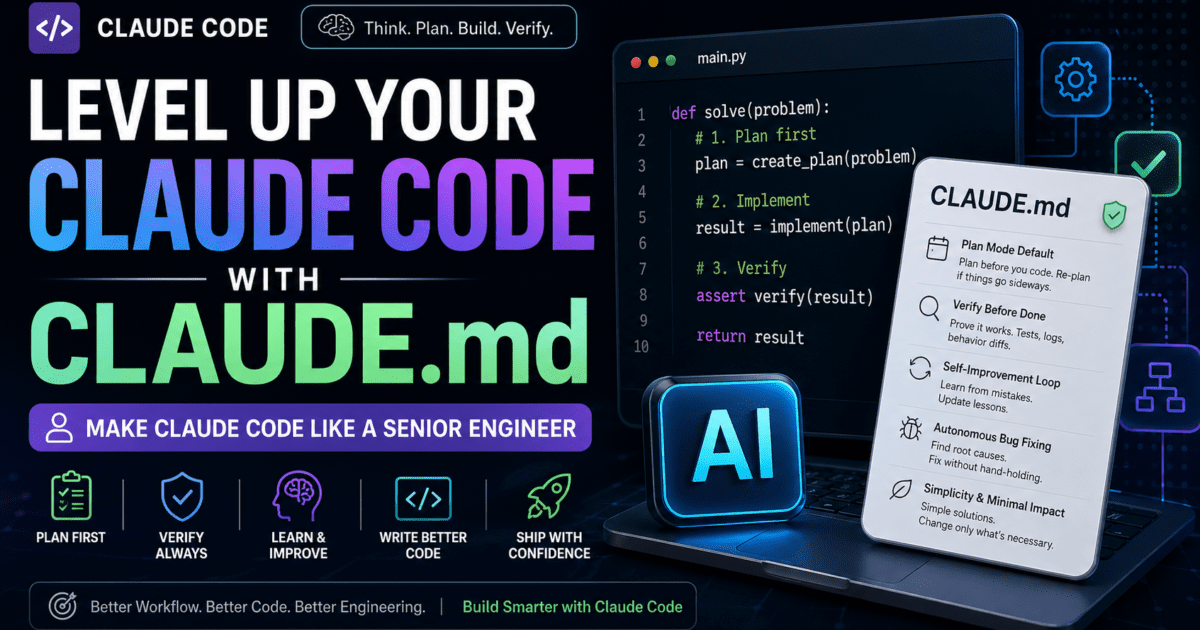
Make Claude Code Think Like a Senior Engineer
If you’ve been using Claude for coding, you’ve probably seen both sides of it.
On one hand, it can:
- Generate solid code
- Solve complex problems
- Debug tricky issues
But on the other hand…
It can also:
- Skip planning
- Rush into implementation
- Declare things “done” too early
- Apply quick fixes instead of solving root causes
That’s not a limitation of intelligence — it’s a lack of structured engineering workflow.
And that’s exactly where CLAUDE.md changes everything.
🧠 What Is CLAUDE.md (And Why It Matters)
Most developers use Claude in a prompt-driven way:
Ask → Review → Fix → Repeat
But this approach lacks consistency.
A CLAUDE.md file is different.
It’s not:
- A feature spec
- A task description
- Project documentation
Instead, it’s a behavioral contract for your AI assistant.
👉 It defines how Claude should think and operate as an engineer, not just what it should build.
Think of it as:
Giving Claude a senior engineer mindset.
⚙️ Why Prompting Alone Isn’t Enough
Even powerful models like GPT-5 or Claude don’t naturally:
- Plan before coding
- Verify thoroughly
- Maintain discipline across sessions
- Learn from repeated mistakes
Without structure, you get:
- Inconsistent output
- Hidden bugs
- Technical debt over time
With CLAUDE.md, you enforce:
✔ Planning
✔ Verification
✔ Reflection
✔ Engineering discipline
🧩 Core Idea: You’re Defining an Operating System
Instead of repeating instructions like:
- “Plan first”
- “Don’t rush”
- “Test before finishing”
You define them once inside CLAUDE.md.
From that point forward:
Every task follows the same structured workflow.
🔍 Breaking Down the CLAUDE.md Workflow
Let’s simplify the key sections that make this powerful.
🧭 1. Plan Mode Default
This is the backbone.
Claude is forced to:
- Plan before coding
- Define steps clearly
- Re-plan when things go wrong
💡 Why it matters:
LLMs tend to patch forward. This stops that behavior.
🧠 2. Subagent Strategy
Instead of doing everything in one thread:
- Break tasks into smaller agents
- Assign focused responsibilities
- Keep context clean
💡 Result: Better reasoning, cleaner outputs.
🔁 3. Self-Improvement Loop
After every mistake:
- Document it
- Convert it into a rule
- Avoid repeating it
💡 This turns Claude into a learning system, not just a generator.
✅ 4. Verification Before Done
No more:
“Looks correct, ship it.”
Instead:
- Run tests
- Check logs
- Validate behavior
- Compare outputs
💡 Think like:
“Would a staff engineer approve this?”
🎯 5. Demand Elegance (Balanced)
Claude must:
- Avoid hacky fixes
- Prefer clean solutions
- But not over-engineer
💡 This balance is what defines senior-level thinking.
🤖 6. Autonomous Bug Fixing
When a bug appears:
- Investigate logs
- Identify root cause
- Fix without hand-holding
💡 This shifts Claude from:
Reactive assistant → Proactive engineer
🧱 Task Management Discipline
CLAUDE.md enforces a structured workflow:
- Plan first
- Verify plan
- Track progress
- Explain changes
- Document results
- Capture lessons
This creates:
✔ Traceability
✔ Consistency
✔ Maintainability
🧠 Core Engineering Principles
At its core, CLAUDE.md enforces three powerful rules:
- Simplicity First → Avoid unnecessary complexity
- No Laziness → Fix root causes, not symptoms
- Minimal Impact → Change only what’s needed
⚡ How to Use CLAUDE.md in Your Project
- Create a file named
CLAUDE.mdin your project root - Add your workflow rules
- Start your session with:
Follow the rules defined in CLAUDE.md for this project.
That’s it.
From here:
👉 Claude operates inside your defined engineering system
🚀 Real Impact on Development
Once implemented, you’ll notice:
🔥 Before CLAUDE.md
- Fast but inconsistent output
- Frequent rework
- Shallow debugging
⚡ After CLAUDE.md
- Structured execution
- Better reasoning
- Fewer repeated mistakes
- Production-ready code quality
🎯 Final Thoughts
The biggest mistake developers make with AI tools is this:
Treating them like generators instead of engineers.
CLAUDE.md flips that completely.
It transforms Claude into:
- A planner
- A verifier
- A debugger
- A disciplined engineer
And in 2026…
That’s the difference between:
❌ Writing code faster
✅ Building systems smarter
More Relevant Articles
- RAG Powered Performance Testing: Real-Time API Behavior Feeds Your k6 Tests
- How Vector DB Latency Impacts AI-Driven Test Optimization in the Agentic QA Stack
- Cypress Component Testing Is the Future — Why You Should Learn It Now