QA
QA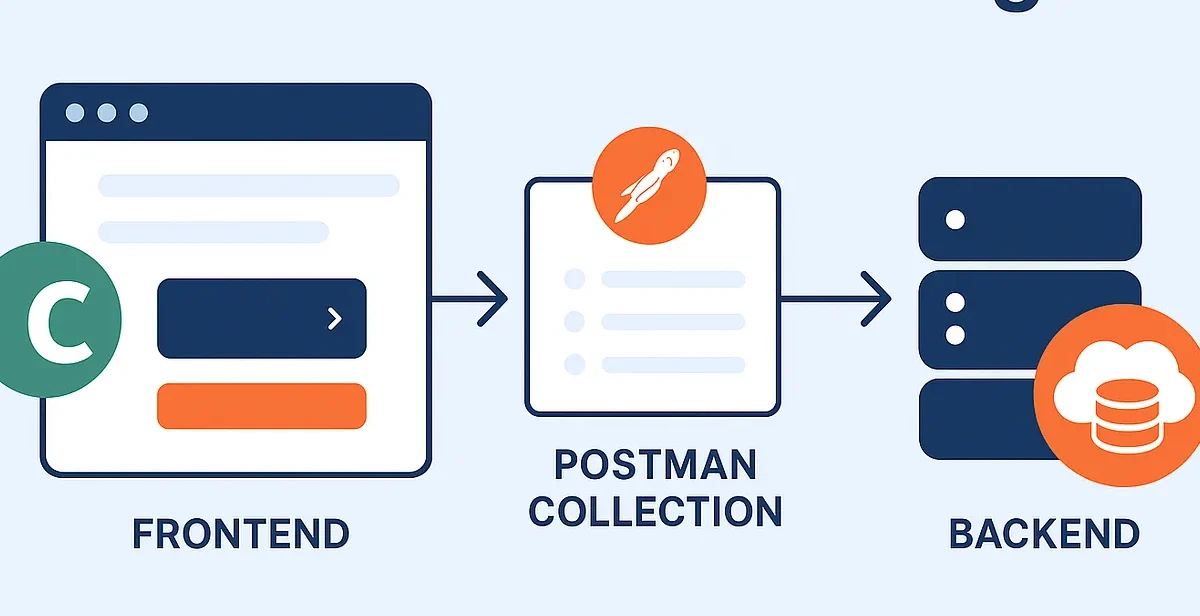
“Most QA engineers test APIs or UIs —
but the real power comes when you test both in one automated flow.”
Why Full-Stack Testing Matters in 2025
Modern apps aren’t just front-end experiences. They’re full ecosystems:
- Frontend (React, Vue, Angular)
- Backend APIs (Node, Django, Spring)
- Microservices
- Databases and queues
If your test suite only verifies UI or API separately, you’re missing half the picture.
That’s where the Cypress + Postman combo becomes a game-changer.
Together, they let you test the entire user journey, from backend requests to frontend behavior — in one automated pipeline.
Concept: Bridging the API and UI Layers
Think of a real-world signup flow:
- User fills the signup form in the UI (Cypress).
- That triggers an API request to your backend (Postman Collection).
- Backend responds → UI updates → confirmation message appears.
In a traditional setup, you’d test these separately:
- Postman tests the API
- Cypress tests the UI
But with integration, Cypress can run Postman collections directly, validate backend responses, and continue the UI test — all in one smooth flow.
⚙️ Setup Guide: Cypress + Postman Integration
Let’s walk through it step by step.
Step 1: Export Your Postman Collection
In Postman, go to:
Collections → Export → v2.1 format
Save it in your Cypress project:
/cypress/postman/collection.json
Step 2: Install Newman
Newman is Postman’s CLI tool — perfect for integrating into CI/CD or Cypress tasks.
npm install newman --save-dev
Step 3: Add a Custom Cypress Task
Create or update cypress.config.js:
const { defineConfig } = require('cypress');
const newman = require('newman');


module.exports = defineConfig({
  e2e: {
    setupNodeEvents(on, config) {
      on('task', {
        runPostmanCollection() {
          return new Promise((resolve, reject) => {
            newman.run({
              collection: 'cypress/postman/collection.json',
              reporters: 'cli'
            }, (err, summary) => {
              if (err || summary.run.failures.length) {
                return reject(err || summary.run.failures);
              }
              resolve(true);
            });
          });
        },
      });
    },
  },
});
This allows Cypress to call your Postman collection mid-test using cy.task().
Step 4: Combine It in a Test Flow
describe('Full-stack signup test', () => {
  it('Validates API and UI integration', () => {
    // Step 1: Run API tests
    cy.task('runPostmanCollection');


// Step 2: Validate UI behavior
    cy.visit('/signup');
    cy.get('#email').type('qa_user@test.com');
    cy.get('#password').type('Password123');
    cy.contains('Sign Up').click();
    // Step 3: Ensure frontend updates correctly
    cy.url().should('include', '/dashboard');
    cy.contains('Welcome, QA User').should('be.visible');
  });
});
Now, when this runs:
✅ Postman validates the backend logic
✅ Cypress validates the frontend flow
✅ You get true end-to-end coverage
Bonus: Running in CI/CD
You can easily add this to GitHub Actions or Jenkins:
- name: Run Full Stack Tests
  run: |
    npm run test:e2e
To make it smarter, store your environment secrets in Postman (for auth tokens, base URLs), and let Cypress pick them up dynamically via environment variables.
Why This Setup Is Powerful
| Problem | Cypress + Postman Solution |
| API and UI tests run seperately | Unified execution in one pipeline |
| Manual Verification needed | Fully Automated validation |
| Poor Test Coverage | End-to-End testing (backend + frontend) |
| Flaky Network Mocks | Rest API responses validated |
This setup helps QA engineers think beyond layers — your app isn’t isolated, so your tests shouldn’t be either.
SEO Keywords
This article naturally integrates:
- Cypress API testing
- Cypress with Postman
- Full-stack test automation
- Newman Cypress integration
- Cypress Postman CI/CD
These keywords help it rank on Google for queries like:
“How to use Postman with Cypress”
“Run Postman collections in Cypress”
“Cypress Newman integration guide”
Final Thoughts
If you want to evolve as a modern QA or SDET in 2025, stop thinking frontend vs backend.
Think full-stack automation.
Postman tests your backend logic.
Cypress tests your UI behavior.
Together — they test your product experience.