Manual API testing is not just boring… it’s expensive.
Not in money — but in time, focus, and missed edge cases.
If you’re still opening Postman, copying endpoints, pasting tokens, and running requests one by one…
👉 You’re not testing.
👉 You’re babysitting APIs.
Let me show you how I built a fully automated, scalable API testing system using n8n + Google Sheets — a setup that runs tests like a machine while you focus on real engineering.
🧠 The Idea: Turn Google Sheets into Your API Control Panel
Instead of hardcoding test cases or relying on manual execution…
💡 I used Google Sheets as a dynamic test data engine
💡 n8n as the orchestrator
💡 And turned the whole thing into a no-code/low-code automation pipeline
⚙️ Architecture Overview
Google Sheets → n8n Workflow → API Execution → Response Processing → Results Sheet
This is not just automation.
👉 This is data-driven API testing at scale
🔥 Step-by-Step Workflow Breakdown
🟢 Step 1: Google Sheets as Data Source (Dynamic Test Engine)
Your sheet becomes the brain of your testing system.
Define columns like:
- Endpoint URL
- HTTP Method (GET, POST, PUT, DELETE)
- Headers (Authorization Tokens, API Keys)
- Request Body (JSON)
- Expected Status Code
- Test Name / Scenario
💡 Example:

👉 Now your QA team can add test cases without touching code
🧩 Step 2: n8n Trigger (Manual / Cron / Webhook)
You can trigger this workflow in multiple ways:
- 🖱 Manual (Execute button)
- ⏰ Scheduled (Cron job → nightly regression)
- 🌐 Webhook (trigger after deployment)
💡 Pro Tip:
Hook this into your CI/CD pipeline for automated API regression testing
🧠 Step 3: Function Node (Smart Data Mapping)
This is where raw sheet data becomes structured API-ready input
You:
- Parse JSON bodies
- Attach headers dynamically
- Normalize methods (GET/POST etc.)
- Handle null values
👉 Think of this as your mini data transformation engine
🌐 Step 4: HTTP Request Node (Dynamic API Execution)
This is where magic happens ✨
Each row → becomes a live API request
- Dynamic URL injection
- Dynamic headers
- Dynamic request body
- Supports all HTTP methods
💡 Result:
You’ve just replaced manual Postman execution with automation at scale
🧪 Step 5: Response Validation (Advanced Upgrade 🔥)
Don’t just hit APIs — validate them intelligently
Enhance your Function Node to check:
- ✅ Status Code Validation
- ✅ Response Time Threshold
- ✅ Schema Validation
- ✅ Key Value Assertions
Example:
if (response.status !== expectedStatus) {
  return { status: "FAIL", reason: "Status mismatch" };
}
👉 Now you’re not just testing APIs
👉 You’re building a validation engine
📊 Step 6: Clean Output to Google Sheets
Push results into a separate sheet:
Columns:
- Test Name
- Status (PASS/FAIL)
- Response Code
- Response Time
- Error Message
- Timestamp
💡 Now you have:
👉 A live test report dashboard
👉 Zero manual tracking
👉 Historical test logs
💡 Advanced Ideas to Level This Up
🔁 1. Parallel Execution
Speed up testing by running requests in parallel inside n8n
🔐 2. Token Automation
Add a step to:
- Fetch token from Auth API
- Inject into headers automatically
👉 No more expired token issues
📈 3. Reporting Dashboard (Next Level 🚀)
Connect results to:
- Google Data Studio / Looker
- Grafana
- Notion dashboards
👉 Turn testing into visual insights
🔔 4. Slack / Email Alerts
Send alerts when:
- Test fails ❌
- API response time spikes ⚠️
🧬 5. AI-Powered Enhancements (Future Ready)
Since you’re already in AI space…
You can:
- Use LLMs to analyze API responses
- Detect anomalies
- Auto-generate test cases
👉 Now you’re building intelligent QA systems
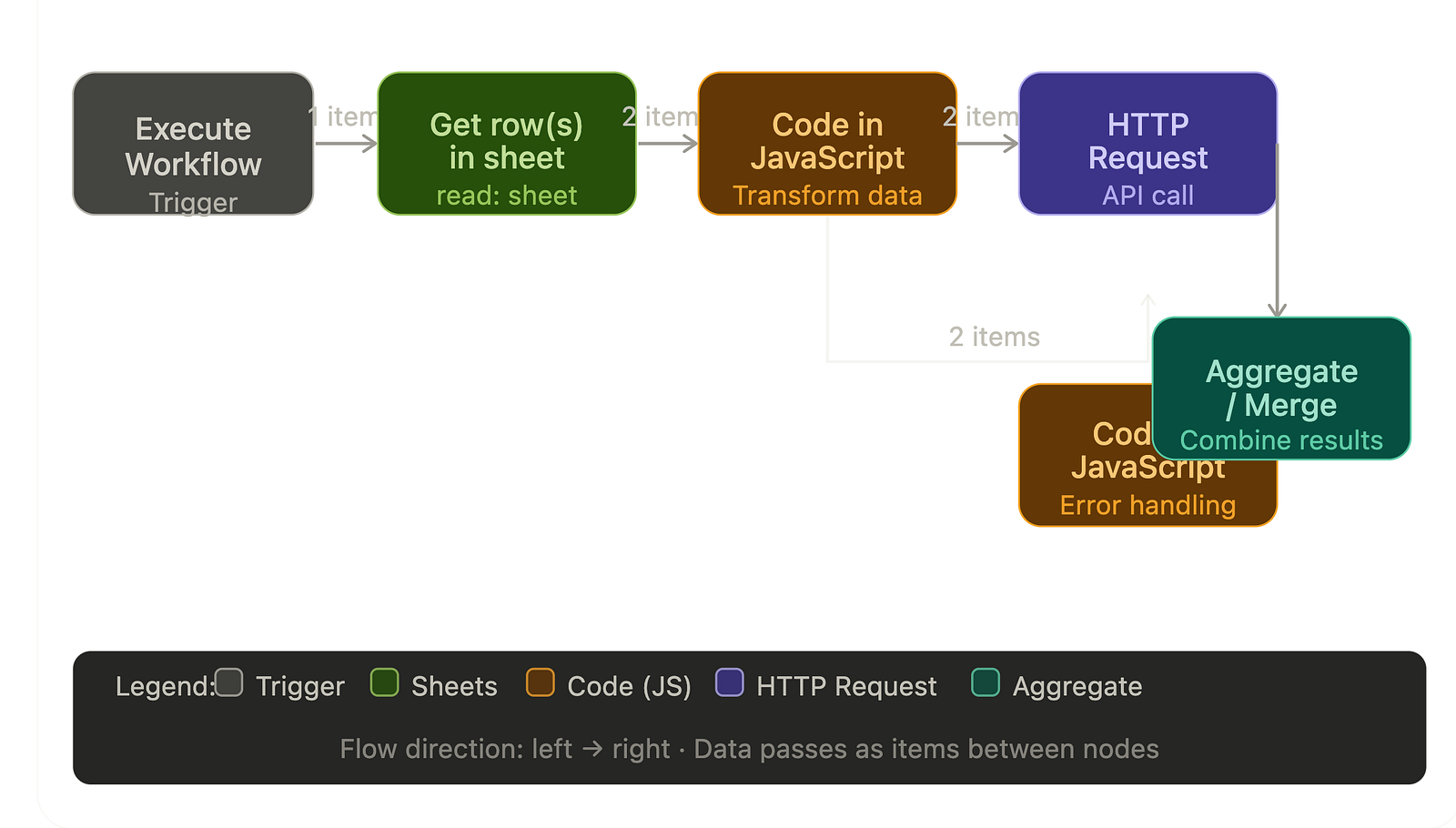
- Trigger → kicks off the workflow manually
- Get row(s) in sheet → reads from Google Sheets (2 items output)
- Code in JavaScript → transforms the data
- HTTP Request → makes the API call
- Code in JavaScript (error handling) + Aggregate/Merge → handles results and errors
🧠 Why This Matters (Real Engineering Insight)
Most testers think automation = Selenium scripts.
But modern QA is shifting toward:
👉 API-first testing
👉 Workflow automation
👉 Data-driven validation systems
This setup gives you:
✔ Zero manual effort
✔ High scalability
✔ Easy maintenance
✔ Non-technical collaboration (via Sheets)
✔ CI/CD readiness
🚀 Real-World Use Cases
This workflow is powerful for:
👨💻 QA Engineers
- Automated regression suites
- API health checks
⚙️ Backend Developers
- Validate endpoints during development
🧪 SDETs
- Build scalable test frameworks without heavy coding
🏢 Startups
- Lightweight testing without expensive tools
⚠️ Common Mistakes to Avoid
❌ Hardcoding API data in n8n
❌ Not validating responses (just hitting APIs)
❌ Ignoring error handling
❌ No reporting layer
👉 Automation without visibility = blind system
💬 Final Thoughts
The future of testing is not scripts…
It’s systems
If you’re still testing APIs manually in 2026…
You’re not behind because of tools.
You’re behind because of approach.
🚀 What’s Next?
If you found this valuable:
👉 Follow me for more AI + Testing + Automation frameworks
👉 Next: Building an AI-powered self-healing test system
🔥 And remember:
“Good testers run test cases.
Great engineers build systems that run themselves.”